O
I had my battery and inverter firmware updated. Now the battery won't charge from the grid either timed or set to + on the app.
I've tried resetting inverter to defaults, but still doesn't work.
What else should I try?

I had my battery and inverter firmware updated. Now the battery won't charge from the grid either timed or set to + on the app.
I've tried resetting inverter to defaults, but still doesn't work.
What else should I try?

Try going into the web portal - inverter - remote control and refreshing the 'read' button on every entry, to make sure the settings are as you want them. My experience has been that firmware updates sometimes change some of the settings, but the changes don't show until you go in and individually refresh the readings.
HTH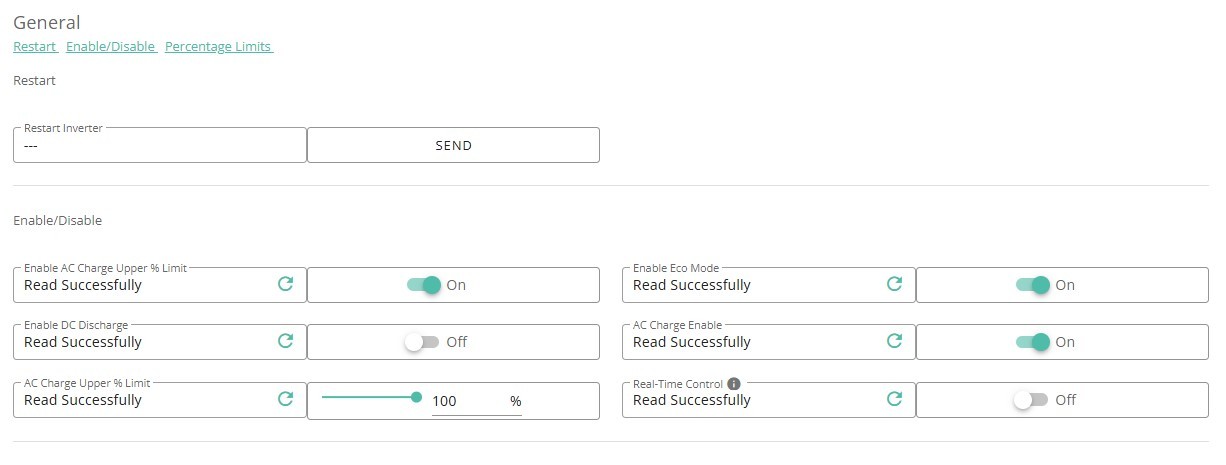
Thanks. I've tried that and still no joy. It will discharge to grid, but will not charge from the grid 😕
[unknown] on my hybrid there are two settings for charging power. One in W controls both solar and grid charging. The other is a % and only affects grid charging. Perhaps that has become 0 ?
ChrisLav Agree that there are surprising dependencies that general behaviour seems to rely on settings of what can appear as unused “Slots”. Eg if I want to set a reserve level during bad weather both Discharge Target and Discharge SOC 1 have to be set to get the desired behaviour.
I don’t like needing to do this - but if you know your setup well enough to reconfigure quickly, a full reset to defaults can help eliminate any other cause of the failure, and allow a quick route an operational state. Shame it hides the root cause which is why I do reluctantly.
EDIT - Apologies, you already did this.
I'm seeing the same on my Gen 2 Inverter / G2 5.2KWh Battery
Charges fine (Now its been calibrated) from Solar, and no issues discharging. but overnight or via the app, max of 40w, 2-3% gain over the 5 hours cheap period.
It also doesn't allow me to adjust the charge power - If I change it to a lower value then within 60 seconds it is reset to 2611 via EV Charger Inverter Control. I'm not sure if that means it is set to max, or its being forced to some invalid value so it won't charge, but shows as max in the web page.
Ok so I think I solved my case. I noticed if I turned off my timed charge schedule it would draw from the grid if I forced charged the battery through the app. So I changed my timed charge value by 1 minute and saved the schedule
It now works. So I had to change the schedule value rather than set my original schedule for it to work. Crappy bug, but at least I got it sorted in the end. Thanks for replies offered in assistance.