Noticed the last two nights the battery has not charged overnight. I found an article suggesting battery condition charging may interfere with it although that is not a new article. Cold conditioning has been switched on for a while but might now just be becoming relevant as temperatures overnight drop. Looking at the graphs, it’s not connected to changing the clocks as it’s only since Nov 1st.
Does anyone have any experience or suggestions about cause and what the fix might be. I have left the first timed charge slot empty for winter conditioning as suggested in the other article.
Cheers
Ally
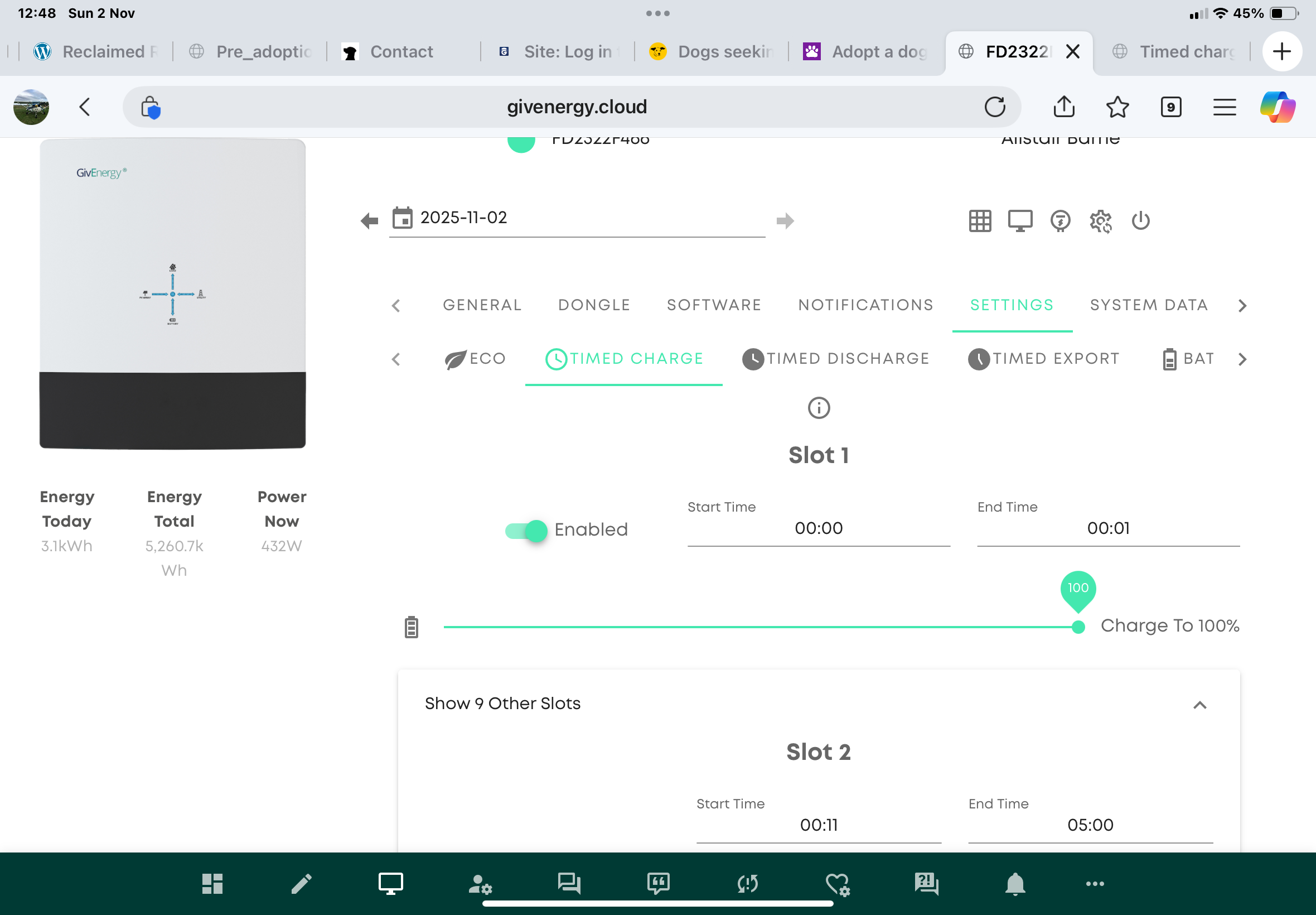
Timed charge not working.
allyB Depends where your battery is installed as to whether winter conditioning has activated or not.
My batteries are in the garage and I have never seen the battery temperature drop sufficient for winter conditioning to activate.
I’d check the other settings in the portal. Is AC charge enable turned on for instance? Check the charge rate is set to maximum
Thanks fella. It’a set to charge at the max rate and has been doing it ok for weeks. All of a sudden it stops. That said, I flagged a separate issue to GivEnergy who replied to say they changed the inverter software. Now I have this issue. The two may be related.
The battery is in the roof eaves behind the attic conversion. The temp outside has been down to single figures overnight of late. Not sure whether that’s low enough for long enough.
allyB check the AC charging enabled flag - someone reported it getting cleared after a firmware update.
Have also set the timed charge time into slot two and left slot one. Will see if that does make a difference tonight.
DD could you tell me exactly where I find that and how I do it? Is it this setting?
Much appreciated.

allyB could you tell me exactly where I find that and how I do it? Is it this setting?
No, those views are a quick summary of your inverter settings. Click on the cogwheel just above ‘system data’ and you’ll see the raw inverter settings, that’s where AC charge enable is located.
With your battery in the roof eaves it’s unlikely to have got cold enough for winter conditioning - yet. It’s the internal battery temperature that applies, not the ambient temperature around the batteries.
If you discharged the battery by say 7pm, it was cold outside and you didn’t charge it up until say 2am then it might get cold enough. Using the battery, charging and discharging it is usually sufficient to keep the battery cells warm enough. Overnight you could drop the battery charge rate to a lower value, still so it charges fully in the cheap period, but a lower slower charge will (a) be kinder to the battery and (b) keep the cells warm all night

allyB could you tell me exactly where I find that and how I do it? Is it this setting?
You'd do better to go into Remote Control (4th icon from the left at the top) and a) check the logs to see what changes were made, and b) go through each of the individual settings and click on the Refresh icon. Sometimes what's showing is not what the register is actually set for (esp - as DD says - after a firmware update). Refreshing the settings will show you what the actual setting is, and allow you to change it if necessary. Mostly you just need to look at the top half of the page - with the Enable/Disable and % Limits - and whatever settings you have set up in the Charge/Discharge schedules.
HTH
Edit: Hah! Geoffrey beat me to it. That's what comes of spending 16 mins composing and correcting my spelling!
Thanks folks. Found those settings (ac charge was on).
geoffreycoan Click on the cogwheel just above ‘system data’ and you’ll see the raw inverter settings, that’s where AC charge enable is located.
well... yes, but the 'enabled' slot on the 'timed charge' is the same flag.
allyB You seem to have slot 1 = 00:00 to 00:01 and then slot 2 = 00:11 to 05:00. Which is not necessarily wrong, but interesting. I guess a short charge to raise temperature for the main charge is a strategy, but 1 minute perhaps a bit short.
One other thing - GE managed to come up with two different registers defining the charge limit. I think it must have happened when they increased the number of slots from 1 to 2 or 10. On the remote control view, there's one limit in the top enabled/disabled section, and then one per charge slot down in the charge limits section. I wonder if perhaps the first one is now an overall limit ?
So having changed firmware, it's possible the slots are now being interpreted differently.
The first slot was someone’s suggestion on another thread that leaving it free was an option to allow winter protection to use it. Not sure I really bought the idea or understood it but thought it was worth a shot anyway.
I found the various % limits as you mentioned. I was set up just to fill the battery and only had slot one to do that which was working. Before it wasn’t.
Looking at the data, the battery temp hasn’t gone below mid teens lately. I doubt it has been winter ops that has triggered. I think personally it’s whatever GE has done with my system that has tried to fix one issue and made it much worse than it was. I’ll ring them tomorrow if it doesn’t charge up tonight automatically.
Thanks all for your input. Very much appreciated.