Batteries are never balanced

21 comments started 2025-11-17 last 2025-11-24
GivEnergy ProductsBattery
D
#1 Dabz

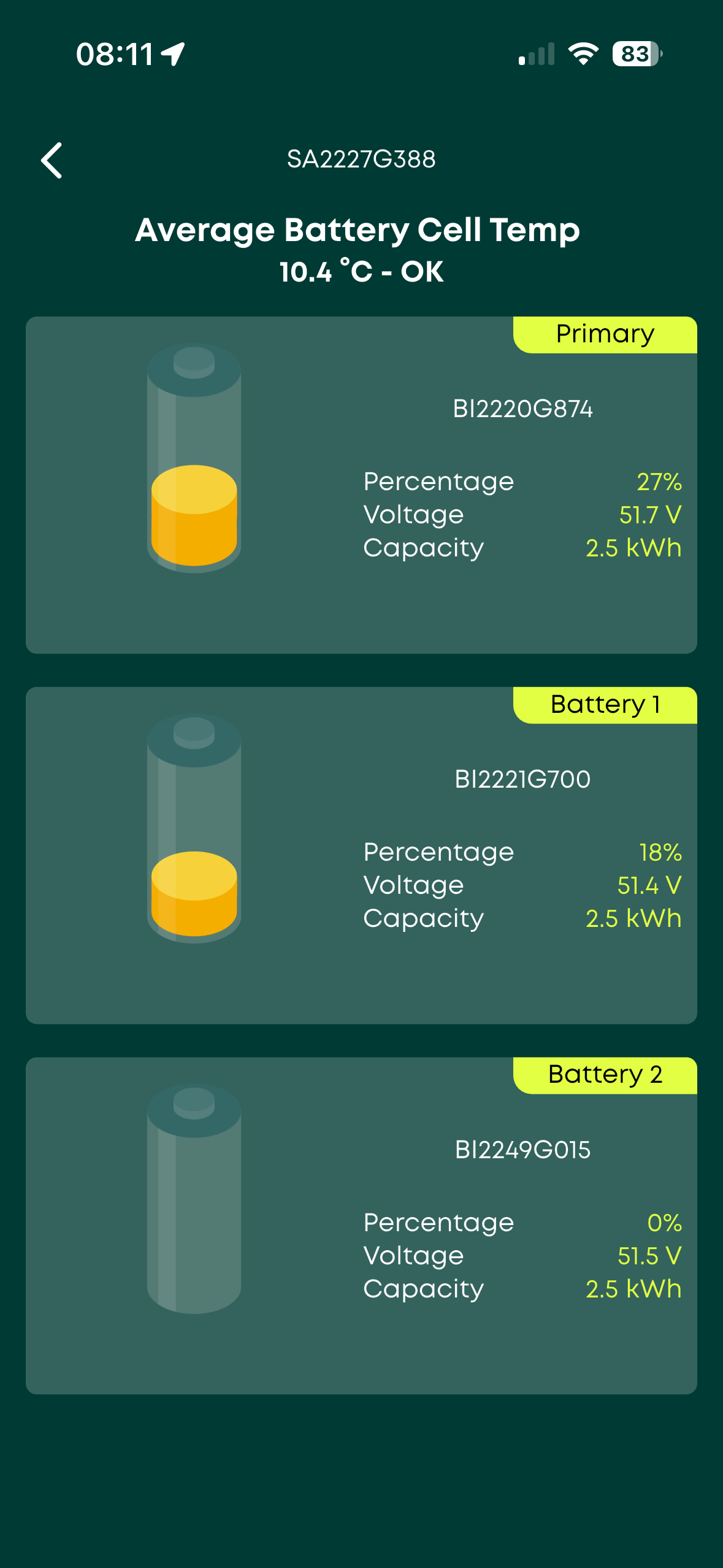
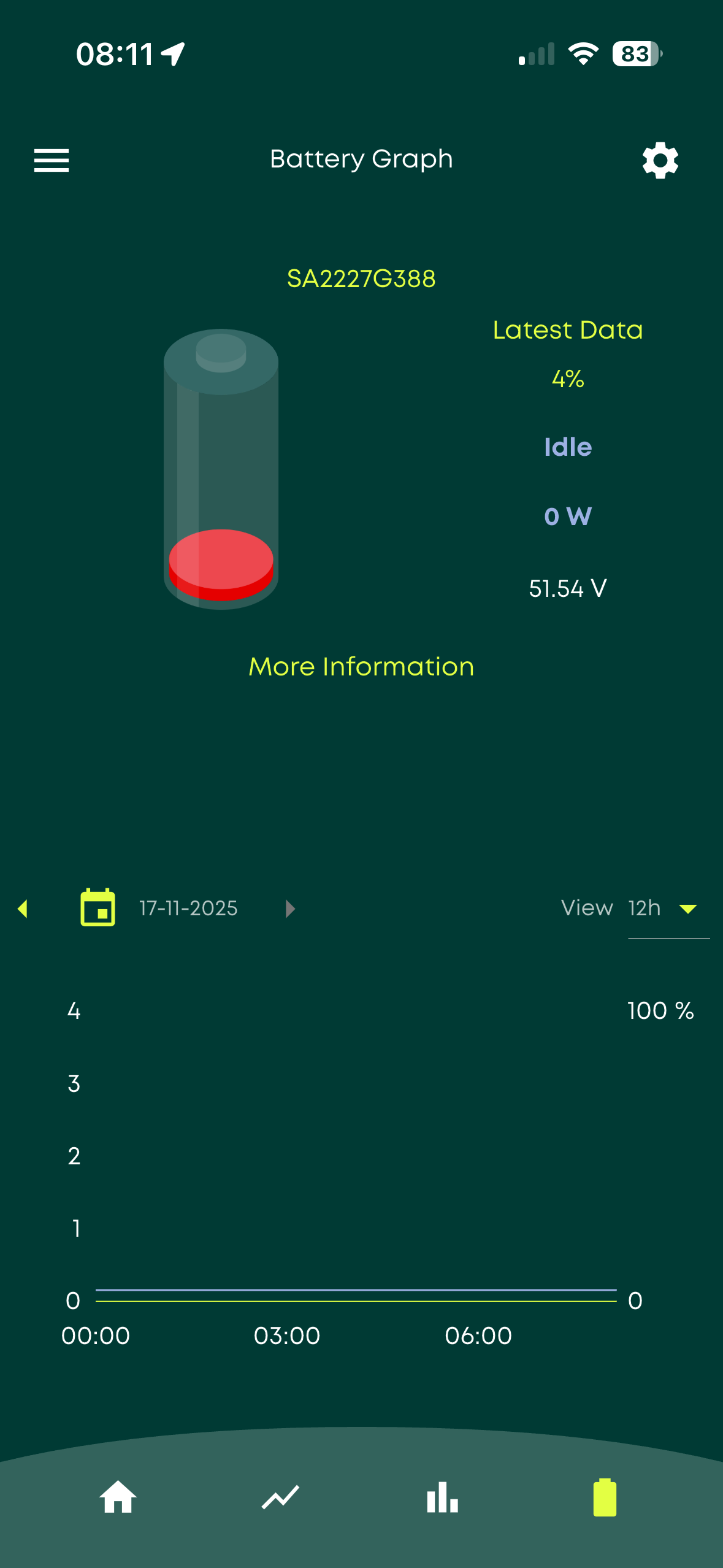
Despite frequently charging to 100% and then discharging my batteries never seem to be in any state of balance. I have 3 x 2.4s. Most mornings lately the third battery is on 4% with the first two on about 20%.
This morning the third battery is on 0%, first at 27% and second at 18%. It means I'm never using the bottom 20% of the first two batteries lately.

Before I start the long slow frustrating process of contacting GE, does anyone here have any advice, other than just doing another charge to 100%?
D
#2 DD

Dabz Sorry, can't really help... it's interesting that the voltage on battery 2 is higher than on battery 1, yet soc is lower. 51.54V would average 3.22V/cell (assuming 16 cells), which I think is around 30% charge.

can you use https://givenergymonitor.wixsite.com/tutorials to inspect individual cell voltages ?

G
#3 geoffreycoan

I’d suggest doing a recalibration to ensure the BMS knows what the battery voltage and SoC ranges are. Also as DD says looking with the Android monitor or Home Assistant if you have it at what the cell voltages are, there may be a duff cell.
Possibly also try recabling the battery sequence so the one with most retained charge goes first

J
#4 JamesFisher22

I'm noticing the same with my twin AIO setup. They are sometimes 10% or more out of balance when charging or discharging. Problem with that is the Gateway uses the average charge of the AIO's to decide when to cut-off when discharging. I watched it last night during scheduled export, the first AIO that hit 5% caused the export to stop even though the other was still on 14%. What then happened was that both battery SOC were adjusted down automatically to 5%. So where did the energy go? was it ever there or is this something written into the software to clean things up when one battery reaches the cut off level? on the previous BMS software version this didn't appear to happen so i'm guessing the BMS isn't doing as good a job of balancing as the previous version.
I think i'm coming to terms with the fact that this GE product is never going to be 'finished' and that it works well enough for my needs but If I had my time again I would have bought Tesla Powerwall's.

D
#5 Dabz

DD I don't have any Android devices sadly - is there any way to run this on anything else do you know? If not I might get a cheap android tablet because it looks really helpful to have more info about the system

S
#7 SteveCook

I suspect you could get an android phone in a 2nd hand phone shop for £10. You dont need a SIM, just connect to your wifi network

D
#8 DD

Dabz If you have a computer that can run python, I have scripts that can connect over modbus. Basically, the same mechanism that Home Assistant uses, but without the installation overhead.

D
#9 Dabz

I’ve managed to get hold of an android phone so just waiting for it to charge and looking forward to diving in to the software 🙂

R
#10 Rubikcube

SteveCook an android phone in a 2nd hand phone shop

Great suggestion. Needs to be Android 5 or later (Android 5 was released in 2014).

S
#12 SteveCook

Rubikcube
Sorry I never knew about Android 5. Thanks for the pointer.
Apparently I need a new phone as my BT email is about to stop
on my (old?) Android 10 phone.

#13 Windy Miller

SteveCook Try K9 mail. It's a great app for emails, supports multiple accounts and is still running on Android 6 tablets and phones.

G
#14 geoffreycoan

Windy Miller +1 for K9. I used to use it on my Android phone

D
#16 Dabz

I've got the app installed - I may have picked the slowest mobile phone ever made, but it's working and connected

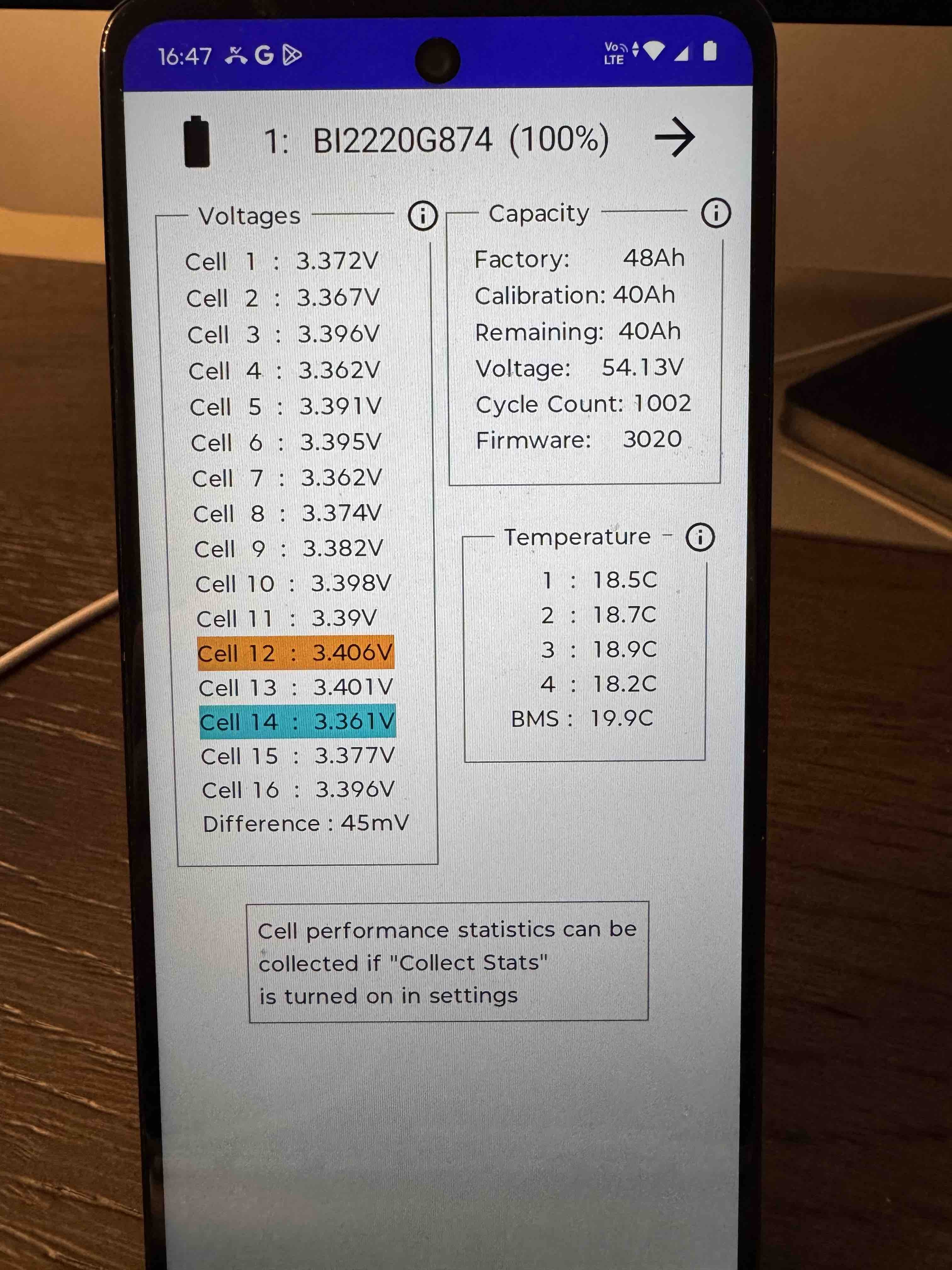
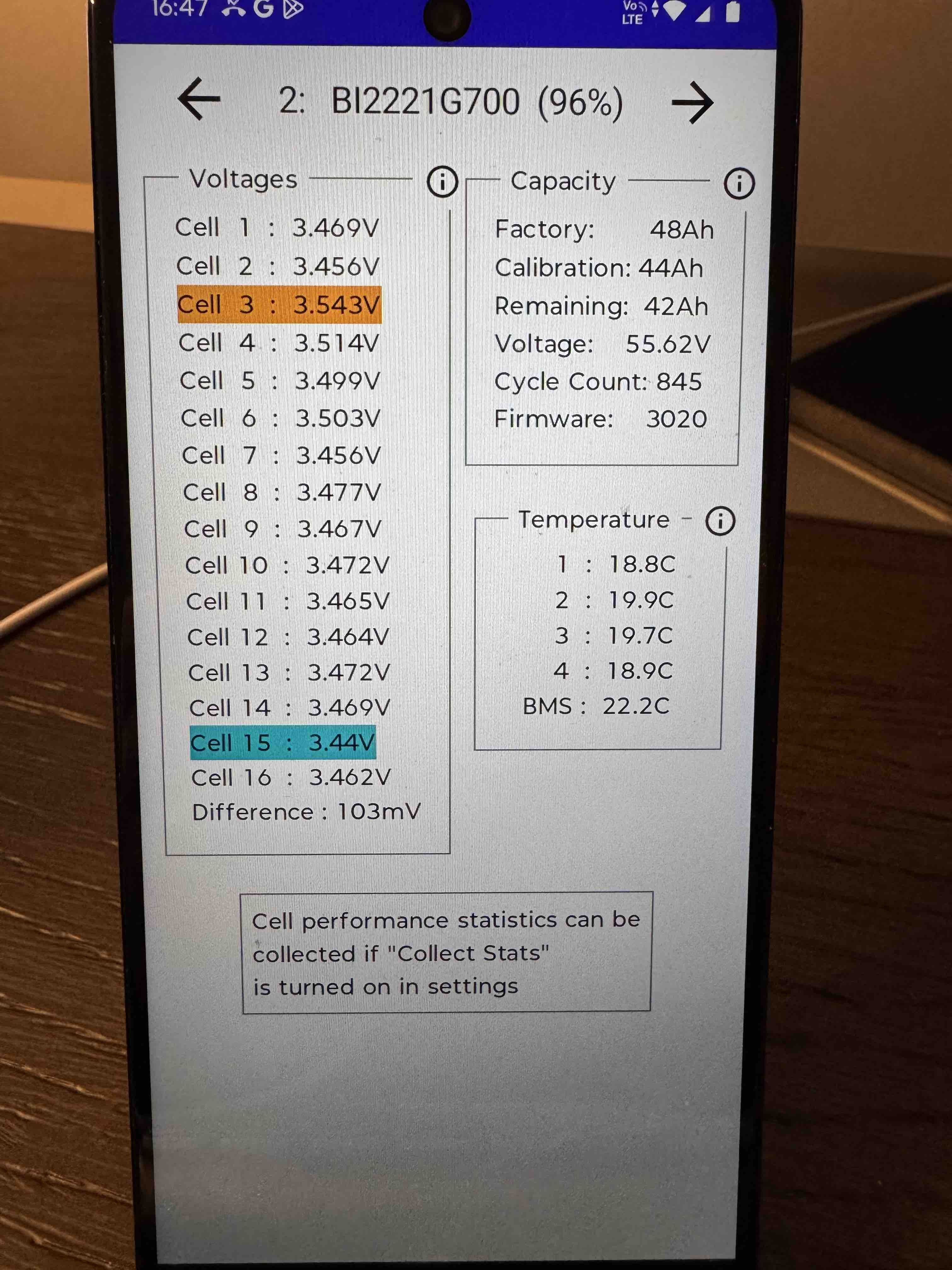
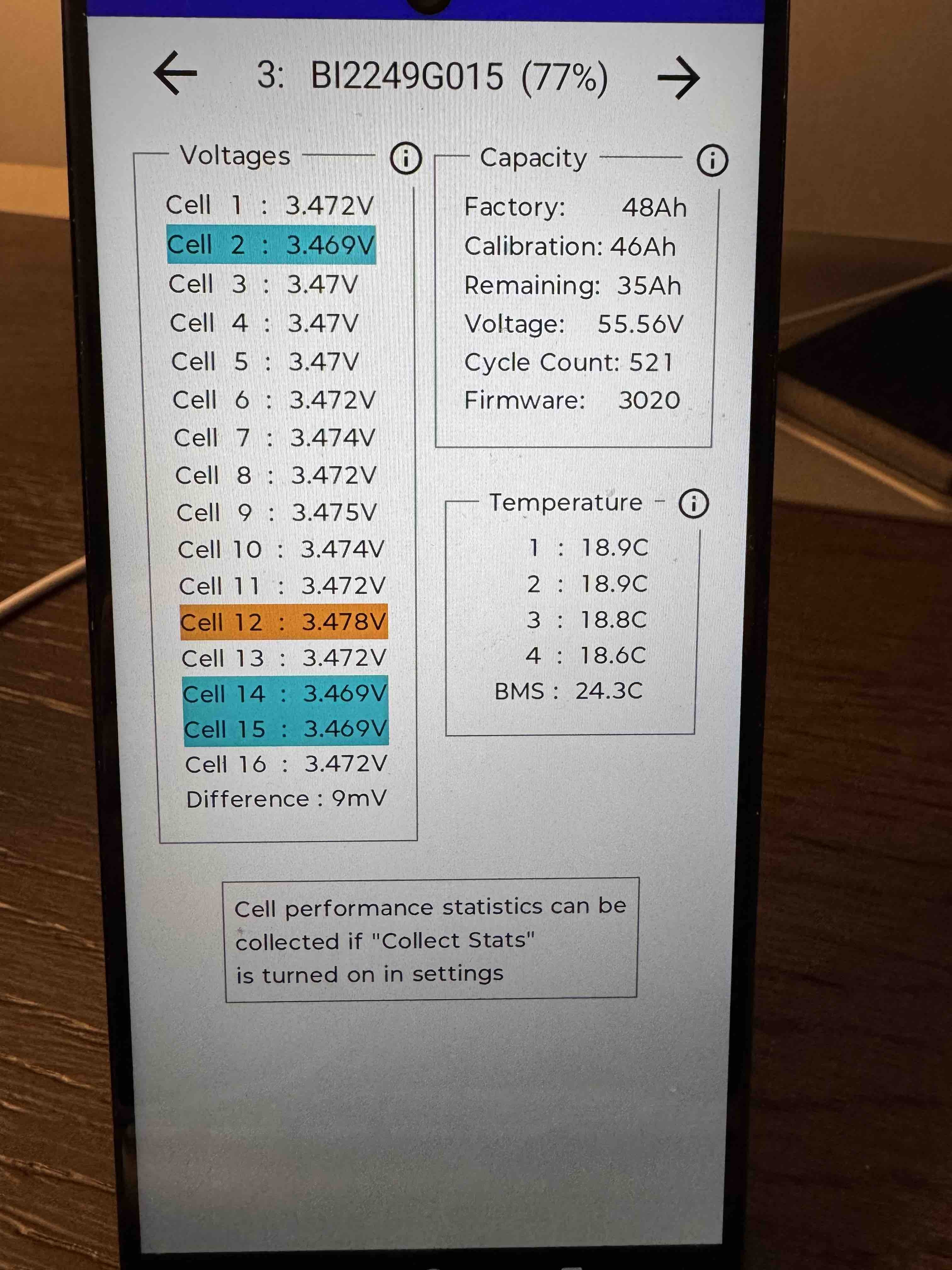
What do the colours mean on the battery cells? I have a couple colours across the 3 batteries...


V
#17 Vestas

Dabz Highest and lowest voltage cells in the battery.

S
#18 SteveCook

You need to turn on "collect stats" in settings, as it says.
The "i" in the circles tells you stuff

R
#19 Rubikcube

If you simultaneously press and hold the power and volume down buttons it should take a screenshot. You can then "nearby share" (bluetooth) the screenshot(s) to another device for posting.

You may also want to look at the readings when the batteries are "empty".

Then I think you should note down the calibration values (40,44,46) and run a calibration at some convenient time. Once the calibration has completed you will see some different calibration values.

The "collect stats" option is a good idea if it is a spare device you can leave at home.

D
#20 Dabz

The app is fantastic. I've left the phone plugged in and collecting stats. Batteries 1 and 2 seem ok -the largest cell performance difference being about 11%. Battery 3 still isn't showing performance data and says it needs to collect more stats first which is odd when the first two have populated fine?

R
#21 Rubikcube

Dabz The app is fantastic.

Thank you, do remember to leave a review on the play store.

Patience is required for the battery cell performance. It accumulates data within each battery cycle, and the results only update when the cycle count changes. From your pictures above your batteries have different cycle counts (1002, 845, 521). Performance stats are a moving average so the accuracy increases over time. Give it at least a week.

My system has only one (9.5kWh) battery, so I don't have any experience of multiple batteries. I would however expect the cycle counts to be closer to each other. Maybe the difference indicates an installation issue?

D
#22 Dabz

The app is still collecting data but all batteries look absolutely fine - no cells showing a particularly low performance %age. I've started charging the batteries to 100% every couple of days and the performance is much better then for a couple of days before getting skewed again. It leads me to think the issue isn't the batteries but is the inverter and the way it's taking power from them. Hoping a firmware upgrade might sort it but I'm a bit reluctant to apply 3022 just yet so will live with manual tweaking and monitoring.