When to ReCalibrate

34 comments started 2025-11-26 last 2025-12-10
GivEnergy ProductsBattery
R
#1 Rubikcube

Batteries lose capacity over time, and GE batteries can benefit from being recalibrated occasionally. So how do you know when a battery needs recalibrating?

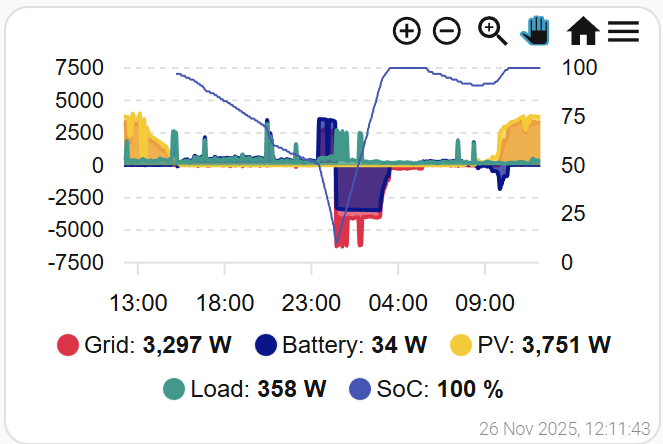
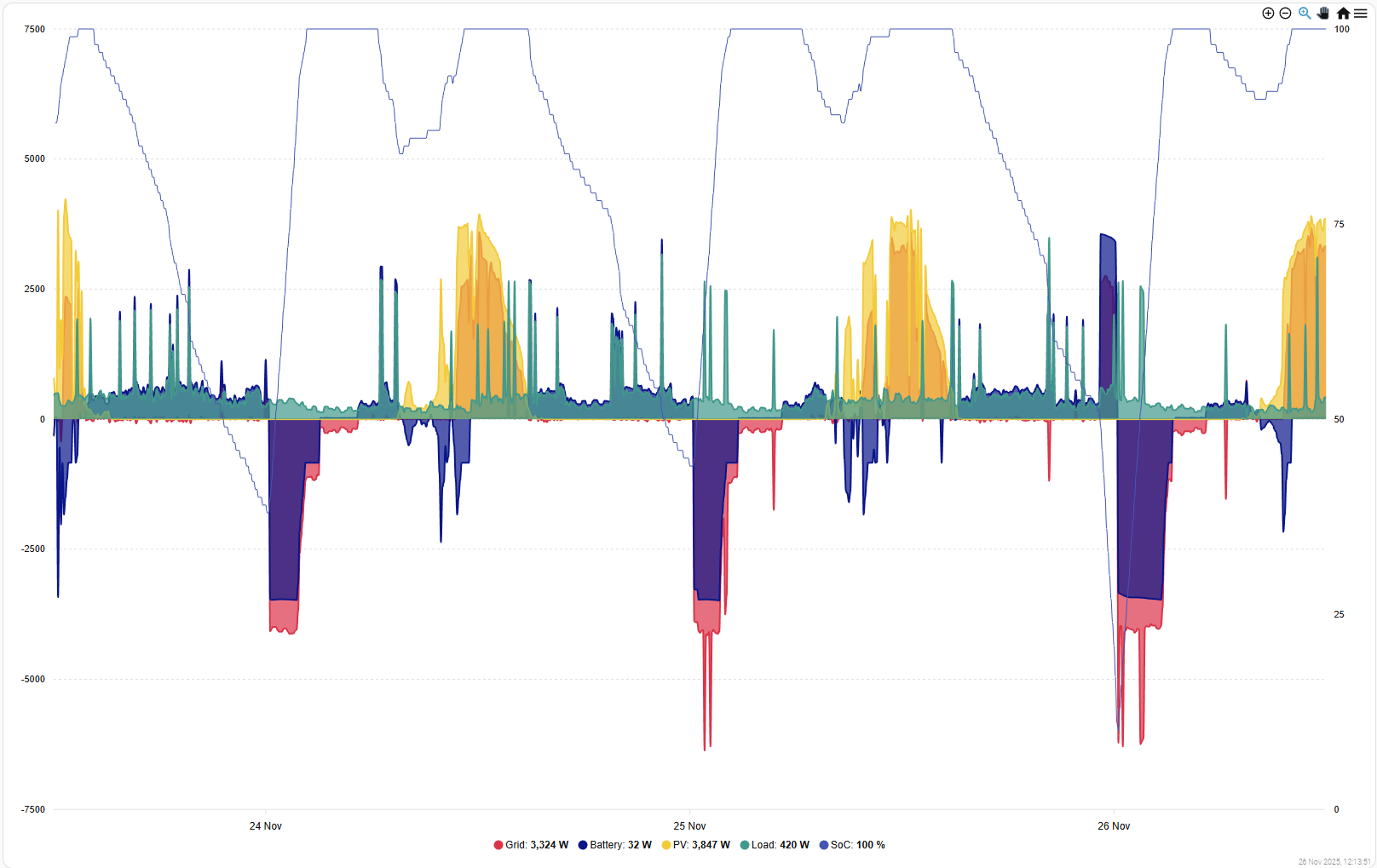
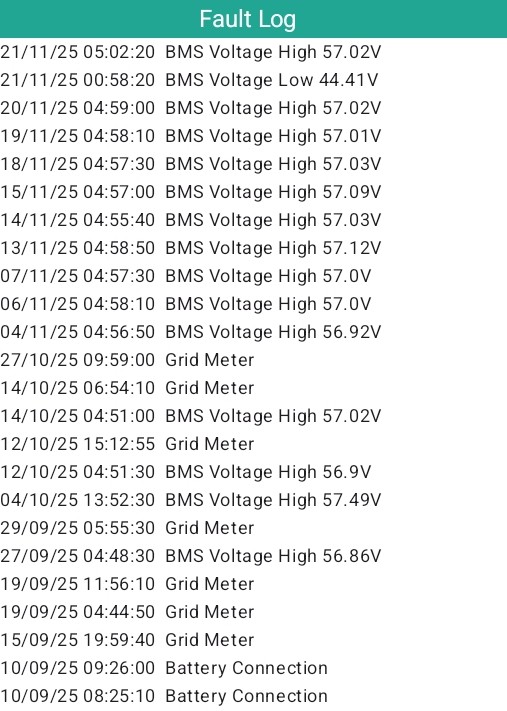
Using my own app I have found that if my battery hasn't been calibrated for some time, I start to get BMS voltage messages in the fault log. Once these become frequent (e.g. most days) I recalibrate and the messages stop.

I had one message at the end of September, 3 in October, and then they became frequent in November so on the 21st I did a calibration, and now it's the 26th and no more messages.

The calibration itself causes the final low and high messages. The capacity (of my 9.5kWh battery) changed from 176Ah to 167Ah as a result of the calibration.

This works for me and my gen1 hybrid with single battery. No idea how well it will work for other setups.

T
#2 TimHutchings

Rubikcube
What was your charge rate during recalibration? I did two in the spring/summer when the sun was going to be shining all day. First time I changed at 1200w, but the battery dropped quite a bit, so I did a further calibration a few weeks later at around 500w charge rate and got about 5 amp hours extra.

W
#3 wrighar

I've not calibrated since May 2024, 570 cycles ago...
I get 1 BMS high a month.
Nearly always go from 100% to 20% and back to 100% each day in the summer and 100% to 75% to 100% to 20% and back to 100% in winter.

I will keep an eye on it though

M
#4 mole

Rubikcube
AIO user here as you know. Regularly get SOC drop off when below 40% (by 25% in 30 minutes). Nothing in logs showing high/low battery other than a single high voltage after last recalibration. Realise not on latest firmware / bms which needs to be done manually, slight hesitancy on my part in case things go wrong. Charge rate set at default of 6kW.
Would setting at 3kW help the system to better manage itself?
Obviously when charging, home demand is from grid so additional cost incurred.
Anyone done 620/620 with bms 13 manually without issue. Notes say it does a mini calib when at 100%, but we rarely get to full level overnight.
Hoping Andrews update in Jan may help with performance measurements to aid when to set a cal.
Martin

#5 Windy Miller

Rubikcube Do you think that the fact you started to get over-voltage warnings before you re-calibrated was because your battery capacity was slowly diminishing over time and this is the way the BMS seems to work (clamping the low end to avoid under-voltage warnings but over-charging at the high end). Losing 9Ah seems to confirm this. (I think you said you had 3017 firmware, and I know calibration seems to be slightly more conservative on my 3020 firmware so not seeing any warnings yet).

R
#6 Rubikcube

TimHutchings What was your charge rate during recalibration?

I did it at the full (2.6kW-ish) rate simply because I wanted to get it done within my cheap rate period (Octopus Go). I think you will get slightly more capacity if you do it at a slower rate, but that probably means you just end up calibrating more often.

D
#7 duplada

mole Anyone done 620/620 with bms 13 manually without issue. Notes say it does a mini calib when at 100%, but we rarely get to full level overnight.

Yes I am on AO.620 and BMS 13 and Gateway Firmware V13 No problems but it does not cure the rapid decline in SOC below 40%. However, a full 100 to 4% export on my Dual AIO system yields around 26.4kWh at best. It would seem to me that the SOC reported is NOT particularly accurate and that the upper 50% SOC is more like 60%. My biggest problem was keeping the 2 AIO's SOC in sync, the only way to solve this is to make use of the full range of the batteries and often. I export down to 8-10% daily and back to 100%. Once a month when I charge my EV I export all the way down to 4% and let it bounce around importing for 15 minutes before charging all the way back up to 100%, After about 20 minutes or so you will see the SOC drop back to 99% that is when the min calibration has taken place. I asked Paul.L about this and he said that is by design. I can also confirm that when this mini calibration has taken place it does update the Calibration Amp Hour value visible in the Inverter Monitor APP. I also asked Paul.L (who has Dual AIO's) what his regime was for keeping batteries in good health, he exports to 10% and charges back to 100% once a week.

Regarding Upgrading to V13 Gateway Firmware and AIO firmware AO.620 the best way to do this is to email support and ask them to activate this for you on the Portal so you can upgrade at your leisure. Then in the Gateway turn on the Bypass so you don't loose house power when it reboots after the upgrade. Then activate the AIO firmware upgrades 1 at a time and be patient it does take some time to complete. Upgrading the AIO firmware for BMS is a screwdriver out scenario and USB drives but is easy to do. There is actually a V14 Firmware for the Gateway but I haven't loaded it myself yet.

The advantages of the V13 and above Gateway Firmware and the AIOAO.618 and above Firmware is two fold. The SOC Sync is much better between AIO's and new features have been added to the Gateway and AIO's enabling a max limit to be set (by support) to stop you overloading the Gateway and automatic throttling of the AIO's should you approach that limit.

#8 hoggy

I run one in early spring when the weather warms up & another when it gets cold. Otherwise my battery gets itself in a bit of a mess in winter (thinks there's more in the tank than there is and then ends up in the 5-12% actual battery SOC range or worse just bouncing off the LV emergency charge if it gets really cold)

I can get away with not doing the summer one if I wanted (as I don't get screwy SOC from that, but equally I don't get the absolute max capacity available due to the extra warmth - which when your over 2000 cycles every Wh counts!

M
#9 mole

duplada
Thank you for that information. I hadn't realised there was also a Gateway update, just battery and bms., which when I update back in Feb went ok, did not have to remove any covers then, but perhaps there was no bms involved, or have I mis-read your instruction for AIO bms. I thought there was a port on the side by the power switch for updates or is that just for the dongle? Do you know if the portal update comes with any documentation?
So the front needs to come off the GW, and possibly AIO and a USB stick inserted into ? Does the stick need to be a certain size and format. Sorry for so many questions and thanks once again for your time.
Regard Martin

R
#10 Rubikcube

Windy Miller Yes, I think the battery degrades over time, but the system doesn't know, and hence tries to overcharge the battery until the BMS says stop. Seems complicated to me, just charging to a set voltage (e.g. 56V) and then stopping used to be the way to do things.

R
#11 Rubikcube

hoggy Good point about the temperature. My battery is indoors at a constant 25C(ish) 24/7/365, so not an issue for me. Batteries outdoors or in unheated garages maybe be better with a seasonal calibration schedule.

D
#12 duplada

mole but perhaps there was no bms involved, or have I mis-read your instruction for AIO bms

Yes, My error sorry.

To update the AIO BMS use the AIO USB port Next to the DC Breaker format USB stick FAT16.

To Update AIO Firmware manually that requires the USB port inside the AIO side cover (4 screws) and DIP Switch changes, format FAT32 and copy the files to it.

To Update Gateway Manually Turn Bypass Breaker ON > Format USB stick FAT16 and Copy the 2 Gateway Files to it, set the Dip Switches to Dongle mode and Insert the USB stick, the Gateway will reboot instantly and perform the upgrade. Turn Bypass off again when everything is complete.

All the Latest files can be found here https://givenergy.co.uk/installer-resources/

Scroll down the page to Firmware > Batteries > AIO Complete

Download the package and extract it to a folder. The latest complete firmware for the AIO which includes Gateway Firmware V14 and AIO Firmware AO.620 are included as is the Dongle firmware.

Install Notes
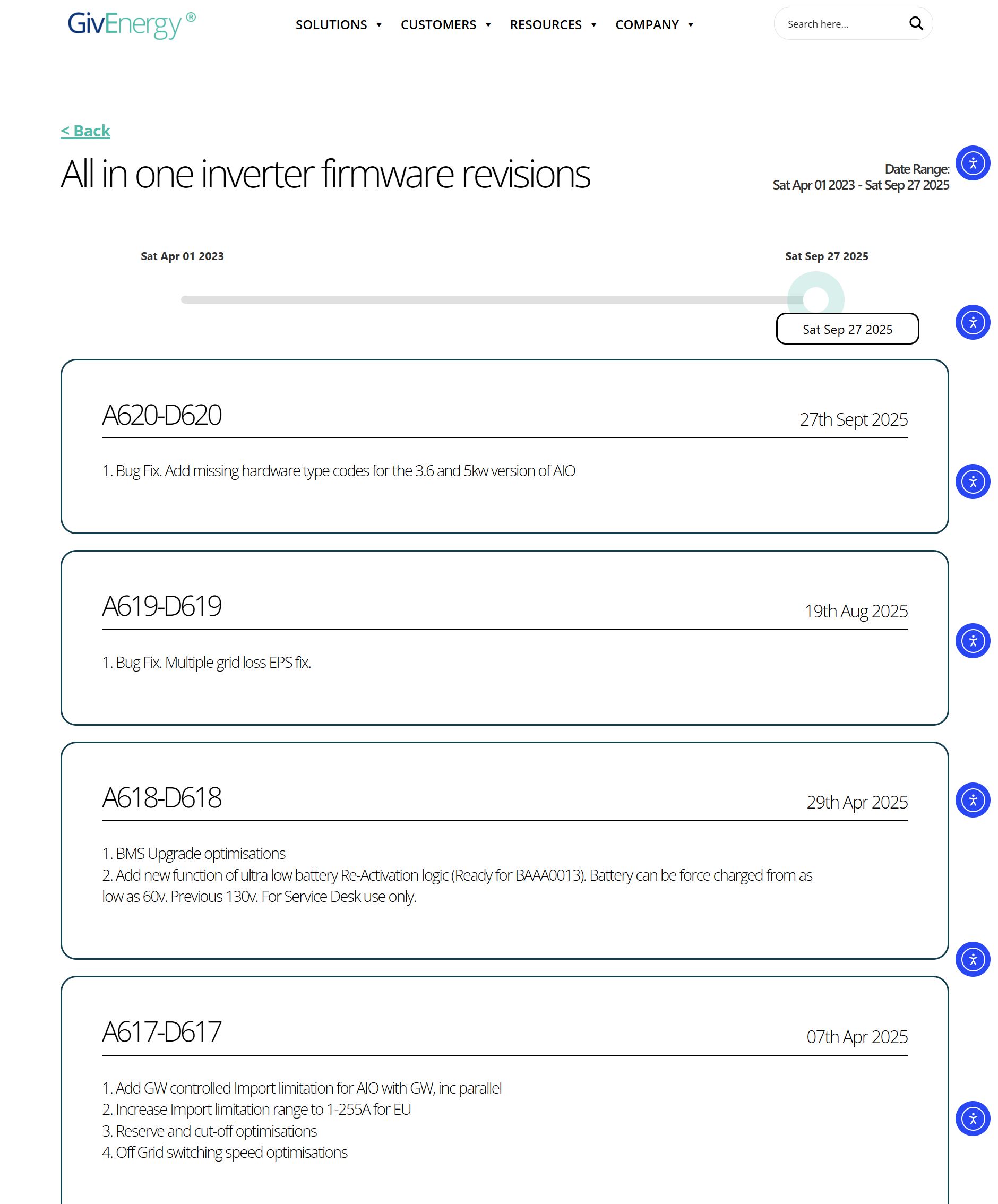
BAAA0013 - AIO Battery Firmware. (Load via USB next to DC Breaker)

Chipset v27 - HF21 actual Chipset update. Load via Uboot page, not the Device Manager page. Note DIP2/3 off for better stability during the load.

D620-A620 - Latest ARM/DSP for AIO1 via USB drive (DIP switch to 0000), or USB A-A cable method Format FAT32

GAAA0014 - Latest Gateway Update USB file with associated bconfig file

M
#13 mole

duplada
Thank you so much for the details and the procedures involved. I will certainly be looking to do this shortly.
All the best.
Martin

M
#14 Mouton

duplada

Does anyone know of any alternative sources of release notes for the versions on Installer Resources? After months of nothing, even though new versions were being developed and issued, the AIO inverter references on https://givenergy.co.uk/resource-hub/#firmware are updated But no hint of what Gateway V14 or AIO Battery V13 really do.

D
#15 duplada

You can assume whoever's job it was to update those documents is no longer with the company. Like most things GE the documentation leaves a lot to be desired.

What I can tell you is that Gateway V13 added the registers for support to set a max Gateway Limit BMS 13 has better SOC optimisations and works in conjunction with AO.618 firmware or later to throttle the AIO's when you are nearing the maximum Gateway limit of 85amps and stops it crashing. However once you have Gateway 13, BMS 13, and AO.618 loaded on your AIO's you need to contact support for them to set things active. I know all this because I have had numerous conversations with support and Paul.L about this and my system has all of these features active.

This is the setting that support needs to make to set your Gateway Limit.

D
#16 DrJohnM61

duplada I have been following this issue with great interest. After getting our second AIO, we had a nightmare with the gateway tripping due to the 12Kw battery charging rate ability, an EV and some other high current use devices. This has resulted in having to manage charge rates, device use etc. The upgrade you describe is exactly what we need to stop the gateway tripping.

I have updated the gateway to version 14 {all files downloaded from the installer support area} and applied the battery BMS update and also the AO.620 update to one of my AIOs BUT it is now showing a red status light. I haven't started an upgrade on the second AIO due to this fault light. I can read the AIOs status on-line all fine. I have not updated the WiFi chipset as all the devices are LAN connected, however, I note that there is also a v1.14_uboot.bin file. Would that have anything to do with the AIO not coming up correctly?

Or is this just that the second AIO has not been upgraded yet?

John

M
#17 Mouton

duplada Interestingly I have the gateway controlled limit working fine with AO.617 in the AIO and Gateway on V13. When the helpdesk (yes I did get through once on WhatsApp - but only once) responded to my enquiry they implied anything newer that AO.616 was not for general release yet - certainly not through the portal. So they would only give me AO.617 and set the limit. She said those newer versions are only implemented (at the moment) to address specific issues or functionality requirements. Whether that means they are still effectively Beta or not is another unanswered question.

It would be useful for people bold enough to try their own upgrades from the Installer Resources to know what the features/improvements/risks are. eg for @DrJohnM61 above, where it looks like there may well be a dependency or unintended risk in the upgrade. I suspect the problem in DrJohnM61 may well be that the AIOs are now on different firmware, but without knowledge of the changes contained we can only guess.

Hey ho, we live in hope Giv will return to normal service soon.

D
#18 Dabz

Is there more to calibrating that simply charging to 100%? Are you able to share best practice or running a calibration?

D
#19 duplada

Dabz With regard to Dual AIO's with Gateway, which I have, If you export down to 4% and leave the system there for 10 minutes or so and then charge back to 100%, as you reach 99% the SOC pauses for quite some time before eventually reaching 100%, then after 15 to 30 minutes at 100% the percentage drops back to 99% at that point this procedure does update the Calibration value stored, and visible using the Inverter APP.

I asked Paul.L why when you charge to 100% the percentage stays at 99% for an extended period before eventually reaching 100% His reply is as follows

"Yes sitting at 99% is re-calibrating 100% on it own.
It can then get to 100%, but may drop back to 99, then will stay there. thats not an issue "

The above procedure works fine for me and I no longer have SOC issues between AIO's and no longer get any SOC plunges. IMHO it is a lot more flexible than doing a full Calibration I have only ever done one of those.

D
#20 duplada

Mouton they implied anything newer that AO.616 was not for general release yet

That is not the case, If you download the AIO Complete download from Installer resources, You will find that A0.620 and Gateway V13 are fully tested and approved. The Test Results document below is included in the file.

aio-gw-d620-a620-test-pass.pdf
130kB

@Rubikcube and @hoggy might want to take a look at the document as it gives some clues to internal operation of some registers.

Here is what has changed in the AIO firmware.

D
#21 duplada

DrJohnM61 Upgrade both AIO's to the same firmware version and I think you will find that they will reconnect without issue.

M
#22 Mouton

duplada That is not the case,

The conversation with support was prior to that page being updated. BTW that page was updated on a different date (much later) to the firmware dates listed. The same firmware pages still do not list or explain GAAA0014, or BAAA0013 for Gateway and battery respectively.

The package you refer to on installer resources actually includes both GAAA0014, or BAAA0013. At the time of writing the test document does not seem to refer to any testing of these two pieces of firmware, just the AIO.

My observation is @DrJohnM61 has updated his gateway to V14 without knowing what it contains, or whether it has passed testing.

Not saying you are wrong either, just in a state where Giv are not very organized; just because those files exist on one of their sites doesn't make an assumption that the behaviour will be as we guess or hope a particularly safe set of assumptions.

G
#23 geoffreycoan

Mouton I believe if the files are on the installer resources section then they are publicly available for install by installers or consumers.

Separately there is a Beta forum and beta software versions is posted there.

D
#24 duplada

Mouton All I can tell you is that I have had V13 Gateway firmware since June and AO.620 AIO firmware for over a month and everything is working fine. When I see further testing documents in the future relating to new Gateway / AIO firmware combinations, It will give me the confidence to upgrade further and that's what I will do.

M
#25 Mouton

geoffreycoan I don't disagree with your point either Geoffrey, or @duplada and yes the likelihood is it's tested if it's in the installer zone.

But from a change control perspective I'd really like to know what's in a version before I install it in a multi £K piece of kit where I know I'm going to have lots of trouble contacting or getting support if there are unforeseen problems or effects.

Outwardly Giv do not look like a company that's fully in control at present (support issues / management team changes, workload etc etc). In that environment is everything else, eg the release cycle, working perfectly?

The helpdesk point made to me - these later versions are not there in the portal for users to self install (and Alina seemed to make the point that that is deliberate policy). So maybe there is a reason for that. Even if Alina was an isolated employee with duff information, we can also see for ourselves that you can't just install AO.620 from the portal - on the face of it that doesn't appear to be by accident. (Are they controlling the pace of rollout looking for corner cases because they expect some)

In normal circumstances I'd be happy to follow the assumptions too and take / encourage more chances, as everyones points are quite valid about the firmware being there and available, and presumably installers themselves are using it (although many just seem to stick to using the app and portal. Mine was very reluctant to use USB when prompted by support).

But we have to be honest with ourselves, choosing to use this firmware resource is a (small?) risk and implicitly making a set of assumptions. For inexperienced readers of the forums they may not understand that fully.

It's a stupid example to make this point, but bear with me, in the case of upgrading the firmware to enable Grid Import Limit.

  1. Even the Giv helpdesk themselves did not understand the AIO as well as the Gateway needed to be upgraded. They upgraded the Gateway only at first, set the values and no effect was observed.
  2. The default value for Grid Import Limit is 200A looking at what happened when the value was first set for me.

So even if a user was to have half an idea that function was in a release then there would be no indication what it was set to after implementation, or that it was helpdesk only settable. (BTW can you set or see this from @Rubikcube 's app or HA?)

So don't get me wrong everyone. I'm not saying anyone should not be using those versions, but for the inexperienced who might read advice here make sure you're comfortable and understand what you're really doing.

G
#26 Guybrush-Threepwood

duplada
“Calibration value stored, and visible using the Inverter APP.”

Is this visible for us GivTCP users or any non-android apps (I assume by inverter app you mean the one posted earlier).

Does anyone know if Predbat going down and up would achieve the same thing? I ask as when it gets to 100% it tends to stop charging and switch to charge hold so perhaps not doing that final up/down you mention.

G
#27 geoffreycoan

Guybrush-Threepwood “Calibration value stored, and visible using the Inverter APP.”

Is this visible for us GivTCP users or any non-android apps (I assume by inverter app you mean the one posted earlier).

As I understand it, the calibration process will fully discharge and then fully charge the battery, i.e. to be clear it will discharge the battery until it can’t get any more out of the battery, and charge it until it can’t get any more into the battery. At each end the BMS notes the battery voltage.

Battery voltage is the only thing the BMS can read and from that it interpolates what the SoC percentage is. This is thus not an exact science not least of which because battery voltage capacity varies with temperature, so hence suggestion to calibrate in summer and winter.

The calibration voltages are to my knowledge not visible at all anywhere. Certainly I don’t see them in GivTCP or the app.

The newer versions of the BMS firmware have an element of self calibration in them, i.e.they will keep trying to charge and discharge at the upper and lower ends and update the calibration data when it does so. So by exercising the battery from full to empty and back again the BMS can keep better track of the voltage to % conversion rates. Just using the battery whether through the app, predbat or whatever will do this automatically but its not a full replacement for a periodic calibration because battery capacity does degrade over time and as I said with temperature.

Guybrush-Threepwood when it gets to 100% it tends to stop charging and switch to charge hold so perhaps not doing that final up/down you mention.

That is slightly different, it’s just the way predbat records what it’s doing.

For a low rate charging period predbat will:

  • set the start and end times of the charge
  • set the charge target
  • set charge rate
  • set battery pause mode (if you have it) to PauseCharge
  • turn on AC charge enabled

Status will be recorded as charging.

When the battery reaches 100% (before the end of the charge period) predbat will leave the battery in charge mode and just records the status as Hold Charge until the end of the charging period when AC charge enabled will be turned off.
If the BMS works out that it can get a bit more in the battery then it will squeeze it in

D
#28 duplada

Guybrush-Threepwood (I assume by inverter app you mean the one posted earlier

Yes the Android APP, sorry I don't use HA / GivTCP so I can't help you there.

#29 hoggy

duplada Thanks for that. Not too much new news in there but it all helps.
Of note is they've started using Mode 10 for writing multiple registers at once rather than the machine gun approach I think we (3rd party people) all currently use.

send 11 10 00 6F 00 02 00 00 00 00 Confirm battery charge & discharge read 0.
Revert it with 11 10 00 6F 00 02 00 32 00 32

I do wonder if we were to switch to that multi method, and ALWAYS include the Calibration register as 0 / off, it would alleviate the random calibrations some people get (unless you wanted a calibration, in which case it would keep binning it off) - one to ponder (don't think it's part of the RAM registers though, so may cause more harm than good!)

D
#30 DrJohnM61

duplada Apologies for not updating. I took the AIO that had not been updated "off-line" (powered down) and the updated AIO came up OK, so it appeared that the issue was in fact an incompatibility with version numbers. Did the upgrade to the second AIO and now everything is running fine. Now just need to get the max grid import register set.

D
#31 DrJohnM61

Mouton I did read the test report in the zipped up install before starting anything to try and satisfy myself that this was a tested product. I noticed the discrepancy with the version number.

Installing all the updates seems to work OK one I had installed to all AIOs

M
#32 mole

DrJohnM61
Have you asked for the " Grid import limit" to be set, especially with a big system as yours? Wonder how long it might take for emails to be acted on.

M
#33 Mouton

DrJohnM61 in my limited experience email support is vv slow for getting grid import limit set. I was lucky and got a one-off quick reply on Whatsapp first time I needed it set. Never got through since.

If you are in contact with your installer they can set this for you with the installer app remotely (I used this route when my cut-out was upgraded from 60A to 80A). Answered first go, took him 10 seconds.

D
#34 DrJohnM61

mole I called the installer. Was set within two days. Tested out the auto throttling on the weekend and all worked 100% ok. Very pleased that this issue has been fixed. I just now can leave the battery charge rate at 12,000w and it works it out all on its own.