Is the EMS any good?

51 comments started 2025-12-14 last 2026-05-25
GivEnergy ProductsAC CoupledBattery
A
#1 Arron

We want to expand our solar production but our gen 2 hybrid inverter is the bottle neck at present as both strings are in use by our existing 5kw array.

I've been debating the best way to expand our system, with no EMS on the horizon (that I know about) for hybrid inverters I'm considering getting another inverter from a different brand that can handle 4 (or more) strings to give us the capacity we want.

This would mean replacing the hybrid with 2 AC inverters for our 2 gen 2 9.5kwh batteries and linking them with an EMS for a powerplant arrangement.

Who out there has a similar setup? and how are they finding the EMS? Would appreciate any views/issues or if anyone has alternative suggestions to expand our setup.

G
#3 geoffreycoan

Arron you could put a second hybrid inverter in parallel with the gen 2 and not have an EMS. There are ways to make the two inverters work together, it’s not perfect but two hybrids can coexist. The main problem of not having an EMS is cross-charging from one inverter to another.

To expand:

One strategy is to set one inverter to a discharge rate of the base load, and the second inverter then picks up the additional load over and above that. If the first inverter is set to not charge during the day (only overnight) then you eliminate cross charging.
This is the way that Oli on speak to the geek has set his hybrid inverter and AIO to work together.

Second strategy is to have automation scripts that detect the inverters cross charging and stop the cross charging from occurring by setting discharge rate and charge rates appropriately, then reverting when the cross charging stops. This does require something like Home Assistant to be running the automation scripts, and you need to turn on real time registers on the inverter to prevent inverter damage.

Third strategy is to let the inverters soak up solar and share house load during the day, and overnight you set both inverters to Pause Charging except for when you have planned charging periods. This prevents the overnight cross charging which is when it mainly happens.

Fourth strategy is to wire the inverters and place the CT clamps so they can’t “see” each other. I can’t remember how this precisely is done, but I think you need to split your consumer unit circuits across the two inverters.

Fifth strategy is to just leave the two inverters to sort themselves out and accept the cross charging that occurs.

I have two Gen 1 hybrid inverters and have had them for coming up to 3 years now. Up until very recently I was using strategy 5, the inverters would cross charge overnight, almost always from inverter 0 to 1, which resulted in inverter 1 always having full batteries overnight. I have about a month ago moved to strategy 3 and this results in very little cross charging, none overnight, the two inverters happily share the house load, and only occasional cross charge during the day.

I just realised your question was about adding more solar capacity, it was nothing about dealing with multiple inverters with batteries which is what I’ve answered at length! If all you want to do is to add more solar capacity then why not just add an AC coupled inverter from any brand. All additional solar will then either be exported (if your inverter is already charging the battery at max rate), or the inverter will charge the battery from excess AC.

The original firmware on my gen 1 hybrids didn’t do this, but upgraded firmware gives AC-charging capability to the inverter so I am sure the Gen 2 will do the same as its had more firmware releases than the Gen 1

#4 ChrisLav

geoffreycoan I just realised your question was about adding more solar capacity,

Preceding info was interesting and informative, though 🙂 Edit: On reflection, 'info' and 'informative' sounds a bit redundant (unless it's coming out of the WH) (there goes my US visa!) 🙁

A
#5 Arron

geoffreycoan thanks, very helpful. Solar is the priority but we have 2 batteries so understanding cross charging is very helpful. The other hope with adding another GE inverter would be doubling our charge/discharge rate.

D
#6 DD

Arron replacing the hybrid with 2 AC inverters for our 2 gen 2 9.5kwh batteries

Can you just add one AC inverter, and run the existing one headless (no solar attached) as the second. I assume you considered adding a second hybrid and running two strings on each?

D
#7 DD

geoffreycoan could put a second hybrid inverter in parallel

Could also put them in series, as primary/secondary. One would do most of the work, and the other would a supplement, filling in what the main one cannot provide.

A
#8 Arron

DD hey, yes this was my first thought. Just add a string inverter but it’s then going DC to AC back to DC to get to the batteries. Not very efficient, a second hybrid would seem to be the way to go, but the HEMS seems to still be a way off.

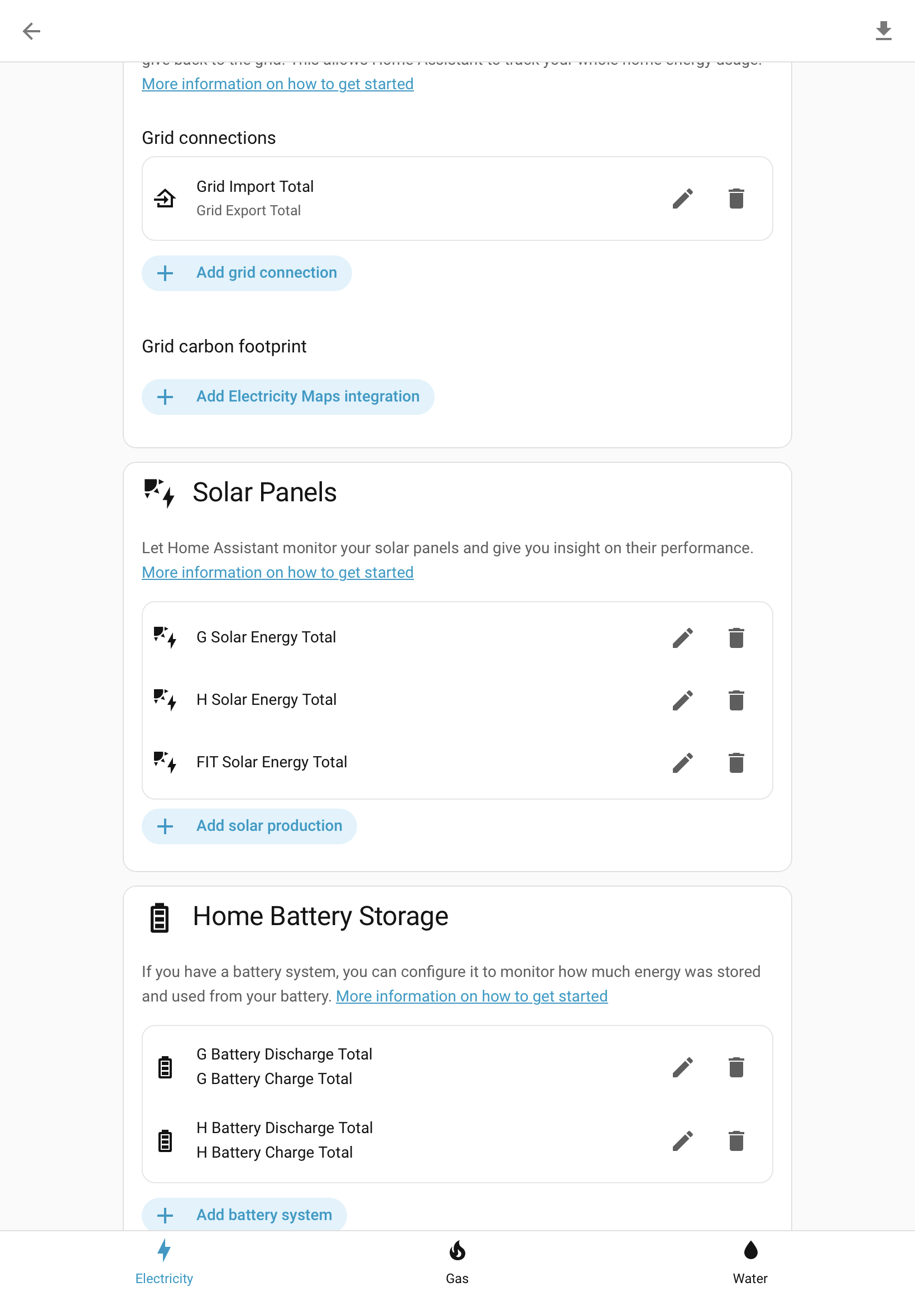
So many other brands seem to just work with adding extra inverters, I wish this were true for GE!

P
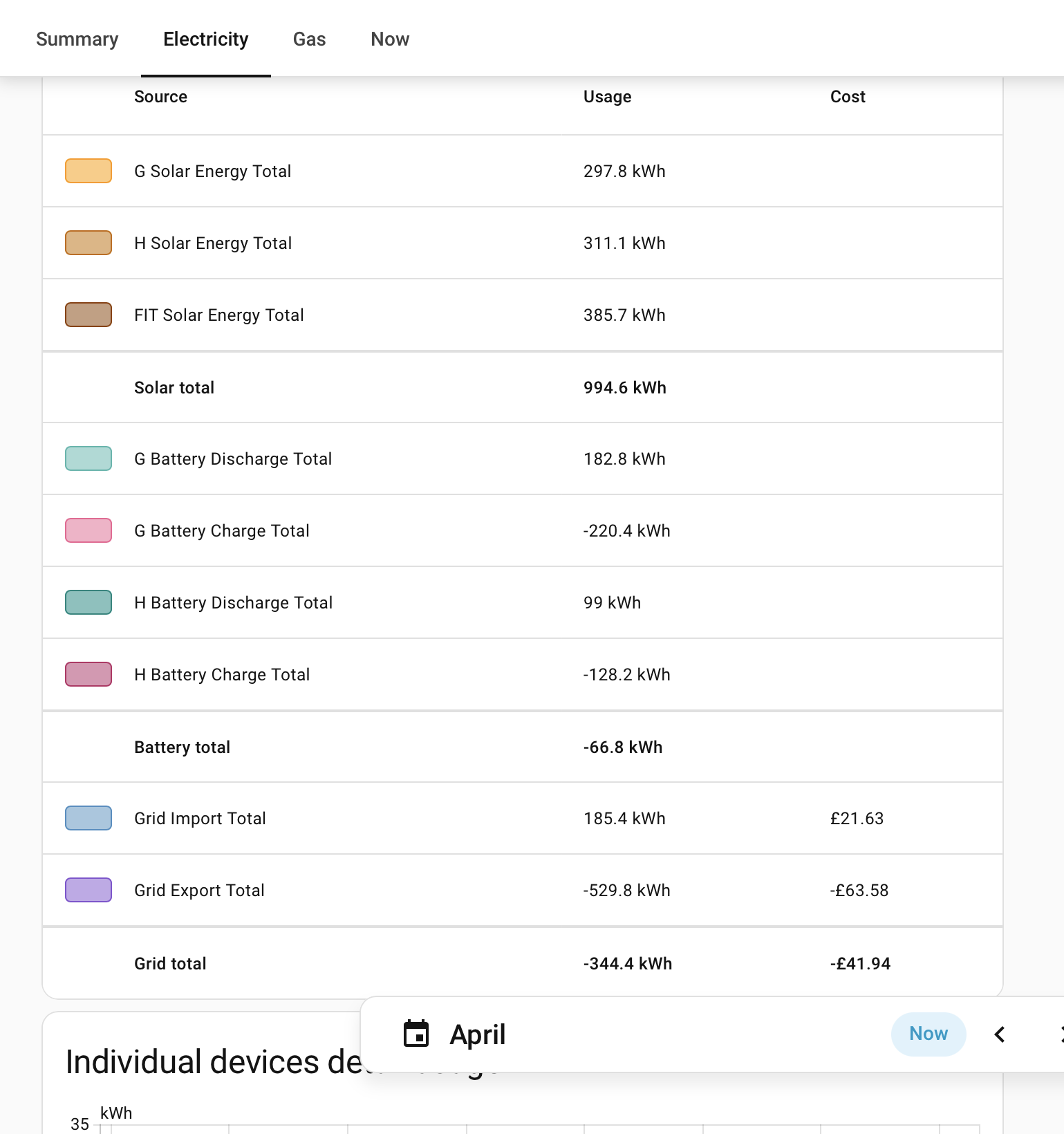
#9 Pete UK

Arron

I have 2x gen 3 hybrid 5.0 inverters and 4x 9.5 GE batteries. Two batteries on each inverter, two strings going into each inverter. 11.34kW peak solar from 4 strings (although it almost never hits max all at one time as the strings are facing all different directions !)

What array sizes do you have now and How much extra solar do you want to add?

I really could do with an H-EMS but for now I’m on a beta trial with GE which is a software version of the AC EMS for the hybrid inverters. GE sends commands to balance the battery pars. It works fine for now and does a pretty good job of keeping each pair on an inverter balanced and effectively avoids the cross charging issue. I don’t know if you can get on that trial as well but it might be worth investigating. Also as @geoffreycoan says there are other options. There is other software out there that can achieve the same thing but I can’t remember which one does it (it might be wonderwatt or it might be predbat or both, you’ll have to investigate and of course if you’re a bit more techy you can use Home Assistant).

The max input and output is always limited in some way by some part of the system. You just need to work out the best for your situation which is why I asked what array size you’ve got and plan to add.

It’s a shame there isn’t a HEMS available already. I’m sure there are plenty of existing GE owners such as yourself looking to expand (as well as those looking to install a new GivEnergy system) who’d find this invaluable. And would potentially be the difference between buying GE kit and another brand. ie lots of lost sales.
Personally I think they are shooting themselves in the foot a bit here by not releasing one already. It’s a pretty essential and necessary bit of kit these days not just an edge case.

A
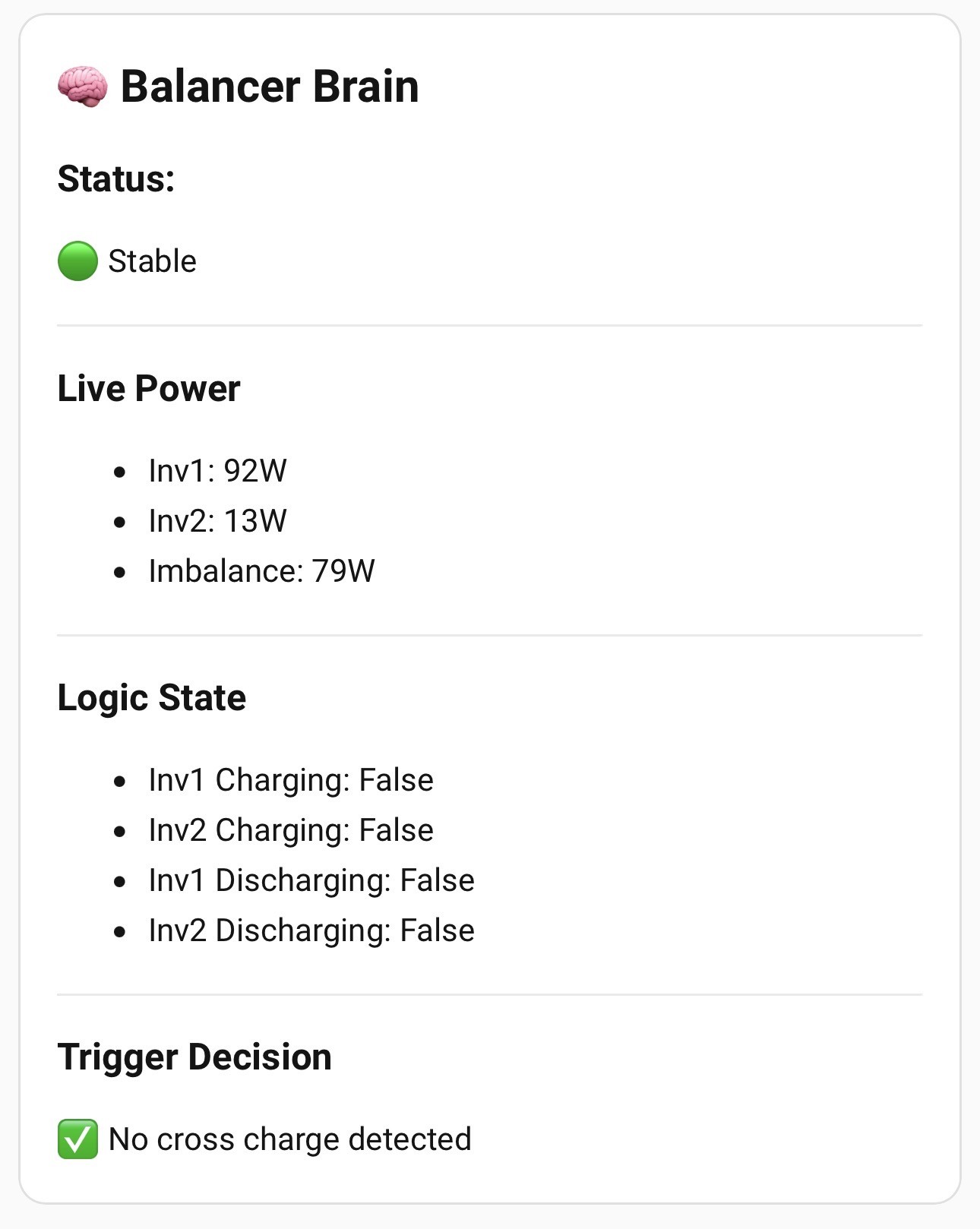
#10 Arron

Pete UK you have our dream setup! We have 5kw array now (ground mounted facing south) and I want to add another 5-6kw east/west on the roof. Initial plan was to split our 2 batteries over the 2 inverters and then add more once we move to electric heating.

Couldn’t agree more about lost sales. The fact I’m sat here considering selling my GE kit and starting again says it all.

How did you get on the software trial? That sounds very interesting. I do dabble with Home Assistant but I ideally wanted a reliable, hardware solution that’s wife friendly!

P
#11 Pete UK

Gotcha.

I guess the more people that pester them for a H-EMS to be released, the more they might consider releasing one. It’s presumably not a priority for them at the moment. I have no idea why though.

In all honesty I was expecting it to be released imminently when I was planning my install in April 2023, for a June 2023 installation. They said “coming soon”. So initially I thought I’d put up with the cross charging for a few months or so and then install it when it was released. That never happened and it may not ever happen in the future !

Without some sort of balancing the two 5.0 hybrid inverters literally spend all day cross charging at max rate from one to the other. It’s quite severe. So some sort of control is absolutely necessary.

How did I get on the beta software trial? Basically I complained to support about the cross charging issue and it was eventually suggested to me. GE then put me on contact with the person running it at GE and they accepted me onto the beta trial. I’m not sure who else or how many others are on the trial. They also had some beta testers for the AC inverter hardware EMS.

Ideally I want a hardware H-EMS for local control. Not that I think GE are going anywhere but in the back of my mind I have the thought, “what if”.

I went for the GE kit as it was cheaper to buy 4x 9.5kW batteries and 2 inverters than 3 powerwalls. Or equivalent solar edge inverters and batteries. Also because it was a DC system so less conversion losses. I did have a lot of problems with the batteries since the install day 1. You can search my previous posts for more on this. Eventually it was sorted out but their support is extremely slow.

If it was me, I’d weigh up all the current options.
GE do now have a 8 and 10kW inverter and HV batteries.

What I’ve got enables me to just about fill all the batteries in the 6 hour IOG off peak time. Which is what I wanted to achieve. Pay attention to the max charge and discharge rates and output and input of the system, particularly if adding batteries to existing ones on the same inverter. My (Gen3) 5kW hybrid inverter will charge a pair of 9.5 batteries at 3.4-3.5kW total, not at 5kW for example, as you might expect, again no idea why. And discharge at 3.7-3.6kW (it used to discharge at 4kW but for some unknown reason it’s now 3.7kW. I’m not sure if that’s something that changed in the software trial - seems like it was though.) 🤷🏼‍♂️

I guess it’s balancing the cost of the painful idea of throwing out what you’ve got now and starting again or adding to it. It’s a number crunching game really. And if you get the DNO approval for larger inverter(s).

G
#12 geoffreycoan

Pete UK My (Gen3) 5kW hybrid inverter will charge a pair of 9.5 batteries at 3.4-3.5kW total, not at 5kW for example, as you might expect, again no idea why. And discharge at 3.7-3.6kW (it used to discharge at 4kW but for some unknown reason it’s now 3.7kW. I’m not sure if that’s something that changed in the software trial - seems like it was though.)

There are two different limits you're highlighting here. The kW limit on the inverter (e.g. 5kW or 3.6kW) is the DC inverter limit, i.e. your inverter can convert that amount of DC power from your inverters to AC to power your home or export to the grid.
Separately is the DC battery charge/discharge limit which on a Gen 2 or 3 hybrid inverter is a nominal 3.6kW, and on a Gen 1 is 2.6kW.
I say nominal because the inverters all seem to charge at a lower rate than the nominal battery charge rate, but discharge at a higher rate. I certainly saw the discharge rate improve on my inverter with newer firmware so maybe the slowdown you have seen is a consequence of the software EMS you are running?

P
#13 Pete UK

geoffreycoan

Yep it seems that way. It all changed after the AWS outage. The S/W EMS broke or went ‘off line’, then they fixed it and it started to work again after a few days (after I noticed and contacted them - it didn’t fix itself). But with different charge and discharge rates when it was back online.

I queried the abrupt behaviour change with the guy running the beta balancer software at GE and sent the before and after screenshots as to what changed but I didn’t really get a satisfactory answer only a one line reply “AWS outage”. I used to be able to discharge at a constant 8kW total but now it’s a variable discharge rate, starting at 7.4kW and finishing off at 7.2kW approaching 4% SOC. It appears to me that the output rate has been changed within that S/W and is now less than it was before and is now based on some factor of how full the battery is. Same with charging (used to be a higher, constant fixed rate 7.2kW IIRC; until the step down tail off). Now it’s 6.7kW increasing to 7.0kW. I followed up again a few weeks later, subtly stating I think some setting has changed but got another one line reply stating “your battery output is 3.6kW”. No more detail than that. And no actual investigation as far as I could tell.

It’s either a deliberate change, or some setting has reverted. If it’s deliberate, for some good reason, fair enough. If it’s not; What’s happened? and can it be put back the way it was? - No reply.
And more importantly what if it changes again…?

This is kind of the problem with the s/w EMS. Things occasionally break, things change, and it’s up to me to pester them by email to get a reply or get things working properly again.

I feel like I’m interrupting a really busy person that is very knowledgeable but doesn’t have time to investigate or reply in any detail. I feel like I’m walking on egg shells a bit. I write a very long and detailed email and get a one-liner back. After several to and fro’s the problem usually gets resolved but it’s quite frustrating and time consuming. And I have to instigate it.

Don’t get me wrong, it does work well when it’s running and yes it is a Beta trial, and yes I appreciate the cross charging fix but I’d just prefer an EMS box fitted on my wall that silently does its job and I don’t have to keep emailing people and experiencing days of my system not working properly. Also I’d really, really like to be able to make use of more than one discharge slot.

I think (or Hope) the mystical hybrid EMS would solve a lot of problems if it ever gets released. I still can’t fathom why they haven’t released one yet.

Can you remind the OP of the other inverter cross charging fixes apart from HA. Was it Wonderwatt or Predbat that can do inverter balancing as well? I can’t remember.

G
#14 geoffreycoan

Pete UK Can you remind the OP of the other inverter cross charging fixes apart from HA. Was it Wonderwatt or Predbat that can do inverter balancing as well? I can’t remember.

Predbat can do inverter balancing https://springfall2008.github.io/batpred/customisation/#balance-inverters
Its not very sophisticated, it basically cycles round, stopping the charge or discharge rates on the inverter to keep the two inverters balanced together. So real-time registers is a must. I did use it for a while.
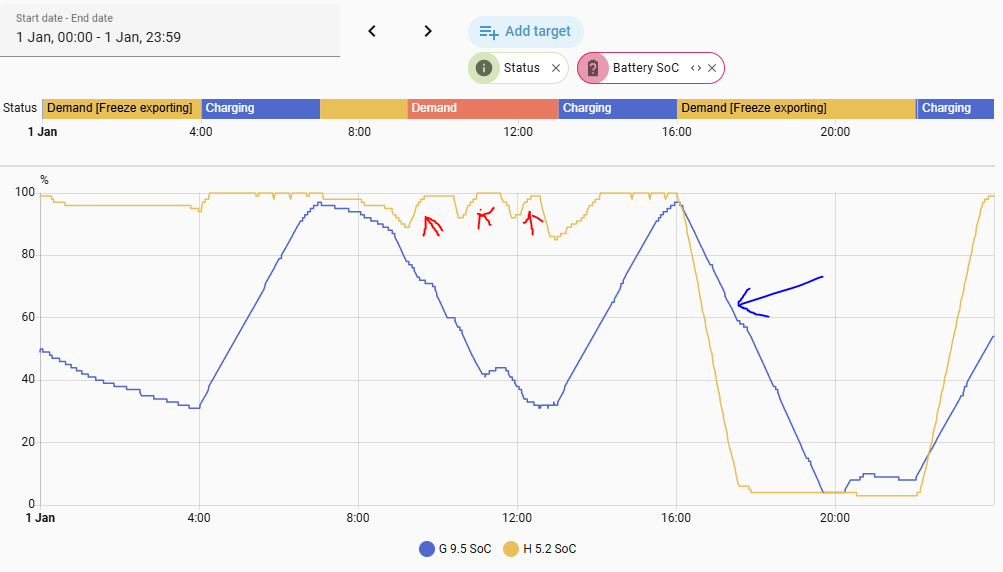
I am now using freeze export during demand https://springfall2008.github.io/batpred/customisation/#freeze-export-during-demand (which I added to Predbat) with an automation to turn that on in the morning and just before sunset. This configuration stops the inverters from charging except for scheduled charge slots, so stops the cross charging I used to get overnight.

Yesterday's SoC chart, the red arrows indicate small bits of cross charging during the day when solar generation wasn't enough to keep the inverters busy, but the blue arrow shows both inverters discharging reliably and not cross charging at all, whereas previously one would discharge and the other cross charge

A
#15 Arron

Pete UK in fairness, I’ve noticed a change to our discharge rate around the same time. All my Wonder Watt calcs and settings are based around a discharge rate of 4kw for our gen. 2 Hybrid inverter, but now our maximum discharge rate is 3.6kw, so we are ending up with more than the 4% reserve left just before our cheap charge windows starts (we’re on Octopus Intelligent Go). So I wonder if this is something that GE have rolled out across the board perhaps?

G
#16 geoffreycoan

Arron Could it be temperature related?

P
#17 Pete UK

Arron

I think you might be correct. I wonder if anyone else has noticed this decrease as well? All my calcs were based on 4kW max export rate per inverter as well (8kW total). It was a bit odd before I must admit; I could export the batteries to the grid at 4kW per inverter (8kW max, 2kW per battery) but under normal house load the batteries would max out at 7.4kW previously (3.7kW per inverter) IIRC. I only got the 8kW when doing a “timed export”. And I do have a 10kW DNO export approval.

I just start my evening export a bit earlier now.

geoffreycoan

No, it’s definitely not temperature related (for me anyway) since install in 2023 it’s always been a constant 8kW max inverter export to grid from the batteries, after the AWS event it became 7.45kW decreasing to 7.2kW over the timed export period. It never decreased over time before either, stayed at exactly 8kW. And the decrease now is a very very gradual one, not a stepped one like during charging, when it steps down the charge rate as the SOC gets above 88% or 90% (whatever it is). Thats why I assume it’s SOC related. I don’t think it’s inverter temp related either. The inverters get hot and more or less sit at that temp for the whole discharge time.

It is odd that the gen3 5kW hybrid inverter won’t export to grid from two batteries at a higher rate. As one inverter will export at 5kW with a bit of solar coming in at the same time. Surely a pair of batteries with an a nominal discharge rate of 3.6kW each could export 5kW (combined) to the grid, as they obviously could export 4kW before. Possibly it’s just the way the inverter is constructed or maybe something in the programming or settings or something to do with the fact it’s a 3.5 and 5kW inverter programmed by software. Or something in the design regarding the 3.7kW export without approval limit built in in the design stage 🤷🏼‍♂️

I also have a feeling the S/W balancer may be a generic bit of software, not tailored to my specific set up and perhaps tinkering with one thing affects more than one person on the trial. But I have no idea, as I have no idea how it operates exactly, or what they tinker with, if indeed they do, despite asking.

N
#18 NormC

Pete UK I have a Gen3 5kW invereter and I had a similar problem in November last year. A Reset to Defaults got it back to normal. I have no idea what was causing the problem. You could try it. Remember to make sure you set everything up again afterwards if you do it.

P
#19 Pete UK

NormC

Cheers - worth a try I guess. Could be something that simple. I’ll do that later today and report back if it works for me 😀

P
#20 Pete UK

NormC and FYI Arron

Awesome. A reset to defaults on each inverter worked. Don’t know why I didn’t try that before, as it’s always one of the first things to try. No idea what changed. I read all the registers before and they are all the same again after, so I guess that’s why I didn’t try it. No idea why it worked but it did. I’m still showing max discharge rate of 3,600 in the registers (and sliders) but I am now getting a fixed, constant 4kW on each inverter again, interesting… 🤔 - go figure. 🤷🏼‍♂️

Back to 8kW max discharge rate again.

Thanks NormC

N
#21 NormC

Pete UK Out of curiosity - when you did the Reset to Default did it set your charge slots to 00:00? When I did mine it didn't reset the charge slots, it did reset the discharge ones. I find that it pays to reset all the times and settings again, just to make sure they are correct.

G
#22 geoffreycoan

People have reported that reset to defaults only resets the inverter settings that the portal knows are not set to the default value, so its advised to click the little circle icon next to each setting to force a download of the current inverter values to the portal beforehand.

For myself, whenever my inverter has got stuck and not responding, which doesn't happen at all often, just clicking reset to defaults has been enough, but passing on the feedback

A
#23 Arron

Pete UK this is great news, I’ll give this a try tomorrow and report back.

P
#24 Pete UK

NormC

Yes as far as I recall it reset them as well. I had to re-enter all the charge and discharge times again.

P
#25 Pete UK

Arron

It was great news - but sadly it’s reverted back to the reduced discharge rate again this evening !

I’m now more certain than before that it’s the balancer software that’s changing the discharge rate. At least it’s not changing it to 1kW but still frustrating nonetheless being less than it was previously.

I’ll try another inverter reset to defaults again tomorrow. And have a bit of a dig around in the meantime…

P
#26 Pete UK

Ok so did an inverter reset on the web portal this afternoon. Had a good poke around and re-read all the registers. All looks normal.

Had to re-enter all the times again as before.

Last time the inverters showed offline when the reset to defaults was performed, think I did the reset on my phone last time but can’t remember if it was via the app or portal.
This time the inverters didn’t grey out (offline) but the values were reset to 0000, 0000.
I tried an app quick play button discharge to test and it was still at 7.4kW discharge rate.

Will report back what happens tonight with my timed export. Expecting it to be the same but who knows maybe it’s back to 8kW again.

N
#27 NormC

Pete UK I have been looking at my logs from November and it seems strange that the reset to defaults changed the charge and discharge rates to 3600 even thought they were set to 3600.

A
#28 Arron

Pete UK bugger. I did a reset and discharge rate has improved, a little… 3.6 is now 3.76 lol.

P
#29 Pete UK

Mines still at the reduced rate.

One thing that did happen was that on this last reset to defaults - the end pause battery time on just one inverter got changed to 0000 instead of 2359. Which messed things up a bit.

A
#30 Arron

Pete UK Hey Pete, any updates on the beta software? still performing as intended? out of beta yet? I've been noticing a few Gen 2 hybrids popping up on eBay and was contemplating taking the plunge on the 2 inverter setup, I've also been dabbling with HA and Predbat so feeling a little more confident that I'll be able to understand what's happening!

R
#31 Rubikcube

Arron If you had a second Hybrid, would you run it with or without a grid meter?

G
#32 geoffreycoan

Rubikcube if you didn't have a grid meter, how would the inverter know when to charge and discharge for house load?

I have two gen 1 hybrids each with their own CT clamp and EM120

A
#33 Arron

Rubikcube I assumed it would have to have its own meter and clamps as @geoffreycoan said. Is running it without one an option? What’s the advantage?

R
#34 Rubikcube

geoffreycoan Arron Having it's own meter is necessary to use ECO mode. But a meter may be a cabling challenge in some situations. On some firmware having both in eco mode can lead to cross-charging.

Without a meter you could adopt strategies where the main inverter does the grid balancing (eco mode). The other inverter just acts as a support. For example if you have a heat pump, in winter you could charge a battery overnight, and then discharge it at a constant rate (say 500W) through the day to support the base load and make the main battery last longer. In summer you might just charge from solar and then export at max during a peak period, say with Octopus Flux.

Brand new inverters are not configured for a grid meter and will work out the box. Almost all second hand inverters will have been configured for a grid meter during commissioning, and need to be re-configured to work without one.

P
#36 Pete UK

Arron

It’s still working. It’s still in Beta as far as I’m aware. I’m not sure if that will change any time soon.

I’d still way prefer a hardware EMS to become available for peace of mind but I’ve pretty much given up hope. Shame really. Missed opportunity.

I feel that dual batteries on a single inverter isn't really ideal if one battery develops a problem. But mine are working ok for now. One battery of the four does seem to be a bit of a wrong ‘un though (from installation; they won’t change it and won’t recognise a fault). The SOC varies by +/-15% on a daily basis. Add to that two batteries on two inverters and….

Saying that the s/w beta balancer has been working well for a good while. A few hiccups along the way but these have been resolved with a few emails. The only thing that didn’t get resolved (and got brushed off) was the decrease from a constant discharge rate of 8kW to a variable discharge rate of 7.5kW–>7.2kW.

I’m not updating anything, I’m not doing any more calibrations, I’m just crossing my fingers that it all keeps working TBH.

A
#37 Arron

Pete UK thanks for the update, good that it's still working and seems to do the job. Agreed a hardware solution would give much more peace of mind.

With all the noise around GE's future at the moment I'm landing on swapping out my GE hybrid for another brand with more MPPTs so we can add the solar we want and getting a couple of AC3s second hand to create a powerplant with the hardware EMS... just got to convince the wife now.

P
#38 Pete UK

Arron

Today, mysteriously (or not so) I’m back to discharging (timed export) at the full 8kW (4kW on each Gen3 inverter).

I guess they have turned off the balancer software for me. Tomorrow could be interesting.

I’ve received and set up my home assistant green.
All up and running in no time at all, including remote access on my iPhone! Fairly easy actually; following speak to the geeks you tube video. I haven’t figured out the exact sensors to use on the built in Energy dashboard yet though. Seems to be slightly different options, different sensor names etc and duel inverters complicate things somewhat.
One thing that I like with Home assistant is the drop down octopus integration options where you can do a forced charge or forced export for a set number of minutes and it then returns to ECO. Handy for “partial” bits of 30 minute slots when the car may or may not be charging.

Now I just need to work out how to get a load of automations up and running to fix the old cross charging issue - which I expect to appear with vengeance tomorrow.

Are you seeing 4kW with “timed export” again?

G
#39 geoffreycoan

Pete UK In the energy dashboard use total entities from givtcp as much as possible. they are more reliable than the today entities.

battery total discharge/charge
grid import total
grid export total
pv energy total

that should get you started. If you have the octopus integration configured, use the ‘use an entity containing current rate’ and select the current import or export rate as appropriate so the energy dashboard will calculate your import and export costs. You can pull the figures from the octopus account but its (a) complicated and (b) the export is lagged a day so doesn’t appear easily in the right place

P
#40 Pete UK

geoffreycoan

Thanks for that. I’ll have a play over the next week or so.

How do you handle your dual inverters in the energy card?

G
#41 geoffreycoan

Pete UK How do you handle your dual inverters in the energy card?

Simply add the total entities for each battery’s charge and discharge, and the PV generation. Only one grid import and export of course.

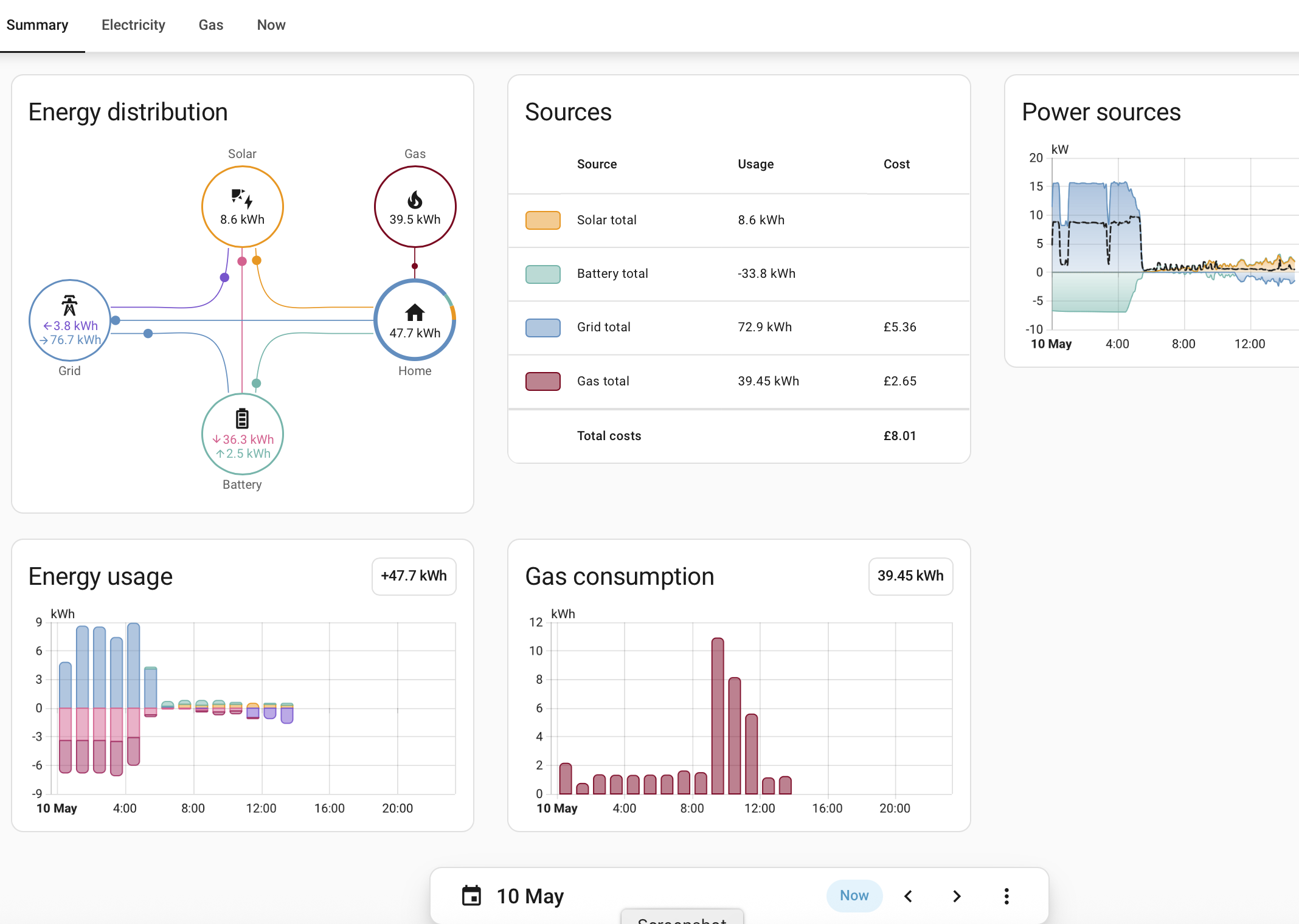
e.g. here’s my energy dashboard. I have the two GivEnergy inverters plus an older FIT inverter

A
#42 Arron

Pete UK I am indeed, exports have been back up to 4kw from the batteries again for a few weeks now.

P
#43 Pete UK

geoffreycoan

Sorry for the delayed reply, missed your post.
In the meantime I’ve got it all sorted.
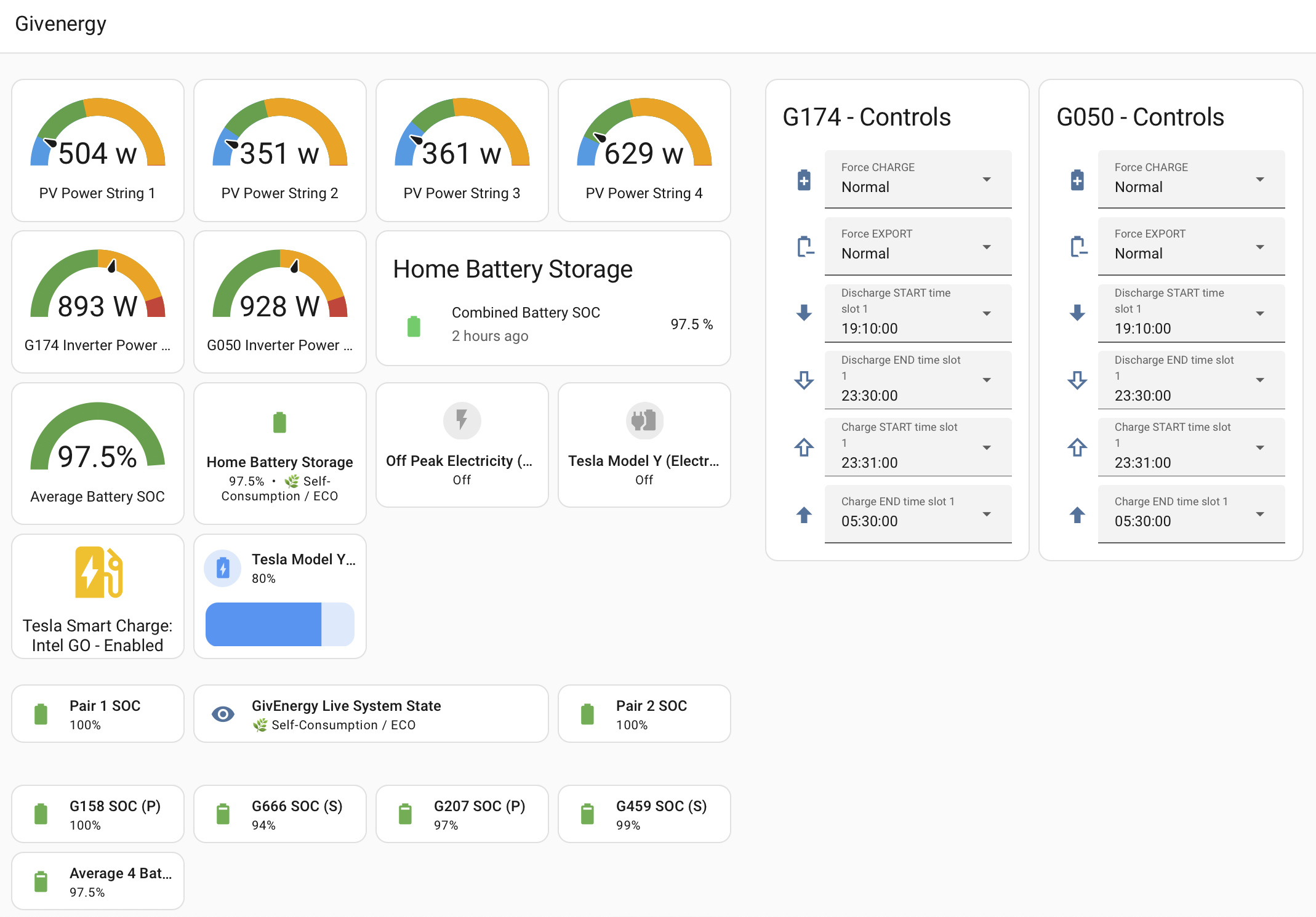
Energy dashboard and GE dashboard (still work in progress) look like this…

G
#44 geoffreycoan

Pete UK Well done, looking good

Here's my current dashboard, I very much like using Mushroom Template badges for giving overview data. Still got to relocate the inverter controls somewhere better

But always stuff to tweak

P
#45 Pete UK

Whoah - I’m very impressed !!!!

You have been busy. Must have taken ages . I’m still very new to HA. Lots to get to grips with and implement, especially being from a non-programming background. I do have a fairly logical brain though. I think I’ve come quite a long way so far from scratch. I get the impression it’ll always be a work in progress for me, especially fine tuning the dashboards. It’s quite addictive.

I like your Energy flow diagram, is that ‘live’ data? I like the built in Energy dashboard but it only updates every hour. It’s good enough but live would be better, so it feels more like the GE app or web page.
I’ll check out the Mushroom template badges. I’m loving the HA green, it’s great.

I’ve since implemented:
1) Remote access (VIA VPN) for the HA iOS app/ web using Tailscale.
2) An automation for handling IOG extra slots (forces the home battery to charge only if the car is actually charging in a bonus slot, thereby not disrupting my evening exports as much if the car isn’t actually charging in a bonus slot). Not that I’ve had any recently!
3) A watcher automation to keep an eye on things that may go awry and fix them.
4) An automation for automatically calculating the start time (dynamically) for my evening grid export based on current SOC approaching export time and writing that into ‘discharge start time slot 1’ of both inverters. So no more manual faffing!

On the To-do list: Automation to implement EMS type battery balancer (back on topic).

I think I’d be struggling a bit if it wasn’t for “Chatty Petey”. 🤪

Have you tried using “visibility” to hide/ reveal the inverter controls? Is that a thing?
I haven’t tried it yet but it looks to me like you can set the controls to only be visible if you “mouse over” or perform some action 🤷🏼‍♂️. You’ve probably tried that already I guess as you’re well versed in HA.

I don’t want to hijack the thread (too late) so is there a better place for discussing HA implementations / dashboards etc?

Meanwhile back to the automations…. 🤯

G
#46 geoffreycoan

Pete UK I like your Energy flow diagram, is that ‘live’ data? I like the built in Energy dashboard but it only updates every hour. It’s good enough but live would be better, so it feels more like the GE app or web page.

Its a power flow diagram, the Compact Power Card http://homeassistant.local:8123/hacs/repository/1113760832

The Energy dashboard originally was driven only by HA's Long Term Statistics which are collected every hour. Recent updates have added a 'now' tab which shows power meters, but I like the CPC because its very configurable as to what you want to show on it, like my 3 solar arrays, two batteries and a number of other devices

Sounds like you are making great progress with your HA setup. it is never complete though.

I need to sort tailscale out myself. I had Wireguard but when I changed IP address allocation as part of moving to a new fibre provider, I never got it setup again so use a fixed IP and firewall port forward at the moment. Not ideal but does work well.
I have a number of automations for checking that givtcp and predbat are working, raising alerts when battery levels are low, the list goes on.

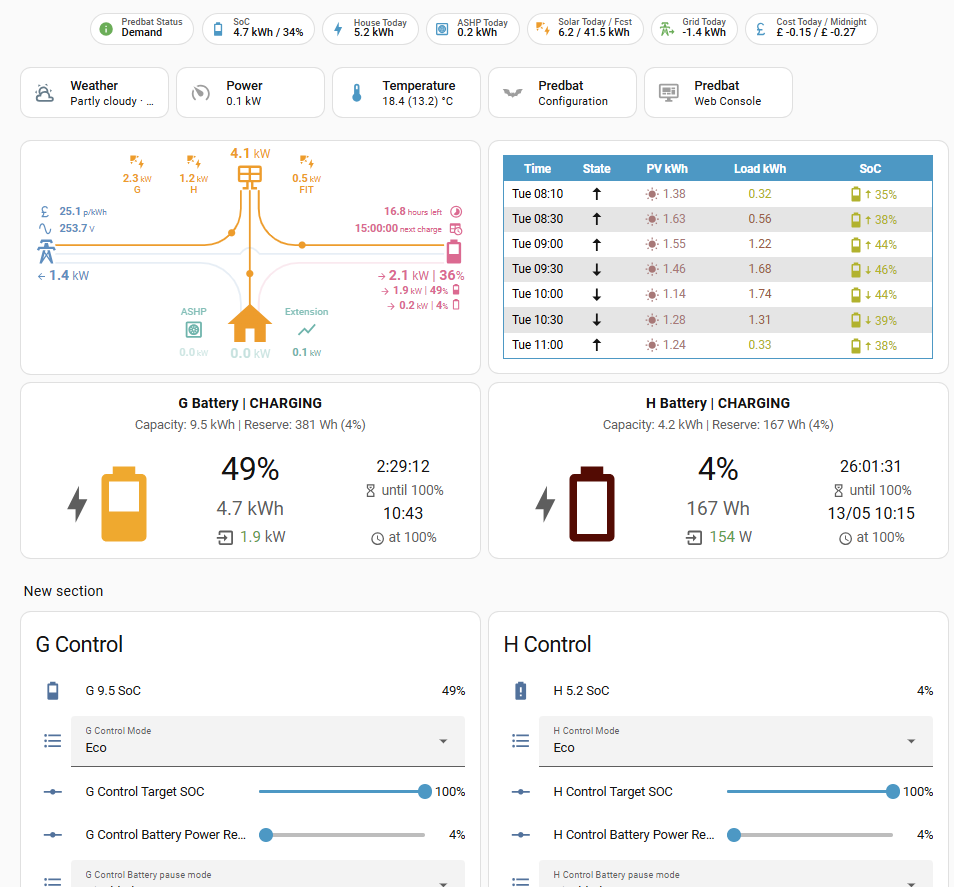
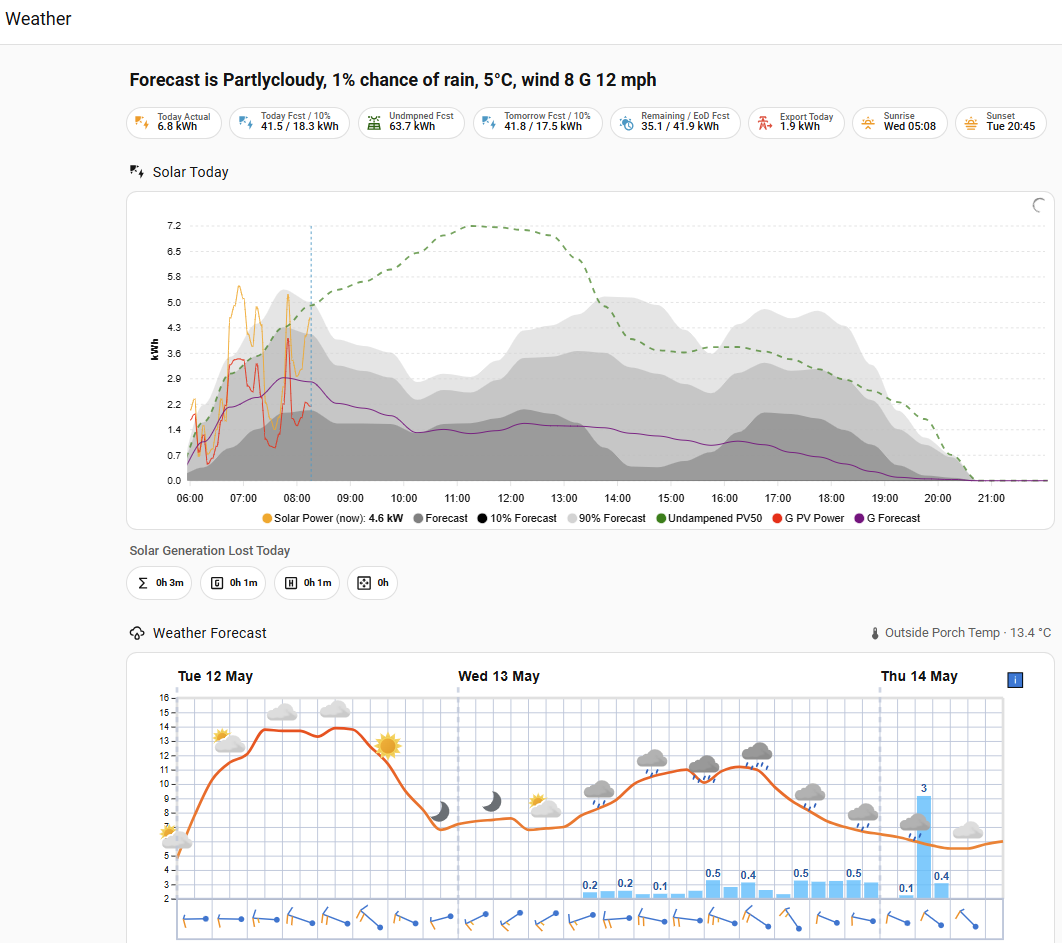
I use predbat for my battery management (predbat plan on the right), but did start off with my own automations.

P
#47 Pete UK

geoffreycoan

Ah, right, that’s great. I’ll be adding that new energy card onto the bottom of my to-do list then !

I think I’m finally almost there with the “EMS automation”. It’s all done just running it in monitor mode for the moment.

So basically this is a summary of what I’ve been up to this week;

I’ve built a fairly advanced smart energy management system in Home Assistant around my solar, battery and EV setup.

The house has about 11.45 kW of solar across split-facing arrays and 38 kWh of battery storage using dual GivEnergy inverters. Instead of using fixed export times, I created a predictive export system that continuously calculates the best discharge start time based on the current battery SOC and expected discharge rate.

Every 5 minutes, Home Assistant works out how long the batteries will take to discharge down to my target reserve level, then reverse-calculates the optimal export start time so the batteries hit that reserve right at the end of the export window. It automatically writes the calculated discharge time directly to both inverters.

I also added logic to stop the export time moving once exporting has already started, so the system doesn’t accidentally delay an active export session.

The setup is integrated with my EV charging automation too. If the car starts charging during cheap-rate or bonus charging periods, the system can pause or adapt battery discharge behaviour so the house batteries and EV charging work together efficiently.

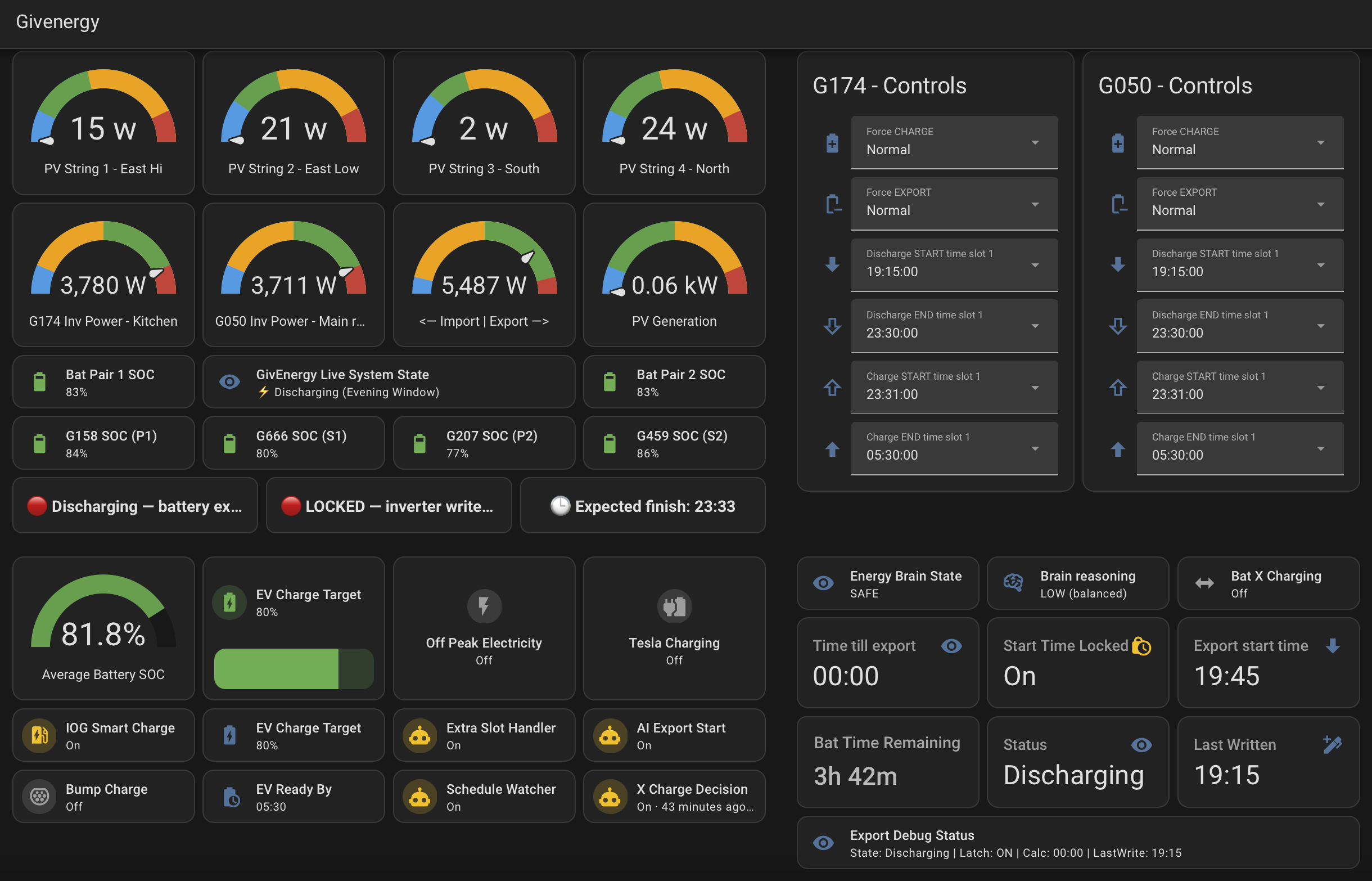
On top of that I built a custom Lovelace dashboard showing:

  • predicted export start time
  • countdown until export
  • estimated battery runtime remaining
  • export lock status
  • export state
  • last successful inverter write time

I also created an “Energy Brain” layer that analyses system behaviour and classifies the house energy state as LOW, MEDIUM or HIGH depending on whether energy flows are balanced or conflicting.

So overall it’s basically a custom predictive home energy optimiser running entirely locally inside Home Assistant, dynamically controlling solar export, battery discharge and EV charging in real time.

And here is my current dashboard;

G
#48 geoffreycoan

Pete UK excellent, a lot of good work gone into that HA automation

I assume you have real time registers enabled on your two inverters ?

One potential improvement you could make is to calculate and use an adaptive discharge rate. Discharging and charging the batteries at slower rates is kinder for them than a full rate discharge/charge. Don’t want to make it over complicated and keep changing the rates too often, but something like discharging at half rate for twice as long still gives you the option to increase the rate in the last hour to hit your target empty time.

Also, if you can build in an idle time when the batteries are empty it helps the SoC balancing to leave them empty for say an hour you will often find on the newer BMS’s 3020+ that they will recover some SoC that you can then discharge to get them to be truly empty.
Maybe do this once a week or so

P
#49 Pete UK

geoffreycoan

Yes “Real time” is on.

They are all (in most cases) very good ideas to consider.

Problem is (in my case, anyway), if I reduce the export rate during the evening export window (and hence increase the duration of the export window (and be kinder to the batteries)) is that it interferes with the export window economics. A longer export window means that an extra slot or two means I export less and the batteries might only reach 30% or more.
Unless I ramp the rate up later in the evening but if the extra slots are near the end (near 23:30) then I don’t have enough time to export all the stored energy. If you only have one battery one inverter then it may make a lot of sense. I agree.

As I’ve got 2 batteries on each inverter, their individual discharge rate is half of the maximum anyway (about 1,850W each), so I’m pretty kind to them already.

The extra slots are a real bonus in winter, a bit of a hindrance in summer. In summer best option for me seems to be to simply plug the car in after (or closer to) 23:30 !

I first think I’m going to see what happens when GivEnergy turn off the beta balancer API software I’m currently on; (maybe they’ll forget, unless they read this 😂). That’s when I can properly implement and check my “virtual EMS balancer”.
I plan to vary (decrease the rate) temporarily on the miss-behaving inverter to force the cross charging to stop. At the moment I’ve got the logic and monitoring in place.

I’ll have a long hard think about how I can implement an idle period at the lower end. Currently only one battery pair seems to go into idle at a time and that’s usually only at the upper end (but I’m not checking 24/7 - sounds like I need to build another sensor to report back to me on that !).

P
#50 Pete UK

Ok, so looks like (for me anyway), GivEnergy have switched off the software beta balancer for dual inverters (via their API).

Slight change of implementation technique but….

I’ve implemented my own balancer automation now using my Home Assistant Green and I’ve now created a tuneable version of it that I can modify various setting including the trigger sensitivity. After a few days monitoring, I’m now live. It’s been live for about 3 days. It’s not had any live interventions yet, as the solar has been excellent over the last few days and the cross charging typically is at its worst during the cross over from zero solar to a reasonable amount of solar or on very low solar days (ie winter). And obviously cross charging doesn’t happen when both battery pairs are full either.

So in summary here’s what it is, and how it works;

I’ve built a Home Assistant “cross charge balancer” for my dual GivEnergy Hybrid 5.0 setup to mitigate the classic inverter tug-of-war issue.

The problem:
Sometimes one inverter/battery stack starts charging while the other simultaneously discharges into it. In extreme cases I previously observed:

  • one stack charging at 3.7kW
  • the other discharging at 3.7kW
  • little/no useful export, just each pair pure cross charging each other up to the max charge rate vs the other at max discharge rate.

Essentially energy circulating internally between each inverters battery pairs.

My observations suggest GivEnergy’s old cloud balancer was doing something very simple:

  • detect cross charging
  • briefly pause charging on one inverter
  • resume
  • repeat if needed

So I recreated a local version in Home Assistant.

How my balancer works:

  • monitors both inverter battery power sensors continuously
  • detects opposing flow:
    • one inverter charging
    • the other discharging
  • ignores intentional windows:
    • overnight cheap-rate charging
    • Octopus Intelligent dispatches
    • evening export window
  • if sustained cross charging is detected above the “tuneable” threshold:
    • temporarily disables ONLY the charging inverter’s battery charging
    • waits a short period
    • re-enables charging automatically on the charging battery pairs

No schedules are modified.
No permissions are permanently disabled.
No inverter modes are forced.

It’s basically acting as a damping controller to calm inverter instability.

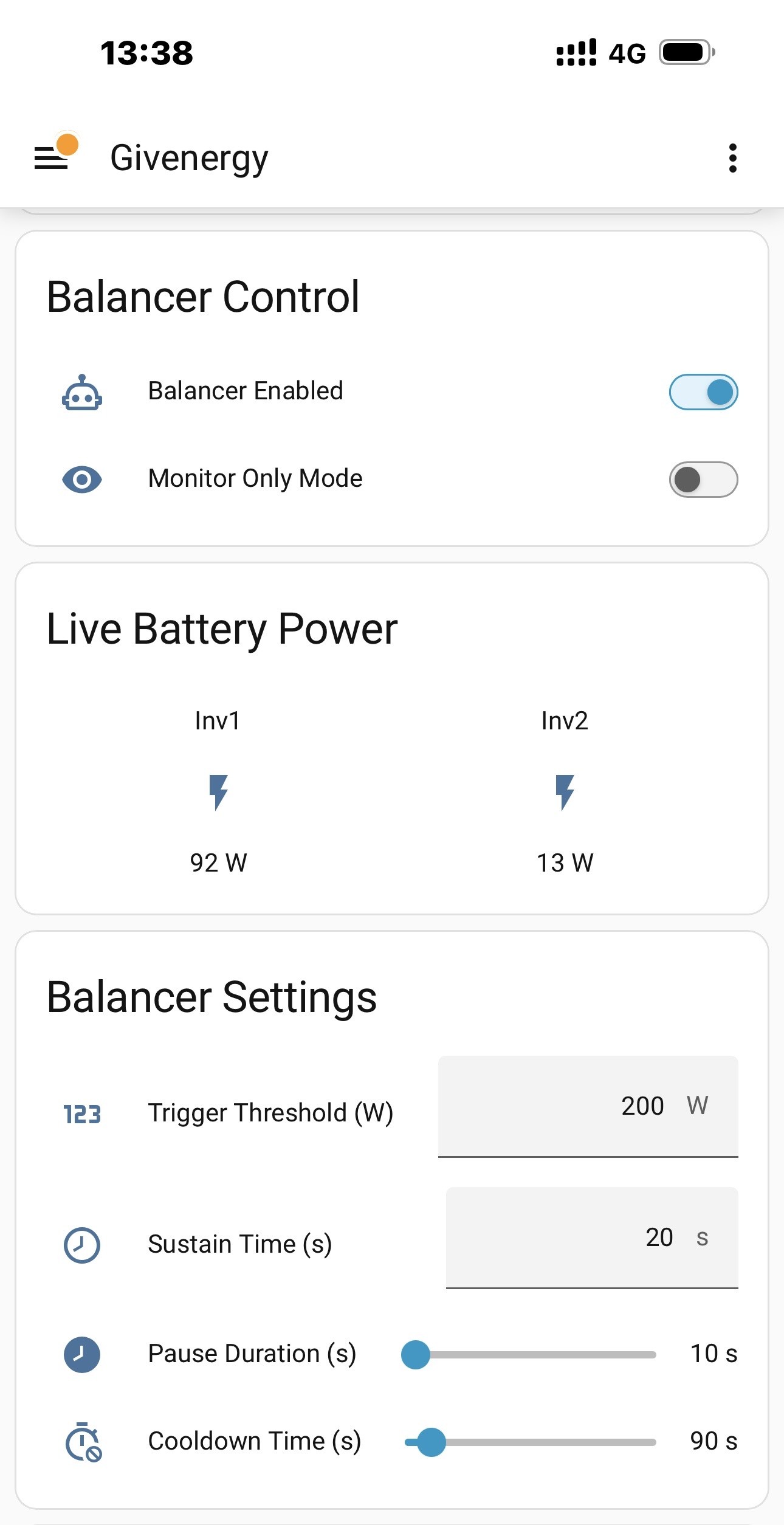
Current tuning:

  • trigger threshold: 200W
  • sustain time: 20s
  • pause duration: 10s
  • cooldown: 90s

The goal is not to “fight” the inverter logic, but gently interrupt unstable feedback loops before they become large circulation currents. Ie prevent the charging battery pair from becoming a sink for the discharging inverter battery pair. Removing the charging pair being an energy sink temporarily thus reduces the extra discharging load from the other inverter’s batteries.

The automation is fully adjustable via HA helpers:

  • threshold sensitivity
  • sustain duration
  • pause duration
  • cooldown
  • monitor-only mode
  • master enable/disable

I also built:

  • Energy Brain dashboard
  • predictive risk sensors
  • monitor-only testing mode
  • HA + mobile notifications
  • cooldown protection
  • safe-window exclusions ie: 1) My dynamic evening discharge automation: xx:xx—>23:30), 2) My overnight cheap charging window (23:31–>05:30) and 3) Any extra IOG bonus slots.

Interesting observation:
During high summer PV the issue is mostly masked because there’s enough solar for both inverters. The instability becomes much more obvious:

  • after overnight charge ends
  • during low-PV mornings
  • late afternoon before dynamic export starts
  • during cloud-edge transitions esp on low solar days
  • winter and low solar days

So far the HA balancer behaviour appears very similar to the original GE cloud mitigation layer.

It’s early days so far (3 or so). Should have a better idea of sensible tuning setting in anger after a few
months.

Here is the control panel I’ve created in HA…

A
#51 Al E.Gator

Slightly off topic to the rest of the thread, but does anyone know how a system could be recovered if an inverter died on an EMS system? I simulated this by turning one of the inverters off and it brought the whole system down. It would be great to know what needs changing so if in future an inverter died (fairly likely), how I could restore the system to run on the remaining 2 inverters.