Gateway offline? How do I check its connections?

17 comments started 2025-12-15 last 2026-03-13
CommisioningGivEnergy Products
A
#1 AnonymousHooman

How do we test if the Gateway is actually on the network? It's is LAN connected, not wifi, and I don't see an address allocated from the router. It is a GIV-AIO-GW1 and LEDs are fine, no errors in cloud.

But what name would the Gateway be likely to show up as?
AIO LAN connection name starts "HF". Gateway dongle starts WJ, but what LAN name would it be?

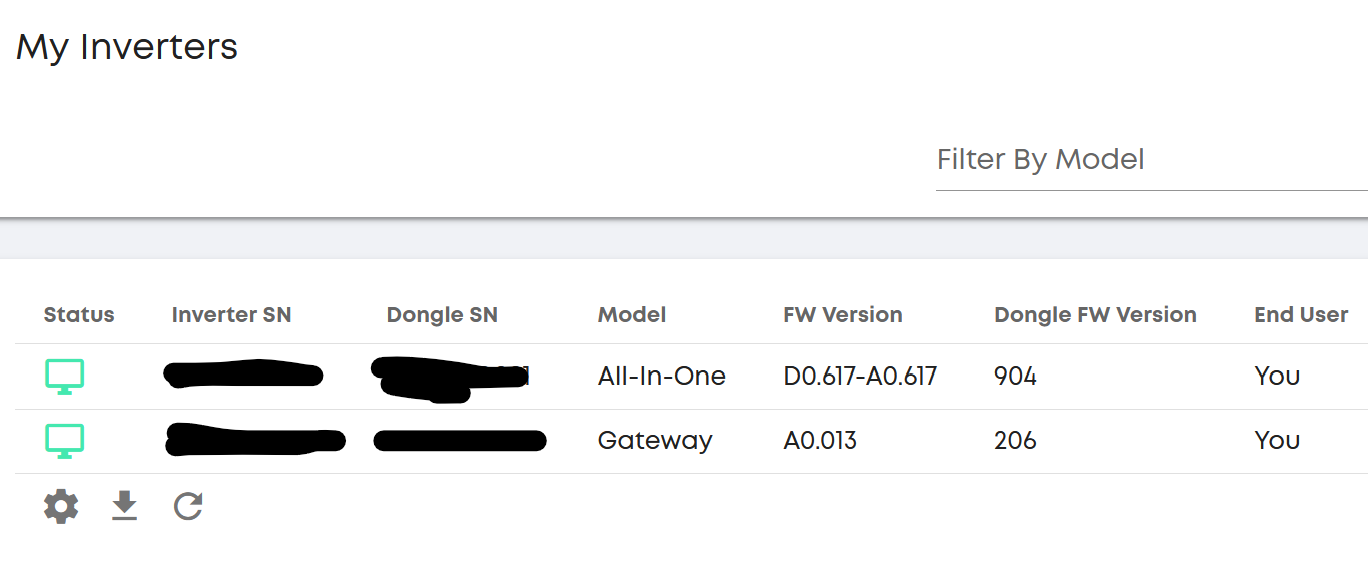
Can I do anything from the cloud to check gateway itself is online? (Gateway has AIO direct connection of course so AIO can see it.)

What ports should be open on Gateway? Is it only porr 8899 I should be able to telnet to?

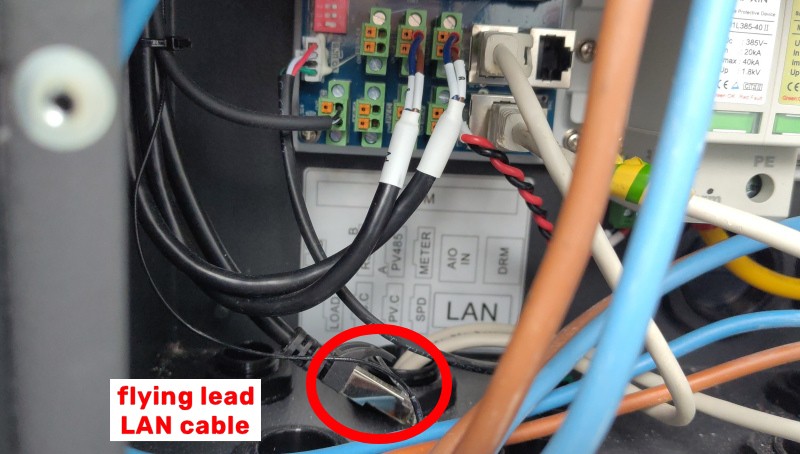
BTW: I have seen the "flying lead" posts but I haven't found the female to female connector.

Context: Installer wasn't good and I only just saw the dip switch on the gateway was wrong, I have sorted it as per manual (1 off, 2,3,4 on) but I am not convinced it's on LAN yet.
Gateway - AIO direct connection is working.
M
#2 Mouton

Mine starts GivEnergy402A.... (last part is essentially the MAC address). Your router should have given it an address and you should be able to ping it locally.

What's the history?

The flying lead is there to work around a manufacturing issue, any wired connection on a modded board is only via that flying lead. The wired LAN port on the main board is dead (tested with a £KK Fluke meter). Many installers do not know this, try for ages, and then just leave on wireless..

If your LAN cable is plugged in to the board, but the board has a black flying lead that is likely the problem.

The cat coupler is shipped with the GW, but probably lost. It's to join the male on the black lead to your male on your LAN cable.

(sorry don't know your abilities) Be careful if taking covers off the gateway while live.

A
#3 AnonymousHooman

Mouton there is no lease I can see from the router, we can't find the female to female connector for the flying lead either. What is the gateway LAN connection for?

Could it be linked to having the AIO breaker in the gateway flip moments after switching over to run from AIO battery (during a power cut, it flips to AIO's battery then the breaker trips and we lose power, this is during power cuts with enough battery left to run for a few hours).

M
#4 Mouton

AnonymousHooman

  1. If there is no lease and you can't discover or ping it it's not on the LAN.

  2. Is the gateway online in the portal? - look here on the portal https://givenergy.cloud/inverter it should show the gateway in the list of inverters and its status if you wave your mouse over the TV type symbol eg

  3. AFAIK the gateway does not have to be online in the portal to be talking to the AIO, but not being online / LAN stops portal updates / control etc.

  4. Have I understood - you do have a flying black lead with an RJ45 plug that seems to originate from behind the main board of the Gateway

  5. AFAIK The marked surface mount LAN socket was intended to be live in the design, but some component issues or changes meant that certain boards have the black flylead instead to provide a workaround rather than have a pile of dud boards or Gateways that are wifi only. On the affected boards the LAN socket is dead (mine is). If you have the black lead its an affected board and has been reworked in the factory to make the black lead the LAN connection.

  6. If the coupler is missing its not surprising, it's just an RJ45 coupler Cat5e / Cat6, rattling loose in the bottom of the box. Many must get lost, just buy one for a few quid

  7. Flipping breakers - now we're talking about something completely different. I've seen elsewhere this caused by poorly tightened connections, possibly not on an AIO? Bad breakers. Others may know more about this point. If the AIO / Gateway comms is OK (via its dedicted lead) I'd suspect the flipping is nothing to do with LAN either way.

A
#5 AnonymousHooman

Thanks for the reply - it definitely looks like the gateway is not on the network. Installer is coming back out this morning. Givenergy suggested a larger capacity breaker might fix our off-grid power issue.

G
#6 geoffreycoan

Mouton AFAIK the gateway does not have to be online in the portal to be talking to the AIO, but not being online / LAN stops portal updates / control etc.

For a single AIO, I agree, comms between the AIO and Gateway is done locally and as long as the AIO is online to the portal you can control the AIO through the app/portal.

For a multi-AIO setup you’d need the gateway to be online as all app/portal control goes through the gateway.

In addition you probably need the gateway online anyway as a condition of warranty

M
#7 mikes01666

This thread has solved a problem for me. Many thanks to all contributors.
System (AIO and Gateway) installed a couple of years ago. All running as planned.
Installers were asked to hard wire the AIO but didn't hardwire Gateway and left it connected wirelessly. The AIO was detected in the Portal but the Gateway was always offline.
Had a look in the Gateway and there was this orphan male LAN connector. However, as there was a socket marked LAN on the board, I used this and adjusted the dip switches. I could never get it to connect via the LAN. As the system was working well I forgot about it until I stumbled on this thread.
Yesterday, I used a female/female adapter to connect to the orphan lead and immediately the Gateway was recognised in the Portal.
Numerous calls to GE had failed to help resolve this problem and I wonder if they even know about it.
The system continues to work well but with the added benefit of being fully recognised in the Portal. Operationally I don't know what benefits this will bring other than software updates. Could anyone shed some light?
Many thanks to all contributors.

C
#8 CW

AnonymousHooman Could it be linked to having the AIO breaker in the gateway flip moments after switching over to run from AIO battery (during a power cut, it flips to AIO's battery then the breaker trips and we lose power, this is during power cuts with enough battery left to run for a few hours).

I had this experiance with my gateway with the AIO tripping - this was caused by a loose connection which when tightened fully, the problem went away.

S
#10 SteveCook

CW
Was this an internal connection that was loose from the factory, or a connection that the installer had not tightened enough

C
#11 CW

SteveCook Installer I believe - it was one of the wires (RHS from memory) that went into the AIO breaker in the gateway. I remember watching the GE engineer re-tightening every connection, and they all required a very minor tighten up apart from the one on the AIO breaker and that was quite a few turns of the screwdriver!! Been good as gold since then.

Also in my simple way of looking at things explained the observed behaviour - the thing would trip the first couple of times and then work - I put that down to the wire expanding a bit to make a better connection

T
#12 Toddy411

mikes01666 I had trouble to and was helped on this forum
Apparently the lan connection was a build fault and the lead was to get around it
Once connected all good
But the installer had no idea
Had to sort it myself

Glad to see you got sorted

A
#13 AnonymousHooman

Well plugging in a female to female connector the engineer brought and using the flying lead hasn't helped. He recommissioned it so now there is at least a greyed out gateway displaying in the cloud portal, but no data can be read from it, and it is clearly not online.
I have a new Ethernet cable I can use from gateway to router (with flying lead and connector) or gateway to AIO, but I don't know how to get the gateway to look for it. Any ideas? The router only shows what is connected when it has recently been in use, so that doesn't really help.

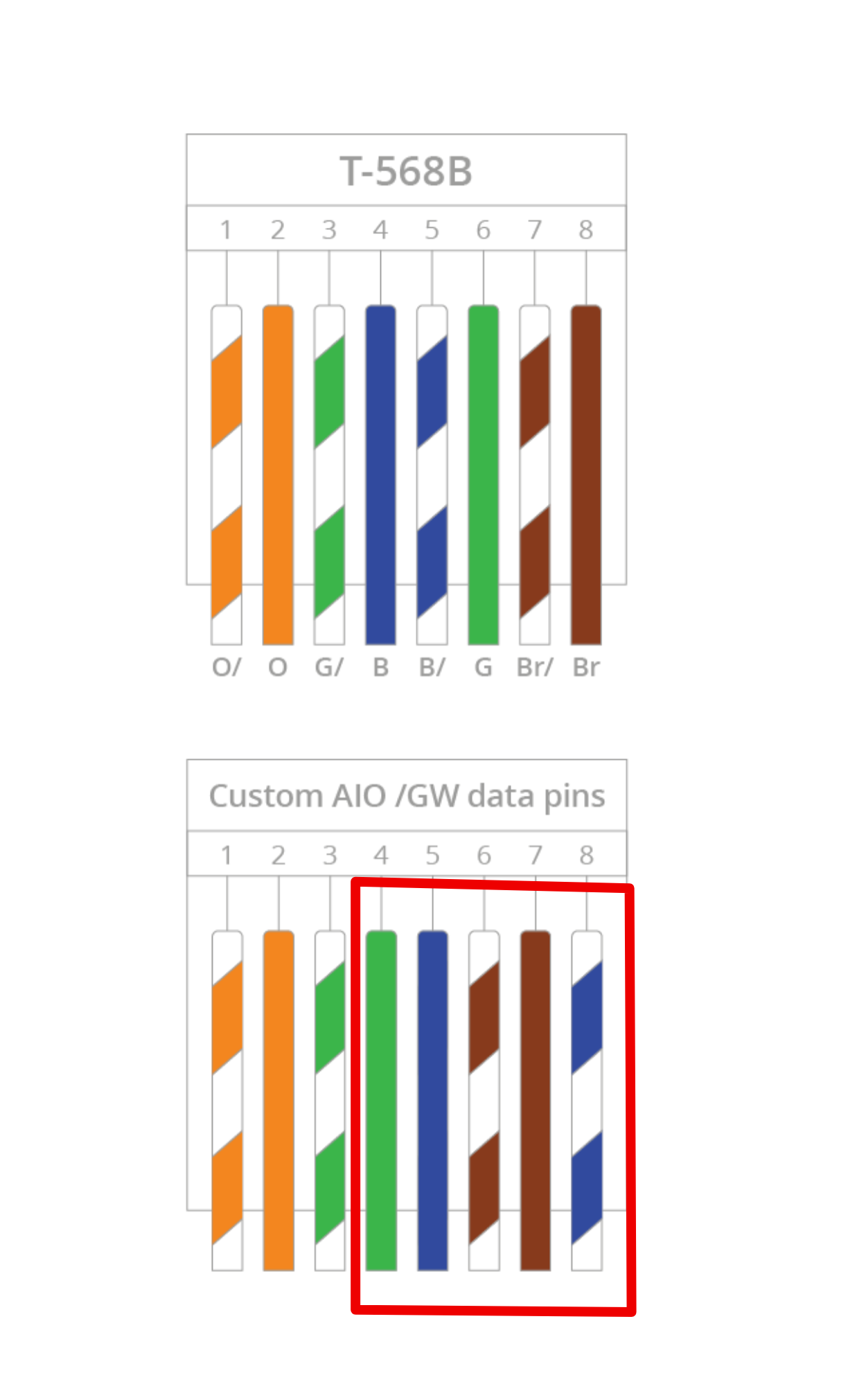
It is just one AIO (no parallel mode). I noticed that "custom wiring" between AIO and Gateway is recommended (pin 3 green, pin 4 blue) for cables over 10m in the manual, but I'm not sure this will make any difference. I think the cable is around 8-9m but it could be over 10m.

Engineer didn't get round to tightening the connections inside the gateway.

M
#14 mikes01666

Straight through ethernet cables worked for me.
My understanding from this thread is that the flying lead is a workaround for certain boards. Have you tried the connector marked LAN on the board? From memory there were no network activity lights on the board and the flying lead is just a male connector.
I plugged the flying lead into a cheap switch and could observe flashing green lights denoting network activity.

A
#15 AnonymousHooman

mikes01666 yes I have tried both, and tried a new direct cable to both the LAN socket and the flying lead with a connector, currently I set it back to wifi in the hope the very weak signal will work. I figure at least one of these should have worked but I still don't see an IP address lease in the router's DHCP leases list. Over wifi I can see a weak connection showing the gateway's dongle SSID name.

I think it isn't trying to connect to the network, and when I restart everything obviously the router is also restarted which takes 5 mins.
I can't find a way to reboot/restart the gateway. It mentions a restart happens in the Commissioning guide and suggests putting it on bypass to keep house powered... engineer didn't do this temporary bypass so it would have restarted when the router was also restarting.
I can't do a remote restart of the gateway from the cloud because obviously that connection isn't working.
Is there a hardware way to reset the gateway while keeping the house power (and router) on? A tiny or hidden switch or would putting it on bypass for 5-10 mins and taking bypass off initiate a network connection?

I also see gateway firmware version A0.256 in the cloud logs (how it got a version I don't know, but it doesn't match any of the gateway versions on the Givenergy resource hub. Its s GW1.

The power failure just after the gateway kicks in seems to be a different issue.

A
#16 AnonymousHooman

Flying lead pic if anyone is interested - this is for the GW1.

A
#17 AnonymousHooman

update: Restarting the gateway I think just involves flipping all the switches inside off, waiting a minute and switching them been on.

It turned out our installer damaged the cable between the AIO and gateway - where it goes through a 600mm external wall... they did not use conduit to protect it.

A separate problem was found by Givenergy second line support - which is the one where you chat in writing through a link instead of by phone. They asked for photos and it turned out our GW1 gateway had the wrong busbar installed at the factory! They sent oyt a replacement and it was a 5 min job for the engineer to fit. There are 2 busbars and the blue one at the back was the problem.