P
When trying to open the GivEnergy app it is stuck on the GivEnergy screen wit the changing icon underneath it. Portal login OK. Has anyone else had this or is it just me!!

When trying to open the GivEnergy app it is stuck on the GivEnergy screen wit the changing icon underneath it. Portal login OK. Has anyone else had this or is it just me!!
Got the same early this morning. First ipad then on the android phone. Tried all the usual things with no result. Then the ipad came back and about 2 hours later so did the phone.
Same here on an Android phone. I've tried reinstalling the app but it remains stuck on the opening screen.
Mine was doing this earlier. Eventually I deleted the App, then reinstalled and signed in and it’s worked ok since then.
I've finally managed to get back into the app by disconnecting then reconnecting my phone to wifi. Faffed a bit with passwords but eventually restored normal functions.
worked fine for me first time opening just now. A few UI tweaks I can see
Mine will not open, just hangs on the first screen. (Iphone XR)
I find it odd that I suddenly had an inverter issue, which I had to restart to resolve and now this, all over one weekend.
Have there been some recent changes/tweaks?
Same here on an Android phone. The app but it remains stuck on the opening screen. Don't tell me - they've updated the app, forced the upgrade and left users with no way of controlling their equipment. Dear GivEnergy, please give us a way ASAP to rollback. And a way to test the new version and rollback if necessary.
Unfortunately i doubt anyone form GivEnergy, including those writing app software read this forum
Not impressed... I've just suffered this on Android. I cycled WiFi off and on while it was stuck, which forced it to the "cannot access config" screen, then I got to a login screen (but that kept redrawing). Finally quitting and restarting, I got a stable login screen, and that got it going again.
Perhaps it was expecting some state to be set during the log in, and couldn't cope with it not being there if you were already logged in?
I had to "clear cache" and "clear storage" for the app on my android phone. This then prompted me to login and all works after that.
Same here first thing this morning. I deleted the app from my iPhone, then re-installed it from the App Store. BINGO!! All working as should.
I cleared data and cache that worked as suggested previously. Thanks
I tried all of the above, separately just as a test, and some more ideas, and then finally deleted the app data and that was the only thing that worked. Cheers to everyone for helping. Presumably, Givenergy will send us all a mince pie for being their unpaid support staff!!??
On iPhone there is a setting: Settings>Apps>GivEnergy>Clear App Data On Next Launch. For me this cleared the problem after I had swiped up to close the app.
Thanks to all who have commented - deleted app data and cache then logged in and appears to be working now. GivEnergy need to do some work on their release testing etc.
Not directly related, but discovered as a consequence of trying to get back into the app, it no longer carries a link to this place.
My first experience with trying to deal with an issue with GivEnergy. Same as any big corporate it seems to me.
I'm Android. Trying to charge my EV.
My problems really started with a random, unnecessary colour scheme App upgrade about a month ago - occasionally wouldn't log in so couldn't start charging my car*.
Yesterday seems they must be rolling out some kind of Single SignOn thing. All gone to pieces.
Can't connect to my charger at all, can't set it up, it's frankly F**KING USELESS.
I'm charging from a 13amp now. What a stupid time for changing an App, in the holidays!
Anyone got any ideas?
OK, I have reinstalled app, tried clear cache/storage too.
I get the app opening, then it wants me to set up my EV Charger - but it's already set, and I suspect it's already on the wi-fi.
When I scan the QR code ... it does nothing. Ooh, tell a lie ... this time it is "processing" ... and doing nothing.
When I enter the details manually ... it goes to "processing" but this amounts to nothing too.
This is really naffing me off.
Final question for tonight ... anyone know how I can reset the Charger password? Or what the default is?
I get on to the Charger's wifi, get challenged for EVSE Config Login but don't know the password. I have tried various defaults, things I might have set it to but don't remember etc.
Anyone got ideas on either a default or a way to reset?

mattd1 page 21 explains how to factory reset it.
https://givenergy.co.uk/wp-content/uploads/UK-Installation-Manual-EV-Charger.pdf
But you do need to take the front off so probably not a good one to be doing if it's raining.
Still stuck on android phone. Works on wife's Iphone
hoggy
Thanks again (and happy Xmas to all) for this.
So I did reset this morning. Got in with default password and reset the network settings, pressed save and then restart (with the charger "web server" confirming ok).
Went back in after and saw details still set.
But blow me if the app still won't connect. As mentioned I'm on android. Open app*, then choose EV Charger, and try to set up ev charger by using qr code and also manually entering. Neither of these is successful.
*
When I opened (and I did a clear cache and clear storage again) I was asked to log in.
I am wondering if there's anything in my account creation that might affect?
Perhaps if create a new account might that work? Anything special I might need to consider in that process?
(Must say this is ridiculous. The app is crap. The whole arrangement smacks of unnecessary complication just to feed electricity to my car. Why the heck I should need an app that they have somehow conspired to make fail at a critical moment just to fuel my car is ridiculous. There should be a fail safe mechanism so I am (so any user is) not left stranded.))
I can’t get mine to work at all. Click on login, but it won’t load the login form. Have tried on 4G, deleting the data, uninstalling the app and reinstalling it. Nothing seems to work.
Having to control my battery via Home Assistant at the minute!
Strangely, if I select the new account option, it states I need to have a GivEnergy product but then only lists Smart Plug or EV Charger as options!
The app works on my android phone but will not accept my password on my android tablet. Tried to reset password but no joy. I have deleted and reinstalled the app on the tablet but no joy.
Well, my app worked on my android phone until I tried 5 minutes ago. now it has stopped working and just says GivEnergy with a moving outline of an inverter. I guess in typical GivEnergy fashion it is f****d.
Lucky it works on the portal and HA, so I will just leave it until someone gets round to fixing it in a few weeks??!!
Dug out a phone my son left when he upgraded.
Put the app on that and it went straight to the login screen and gave the choice of SSO login or username and pword.
Put in username and pword and the app worked straight away.
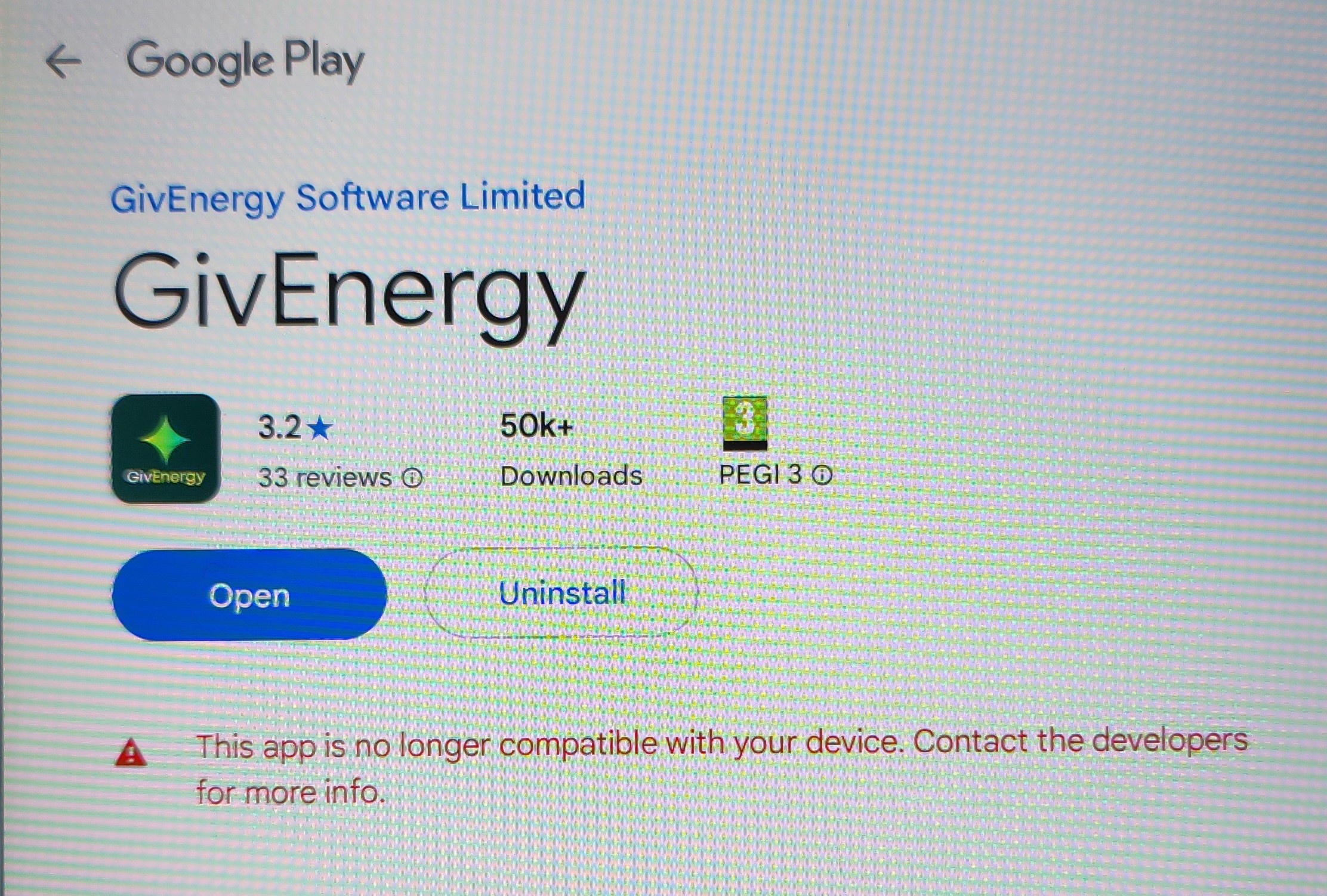
Checked the phone that is working and it is Android 12. The phone that has stopped working is Android 10.
I have been messaged a few weeks ago by BT saying my BT email app will stop working on Android 10 .
Maybe the app no longer works on Android 10.
Oh well, time for a new phone in the sales!!
Mine (which is working) is Android 16. I can easily imagine the app relying on a library or function that doesn't exist on older Android versions. Perhaps those who can and can't get it working can post their Android versions to see if the pattern continues to support this theory.
The app by @Rubikcube and the portal may be cheaper and easier than a new phone but I imagine Android 10 phones probably haven't had security updates in years and will have an increasing catalogue of incompatible apps.
SteveCook time for a new phone in the sales
If your goal is a basic phone that will last you as long as possible it looks like the Pixel 9A will be supported until March 2032 (Pixel phones get seven years of software support from the Pixel 8 onwards) and Backmarket has some very reasonable prices on refurbished models. At the time of writing there is one in "excellent" condition for £296. In theory it should see you past the end of the decade.
Refurbished Samsung S22 on offer just bought. Thanks for heads up.
Givenergy.cloud has a Known Issues section for them to notify people of ongoing issues and for reporting issues to them. Could this have been the problem?
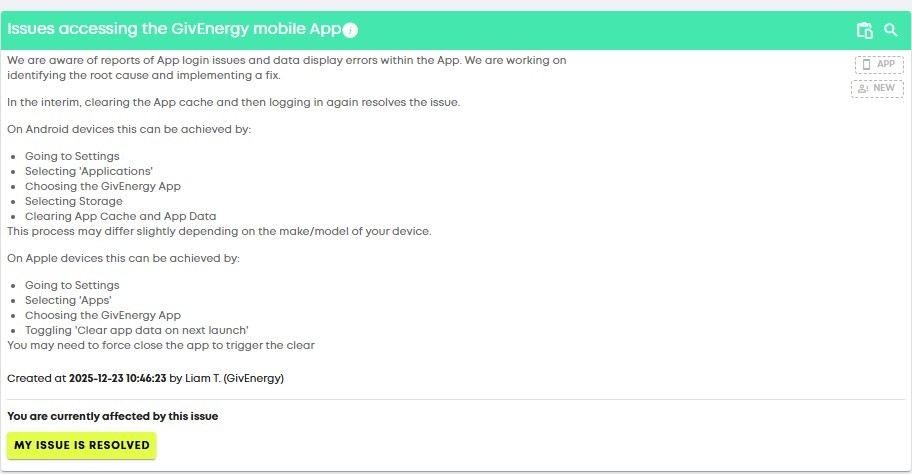
Issues accessing the GivEnergy mobile App
_We are aware of reports of App login issues and data display errors within the App. We are working on identifying the root cause and implementing a fix.
In the interim, clearing the App cache and then logging in again resolves the issue.
On Android devices this can be achieved by:
Going to Settings
Selecting 'Applications'
Choosing the GivEnergy App
Selecting Storage
Clearing App Cache and App Data
This process may differ slightly depending on the make/model of your device.
On Apple devices this can be achieved by:
Going to Settings
Selecting 'Apps'
Choosing the GivEnergy App
Toggling 'Clear app data on next launch'
You may need to force close the app to trigger the clear
APP
NEW
Created at 2025-12-23 10:46:23 by Liam T. (GivEnergy)_
AnonymousHooman
See my posts #32 and #33
Tried all GivEnergy suggestions and they made no difference on my phone (happens to be Android 10 and can go no further)
Dug out an old phone from my son which is Android 13. loaded the app and all worked straight away.
IMHO i think it is app issues that were never tested on older devices.
SteveCook Or that the app, the framework or a dependency library no longer supports Android older than X version. This may not have been a conscious choice by GivEnergy if the change was related to a library, framework, tooling or any other dependency.
We don't know that this is the case but is anecdotally supported by evidence so far. This is why I suggested people who are having persistent issues that cannot be resolved with a cache clear report their Android versions.
I doubt it's the Android version - very plausible that Android 10 could be problematic, but Android 15 and 16 are really only two years old.
Much more likely is (a) they changed the app skin (colour scheme etc) a few months back, (b) they've probably had problems and continuing to improve/get working, and (c) they've done a release in December at a critical time like a bunch of complete amateurs and have buggered it up.
That they are failing to respond or provide support is appalling and frankly I won't be looking at GivEnergy with any credibility in future and would advise people to avoid them.
(That said, other cos might be even worse, I've no experience and I'm only using a car charger - but this kind of CRITICAL infrastructure requires some sort of 24x7 support for an organisation this big - not 9-4pm and crappy automated responses and a reliance on a community - utter s-h-i-t.)
I will endeavour to try my wife's iPhone today and see if that works.
(I have tried on a Google Chromebook OS laptop but no luck).
Is there anyone reporting it not working with Android 15 or 16 after clearing the cache? Mine is working just fine as I stated in the earlier post.
@SteveCook reported it working in Android 13.
The only broken report with Android version so far is Android 10 I thought?
Yes, me. I'm on Android 15. I've removed/reinstalled, I've cleared cache and storage. I get in app but I simply cannot make it recognise there's a car charger there, following the instruction.
I have connected to the car charger on its "start up/config" wireless network and get it on to my home wifi, but the app simply won't get past the initial connection to "set up" the EV Charger.
This app worked at beginning of December on my current phone. (And in months prior despite the app skin update that I don't really need/care for).
There may be multiple issues at play - the login issue seems to work with Android 13 and up but not on Android 10 for at least one user who can get it working on newer handsets. This doesn't prove it is Android version related but suggests it is a possibility. Since you can log in though this doesn't seem like the issue you have.
The other issue could be and likely is an unrelated regression in app functionality. That said it is possible it is also authentication related if some necessary claims aren't being issued on login.
Finally cleared the app cache and deleted it then reinstalled. Used the forgotten username just in case I got it wrong. Correct details entered and now working.
SteveCook didn’t solve my problems with an iPhone Steve. Still waiting for a real fix.
I have reset the App on my iPhone, and the App still does not work, and batteries still do not register.
cxsken on Android phones by clearing cache you will get in. Those of us on iPhones been down since 23rd December when GivEnergy decided to change everything to something that doesn’t work and still doesn’t mid January. Robot Rachael promises somebody will call back but nobody does. Texts sent and now have 5 job numbers of complaint. One day maybe!
My moto g6 on android 9 wirks ok.but my wife's moto g7 which I've just loaded android 15 is showing the same problems - stuck in login screen, ignores valid name and pw.
I need to progress past android 12 for other apps, so this must be sorted. Please!

mwilliams2 Have you tried clearing the cache, as per previous posts?
mwilliams2
I dont think asking for GivEnergy help on here to fix the app will do anything. I doubt it will be read by anyone responsible for the code.
I don't think anyone from GivEnergy full stop reads these anymore.
Peter Sheardown,
Sorry re my previous post. I have been unable to use the app on iPhone but works on PC. Cleared cache. Tried to contact by phone & email. No help yet. Sounds as if they are in a mess. Just glad mine is not too serious.
Terencegrove on Android phones by clearing cache you will get in.
Not true - it didn't work for me on android.
What did work was turning off WiFi during the splash screen as suggested earlier. But only once - closing and reopening the app reset it to the broken state. Looks like I need to trick it to let me in each time.
rich_f What I would try is Settings -> Local Monitoring -> IP Addresses and press the red bin icon against any and all entries.
If that works you may want to allocate a fixed IP address using your router's web interface/app and add that IP address in under Local Monitoring in the GivEnergy app.
Working fine here on an Android 9 tablet. An old Lenovo.
New colour scheme didn't install but it's all good.
mikes01666 New colour scheme didn't install
Which version do you have? It sounds like you are maybe stuck on an older version if the design hasn't changed.
The current version seems to be 4.0.4