
Hi. First time poster here. I monitor my home network with Prometheus and Smokeping. I had a GIV-HY5.0 installed in November. I've been running Predbat. Last night I noticed there had been ping loss on the WiFi "dongle" that connects to my home network starting at 08:40. The Givenergy web site showed that there had been a massive discharge at the peak rate time of 16:00, which had apparently flattened the battery down to 0%.
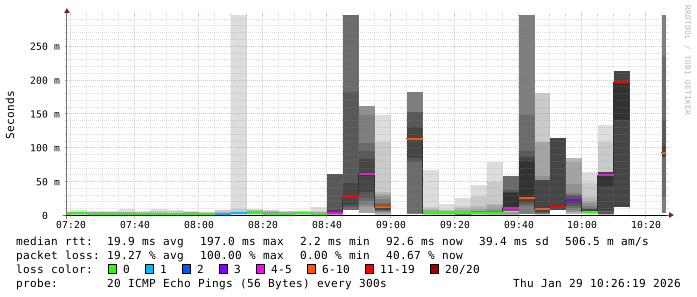
The log showed that my battery voltage had apparently dropped to 5.57V !
``
2026-01-29 21:58:04 5.57 0 0 0
2026-01-29 19:03:03 7.98 0 0 0
2026-01-29 18:50:42 8.08 0 0 0
2026-01-29 18:49:26 8.04 0 0 0
2026-01-29 18:49:10 8.04 0 0 0
2026-01-29 18:12:04 46.64 0 17 4
Pings showed packet loss, plus many duplicate replies
$ ping 192.168.22.14
PING 192.168.22.14 (192.168.22.14) 56(84) bytes of data.
64 bytes from 192.168.22.14: icmp_seq=2 ttl=64 time=216 ms
64 bytes from 192.168.22.14: icmp_seq=2 ttl=64 time=216 ms (DUP!)
64 bytes from 192.168.22.14: icmp_seq=6 ttl=64 time=127 ms
64 bytes from 192.168.22.14: icmp_seq=6 ttl=64 time=127 ms (DUP!)
64 bytes from 192.168.22.14: icmp_seq=6 ttl=64 time=352 ms (DUP!)
64 bytes from 192.168.22.14: icmp_seq=6 ttl=64 time=381 ms (DUP!)
64 bytes from 192.168.22.14: icmp_seq=8 ttl=64 time=336 ms
64 bytes from 192.168.22.14: icmp_seq=9 ttl=64 time=271 ms
64 bytes from 192.168.22.14: icmp_seq=10 ttl=64 time=195 ms
64 bytes from 192.168.22.14: icmp_seq=10 ttl=64 time=195 ms (DUP!)
``
I turned the system off and on again twice, the WiFi seemed no better and the battery didn't seem to be charging. It was getting late, so I turned everything off once again and went to bed. This morning, the ping loss is still there. The battery is showing 4% and 47.81V so at least that's a relief. I've now disabled Predbat. All four LED arrows on the inverter show at least 3 lit, plus a slowly blinking green centre LED.
I'll now try to phone E.On.