S
Gen1 Hy 5.0 and 9.5 battery
Just come upon my portal page
Update of 9.5 battery form 3020 to 3022
Anyone done this successfully?
Any comments?
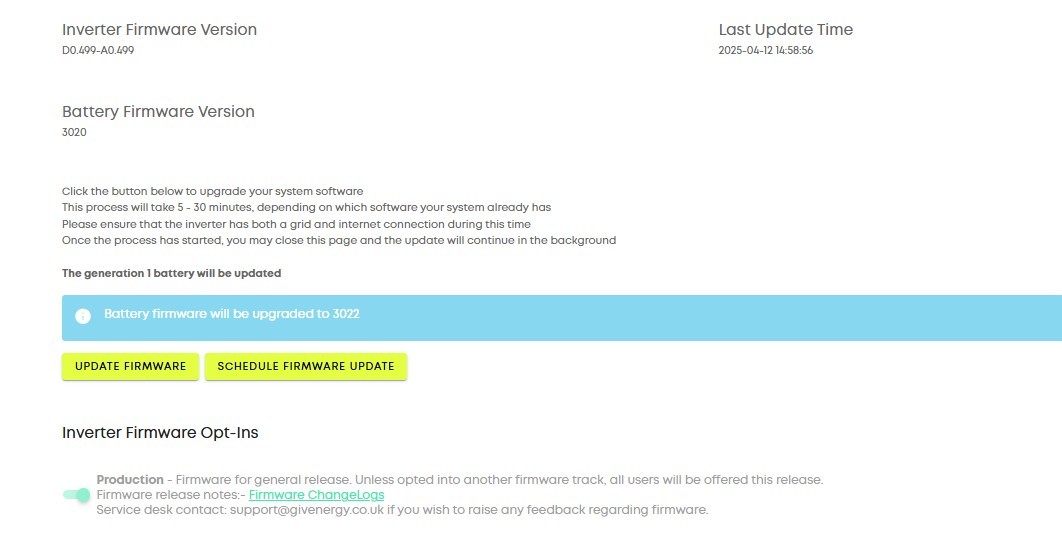

Gen1 Hy 5.0 and 9.5 battery
Just come upon my portal page
Update of 9.5 battery form 3020 to 3022
Anyone done this successfully?
Any comments?
Been on 3022 back in November, the only thing is I did a calibration afterwards and my primary battery capacity dropped but that may just be coincidencal.
if you haven't calibrated for a while then your available battery capacity could well drop, but 30% is quite excessive
also, if you calibrate in the winter, the battery doesn't hold as much charge as when its warm in the summer, so this might have contributed to the drop?
I ran 3020 and then 3022 on my 5,2 battery for about a year. It worked fine BUT I found the available capacity dropped from 4.2kWh to 4kWh (at best), and sometimes as low as 3.8kWh. Same behaviour on both 3020 and then 3022 which is why I never upgraded my 9.5 battery. I know of one other person who saw the same behaviour on his two 5.2kWh batteries, so be aware of this. Doesn't appear to be an issue with the larger battery sizes.
Last month I tried installing 3017 to see if I regained the lost battery capacity and for unknown reasons this stopped my battery from talking to my inverter. Tried going back to 3020 then 3022, and in each time the upgrade worked, but the battery still wouldn't talk to my inverter.
Just got news tonight that an engineer is coming to fix/replace it on Thursday 🤞
I've had repeated issues of my hy-5 inverter and 2 x 9.5Kw batteries not upgrading remotely. The D side works but the A side does not update. GE have had to send out an engineer to get the upgrades done. Some of this might be due to a BMS issue I apparently have, despite both battery BMS being replaced last year.
Doesn't seem like there's much advantage going from 3020 to 3022 for my single 9.5 battery. Thought I'd wait a while to see any problems that may arise. I've read a couple of posts that mention reduced capacity after upgrading, so I think I'll hold fire for the moment as I want to wait for the warmer and sunnier weather to do a slow calibration anyway. Certainly don't want to be loosing any more capacity for the moment.
Still on gen1 fast firmware 191/193 which I've had no problems with, and 3020 battery firmware. Both seem to play well together and aren't causing any problems at the moment. 'If it ain't broke, don't fix it'!
TimHutchings I’m of the same view of works fine so don’t change it. Am on gen 1 fast firmware 187/187 which is apparently the latest, this has the real time registers which I don’t think 191/193 had? BMS 3015 on my 9.5 battery which does have the wrong temperature curve, so it would be good to get to 3020 to fix that, but given the capacity issues I had with 3020 on my 5.2, I didn’t move.
The wrong temperature curve is of much more noticeable on the smaller batteries and I definitely saw reduced charging with 3015 on my 5.2.
geoffreycoan 3015 doesn't have the reduced temperature charging below 10C - that's later firmware.
Vestas 3015 doesn't have the reduced temperature charging below 10C - that's later firmware.
thanks, my mistake.
It’s hard to tell from the release notes https://givenergy2025.zohodesk.eu/portal/en/kb/articles/bms-gen-1-2-firmware-log when the temperature throttling was introduced. I can see there are temperature related changes made in 3018, 3019 and 3020, so was 3018 the first version that introduced this?
Part of me thinks to remain on 3015 as its stable on my 9.5, part of me thinks to go to 3017 as this has dynamic SoC calibration, and part of me thinks to go to 3022 as the latest and most bug fixed BMS.
3020 was absolutely fine on mine, great cold weather perf, great charge/discharge/self calibration, I was bumped up early as I was on 3017 or 3018 which had reduced cold charging.
Can't say about 3022 yes as I've upgraded, but the battery is inaccessible
wrighar I have an AC3.0.
I attempted to upgrade to 2020 last summer and the upgrade stalled on 90% for several hours.
Eventually, I rebooted everything and it took me 8 hours to get the dongle to communicate and to complete the upgrade. I am on 2020 and there is no way that I am going to try upgrading again. Since getting the dongle to communicate, inverter and batteries have worked consistently, even communicating after several power cuts.
I do have a prompt under 'Inverter/Software' to upgrade my system software to 2022
......... and buttons to upgrade to pre-release firmware.
I do not want to run the risk of spending hours getting dongle communication back and the after another failed upgrade. I am leaving 'well' alone and will stick with 2020..
Rob
I have had/have repeated issues with installing firmware updates on my hy-5 inverter and batteries that I contact Ge technical prior to upgrading so they can do the upgrade and when/if it fails they arrange a site visit to sort it out. They have had to visit 3 times in two years to get it sorted. I told them last time to replace my inverter and or batteries if it happens again but no joy (so far)
geoffreycoan 3015 works OK* with 191/193 inverter f/w so I'm sticking with it. I dunno what your inverter f/w does so that could be a factor.
*it has issues but they're repeatable and can be ameliorated with automations, at this stage I'm not really interested in discovering how newer firmware works.
Thankyou all comments. I will avoid the temptation to press the "Update Firmware" button
Sorry to say I got itchy fingers and pressed "Update firmware" last night about 20:00
Got the message it started. Took about 10 minutes
Got the message it was done
All good
Using my left had to hold back the right hand with an extended finger! The force is strong here! 😂
SteveCook Got the message it started. Took about 10 minutes
Got the message it was done
Great to hear, Steve.
I know some folk still have issues with updates, but in general does anyone else out there get the impression these updates are becoming slightly more "routine"? This forum used to be full of "the BMS sucks". There's less of that now. Currently the vibe is "support sucks".
I hope this isn't tempting fate (I've not updated to 3022 yet!) but I'm very fortunate that I've not needed GE support recently. I do think GE's support Resource Hub is well structured and has the right sort of information and collateral.
Cautiously positive vibes, anyone?
Did my 8.2kWh battery (on an early mk1 3.6 hybrid) a few days ago. Went smoothly. No problems. Haven't felt the need for a calibration run since I run the battery 'end-to-end' every now and then, accidentally.
BobB I agree, the releases are becoming more incremental and stable, and perhaps that’s to be expected with more mature product lines and just edge case bug fixes rather then big new features being introduced.
Certainly we have not seen anything like the angst there was with the AIO firmware releases where people were creating spreadsheets to try to track their SoC as the AIO was doing so badly.
There is a lot of lab testing goes on and there’s a pretty big beta activity with extensive testing before a release gets made available.
I had a GivEnergy engineer here on Thursday fixing my 5.2 battery and afterwards he asked me what BMS I wanted installing. He viewed 3008 as being the best firmware version and said that he had only recently upgraded his installation to 3022, having skipped all the interim versions.
He installed 3015 for me as later versions had the temperature charge-rate limiting and I know I had seen capacity reductions on 3020 and 3022.
Rbor I probably stupidly pressed the button to upgrade to 3022 battery software and almost immediately the dongle lost communication. So update failed but cannot get the dongle to reconnect. Have tried pressing the reset button, gone into the dongle wife set up and pressed restart, powered down the whole system and the dongle still does not want to communicate with the inverter. Mine is a Gen 1 inverter with 2 x 9.5kw Gen I batteries. I know that in hindsight I should not have pressed the update firmware button but all previous updates have gone smoothly. Not sure what to do as Givenergy support seems non existent.

marklucey two ideas:
Wondering what the consensus is now? Still running 3020 and it seems OK. Also telling me to update Inverter software to D0.922-A0.922 from 920 and to updated the dongle firmware to 105 from 101.
Both Battery and Inverter firmware are still listed by GE as Pre-Release. Dongle confuses me. I have a Gen2 with a 9.5kWhr battery. Gen2 is supposed to have inbuilt wifi, but I have a dongle.
What are the benefits might be of updating each of these, what the downsides and what are the risks and recovery chances if something goes wrong, considering the lack of support from GE these days?
I'm also on 3020. And I'm not updating. My reasons are risk aversion. 3020 isn't bad and if something goes wrong, now that GE is no longer here, it'll be a real pain to fix. There's the paid support of Paul and the team. That's reassuring but they don't (or at least, shouldn't) have access to your system. For me, the risk is simply too high.
I pressed the update to 3022 and regretted it a few hours later when it failed and then the dongle refused to communicate with anything. This was just around the time when Givenergy announced it had gone into receivership a few weeks ago. I tried everything I knew or read in the wifi set up document. No luck there. But luckily my installers, Next Generation Renewable Energy Ltd, who are a local firm to me rescued me and came out and sorted. So the moral of the story, if it is not broken, don't try to fix it. I won't be in a hurry to do any future updates but possibly they won't arrive anyway now with no Givenergy software updates likely now.
Jerrytaff If you think of a firmware update as just a later software version, would you attempt a software upgrade unless you were experiencing problems with your current version and the latest software release addresses those issues?
If the answer is "no" then I would just leave it well alone; If the answer is "yes" then you should consider what happens if the update fails and the manufacturer of the software no longer is in business (and AFAIK GE Software Ltd is not the author of the firmware - that was provided by the hardware company - I may be wrong so please check) - what happens then?
In general I would say software updates should be applied because they tend to fix security issues. But in the Givenergy case, I wouldn't do it because as you say, it's too risky. What's also risky is that there's no one fixing any newly discovered security vulnerabilities. I think I might isolate mine from the outside world if I can figure out how - router settings, I expect.
Steve
Thanks for the replies.
The risks associated with firmware update were understood. However, None of you have addressed the other part of the question - what would I be missing out on if I don't update? Previous changes introduced the cold weather protection of the battery- important now that we haven't got any hardware support, but initially it went too far the other way, limiting charge rate when the weather was only cold-is. That was a real annoyance. Am I right, in thinking that they actually optimised that in the firmware I have, or are there further improvements in the firmware I'm not using? Also, what other functional improvements/changes am I missing, or would they only affect more complex systems than my Gen 2 with a single 9.5kWhr battery?
Jerrytaff You can find the details here https://givenergy2025.zohodesk.eu/portal/en/kb/articles/bms-gen-1-2-firmware-log .
And here
https://givenergy2025.zohodesk.eu/portal/en/kb/articles/gen-2-hybrid-firmware-log