
Sudden SOH drop and SoC discrepancies on 9.5kWh battery (Firmware 3022)

12 comments started 2026-02-25 last 2026-02-26
GivEnergy ProductsAC Coupled
C
#1 CharlieC

Hi everyone,
I’m looking for some advice or a second pair of eyes on my system. I’ve noticed a significant change in one of my 9.5kWh batteries (DX2221G407) following the update to firmware 3022, and I’m wondering if anyone else has seen similar behaviour.
I have two 9.5kWh units, and comparing them via givTCP has highlighted some odd discrepancies with the DX2221 unit:
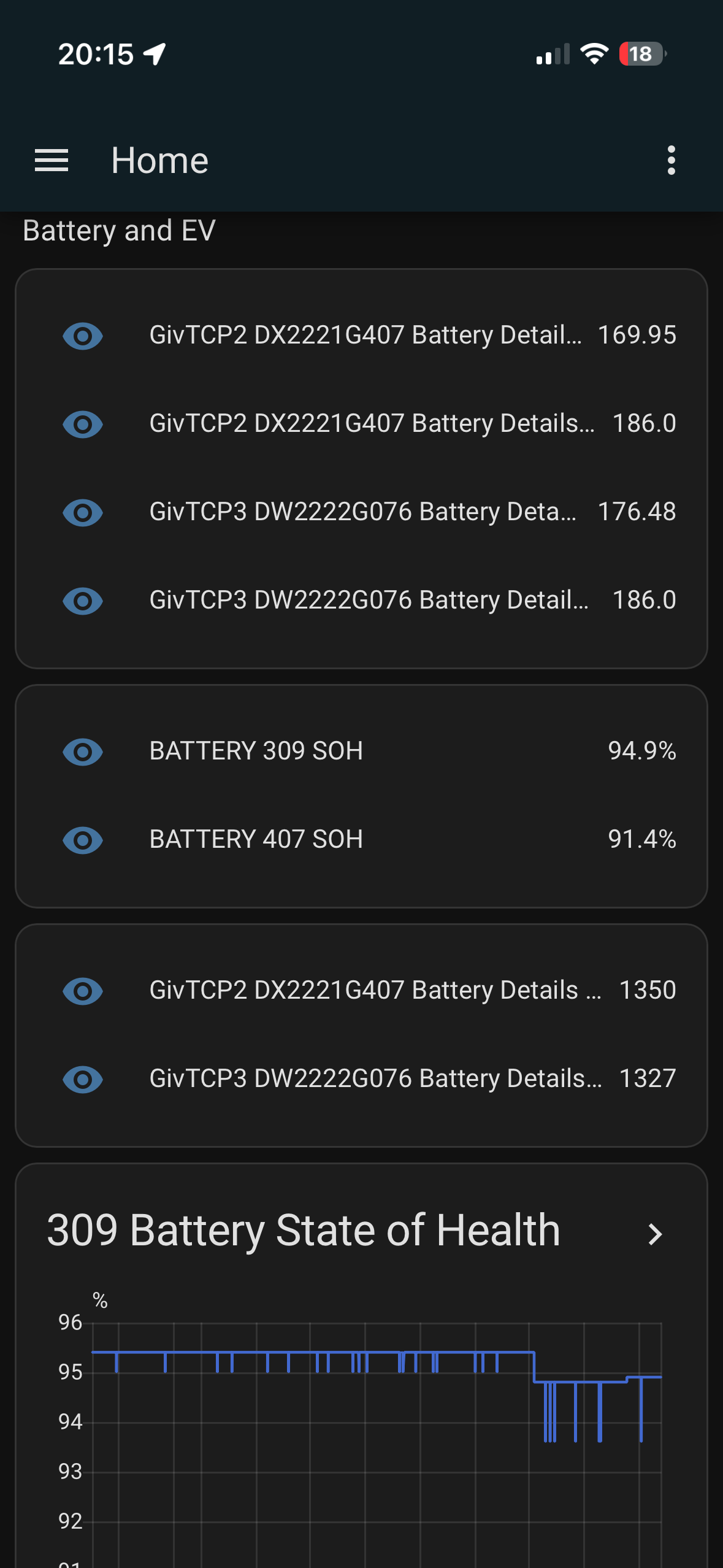
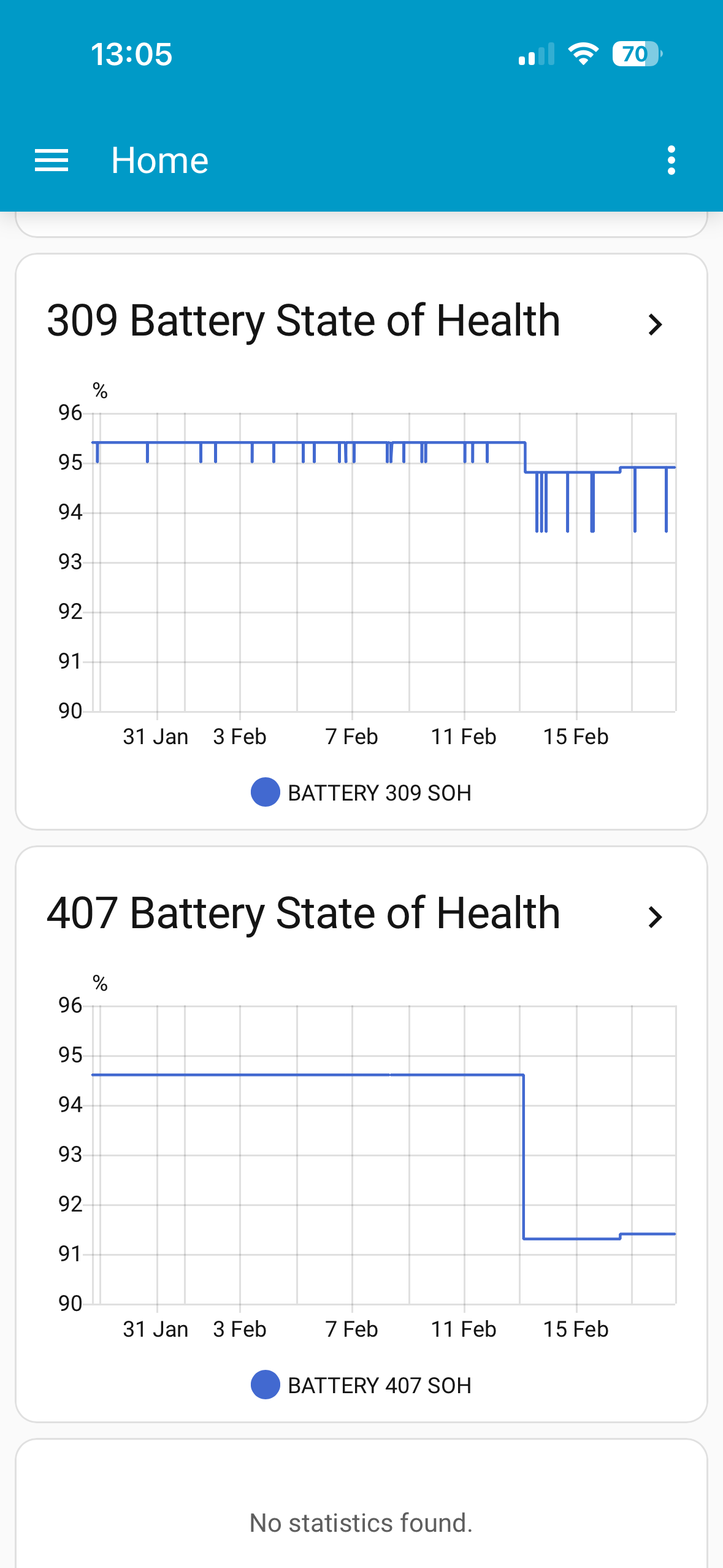
• SOH & Capacity Shift: Prior to the update, this battery reported 94.7% SOH. It has since dropped to 91.4%. It currently reports a full capacity of 169.95 Ah, whereas my other unit (DW2222G076) is at a much healthier 176.48 Ah (94.9% SOH).
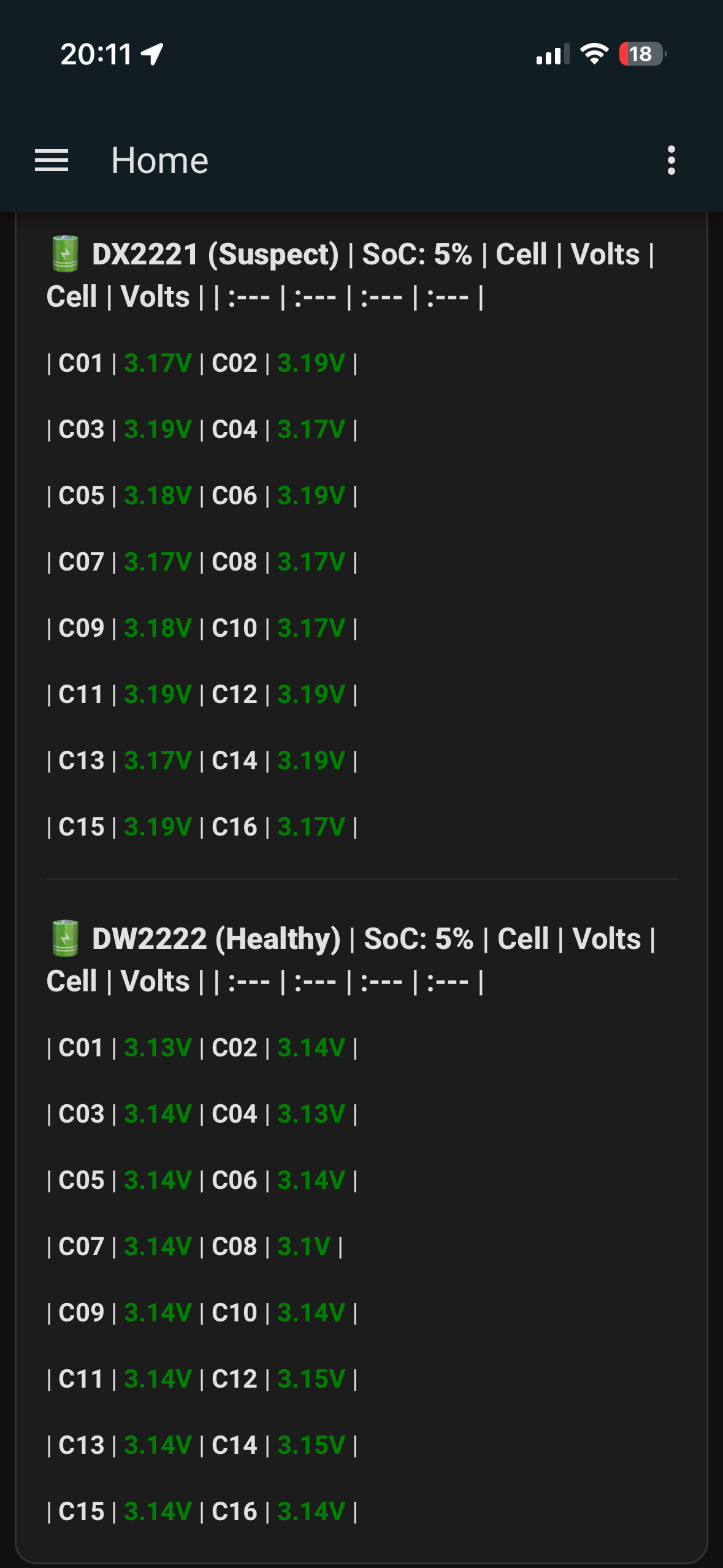
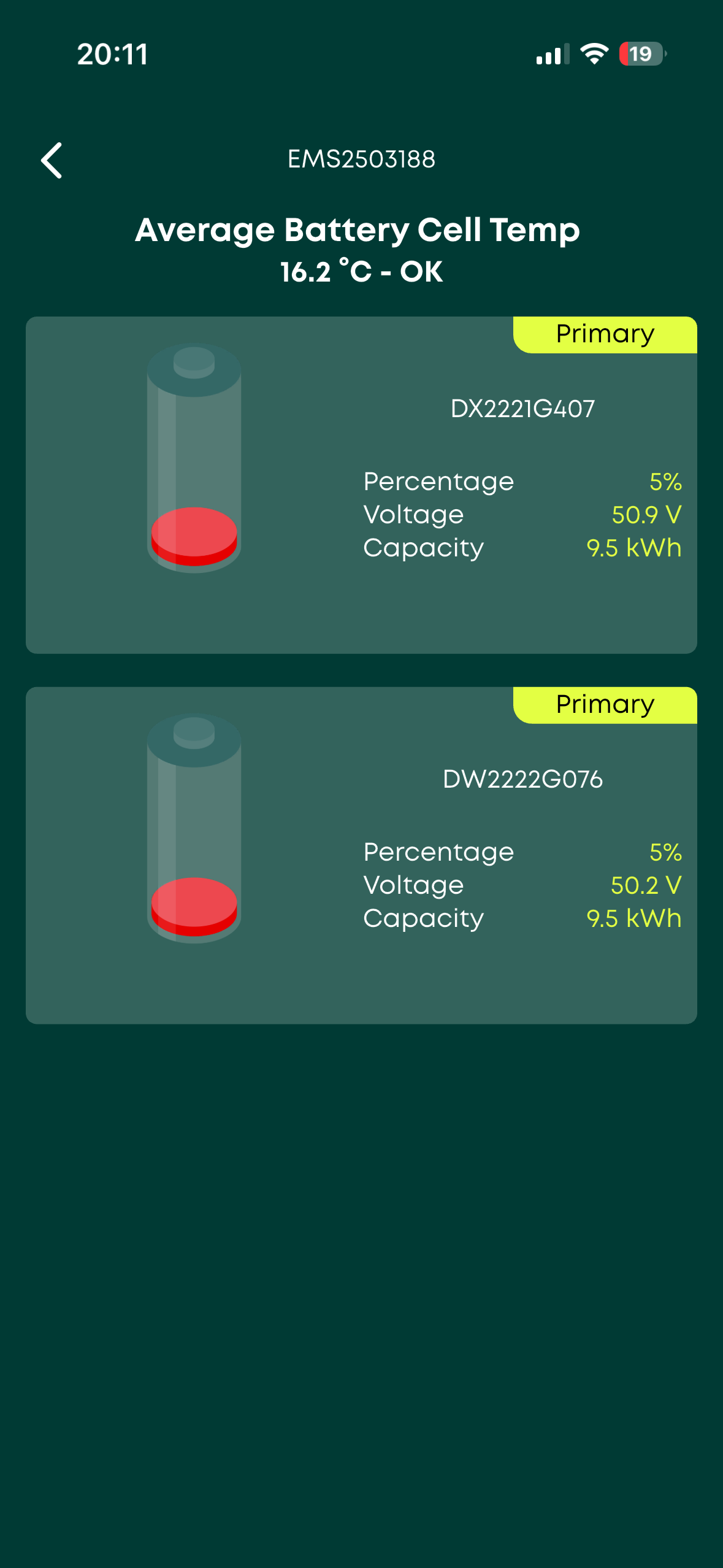
• Discharge Behaviour: When the system hits 5% SoC, the DX2221 unit is still sitting at a total voltage of 50.9V (cells at 3.18V). My healthier unit correctly continues down to 50.2V (3.14V per cell).
• Cell Balance: On the plus side, individual cell voltages are well-balanced within 0.02V, so the hardware itself looks solid.
• Charging Issues: Both batteries occasionally fail to reach 100% SoC; the EMS stops the charge at 99-100%, but the batteries themselves sometimes sit at 96-97%.
I’ve already tried both a standard calibration and a low-power calibration, but the 5% SOH drop occurred so suddenly after the firmware update that I suspect the BMS has become overly conservative with its calculations.
Has anyone had success getting a BMS Capacity Reset/Recalibration from support for this specific firmware issue? I’m keen to get both units back in sync and performing at their best.
I’ve attached some screenshots from my monitoring dashboard to show what I'm seeing.
System Details:
• EMS: 2503188
• Inverter 1: CE2223G194
• Problem Inverter: CE2230G309
• Linked Battery (Suspect Unit): DX2221G407
Cheers,
Charlie
E
#2 ectoplasmosis

CharlieC I had the exact same thing happen after updating my 2x Gen2 9.5kWh batteries to firmware version 3022.

One of the batteries had its ‘calibrated capacity’ (SoH) drop massively and instantly from 180Ah to 125Ah (!!).

I resolved this by manually triggering a full calibration via the BBC Basic Inverter app. This didn’t go entirely smoothly: the calibration routine became stuck during discharge, taking both batteries down to a disconcertingly low voltage which put them in a reduced power mode for 12 hours. I then had to manually abort the process, and trigger a manual ‘top end calibration’, which took 16 hours to charge both batteries, after which they both reported >100% SoH (190Ah) and have been working flawlessly ever since.

My advice would be to trigger a full calibration, either via the portal or GivTCP, and keep an eye on it.

R
#3 Rubikcube

CharlieC Upgrade to 3022 from what?

As far as I am aware there is no capacity change between 3020 and 3022. However there is a change between 3017 and 3020.

E
#4 ectoplasmosis

Rubikcube My capacity dropped by 30% going from 3020 to 3022, for what it’s worth.

G
#5 geoffreycoan

It’s interesting hearing these reported capacity drops. I have only upgraded by 5.2 battery with 3020 and then 3022, and I was consistently getting 3.8-4.0kWh out of the battery whereas with 3015 I was getting and should see 4.2kWh (80% DoD).

I’ve installed 3015 back on the battery now but this has coincided with the warmer weather and the batteries not emptying with the heat pump load so I’ve not been able to measure how much capacity I am actually getting out of it.
I’ll have to do a force discharge test to confirm its capacity.

C
#6 CharlieC

ectoplasmosis I’ve don’t two calibrations via the portal and it didn’t help- I just scheduled them for 23:30. One at full charge percentage and one at half - do you mean just to click calibrate on the portal? Or are you suggesting something else - you mention top end and full calibrations.

Do GE support monitor this forum - is it a potential way to get someone to look at my battery?

Thanks for everyone’s help!

C
#7 CharlieC

geoffreycoan how do you backgrade a battery eg if I wanted to go back to 3020 to see if that helps?

C
#8 CharlieC

ectoplasmosis

When you did the initial one and had to manually override - was that via a manual shut down procedure?

E
#9 ectoplasmosis

CharlieC As written in my initial post, I used the BBC Basic Inverter app on iOS to manually trigger and abort each type of calibration.

I’ve never scheduled a calibration via the portal, so can’t say how that process compares to the above.

C
#10 CharlieC

ectoplasmosis Thanks - would think that’s the same as a portal calibration which didn’t help for me unfortunately - the BBc Basic inverter app doesn’t give me an option to calibrate anyway

G
#11 geoffreycoan

CharlieC how do you backgrade a battery eg if I wanted to go back to 3020 to see if that helps?

you need to have a copy of the BMS firmware (from the inverter resources page) and then either copy it onto the dongle stick on the inverter or onto the memory stick inside the battery. I did the latter

There’s videos of how to do it on the Giv website

E
#12 ectoplasmosis

CharlieC Read the app description on its App Store listing; how to reveal the hidden calibration control buttons is described there.