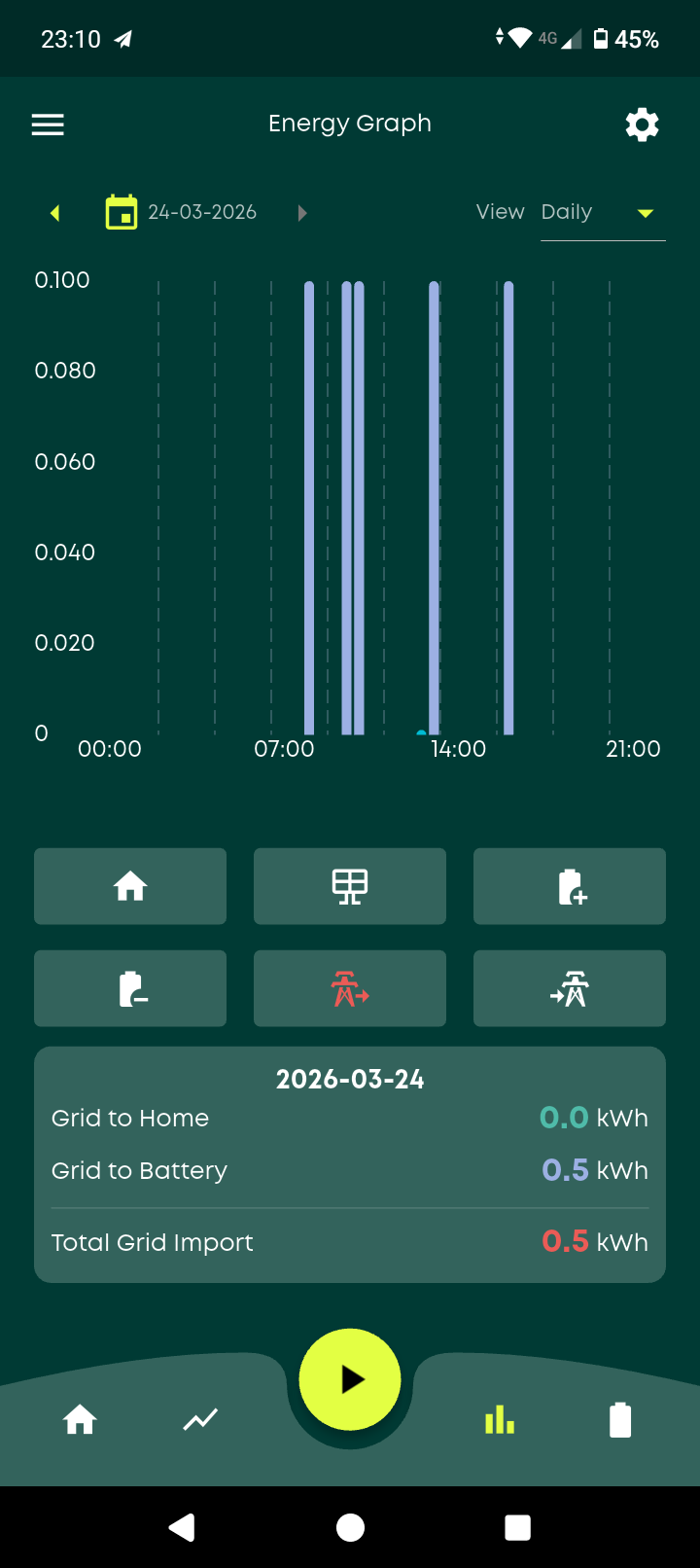
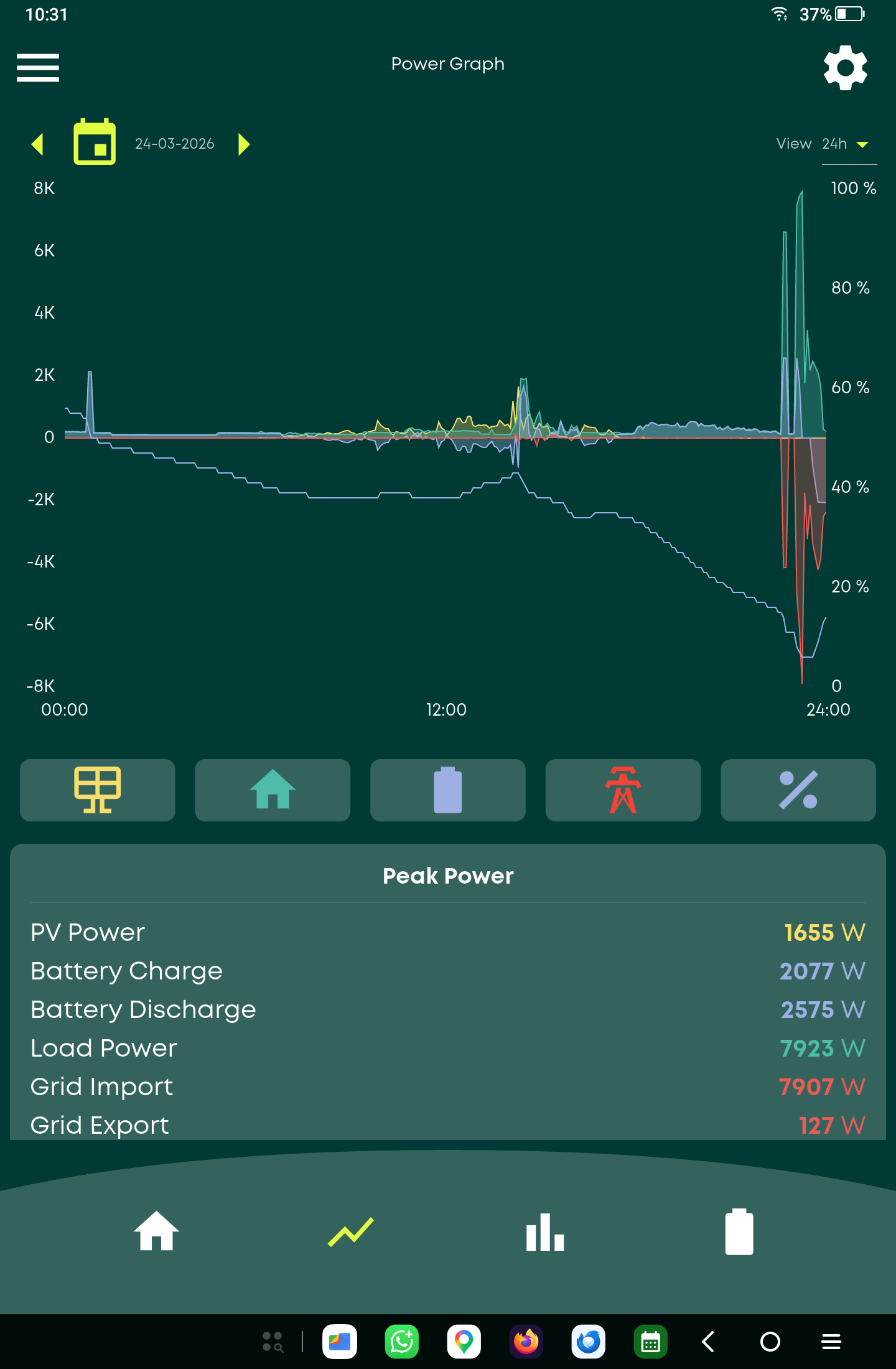
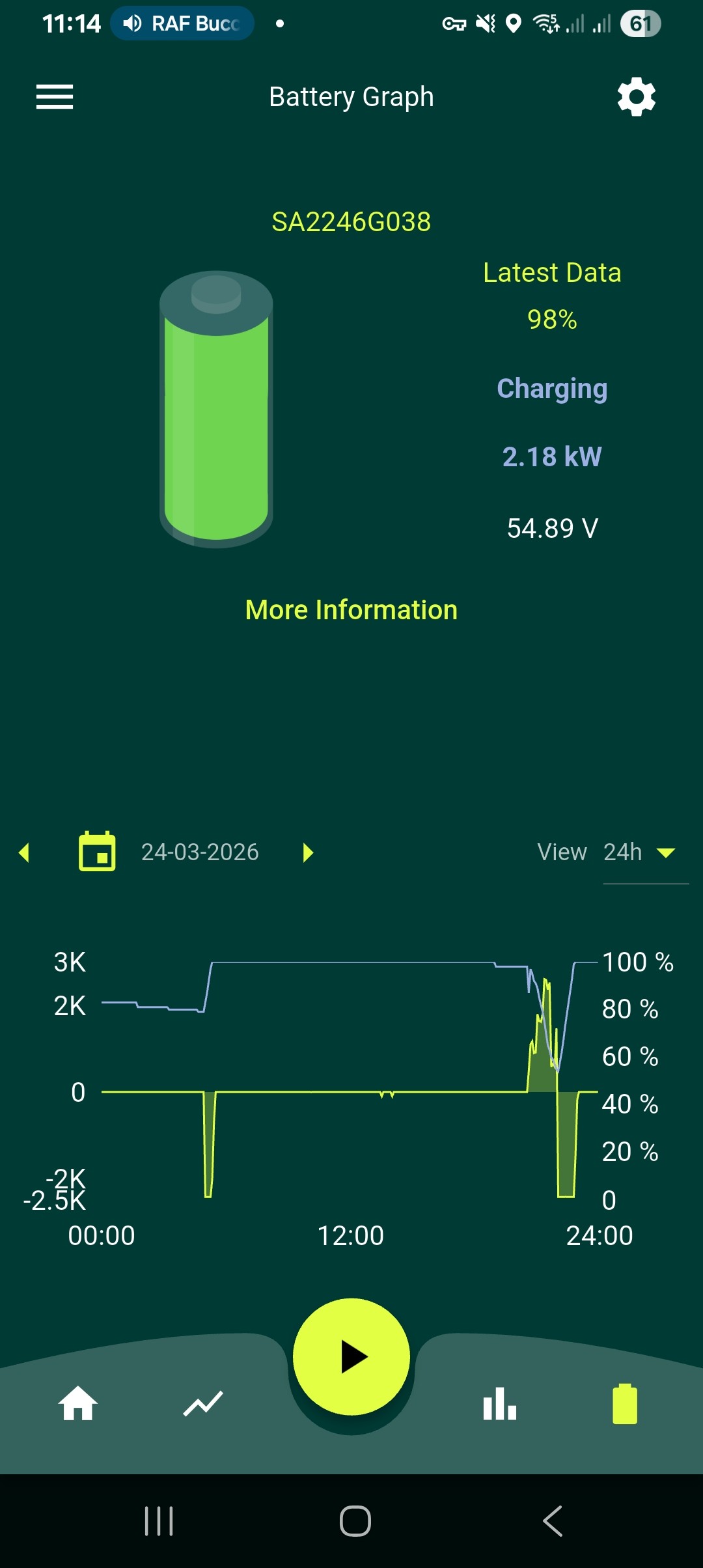
Battery Randomly Charged From Grid Overnight

30 comments started 2026-03-23 last 2026-03-27
GivEnergy ProductsBattery
A
#1 Anomnomnomaly

Woke up this morning to find my batteries at 100% after running them down to 4% last night after basically being off grid the last few days after the nice weather we'd had since last Weds until it became a little overcast on Sunday and generation dropped from 20kwh to 8kwh for the day.

No timed charges are set, no notifications to say it's being done by givenergy, no winter conditioning profile in use.

Anyone else had this happen? Would like to know the cause and how to stop it, I'm not happy about paying 26p from the grid to charge the batteries without consent when we only get 12p export now for any generation today.

The last time this happened it was a forced discharge/charge triggered by givenergy without warning or consent during the middle of the day.

S
#2 SteveCook

what tariff are you on?
what does the history show in the remote control tab on the portal page

E
#3 ed-form

I found the same thing this morning. My battery was at 100%, having charged overnight and was offline. I used the quick setting to bring the battery online.
Then I saw the announcement this morning that the app has been misbehaving and carried out the suggested 'remove all data on next launch' instruction on my iPhone and the app began to look normal again, except that my battery was full and was discharging into the house.
I did not ask for an overnight charge.
In case it matters, we have recently migrated to Octopus with the changeover taking place on the morning of the 12th of March and are on their flexible tariff, waiting to swap to the flexible go after Octopus have confirm that they can read our smart meter and talk to our new Ohme Home Pro charger.

A
#4 Anomnomnomaly

SteveCook Currently on an Octopus fixed tariff until May this year. Not sure what you mean by 'remote control tab' on the portal. I've looked through all of the inverter settings tabs and can't see anything about remote control... and I've not handed over control of my system to octopus.

EDIT: OK, I've found the remote control history, had to change the settings to see back far enough.. there's a an SOC calibration triggered at 12:04am until around 5am

P
#5 pwdst

Calibration will empty your battery and then fill it to set the State Of Charge (SOC) limits more accurately. Random uncommanded calibrations used to be an annoying occasional occurance but I haven't heard as much about them recently. Which equipment and firmware do you have?

S
#6 SteveCook

Anomnomnomaly
Sounds like that did it. Well found

E
#7 ed-form

I looked back through my remote control event table and found...
2026-03-22 13:22:23.123 You AC Charge 1 End Time Written Successfully 00:00 23:59 23:59 App - Quick Settings - Charge Battery to Full.
The instruction before that was more than a month earlier.
I did not do any of this. Can anyone tell me what happened?

D
#8 DD

ed-form I think app quick settings is when you use the buttons at the bottom of the app to control the inverter. The inverter has no "charge now" mechanism, so I guess instead it configured a timed charge slot for the whole day.
You can configure the app to hide those controls.

V
#9 Vestas

DD I think that's the best option - don't use quick settings. IIRC it fires off a series of commands to the inverter which isn't happy with "rapid" comms (to say the least).

Been a long time since I used quick settings but they caused problems more often than they were worth. Personally I think that was partly due to users repeatedly pressing the button as they didn't see an instant effect. My wife did this until I said its a ten second polling period if you're "local to the inverter", 5 minutes if you're not. She (quite rightly) asked where any of that was documented (she's a software engineer) and it isn't - or wasn't.

tl;dr Quick settings are an accident wating to happen. Don't use them - or the app but YMMV on that.

E
#10 ed-form

DD Thanks for the reply, but I don't believe I looked at the app at all during Sunday 22. The trigger that made me look at it was my wife telling me the battery was at 100% at breakfast this morning.
I know that Octopus are interrogating our system to determine whether we can have Flexible Octopus Go and that one of their features is using our battery as a store - charging it overnight and releasing it during high demand times to lessen the load on the grid. I've asked them if they did this, but have not had a reply.

D
#11 DD

ed-form I've asked them if they did this, but have not had a reply.

I think "quick settings" in the log is fairly explicit - from logs I've seen posted from other IOF users, Octopus don't include any information in the "who" column.

G
#12 geoffreycoan

ed-form lexible Octopus Go and that one of their features is using our battery as a store - charging it overnight and releasing it during high demand times to lessen the load on the grid

Octopus Go is an EV tariff, its nothing to do with your battery storage. You can of course charge overnight and discharge in the day, but that's up to you to do that.

Only Intelligent Octopus Flux interrogates and controls your battery and I think that's closed to new applicants at the moment

E
#13 ed-form

DD You're plainly right about this. Must be more careful. After examining the data graphs it turns out it only put about 4.9kWh into the battery, The rest that gave the apparent 100% fill resulted from the sun yesterday.

M
#14 Marren2016

I've imported 400wh from the grid with a battery that's at 70% and no settings to charge. Its been doing it for a few days by the looks of it. If its happening to everyone is it a server side issue?

P
#15 pwdst

Imported to the house, or battery charged? If a sudden load like a kettle or an oven turns on then it will take potentially up to ten seconds in the worst case for the CT to record that and then another few seconds for the batteries to respond to meet the load. In the meantime the energy comes from the grid.
This will especially be the case if you have a Gen 1 inverter without the fast react firmware.
Variable loads like an oven or tumble dryer will tend to exhibit it more.
Another possibility is loads exceeding the combined battery and solar capacity - this can easily happen when cooking when you have the oven and the stove going and you turn on the microwave or the kettle.

M
#16 Marren2016

pwdst it was grid to the battery, over night, with nothing on except fridge, cctv and router.
Gen1 inverter with latest firmware.
My conspiracy theory brain says GE are helping octopus get some money in on days where they make nothing.

D
#17 DD

Marren2016 You describe the problem as "over night": is it behaving as expected during the day ; at what time does it start then stop misbehaving ?

P
#18 pwdst

Marren2016 Where is your battery and what temperatures did it get to overnight? Is Winter Battery conditioning turned on?

M
#19 Marren2016

pwdst it's in a partly insulated garage, in the northwest. I doubt the temps dropped below 9c in there but cannot be sure, but they import to battery was 10.30 -12.00 noon. Sorry about saying it was overnight.

M
#20 Marren2016

Today my system has imported 500wh from the grid with nothing set.

D
#21 DD

Marren2016 This seems to continue after noon. Please could you post a power graph - it's a bit easier to see the whole picture from that.
My gen-3 will charge gently from grid if SoC is below a reserve or discharge limit - not sure if gen-1 is the same. Or what a gen-1 does if charging from solar when the sun goes behind a cloud, for example.
I think the system can accurately record grid in , battery charge, etc. I'm less sure that it's always correct in attributing grid-to-battery, or solar-to-home, for example, when there's lots going on.

M
#22 Marren2016


I charged the battery last night at 23.30 onwards so the periods of charge through out the day are automated for which I do not know why.
Looking at previous days when it has happened it's always 100w per charge.

D
#23 DD

Marren2016 There are clearly some small pulses of import when the consumption increases beyond the solar. Seems to me that it's just the inverter being a little slow in adjusting its behaviour to cover the change in consumption/solar. 100Wh (0.1kWh) may just be a rounding/quantisation thing.
From what I've seen so far, it doesn't appear to be happening at any particular time, so I'm guessing it's more correlated to fluctuations in generation/consumption.

I have an Octopus mini which reports almost-live consumption, and I see small fluctuations along the base line even though I have plenty of battery to cover it. I think gen-1 is known to be a bit slow to respond to changes (except for the "fast-response" firmware that's not compatible with all systems).

G
#24 geoffreycoan

Marren2016 what firmware do you have on your Gen 1, is it the 450/451 which is the latest publicly available Gen 1 firmware?

If so, this can be a bit slow to respond to changing grid, taking (from memory) up to 20-30 seconds to respond to home demand to start discharging the battery and the same on stopping discharge when the load reduces (e.g. kettle boils).

The problem with looking at the GivEnergy portal and app data is that it only takes a snapshot every 5 minutes and the graphs assume that the same load occurred for the whole 5 minutes. If you look at the meter data in the portal at the grid column you can see better the actual import/export data, but its only at 0.1kWh granularity so you'll see a jump up, but that will be when 0.1kWh in total has been imported, which could have been accumulating over a longer period of time.

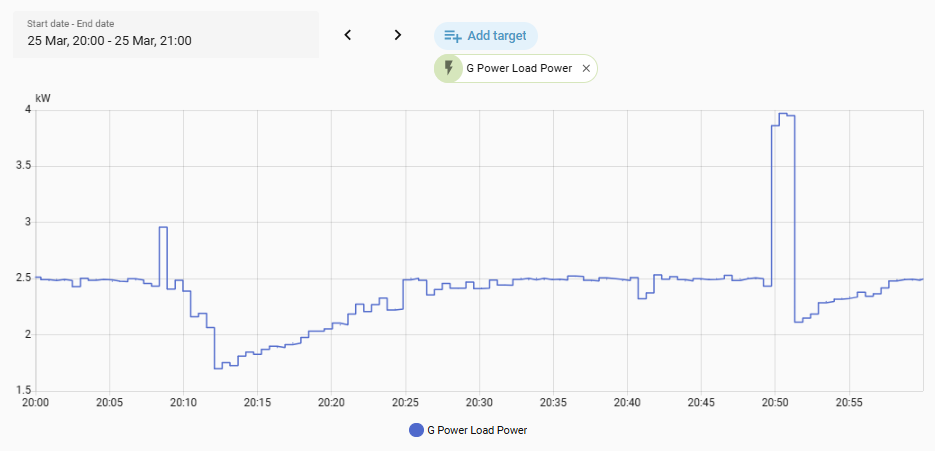
To illustrate both of these points, here's an hour of grid power from my Gen 1 inverter from 8-9pm tonight so no solar. I have the fast response firmware which is much quicker to respond to changing house load. These are taken with GivTCP in Home Assistant which polls my inverters every 30 seconds.
Top graph grid power, as you can see it bobbles around the zero mark all the time, never quite perfectly zero, and a couple of times where there's been some increased house load, I'm importing a bit, and then 30 seconds later the inverter has caught up.
Bottom graph is import energy total off the inverter, which clicks up another 0.1kWh in the second spike
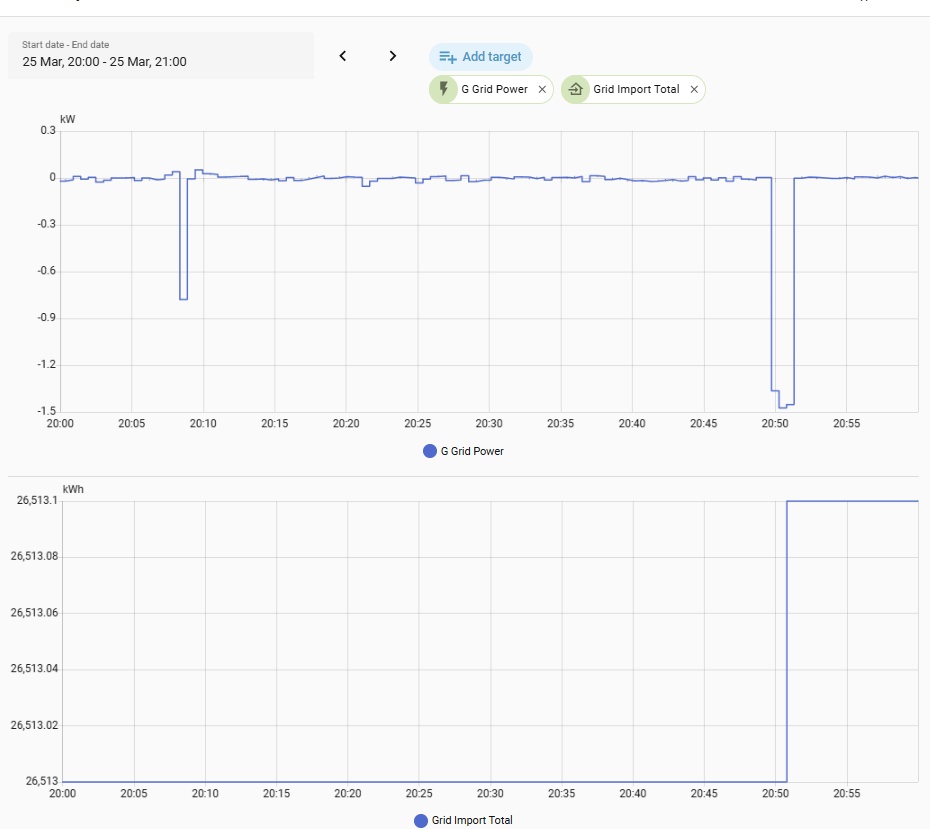
and house load for the same period, going up and down all the time

D
#25 DD

geoffreycoan The problem with looking at the GivEnergy portal and app data is that it only takes a snapshot every 5 minutes and the graphs assume that the same load occurred for the whole 5 minutes

Hmm... Given that the spikes are exactly 0.1kWh, is it possible that the app is actually showing the (changes of) the meter data over the interval? That seems more likely than the snapshots being exactly 0.0kW or 1.2kW (0.1kWh per 5 mins).

D
#26 DD

Marren2016 My smartmeter (the unit itself, not the IHD) has a little indicator to show which way power is flowing. It's constantly flicking back and forth to show tiny amounts of import and export, showing that the inverter cannot exactly match the consumption - it has to react to changes, rather than anticipate them, which takes a little time.
(I can't immediately find a picture of it - searches all seem to focus on the IHD rather than the smartmeter itself.)

M
#27 Marren2016

DD that would make sense.
Since they put the fast response firmware in (191-193) the battery dips to 98% occasionally when the solar is exporting. So the inverter taking up it's slack sounds about right, or at least a good enough answer to stop me obsessing 😂

R
#28 Roy124

I noticed this anomalous display and could find no reason. All indications were of a magic battery holding charge at 100% while feeding grid and house. I sat on my hands and changed nothing. Next day back to normal

R
#29 Roy124

I also mentioned some time back that the display Home or Away had been on Away but suddenly switched to Home where it has been for 2 months or more. Yesterday SNAFU and Away only.

I dun nutting I swear

R
#30 Roy124

Having din nutting the Home connection has returned.