GIV-HY3.6/Gen1 Stuck on idle (No PV or battery)

31 comments started 2026-03-27 last 2026-05-05
GivEnergy Products
L
#1 lukedom89

System Details:

  • Current Battery Firmware: 3020 (Target: 3022) - Inverter GIV-HY3.6 Firmware D0.449-A0.449
  • Issue: Battery update hangs at "90% - Verifying update" then fails.
  • Current Status: Inverter is stuck in "Idle"—no PV generation and no battery charging/discharging.

Troubleshooting already attempted:

  • Restarts: Performed remote restarts via the portal and full physical power-downs (Inverter + Battery).
  • Settings: Toggled 'Eco Mode' and attempted a factory reset of settings to clear stuck registers.
  • Connectivity: System is still reporting grid usage, so the communication module is online.

A couple of weeks ago I noticed my battery wasn't charging and there was a firmware update available for it.

I attempted a battery firmware update to 3022 however it gets stuck on "90% - Verifying update" and then just fails. I've tried several times over the last couple of weeks as well as restarting via the web interface and physically powering down the battery and inverter.

My inverter is now no longer generating any PV or charging the battery. The inverter status is just "idle".

I've seen other posts suggesting that some of the settings can get stuck so I've attempted switching on and off 'eco' mode and resetting the settings to factory default but it stays the same. The system is still reporting grid usage to is still functioning.

What other potential recovery steps are there? I've put a ticket in with GivEnergy but haven't heard back in over 3 weeks.

D
#2 DD

lukedom89 Not sure why problems with battery firmware should affect PV generation.

Are you doing the update over the air via the portal? I think there is a way to do it locally. See https://www.youtube.com/watch?v=MFtmEc5F1wQ which talks about the online update, and then the last section talks about local updates. There are various links for how to do it on various different bits of kit. (I've not done this myself.)

G
#3 geoffreycoan

Guide here for how to upgrade the firmware locally https://kb.givenergy.cloud/article.php?id=72

Be careful doing this, it is straight forward but getting the USB drive out can be a pain as its stuck in with anti-vibration glue that you have to carefully remove.

L
#4 lukedom89

Thanks for getting back to me.

I'll give that guide a go. Unfortunately it looks like I still need GivEnergy support to be responsive to obtain the firmware files. Unless they are publicly available elsewhere?

Does a broken battery firmware explain why no PV is being generated?

P
#6 pwdst

It is possible that the battery firmware upgrade kicked off a calibration which does temporarily stop your solar during the discharge phase. If this has got stuck you may need to cancel the calibration to resume operations.
In the absence of GivEnergy support if you have £10 and an Android phone then you can install the excellent Rukicube Monitor For GivEnergy Inverter app and pay to unlock controls. I think you can probably see the calibration stage for free before upgrading and if it is anything other than zero upgrading to controls should give you a Stop Calibration button which might resume normal operations.

P
#7 pwdst

Another advantage is that will give you a backup option for controlling your system if your internet goes down or if GivEnergy do indeed go into administration.

L
#8 lukedom89

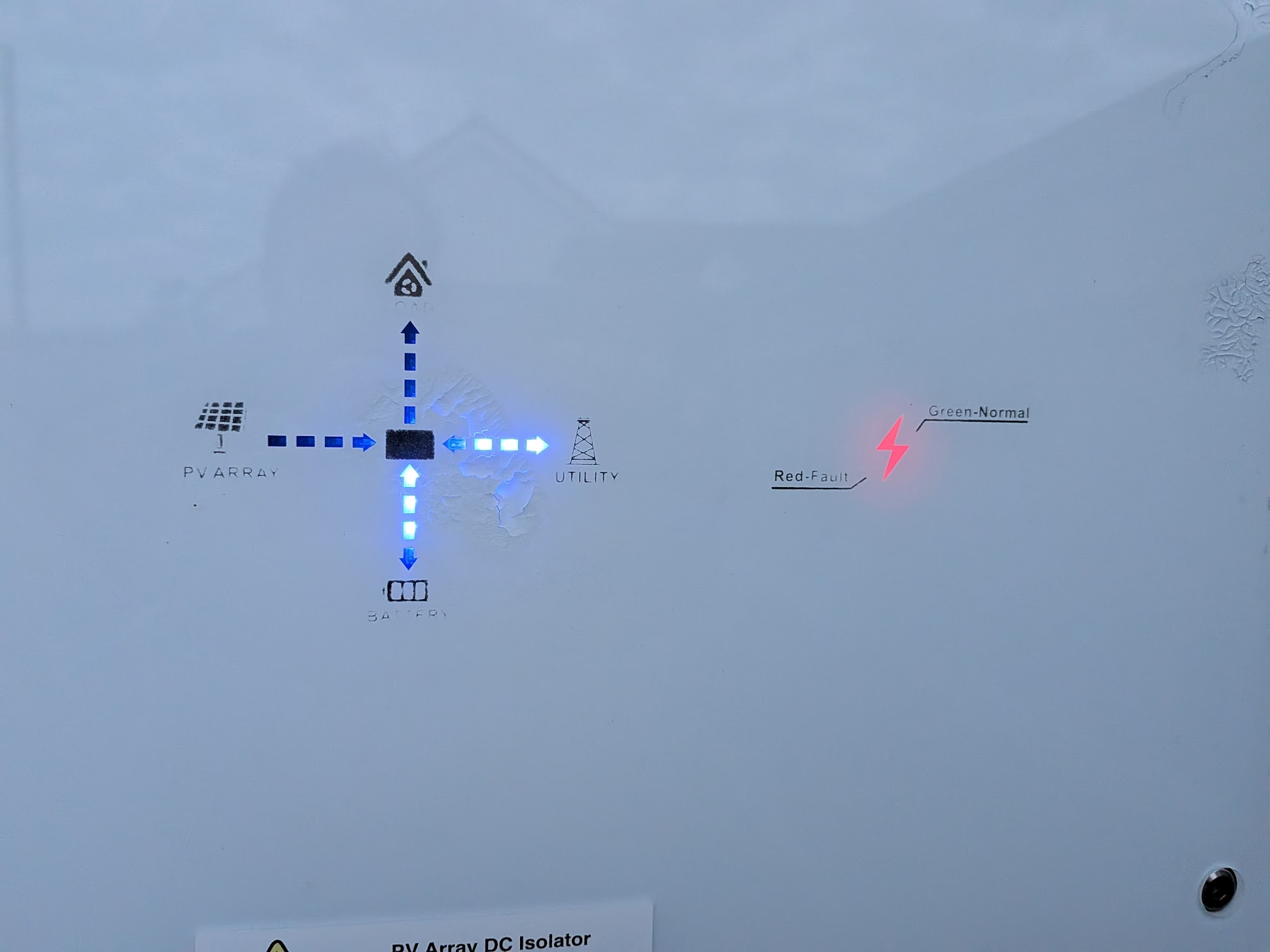
Thanks @geoffreycoan - I've attempted a battery firmware upgrade today via the USB both to 3022 and then 3020. The same thing happens with both on startup: status light flashes red/green, then beep then the status light goes green and finally back to red with the 25% light flashing green.

I was going to attempt a manual update of the inverter firmware as I saw in another post that mine is very out of date (D0.449-A0.449) There doesn't seem to be any firmware files for my inverter though: GIV-HY3.6? Is that correct?

pwdst I've given that app a go - it works really well! I also realized that Home Assistant provides that level of detail/control as well through GivTCP although it's difficult to tell which values haven't been updated without clicking through. Anyway, both are reporting stage 0 for the calibration. I tried kicking one to see if it could get the inverter out of idle state but no change yet.

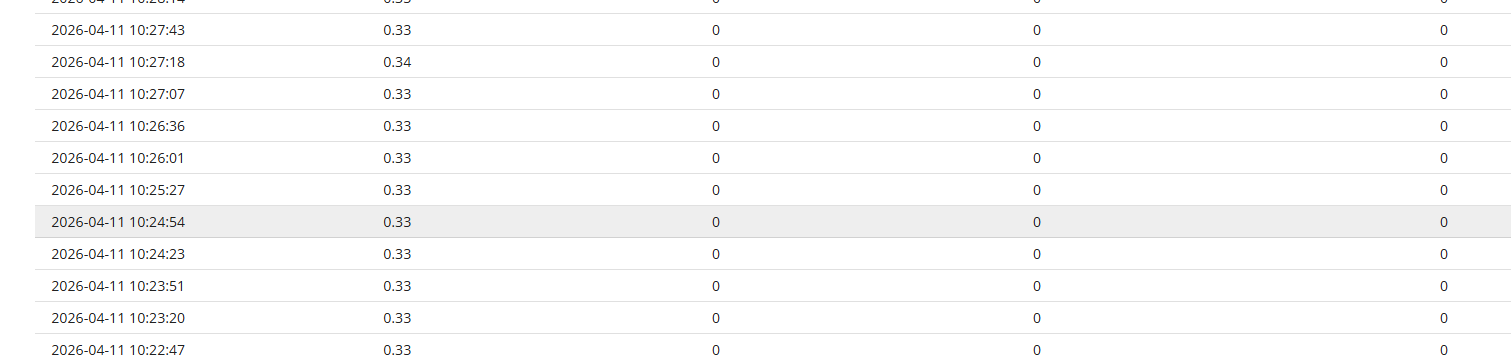
Is it possible to get more detailed logs from the inverter/battery? It would be useful to find out why the battery is showing a red status. The only data I'm getting on the battery tab is the voltage currently.

G
#9 geoffreycoan

lukedom89 what do you see on the notifications tab? That’s where any notifications from the inverter are reported.

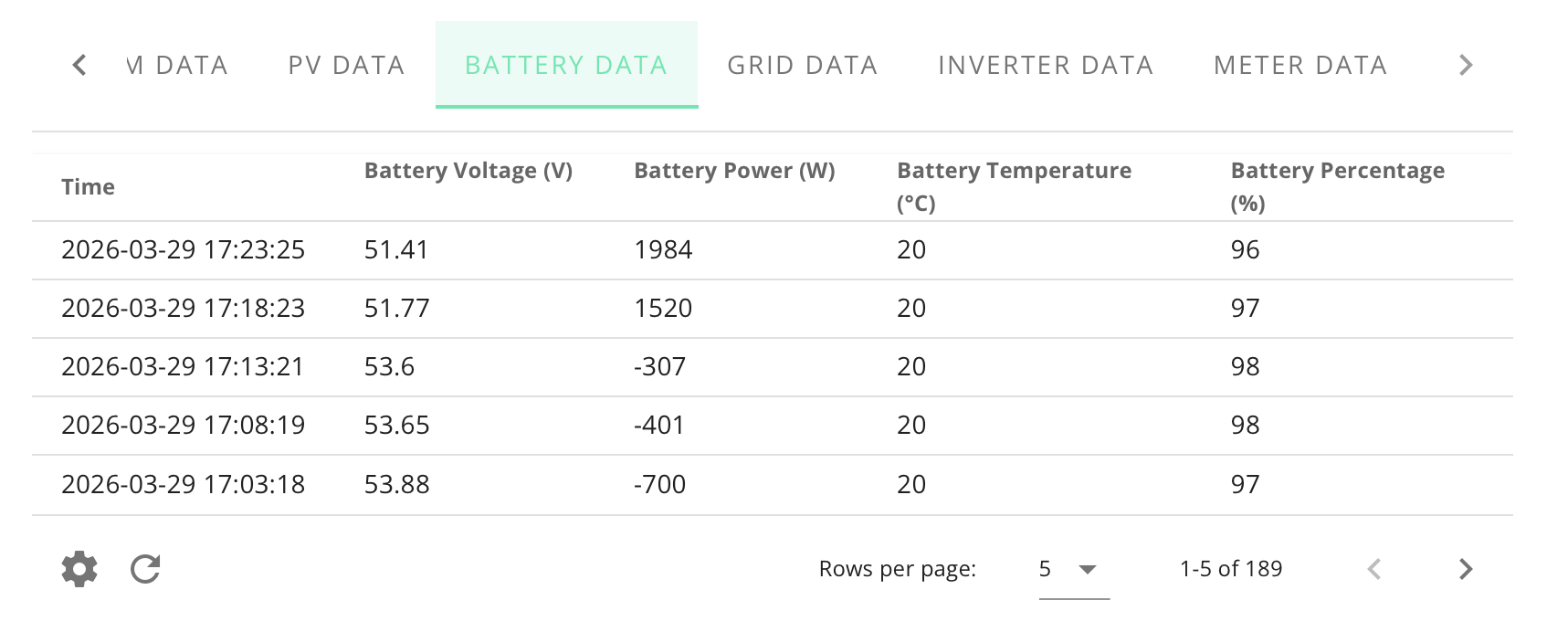
Your battery data is VERY VERY low. Here is mine for comparison:

If that data is correct then your battery is flat and probably the only way forward is to get your installer to charge it locally. You might have a dead cell because even when empty the battery is usually around 48V, so it looks very suspicious. That would explain why you can’t turn it on.

The other possibility is that the inverter has lost communication with the battery - the thin black data cable between the battery and the inverter has fallen out of the bottom of the inverter, which is a known problem with the older Gen 1 inverters. If so, then the data you see in the portal will be wrong. But that doesn’t explain why the battery won’t turn on.
When you removed the USB stick to do a local upgrade, just make sure you didn’t accidentally knock the DIP switches immediately below the stick inside the battery. That could also cause the battery to not talk to the inverter. Unlikely as it wasn’t talking before you tried the upgrade, but worth eliminating

L
#10 lukedom89

Thanks again for your support. Having had a couple of weeks more silence from GivEnergy support, and their phone line just hanging up and now administration....I tried a manual update of the inverter today to see if I could at least get it back to generating PV power.

It hasn't gone great. I tried finding the right firmware version but all I could find was on this post: https://community-beta.givenergy.cloud/t/where-to-find-gen-1hybrid-inverter-software-d-450-a0-451/5216. Having tried a manual update with that the inverter just has a red light (after several hours) and reverting the stick back to have the original files has the same issue.

Any ideas on how to recover the inverter back to it's semi working state?

Inverter Model
GIV-HY3.6
Software Version
D0.449-A0.449

W
#11 wrighar

This is what my battery claims to have
but in reality it has 52.5v, and has done for the last 2 months

red with 1 flashing green.

because my inverter battery board has failed.

L
#12 lukedom89

That's interesting - my health check also suggested the battery voltage was much higher than the logs.

I've got the installers coming out to take a look on Wednesday afternoon so will see if they have any more luck. They also said they haven't been able to get hold of GivEnergy for quite a while so it looks like it's not just consumers that have been ghosted.

I've still not been able to get the inverted back online since attempting an update. Does anyone have the correct firmware for a gen 1 GIV-HY3.6? It seems like it's not on the official download page?

G
#13 geoffreycoan

lukedom89 I don’t have the firmware files sorry

The Gen 1 firmware has not been on the website for ages. Probably because the Gen 1 is officially end of life and there’s been no firmware upgrades for several years.

Your installer should be able to access them through the installer menus and download them (I believe)

Maybe if they can give you a copy you can share them for the benefit of others

N
#14 NormC

lukedom89 This was posted on FB by Paul Landregan a while ago.

gen1-inverter-software-450-a453-rtcl-function-added.zip
95kB

Hope it is what you need.

G
#15 geoffreycoan

The last formally released version of the Gen 1 firmware is 450/451. Based on the name this is an updated firmware version that includes the real time register support.

Thanks NormC I’ve taken a copy. I’m on a beta version (fast response firmware) but definitely worth having in the back pocket.

T
#16 TX200

Is this the firmware that might cause earlier versions of the gen1 hybrids to go pop?

V
#17 Vestas

TX200 No, that's the fast response f/w. The one linked here is production firmware with the addition of safe register writes to RAM.

C
#18 cbowen

I've got this firmware to install for my parents early Gen 1 inverter which does a lot of writes with them being on Agile. Problem is, I'm not brave enough to now install it!

V
#19 Vestas

cbowen does a lot of writes with them being on Agile.

How many per day? I'm sure we've had this discussion before and @geoffreycoan (IIRC) worked out that even with predbat running it'd take something like 19 years to fail?

I'm on Agile but don't run predbat (there's not a lot of point these days) and average 12 register writes per day according to GivTCP v3.

C
#20 cbowen

Vestas It can vary depending on how the rates are. Lower rates and predbat will look to do a lot on importing and exporting. In the last 5 days, his inverter has done 550 writes although that is taking into account the negative rates over the weekend so that's more than normal.

T
#21 TX200

I'm averaging 34 writes a day, might be dropping as I moved from agile to IOG.

I set a fake export price overnight to stop the system exporting during the off peak (e.g
Export import export import export import).

T
#22 TX200

Over last ten days, 15 writes per day.

V
#23 Vestas

cbowen I didn't see any point in letting predbat run last weekend - not with the charge rate of a G1. I just charged/dumped the entire battery several times from Friday night onwards. There isn't enough variation in Agile rates these days to justify running predbat 24/7 on a G1 - G2/3 maybe as they have higher charge/discharge rates. I think I lost 14p by not using predbat.

I have 715 writes since 10 March when I did all the stuff for the "Nuclear" thread. That includes time syncs (which I now only do once a week) & automations to stop battery going over/under voltage, pause battery, additional charge/discharge slots for overnight charge/dumps, emergency charge etc etc.

M
#24 MikeyHaz

cbowen When all the fuss about the writes came up - I was the same and was looking for this firmware - it's actually the first time I've found it.

I'm in the same place as you though - it's a (in theory) beta firmware - GivEnergy presumably held it back for a reason. I'd like to know if that reason was because they saw problems, because they didn't test it enough or because they couldn't be bothered to move it forward.

The techie in me wants to upgrade. The pragmatist says 'but it's working - leave it alone'

V
#25 Vestas

MikeyHaz Same reason they didn't release the fast response f/w - no business case for it, given the inverters are/were EoL at the time. Edit - not quite the same as inverters with serial numbers in the mid 22s (IIRC) will literally blow up if you put fast response f/w on them.

It's my understanding they analysed the external writes log on the portal and some people got beta software due to the number of daily writes being incurred but I can't remember now. @geoffreycoan would be your man for that.

M
#26 MikeyHaz

Vestas 2209 and under I believe for the 'fast response doesn't work' category.

https://givenergy2025.zohodesk.eu/portal/en/kb/articles/gen-1-a1xx-d1xx-firmware-log

Just working through the logic and watching the manual update video - it looks like the dongle has the current firmware on it - so it feels like there's a 'lower risk' route here which is 'backup the current firmware', 'try the new', 'backout with the old firmware if it fails'.

C
#27 cbowen

I've updated using this method in the past and on one occasion, it worked fine. The other time, it failed and roll back successfully. It was squeaky bum time when it was rolling back!
The other thing that's influencing me is that already have a spare 3.6 Gen 1 inverter anyway incase theirs at any point.

M
#28 MikeyHaz

Well I figured "what the hell" and upgraded.

It wasn't smooth. Followed the video - although my dongle didn't have the old firmware and was only in FAT format (not FAT32) - and was only 1MB big as a partition. Inverter was in a cycle for an hour of doing just green flashing and being offline. Power cycled the inverter ... went into a boot loop ... removed the dongle ... formatted it again - dropped the files back on once more ... power cycled the inverter again ... plugged it back in ... very loud and long beep ... reboot ... suddenly functional and upgraded.

I may need a change of underwear.

G
#29 geoffreycoan

The whole inverter register writes is in my view overblown. I use Predbat as you know and have been on Agile and Cosy. My average inverter writes is 50 writes per inverter per day but it varies between 30 and 60 a day. There was some guidance from GivEnergy that I think was one write per 6 minutes was OK, but I know that when I looked into it properlyI was significantly below the recommended limit even with Predbat on Agile, and so I never turned the read time registers on.

My view is that real time registers are really only needed if you have multiple inverters and are doing load balancing across the two inverters. When this was first raised by Oli on Speak to the Geek he was doing load balancing in HA across his hybrid inverter and AIO, every minute checking of they were cross charging and setting the charge and discharge power to stop the cross charge. He called out Predbat as being a cause of excessive inverter writes which wasn’t really true. Predbat certainly could be, and was, improved to reduce unnecessary inverter writes, but it was still an order of magnitude less than his load balancing.

I have two Gen 1 inverters and so you might ask what I do about cross charging. Basically the most cross charging I got was overnight when there wasn’t solar power feeding the inverters and so I changed Predbat to add a toggle switch so it would set Freeze Export mode instead of Demand, and then run an automation to turn on and off that switch overnight. Freeze Export mode means the inverters can discharge but not charge which cured 99% of my cross charging. Occasionally I get a bit of cross charging during the day when it’s low solar power, but I can live with that.

So personally I wouldn’t bother upgrading because of the risk of failure and now no support. I think GivEnergy haven’t pushed this upgrade out because even with fully tested software there is going to be a few people with issues and more issues = more support calls, and we all know how the support service was.

M
#30 MikeyHaz

Just to add onto the comment about not upgrading.

I think I'd agree especially if you're not in any way technically competent. I spend my life dealing with computers/upgrading firmwares/bios etc. I was watching this upgrade without any way of knowing if it was working or not. I watched it go into that boot loop and thought "oh hell".

When it actually sprang back to life - I immediately assumed it had managed a rollback and was just hoping it was ok. Seeing the upgrade had happened was something else.

There was 0 backup for me if that 'try again' hadn't worked.

Much more luck than judgement - and I'd consider myself 'confident' with technology.

L
#31 lukedom89

NormC thanks for sharing the firmware.

I've given that a go but sadly no luck. The inverter starts up green, goes red, flashes green for about 5 seconds and then ends up red with the battery and utility lights on.

Is there any diagnostics that can be obtained, does that light combination mean anything?

The installer thinks it might be the USB dongle but I'm assuming that's just because it's offline. I've actually just noticed that the dongle seemed to connect to the Wi-Fi network when I was writing the firmware files so I assume it's working.