
Timed Charge being disabled automatically - Rubik App / GE App

17 comments started 2026-04-14 last 2026-04-15
Mobile AppGivEnergy ProductsAC CoupledBattery
M
#1 M_J

So last night the batteries didn't charge.

The timed charge settings are getting disabled.

This morning I kept setting it on but after a few minutes the settings get turned off. Using both the GE app and Rubik's inverter app.

Batteries now charging up via eco mode as solar being directed to batteries.

I will log onto web portal to see if I can check the logs there.

I guess all I can do is to try a reset and hope that solves it. I have PredBat running in monitor mode so that shouldn't be changing anything...

More digging to do later this morning...
M
#2 M_J

OK had a quick minute to check the portal logs via remote control...

For some reason the server is changing the value I sent at 8:50 I enabled the charging window but at 8:53 the server decided to change it back?

2026-04-14 08:55:33.223 Server AC Charge Enable Read Successfully true false External Change Detected
2026-04-14 08:53:42.686 Server AC Charge Enable Read Successfully false true External Change Detected
2026-04-14 08:52:50.665 You Real-Time Control Read Successfully false Portal - Remote Control
2026-04-14 08:52:34.005 You AC Charge Enable Written Successfully true false false Portal - Remote Control
2026-04-14 08:52:31.793 You Enable AC Charge Upper % Limit Written Successfully true false false Portal - Remote Control
2026-04-14 08:51:44.481 You Enable AC Charge Upper % Limit Written Successfully false true true Portal - Remote Control
2026-04-14 08:50:56.459 You AC Charge Enable Written Successfully false true true Portal - Remote Control

C
#3 CW

Do you have any third paries controlling your system (IOF or similar)?

D
#4 DD

M_J external change detected suggests it's a local modbus change, not done through API or portal.

C
#5 CW

Or, have you tried out the new smart tariff card in the portal - I know when I tried it and decided not to use it, it was still doing its thing until I deleted it (switcihing off didn't do it)

M
#6 M_J

DD

I did a Home Assistant update yesterday and updated PredBat too.

I have PredBat set as read only and just monitoring so that shouldn't be making any changes. I will log on to PC and see if HA is just nobbling that value. Maybe the updates upset something...

M
#7 M_J

CW no never used the smart cards...

My current bet is HA for whatever reason as I updated stuff yesterday.

I have never used it to control the system bar when I use the car charger and I use an automation to charge battery at same time. That automation is disabled...

More digging to do...

M
#8 M_J

Hmmm I have found the activity in HA and I have just used MQTT to turn it on but it gets turned off again...

As I am fairly new to HA I am trying to find what is doing the switching if it is within HA.

I am looking at the GivTCP Control panel where I can manually choose the inverter values....

The audit doesn't say what changed it...

GivTCP Control Enable Charge Schedule turned off
10:15:33 - 5 minutes ago

More digging....

M
#9 M_J

OK it looks like it might be PredBat? Not sure why...

After the HA updates yesterday PredBat had lost the settings I had it on.
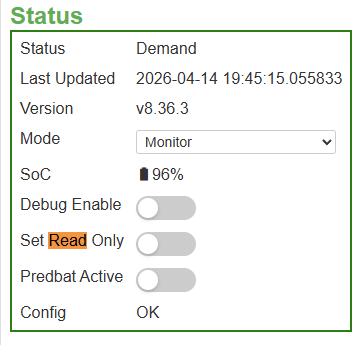
So I left it on Mode "Monitor" and the Read Only flag set to "yes". Yet oddly it was showing as Active but I just left it at that...

I have just switched PredBat mode to "Control Charge and Discharge" and left Read Only Mode "on" and the Charge Timer has not been re-set to Off. So this seems to be stopping it from being turned off...

I need to understand why PredBat in Monitor mode seems to be making changes and stopping the charge window on the Inverter..

Odd

Edited to add I did think it was Odd that PredBat was showing as Active when it was set to Monitor / Read Only

Yet now the overall status is off when it is Set to mode Control and Discharge and Mode Read Only...

M
#10 M_J

OK I now need to see why PredBat is feeling the need to turn off the charging window and why in monitor mode and read only it is actually updating the Inverter.

Not sure if it is a PredBat bug after the latest update or it is something I have set wrong?

I have yet to use PredBat after getting it loaded on HA as I want to be certain that I understand what it does and why...

I clearly have to do some digging to understand it.

It would be helpful that on the Inverter Log it could show the update as a PredBat initiated one but I guess the Log only has certain values that can be used...

W
#11 wrighar

You could try read only mode as well as Monitor:

M
#12 M_J

It was set as read only and monitor...

G
#13 geoffreycoan

M_J there is an intermittent bug with predbat that it can loose some of the settings you have set when you do a predbat update. So always worth saving your predbat settings and check that they have not changed after the update.

But having said that, Monitor mode shouldn’t be changing your inverter settings.

I tend to use read only mode when I want predbat to continue generating a plan and to just not execute it.

M
#14 M_J

geoffreycoan But having said that, Monitor mode shouldn’t be changing your inverter settings.

Yep I think it might be a bug, I just need to prove it and for someone else to validate it.

I might have more time to experiment later this week.

I just know at the moment it's not automatically turning off the charge window...

G
#15 Goshiki2

geoffreycoan For me, I have found that Predbat only loses settings on a HA update rather than a Predbat update.

M
#16 M_J

Goshiki2 well I did do a HA update as well, there was about 6 things needing updating.

G
#17 Goshiki2

M_J That would be the cause in my experience.