
Octopus locked inverter

15 comments started 2026-04-29 last 2026-05-03
Cloud PortalGivEnergy Products
G
#1 greyseason

I signed up for one of the Octopus tariffs where they control your inverter to charge the battery / go to grid at the best times. I've come off the tariff but my inverter won't let me change settings and give me a message "Settings for this inverter are locked and controlled by Octopus". I've asked Octopus 3 times to unlock it and they said they're relinquished it and it's an issue with the inverter. GivEnergy just straight up won't reply to anything I send them - any help at all or ideas would be much appreciated 🙁

T
#2 TimI

Delete any API keys within Giv's portal, that should release any potential locks?

M
#3 mrand31

greyseason GivEnergy just straight up won't reply to anything I send them

Read the other threads on the forum...

P
#4 pwdst

GivEnergy are in administration and there are no support staff left to reply. Revoke your GivEnergy API key in the Portal and Octopus won't be able to control the battery anymore even if they wanted to.
Also check the remote control log to make sure it isn't something like the GivEnergy Smart Tariff card controlling your batteries and you're not erroroneously blaming Octopus.

T
#5 TX200

You can also disconnect octopus from GivEnergy via the octopus app (see the device menu - there's two devices menus, one at the bottom of the app and one I think hidden in account settings via top right menu if I remember correctly, check both!)

Cleaner to revoke from octopus end first, then revoke from Giv Portal 2nd.

Fingers crossed it does clear the issue, because as above, there's not much support available now!

T
#6 TX200

Oh and if you never get the lock cleared, then the only choice left is locally control the inverter.

You can do that using an app such as Android Monitor by @Rubikcube or by the BBC Basic app for Inverter (on mobiles, soon to be android only I hear, apple app store app going) or go the whole Home Assistant route.

G
#7 greyseason

That sucks about going into admin, hope everyone that were givenergy are doing okay.

I've looked in both octopus "devices" pages and they are empty, so I think that side is alright. I'm looking for how to revoke the API key in the portal though and I can't see it, can anyone point me to where it is please? Sorry I'm fairly new to all this.

I'll take a look in the meantime at Android Monitor, and I do have Home Assistant already but I've done nothing with it so if anyone can recommend any places to start I would massively appreciate it.

Thanks all for your replies though so far!

S
#8 SteveCook

greyseason
In the portal
I think account settings LHS of screen
Manage Account Security top EHS of screen
Manage API tokens half way down

G
#10 greyseason

How strange then if Octopus has relinquished and I've got no API tokens that it's still locked by Octopus

V
#11 Vestas

greyseason IIRC they use oauth so don't use the API tokens. People have had problems in the past with this which (IIRC) were sorted out by GE. That's obviously not an option now and probably your only option is to disconnect the inverter from the internet - see multiple threads about how to do this and what happens when you do.

D
#12 DD

I'm sure I'm wrong, but my understanding was that the API token is the means by which Octopus are allowed to access your inverter, and locking is a mechanism provided by the API. Deleting an API token ought to delete all the locks associated with it, since only the lock creator can remove it, but I can't immediately see where in the docs it actually says that. (But deleting the access token does mean Octopus cannot now use the API to remove the lock.)

https://givenergy.cloud/docs/api/v1#locking

S
#13 SJB

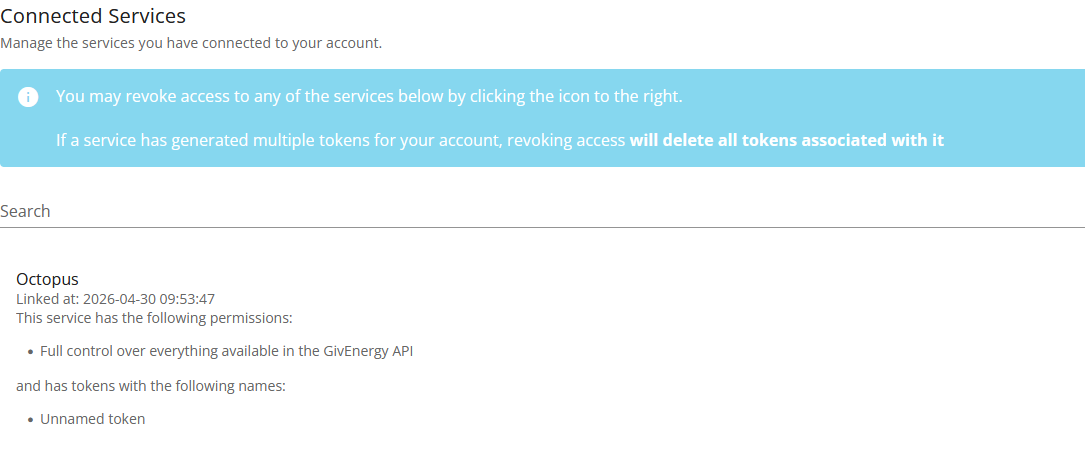
I'm on IOF - the Account Security Settings page (https://givenergy.cloud/account-settings/security) shows the Octopus access under connected services:

I cannot see anything else Octopus related. I do not know what happens if you delete it.
I would expect that GivEnergy Software Ltd would be reponsible for fixing this problem, their last email suggests as much:

With GivEnergy Ltd in administration, GivEnergy Software can only directly support with software issues – we’re not authorised to help with hardware and firmware.

The problem is how to contact them, maybe the premium@givenergy.co.uk email address would work, or you could use that email address to ask them how you can request software support.

D
#14 DD

greyseason Were you aware that GE will be charging for use of the portal going forwards (£4.99 per month I think)? If you don't intend paying this, there's no point worrying too much about the lock, since it works at the portal level.
If you do decide to pay, you can reasonably expect some support from GE to fix it. I think the first month (May) is free, so that's a chance to test the service.

G
#15 geoffreycoan

Octopus connect via Oauth not API keys, and as far as I know there is no way to revoke the Oauth key from the portal.

When people had this problem before, givenergy support had to revoke connection so I’d suggest contacting givenergy software via the premium email address if nothing else, they should hopefully be able to resolve it.