Lost comms between battery and inverter

35 comments started 2026-05-23 last 2026-05-28
GivEnergy ProductsBattery
S
#1 SharonHoneyman

System installed October 2022 and working fine until recently.
Inverter: GIV-HY3.6, firmware version D0.449-A0.449.
Battery: Giv-Bat 9.5 (I believe it’s gen 1), firmware version 3020 (didn’t update to latest as I read some bad comments about it).

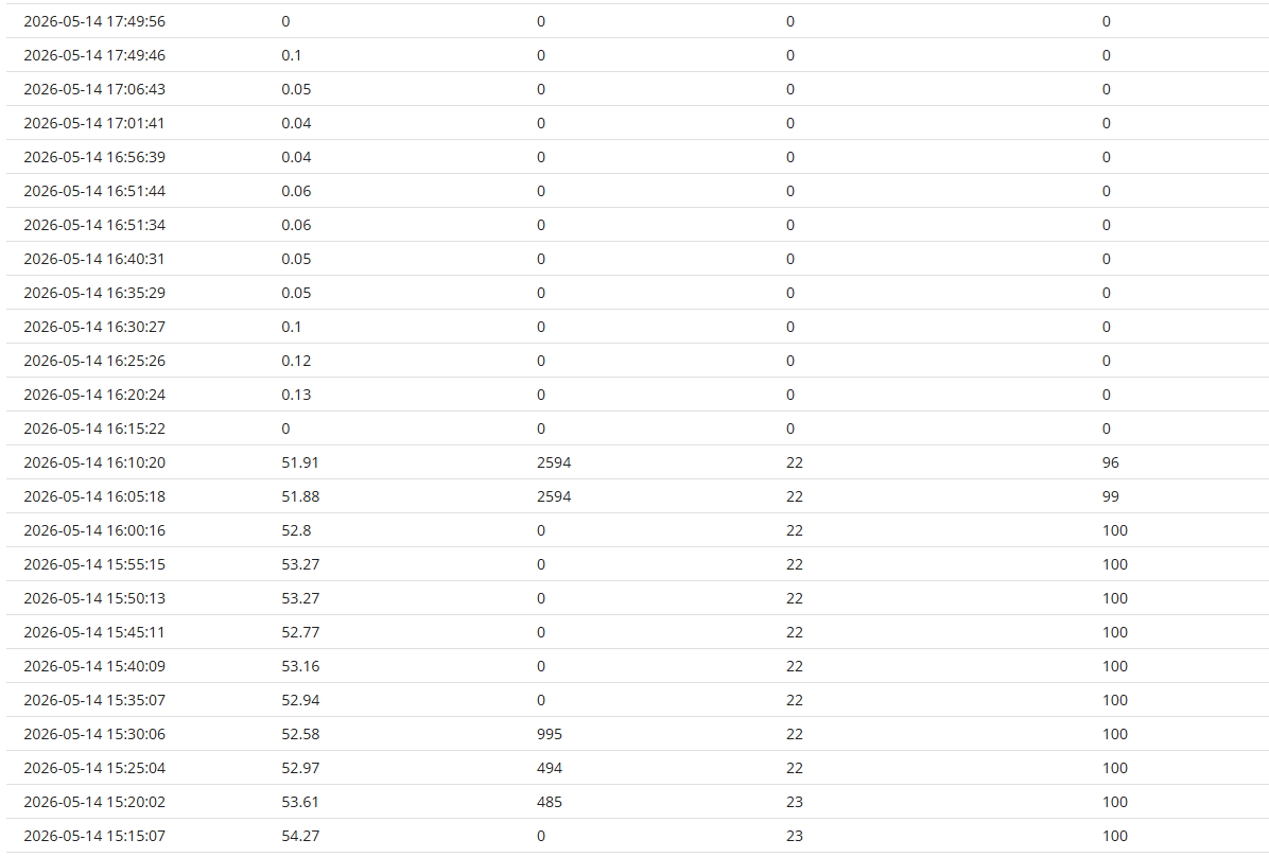
I noticed we had no export to the grid from our battery for about a week, and found from the report below that it suddenly dropped off on the 14th May at 16:15.

Headings are: Time, Battery Voltage (V), Battery Power (W), Battery Temperature (°C), Battery Percentage (%)
No error messages in the inverter portal, nor in the remote control section from what I can see.

On physical investigation, the battery itself was showing all four green lights on which corresponds to the 96% it was at before it disconnected itself, but the status light was red. We did a reboot of the battery, but when it comes on it does the “clicks of death” that I’ve read about (but don’t know what they actually mean), then it goes back to the red status light.

We then did a number of full reboots of everything in the correct shutdown and start-up order, but still get the clicks and red light on the battery. The app and web portal just show 0% for the battery.

We’ve checked all the switches and cables are seated correctly, not that they’d move as they’re very securely plugged and locked in, but it appears that our battery is not talking to the inverter anymore and we are at a loss as to what to try next. I’m well aware that GivEnergy went into administration, so have left a message for our installer company to see if they can help, plus wondered if anyone else has any tips or tricks? I do hope it’s not a hardware fault as the warranty is now worth zilch. :-(

Thanks for any help!
Sharon
S
#2 SharonHoneyman

I should also note, I did send a calibration command to the battery about 36 hours ago but there were no changes in the lights on the battery as I assume there's no comms getting through for it to do the calibration.

S
#3 SteveCook

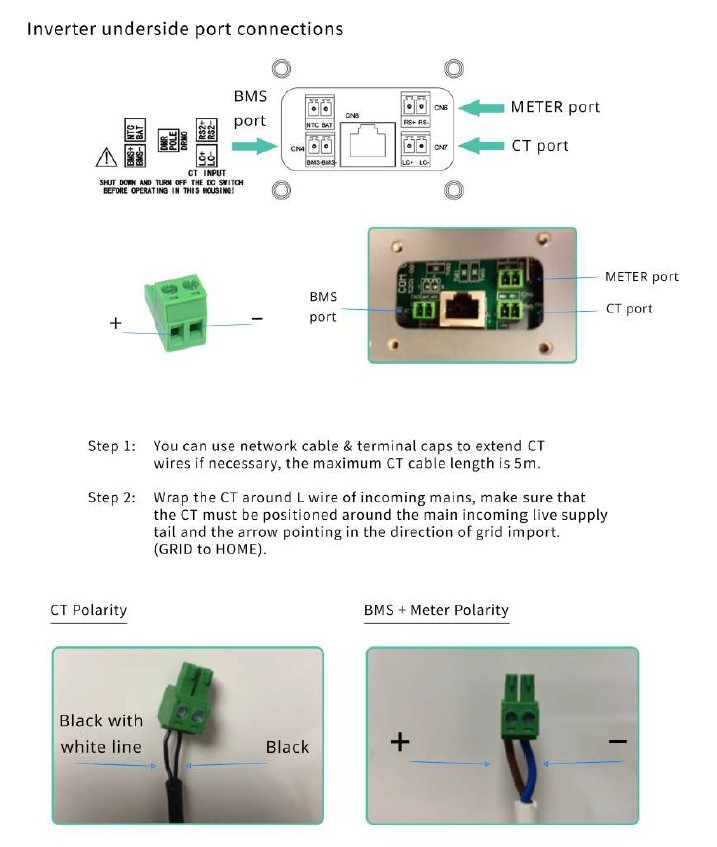
Has the BMS cable from the battery fallen out of the port on the underside of the inverter. I don't think the plugs a locking tab., like an RJ45
On my Gen1 Hy 5.0 , the plug fell out of the bottom of the inverter.
The port is on the underside of the inverter concealed by a black plastic boot held in place by 2 philips screws.
There were no cable clamps or anything to take the weight of the cable.
All fixed up with some proper clamps now and been fine for 3 years.
Before plugging/unplugging anything, i think it is advisable to shut everything down fully

M
#4 M_J

SharonHoneyman but it appears that our battery is not talking to the inverter anymore and we are at a loss as to what to try next.

Actually it could well be talking but the red error lights are a safety shut down feature if the inverter is not operating correctly.

With the batteries isolated from the inverter when you turn them on do the status lights on the battery stay green?

By isolated I just mean turning off the power isolation switch between the batteries and inverter. Obviously turn off batteries before throwing that switch.

By doing this you can see if it's an inverter issue or a battery issue.

I would also spend £10 on the Android Inverter App as that gives you access to error messages deliberately hidden by GE. This will help explain why it's going red.

If the inverter has failed then it needs replacing which your installer might do if you can source one?

R
#5 Rubikcube

M_J spend £10 on the Android Inverter App as that gives you access to error messages

No need to spend anything, the error messages are available in the free version.

S
#7 SharonHoneyman

M_J
Thank you for this advice - we isolated the battery from the inverter and when we switch the battery back on the status light goes green.
Next stage was to download the Android inverter app, but we don't have Android devices in this household (d'oh!) so I've had to download it to the Blue Stacks app player on my laptop.
I don't know where to find the logs though, so can someone help me out here? Not sure if it's because it's not on a proper Android device, or am I missing where to look? I've tried clicking on the Errors section.

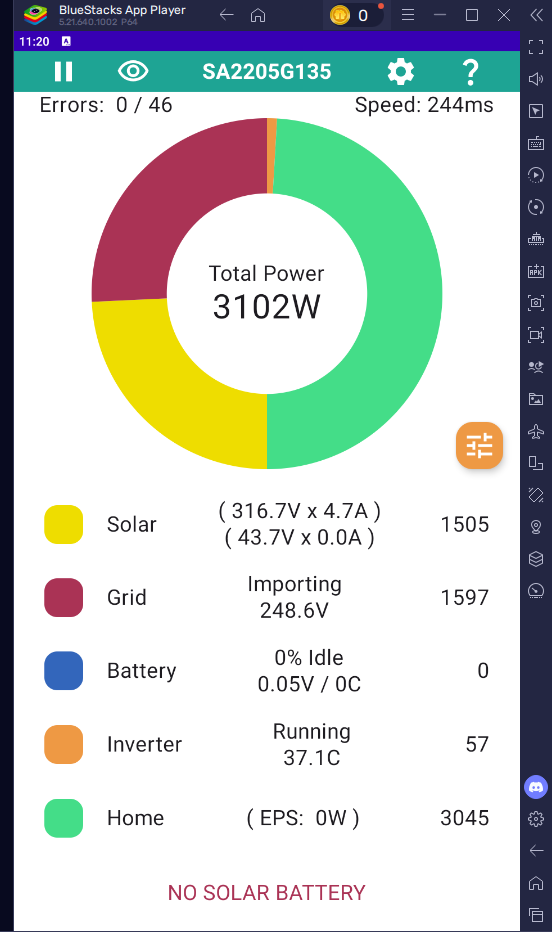
The main screen shoes the battery in the list, but then says "No Solar Battery" at the bottom.

S
#8 SharonHoneyman

Rubikcube
Many thanks! I've had to download to the Blue Stacks app player on my laptop as we don't have any Android devices. I can't see where to get into the logs, please can you advise? I tried clicking on the Errors section but nothing happens.

S
#9 SharonHoneyman

Ah wait, I think I have found it. I have turned on "Collect Stats" in the settings, so now I have extra menu options. The log shows no faults yet, but the battery section is still saying no battery connected.
Next stage, we will power everything down again and check the cables under the black boot covers, as suggested here too.

R
#10 Rubikcube

SharonHoneyman Well done, you found it. Leave the app running whilst you turn the battery off and back on. See if anything turns up in the fault log.

S
#11 SharonHoneyman

SteveCook
Thank you - we turned everything off and checked the comms cables under the black boot cover.
Firstly, the BMS one did look a bit untidy so we re-seated the brown and blue cables into the green plug. Secondly, the CT one wasn't "clicked" into the port, so that got pushed in properly.
However... still no change once everything was fired up again.
Maybe the CT one was unsettled by us fiddling around, but we're still back to square one with no battery.
I'm hoping our installer can help when they're back in the office on Tuesday, but still open to any other suggestions!

M
#12 M_J

SharonHoneyman if the battery packs stay green when not connected to the inverter it would likely indicate an inverter issue.

I had a similar issue to you and I created a long thread on it if you search on Red Light.

Ultimately I had the inverter replaced by GE.

You should be getting an error message and as I am currently traveling I can't easily explain where you will see that. Double check because it should give you a clue...

If it's the inverter and you want to keep the system a replacement inverter will be the easiest solution as it will be just swapped and an hours work at most...

It's a tough call though as choosing to stay with an end of life system? If you can pick up a cheap inverter it might be worth the risk?

R
#13 Rubikcube

SharonHoneyman
Does the battery still have a red light?
After you turned the battery off and on did anything show up in the fault log?

S
#15 SharonHoneyman

M_J

Thanks - I've looked through your threads but can't find the specific one on Red Light, so any pointers when you're able to would be great.

I do have the Android app running locally on my laptop (as don't own Android devices), and there's nothing appearing in the fault logs, even when I switch the battery off and then on again while the app is running. But I guess that's because the app is saying "No Solar Battery" on the main screen, plus "No batteries detected yet" on the battery screen, hence no logs from it.

Good point about perhaps replacing with a different inverter - but we are linked to Octopus (they normally control it for us) and I know they only link to specific ones. It's currently "unlocked" so we can reboot and try various things at the moment due to the battery issue, but normally it's locked down in the app.

Guess I can ask them which other inverter will be compatible with our tariff.

S
#16 SharonHoneyman

Rubikcube

Yes, battery still has the red light. Nothing showing in the fault logs in the app, even when switching battery off and on again with the app running. App says there's no battery connected.

R
#17 Rubikcube

SharonHoneyman
It looks like the battery has failed.
To test the battery on it's own, hold the black button on the right hand side in (for a few seconds) until the battery turns off. Then open the clear cover on the left hand side and push the green isolator down. Hold the black button on the right hand side in until the battery turns on. If the battery still has a red status light, then I think the battery is broken.

S
#18 SharonHoneyman

Rubikcube
Thanks. That was another suggestion above and it did work on its own.
We isolated the battery from the inverter and when we switch the battery back on the status light goes green. If we try it when connected to the inverter it starts off green then does the clicking sounds and goes red.

R
#19 Rubikcube

SharonHoneyman
In that case, I change my mind, and I think the Inverter has failed.
Doesn't make much difference. See if your installer can help next week.

G
#20 geoffreycoan

SteveCook Thanks for posting this.

Last night I was doing some work on the wiring for my inverter and had powered it down. When I followed the startup procedure, turned the battery on, green lights, got the battery click of death, red light, battery turned off.

Tried several times, same thing each time. Turned the battery breaker off, turned battery on, stayed on.

All of which indicates failure of the battery and inverter to talk to each other, usually BMS motherboard failure.

Reading the forum last night I saw this article. This morning checked the portal and it showed a number of BMS communication failures that has subsequently been cleared by themselves.

Carefully unscrewed the cover under the inverter, pulled it down holding the wires in place so they didn’t pull down any more, and through the gap I could see the BMS plug on the left. I gave it a push and it pushed further into the inverter socket.

Turned the battery on, green lights, all good. Battery lights back on the inverter, SoC, cell voltages, temperature, etc all reading fine in givtcp.

Phew. I couldn’t believe my bad luck with the inverter failing, but it hasn’t. Just the stupid wire came loose. I had this before years ago and added cable ties to support the cables so they didn’t fall out naturally, but with finding the issue last night I didn’t think of this.

Thanks

S
#21 SteveCook

geoffreycoan
For mine when this happened, I took the shroud off, pulled about 12" of cables inside the shroud, doubled them over, wrapped tape around them and pulled them back into the taper of the shroud so they jammed leaving enough slack for the plugs to be pushed in. Refitted the shroud and all been good for 3 years. Now if the cables do get pulled, the force comes onto the shroud, the bunched cables and the philips screws - NOT the plugs.

Glad all working

W
#22 wrighar

I had my inverter replaced mid April due to the click of death.
On installing the new one we still had the click of death,
On removing the battery front cover, we tapped the big cereamic resister in the middle of the BMS board (only used on startup) and it all started working.

Premise is the broken inverter stressed the BMS soft start over several days trying to restart every 30minsand caused a dry joint on the resister.

Apparently it's 'known'

S
#23 SharonHoneyman

Aaaaggghh!

Even during the frustrating battery issue, we were still getting solar power to the house. Up until a couple of hours ago....

We had a battery firmware update waiting in the portal which I hadn't done as previously read bad reports... but... I thought how much worse could it be if I did update the battery firmware. So, I requested the battery firmware update, but it has now wiped out our flipping solar import.

This happened right at the time GivEnergy switched over their app & web portal to the premium version. Great timing, huh?!!

Obviously don't need it for local, but I signed up to get the full app working again to see what's going on. Still no solar energy coming in, even with the battery off and isolated and everything restarted.

Is this a new app/software issue, or is it our inverter giving out bit by bit?!!!

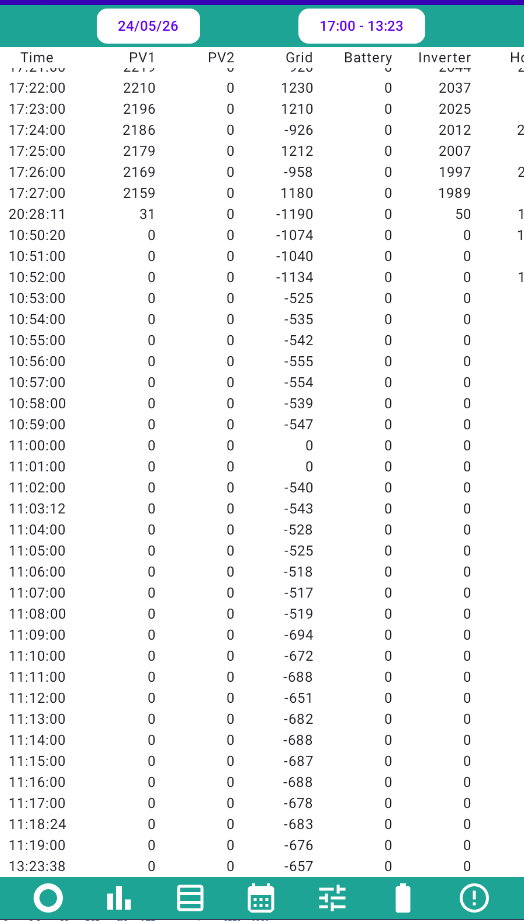
The data from the wonderful (and free) Android app shows the following: (only started up on my laptop at 10:50 this morning as I don't have an Android, hence it's not running all the time. Also stops recording data when my laptop goes to sleep)...

R
#24 Rubikcube

I think that trying to update battery firmware if you don't have a battery will brick the inverter.

Turn off the inverter AC and PV.
Remove the dongle.
Insert the dongle into a laptop.
Remove all files except msn.txt (you should see .bin files I think)
Safely remove dongle from laptop.
Put dongle back into inverter.
Turn inverter back on.

Good luck.

G
#25 geoffreycoan

geoffreycoan Further update on my inverter.

Having fixed the problem of the battery not powering on due to the BMS lead coming out, last night I continued with the work I needed to do moving the DC and AC isolators, I finished it all and powered the inverter back on, only to find exactly the same problem with the battery not talking to the inverter; a series of clicks from the battery that then shuts itself down.

Double and triple checked the BMS plug, definitely plugged in, and to prevent gravity strain on the cables I’ve pulled some more through into the cable housing.
But no, not working.

And also stopped working, the inverter reading grid power via the CT clamp. In the portal I see two notifications for ‘meter communication error’ and ‘meter communication failure’ and am now not getting any reading of grid power on that inverter.
Double checked that the CT clamp plug is in the correct socket, it’s in the right hand front one which is labelled ‘meter’ on the installation guide; not the rear CT one. Pretty sure this has caught me ought before.

So that was last night, I left it with no battery on and no grid power.

This morning, solar generation has started, went to the inverter, tried turning the battery on, and it came on straight away and the inverter is happily talking to it again.
So why I don’t get the click of death when the battery is turned on and solar is being generated but I do get the clicks and battery won’t talk to the inverter at night when there’s no solar, I don’t know.

One issue down, one to go.

Still got the meter errors in the portal and grid power not working on the inverter. Double checked the meter plug against my other inverter, and it’s definitely the right front plug it goes into. Did try on the rear one just in case but no improvement. Rebooted the inverter, same thing.

Looking at the remote control history in the portal (am so glad that is still available even without premium subscription), I see lots of messages about the battery from last night, but can’t see anything related to the meter or meter configuration.

Any ideas?

T
#26 TX200

geoffreycoan I had what I thought was the click of death after a firmware update.

I'd previously had a click of death on my old AC3.

But this time it wasn't what I thought it was. And Paul helped me get the system back online. Never had the issue again, touch wood.

The advice to get it working was something like this: ensure AC side of inverter was off, ensure PV isolators off, turn on the battery breaker, turn on the battery. Wait for the inverter to power up. Turn on the PV input, wait a few minutes, then turn on the AC input to the inverter. It did the trick for me.

S
#27 SharonHoneyman

Rubikcube
Lifesaver! We are now back to receiving solar power again.
Still no battery working, but glad to have something at least!
Thank you ;-)

V
#28 Vestas

geoffreycoan I dunno, is it some sort of mission you have to explore all the failure modes of your kit? 😃

TX200 's suggestion might actually work. I had a "stuck" system (no clicks) some time ago on production f/w where that sequence (inadvertantly - I got the power-up sequence wrong) worked.

S
#29 SharonHoneyman

TX200 The advice to get it working was something like this: ensure AC side of inverter was off, ensure PV isolators off, turn on the battery breaker, turn on the battery. Wait for the inverter to power up. Turn on the PV input, wait a few minutes, then turn on the AC input to the inverter. It did the trick for me.

We tried this sequence but the battery is still doing the clicks of death and going to red status.

The main assumption for our issue is that the battery board within the inverter has failed, but with no warranty due to GivEnergy going bust, we're stuck with a (likely healthy) battery that does nothing for us.

We don't really want to replace the inverter as the house is up for sale, but if there's a fairly reasonable hybrid inverter out there then we may have to bite the bullet. Does anyone know of an alternative to replace a hybrid gen1 inverter?

T
#30 TX200

SharonHoneyman contact your installer if they are still in business. That's who you presumably bought the system from, so that's where the contract is. Sales of goods act, reasonable quality etc etc.

V
#31 Vestas

SharonHoneyman You'd need to buy a used Gen1 inverter as you can't commission a new one.

The labour costs of fitting/testing are pretty high so if you I'd be inclined to replace inverter/battery with something like Fogstar battery/compatible inverter - cheap & does the job fine.

Otherwise you'd have to negotiate a discount with your buyer. Nobody wants to buy a house where the PV system doesn't work.... 🙁

S
#32 SharonHoneyman

Vestas Nobody wants to buy a house where the PV system doesn't work....

The PV part is working, it's the battery that isn't. Or rather, the inverter is not talking to the battery.
We are getting solar energy into the house/grid, we just can't store it anymore.

V
#33 Vestas

SharonHoneyman Sell it that way then, but be aware most buyers will want you to remove the battery. That's your cheapest option.

Do remember to update the estate agent if battery storage was mentioned.

Edit - it probably won't drop the sale price anyway as the system is effectively worth zero with no manufacturer/installer support (like all GE systems).

G
#34 geoffreycoan

geoffreycoan I got the grid power working again last night, I think its either a break in the meter cable or dry jointing on the pins underneath the inverter. A bit of wiggling the cable and it suddenly started working again.

I’ll do some more investigation and if need be change the cable.

@SharonHoneyman if you are still getting the clicks when you try to power the battery on, I would firstly check the BMS cable. Turn the battery off, unplug the data cable from the bottom of the inverter and check the cable connections into the green plug. Is the cable crimped on insulation?
You could disconnect the cable from the battery end (will need to take the battery cover off, its just terminated on two. screw connectors inside) and then do a continuity test on the cable to see if its broken inside

D
#35 duplada

geoffreycoan You are relentless, Good Work 🥳