Setting schedules

31 comments started 2026-06-01 last 2026-06-03
Mobile App
E
#1 Eric22

Hi, I am trying to set a schedule on my inverter both using Dashboard and Direct control in the iOS app with no luck (not premium). This simply means I have no control over the inverter in terms of scheduling.

  1. via Dashboard, if I set a schedule manually and apply it, it gets reset the next day. Useless šŸ™
  2. via Direct control to set inverter parameters. After setting one schedule slot and apply it, it tells me it can’t apply it (no validation error as it is via number input in the form so I assume something is wrong)

Any thoughts?

Eric

#2 Maxwell

@Eric22 Have to tried the BBC inverter app, not sure it that supports your scheduling needs. That works on IOS.

D
#3 DD

Eric22 The app has a 'smart scheduler' slider at the bottom - I assume you haven't turned that on? I can't think what else would change any settings without your involvement. Unless you used to have smart scheduling enabled on the portal (or any other external agent) before things went premium, and that's still active ? (I think I read that the API continues to run for a week ..?)

What is the schedule you're trying to set, and what sort of GE system do you have ?

M
#5 MerseyRider

Eric22 I've been experiencing similar issues since Friday, 29th May; noting unxplained resets to a 'timed charge' session on consecutive days. The logs show these changes were made by 'SERVER'. I will continue to monitor the situation and report back here once I have a clearer line of sight on the issue.

[Operational background] I have a Gen3.6 inverter and a 9.5kWh battery. I've configured HA to read data, but stopped short of full API integration. On 29 May I confirmed Axle integration for 'Events Only' and there have been no notifiable events. I use the GE app to manage battery scheduling via local network, but not configured 'Smart Scheduler' via the cloud. I also employ 'Inverter Monitor', but have not used it recently.

More to follow...

E
#6 Eric22

Maxwell I have. I was on the impression that it is ā€œread-onlyā€ but now that you have mentioned, I’ve had another look and it seems it can write too. I’ll give it a go.

E
#7 Eric22

DD I haven’t enabled the smart feature as it is a premium-only feature. However, I used to have smart scheduling in place but interestingly my current schedule is not what I expected and had before. I haven’t checked the online platform since recent changes but will have a look.

E
#8 Eric22

MerseyRider I have the same setup. I’ll keep an eye on the settings and will update here if anything changes.

I
#9 IJKIJK

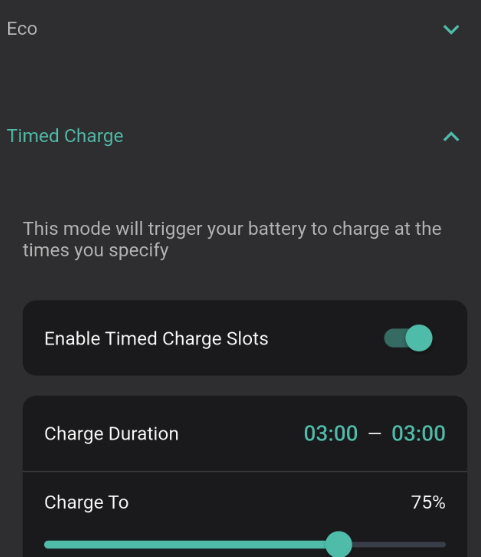
I am on the premium trial and for the last couple of nights my schedule has reset itself at 3am. I go to bed and Inverter settings are set for a timed charge between 00.30 and 05.30 Charging starts but stops at 3am and my screen looks like

I reset this to 00.30 and 05.30 and same thing happened following day. Is it a problem with smart scheduler (I have toggled ON )

D
#10 DD

IJKIJK

IJKIJK Is it a problem with smart scheduler (I have toggled ON )

I would assume so. Do you actually need smart scheduling?

M
#11 MerseyRider

IJKIJK it's reassuring to see someone else experiencing the same issue!

I note GE created a 'Known Issue' on 1st June which seems to cover our issues, so worth following their progress...

Meanwhile, I'm happy to report my 'Timed Charge' schedule was unaffected last night, but I remain vigilant.

D
#12 duplada

I would never trust any GE software for scheduling. I use Wonder Watt for that, it costs but it is good and works amazingly well with IOG automatically scheduling charges for bonus IOG slots.

I
#13 IJKIJK

DD

No, Just I thought needed to use the scheduler. Have now turned it OFF and see what tonight holds...

D
#14 DD

IJKIJK If you're on IOG, I guess you might hope for the battery to respond to bonus charging slots, but not sure if the GE software can actually do that yet. (And it's awkward basing it on the Octopus schedule, since that often changes at short notice - I now base it on whether the car is actually charging or not.)

I
#15 IJKIJK

DD

I only need OG to charge my PHEV and Battery at cheap rates as I benefit from the 2010 FIT scheme until 2036 and no incentive to manage export (as FIT assumes I export 50% at 5.25p)

D
#16 duplada

IJKIJK Well usually if you are on the FIT 2010 scheme as I am when I reported that I had had a battery system fitted, they want to you off deemed export at 50% and onto a actual basis as recorded by your Smart Meter. I switched and now enjoy 12p per kWh instead. I pause the battery @ 9:00am every day until 7:00pm no point in storing power I can get paid for.

T
#17 Tabulous

MerseyRider did you sign up to Axle ? if so it is them switching it off

M
#18 mikes01666

I'm using the Buy/Sell/Use buttons at the bottom. Appears to be working OK. AIO1 and Gateway.

I
#19 IJKIJK

Tabulous

I did not sign up to Axle

I
#20 IJKIJK

duplada

My installer said no need to change anything ...... I also use c20 kw outside the offpeak hours as wife likes the hot tub hot !! so have little to export anyway.

D
#21 duplada

IJKIJK Well you have to tell your FIT supplier if you have a battery system fitted. It is part of the rules of having a FIT each time you submit a reading there is usually a box saying has anything changed. You are obliged to tell them or you are in breach of your FIT agreement. It is at the point you tell them about your battery they want you off the deemed 50% and onto an actual reading.

M
#22 MerseyRider

Tabulous Yes I did sign up to Axle on Friday 29th, but only to 'Events Only', so I'm not expecting them to manage scheduling outside of such occasions.

I'm game to watch and wait and build up more history / evidence and to see if GE resolve the 'Known Issue' they reported on 1 June

T
#23 TX200

duplada does it depend on wether it's a standalone AC3 inverter and battery vs. a replacement hybrid inverter?

F
#24 ForzaFRZ

I have this same problem. 🧐
Scheduled charge slots I added to the inverter from 2330 to 0530 keep disappearing! Wake up the next day & no charge has been added during that time.
Has been like this for 2 days now. 🤨

D
#25 DD

ForzaFRZ are you on axle and/or premium? Have you enabled smart scheduling on the app? Have you checked the activity log on the portal?

D
#26 duplada

TX200 It doesn't matter what you have changed you have to report it.

D
#27 didgesteve

IJKIJK Do you have 'ECO Scheduling' enabled on the home screen. I have exactly the same problem as you. I reset the charge times once, then it happened again last night. Today I have turned of the scheduling, see if that makes a difference?

D
#28 duplada

I don't let any GE software schedule my system I use Wonder Watt far superior but you have to subscribe, but you can get a free trial.

E
#29 Eric22

Eric22 I can definitely confirm that my schedule keeps changeing even if I set it via another app. I don’t see anywhere on the cloud (not premium user) either to change anything relevant to schedules which I am allowed to do. Certainly, something behind the scene is setting the inverter’s settings. Within the GE app itself, setting the schedule only lasts a day and resets to some default settings afterwards.

I
#31 IJKIJK

didgesteve

Yes I have ECO scheduling enabled. Charging worked OK last night with the smart scheduler OFF

J
#32 jonnycrh

When the "known issue" is fixed, will we be getting a refund or compensation from GE for the missed opportunity of exporting solar generation during the day because it is filling up our empty batteries which were not recharged during the night?