
WTF??

24 comments started 2026-06-04 last 2026-06-14
GivEnergy ProductsBattery
I
#1 IamFof

When GE have brought in their new paid-for-system, they stated that it would NOT affect local operations.
What a load of crap.
I am with Octopus and when ever they gave me "free" power, I could, via My Inverter, prevent my battery from powering my home. thereby making maximum use of the free electricity.
This facility is now non-operative, unless I pay them.
As far as I am concerned GivEnergy are just an absolute crock of shit

D
#2 duplada

IamFof Agreed 100% they lied to me about free access for my system, as I cannot get local control. When they locked everything down, guess what no free access as promised. I will never trust another word from them. They are no better than the scammers who daily try to fleece you.

D
#3 DD

IamFof I could, via My Inverter, prevent my battery from powering my home. thereby making maximum use of the free electricity.
This facility is now non-operative

No, should still work, using timed pause or by setting discharge power to 0, or turning off eco. Or even setting up a timed charge. All available with local access using the GE app.

I
#4 IamFof

DD
I don't use the mobile app. I use a laptop, though that SHOULDN'T make a difference. Ha! Ha!
Thanks for the suggestions. I'm expecting free pwr soon, so I'll see if they work.

K
#5 killythebid

IamFof

If using the browser dashboard on a PC you should still be able to control the inverter (locally) for free. You need to select the inverter card and go to the remote control section from the drop down menu.

I
#6 IamFof

killythebid

Thanks for the suggestion.
The only option I can see that would appear to prevent the battery from powering the house, "Enable DC discharge", when turned off, states "Subscription required".
Am I trying the wrong option?

#7 Maxwell

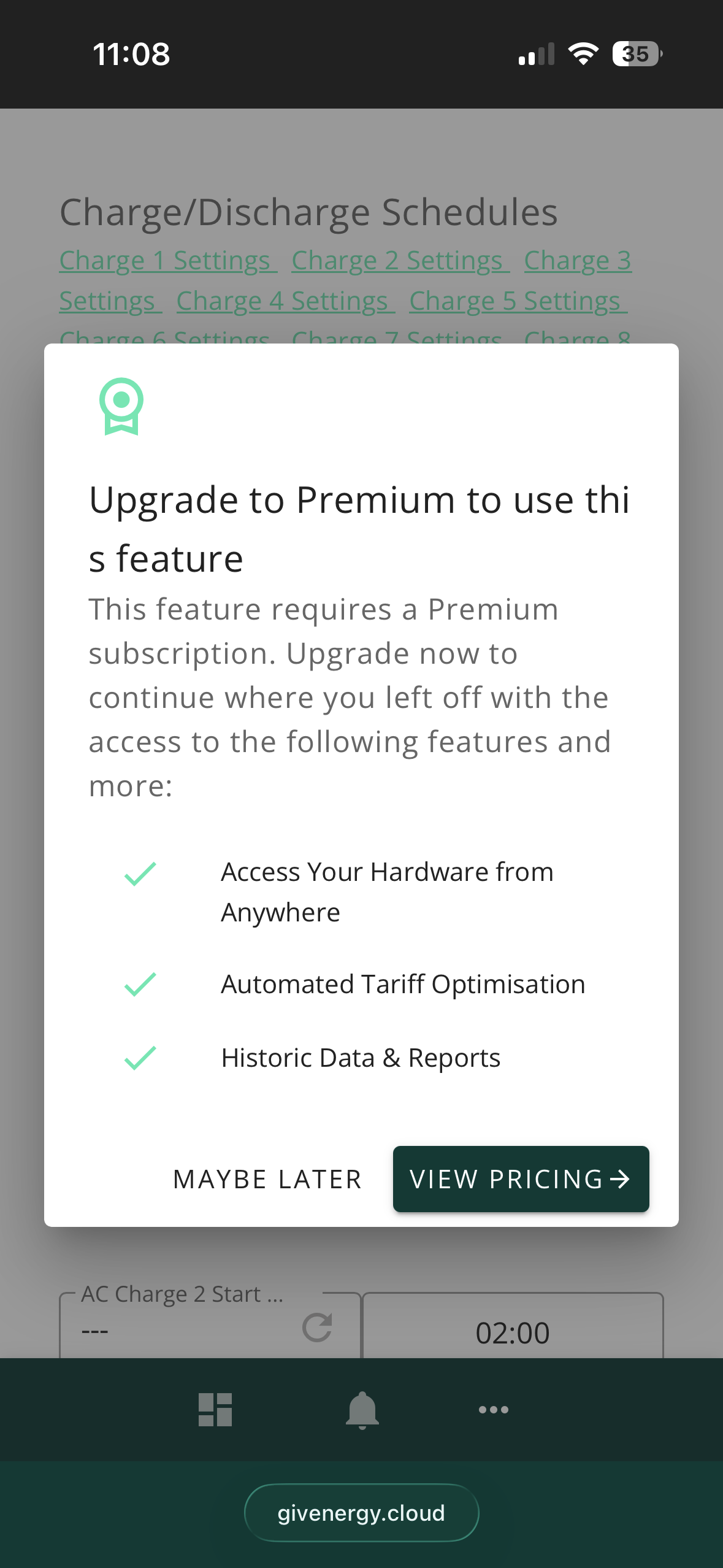
killythebid If you are on the free tier you can’t use your pc browser to change inverter settings using the old ge cloud, see image below when I tried to change my battery ac charge slot times from the browser.

If you want to use a browser for local inverter control you will have to be using some other type of local control (eg givtcp, HA etc)

The ge app even on free tier allows you to do local control (where your app device and inverter are on the same ip subnet on your home network)

S
#8 s125

IamFof You can't get free local access on a laptop, or not on a Windows 10/11 laptop. That is what GE software told me. And as owners who don't use the phone app and rely on a laptop are a minority, they don't intend at this stage doing anything to rectify the situation for us laptop (big screen!) users.
"Any phone or tablet released in the last 7 years should be sufficient."
My very IT savvy friend tried with a phone 5years old, and it wouldn't connect. That was before the premium option came in.
Don't know what happens when your phone or tablet ages to 7years old!
I bought a HA Green and have it set up with GivTCP following STTG video. At least I can still see the screen and use a mouse to control my battery using that system.
I also want to be able to make the most of Octopus free electric hours on Flux and don't want any third-party or app deciding when to export from my battery.
I still have the ten charging and export time slots on GivTCP. Though export is called discharge.

P
#10 Paulsimmons

Interesting use of BBC basic !

M
#12 Mark7

hoggy I have found the BBCBasic to be an excellent app. It is free but it is only available for iPhone. It also loads way faster than the GE App!!!

IamFof I believe it will do all the things you have asked for.

#13 Maxwell

Mark7 According to the website there is an Android version. I don’t seem to be able to upload a screen shot at the moment or I would show the table from the web site.

M
#14 Mark7

Maxwell my mistake. I can’t find it on the Australian google play store. Maybe it’s only available on the UK one.

#16 Maxwell

Mark7 Struth, that fella has no strides on 😉 (other beverages are available)

M
#17 Mark7

duplada many thanks. That is very comprehensive!

I
#18 IamFof

Mark7 Thank you.
As you suggest, this would appear to do what I require.
Brilliant.
Thanks also to Mr Russell.

Maxwell
Likewise, thanks for the link.

A
#19 AnonymousHooman

BBC Basic app works fine on Android. I didn't realize until tonight that it gives you free control too. All versions are linked to from https://www.bbcbasic.co.uk/inverter/index.html

If you avoid google play it's also on the Aurora Store.

S
#20 steve99

s125 I don't know your level of tech savviness nor whether you've already tried this, but I use the predbat app (i.e. add-on, not a phone app) in my Home Assistant and it controls all the stuff for Octopus saver and free sessions (as well as its core purpose of running a PV and battery system efficiently). It's a long time since I installed it but as far as remember it just worked out of the box. I have tweaked its configuration to prioritise self-sufficiency. The only downside is daily or more software updates, but if I found those irritating enough I'd set it to update itself automatically.

Saver and free sessions can also be done through HA automations of course, and even manually, but I like that I can just leave predbat to get on with it.

Sorry if this is Grandma and eggs territory.

Steve

J
#21 johnny5

My inverter is on a separate wifi from my home so i have no access at all on any app to do anything, perhaps need to ask GE for all my money back

S
#22 SteveCook

johnny5
Dont know who you would ask. They have gone into administartion.

#23 Maxwell

johnny5 Have to tried changing the WiFi ssid that your phone connects to and select the same one that your inverter is on. If that is something you don’t know how to do then perhaps you can ask your installer to come round and sort your connection out.

T
#24 T-M

johnny5 You would need to get in touch with the GE administrators and get in a long line for any chance of a payout. If you paid for some or all of your system using a credit card you might have a chance getting your money back from them.
Do come back here in a few years time and let us know how you got on 🙂
