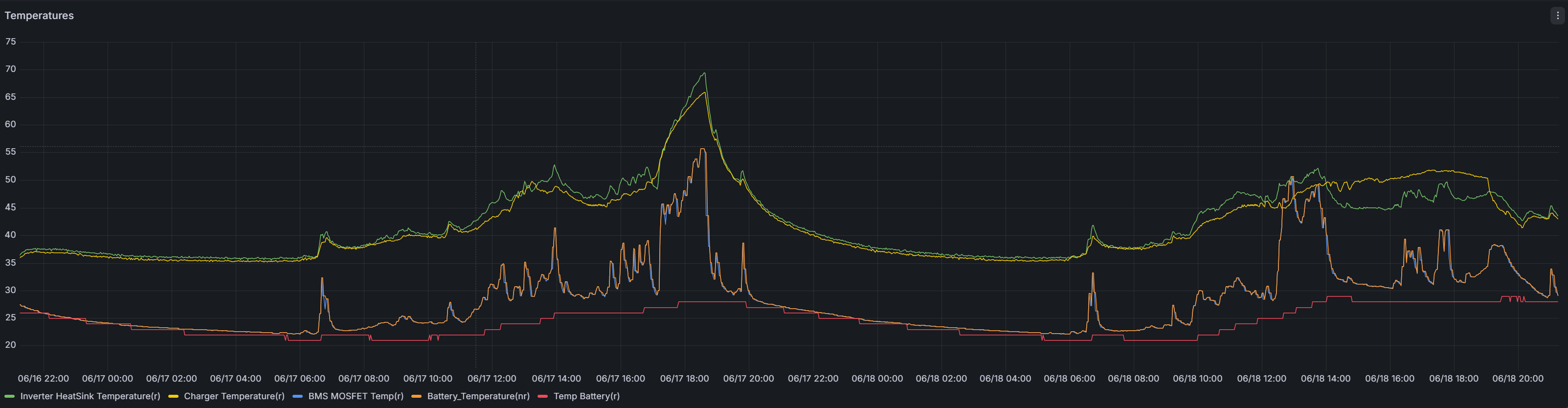
Inverter & charger temperatures

40 comments started 2026-06-18 last 2026-07-29
Mobile AppGivEnergy Products
D
#1 Dabz

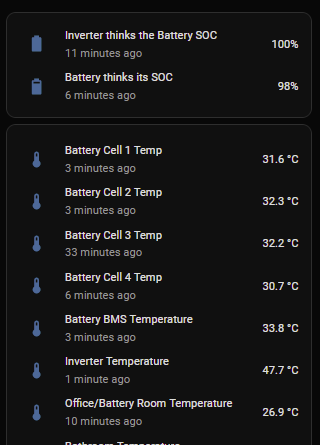
In the Read Only part of Direct Control, it shows our inverter at 55.5 degrees, battery 25 degrees (which is realistic - it's in the loft and it's hot today) and charger at 55.1 degrees. The charger is in a cool garage and is room temperature to touch.

Is anyone else getting temperature misreports or high readings on their inverter/charger?

Z
#2 Zaz

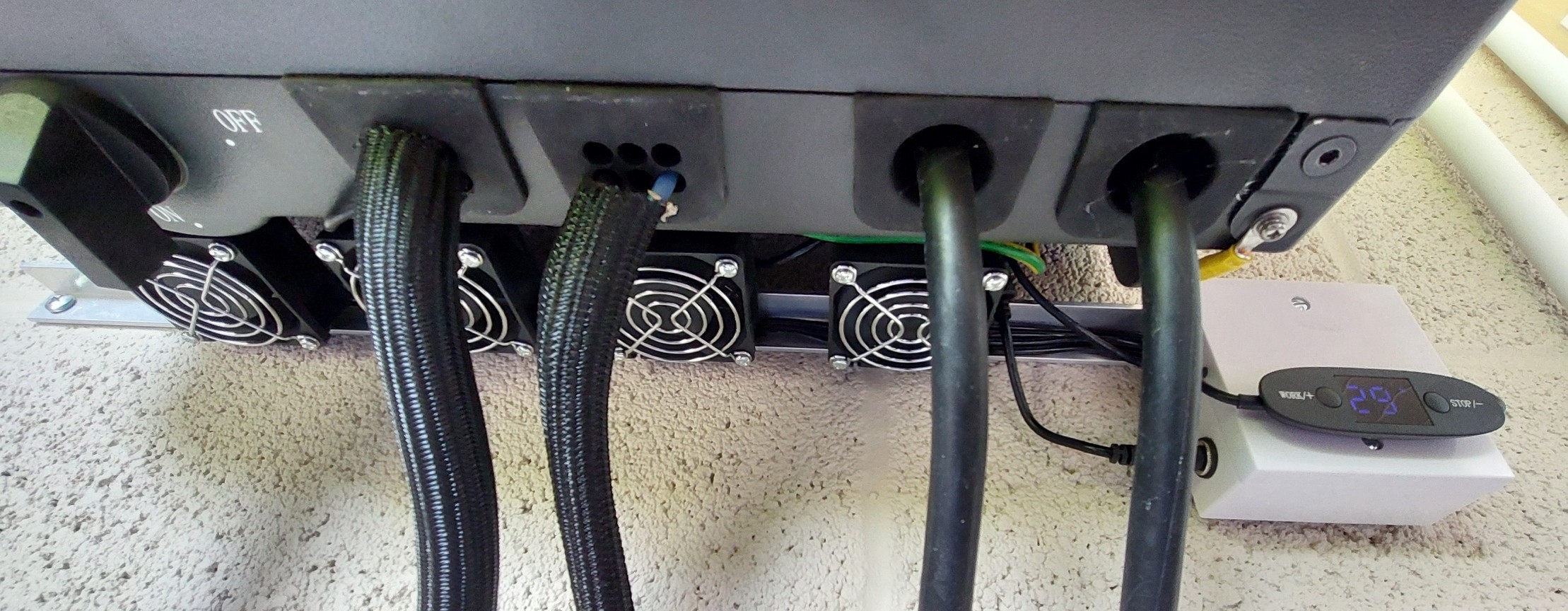
My gen1 battery and inverter are in the loft and in warm sunny weather have got up to over 60C for the inverter, 50C+ for the battery main temp and up to 30C for the cells. I now have a set of fans on the bottom and top of the inverter which keeps it below 50C so far this year. I don't have a charger to compare I'm afraid.

D
#3 Dabz

Zaz mine get very hot too, but right now the garage where the EV charger is is actually cold, yet it shows as 55 degrees. Just wondering why 2 of 3 temperature readings would be wrong

S
#4 SteveCook

The battery is sitting there doing very little. The inverter is probably doing a lot of "work".
I don't think readings are wrong, just that they will no/do not have to be the same as they are doing different things.
According to the portal, my battery is currently 28degC and my inverter is at 43degC

A
#5 Andrewz61

Depending on the size of your inverter and the number of panels I'd say thats normal temps for a day like today, it will be working hard if not flat out for a prolonged period, mine is also in a cool garage but I've had to install cooling fans to keep it under 60, they come on at 55 and turn off at 35, during the peak they just remain on, they haven't quite got the power to cool it, they just maintain

#6 Maxwell

Quite a few temperature related registers. And today i can see the inverter temperature is lower as my little solar powered cooler fan was in action. But yesterday it wasn't as it didn't get enough solar to charge the battery to the point where the mppt tuns on the load. What is the "charger temperature" it's pretty close to the inverter heatsink ?

#7 hoggy

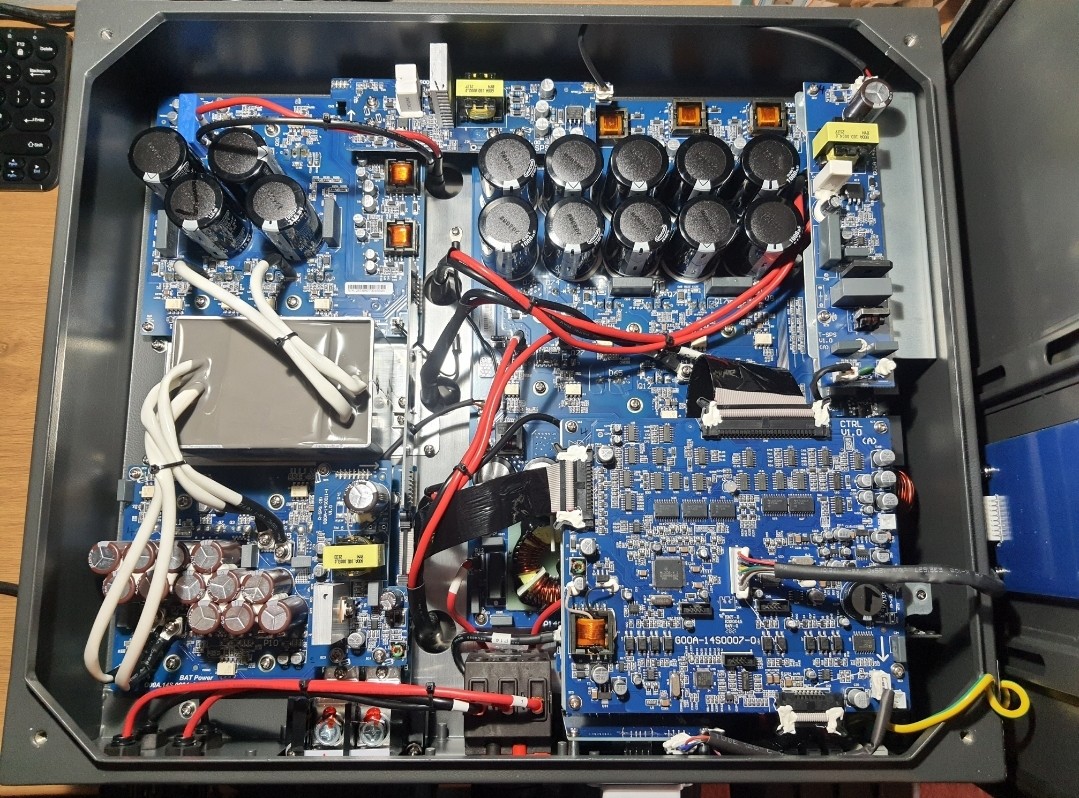
Maxwell they are pretty much measuring the same bit of metal in reality.
You can see the two sensors in the gap just to the left of middle screwed to the rear plate.

D
#8 Dabz

hoggy ahh that makes sense, I assumed Charger was the EV charger which is the other side of the house in a very cool garage. If it’s part of the inverter it makes more sense why it’s reading is so high

#9 Maxwell

@hoggy Thanks. But being so close what is difference in what the sensors are measuring and how did they intend to use the data from both rather than just one. Or is it simply a bit of redundancy ?

#10 hoggy

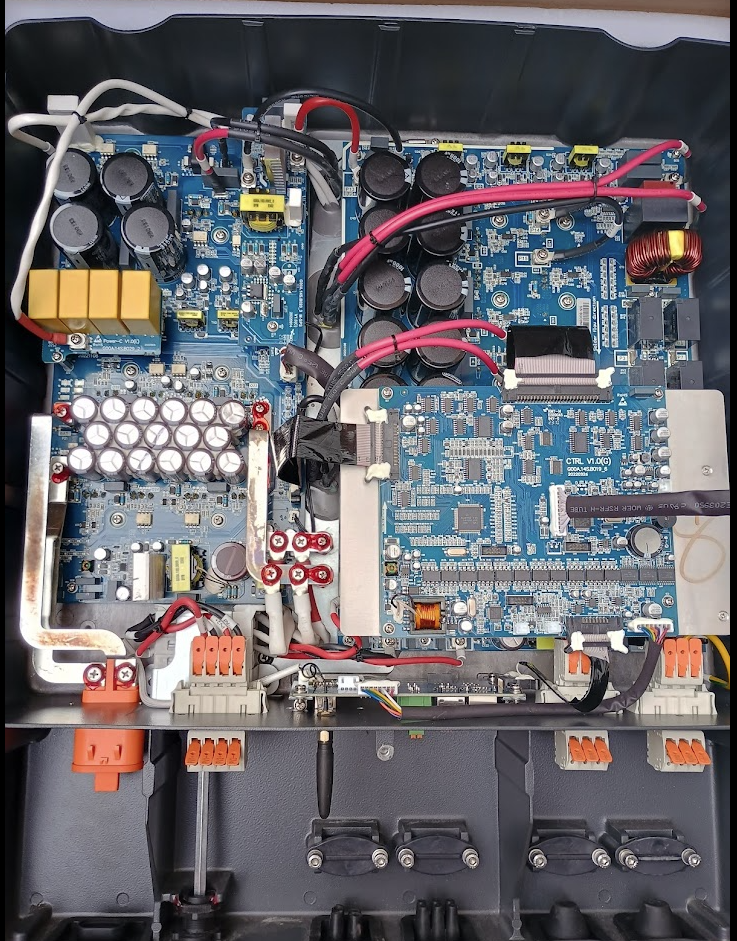
Maxwell the inductors for the battery charger and the inverter sit inside a chamber that is behind the plate (this is the big lump on the back of the inverters that doesn't have the heatsink fins on them)

Rather than put the probe in the pocket with the related charger/inverter inductor they've just clamped them as close as they can get to them. But as they are essentially next to one another and the entire thing is metal they tend to just measure within a few 'C of each other.

Each generation seems to play around with where these inductors sit. On Gen 1 they are in the middle, Gen 2 they are to the right hand side, Gen 3 I can't remember but think they ended up in the middle again?
AIO they are to the RH side...

Many years ago before Giv got really big and Gen 2 was in Dev I do remember someone on the inside saying they had a G2 on test that pushed over 4.5kW+ from battery, but it didn't seem to last long. What failed I don't know but if it's temp related it may explain why we never got more than 3.6kW out of the LV stuff.
The person left soon after so what happened to that dev unit I'll never know.

#11 Maxwell

hoggy With that level of insider knowledge perhaps you can stand up a new company manufacturing a joined up hardware and software solution. “HoggEnergy”, basic inverter models the “Hoggster”, intermediate the “HoggRoast” and top of the range “HoggInOne”. U can see why I don’t don’t do marketing 😉

W
#12 wrighar

hoggy

Slightly left of centre, but yes, middle for Gen 3:


G
#13 garycatt

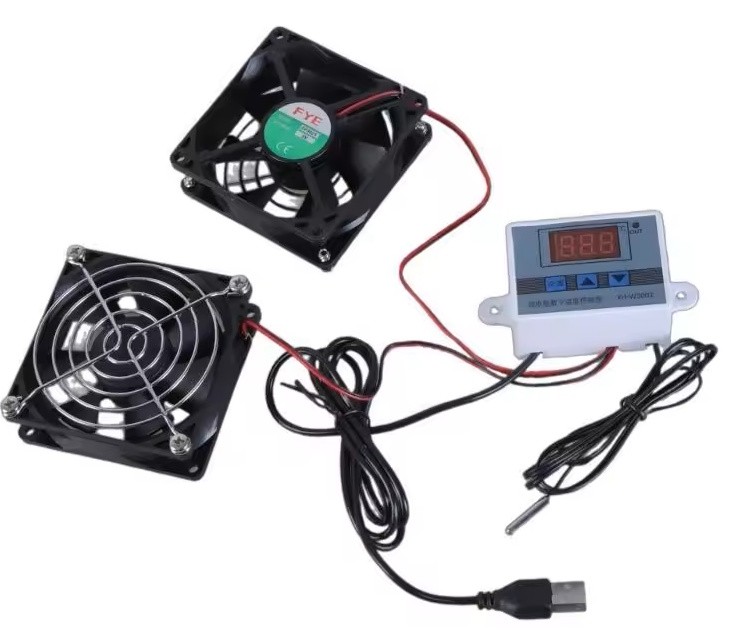
I was concerned about inverter temp last year when we had a few hot days and my inverter went to near 60C. I've since bought some temp controlled USB fans and they seem to work well just plonked on top of the heatsinks
. During the last heatwave in May, the temp didn't go above 48C. I guess it's more important now that we don't have a hardware support warranty.

https://www.aliexpress.com/item/1005008933835439.html?

D
#14 Dabz

What happens if it overheats? Does it shut down to prevent failure or just keep going until I breaks?

K
#15 killythebid

I have my batteries and inverter in the loft and a set of fans to keep the inverter cool. It's a partially sunny day and the inverter is running at 37 and the batteries at 25 with 100% SOC. The fans have switched on today but do not always. Our loft does not get too hot often cooler than our detached garage. One reason for this is under rafter insulation (Superfoil SF40) which keeps the loft cooler in summer and helps with reducing heat loss in winter.

D
#16 Dabz

How are you powering the fans?

K
#17 killythebid

Dabz They are powered from a mains plug and power block (like for a laptop) and a electronic themastat with a temp sensor clamed to the fins of the inverter. It is a setup I got from eBay. I also use a smartplug to be able to monitor it and switch it on and off remotely if required.

D
#18 Dabz

killythebid thanks, annoyingly I’d need a power socket adding to the loft to get this up and running so no chance for the coming heatwave

M
#19 M_J

Dabz if you can access the roof a small solar panel can run a usb fan.

I am using this for the garage.

A
#20 ADO

garycatt
Hi do you have the fans pulling the heat out from the top or blowing back in to the inverter
Cheers

K
#21 killythebid

Dabz Sure, remember that there will be most likely power in your loft for lighting. My fans only draw a maximum of 10w and normally 6w so certainly no more load than a light bulb.

K
#22 killythebid

ADO My fans are fitted underneath the Inverter and blow upwards through the fins. I had them initially at the to drawing air up the fins. I changed to try and see which way was more efficient. In actual fact it didn't make much difference but possibly a small increase in colling blowing upwards.

#23 Tenkaykev

killythebid
Similar experience. Had a couple of 80mm usb powered fans which just about slid under the AIO between the support feet. It was a faff trailing the supply to the nearest usb socket. Worked really well in one of last years hot spells. This year I decided to tidy up and simplify so I positioned the two fans on top of the grille above the heat sink and the cooling is much the same. I use the BBC Inverter app as well as Rubikubes excellent " Android Inverter Monitor ". You can see the temperature drop in real time one I switch the fans on.

G
#24 garycatt

My fans sit on top, suck air up through the fins and are powered by a nearby socket with USB outlets. Peak inverter temp yesterday was 48.6C with outdoor temp of 33.6C

V
#25 Vestas

I'm sure I've said it earlier in this thread/others but most fans are not designed to suck air - they are designed to blow air and there's a big difference between the designs (in cost as well).

Fans positioned appropriately at the bottom of the inverter will produce a lot more airflow across the heatsink than fans positioned at the top.

#26 Tenkaykev

Currently 35.8 degrees in the outbuilding that houses our AIO, Gateway and Solis Inverter. I have a couple of 80mm fans constantly on the go, they are sitting on top of the AIO in line with the ventilation slots in the casing. I know that blowing is seen as more efficient, I couldn't get the fans under the AIO so I settled on leaving them on the top. They are quite effective in that The panels are generating 3.7kW ( I suspect the heat has affected efficiency ). The battery temp is showing as 32.3 degrees and the Inverter at 42.9.
I might rig something up to blow air over the Solis inverter, it's mounted off to one side and higher on the wall than the Gateway, but I'm not sure if that would make any appreciable diffeence.

V
#27 Vestas

Tenkaykev Its not that big a deal given the gap between the heatsink and the wall, just better underneath.

Basic problem is most fans aren't designed to pull air against a static pressure so it reduces airflow and often has the same effect on the bearings lifespan if used in that way.

https://integracontrols.com/fan-curves-explained/

A
#28 ADO

Can I ask those that have a temperature control with a probe, where have you placed the end of it I have ordered a set of fans with control but was wondering if you just placed it in the heat sink or just layed on top. I have a gen 3 5kw hybrid inverter and don’t want to place it where it shouldn’t go. Any advice is greatly appreciated
Cheers

M
#29 M_J

Just on top of the metal fins of my AC3 unit. Bulldog clip to keep it in place.

P
#30 Pete UK

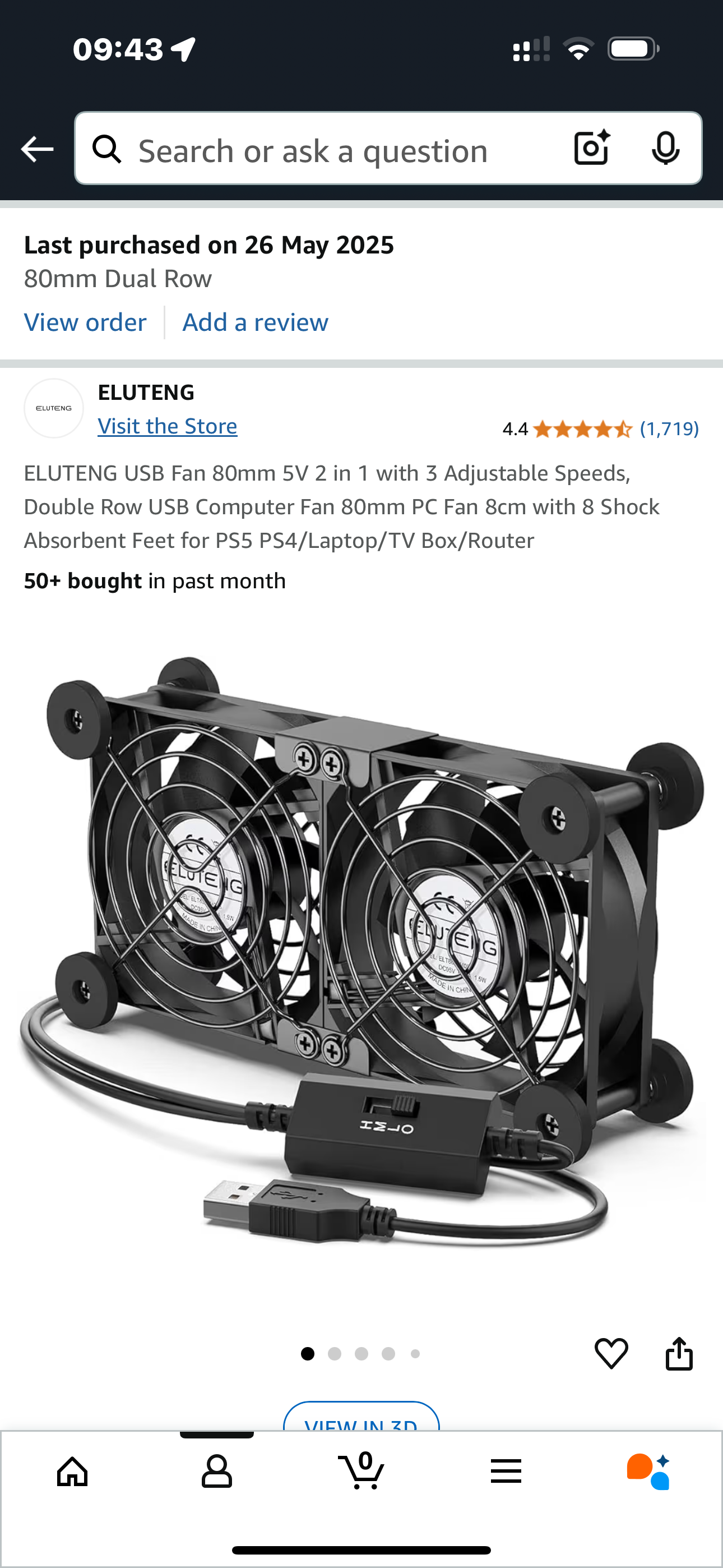
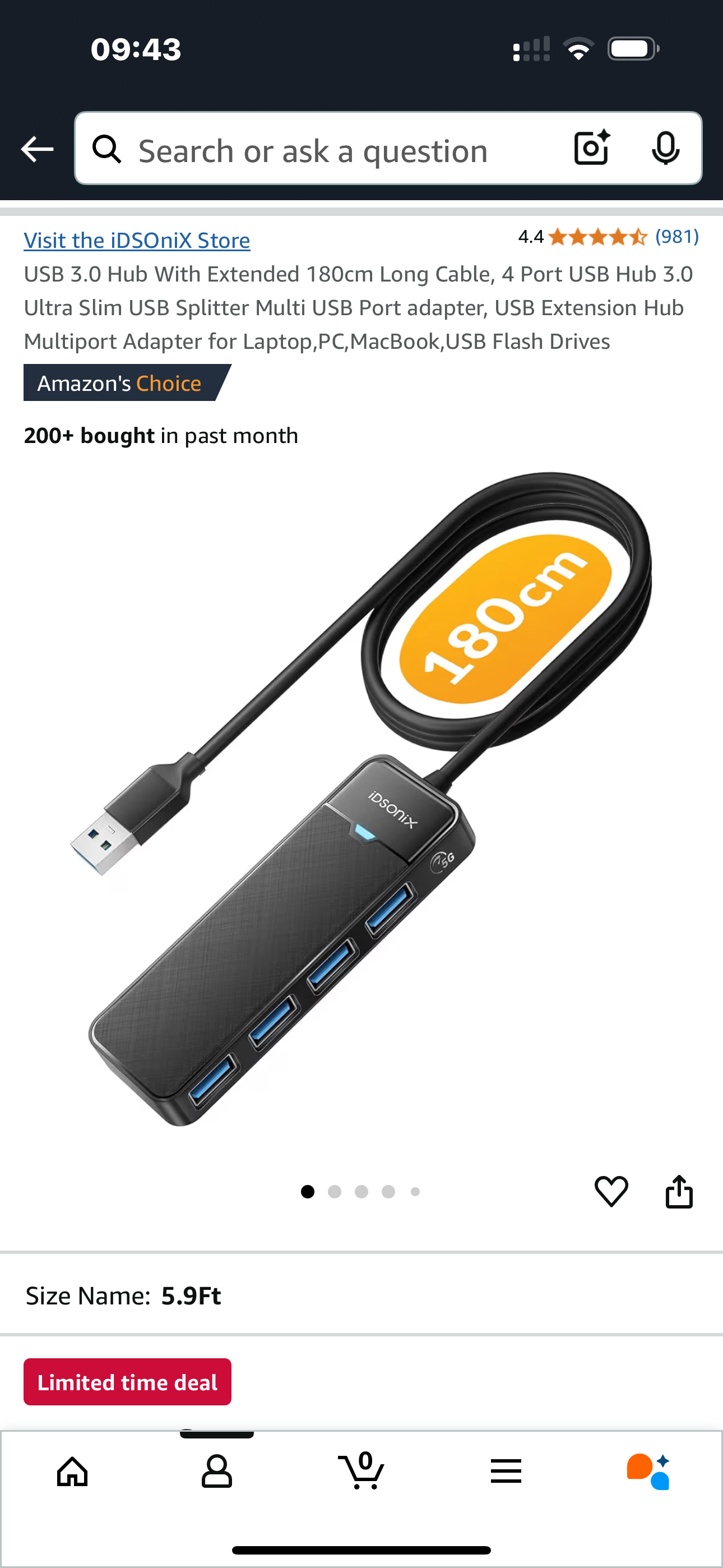
I’ve got 4x 80 mm USB fans under each of my G3 hybrid 5.0 kW inverters. I bought the ones with the rubber feet, come in a block of 2. they have 3 speeds; I leave them on high permanently, as it helps with airflow in my cellar. They wedge perfectly between my uneven brick wall in the cellar and the inverter, - underneath the inverter. They haven’t moved once since installing. I’ve got 2 inverters, 8 fans total, I used a 4 way USB splitter and an old Apple iPad charger to power them. Each fan pair has its own USB power supply. I They use about 1W each I think.

After 4.5 hours exporting at 4kW each they were getting over 70c on each inverter IIRC. Now the max is about 55c. I’m not sure if it really makes much difference at the end of the day, as they are probably designed to work at high temps but a bit of extra cooling is generally good for electronics.

Here’s what I bought;

G
#31 garycatt

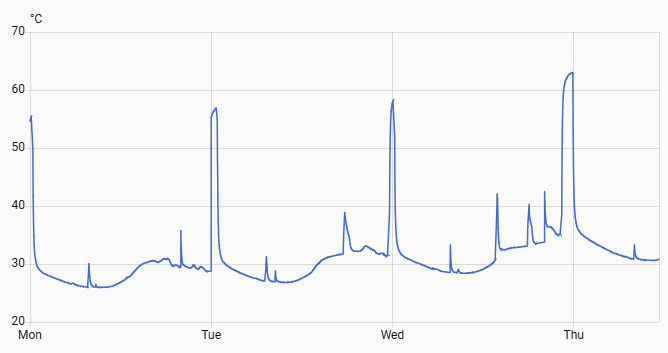
I never considered battery temps before but when I look at Home Assistant I see it is peaking at 62C when charging overnight. As there are no heatsinks etc, I wouldn't know how or where to cool the battery, Ideally, as it has a 6 hour window to charge it, it could be charged at ~ 1 kW to extend the battery life?

R
#32 Robgy

garycatt Are you sure that graph is the battery temperature, it looks more like my inverter temperature with the fans turned on, although I guess it could be the BMS temperature. Without the inverter fans similar to above turned on my inverter will show temps around 80c

V
#33 Vestas

Robgy Its the BMS board.

S
#34 SteveCook

Pete UK
I bought 4 fans (2 x twins) and just sat them on top of the cooling fins (drawing air through and upward) on my Gen1 Hy5.0 at around 12:30. Set them both on medium speed
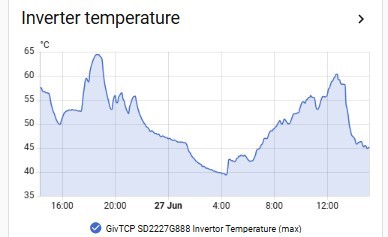
Hot today in Yorkshire 26 deg C and inverter temperature dropped pretty quickly from just short of 60deg C to 45 deg C

D
#35 DocGra

ADO Hello ADO,
I'm putting 4 x 60mm 5V fans and a USB temp controller together and planning to 'stick' it's sensor towards the top of one of the middle fins using a couple of magnets (one is a magnetic strip with an adhesive backing which will be stuck to the fin and the other is within the sensor housing).
Think I'll need to be careful drawing the sensor and it's wire between the fins (on a string) but hope to reach things by leaning over the top if the inverter.

Hope the sticky magnetic strip remains stuck to the fin's surface - but I think the sensor needs to be somewhere close to the hottest part of the (external surface of the) heat exchanger so will cause the temperature controller to activate the fans earlier than if the sensor was elsewhere.

I'm planning to place the fans below the heat exchanger (in the space behind the back of the inverter and the wall) to hopefully, mover more air than if they sat on top of the heat exchanger and I hope using 60mm fans won't constrict air flow into the heat exchanger too much, when they are off. Just hope they are powerful enough!

The 5V DC power supply will get plugged into one of the EMS sockets - so I'll even be able to see how much power the thing consumes (expecting less than 6W🙂)

Just waiting for the PSU to arrive before I solder it all together and bolt it to the wall ... bet the weather gets cooler before it's here 🙂

I have a desk fan in front of the inverter at the moment and have seen the inverter's temperature fall from 70C to about 48C in less than 30min (so air velocity may not need to be very high to prevent things heating up providing the cooler starts to run at around 40C) - and the inverter seems to export closer to it's specification maximum - perhaps as a result (perhaps another 150 to 200W) - so the 'cooler' should pay for itself this summer.

Hope this helps ...

#36 Maxwell

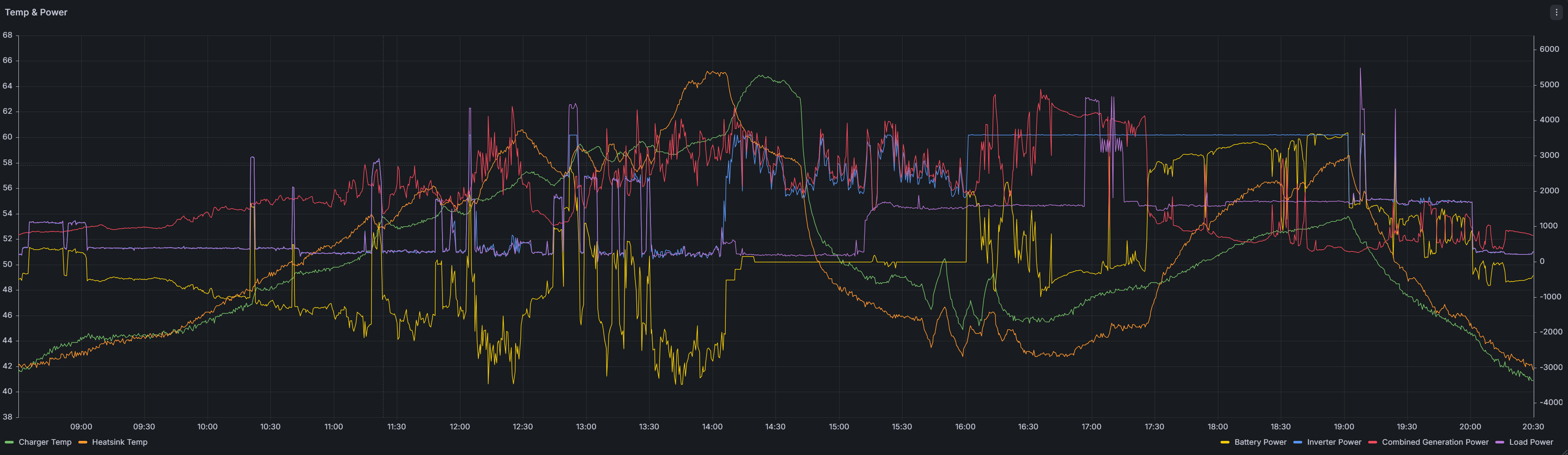
@SteveCook From Today's data i would say that temp rises more when the battery is being charged/discharged. These results are with some fans at the top of the inverter. But, i am looking at getting some others and placing them underneath. The small wooden shed the battery and inverter has a temp of 31deg.

R
#37 Robgy

My inverter gets hotter when discharging than charging.

S
#38 SteveCook

Maxwell
Yes, the temperature will rise depending on how hard the inverter is having to work (AC to DC and vice versa), charging or discharging..
I added the fans as a cheap/easy way to lower the temperature without lots of thinking/work.

My inverter went down to 40 degC overnight and has now risen to 45 degC as the sun has come out and the battery is charging from the PV DC strings

A
#39 AnonymousHooman

The installation guide gives clearances around it, and also stresses the importance of good ventilation. Loft sounds like a very bad idea, but perhaps you can add an extractor fan to get the hot air through from/to outside.

With shade they can apparently go outside assuming you don't have a garage.
Our AIO is in a reception room alcove with very good ventilation, (and the front screened from view, it is not a house that overheats.) Gateway is outside under opaque canopy.

D
#40 DocGra

AnonymousHooman Maxwell Robgy Hi Chaps, My little row of fans has been running for a few weeks now and seem to have avoided Inverter temperature excursions much above 50C (I used to see temperatures into the 60s).
The max temp data from the last couple of weeks suggests the Inverter is hottest around 04:30 and around 22:30 which is towards the end of the battery's recharge times (we're on Octopus Cosy) but generally the Inverter sits between 35C and 45C.
I've only seen the thermostat operate (turns the fans off if Inverter temp falls below 35C) a couple of times but I guess it will be a bit more active in the Winter.
The fans run on USB volts and typically consume around 5W. Total cost for the fans and the thermostat was around £40 and they weren't difficult to put together.
I wonder why something like this wasn't included in the original design?

Hope this helps ...