Strange EPS/Inverter behaviour

34 comments started 2026-06-29 last 2026-07-03
GivEnergy ProductsAC CoupledBattery
P
#1 P3tro

Hello folks. Hoping to get some help on an issue as I have no clue where to begin to diagnose or identify the source of the problem.

Home Assistant, through the 'GivEnergy Local' integration (version 2.4.0), sometimes reports that the EPS is supplying power at seemingly random intervals. Sometimes, it will also report that my home energy consumption is almost the exact same as the solar energy being generated.

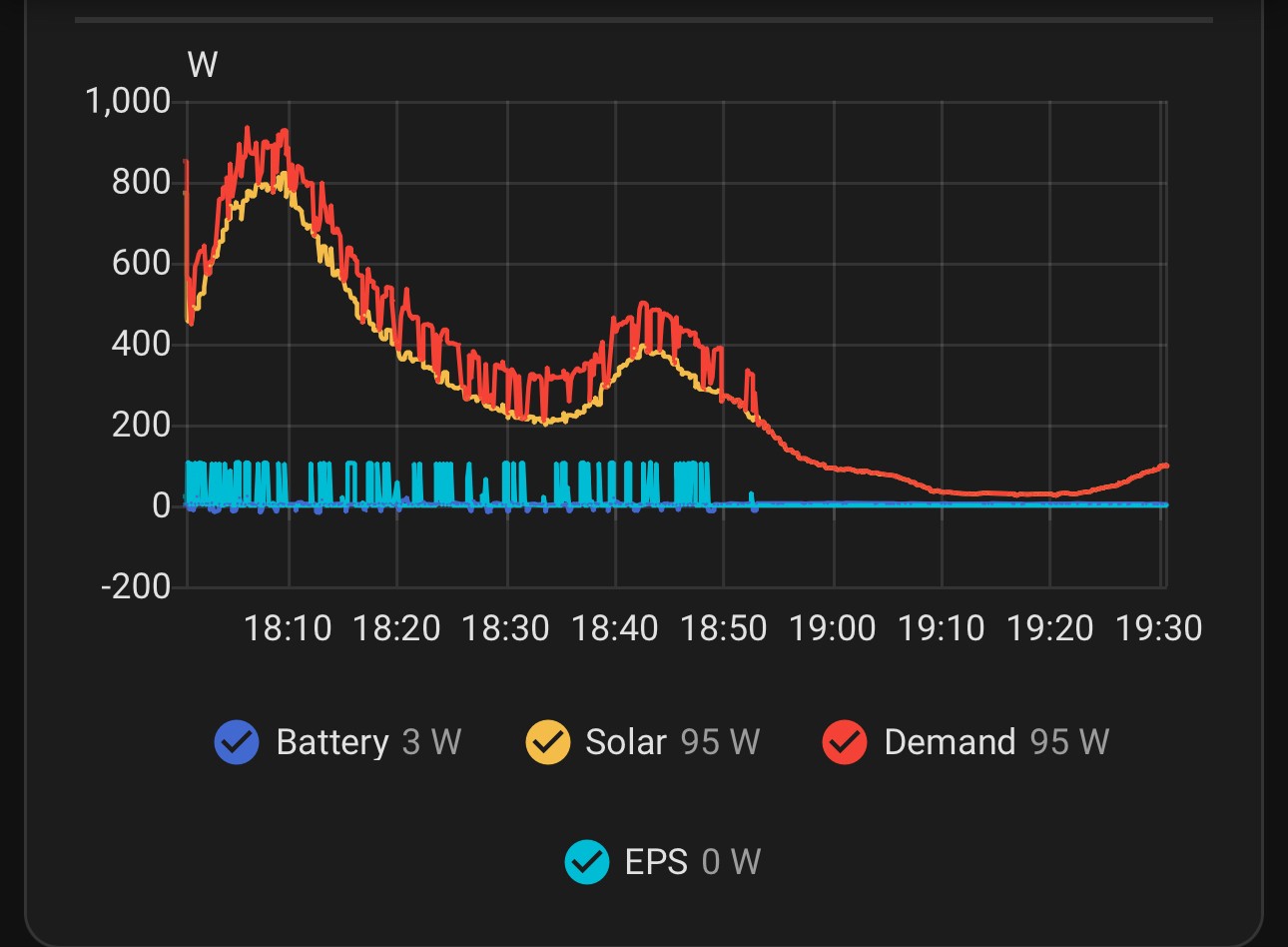
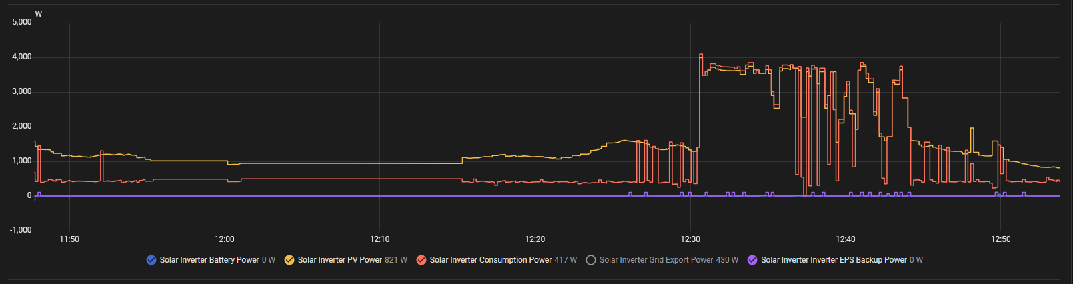
Take a look at the screenshot of the attached graph and notice the blips in EPS power and dramatic rises in home demand consumption. I can confirm I did not turn on any appliance during this time. All I'm doing is being sat at my PC, which uses around 400W. Normal house usage when dormant is around 160W.
For the graph: Yellow is solar power, orange is conusumption, purple is EPS power. Battery power is blue, full at capacity and dormant due to solar generation.
My home's light circuits and gas boiler are routed through the EPS, the idea being if there's a grid power cut I have lights and heating. The downside is that if there's a problem with the battery or AC-coupled inverter, I have no lights and boiler.

When this happens, I notice that the lights dim or turn off for half a second, as if there's a powercut, then returns to normal.

This is obviously made worse by the situation with GivEnergy going into administration and my installer was First4Solar, who infamously also went under. I wanted to ask you all for any advice before I call an electrician who knows what they're doing with solar and battery storage (bonus on familiarity with GivEnergy).

I am running:

  • Inverter Model: GIV-AC3.0
  • Inverter Software Version: D0.212-A0.212
  • Battery Type: Lithium-ion
  • Battery Capacity: 186 Ah | 9.52 kWh | (1 Pack)
  • Battery Firmware Version: 3020
    Not signed up to premium features of cloud data.

My solar panel and solar inverter set-up pre-dated (2012-13) the install of the GivEnergy equipment (2022), hence the AC coupled inverter.

Any ideas on where to start to diagnose the cause of this or should I just call an electrician?
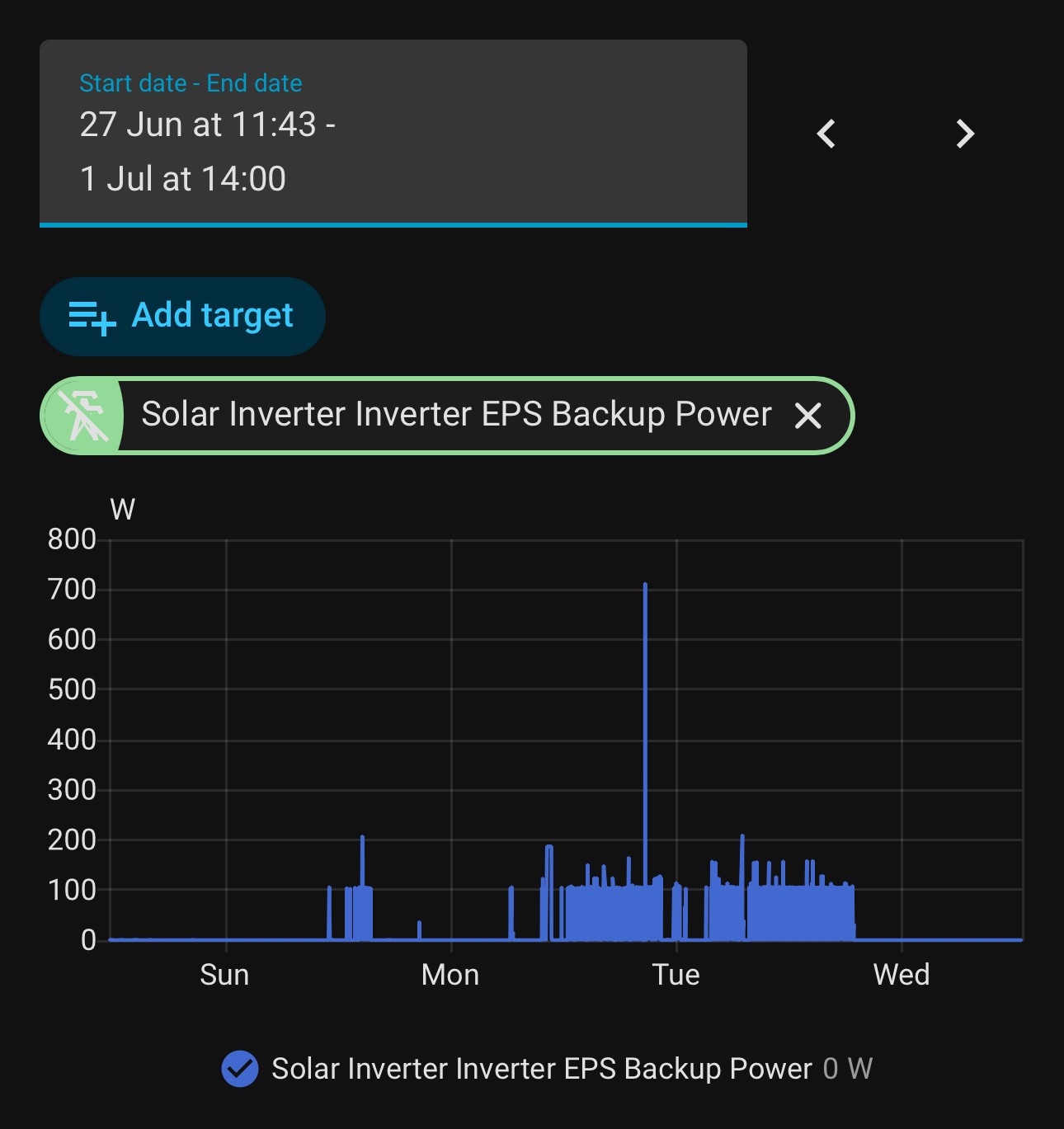
S
#3 SteveCook

You say "when this happens", what happens? You do not explain

We have a consumer unit just for my EPS circuits (lights, gas boiler, fridge/freezer, smoke detectors, house alarm, router, lounge tv power).
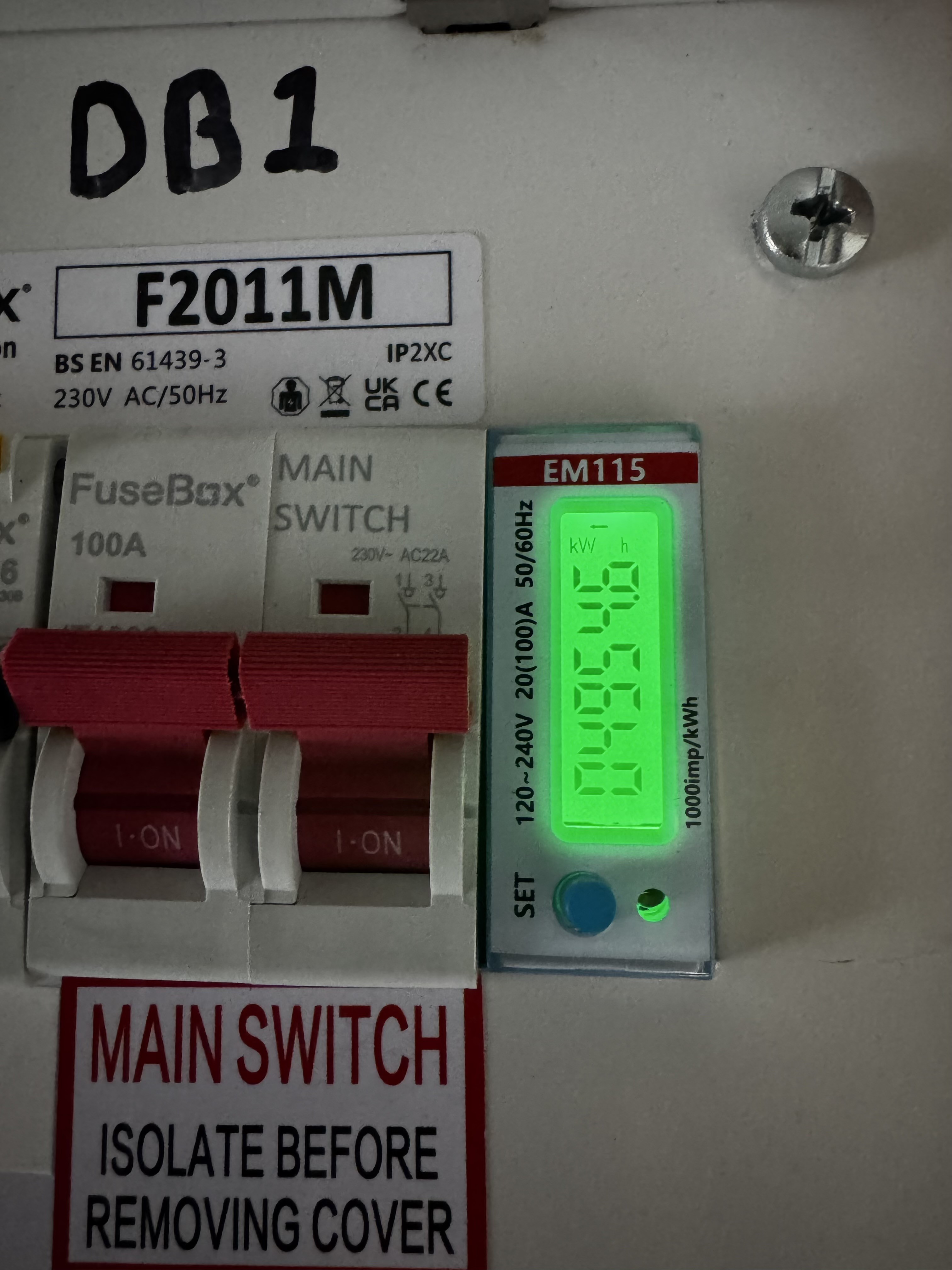
When there is a power cut, we can stay warm, have a cold drink and watch tv. if we want a hot drink, we have to boil a pan of water on the gas cooker.
This EPS consumer unit is fed from the EPS output of the inverter (Gen1 Hy 5.0 and 9.5 battery) via a manual changeover switch.
The changeover switch has 2 inputs and a single output. Only 1 input can be selected at any time, so no cross connections.
Input1 mains from main consumer unit
input2 EPS output from inverter
output to EPS consumer unit.
I run on the EPS output 24/7 at about 300W.
The manual changeover switch means if there is ever a problem with the inverter and it need to be maintained/removed, I can route mains power through the changeover switch straight to the EPS consumer unit.
So far after 4 years all good. In grid failure, everything in the house goes dead and then the EPS circuits go live after about 10 seconds

P
#4 P3tro

Hello again. To clarify what's happening:

  1. I'm getting blips of EPS power supply showing in Home Assistant
  2. Room lights are blinking when switched on (lighting circuit is wired to a board used by the EPS)
  3. According to Home Assistant, home power consumption is matching very closely to the amount of solar power being generated (see screenshot)
  4. At times, power from the battery is not being fully utilised when high-demand by an appliance is occurring as I found out at lunchtime today using my electric mini oven.

Though I was suspicious, I first thought this was a result of an issue with my wifi as I had to reconnect my system to my wifi network (the IP address had changed). Clearly, it's nothing to do with wifi, but could it be to do with a lack of cloud monitoring?

S
#5 SteveCook

Is the mini oven on the EPS circuit?
If lights are flickering it suggests a power supply problem.
1 could be a problem with the inverter DC to AC output?
2 could be a loose cable/loose connection somewhere.

P
#6 P3tro

SteveCook
Only lights and my boiler are on the EPS circuit. The lights dimming seem to indicate the EPS coming on and then off. This is supported by the info I’m seeing in Home Assistant.

Even more strange is that this seems to happen at random and not everyday. For example, see the first graph I posted.

D
#7 DD

P3tro home power consumption is matching very closely to the amount of solar power being generated (see screenshot)

I think this can be a symptom that the CT clamp is not reporting correctly: the inverter sees the solar being converted to AC, but doesn't see it recorded as exported by the CT clamp, and so assumes that it's being consumed.

GE systems (or at least my one), do not measure consumption directly; they infer it from difference between what the inverter generates and the grid activity reported by the CT clamp.

S
#8 SteveCook

P3tro
I dont think the EPS is a UPS (uninterruptible) unless you got GivEnenrg to set it that way.
Mine takes about 10s for everthing to go into island mode and then EPS come on.
Are any other lights in the house dimming?
Is there a loose connection on incoming supply?
Do you have an issue with your mains?

A tree near us fell down and took out overhead cables. About 10 houses had to go on generator for about 4 weeks. NPG never told anyone this. One day I just stumbled across the generator down the road tucked away. This caused some power stability issues for a while

C
#9 ChrisRowe

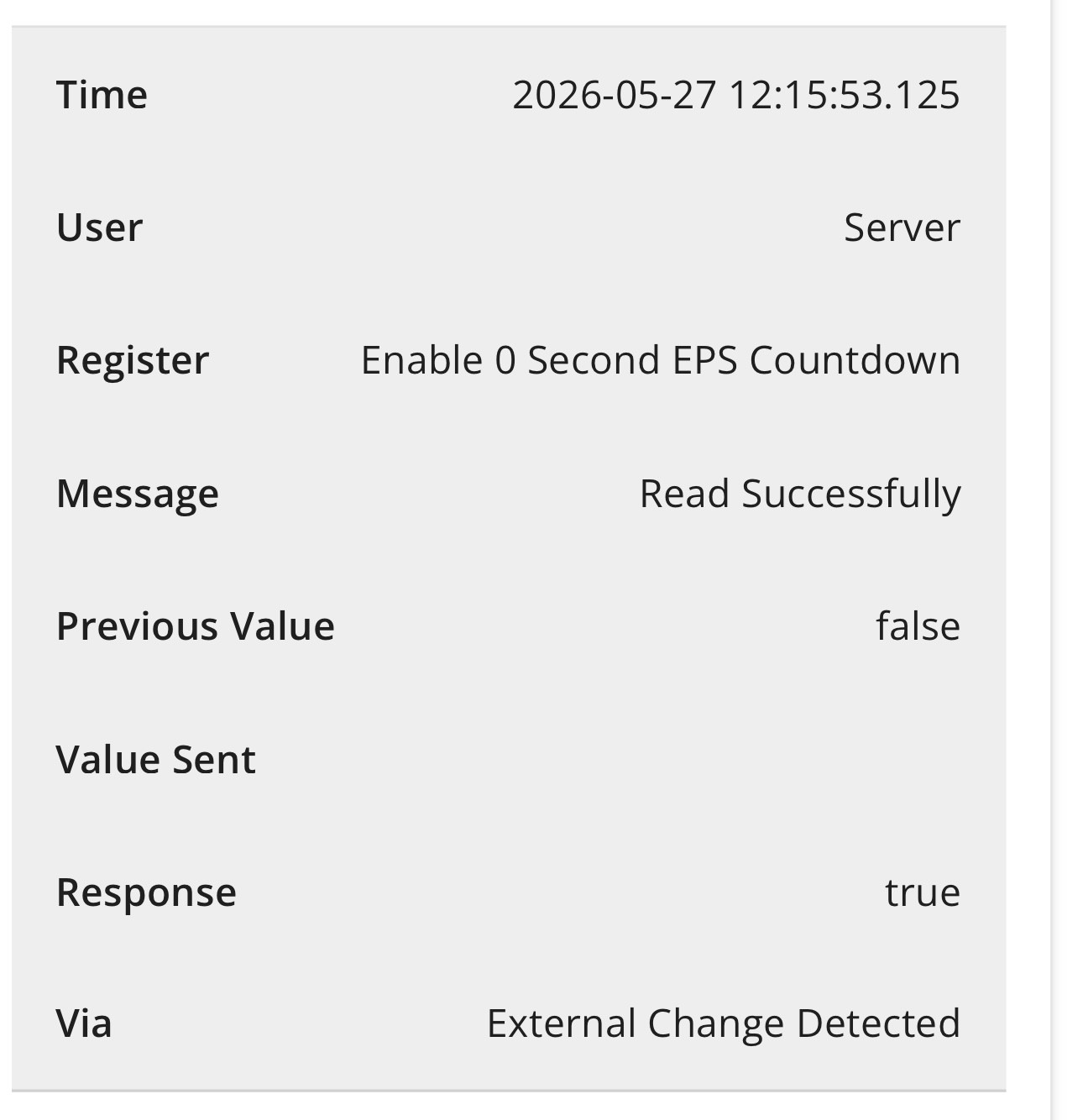
My lights started dimming after activating 0sec EPS setting. As soon as I switched this off it stopped happening.

P
#10 P3tro

ChrisRowe I think this is the issue, but how do I change the setting since GivEnergy removed the cloud management feature?

C
#11 ChrisRowe

P3tro My issue happened 18 months ago so GE Support were still around and sorted it.
You could try these people? https://predsupport.com/

P
#12 P3tro

ChrisRowe Thanks, I've just sent an email. Just in case, I saw a setting on GivEnergy's dashboard to reset values to defaults in hope it permanently solves the issue. Will update this when I have more info.

P
#13 P3tro

Haven’t had a reply yet. Starting to worry about my options. Came home and had a look at the GE app on my phone thinking the setting to adjust the EPS time was there under direct control but it’s not. Could only disable EPS.

Is there any way to force the inverter to factory settings?

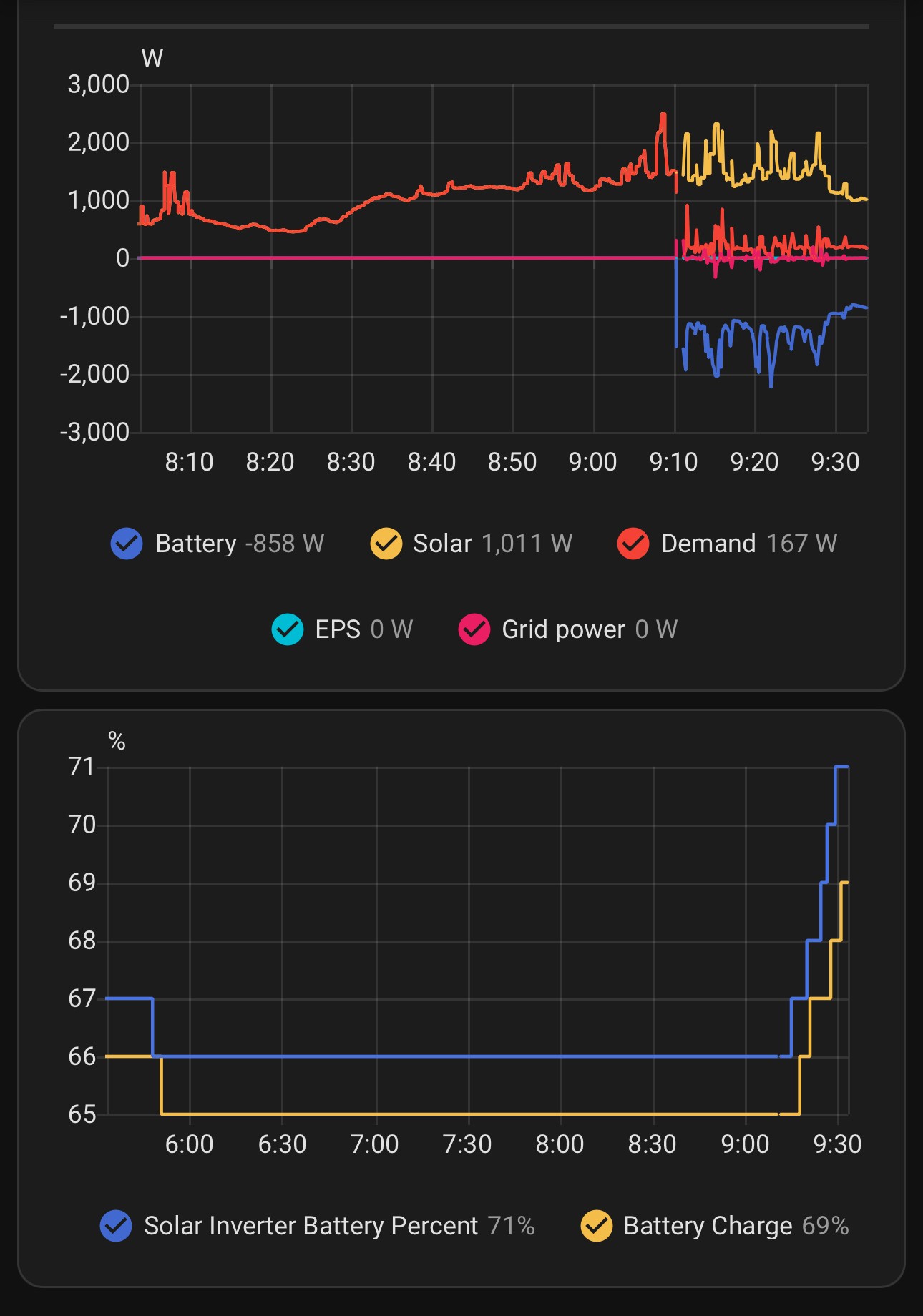
Take a look at the graph now and notice the consumption is following solar generation and EPS supply. You can clearly see when I disabled EPS on the app!

P
#14 PaDav6

Those symptoms are similar to when my system was first put in and the CT clamp (an EM115) was set up as a GEM120 on the inverter instead. The solar tracked the load. It was a simple register change to fix by GE, but not sure whether it is user accessible or not.

D
#15 DD

PaDav6 If it was a misconfiguration, I assume it would always misreport consumption, whereas OP says

Sometimes, it will also report that my home energy consumption is almost the exact same as the solar energy being generated.

P
#16 P3tro

PaDav6 thanks.

This has only started happening on and off in the last two weeks but in the last couple of days it’s not fixed itself. Battery system been in place since around 2021. So my only theories are:

  • It’s a result of the changes made by GE given the change in business status
  • it’s because I changed the value of the EPS time using the GE cloud dashboard before it was locked to premium users (but then why didn’t it happen straight away?)
  • some piece of hardware is not working as expected

But I don’t understand why power consumption is being reported as pretty much the same as solar generation. I was on my PC last night and it didn’t even impact the reported consumption (I know my PC adds at least 400W, more when gaming).

Right now, I’m wondering if a factory reset of inverter settings will fix the issue?

I’m stuck and don’t know who to contact for support 🙁

D
#17 DD

P3tro Can you add measured grid activity to the graph

P
#18 P3tro

DD I can, but it’s value seems to always be zero while this is happening.

D
#19 DD

P3tro Yes, that's what I expected... the consumption is inferred from power generation (solar + battery discharge) minus grid import. So if it's incorrectly measuring grid import as 0, it will report consumption = solar + battery discharge, as you are seeing.

Do you have an independent measure of grid activity, such as smartmeter IHD, or Octopus Mini ? Or even a flashing LED on the smartmeter ?

P
#20 P3tro

DD I don’t have a smart meter but when the system was installed the electrician added something to my main firebox (not the EPS one) which I’ll take a photo of to show you…

I’ve no idea what it is or how to use/read it (bad install experience with a company who went into administration). The numbers change and there’s a blinking red light.

D
#21 DD

P3tro sometimes reports that the EPS is supplying power at seemingly random intervals

What is the magnitude of the power it reports? A couple of times, the RCD supplying inverter has tripped. First time, it took a little time for me to notice. Since EPS was reporting non-zero at that time, I added an alarm to report when EPS was non-zero. Got a couple of false positives when it report 1 or 2W, so I changed my alarm to be when EPS was bigger than 5W. (It goes to about 200W when RCD actually trips. I don't have the EPS circuit powering anything.)

So if it's just one or two watts, might just be spurious ?

P
#22 P3tro

DD seems to range around 100-200W as shown in the attached graph.

D
#23 DD

P3tro do those coincide with the grid going to 0 ?

P
#24 P3tro

DD no

D
#25 DD

P3tro The EM115 is the device GE use to get the CT clamp information to the inverter. The display cycles through various properties of the grid connection (voltage, frequency, ...) , and there is a separate modbus connection which allows the inverter to query it.

if either the connection of the CT clamp to the EM115, or the connection from EM115 to the inverter was interrupted (or the power supply to the EM115, I guess), the inverter would be unable to measure the grid import/export.

Not sure if it's signicant that it's in the main CU. Is that the one powered by the EPS output ?

What sort of meter do you have? Can you tell by looking at it whether your system is importing or exporting ?

P
#26 P3tro

DD thanks, interesting to learn about the EM115. I have a solar generation meter and a digital electricity meter monitoring usage outside my house. The latter only counts what’s incoming from the grid.

Edit: oh and as for the EPS circuit, that’s another unit not in the photo.

#27 Maxwell

@P3tro You said you don’t have a smart meter. So you won’t be making any money from selling your excess electricity back to the grid. Is that a conscious choice

P
#28 P3tro

Maxwell you don’t need a smart meter to export and get paid. I’m on the old Feed In Tariff (FiT).

D
#29 DD

P3tro I have a solar generation meter

I assume that's the original one to measure generation for FIT. One thing I'm not clear on is how an AC-coupled inverter measures solar generation - is there a second interface to the GE system to report solar generation? I can't immediately find the installation manual. In principle it doesn't really need to know where the generated power comes from: if there's a net export, it should charge battery to grab it; if there's a net import, it should discharge battery to cover it.

#30 Maxwell

P3tro Ah I wasn’t thinking about FIT.

P
#31 P3tro

Small update but my situation remains pretty much the same. Battery isnt charging from solar generation. I joined premium to see if I could see the “Enable 0 Second EPS Countdown“ setting but it’s gone. Reverting to default settings on the Cloud Dashboard doesn’t restore the value of this register.

Does anyone know how to restore all inverter settings/registers back to their defaults?

D
#32 DD

P3tro see if I could see the “Enable 0 Second EPS Countdown“ setting

Are you sure this is the problem you need to solve?

P
#33 P3tro

DD things started going wrong after this setting was changed, so I’d like to be in a position to rule it out by reverting to factory settings if I can.

P
#34 P3tro

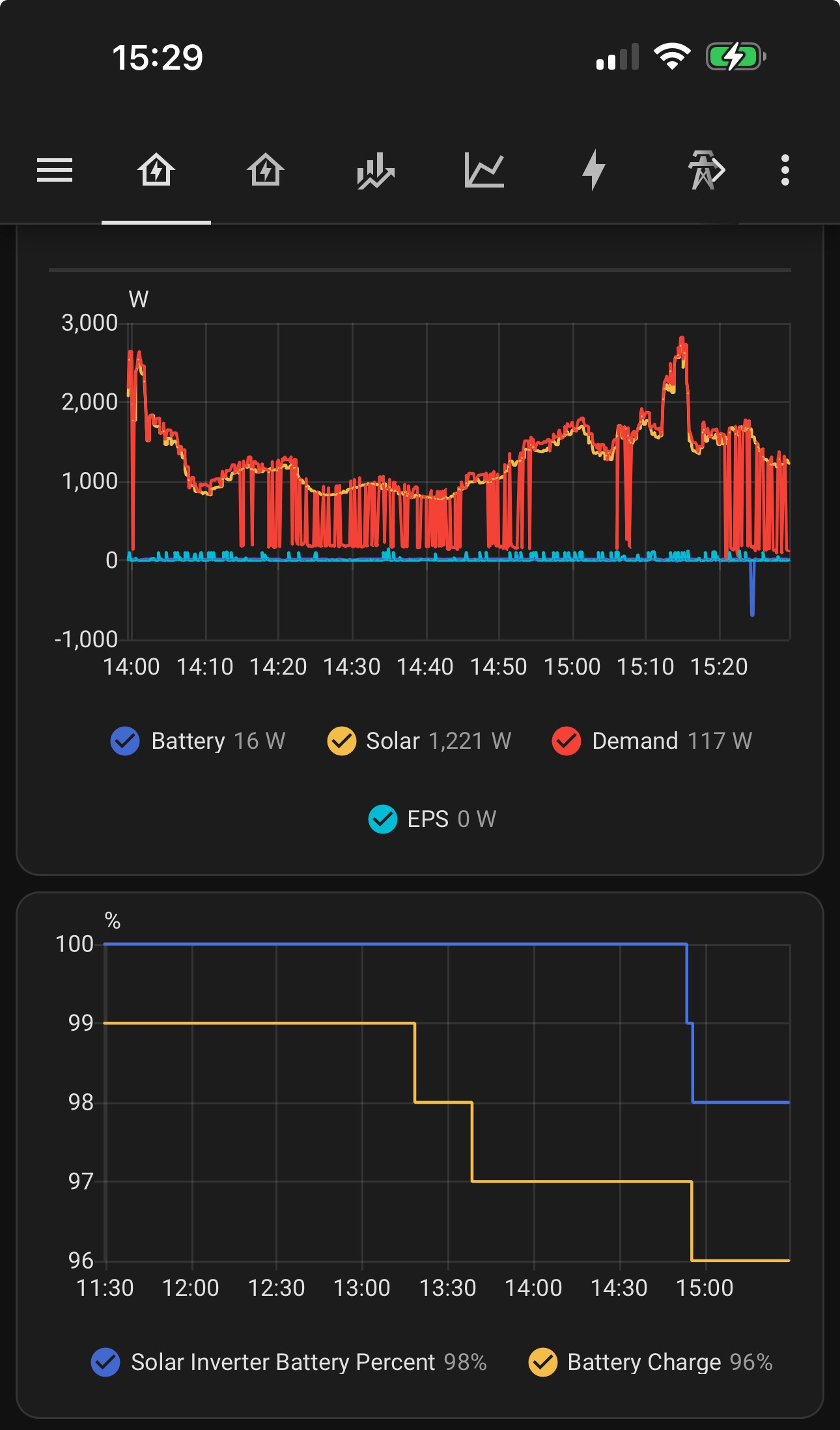
After I bought premium and used the cloud dashboard to restore factory defaults for the inverter, I then restarted the inverter. Home Assistant started reporting the battery was charging from solar again when the inverter came back online. Take a look at the screenshot.

EPS is still disabled though. Might turn that back on to see if EPS Power data shows as blips.