J
Predbat is reporting that my inverter's date/time is not correct - how do I reset the inverter date/time without a Premium account?

Predbat is reporting that my inverter's date/time is not correct - how do I reset the inverter date/time without a Premium account?

If you're using Predbat you must be using Home Assistant.
GivTCP has a button for sync time. I use this as I have set my inverter to never connect to the internet now.
I have also written an automation that presses this every day to make sure. Just replace <serial> with your inverters serial number.
alias: GivTCP Daily Time Sync
description: "Sync inverter time daily "
triggers:
  - at: "01:20:00"
    trigger: time
    weekday:
      - mon
      - tue
      - wed
      - thu
      - fri
      - sat
      - sun
conditions: []
actions:
  - target:
      entity_id: button.givtcp_<serial>_sync_time
    action: button.press
    data: {}
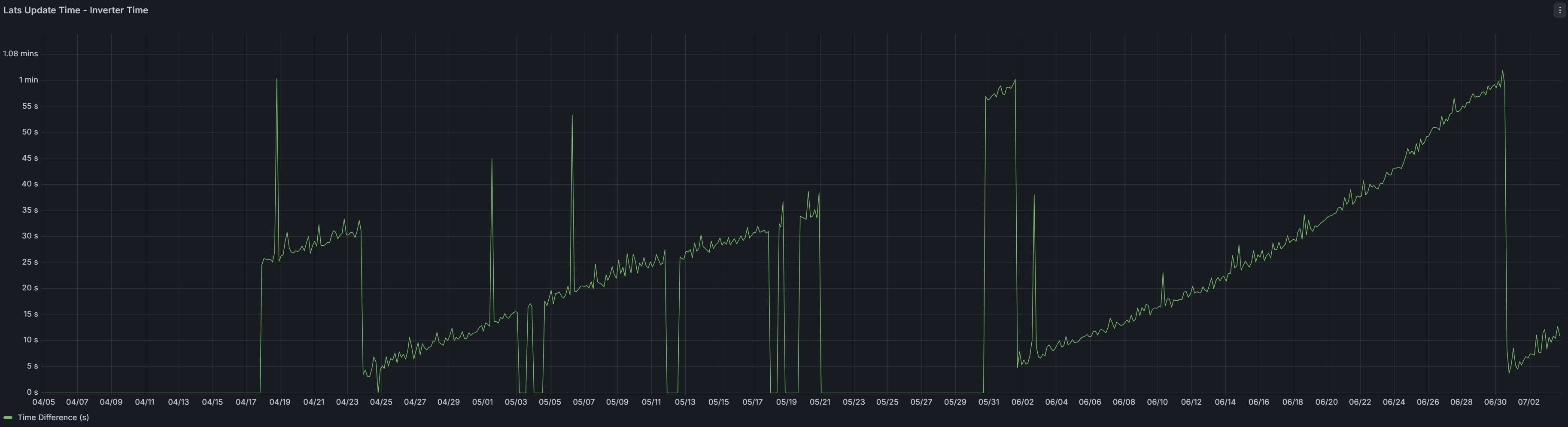
mode: singleI looked at the difference between the "last updated" time and "inverter time" registers exposed by givtcp (no HA). And i can see this pattern over time. Is this normal behaviour ? I am not doing any manual time syncs/updates and i am on the free tier. The gaps (periods of 0s) are just where i have had givtcp downtime. So, missing data. So, generally the last updated time is always ahead of the inverter time. Givtcp is polling every 30s.
Guybrush-Threepwood If you're on firmware which doesn't have "safe writes" then I wouldn't be syncing every day were I you. Sync time consumes a minimum of 6 writes so that's 2190 writes per year before you do anything else with the system. Once a week is more than enough.
Also your timing is flawed - have you considered what happens when the clocks change twice a year? Writing the sync time at 0120 is going to leave you 1 hour out for a day with your current setup. Better to sync on Sundays at 0400 or so.
Vestas Sync time consumes a minimum of 6 writes so that's 2190 writes per year before you do anything else with the system.
Does the time really live in flash registers? Surely the seconds counter updates once a second, which would wreck a flash cell very quickly.
I had assumed the clock was implemented as a separate battery-backed RTC - in effect, always a live register, even before they generalised the concept to the other registers.
General question on time sync. So, for those on the basic tier how does the inverter sync time ? Does it routinely sync with a web resource ? The local control in the ge app doesn’t have that option. And if you have chosen to isolate your inverter from the web then how does it sync time. And if you are using HA/givtcp or other such solutions do those provide a sync with local device time or web time ?
Vestas yes, but it's surely not the number of writes that matters, it's what you're writing to: if the clock is just an RTC device if some sort, writing to it would be free. Writing to flash is entirely different.
And it's only 6 writes if you update all fields. If you are only correcting a small drift, updating just the seconds should be sufficient. For BST changes, you only need to write to the hour register.
Vestas According to Co-pilot givtcp syncs the time from the local device to the inverter every hour. And as you say uses 6 writes. But it says those writes store the time data in volatile RAM. So don’t have the same impact as it would on those flash storage writes. I haven’t been able to independently verify any of those statements.
Although i can see on mine that the givtcp register Sync_Time is set to disable

Time is a holding register (or registers I should say)
Id like to think that if they truly were committed to flash every second my 5 year old inverter would be toast so I imagine that like the RTCL improvements these sit in RAM unless something actually writes to them.
There must be some loop in the firmware that responds with those (& if RTCL is enabled those too) specific registers from RAM as part of the building of the Modbus response.
HR Block:
SYSTEM_TIME_YEAR = (35, {'write_safe': True})
SYSTEM_TIME_MONTH = (36, {'write_safe': True})
SYSTEM_TIME_DAY = (37, {'write_safe': True})
SYSTEM_TIME_HOUR = (38, {'write_safe': True})
SYSTEM_TIME_MINUTE = (39, {'write_safe': True})
SYSTEM_TIME_SECOND = (40, {'write_safe': True})
There is the leap year bug also that will raise its head.
hoggy Its more likely that the holding registers are only written to on loss of power/reboot. The rest will be a simple counter running off 50Hz, hence the tendency for the "time" to drift badly.
Simple enough to prove - power the entire system down and leave it for half an hour. Power it back up and see if the time is half an hour out - without any ntp lookups/sync.
I can see my "write count" register shows 85 and the "safe write count" register shows 0. I went through disabling/enabling and changing timed export including times. And i could see no change in value in any of those registers. When i get the time i try enabling the givetcp sync time function to see if any of the write counters change.
Update
I set up a static page with a button that used the restapi endpint that givtcp exposes and after executing that my write count went up from 85 to 91
"syncDateTime": {
"method": "POST",
"payload": "{'dateTime':'%d/%m/%Y %H:%M:%S'}",
"url": "/syncDateTime",
"usage": "Syncs the inverter system time and date with Container time"
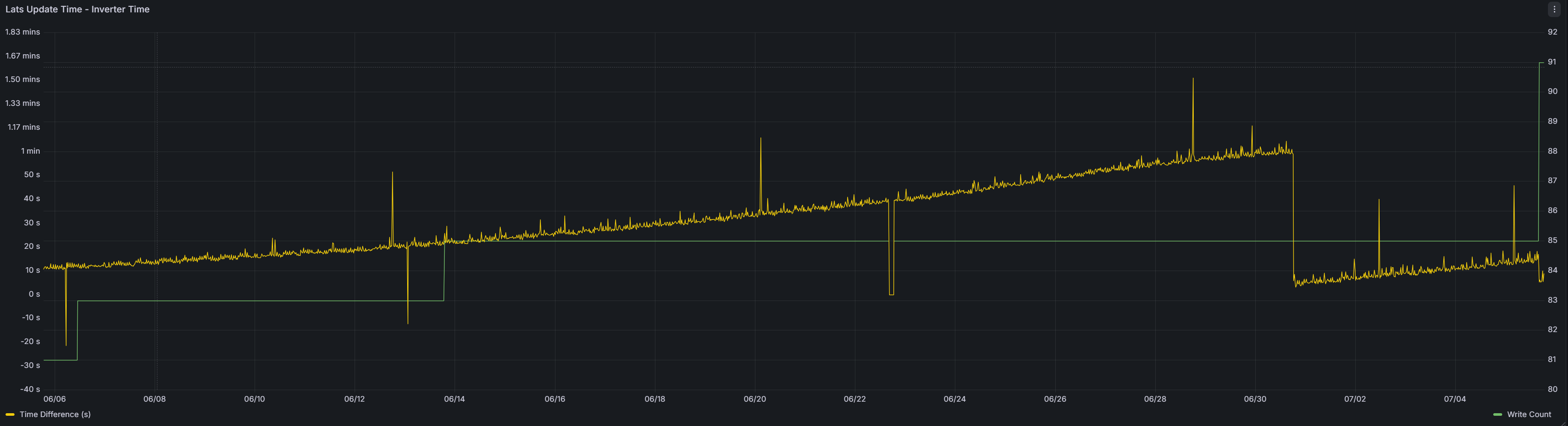
Can anybody explain this one. So, when i plot write counts along with the time difference between lats update time - inverter time (the graph i posted earlier) you can see the write count increase when i used the rest api register to sync the time (right hand side of the first chart). Now you can alos see my write count increased on the 13/6 by 2.
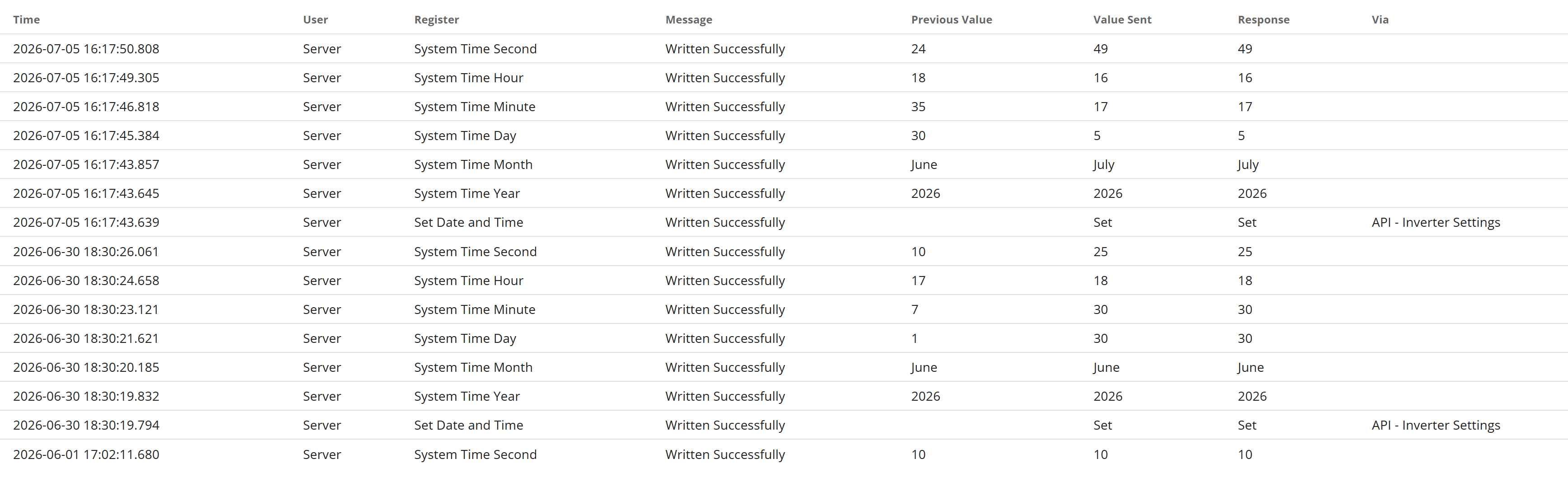
So looking at the write register logs in the portal you can see today's time sync. The API Inverter settings shown on todays date is my manual time sync via givtcp. But, the similar looking log event on the 20th June was not my manual sync via givtcp. But, you can see the effect of that as the time difference drops. Which is good. But, the write count doesn't increase. So, how did these two different events have the same effect in the inverter and look identical from a log perspective but there is a difference in write count ? Also, you can see from the logs that there was no logged write event on the 13th which you could link with the write count increase of 2 ?? I have omitted read command as i believe they should have no impact on write counts.