So, long story short, I have managed to obtain a virtually new gen 3 9.5kwh battery for peanuts.
I curently have AC3.0 and Gen2 9.5kwh battery running for almost 4 years without any issues.
I have been quoted silly money to add the extra battery to my system but trawling this forum it appears, post GE existing, I should be possible to add the battery to my system myself.
I also note there are new batteries for sale in places such as Ebay, which are advertised as 'plug & play'.
Anyone on the forum actually done this and can advise on a solid process to do it?
Many thanks in advance.
S
#2SteveCook
I think the batteries are supposed to be DC daisy chained with the correct DC cable and plug.
If your batteries are just plug to plug you will probably not need much electrical skill, but if you need a "plug to lug" cable you may need an electrician.
I think the "plug to plug" cables also handle the BMS comms and so I think all you then need to do is set the dip switches for the master battery
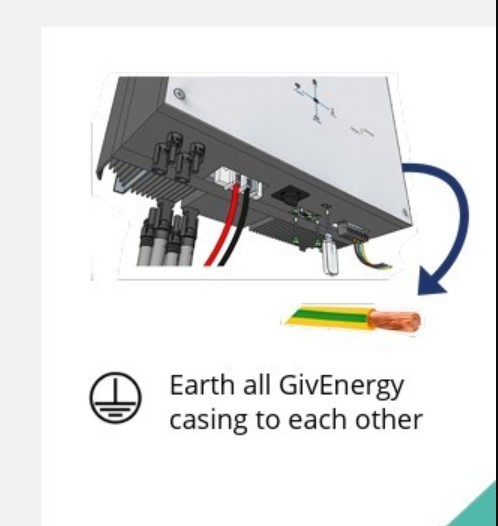
9.5 to 9.5 plug to plug cable came with the battery, it really is plug and play (with the exception of the earth cable which I made up)
Power everything down
Set the dips witches on the new battery to slave
Connect the battery to the existing battery
Power everything back up
Once your inverter is back online it should find it.
If you have the inverter monitor app, load that up, leave it a minute and then go to the battery section, click the battery serial number at the top of the screen and it should open up a bubble with 2 batteries listed
Plenty of Givenergy manuals online, just make sure you get the right manual for the generation of battery you have.
B
#4biga
i got another battery added after giv energy stopped support due to administration it was a huge problem which took the installers 2 days to resolve as it would not reconise the batteries it had to be manually loaded off a usb from the installers page
C
#5cluelesscris
Thanks everyone for your input. I appreciate your time. Good pointer to the earth bondng. It's not shown in any diagrams but there is a one liner I didn't take in in the Battery Installation Manual. So, I now only have three things to decide on:
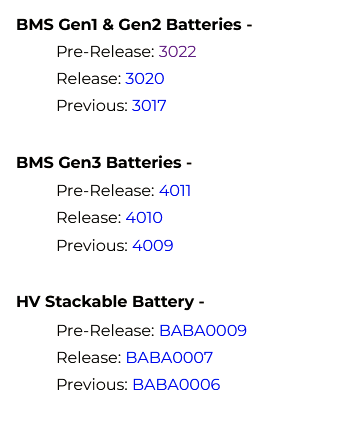
Should I upgrade my battery firmware to 3022 as it is currently on 3017.
How to balance the voltages of the two batteries before installing #2.
Whether to make the Gen 3 (new) master and the gen 2 (old) slave or just add the Gen 3 to the Gen 2 as the slave. The manual only asks that the bigger battery is first, but these are both 9.5kWh.
Thanks again everyone.
A
#6Andrewz61
With the lack of GE support I've left the firmware alone, mine are different....I'm going with if it's not broke, don't fix it.
Once I'd got mine online I exported what was in both batteries overnight and then let them fully charge through the panels the next day, I didn't balance or calibrate anything, they've just worked as expected.
This thread may answer some questions, I was concerned about the firmware differences, I was also expecting the battery voltages to float across the 2 and be equal at all times, turns out the SOC can be off a fair bit and mine appear to be on the closer side than others. GE manuals say actual battery voltages should be with 0.5V which mine are.
Andrewz61 Thanks again. Just waiting for the wife to get out of my garage! She's painting loads of kitchen doors for our Daughter who's doing up a place. Used up the whole space so, until she's finished, the battery stays in the box.
I too am firmly in the 'if it ain't broke, don't fix it' camp. The only time I have ever upgraded firmware was if I needed to contact GE support whose first instruction is always 'update your firmware and call us back'.
M
#8Marren2016
I'm thinking about adding a 9.5 gen 3 to a 9.5 gen 2.
If it fails to work can I keep the new one in storage until my old one breaks. Then swap it out.
Are both firmwares the same from gen 2 to gen 3?
C
#9cluelesscris
i'm probably not going to worry about the firmwares unless there's an issue come up. Evidence in the field suggests the requirement to match firmwares is not critical. See Andrewz61 link above.
A
#10Andrewz61
You wouldn't be running the same firmware anyway if you have different generation batteries, looking at the gen 3 manual it only mentions firmware compatibility on the early gen 1/2 batteries with hard wired connections, plug to plug is just set dipswitches so you 'should' be good to go.
M
#11Marren2016
Andrewz61 I'm just about to pay £1900 for a gen 3. Is this unwise in your opinion?
A
#12Andrewz61
I cannot see any reason why it would not work.
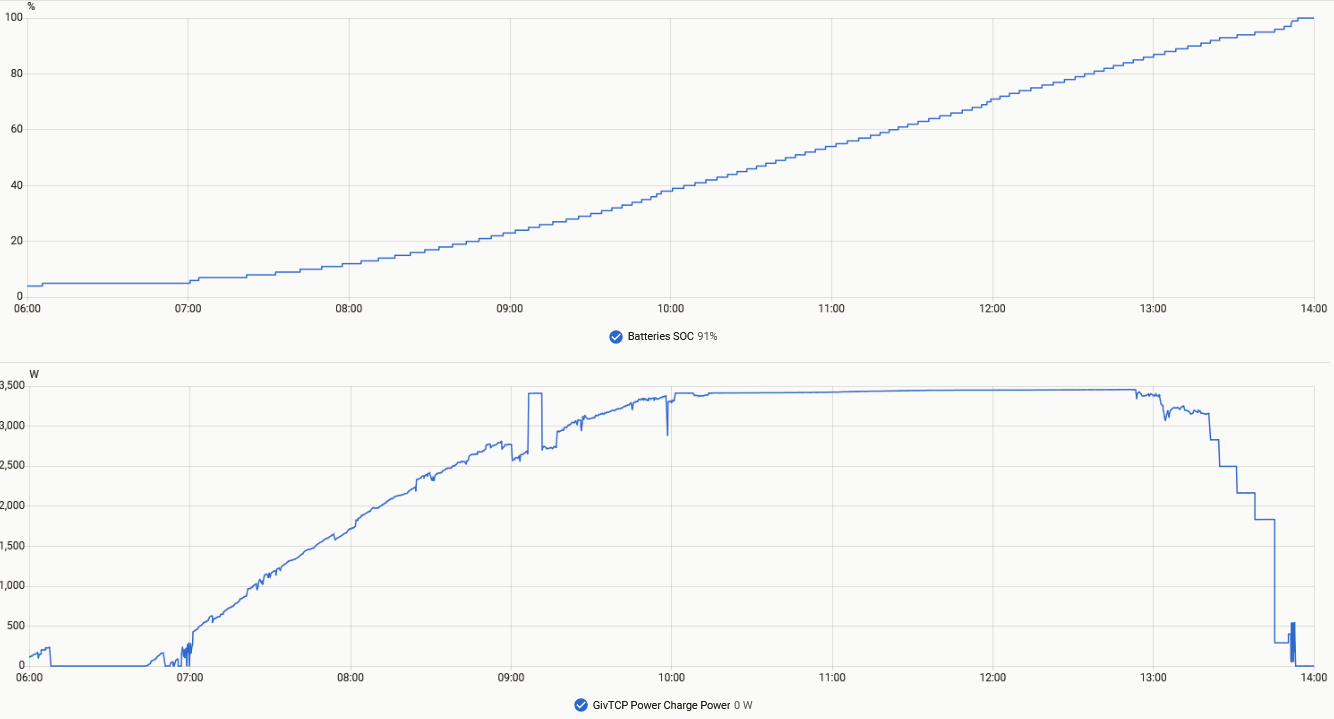
My only thought would be charging 19kwh worth of batteries with a 3kw inverter unless you plan to also charge from the grid.
I've got a 5kw (charge at 3.6kw max) and mine take some time to get to 100% even with perfect conditions like we've been having, The air con has been running pretty much non stop so the batteries have been run down to empty most nights
M
#13Marren2016
I've bought the 2nd battery and my mind thinks I should make the Gen 3 battery the Master and the older Gen 2 battery into the slave.
Will I stumble across any hurdles?
C
#14c2ushe2
Marren2016 That is the correct way to install it, according to GivEnergy literature.
M
#15mikes01666
Has anyone experience in daisy chaining two All in Ones v1?
Thanks
mikes01666 I have 2 AIO v1 fitted with GW and solar production fed from micro inverters so the AC generated is fed via the GW to the AIO's and /or Grid.
History, I had AIO and GW fitted Jul 24. Installer couldn't commission the system and bring it on line, took GE 3 weeks to turn up and fix. Turned out dyslexic Dennis mixed up the WiFi code digits in the factory. The fix was, replace the WiFi circuit board and information sticker. My system is LAN connected but need the WiFi to start the commissioning procedure, which brought the system alive. Roll forward to Oct 25, second AIO fitted and commissioned satis.
They are supposed to be connected in parallel but what I find is they don't play nicely in the sandbox. At about 60% SOC one (and can be any one) will race to be first to get to 4% SOC whilst the other is cruising fat, dumb and happy doing as little as possible.
This was noticeable when the house was empty Jan to Mar with just the bare minimum appliances working. Total house consumption less than 6Kw but one went to 4% and the whole recharged to 80% SOC between 2 and 5 taking 19Kw from the grid.
Both AIO are at FW D0.620-A0.620 and GW A0.013. Before that FW ver, I noticed that the cloud connection was dropping out from the My Inverters log, 10 mins per 24 hours and had been increasing till 26 Feb I updated the FW to D0.620-A0.620 and AO.013. What a mistake that was, since that date the cloud drop out has increased to a rough average of 4 hours per 24 hours, everyday. Yesterday being the worst on record at 5hrs 45mins. Whilst it's down you can't do any tinkering or see what the system is doing.
So that is my experience, also forgot to mention thee is a difference in the battery voltages at any SOC of around about 6V.
I have arranged for my installer to visit today and have a phone call arranged at the same time with PredSupport. All on my dime so it better be worth it. Just a mention with 2 AIO's the only way you can see the system is via the cloud, the WiFi is still broadcasting but doesn't work so local connection is off the cards. I have managed to secure the 2nd AIO WiFi SSID but the original fit GW and AIO SSID can be secured but opens up within a week. GE fix for that was to hid the SSID. As and when I get the urge to secure it, I do it but find sooner or later its open and broadcasting for all the world to see. Frustrating or what.
I hope that helps but maybe not what you want to hear.
P
#18phosco152
I have 2x 9.5Kw gen 2 batteries. Using the Android app I noticed there was quite a bit of imbalance across the cells of both batteries, so carried out a calibration using the GIvenergy App under the remore control option. The cal however only charged the master battery back up. The slave wouldn't recharge. In the end I fixed it, by disconnecting both batteries and changed the DIP switches so the slave became the master and then force charged it to a 100%. During this time the inverted recognised only 1 battery -9.5KW
I then reconfigured it back to a slave, reconnected the other battery and restarted the inverter. The capacity came back as 19.5KW, but initially as 1 pack, but then updated to 2 packs.
Both batteries are now working and charging ok, cell balance is vastly improved with a cell difference of under 10mV.
So in summary, providing the DIP switches are set correctly and I would put the Gen3 as the master, the inverter seems to work out how many batteries it has connected. I would also suggest you do a full discharge and then charge on your existing, then the same on the Gen 3 but have that as the master and only it connected. Then set up as Gen 3 master and Gen 2 as slave.

B
#19Bobanthony
Just checked my 2 AIO battery data. The newer on ay 00:00 was at 90% SOC by 08:30 at 65% SOC compared to the older AIO battery date, at 00:00 91% SOC at 08:30 83% SOC. The only extra appliance running all night was one fan on a low setting. The sun is shinning so the system will recover some what before its all turned off later today.
I will get the installer to check the system fully and suggest a cell balance. I'm sure that my AIO V1 doesn't have dip switches or I'm not aware of any. The only dip switches on the AIO and GW are to choose between local WiFi and LAN but with 2 AIO local connection is off the cards.
Again thanks for your suggestions and work around.
M
#20Marren2016
phosco152 thanks for this.
When you do a full calibration discharge does it have to be at 100% prior or can it be nearly empty?
It would be useful to be able to charge it fully when it's negative pricing.
M
#21mikes01666
Bobanthony Yes thanks for the input. I was looking for "buy second AIO from eBay (probably), set it down next to existing AIO, connect them with a cable, connect LAN, switch on, forget"
Probably a bit wishful, but what level of commissioning is necessary?
AIO and Gateway are network hardwired.
M
#22mikes01666
cluelesscris Thank you this is what I was looking for. Unfortunately the AIO and Gateway are 20m apart so it will mean running additional cable.
Oh well I thought of connecting one to the other like a couple of giant AAs! Nothing so simple and way beyond my capability.
P
#23phosco152
Marren2016 It can be at any state of charge for the cal discharge, but is a lot quicker if the battery is almost empty/lower state of charge rather than full. Yes you can obviously set the recharge time to use off peak/night rates - as if at low charge before the cal, you will be putting in more than you got out of it - or charge it on a sunny day, so the solar charges it, rather than exporting to grid.
M
#24Marren2016
Hello, so my new Gen 3 9.5kwh battery has arrived.
I've powered the whole system down, disconnected old battery, set jumper switches on both batteries & turned the system on.
Initially things were looking weird so I shut the batteries down and restarted only the new one. It is powering my house and the oven but the inverter app can't see it. When I click on the battery bar at the bottom all I get is a timer.
Also, the new battery is indicating itself as 125AH not 195AH. I'm guessing this is a calibration issue?
On the battery led indicators it's showing 4 amber lights?
How do I get both batteries working together?
Marren2016
Have a word with your original installer and ask about wiring regulations
M
#28Marren2016
I have figured out why my batteries couldn't be seen. I had the dip switches set to the wrong protocol. Durr.
They've washed their hands of it now.
M
#29Marren2016
I'm watching the percentage of the new battery increase as the night draws in. Does it draw power from the full battery so the cells are balanced? I would have thought that the lowest SoC would hold itself until the levels meet.
P
#30phosco152
I think, but stand to be corrected that each battery sorts its own SOC out for discharge/charge, so that one shouldn't feed the other. Several people have mentioned in the interweb that they see a difference in SOC between them. I guess you still have solar generation, so the lower SOC one is charging up to reduce the difference with the other one?
M
#31Marren2016
It seemed to increase up to 28% and then stayed there for a few hours until the sun rose up. I tried to show you a screenshot but the logs don't add up, I only installed it yesterday but I've got logs that go back at least a week. Weird
#3226Left
Any thoughts please on whether it's possible / feasible / wise to add a 2nd AIO to my system? Is there even stock availabe?
I currently have:
1x 5kW GE inverter,
1x AIO (1st gen) and
1x GW (1st gen).
I am thinking about a heat pump (Octopus are suggesting a Grant Aerona 290 15.5kW - we'd be scrapping an oil boiler so £9K grant eligible), so thinking further whether its a good idea to add a second AIO so that I have:
a) 2x storage (2x 13.5kWh), and
b) 2x output power (2x 6kW).
Appreciate any input from others that are further down the path on these matters than I am.
…as GivEnergy has gone into administration, we are no longer able to supply or offer their products.
Unfortunately, as you have an existing GivEnergy setup, adding a battery from a different manufacturer isn't a viable option. Combining different battery technologies on the same system causes them to conflict when drawing and storing power. Consequently, to expand your storage capacity, the existing inverter and battery would need to be replaced with a single, unified system.
I apologise for any disappointment this causes, as I know it is not the ideal scenario.
If you would like me to prepare a quote to decommission your existing equipment and supply a replacement system, please let me know and I will be happy to put that together for you.
V
#34Vestas
26Left thinking further whether its a good idea to add a second AIO
I don't see any scenario where its a good idea to buy GivEnergy equipment which will require installation by a sparky.
I really don't understand why you'd consider buying unsupported equipment with no warranty and pay someone to install it.