Need replacement fuse for AIO

36 comments started 2026-07-17 last 2026-07-24
GivEnergy ProductsBattery
J
#1 JimA

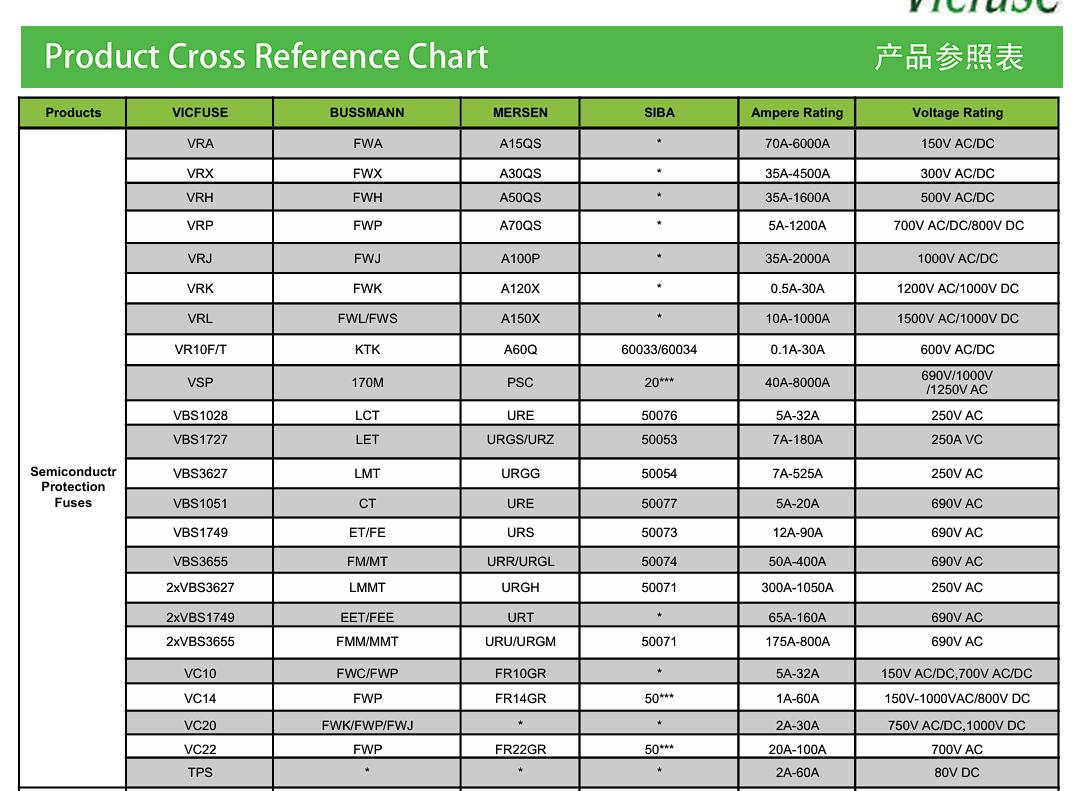
Anyone know how to source a Vicfuse VBS1749-50 A 800 VDC, this is the internal fuse used in AIO?

I have taken help for Predictive Support and my installers to help diagnose problem, but struggling to get hold of exact same fuse. Found an alternative Eaton Bussmann 50FE Fuse 690V 50AMP, which is same in all ways except the voltage. Much rather use a fuse with same rating though.

J
#2 JimA

There are obviously some additional questions about why the fuse blew in first place, awaiting additional help from Predictive support.

J
#3 JimA

I will post the full story of this when I have an ending - then others can hopefully reduce time/cost involved if they face it themselves.

#4 hoggy

Looks like a fairly ubiquitous BS88.4 type fuse. I’d have a rummage in RS components and you’ll find something similar probably from Bussmann or Eaton.

J
#5 JimA

hoggy That's exactly what we did to find the Eaton Bussmann 50FE Fuse 690V 50AMP. But nothing in the 800V range. Thanks for response.

#6 hoggy

JimA higher voltage would also be fine (I’m out at the moment and can’t really look but I’ll have a rummage tomorrow)

J
#8 JimA

PaDav6 thanks I had seen that before, I tried posting an enquiry though this time.

#9 hoggy

Sorry, got caught up on other things over the weekend.
Vicfuse have a cross reference chart

Your 1749 is comparable to the Bussman FE type (Except DC Voltage & breaking Speed (faster)) - looking through all those cross referenced brands none have 800V DC capability (although Vicfuse seem a little cagey on where this 800VDC applies as they also have it rated at a more normal 450VDC too (depends what spec it's been tested against but it doesn't say))

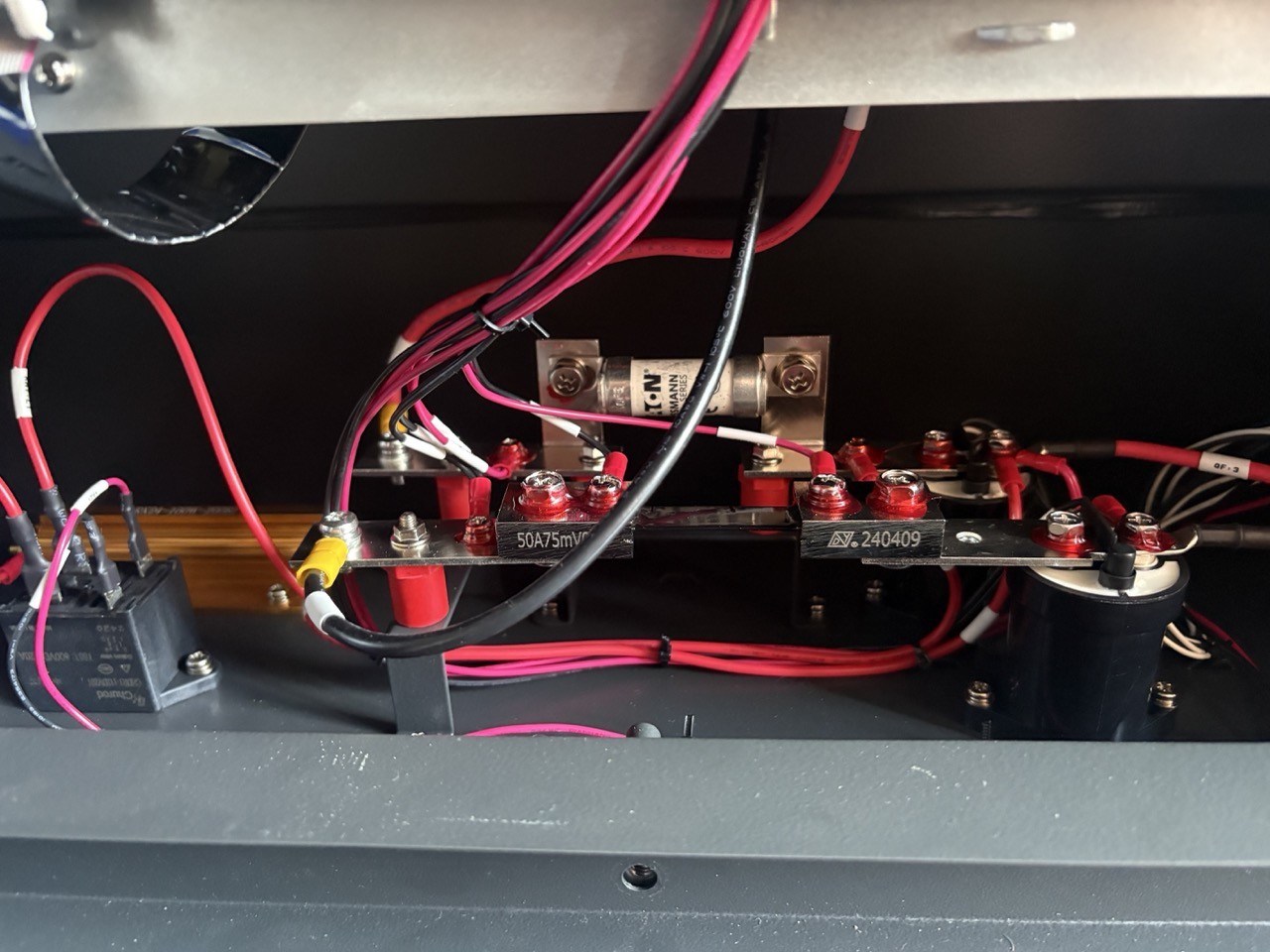
BUT do you need it - where exactly is this fuse sat (I've never had an AIO apart so is it on the DC side or AC Side? (To be honest I can't even see the DC side getting up much above 400V & the AC side certainly won't - so I'd say you would be fine with the Bussmann but equally it looks like the OEM one is unobtanium unless your looking to buy a pile of them from Alibaba or perhaps pay a lot of money to import one: https://www.ebay.co.uk/itm/205266797437?var=506019545471 so you may not have much choice)

Depends how lucky your feeling & if your confident you have fixed whatever took it out in the first place.

J
#10 JimA

The installer came today and installed the Bussman FE type fuse. Made some difference but still no joy. The battery now starts up and reports Idle, but the battery still beeps and there is no discharge from battery. The new fuse did not blow when it was put in but obviously something else is at fault - unit reports 'BMS Error'.

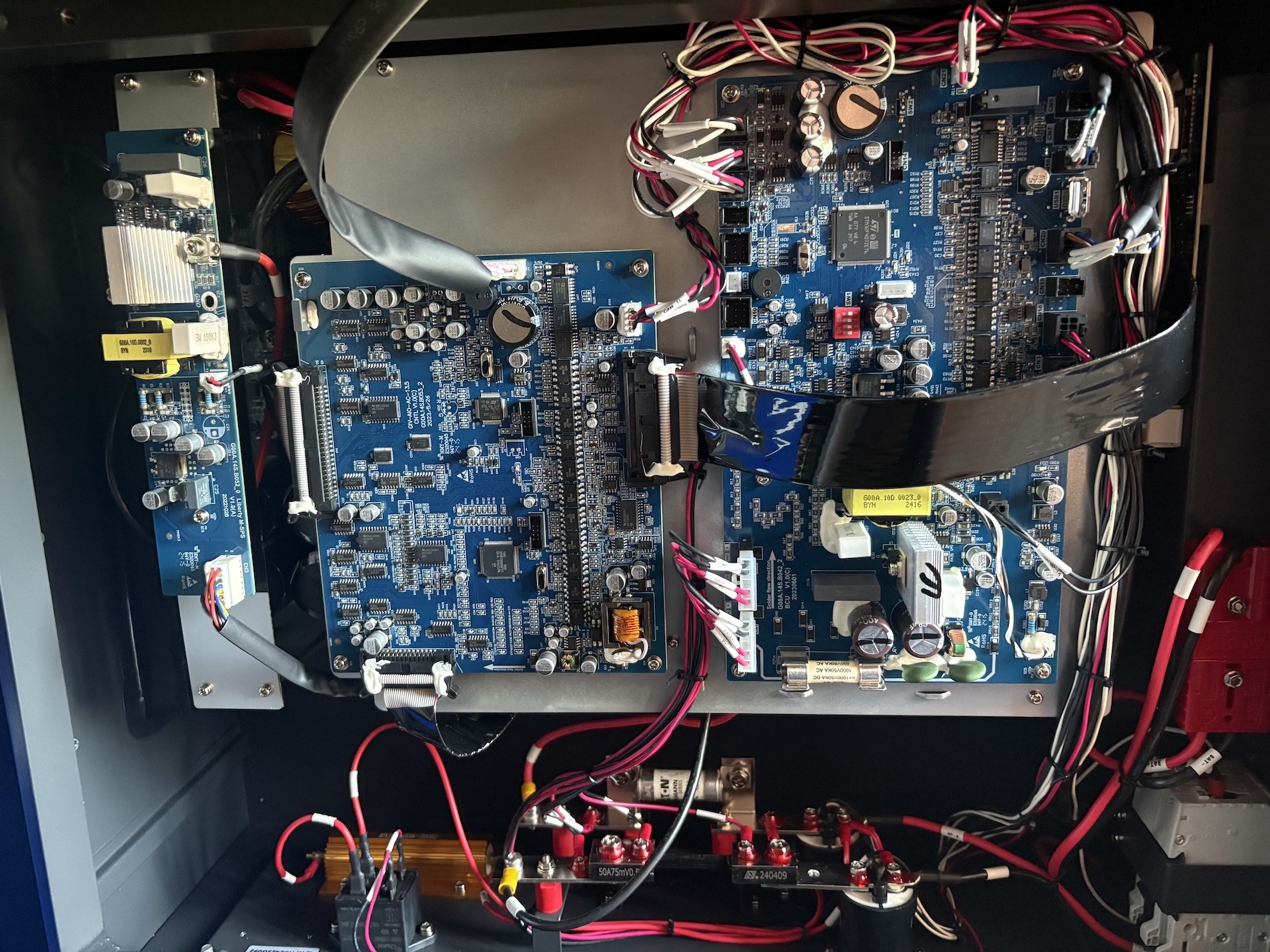
The fuse sits at the bottom of the inverter unit under all the boards, I'll try and grab a picture later.

I am very close to just cutting my losses as already about £500 down on time spent with Electrician, Predictive Support and fuses.

#11 hoggy

JimA If it now boots up then thats a big win - the batteries may well be flat if it's been stood a long time.
If you can get the AIO on a network you can use things like the Inverter APP or GivTCP to read the data and see if it's anything obvious (like flat battery packs) before cutting your losses.

J
#12 JimA

hoggy battery is at 56% but still seeing 0v. Predictive support were able to see batteries were ok but for some reason bms unable to see them . they suggested the fuse. but for some reason are not being very forthcoming beyond that.

S
#13 SteveCook

Has BMS cable become unplugged at either end?

J
#14 JimA

It always booted up, but previously showed as ( think it was) unavailable in dark grey and gateway showed red fault light in middle . Now just shows as idle and gateway has green light in middle. The only symptoms are: constant beeping after clicks on startup, no battery discharge and ‘BMS error’ that gets cleared shortly after it’s raised.

J
#15 JimA

SteveCook there are lots of internal cables (Aio) I am trying to upload photos but keeps failing.

S
#16 SteveCook

JimA
Jim. Thanks, but I know nothing about AIO.
My Gen1 BMS cable dropped out (there is no restraining clip like RJ45) and my portal showed that I had a smaller lead/acid battery. I shut everything down, fixed cable back in and turned everything back on. Battery came back as 9.5kWhr Lithium Ion

#17 hoggy

JimA this forum has a file size limit so that might be why the photos aren't working. I think it's 3mb max

J
#18 JimA

J
#19 JimA

J
#20 JimA

I am just looking at components that can go and I can replace - the 12v Relay CHDR1-112DV20 seems plausible (black box bottom left of last photo) - ChatGPT seems to think is quite likely. I am pretty confident that the boards are all ok due to the fact that it all starts up ok. The fuse now passes continuity test as does the shunt. The breaker has also been tested.

J
#21 JimA

Strange question - given the opportunity could others observe the clicks that their AIO1 do as they start up:

Quiet click followed by 2 more quiet clicks, these a very quiet.
Pause for a few seconds
Much louder clunk, a pause for a second followed by 3 slightly quieter clicks very close together.
then I just get beeping.

#22 hoggy

OK, so the AIO topology (for the DC side) is as follows:
Inverter DC Bus > BCU > BMS > Cells...

So you have 4 "draws" (modules) of cells - each with there own BMS inside that all talk to the BCU. The BCU is the board you see on the right (the one on the left is it's brain/Inverter Control Board.

So in an ideal world you'd be looking at the batteries themselves rather than the rest of the inverter (given the message says "BMS Error" and not "BCU Error" but Givenergy being Givenergy there is a good chance that the error is either not that descript or even just badly translated.

Seeing as you've popped the fuse on the main DC bus by the look of it the "BMS Error" might be a red herring and the BMS is actually checking it is safe to close it's mosfets and connect to the DC bus - seeing something it doesn't like (such as a short upstream at the inverter end that took the fuse out first time around) and simply saying "nope".
As an AIO isn't really an AIO and has no other DC sources (like a hybrid) this may be the AIO equivalent of the "Click of Death" the LV Giv inverters suffer from.

That said, I heard a rumour a long time ago that you could run an AIO on 3 out of 4 packs installed. No idea if it's actually possible (it's essentially the same as running a HV Gen 3 inverter with just 3 packs in a stack) but it's a free thing to try. Remove 1 pack at a time and see if it gets any happier when the "bad" one gets taken out.


J
#23 JimA

hoggy thank you, really enjoyed trying something different. But, will not start with 3 batteries - tried all combinations.

T
#24 TheGuru

When PredSuppot could read the battey.
Were all 96cells OK.
Were all 48 temp sensors ok

M
#25 mrand31

Test things before just replacing them. It'll save you both money and sanity.

J
#26 JimA

TheGuru There is very little information available to me and PredSupport are far from forth coming. Here is the last useful exchange I had with them:
`The batteries are 56% charged up. So thats not the problem here. there is no power getting from the battery box to the inverter box.

So this will need deeper investigation. Possible internal fuse, or the DC breaker on the right side is off or faulty.

Please can this diagnosis be passed back to the installer. If they wish to try to repair, get them to respond to us. `

Then they seemed to go very quiet and would not respond to myself or Installers.

J
#27 JimA

mrand31 I think that's good advice, thank you

J
#28 JimA

Right now I am thinking of just trying to recoup some money from it (already potentially sold the gateway). Couple of questions:
1) Anyone know how I can test the batteries so I can give a potential buyer confidence in what they are buying?
2) Are the batteries worth anything when sold individually or do they need to be sold as a working unit of 4?

D
#29 duplada

You will have probably done this but I will mention for other AIO and Gateway users who are not aware.

When I had issues with my Gateway RED Light. To fully reset it you actually have to power off all connected devices including the Solar, and all isolator switches and Gateway MCB's. Then turn the House Power Off at the Main House Fuse where Power Enters the property. Unless you do this the Gateway never totally resets as it is powered all the time. Turning off the Grid Breaker in the Gateway WILL NOT reset the Gateway.

J
#30 JimA

duplada I was sure the installer had reset everything but just tried it again and no good still get beeping and 'BMS Error' in log.

D
#31 duplada

JimA Sorry to hear that but it was worth a try. Good luck with it, keep us updated.

D
#32 duplada

When I had my BMS errors on one of my AIO's when it was new and they couldn't install it, GE came out and replaced the board that is in the centre of the pictures above. Which I think @hoggy is saying is the Inverter control board, though it was saying BMS errors in the AIO log.

J
#33 JimA

I am trying PredSupport one more time. Their email now includes details about GivLocal, used to provide remote access. I installed both the GivLocal agent in preparation for giving them remote access, but also installed their 'Givlocal: GivEnergy Monitor' app. It shows faults that are not displayed anywhere else. I have 'BMS Charger Over Temperature', 'BMS Over Voltage', 'Battery Open' and 'Battery Match Fault'. This has been by far the most informative app I have used to date! Not looking good though!

J
#34 JimA

interesting now have 6 errors: 'BMS Comms Fault', 'Battery Reversed' (and the 4 above).

then its drops down to 5: 'BMS Comms Fault' (and the 4 above)

J
#35 JimA

The more I look at this app, the more I like it - you can see individual cells. All the cell voltages and temps seem ok.

D
#36 duplada

Well maybe the Gateway reboot has now enabled the full scenario to be reported. Surely Pred Support will know from all those errors where the fault lies?