
GivEnergy Gateway flashing red after prolonged power cut – no power to house

5 comments started 2026-10-04 last 2026-10-07
GivEnergy ProductsAC CoupledHybridBattery
A
#1 Aaron B

Hi, hoping someone can help.

Scottish and Southern Electricity Networks have had a power cut in our village. We were without power for whole weekend, so I suspect our GivEnergy All-in-One battery may have completely discharged.

SSEN have now connected the village to a temporary diesel generator, and I can see that electricity is reaching the grid side of the GivEnergy Gateway. However:

  • The Gateway is flashing red
  • The All-in-One battery has no lights on the front and won’t turn on
  • The AIO indicator/light at the Gateway isn’t coming on
  • The incoming supply is present, but no power is being passed through to the house

Does anyone know how to get the Gateway/AIO to restart and allow the incoming power through to the house?

I’ve tried the normal AIO restart procedure, but the battery still appears completely dead. I’m wondering whether the battery has gone into a low-voltage/deep-discharge state and needs to be reactivated before the Gateway will reconnect.

Unfortunately, it’s Sunday so I haven’t been able to get hold of GivEnergy support or a GivEnergy-qualified electrician.

Has anyone had the same issue after a long power cut, and if so, what was needed to get the system running again?
W
#2 wrighar

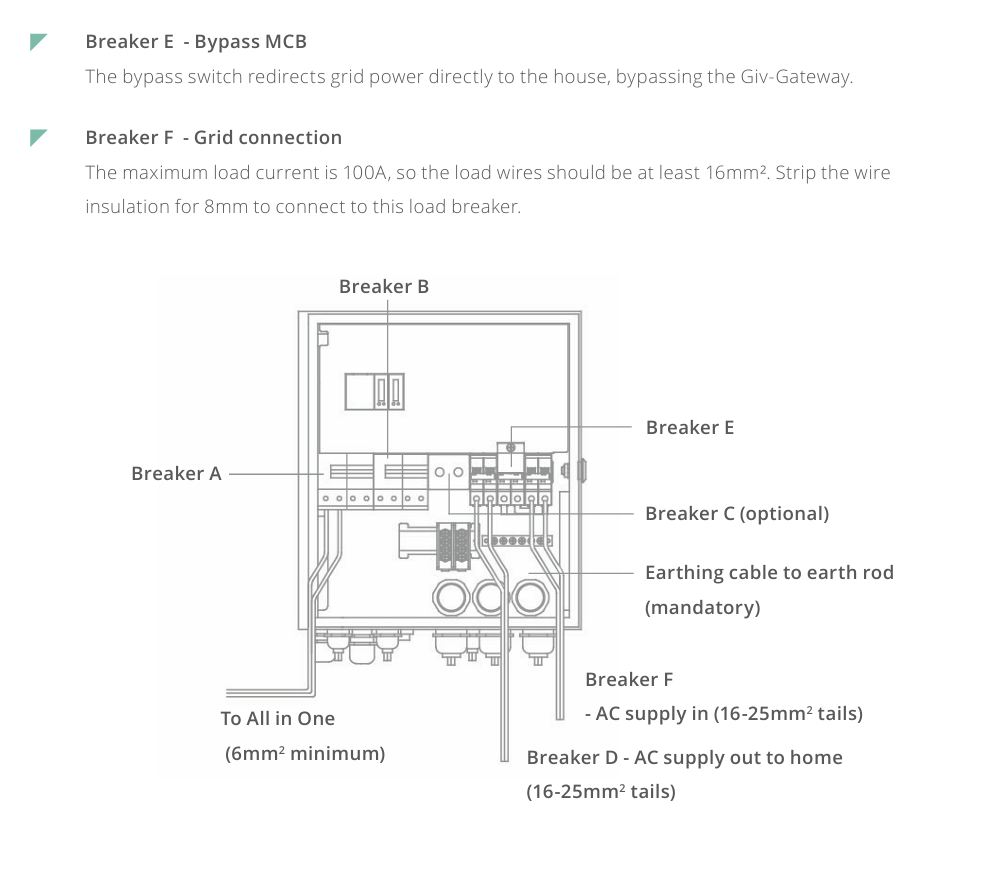
Make sure nothing in the gateway is tripped, and if not throw the normally covered emergency switch in the gateway to get house power.

D
#3 duplada

Usually when you get a Red Light on the Gateway the procedure is to turn everything off first, shutdown any batteries turn off at the breaker and AC isolator, then in the Gateway turn off an isolate any solar. To Get the Gateway rebooted you have to kill the power from the Grid the only way to do this is to turn off the breaker in the meter cupboard or wherever the breaker resides. Then power everything up in reverse. Just so you know switching the grid power off and on in the Gateway will not reboot the Gateway as it is powered all the time. If this happens again in the future to get power to the house remove the bypass screw plate in the Gateway and flip the breaker. Just remember to set it back again when the dust has settled.

A
#4 Aaron B

Thanks everyone for your help! I tried shutting everything down and restarting it, but that didn’t resolve the issue. Switching the gateway into bypass mode got electricity back to the house, so thanks for suggesting that.

I then raised a support ticket with PredSupport, who were able to log in remotely and fix the fault. The whole system is now back up and running.

I’ve also updated the firmware on all three units and got everything onto one account, as the original setup was split across two.

T
#5 Toddy411

Sounds like a very good outcome ,Lucky to have Predsupport