System Idle after a powercut

50 comments started 2022-08-15 last 2022-08-22
GivEnergy Products
F
#1 feidhlim

Had a brief powercut today and after the power came back, my system is stuck in idle and the inverter lightning bolt light is flashing green rather than solid green.

I’ve had power cuts before and things always came back online fine.
It’s connecting to the online portal (showing Idle) but reporting the load is only 6w.
I’ve done another reboot of the battery and inverter but no change.

#2 TheDragon (GivEnergy)

Are the batteries turned on? Green breaker up position.
Are you seeing solar generation?

You didnt mention if hybrid or AC coupled

F
#3 feidhlim

TheDragon (GivEnergy) yeah battery is on. Breakers are up.
It’s hybrid. Not seeing solar generation (but it’s heavily cloudy and raining so not expecting to see anything). Not seeing any grid pull either. Just home consumption of 6w and battery draw of the same. It should be around 300w.

F
#4 feidhlim

No change and no PV generation either this morning. I have contacted GE Support.

#5 TheDragon (GivEnergy)

Is the dongle connected and portal updating.

As tech support will want to log in remote to take a look

F
#7 feidhlim

Starting to get a smell of singe/burn from the inverter. Not taking any chances and have shut the whole thing off

#8 hoggy

feidhlim yeah that’s the right thing to do. Time for an engineers visit I’m afraid.

it’s purely anecdotal from a couple of installers but I believe the AC coupled units don’t like “messy” resync with the grid after a power cut (as opposed to clean break from say a breaker trip or isolator being thrown) particularly if when the power comes back it’s of poor quality.

Not seen anything about the Hybrid being the same but I guess internally they may share some of the architecture so maybe / maybe not although given it worked before and now doesn’t it would be a bit of a coincidence!

#9 TheDragon (GivEnergy)

hoggy Another one bites the dust.

Deffo a pattern developing here with power cuts.

See Awk Sods posts on fakebook

T
#10 TX200

UhOh! Not looking good for the winter of discontent or whatever the tabloid newspapers called it. 😱🤣

W
#11 wrefordj

feidhlim My installer arranged an EPS and on the day he demonstrated it, the inverter failed...
Took a couple of weeks for GE to arrive and replace a burned out power thyristor, I believe. (no charge)

#12 TheDragon (GivEnergy)

wrefordj
Oh dear.
Was the EPS powering too much?

W
#13 wrefordj

TheDragon (GivEnergy) No, only wifi, central heating controller and a few lights. He just switched off the mains power and changed over to the battery when something blew. Apparently, a few of those thyristors had been failing elsewhere.

W
#14 wrefordj

It works fine, now.

F
#15 feidhlim

Got a replacement inverter and back up and running.

F
#16 feidhlim

Not out of the woods entirely it seems.
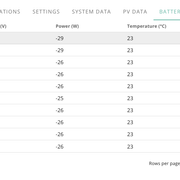
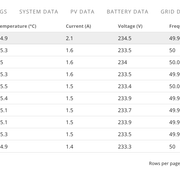
The numbers seem off in the app and web portal. There's nothing running in the house right now, no heating, hot water, dishwasher or anything like that but it's saying I'm consuming 3.7kWh. It should be around 200-300w right now. I'd need to have multiple high energy things running to be at 3.7kWh.

The home consumption seems to fluctuate with the PV generation. If PV goes down to 2.4kWh, home consumption goes down to within a few watts of the same. It goes up to 4.2kWh, then Home consumption follows suit.
The house is idling right now. Using 2-300w. The rest should be getting exported but it’s feeding into the “home” for some reason.

F
#17 feidhlim

feidhlim and when things should be using power, like running the oven and dryer right now I should be using over 2.0kWh but only reporting 1.3kWh.

#18 TheDragon (GivEnergy)

feidhlim sounds like your import CT clamp is backwards. Or in the wrong place

Shut off solar. Pause battery.
What does load read? What does grid read?

F
#20 feidhlim

Btw - changing the battery to Pause / Force Charge / Force Discharge doesn’t seem to do anything either

#21 Simon_C

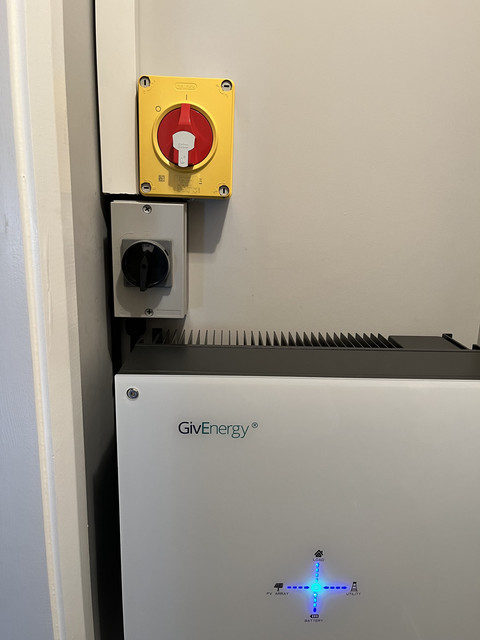
The solar PV provides a DC voltage, so is the black/grey switch.

The mains AC cable to your consumer unit/meter box is isolated by the red/yellow switch.

The household consumption (Load) can only be calculated by having accurate readings for 3 other values, solar PV generation, battery import/export, and grid import/export, hence the 4 way indication on the front of the inverter.

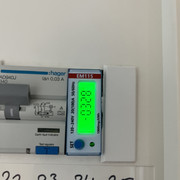
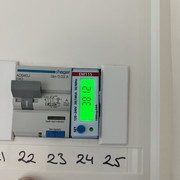
You should have an EM115 model electric meter monitoring your grid cable (so located close to your main utility meter).
If this is accessible, you can press the single button on it to cycle through various values including the instantaneous power (in kW). If you have your solar PV and battery switched off, then switch on say a kettle, you should see the 3 kW kettle load plus any other household consumption on the EM115 display.


F
#22 feidhlim

Simon_C Thanks Simon.
I do have the EM115 meter.
With the house idling, it shows -0328. Negative probably isn't right unless it means I'm currently exporting?

Flipping on the (electric) dual-oven to generate load, it shows 3812.

But the GE app didn't change, "Home Consumption" stayed at its current ~ 550w at the moment. I left the oven on for a few minutes and no change because I know it can take a minute for the load change to be noticed/reported by the app.

F
#23 feidhlim

TheDragon (GivEnergy) If I shut off the PV (flipping the black/grey switch above) then I lose all data from the app. Everything goes grey and 0w.

#24 Simon_C

The EM115 values look sensible at least, but concerning that you do not see them via the web portal or app.
There is a 'Local' connection setting available via the app that updates faster than every 5 minutes.
As I am still waiting for my GE installation, may be someone with a working system can confirm if the +ve and -ve polarity is correct for grid import/export.

F
#25 feidhlim

Simon_C I've relayed everything above back to GE too but I don't expect an update until next week.
It's the same with the Local connection on the app. Somethings not right. I may just do a full shutdown and start up.

T
#26 Tim

feidhlim If I shut off the PV (flipping the black/grey switch above) then I lose all data from the app. Everything goes grey and 0w.

Is your ac supply still isolated? Does your battery have a separate DC isolator, or just the one under the inverter? Is that on or off?

Simon_C confirm if the +ve and -ve polarity is correct for grid import/export

-ve is correct for export and +ve for impot

F
#27 feidhlim

Tim Beneath the inverter I have two green trip-switch style switches in their own box that are both on. The only other switch is the twist-switch on the underside of the inverter itself.

T
#28 Tim

feidhlim The green trip-switch is a double pole isolator from the battery which should normally be in the up position, the same as your consumer unit isolator (usually red). The twist-switch is to isolate the inverter from the battery and should be in the "on" position. If your ac isolator, PV isolator, Battery isolator and inverter battery isolator are all in the "on" position, and the battery is also switched on (small button at top right hand corner of the battery - needs to be pressed for up to ten seconds to switch on/off) you should be able to see parameters for all the connections in the inverter tabs:
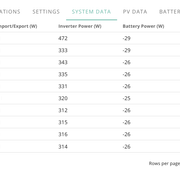
System Data for generation from PV, Import/export and inverter power
Battery data for voltage and SoC (although you may still get this data from the BMS if the isolators are open)
Inverter data for AC voltage, frequency, power and current.

Can you see all these data? Do they look sensible?

#29 Simon_C

Is the GE inverter and attached solar PV the only generating device in your household?

Just asking, as if you have another solar PV system then the maths for the household consumption will not add up without another metering device.

F
#30 feidhlim

Tim I can these online, but no they don't look correct to me. I turned back on my ovens at 18:09, and can see the load in the EM115 of around 3500w. I've let these run for more than 10 mins.

Consumption of only 472w when you have a two electric ovens running is absolutely wrong.

I know there is never enough PV generation this time of evening so the battery should be getting drawn, but it's not. The PV generation values look correct to me.

F
#31 feidhlim

Simon_C Yes it's my only generator. Nothing changed except the installer swapped out the old inverter for the new one.

T
#32 Tim

feidhlim I've let these run for more than 10 mins.

In normal operating mode, the portal updates every 5 minutes or so with a snapshot of the inverter register. Your inverter was updating every few seconds. The only time I've seen this on my inverters is when it was carrying out a battery calibration. Maybe your inverter is calibrating your battery following the change? The numbers don't seem to add up and the behaviour is odd. Another case of maybe the inverter is doing what the commissioning people want but there's no notification to say so?

When I see odd figures, I usually find that if I ignore the portal and come back later, and look back, it seems to make sense. Maybe we are too used to seeing "real time" data and suffer "cognitive dissonance" in the here and now?

Hang tight?

F
#33 feidhlim

Tim Thanks.
Nothing I can really do anyways at this stage other than wait so we'll see how it goes over the weekend and I'll give the installer a buzz on Monday.
Now if it's a case that my electricity provider is seeing zero pull from the grid too then I can live with that 😆 .
Hopefully things are working under the hood and it's just a numbers thing.

#34 TheDragon (GivEnergy)

feidhlim

Ok a Hybrid. Was hoping it would remain powered like at night.

Wait till dark then. Pause battery so grid is your only source.
Look if your grid reads import or export.
If it reads export, CT clamp on your meter tail is backwards

F
#35 feidhlim

TheDragon (GivEnergy) no PV right now at 21:30. Battery is off (pause doesn’t work). Portal says consuming 7w (I wish) drawing 1w from the battery (battery that is off), so 6w made up by magic.

Grid is showing 0w in either direction.

#36 Simon_C

Given the EM115 meter appears to be reporting correctly on its own display, and your previous statement, I reckon the comms between your inverter and the EM115 is the issue.
When the inverter was swapped, could the comms cable to the EM115 have been connected wrong, or in the wrong socket on the inverter?

The home consumption seems to fluctuate with the PV generation. If PV goes down to 2.4kWh, home consumption goes down to within a few watts of the same. It goes up to 4.2kWh, then Home consumption follows suit.

The household consumption (Load) can only be calculated by having accurate readings for 3 other values, solar PV generation, battery import/export, and grid import/export, hence the 4 way indication on the front of the inverter.

So if the inverter thinks the grid import/export is always 0, even though it is not, do the remaining figures balance out?

#37 TheDragon (GivEnergy)

On the portal. Under notifications. Do you see Meter Comms fail?
The symptoms surly point to something screwy with the meter comms. Especially as the meter is reading power. Just not sending it to the inverter.

There are some engineer settings for meters. But only your installer and GE can access them.
Ensure they are set correctly.
@Adam-Reynolds Are you able to check this guys meter settings.

F
#38 feidhlim

Simon_C I’ve no idea if things are cabled correctly. I’ll have to call the installer on Monday.
The remaining values don’t seem to add up. Last night during darkness. It was just reporting a consumption of a few watts, nothing coming from the grid, nothing coming from the battery.

F
#39 feidhlim

TheDragon (GivEnergy) No notifications about meter comms fail.
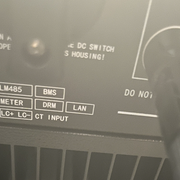
I don't know if this is relevant, but on the underside of the inverter you have this diagram and arrow pointing towards cable ports.

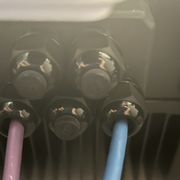
The purple cable appears to be from the meter and in the "meter" port according to above. The blue cable goes to the breaker box between the inverter and battery and then into the "comms" port of the battery. But on the inverter side should it not be in the top right port? It looks to be in the "lan" port.

F
#40 feidhlim

feidhlim Meant to also tag Simon_C on above about the comms cables.

#41 Simon_C

They are stuffing glands that the purple and blue cables pass through, which are for weather proofing to stop moisture getting in.
It would normally be the case that the cables are aligned with the connections under the cover, but not essential.

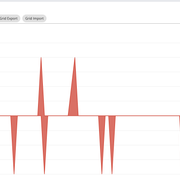
If you look at the web portal, and specifically the Power Graph, do the red traces for Grid Export and Grid Import ever change from 0?

As TheDragon (GivEnergy) stated, on the web portal expand My Inverter, then check the Notifications tab and look for meter comms events.

F
#42 feidhlim

Simon_C
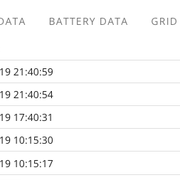
No notifications about the meter, there are some at 10:15 yesterday which was install time. And 17:40 and 21:40 would have been times I tried to reset things.

The Grid export / import never registers anything more than +- 2w

#43 Simon_C

From your photos, it looks like you have a Gen2 hybrid inverter, which uses RJ45 sockets for the Meter comms, BMS comms and LAN connections.
So the question is whether your purple and blue cables are in to the correct sockets, and fully plugged in to latch in place (just like a normal network cable in to a PC or wall socket).
It is up to you whether you are happy to fully power down the inverter, wait for a few minutes for the stored energy to discharge, then remove the cover to check, or whether you want the installer to return to check.

F
#44 feidhlim

Simon_C yeah I’m not going to go that far myself. I’ll call the installer. Thanks though.

#45 TheDragon (GivEnergy)

Simon_C wired thing is, if the meter was in the wrong port, there would be a meter comms error.
Which is what's making me think it's a setting in the engineer menu for meter type polarity etc.

F
#46 feidhlim

Another weird data point, I've set the battery to force charge from the grid (I get free power 9-5 on a Saturday). It's charging. But nothing is reported from the grid. My PV generation values spiked instead to over 3200w and are sending that to the battery.
It's too overcast and early for my panels to be doing such high and consistent values.

I suspect (and hope) that everything is working as it should, but that it's the numbers are misreported or misattributed. Because I can see yesterday, from my energy provider portal, the grid import activity. We'll see tomorrow if I can see the large grid import that should be going to the battery right now.

#47 TheDragon (GivEnergy)

feidhlim argh ok. I see what's going on here.

The meter cable is in the 2ndary PV meter port.

As your grid readings are showing as solar.

#48 Simon_C

One of the photos by @feidhlim shows the legend for the comms connections on the Gen 2 Hybrid inverter.

Top row = 'LM485' - 'BMS'
2nd row = 'Meter' - 'DRM' - 'LAN'
3rd row = 'LC+/LC- CT Input'

Which is the '2ndary PV meter port' ?

#49 TheDragon (GivEnergy)

Simon_C CT input

Like the previous and AC coupled. Can add a passive CT clamp.
That is what I assume this is for.

Ideally need a picture of where there actually plugged or wired into. Not just the cable housing gland position.

F
#50 feidhlim

Had my installer back out and with the change from a Gen1 to Gen2 inverter apparently there’s an extra step needed to tell the Gen2 about the meter. So now my numbers are all back to normal.

I’m might ask GE to reset my historical data because with this issue my metrics are all messed up for the last few days. Especially today after correcting things, my generation for just today is 1981kWh. No, not 1981w, or 1.9kWh….but almost two megawatt.

Waiting on GE themselves to call me because the battery is not behaving 100%. If I force discharge, the battery fails and I get two alarms.

  • BMS Discharger Over Current
  • Battery Voltage Low

The battery voltage drops from its normal 52.x down to 7.x until I set the battery back to resume.

I’ve tried calling GE a few times and waited on hold for over 20 mins each time. Sent them an email asking them to call me.