NGINX Proxy Setting to Reach HA remote

10 comments started 2022-08-30 last 2022-08-31
Home Automation
#1 TheDragon (GivEnergy)

Hi All,

I have got HomeAssistant working remote using SSL on the default 8123 port, for both internal and external.
I want to now have internal non ssl, and external SSL. It has been suggested that using nginx reverse proxy is the best way.
When I do this https://mydomain.duckdns.org gives 400: Bad request
Internal works unencrypted correctly

Here are the config/yaml parts of interest. I believe niginx has an IP on 172.30.32.1
Some say as its on the same host, use 127.0.0.1 (didnt work, default has 172.30.32.0/24
So i had both

http:
use_x_forwarded_for: true
trusted_proxies:
- 172.30.32.0/24
- 127.0.0.1
The config in the ad-on is all at default, bar the domain name changed to mydomain.duckdns.org

The Add-On boots fine, no errors
But when I browse to https://mydomain.duckdns.org I get a black screen in the top corner
400: Bad request

Before playing with NGINX, it was working fine internal & external, using the external URL, this is relying on my internal router looping back the resolved IP. If the WAL link is down, internally it wont resolve, hence wanting to leave local plain old http on port 8123
A
#2 anglefire

Have you port forwarded port 443 to your internal HA IP address (Wherever Nginx is located)?
Thats the first thing to do if not.
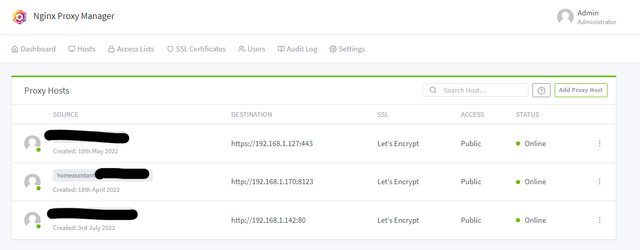
Then in the Proxy manager add your source and destination.

In my case I have three URL's that depending on the subdomain get directed to the internal destination.

What is important to remember is that you aren't using 8123 externally to get to the internal address, but using port 443 (i.e. HTTPS)

I have nothing setup in the yaml file - purely default.

A
#3 anglefire

Oh I don't use duckdns BTW but the principle should be the same as that just updates the external IP address to the URL AFAIK!

#4 TheDragon (GivEnergy)

anglefire

Cheers Im not using NGINX Manager, I only have 1 to play with.
Yes 443 is forwarded to 192.168.0.100

What i dont see is what its forwarded to port wise yours is obvious, http:.192.168.1.170:8123

My NGINX is running as an Ad-On

#5 TheDragon (GivEnergy)

Just been playing.

http:
use_x_forwarded_for: true
trusted_proxies:

  • 172.30.32.0/24
  • 0.0.0.0/0

Its now working?? Yes the Proxy IP is 172.30.32.1 where ever that is?
If I remove the 0.0.0.0/0 I get this error
2022/08/30 20:17:50 [error] 122#122: 676 connect() failed (111: Connection refused) while connecting to upstream, client: 147.161.**.9, server:mydomain.duckdns.org, request: "GET /api/websocket HTTP/1.1", upstream: "http://172.30.32.1:8123/api/websocket", host: "mydomain.duckdns.org"

the 141address is my work Laptop in the office now.

#6 TheDragon (GivEnergy)

Here is the 1st half of my config.yaml

Loads default set of integrations. Do not remove.

default_config:
recorder:
commit_interval: 5

Set Internal & External URLs

homeassistant:
external_url: https://mydomain.duckdns.org
internal_url: http://192.168.0.100:8123

Text to speech

tts:

  • platform: google_translate
    ffmpeg:

    Enable Https

    http:
    use_x_forwarded_for: true
    trusted_proxies:
    • 0.0.0.0/0

Default Section

automation: !include automations.yaml
script: !include scripts.yaml
scene: !include scenes.yaml

Track Network Devices

device_tracker:

  • platform: sky_hub
    host: 192.168.0.1
    interval_seconds: 60
    consider_home: 180
    new_device_defaults:
    track_new_devices: false
A
#7 anglefire

I guess that is all to do with Duck DNS-

Though I have checked my yaml file and I do have this:
http:
use_x_forwarded_for: true
trusted_proxies:

  • 127.0.0.1
  • 172.0.0.0/8
    But I think that was for something else (I have wireguard VPN as an addon too) - but actually can't remember now.

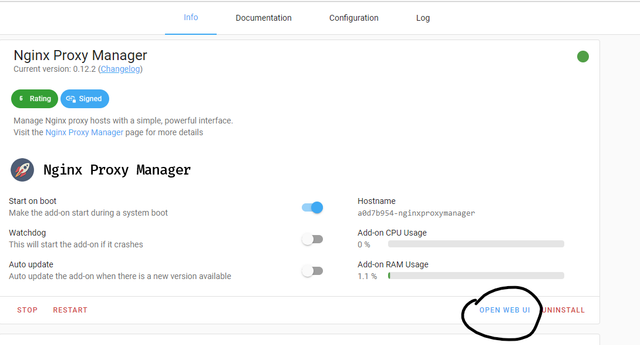
Anyway - Nginx - when you go to the addon, do you go to the web ui?


image post

#8 TheDragon (GivEnergy)

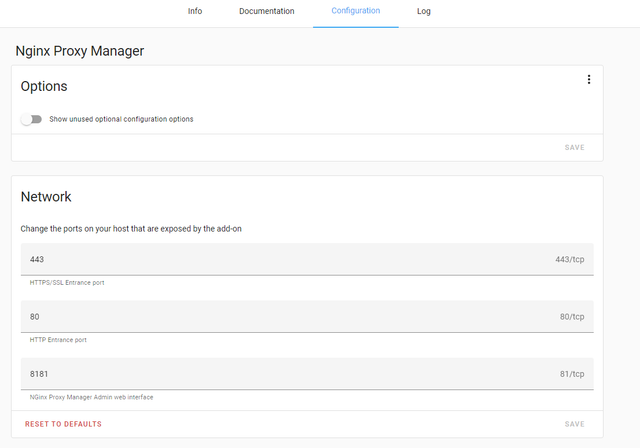
anglefire When I install the NGINX Proxy Manager, it fails to start. Port 443 in use.

Yes it is by NGINX Proxy server itself

A
#9 anglefire

TheDragon (GivEnergy) hum. Are you running ha on a rpi?

Not that that particularly matters.

If nginx isn’t running try pinging the IP address on port 443.
Not wishing to teach you to suck eggs you can do this with either telnet or powershell in windows.
Assuming you have windows open powershell and run this command

Test-NetConnection <address> -p 443

If it works then something has grabbed port 443 - if not then it would seem to be nginx.

If it has worked then you have the inevitable task of finding what!

#10 TheDragon (GivEnergy)

Sorted it.

172.0.0.0/8
Got it going, could probably just add the 172.17 network, but as there are oters, I added the whole 172 net

There are a couple of 172 networks in various Docker containers
172.30.32.0/24 Hassio Docker
172.30.33.0/24
172.17.0.0/24 NGINX