Apologies if this has been covered before - I'm new to the community. For context, I've got a small PV array consisting of 8 panels on a south facing flat roof (2.72 kWp), GivEnergy 3600 HY inverter and their 8.2kw battery storage system all installed two weeks ago. This is all appears to be working well since installation 2 weeks ago and it all appears on the GivEnergy app on my phone. I also have MyEnergy Zappi EV Charger, Hub (and Harvi) which appear on the MyEnergy mobile app. BUT, I can't see my Zappi on the GivEnergy app and I can't see the Solar and/or the Battery on the MyEnergy app.
My question is, should I get the PV installer/electrician back to sort out the CT clamps so that I can see everything on both apps because he should have done this as part of the original installation (I wasn't home for this and didn't ask him specifically to do it), OR is it something any decent electrician is able to do (and is it worth doing it anyway)? Interested in your collective opinions.
Thanks in advance. Mick
GivEnergy/MyEnergy App integration
You won't see the devices on each in others apps as there is no integration cross-platforms.
The Zappi should see the power flow if the correct number of CT clamps are fitted.
The post above is correct, you cannot control the MyEnergy devices from the GivEnergy app or vice versa. I cannot see this changing in the future.
Its probably worth you also knowing that the MyEnergy systems though cannot distingush between the battery discharge and solar discharge on a Hybrid inverter (not possible to fit a CT clamp to the cables as they are internal to the inverter), which means it becomes difficult to manage eco export to the Zappi from the myEnergy app - and you will not be able to separate battery export/import from solar import/export. Lots of post on the MyEnergy forum about this, including some work arounds.
So I understand I can't control the devices from the other devices app but I thought there was a way of at least having those visible on the apps. For example, on the GE app I'd like to see the EV charger icon and on the ME app I'd like to be able to see the solar PV and battery icons just so that I can see an overview of the entire system in one place; is that not a thing? Thanks again, M
PS. I schedule charging of the car during off-peak times rather than drawing excess from the solar pv (there's not much anyway due to the small size of my array and my larger than average consumption).
Fleetwood_Mick I would think there is little incentive for the manufactures to do this - why would they?
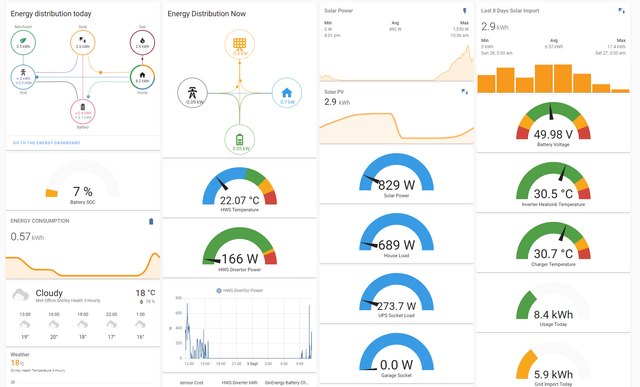
But it can be done in things like Home Assistant.
My dashboard is a bit busy and I have to scroll to see some of it, but I have gas data coming in from a Hildebrand Glow integration, the electric for the solar and grid import from GivTCP via Node-Red, the HWS diverter power comes in via Modbus through Node Red, The weather from a weather integration.

anglefire Thanks for your reply. I'm new to all this so naively thought the apps would at least acknowledge each others presence on the system. My bad, ha ha. I thought I'd seen videos/screenshots of apps showing this but it might be the Home Assistant app that you have that I've seen. I'll check it out. Thank you again, M :-)
TheDragon (GivEnergy) You can see EPS on the Inverter Tab and on the Inverter Data page.

TheDragon (GivEnergy) Mine shows 26-29W load (broadband router, couple of Pi, Zappi gateway, ethernet switch etc) when inverter is connected to grid. I'm assuming your EPS load is on continuously as I think you've said you have it set up as UPS rather than EPS. Maybe there's a clue there?