GivTCP v2.0 beta testing

169 comments started 2022-09-09 last 2023-04-04
Home AutomationHome Assistant
B
#1 Britkat

Evening all, I've been beavering away on a major update to GivTCP, which wraps up lots of feedback from you all as well as some new functionality and structural changes under the hood.

For those brave souls who fancy helping me find all the oddities in various use-cases and plant configurations you can now download and have a go at the latest version:

Its not yet available as an addon (only because I can't make it available without it going to everyone!), so you will need to install directly in docker.

I've started to capture the main changes here

Key Home Assistant updates:

  • Charge/Discharge Timeslot control via "Select" entities
  • Force Charge and Force Export control via "Select" entities

Please use this thread to report bugs, ask questions and help improve GivTCP.

Thanks!

#2 dbt85

Got it running via a docker compose without adding any new details other than the image change. The logs look so quiet now.... šŸ˜‚

These are the only errors so far after 10 mins or so. They mean nothing to me.

2022-09-09 23:57:09,109 [ERROR] Did not receive expected response type: ReadHoldingRegistersResponse != ReadInputRegistersResponse
2022-09-09 23:57:11,824 [ERROR] Error collecting registers: (<class 'KeyError'>, KeyError(HR:113), <traceback object at 0xb6868488>)
2022-09-09 23:57:11,824 [ERROR] Removing lock file due to read error

And then midnight happened and it got upset again

2022-09-09 23:59:56,811 [ERROR] Energy Today is Zero and its midnight so removing regCache
2022-09-09 23:59:56,813 [ERROR] Error processing registers: (<class 'ZeroDivisionError'>, ZeroDivisionError('float division by zero'), <traceback object at 0xb5afdb48>)
2022-09-10 00:00:01,484 [ERROR] Did not receive expected response type: ReadInputRegistersResponse != ErrorResponse
2022-09-10 00:00:01,994 [ERROR] Error collecting registers: (<class 'KeyError'>, KeyError(IR:110), <traceback object at 0xb685bc88>)
2022-09-10 00:00:01,995 [ERROR] Removing lock file due to read error
2022-09-10 00:00:17,226 [ERROR] Energy Today is Zero and its midnight so removing regCache
2022-09-10 00:00:17,226 [ERROR] Error processing registers: (<class 'FileNotFoundError'>, FileNotFoundError(2, 'No such file or directory'), <traceback object at 0xb685bd08>)
2022-09-10 00:00:22,449 [ERROR] Energy Today is Zero and its midnight so removing regCache
2022-09-10 00:00:22,450 [ERROR] Error processing registers: (<class 'FileNotFoundError'>, FileNotFoundError(2, 'No such file or directory'), <traceback object at 0xb685bca8>)

B
#3 Britkat

Wow, quick off the mark there!
Did you use the new docker compose file? I’d also suggest clearing out any cache data if you have mounted the config folder.
I thought I’d got rid of the zero division error…

#4 dbt85

Ah yesbi happened to be browsing late last night and saw it so figured id give it a go. I didn't use your new compose file I just did what I'm sure any developer hates and copied one of my old ones and changed the image details. I'll have a look later.

I made a new container and stuff so (I think?) I don't have to worry?

Can I ask about using multiple inverters in the current state of this image? Are you expecting all 3 inverters to be in one container using the inverter_1 or _2 ENV, and then also use NumBatts_1: 2, numbatts_2:1 also? Apologies that I've got the ENV names wrong I can't recall them off the top of my head and I'm not at my PC.

B
#5 Britkat

dbt85 New container is fine, but the docker-compose file will add the right ENV, so that's why its useful!
The assumption is to have one container with multiple invertors (up to three currently) with the ENV as you say.
I do want to check how it works with v2 as its had some tweaking but I only have one invertor with one battery, so its hard to test!

#6 dbt85

Britkat and i would use the numbatts_1 env (or whatever its called) for each inverter also?

I'll give it a whirl later and post up what it does. We have 3 here and 4 batteries but all 3 inverters are separate as they are in different properties.

R
#7 rwbarrett

I tried V2 (on a clean raspberrypi) but it ignored the second battery - went back to 1.17 and everything reappeared

B
#8 Britkat

rwbarrett that’s odd, what does the ENV setup look like? And can you send the logs from startup?

R
#9 rwbarrett

I deleted everything to go back to 1.1.7 - will try again tomorrow and send it through

#10 dbt85

I have tonight used your docker compose and the results were not great. Similar if not identical results from all 3 inverters. At the bottom is the contents of my Compose file just in case I'm being captain thicko. It seems last night I was using giv_tcp-ma:dev for the image what was entirely incorrect and I'm sorry for wasting your time šŸ˜‚

I see a pull request for the dev branch so maybe that IP fix will correct this issue?

2022-09-10T22:11:17.340541164Z 2022-09-10 23:11:17,340 - GivTCP_Startup - [CRITICAL] - No config directory exists, so creating it...
2022-09-10T22:11:17.340906995Z 2022-09-10 23:11:17,340 - GivTCP_Startup - [CRITICAL] - Setting up invertor: 1 of 1
2022-09-10T22:11:17.367804144Z 2022-09-10 23:11:17,367 - GivTCP_Startup - [CRITICAL] - Recreating settings.py for invertor 1
2022-09-10T22:11:17.369542687Z 2022-09-10 23:11:17,369 - GivTCP_Startup - [CRITICAL] - Running Redis
2022-09-10T22:11:17.370650512Z 2022-09-10 23:11:17,370 - GivTCP_Startup - [CRITICAL] - Running RQ worker to queue and process givernergy-modbus calls
2022-09-10T22:11:17.371126897Z 2022-09-10 23:11:17,370 - GivTCP_Startup - [CRITICAL] - Running Invertor read loop every 5
2022-09-10T22:11:17.380236514Z 2022-09-10 23:11:17,372 - GivTCP_Startup - [CRITICAL] - Subscribing Mosquitto on port 1883
2022-09-10T22:11:17.388532322Z 2022-09-10 23:11:17,388 - GivTCP_Startup - [CRITICAL] - Starting Gunicorn on port 6345
2022-09-10T22:11:18.113656294Z [2022-09-10 23:11:18 +0100] [14] [INFO] Starting gunicorn 20.1.0
2022-09-10T22:11:18.114745952Z [2022-09-10 23:11:18 +0100] [14] [INFO] Listening at: http://0.0.0.0:6345 (14)
2022-09-10T22:11:18.114904414Z [2022-09-10 23:11:18 +0100] [14] [INFO] Using worker: sync
2022-09-10T22:11:18.127196803Z [2022-09-10 23:11:18 +0100] [17] [INFO] Booting worker with pid: 17
2022-09-10T22:11:18.165264794Z [2022-09-10 23:11:18 +0100] [18] [INFO] Booting worker with pid: 18
2022-09-10T22:11:18.228748928Z [2022-09-10 23:11:18 +0100] [19] [INFO] Booting worker with pid: 19
2022-09-10T22:12:07.488172397Z 2022-09-10 23:12:07,487 - GivTCP_Read_1 - [CRITICAL] - First time running so saving AC Charge status
2022-09-10T22:12:07.495107660Z 2022-09-10 23:12:07,494 - GivTCP_Read_1 - [CRITICAL] - Publishing Home Assistant Discovery messages
2022-09-10T22:13:31.394467082Z Traceback (most recent call last):
2022-09-10T22:13:31.394664358Z File "/usr/local/lib/python3.10/site-packages/redis/connection.py", line 611, in connect
2022-09-10T22:13:31.396391438Z sock = self.retry.call_with_retry(
2022-09-10T22:13:31.396491974Z File "/usr/local/lib/python3.10/site-packages/redis/retry.py", line 51, in call_with_retry
2022-09-10T22:13:31.396939989Z raise error
2022-09-10T22:13:31.397020933Z File "/usr/local/lib/python3.10/site-packages/redis/retry.py", line 46, in call_with_retry
2022-09-10T22:13:31.397434078Z return do()
2022-09-10T22:13:31.397511467Z File "/usr/local/lib/python3.10/site-packages/redis/connection.py", line 612, in <lambda>
2022-09-10T22:13:31.399184361Z lambda: self._connect(), lambda error: self.disconnect(error)
2022-09-10T22:13:31.399273565Z File "/usr/local/lib/python3.10/site-packages/redis/connection.py", line 677, in _connect
2022-09-10T22:13:31.401053311Z raise err
2022-09-10T22:13:31.401156365Z File "/usr/local/lib/python3.10/site-packages/redis/connection.py", line 665, in _connect
2022-09-10T22:13:31.402882001Z sock.connect(socket_address)
2022-09-10T22:13:31.403043610Z TimeoutError: [Errno 110] Operation timed out
2022-09-10T22:13:31.403102499Z
2022-09-10T22:13:31.403156665Z During handling of the above exception, another exception occurred:
2022-09-10T22:13:31.403212128Z
2022-09-10T22:13:31.403264553Z Traceback (most recent call last):
2022-09-10T22:13:31.403318312Z File "/app/GivTCP_1/read.py", line 876, in <module>
2022-09-10T22:13:31.406995248Z globals()sys.argv[1]
2022-09-10T22:13:31.407088562Z File "/app/GivTCP_1/read.py", line 553, in self_run2
2022-09-10T22:13:31.409554821Z runAll("True")
2022-09-10T22:13:31.409649172Z File "/app/GivTCP_1/read.py", line 523, in runAll
2022-09-10T22:13:31.412158061Z result=GivQueue.q.enqueue(getData,full_refresh)
2022-09-10T22:13:31.412265097Z File "/usr/local/lib/python3.10/site-packages/rq/queue.py", line 515, in enqueue
2022-09-10T22:13:31.413725364Z return self.enqueue_call(
2022-09-10T22:13:31.413808623Z File "/usr/local/lib/python3.10/site-packages/rq/queue.py", line 413, in enqueue_call
2022-09-10T22:13:31.415242668Z return self.enqueue_job(job, pipeline=pipeline, at_front=at_front)
2022-09-10T22:13:31.415336223Z File "/usr/local/lib/python3.10/site-packages/rq/queue.py", line 573, in enqueue_job
2022-09-10T22:13:31.418195442Z job.save(pipeline=pipe)
2022-09-10T22:13:31.418301071Z File "/usr/local/lib/python3.10/site-packages/rq/job.py", line 689, in save
2022-09-10T22:13:31.420301000Z if self.get_redis_server_version() >= (4, 0, 0):
2022-09-10T22:13:31.420404870Z File "/usr/local/lib/python3.10/site-packages/rq/job.py", line 697, in get_redis_server_version
2022-09-10T22:13:31.422217912Z self.redis_server_version = get_version(self.connection)
2022-09-10T22:13:31.422302393Z File "/usr/local/lib/python3.10/site-packages/rq/utils.py", line 280, in get_version
2022-09-10T22:13:31.423208090Z return tuple(int(i) for i in connection.info("server")["redis_version"].split('.')[:3])
2022-09-10T22:13:31.423289163Z File "/usr/local/lib/python3.10/site-packages/redis/commands/core.py", line 972, in info
2022-09-10T22:13:31.425682386Z return self.execute_command("INFO", section, *args, **kwargs)
2022-09-10T22:13:31.425772793Z File "/usr/local/lib/python3.10/site-packages/redis/client.py", line 1235, in execute_command
2022-09-10T22:13:31.428761697Z conn = self.connection or pool.get_connection(command_name, **options)
2022-09-10T22:13:31.428854381Z File "/usr/local/lib/python3.10/site-packages/redis/connection.py", line 1387, in get_connection
2022-09-10T22:13:31.432243523Z connection.connect()
2022-09-10T22:13:31.432349614Z File "/usr/local/lib/python3.10/site-packages/redis/connection.py", line 615, in connect
2022-09-10T22:13:31.433903695Z raise TimeoutError("Timeout connecting to server")
2022-09-10T22:13:31.434065787Z redis.exceptions.TimeoutError: Timeout connecting to server
2022-09-10T22:14:02.967298245Z 2022-09-10 23:14:02,965 - GivTCP_Read_1 - [CRITICAL] - Publishing Home Assistant Discovery messages
2022-09-10T22:15:02.966294197Z 2022-09-10 23:15:02,964 - GivTCP_Read_1 - [CRITICAL] - Publishing Home Assistant Discovery messages

GivTCP:
image: britkat/giv_tcp-dev:2022.09.09
ports:
- "1883:1883" # MQTT
- "6345:6345" # REST (add increments for each invertor)
- "3000:3000" # This should match the WEB_DASH_PORT ENV below
- "6379:6379" # Redis for job queueing
environment:

Critical to update

- NUMINVERTORS=1 # Set this to the number of Invertors in your setup, then replicate the next two lines for each invertor (changing the last number of the ENV)
- INVERTOR_IP_1=192.168.1.89 # Set this to the IP address of your Invertor on you rlocal network
- NUMBATTERIES_1=1 # Number of battery modules installed and connected to the above invertor
- MQTT_OUTPUT=True # "True" if you want to publish your data to MQTT, "False" otherwise
- MQTT_ADDRESS=192.168.1.200 # IP address of an existing MQTT broker, or leave as "127.0.0.1" to use the internal broker
- MQTT_USERNAME=Mr # Username of your existing broker, if needed. Not required for internal broker
- MQTT_PASSWORD=flibble # Password of your existing broker, if needed. Not required for internal broker
- HOSTIP=192.168.1.200 # External IP address of the docker host (needed for web dashboard)
- CACHELOCATION=/config/GivTCP # Location of cache data, this folder can be mapped to a persistence storage outside the container
- TZ=Europe/London # Set to your Timezone

Optional

- MQTT_TOPIC= # Root topic to publish data to. If left blank it will default to GivEnergy/<invertor_serial_number>
- MQTT_PORT=1883 # Port of your existing broker, leave as "1883" for internal broker
- LOG_LEVEL=Error # Level of logs to be reported: "Error", "Info" or "Debug"
- PRINT_RAW=True # If True this will publish all inverotr data unprocessed as well as standard data
- SELF_RUN=True # If True the container will self-run and connect and publish data. If "False" the you will need to trigger externally via REST
- SELF_RUN_LOOP_TIMER=5 # Wait time between every read command to the invertor
- INFLUX_OUTPUT=False # "True" if you want to publish your data to InfluxDB, "False" otherwise
- INFLUX_URL= # URL of an external Influx instance
- INFLUX_TOKEN= # Access Token for your Influx instance
- INFLUX_BUCKET= # Data Bucket of your Influx instance you want data sent to
- INFLUX_ORG= # Influx instance Organisation
- HA_AUTO_D=True # If True (and if MQTT_OUTPUT is True) this will publish Home Assistant Auto Discovery messages to the broker
- HADEVICEPREFIX=GivTCP # Defines the preficfor all entities in Home Assistant
- PYTHONPATH=/app
- DAYRATE=0.155 # Price in £/$ for your daytime electricity per kWh
- NIGHTRATE=0.055 # Price in £/$ for your night time electricity per kWh
- EXPORTRATE=0.04 # Price in £/$ for your export electricity per kWh
- DAYRATESTART=04:30 # Time in HH:MM when your day time tariff kicks in
- NIGHTRATESTART=00:30 # Time in HH:MM when your night time tariff kicks in
- WEB_DASH=False # Enable the wed dashboard
- WEB_DASH_PORT=3000 # Port to serve the web dashboard on
- SMARTTARGET=False # Enables the PALM capability, requires the three ENV below to be set
- GEAPI= # API Key for the GivEnergy Cloud
- SOLCASTAPI= # API key for Solcast
- SOLCASTSITEID= # SiteID for Solcast site (single array)
- DATASMOOTHER=High # Set the data smoothing to most agressive setting (High, medium, low)

restart: always
privileged: true
network_mode: host
M
#11 mpartington

Britkat Britkat Hi, just curious to how the different data smoothing settings operate?

R
#12 rwbarrett

ok have installed v2. Got both batteires reading for a short period and now get this -

022-09-11 09:47:01,063 - GivTCP_Startup - [CRITICAL] - No config directory exists, so creating it...
2022-09-11 09:47:01,075 - GivTCP_Startup - [CRITICAL] - Running Redis
2022-09-11 09:47:01,079 - GivTCP_Startup - [CRITICAL] - Setting up invertor: 1 of 1
2022-09-11 09:47:01,211 - GivTCP_Startup - [CRITICAL] - Recreating settings.py for invertor 1
2022-09-11 09:47:01,223 - GivTCP_Startup - [CRITICAL] - Running RQ worker to queue and process givernergy-modbus calls
2022-09-11 09:47:01,226 - GivTCP_Startup - [CRITICAL] - Running Invertor read loop every 5
2022-09-11 09:47:01,236 - GivTCP_Startup - [CRITICAL] - Subscribing Mosquitto on port 1883
2022-09-11 09:47:01,250 - GivTCP_Startup - [CRITICAL] - Starting Gunicorn on port 6345
[2022-09-11 09:47:04 +0100] [15] [INFO] Starting gunicorn 20.1.0
[2022-09-11 09:47:04 +0100] [15] [INFO] Listening at: http://0.0.0.0:6345 (15)
[2022-09-11 09:47:04 +0100] [15] [INFO] Using worker: sync
[2022-09-11 09:47:04 +0100] [16] [INFO] Booting worker with pid: 16
[2022-09-11 09:47:04 +0100] [17] [INFO] Booting worker with pid: 17
[2022-09-11 09:47:04 +0100] [18] [INFO] Booting worker with pid: 18
2022-09-11 09:47:13,120 - GivTCP_Read_1 - [CRITICAL] - First time running so saving AC Charge status
2022-09-11 09:47:13,529 - GivTCP_Read_1 - [CRITICAL] - Publishing Home Assistant Discovery messages
2022-09-11 09:51:51,526 - GivTCP_Read_1 - [ERROR] - Error collecting registers: (<class 'KeyError'>, KeyError(HR:013), <traceback object at 0x7f9118e900>)
2022-09-11 09:52:02,390 - GivTCP_Read_1 - [ERROR] - Error collecting registers: (<class 'KeyError'>, KeyError(HR:013), <traceback object at 0x7f9118e900>)
2022-09-11 09:52:13,067 - GivTCP_Read_1 - [ERROR] - Error collecting registers: (<class 'KeyError'>, KeyError(HR:013), <traceback object at 0x7f9118e900>)
2022-09-11 09:57:41,704 - GivTCP_Read_1 - [ERROR] - Error collecting registers: (<class 'KeyError'>, KeyError(HR:113), <traceback object at 0x7f91127e80>)
2022-09-11 09:57:52,612 - GivTCP_Read_1 - [ERROR] - Error collecting registers: (<class 'KeyError'>, KeyError(HR:113), <traceback object at 0x7f91127d00>)
2022-09-11 09:58:03,057 - GivTCP_Read_1 - [ERROR] - Error collecting registers: (<class 'KeyError'>, KeyError(HR:013), <traceback object at 0x7f91126d00>)
2022-09-11 09:58:14,457 - GivTCP_Read_1 - [ERROR] - Error collecting registers: (<class 'KeyError'>, KeyError(HR:113), <traceback object at 0x7f91126dc0>)
2022-09-11 10:03:42,569 - GivTCP_Read_1 - [ERROR] - Error collecting registers: (<class 'KeyError'>, KeyError(HR:013), <traceback object at 0x7f91196940>)
2022-09-11 10:08:01,481 - GivTCP_Read_1 - [ERROR] - Error collecting registers: (<class 'KeyError'>, KeyError(HR:013), <traceback object at 0x7f911184c0>)
2022-09-11 10:09:14,703 - GivTCP_Read_1 - [ERROR] - Error collecting registers: (<class 'KeyError'>, KeyError(HR:113), <traceback object at 0x7f91118580>)
2022-09-11 10:09:25,973 - GivTCP_Read_1 - [ERROR] - Error collecting registers: (<class 'KeyError'>, KeyError(HR:113), <traceback object at 0x7f9114ff80>)
2022-09-11 10:10:02,698 - GivTCP_Read_1 - [ERROR] - Error collecting registers: (<class 'KeyError'>, KeyError(IR:110), <traceback object at 0x7f9119af80>)
2022-09-11 10:10:53,335 - GivTCP_Read_1 - [ERROR] - Error collecting registers: (<class 'KeyError'>, KeyError(HR:120), <traceback object at 0x7f91196b40>)
2022-09-11 10:13:17,381 - pymodbus.client.sync - [ERROR] - Connection to (192.168.79.20, 8899) failed: timed out
2022-09-11 10:13:22,495 - GivTCP_Read_1 - [ERROR] - Error collecting registers: (<class 'KeyError'>, KeyError(IR:000), <traceback object at 0x7f91196900>)
2022-09-11 10:14:46,639 - GivTCP_Read_1 - [ERROR] - Error collecting registers: (<class 'KeyError'>, KeyError(HR:113), <traceback object at 0x7f91162fc0>)
2022-09-11 10:14:58,595 - GivTCP_Read_1 - [ERROR] - Error collecting registers: (<class 'KeyError'>, KeyError(IR:110), <traceback object at 0x7f911267c0>)
2022-09-11 10:15:22,655 - GivTCP_Read_1 - [ERROR] - Error processing registers: (<class 'KeyError'>, KeyError('BG2142G007'), <traceback object at 0x7f90d30040>)
2022-09-11 10:15:22,657 - GivTCP_Read_1 - [ERROR] - Invertor Update failed so using last known good data from cache (2022-09-11T09:15:10.260477+00:00)
2022-09-11 10:15:35,291 - GivTCP_Read_1 - [ERROR] - Error processing registers: (<class 'KeyError'>, KeyError('BG2142G007'), <traceback object at 0x7f90d30040>)
2022-09-11 10:15:35,293 - GivTCP_Read_1 - [ERROR] - Invertor Update failed so using last known good data from cache (2022-09-11T09:15:22.621724+00:00)
2022-09-11 10:15:47,728 - GivTCP_Read_1 - [ERROR] - Error processing registers: (<class 'KeyError'>, KeyError('BG2142G007'), <traceback object at 0x7f90d2ba00>)
2022-09-11 10:15:47,730 - GivTCP_Read_1 - [ERROR] - Invertor Update failed so using last known good data from cache (2022-09-11T09:15:35.258775+00:00)
2022-09-11 10:15:59,807 - GivTCP_Read_1 - [ERROR] - Error processing registers: (<class 'KeyError'>, KeyError('BG2142G007'), <traceback object at 0x7f90d30080>)

The serial number is the 2nd battery but all reads have stopped. The app reads local data and the HACS givenergy local app worked non stop (I uninstalled it before installing GivTCP). GivTCP gives much more data though, so I'd really like to get it to work.

B
#13 Britkat

Looks like a failed modbus connection stuffed things up. Others have found that using the GE app on local mode can cause this (even leaving it running in the background).
I’ll look at trying to more gracefully handle this and recover

B
#14 Britkat

mpartington the levels of data smoothing essentially set the maximum jump in data points. 25-35-50%, and is not applied to Power. Data smoothing also ignores zero values for those that it isn’t expected.

B
#15 Britkat

rwbarrett if you’re on the Facebook group then DM me and I can deep dive into this and help out

#16 TheDragon (GivEnergy)

Britkat
GivTCP 1.1.17 still (Add On version)
When the number entities are changed on the slider, how do we send that to the Inverter.
If I change it on an entities card, it doesn't set anything. If I click on it, to brig up the history, then change it there, leaving the history open for a min, it sets it. Is there an option to add a button to send the command?

Tested by altering the discharge rate, while the wife is cooking, so the battery load is reduced as expected, but only by opening the history card, not editing it on the entities card directly.

A
#17 anglefire

I've installed this tonight - I used the very latest dev:dev container as the one in the compose file didn't work - and it worked straight away - I had turned raw off - and found my Node red flow did use raw in some of the nodes - but I updated the ones I could to the none raw Json and then turned raw back on to get the ones not otherwise available (That I could see!)

I had got the discharge/charge bit disabled - but I've enabled it now - but not sure it works right - I have an error in the one pallete:
nodered-contrib-system-utils
0.1.3
ERR_DLOPEN_FAILED
ERR_DLOPEN_FAILED
ERR_DLOPEN_FAILED
and I get an error in the flows HA current state node, which seems to be related.

#18 dbt85

I now have the latest dev:dev running with 3 invteres and 4 batteries and all seems to be runnig swimmingly, certainly better than ever before.

I did have one issue this morning, one battery was showing in HA as having a 1% SOC after dropping from 40%. and it just stayed there. a restart of the container kicked it back up to the 26% it was actually at. From the log

2022-09-16 08:16:44,375 - GivLUT - [CRITICAL] - Consecutive failure count= 11
2022-09-16 08:16:44,375 - GivLUT - [CRITICAL] - 10 failed invertor reads in a row so removing regCache to force update...
2022-09-16 08:16:44,376 - read - [ERROR] - Error processing registers: (<class 'KeyError'>, KeyError('BG2112G123'), <traceback object at 0xb58dc7a8>)
2022-09-16 08:16:44,377 - read - [ERROR] - Invertor Update failed so using last known good data from cache (2022-09-16T07:16:32.466252+00:00)

The other things I'm actively monitoring were still getting updates fine (inverter temp, other battery SOC, grid power, PV etc)

What I have also just found is that I can set an inverter to force charge but for the life of me I can't stop it again by setting it back to "normal" which maybe isn't supposed to be how it works.

R
#19 rwbarrett

Yep - I saw that with the 1% figure - if I manually deleted the ipk files with the container running it sorted itself out - Mark is working on it

B
#20 Britkat

1% is used in place of 0% so the battery reported 0, but then got stuck. As mentioned above, the current dev image is looking promising, I'll put out a post tomorrow if all goes well overnight!

#21 TheDragon (GivEnergy)

Britkat will these changes make it to the AddOn eventually?

B
#22 Britkat

Looks like the latest dev release is looking stable, so will push out to the add on soon

A
#23 anglefire

Britkat Its certainly been stable for me since I started it 4 days ago - though I only have one battery and one hybrid inverter.

B
#24 Britkat

V2 officially on on the main branch and available as an HA add on. Should be stable for multi battery and (hopefully) multi invertor

I
#25 ispookie666

Installed V2
Thank you @Britkat
Had a few errors in the log related to MQTT, a restart and its been working.

B
#26 Britkat

OK, might have been related to the rateData, I had the same till I deleted the existing pkl files from the cache

M
#27 mpartington

Britkat that's great thanks! Are there any notes on how the new options like solar forecasting and charging works? Couldn't see anything on the add on info

A
#28 anglefire

@"Britkat" In the new compose file, there is an addtional port - 9181 - what does it do, because its suggested its a dashboard for charge times - but if I try to connect to that port its unavailable.
Or am I doing something wrong! I guess the RQ reference is signigicant šŸ˜‰

S
#29 Smk82

For those of us who aren’t technical regards programming, are there plans to make something which would allow people to do a plug/play install like a normal computer program?

A
#30 anglefire

Smk82 the nearest thing would be the home assistant addon currently.
Other than that, it’s the official app from givenergy which provides a lot of the functionality- just not all.

M
#31 MycroftVonLipwig

Using in HA for a few weeks and no issues. Mainly just using to view data as live as possible.
Since 2.0 power updates are no longer every 10 seconds but every few mins, and not all entities either, pv power may update but pv to house or pv to grid etc may not. Logs full of errors stating
2022-09-19 08:36:23,123 - read - [ERROR] - Invertor Update failed so using last known good data from cache (2022-09-19T07:36:10.432644+00:00)
2022-09-19 08:36:35,388 - GivLUT - [CRITICAL] - Consecutive failure count= 4
2022-09-19 08:36:35,391 - read - [ERROR] - Error processing registers: (<class 'KeyError'>, KeyError('night_start_energy'), <traceback object at 0x7f84708400>)
2022-09-19 08:36:35,392 - read - [ERROR] - Invertor Update failed so using last known good data from cache (2022-09-19T07:36:23.102392+00:00)

Wifi signal has not changed, good but not great. Updates in the givenergy app local connected seems fine at the same time these errors occur.

Is there anything I can try to resolve or should I uninstall and go back to 1.17 which was rock solid?

Thank you for all your work on this and thankyou for sharing!

R
#32 rwbarrett

MycroftVonLipwig when did you last download the container? @Britkat fixed a number of issues on Saturdays dev version - redownload it and see if the errors go

M
#33 MycroftVonLipwig

I installed 2.0 Saturday and 2.0.1 today. I have not tried removing and re-installing, was an upgrade from 1.7.1. Should i try a re-install? Hopefully my dashboards will retain their devices.

A
#34 anglefire

I've just deployed 2.0.1 - and all seems to work, but so get this in the logs (As before!)


Creating /app/GivTCP_1 folder
cp -r /app/GivTCP /app/GivTCP_1
/app/GivTCP_1/settings.py does not exist, creating.
/app/GivTCP_1/startup.sh does not exist, creating.
/app/GivEnergy-Smart-Home-Display/app.json exists, deleting and re-creating.
Creating settings.py for Invertor 1
Creating startup.sh file for Invertor 1
subscribing Mosquitto on port 1883
instance is 1
Starting Gunicorn on port 6345
[2022-09-19 17:08:05 +0100] [15] [INFO] Starting gunicorn 20.1.0
[2022-09-19 17:08:05 +0100] [15] [INFO] Listening at: http://0.0.0.0:6345 (15)
[2022-09-19 17:08:05 +0100] [15] [INFO] Using worker: sync
[2022-09-19 17:08:05 +0100] [26] [INFO] Booting worker with pid: 26
[2022-09-19 17:08:05 +0100] [27] [INFO] Booting worker with pid: 27
[2022-09-19 17:08:05 +0100] [28] [INFO] Booting worker with pid: 28
ERROR:GivTCP_1_MQTT_client:No serial_number available waiting for first read run to occur
INFO: Accepting connections at http://localhost:3000.
ERROR:GivTCP_1_MQTT_client:No serial_number available waiting for first read run to occur

#35 TheDragon (GivEnergy)

anglefire tey deleting the pkl files in the config GivTCP folder.
While the AddOn is stopped.
Then restart

A
#36 anglefire

TheDragon (GivEnergy) I’m not using the addon. It’s running in a docker container. I use rest to pull the data into ha via nodered.

C
#37 chickengeorge

Hi, new to GivTCP. Running 2.01 as an add-on on HA. Appears to be functioning OK. Using Node-RED to stop my zappi from draining my batteries at night. So far so good....If you're interested in some logs then I have some here...

2022-09-20 16:24:16,582 - GivLUT - [CRITICAL] - Consecutive failure count= 1
2022-09-20 16:24:16,583 - read - [ERROR] - Error collecting registers: (<class 'KeyError'>, KeyError(HR:013), <traceback object at 0x7fa57b0436c0>)
2022-09-20 16:29:18,680 - GivLUT - [CRITICAL] - Consecutive failure count= 1
2022-09-20 16:29:18,681 - read - [ERROR] - Error collecting registers: (<class 'KeyError'>, KeyError(HR:013), <traceback object at 0x7fa57b043840>)
2022-09-20 16:31:57,866 - GivLUT - [CRITICAL] - Consecutive failure count= 1
2022-09-20 16:31:57,867 - read - [ERROR] - Error collecting registers: (<class 'KeyError'>, KeyError(IR:110), <traceback object at 0x7fa57b047340>)

#38 TheDragon (GivEnergy)

@Britkat

Used the Temp Pause today, paused for 2 mins. The entity seect.givtcp_serNo_temp_Pause changed from Normal to Running.
No matter what I did, it wouldn't go back to Normal.
If I set the state manually to Normal, it would go back to Running, and discharge set to 0%

Only way out of this

Stop GivTCP
Set state manually to Normal.
Logonto GE Portal, set Discharge back to 3000W
Restart GivTCP

#39 TheDragon (GivEnergy)

@Britkat GivTCP 2.0.1 crashed again in the early hours. Inverter is online perfectly fine
Here is the log
2022-09-22 03:47:59,687 - sync - [ERROR] - Connection to (192.168.0.4, 8899) failed: [Errno 113] Host is unreachable
2022-09-22 03:48:02,190 - sync - [ERROR] - Connection to (192.168.0.4, 8899) failed: timed out
2022-09-22 03:48:03,239 - sync - [ERROR] - Connection to (192.168.0.4, 8899) failed: [Errno 113] Host is unreachable
2022-09-22 03:48:05,744 - sync - [ERROR] - Connection to (192.168.0.4, 8899) failed: timed out
2022-09-22 03:48:06,791 - sync - [ERROR] - Connection to (192.168.0.4, 8899) failed: [Errno 113] Host is unreachable
2022-09-22 03:48:07,293 - GivLUT - [CRITICAL] - Consecutive failure count= 5
2022-09-22 03:48:07,296 - read - [ERROR] - Error collecting registers: (<class 'KeyError'>, KeyError(HR:013), <traceback object at 0x7f80f8d100>)
2022-09-22 03:48:19,809 - sync - [ERROR] - Connection to (192.168.0.4, 8899) failed: timed out
2022-09-22 03:48:20,871 - sync - [ERROR] - Connection to (192.168.0.4, 8899) failed: [Errno 113] Host is unreachable
2022-09-22 03:48:23,376 - sync - [ERROR] - Connection to (192.168.0.4, 8899) failed: timed out
2022-09-22 03:48:24,423 - sync - [ERROR] - Connection to (192.168.0.4, 8899) failed: [Errno 113] Host is unreachable
2022-09-22 03:48:26,926 - sync - [ERROR] - Connection to (192.168.0.4, 8899) failed: timed out
2022-09-22 03:48:27,975 - sync - [ERROR] - Connection to (192.168.0.4, 8899) failed: [Errno 113] Host is unreachable
2022-09-22 03:48:30,479 - sync - [ERROR] - Connection to (192.168.0.4, 8899) failed: timed out
2022-09-22 03:48:31,527 - sync - [ERROR] - Connection to (192.168.0.4, 8899) failed: [Errno 113] Host is unreachable
2022-09-22 03:48:32,029 - GivLUT - [CRITICAL] - Consecutive failure count= 6
2022-09-22 03:48:32,031 - read - [ERROR] - Error collecting registers: (<class 'KeyError'>, KeyError(HR:013), <traceback object at 0x7fb11e8640>)
2022-09-22 03:48:34,389 - sync - [ERROR] - Connection to (192.168.0.4, 8899) failed: timed out
2022-09-22 03:48:35,463 - sync - [ERROR] - Connection to (192.168.0.4, 8899) failed: [Errno 113] Host is unreachable
2022-09-22 03:48:37,967 - sync - [ERROR] - Connection to (192.168.0.4, 8899) failed: timed out
2022-09-22 03:48:39,015 - sync - [ERROR] - Connection to (192.168.0.4, 8899) failed: [Errno 113] Host is unreachable
2022-09-22 03:48:41,520 - sync - [ERROR] - Connection to (192.168.0.4, 8899) failed: timed out
2022-09-22 03:48:42,567 - sync - [ERROR] - Connection to (192.168.0.4, 8899) failed: [Errno 113] Host is unreachable
2022-09-22 03:48:45,072 - sync - [ERROR] - Connection to (192.168.0.4, 8899) failed: timed out
2022-09-22 03:48:46,119 - sync - [ERROR] - Connection to (192.168.0.4, 8899) failed: [Errno 113] Host is unreachable
2022-09-22 03:48:46,622 - GivLUT - [CRITICAL] - Consecutive failure count= 7
2022-09-22 03:48:46,623 - read - [ERROR] - Error collecting registers: (<class 'KeyError'>, KeyError(HR:013), <traceback object at 0x7f80877700>)
2022-09-22 03:48:59,138 - sync - [ERROR] - Connection to (192.168.0.4, 8899) failed: timed out
2022-09-22 03:49:00,199 - sync - [ERROR] - Connection to (192.168.0.4, 8899) failed: [Errno 113] Host is unreachable
2022-09-22 03:49:02,704 - sync - [ERROR] - Connection to (192.168.0.4, 8899) failed: timed out
2022-09-22 03:49:03,751 - sync - [ERROR] - Connection to (192.168.0.4, 8899) failed: [Errno 113] Host is unreachable
2022-09-22 03:49:06,255 - sync - [ERROR] - Connection to (192.168.0.4, 8899) failed: timed out
2022-09-22 03:49:07,303 - sync - [ERROR] - Connection to (192.168.0.4, 8899) failed: [Errno 113] Host is unreachable
2022-09-22 03:49:09,808 - sync - [ERROR] - Connection to (192.168.0.4, 8899) failed: timed out
2022-09-22 03:49:10,855 - sync - [ERROR] - Connection to (192.168.0.4, 8899) failed: [Errno 113] Host is unreachable
2022-09-22 03:49:11,357 - GivLUT - [CRITICAL] - Consecutive failure count= 8
2022-09-22 03:49:11,361 - read - [ERROR] - Error collecting registers: (<class 'KeyError'>, KeyError(HR:013), <traceback object at 0x7fb11e8500>)
2022-09-22 03:49:13,720 - sync - [ERROR] - Connection to (192.168.0.4, 8899) failed: timed out
2022-09-22 03:49:14,791 - sync - [ERROR] - Connection to (192.168.0.4, 8899) failed: [Errno 113] Host is unreachable
2022-09-22 03:49:17,295 - sync - [ERROR] - Connection to (192.168.0.4, 8899) failed: timed out
2022-09-22 03:49:18,343 - sync - [ERROR] - Connection to (192.168.0.4, 8899) failed: [Errno 113] Host is unreachable
2022-09-22 03:49:20,848 - sync - [ERROR] - Connection to (192.168.0.4, 8899) failed: timed out
2022-09-22 03:49:21,895 - sync - [ERROR] - Connection to (192.168.0.4, 8899) failed: [Errno 113] Host is unreachable
2022-09-22 03:49:24,400 - sync - [ERROR] - Connection to (192.168.0.4, 8899) failed: timed out
2022-09-22 03:49:25,447 - sync - [ERROR] - Connection to (192.168.0.4, 8899) failed: [Errno 113] Host is unreachable
2022-09-22 03:49:25,949 - GivLUT - [CRITICAL] - Consecutive failure count= 9
2022-09-22 03:49:25,952 - read - [ERROR] - Error collecting registers: (<class 'KeyError'>, KeyError(HR:013), <traceback object at 0x7f808779c0>)
2022-09-22 03:49:38,519 - sync - [ERROR] - Connection to (192.168.0.4, 8899) failed: timed out
2022-09-22 03:49:39,591 - sync - [ERROR] - Connection to (192.168.0.4, 8899) failed: [Errno 113] Host is unreachable
2022-09-22 03:49:42,097 - sync - [ERROR] - Connection to (192.168.0.4, 8899) failed: timed out
2022-09-22 03:49:43,175 - sync - [ERROR] - Connection to (192.168.0.4, 8899) failed: [Errno 113] Host is unreachable
2022-09-22 03:49:45,680 - sync - [ERROR] - Connection to (192.168.0.4, 8899) failed: timed out
2022-09-22 03:49:46,727 - sync - [ERROR] - Connection to (192.168.0.4, 8899) failed: [Errno 113] Host is unreachable
2022-09-22 03:49:49,231 - sync - [ERROR] - Connection to (192.168.0.4, 8899) failed: timed out
2022-09-22 03:49:50,279 - sync - [ERROR] - Connection to (192.168.0.4, 8899) failed: [Errno 113] Host is unreachable
2022-09-22 03:49:50,782 - GivLUT - [CRITICAL] - Consecutive failure count= 10
2022-09-22 03:49:50,784 - read - [ERROR] - Error collecting registers: (<class 'KeyError'>, KeyError(HR:013), <traceback object at 0x7fb11e8540>)
2022-09-22 03:49:53,049 - sync - [ERROR] - Connection to (192.168.0.4, 8899) failed: timed out
2022-09-22 03:49:54,119 - sync - [ERROR] - Connection to (192.168.0.4, 8899) failed: [Errno 113] Host is unreachable
2022-09-22 03:49:56,624 - sync - [ERROR] - Connection to (192.168.0.4, 8899) failed: timed out
2022-09-22 03:49:57,671 - sync - [ERROR] - Connection to (192.168.0.4, 8899) failed: [Errno 113] Host is unreachable
2022-09-22 03:50:00,175 - sync - [ERROR] - Connection to (192.168.0.4, 8899) failed: timed out
2022-09-22 03:50:01,223 - sync - [ERROR] - Connection to (192.168.0.4, 8899) failed: [Errno 113] Host is unreachable
2022-09-22 03:50:03,726 - sync - [ERROR] - Connection to (192.168.0.4, 8899) failed: timed out
2022-09-22 03:50:04,774 - sync - [ERROR] - Connection to (192.168.0.4, 8899) failed: [Errno 113] Host is unreachable
2022-09-22 03:50:05,277 - GivLUT - [CRITICAL] - Consecutive failure count= 11
2022-09-22 03:50:05,279 - GivLUT - [CRITICAL] - 10 failed invertor reads in a row so removing regCache to force update...
Traceback (most recent call last):
File "/app/GivTCP_1/read.py", line 54, in getData
GEInv=plant.inverter
File "/usr/local/lib/python3.10/site-packages/givenergy_modbus/model/plant.py", line 32, in inverter
return Inverter.from_orm(self.inverter_rc)
File "/usr/local/lib/python3.10/site-packages/pydantic/main.py", line 577, in from_orm
values, fields_set, validation_error = validate_model(cls, obj)
File "/usr/local/lib/python3.10/site-packages/pydantic/main.py", line 1055, in validate_model
value = input_data.get(field.alias, missing)
File "/usr/local/lib/python3.10/site-packages/givenergy_modbus/model/register_getter.py", line 15, in get
self.get('inverter_serial_number_1_2'),
File "/usr/local/lib/python3.10/site-packages/givenergy_modbus/model/register_getter.py", line 69, in get
return getattr(self.
obj, key, default)
File "/usr/local/lib/python3.10/site-packages/givenergy_modbus/model/register_cache.py", line 26, in getattr
val = self[register]
KeyError: HR:013
During handling of the above exception, another exception occurred:
Traceback (most recent call last):
File "/app/GivTCP_1/read.py", line 861, in <module>
globals()sys.argv[1]
File "/app/GivTCP_1/read.py", line 559, in self_run2
runAll("False")
File "/app/GivTCP_1/read.py", line 522, in runAll
multi_output=pubFromPickle()
File "/app/GivTCP_1/read.py", line 535, in pubFromPickle
result=getData(True)
File "/app/GivTCP_1/read.py", line 77, in getData
GivLUT.consecFails()
File "/app/GivTCP_1/GivLUT.py", line 252, in consecFails
os.remove(GivLUT.regcache)
FileNotFoundError: [Errno 2] No such file or directory: '/config/GivTCP/regCache_1.pkl

#40 TheDragon (GivEnergy)

A stop of GivTCP, wait a minute, then restart the Add-On has restored the service

A
#41 anglefire

TheDragon (GivEnergy) running as a docker and I’ve not had any issues. Been running fine since I updated to 2.01
Unless it’s an addon issue?
I did have an issue with my reverse proxy the other day and turned out was a problem with Marion db - just restarted that and then the nginx addon and was all ok.
That followed an update to HA - so May be something like that

I
#42 ispookie666

Having frequent data freezes all day. I do not know if its a GivTCP issue or Inverter problem. I can access the IP address of the dongle but unable to restart the inverter.

#43 TheDragon (GivEnergy)

ispookie666

I'd restart GivTCP 1st. I get the freeze when the inveryer cant be contacted for 10 loop cycles. It then seems to just give up and freeze.

See my post above.
Hasn't happened last night, wondering it it's something to do with my sky Box going to deep sleep between 3 and 5am. As the issue seems to be around the same time

C
#44 chickengeorge

Anybody played around with the Control Battery Reserve slider? After I move it the battery refuses to discharge until I reboot my inverter.

#45 TheDragon (GivEnergy)

chickengeorge reserve isnt honoured in current firmware
I have some beta firmware on my AC coupled. Which actually correctly uses reserve if set. 535/535 is the version number.

Tested by setting to 10%. On discharge the battery stops at 10%. Unless power fails, then it uses this to provide EPS power as expected.

C
#46 chickengeorge

TheDragon (GivEnergy) Hi, thanks. Is it common to have features on the cloud portal that do nothing? Or am I missing something? It's even on the legacy dashboard...

#47 TheDragon (GivEnergy)

chickengeorge
The reserve feature is fixed in the firmware 535/535.
All the other bits work as intended

R
#48 rwbarrett

TheDragon (GivEnergy) are you running docker and if so have you got the latest dev build - this was fixed for me last weekend and I havent seen this since I started the latest dev version - I started a new container to make sure I didnt have any old files interfering. The dev build was worked on by @Britkat quite a lot a week ago so if you've used a version of this from before last weekend it will still have the bug in it.

#49 TheDragon (GivEnergy)

rwbarrett I'm running the Addon version of GivTCP. 2.0.1

I
#50 ispookie666

TheDragon (GivEnergy)
I'm not sure my problems are due to GivTCP. My inverter seems to be going offline a lot, even though I am able to access the dongle.and can ping the dongle all the time.

#51 TheDragon (GivEnergy)

ispookie666 try reducing the loop timer to 10s or 20s

#53 dbt85

Mines been running well for several days and today I noted Inverter 2 had just stopped updating yesterday at about 23:30

Heres the link to everything in the folder
https://ln5.sync.com/dl/742c2d440/6cmc2vws-hm5n2p87-sfmfup6r-nxdc8uiq

Restarting the container resolved the issue but I can't fine a .log file for inverter 2 for the 24th. Logging is still set to Info at the moment which doesn't seem to be elaving much in the log files that do remain?

If theres anything I can change to get better info for your @Britkat let me know.

D
#54 Dpe

I have been using the add on for a couple of days and generally it is working very well. It identifies the two batteries.
I do get some errors of the type
2022-09-26 23:34:04,611 - GivLUT - [CRITICAL] - Consecutive failure count= 1
2022-09-26 23:34:04,616 - read - [ERROR] - Error collecting registers: (<class 'KeyError'>, KeyError(HR:013), <traceback object at 0x7f922c8540>)
Consecutive count failure rarely >1

I thought I would try the charge automation. I believe I have entered all the required information but get the following error when it runs:
2022-09-26 21:50:43,925 - palm_soc - [CRITICAL] - PALM... PV Automated Load Manager Version: v0.8.3bSoC
Traceback (most recent call last):
File "/app/GivTCP_1/palm_soc.py", line 407, in <module>
solcast.update()
File "/app/GivTCP_1/palm_soc.py", line 320, in update
pv_est10[index] = int(solcast_data_1['forecasts'][cntr]['pv_estimate10'] * 1000)
IndexError: list assignment index out of range

Any suggestions as to the cause?

#55 dbt85

Today inverter 3 stopped reporting in HA. Againa restart of the container cleared the issue. Upon looking in the logs folder there isn't even a log file for any of the 3 inverters for yesterday for some reason, and the ones for today are much sorter than I would expect. I would have thought the log files would be quite large.

#56 TheDragon (GivEnergy)

dbt85 I had the same, no log files for the issue period.

Wonder if when it begins to fail or crash, the logging routine stops

ALso another bug found,
The switch.givTCP_Enable_Discharge does what its supposed to do, but also when set to off, disables Charge too.

Today I noticed 2kw out to grid for 20 mins, battery was a 0W, with the odd flicker to -15w like its trying to charge then stopped.
Set the entity back to on, and the charge resumed, aswell as allowing discharge (Which is what I was turning off)

C
#57 cluelesscris

Firstly, many thanks for developing this. And to eveyrone that has helped get it to where it is. This is so much better than the cloud dashboard which has it's merits but is pretty much useless if you want to know what the inverter is doing 'now'.


I've got this installed as a HA addon and the givEnergy dongle on a dodgy wifi service - it's in a detached garage and I'm in the process of adding a proper ethernet link from the house. At the moment it's on a powerline link which can give up once every couple of days. It usually recovers itself within 10 minutes or so.

Mostly it's fine but, of course, if the link goes down the HA rapsberry can't see the dongle. As a result I can get to the dreaded read 11 failures. I'm reading every 10 seconds so if the line goes down I'm going to get enough failures to kick off the restart.

In my case it crashes the service with a 'no such directory of file' when trying to remove the regCache_pk1 file in order to gracefully restart.

If I use a terminal to create a dummy file with that name I can restart the service and it chunters on until the next time.

Can I suggest the service checks for the existance of the regCache_pk1 file before trying to remove it and crashing out?

C
#58 chrisdev

Thank you for putting this new version together, I also have it running successfully in docker on my RasPi just by updating my ENV file.

A couple of questions:

  1. I see this log line in the start-up messages, what does it refer to? I'd rather GivTCP didn't set my battery charge as I have my own node-RED algorithm for that: "2022-09-29 12:08:45,865 - startup - [CRITICAL] - Setting daily charge target forecast job to run at: 00:20"

  2. I occasionally see this error message in the docker output: "2022-09-29 12:44:33,504 - GivLUT - [CRITICAL] - Consecutive failure count= 3
    2022-09-29 12:44:33,509 - read - [ERROR] - Error collecting registers: (<class 'KeyError'>, KeyError(HR:113), <traceback object at 0x758b52e8>)"

Thanks!

M
#59 MikeJ

I've upgraded to v2.0.1 from 1.1 which worked well for me.
2.0.1 only updates mqtt every few minutes although a tcpdump shows two way comms at <run interval> which contains the data (as far as I can tell).

If l check mqtt with explorer, the "last_updated_time" only increments every few minutes.
The HA log contains lots of:
2022-09-29 09:24:50,403 - GivLUT - [CRITICAL] - 10 failed invertor reads in a row so removing regCache to force update...
2022-09-29 09:24:50,404 - read - [ERROR] - Error processing registers: (<class 'KeyError'>, KeyError('night_start_energy'), <traceback object at 0x7f835ccdbc80>)
2022-09-29 09:24:50,405 - read - [ERROR] - Invertor Update failed so using last known good data from cache (2022-09-29T08:24:28.950363+00:00)
2022-09-29 09:24:50,549 - GivLUT - [CRITICAL] - Consecutive failure count= 6
2022-09-29 09:24:50,550 - read - [ERROR] - Error processing registers: (<class 'KeyError'>, KeyError('night_start_energy'), <traceback object at 0x7f153876b9c0>)
2022-09-29 09:24:50,550 - read - [ERROR] - Invertor Update failed so using last known good data from cache (2022-09-29T08:24:08.299407+00:00)

What can I do to help resolve this?
Thanks
Mike

C
#60 cluelesscris

On the 10 failed reads try increasing the loop time.

The default is 5 seconds but I found it persistantly reported read failures and these reduced dramatcally when I increased the loop time to 10 seconds.

M
#61 MikeJ

cluelesscris I'm already at 20 secs. It was the 1st thing I tried. Looks to me (from the packet capture) that the inverters are responding just fine.

C
#62 chrisdev

@Britkat Last night I’m pretty sure that GivTCP ran a solar forecast at 00:20 and commanded my battery to charge to 100% (I’d already set it to 40% through my own script). Is there a way to disable this please?

The reason I’m pretty sure it was givtcp is because there is no sign of the 100% request in the inverter logs within dashboard and it started charging at 00:20 when it didn’t need to in order to maintain 40%.

Thanks

D
#63 Dpe

chrisdev
I think if you move the SMARTTARGET slide to the off position and restart this should do what you want.
I have been trying to get the smart charging to work for me so if you have any advice on how to do that, I would be grateful!

C
#64 chrisdev

Dpe I should have said I'm not running HA, so just looking for the ENV switch or similar that would disable this feature.

R
#65 rwbarrett

@chrisdev I think this is what you're after
SMARTTARGET False

M
#66 MikeJ

MikeJ I solved my issue of sporadic updating of values by deleting all the .pkl files in the /config/GIVtcp directory and restarting the add on.
thanks @Britkat

M
#67 MycroftVonLipwig

I too deleted all the .pkl files in the /config/GivTCP/ dir and restarted. This seems to have fixed, or at least improved my issue since upgrading to 2.0.x with power values etc only updating every few mins. Seems much more like it was in 1.1.7 where I get regular updates (10-35 seconds). I will see how it goes but most of the errors in the logs about consecutive failures have gone now.

On another note, what is the easiest way using HomeAssiatnt and the Addon to set values of the schedules? Specifically for now the Charge Time Slot 1 Start and End. I assume Slot 2 does not do anything yet.

Is there any other way to tell the inverter to charge from the grid that I am missing? Basically want to have the battery charge based on Agile plunges/cheap slots. Even if I have to set manually for now. Does not seem easy in HA. Seen people talking about creating a script to change a variable which seems mad coming from Indigo Domotic controller or even Vera.
I have been using the Octopus Sceduler but I would rather just use 1 system for all my needs. Currently I am having to set the schedule value via givenergy.cloud or the app if I want to do it manually (so I can see the value change in HA), or use the Octopus R&D app/site if I want to hope that it works as it does not set the schedule till bang on the min it is supposed to be charging. Due to this mix of ways, errors have occur such as forgetting to turn off a schedule for the next day, negating any gains from the previous day/night.

Hopefully its simple and its just "set it here" or enable this and it will charge from grid instantly and disabling will disable instantly...

What the heck is SMARTTARGET. How is it used, why is it use how does it work?
Is there a reference manual I am missing. I can see in the API guid what some things do but not this.

Again thank you for creating this, I just need a nudge in the right direction for setting options and not just viewing which is what I am using this for currently.

A
#68 anglefire

@Britkat - I have config/GIVtcp set as the location in the ENV - but I don't have that folder - the .pkl files seem to be in the GIVtcp folder (Actually its GivTCP_1 I assume its because I have a dormant previous version in GivTCP)

R
#69 rwbarrett

MycroftVonLipwig smart target sets your target SOC based on tomorrows solcast generation forecast. You need a solcast account to use it (like the GivEnergy portal forecast) but currently it only works with one site so if you have the max two sites ( in the free account) set up for different panel orientations it won’t work fully.

You can use a HA automation to set the charging - you don’t need to be able to write scripts. I use this to set my target SOC. have a look at creating an automation - it’s fairly self explanatory and you can look at some examples on the HA forum

M
#70 MycroftVonLipwig

rwbarrett Thankyou. I think that’s were I am struggling. I can set the charge switch on or off as it shows as a device but where you set the value of the variable/sensor is my issue. Is there any chance you could post the action part of your automation so I can see how it’s done or do you have a link to a relevant forum post as I have not found one yet that does not involve a script as an action.

So for the smart target, do we know exactly what it does? I get it uses the forcast but is the exact details of the logic described anywhere? Like a use case?

R
#71 rwbarrett

In the action section of the automation -

choose "Call Service"
choose the "Number: set" service
For the target click on entities and filter the list on "time"
set the charge slot time start and end as separate actions then do the same for Targert SOC and set the value to 100
(so it will charge unless full)

M
#72 MycroftVonLipwig

rwbarrett Thankyou! Exactly what i was missing.

Also on the results of deleting the pkl files and rebooting, still way more responsive, worst ā€œconsecutive errorā€ I have had is ā€œ Consecutive failure count= 1ā€ while since upgrading from 1.1.7 to 2.0.x I was seeing up to 10 and failing completely quite often so right now all slowness issues have been resolved. Might change the loop value now to see if I can remove all errors :-)

Also noticed selection drop downs for for charge and discharge times which was not there before I deleted all the pkl files so clearing those out after upgrading from 1.x to 2.x really should be mandatory. Had I known that, setting charge slots would be much easier.

#73 TheDragon (GivEnergy)

MycroftVonLipwig I've found if GivEnergy App is running aswell as GivTCP you get these failed to connect upto 11 then it crashes.
Recover by stopping GivTCP, deleting all pkl files. Wait 5 min and restart it

D
#74 Dpe

Can anyone suggest a reason why my GivTCP does not want to change any of the settings? For example, if I move the slider in HA for the SOC, I get an error in the log of GivTCP and the slider remains set where I put it.
If I go to the Givenergy portal the setting has not changed?
Running HA with the addon.

C
#75 chickengeorge

I'm by no means a python expert but have a brief understanding of how GivTCP works. There is a write.py module/function that is called, so maybe that is the culprit? Can you control any setting from HA?

D
#76 Dpe

Thanks for the reply,
No, I cannot seem to control anything from within HA. The slider moves to the new position and this message appears in the GivTCP log:
2022-10-03 22:43:46,098 - write - [CRITICAL] - Setting target SOC to: 39
But the inverter setting does not change.
I have mqtt explorer linked to the HA IP, and I can see the setting change there, but to be honest I do not really understand what I am looking at. What I mean by this is whether I am looking and what is read from HA (I suspect that this is the case) or what is being passed to the inverter as a write instruction.
I have reinstalled GivTCP - with no difference.

C
#77 chickengeorge

My understanding is HA <-> Broker <-> GivTCP <-> Inverter
So the fact that you're seeing "write - [CRITICAL] - Setting target SOC to: 39" appears to mean it's getting to GivTCP but just not sending the control message on or even the inverter not responding to the REST API commands. Theres a way of testing it directly using the below commands somehow.
/setChargeTarget {"chargeToPercent":"50"}
Maybe the experts can explain more...

#78 TheDragon (GivEnergy)

Dpe

Have you tried in the development tools, services, then select the set number service, target number.givtcp_whatever then see if that sets it. If it does, it will be a GUI issue not calling the service doing the actual work.

D
#79 Dpe

Thanks for the reply, I have tried 'development tools services' on the "setting target SOC" with no success. In the GivTCP log it shows
2022-10-04 09:49:30,129 - GivLUT - [CRITICAL] - Consecutive failure count= 1
2022-10-04 09:49:30,133 - read - [ERROR] - Error collecting registers: (<class 'KeyError'>, KeyError(IR:110), <traceback object at 0x7f9fe50c00>)
2022-10-04 09:49:32,671 - write - [CRITICAL] - Setting target SOC to: 30
2022-10-04 09:50:44,894 - write - [CRITICAL] - Setting target SOC to: 30
I have included the top error message as I get quite a few of these with seemingly no impact. I do not know if these are of any relevance to the current problem

M
#80 mrand31

I haven't tried version 2.x. I only got docker, mosquitto, mqtt explore, portainer givtcp and homeassistant installed and set up on a spare Pi last night, so I'm still in the (very) steep part of the learning curve. There is one thing that I've noted though.

Docker inspect and docker images don't show any indication of the givtcp version number. would it be a good idea to put that into V2.x if you haven't already?

T
#81 Tim

mrand31 @Britkat I installed V2.0.1 three days ago and Givetcp has stopped working twice so far. I found that on both occasions, the problem was that the container log file had grown to fill the free disk space (>20GB). Using the command

sudo sh -c "truncate -s 0 /var/lib/docker/containers/*/*-json.log"

removed the log files for all containers. I've set the log driver to local following these instructions and will see if this sorts the problem. I didn't get this issue with the last version I was using (1.1.7). Is there another/better way to keep the logs without them growing so large?

I
#82 ispookie666

A big thank you to all those who help and to the creator of this important Add On.

Curious to know how the smart target works?

M
#83 MycroftVonLipwig

Tested force charge with the option of 60 from HA and as expected/hoped it charged my battery for 60 mins and returned to eco mode when finished.
While this feature was in the release notes there is no description of what each option does, while seemingly obvious I had to try it to be sure as unless I am blind (and it is often the case) I could not find this new feature described anywhere. Very useful feature and works a charm.

Would still love to know the logic of SmartCharge as testing it blindly as the feature above could prove to be costly. Anyone used it? Even anecdotal results would be welcomed.

M
#84 MycroftVonLipwig

Force charge works great, It changed the charge start and end slot to the desired time by minutes.
I changed the end time down to match a 30 min period and it did stop charging at that time but it crashed the addon in HA:

2022-10-20 14:23:23,360 - GivLUT - [CRITICAL] - Consecutive failure count= 1
2022-10-20 14:23:23,366 - read - [ERROR] - Error collecting registers: (<class 'KeyError'>, KeyError(IR:110), <traceback object at 0x7fb4504c80>)
Traceback (most recent call last):
File "/app/GivTCP_1/mqtt_client.py", line 172, in <module>
client.loop_forever()
File "/usr/local/lib/python3.10/site-packages/paho/mqtt/client.py", line 1756, in loop_forever
rc = self._loop(timeout)
File "/usr/local/lib/python3.10/site-packages/paho/mqtt/client.py", line 1164, in _loop
rc = self.loop_read()
File "/usr/local/lib/python3.10/site-packages/paho/mqtt/client.py", line 1556, in loop_read
rc = self._packet_read()
File "/usr/local/lib/python3.10/site-packages/paho/mqtt/client.py", line 2439, in _packet_read
rc = self._packet_handle()
File "/usr/local/lib/python3.10/site-packages/paho/mqtt/client.py", line 3033, in _packet_handle
return self._handle_publish()
File "/usr/local/lib/python3.10/site-packages/paho/mqtt/client.py", line 3327, in _handle_publish
self._handle_on_message(message)
File "/usr/local/lib/python3.10/site-packages/paho/mqtt/client.py", line 3570, in _handle_on_message
on_message(self, self._userdata, message)
File "/app/GivTCP_1/mqtt_client.py", line 143, in on_message
writecommand=float(message.payload.decode("utf-8"))
ValueError: could not convert string to float: 'Normal'

Not sure where to report issues. As this is a feature in 2.x I am adding here. Issues area disabled on the Github repo, would have added there if it was possible.

C
#85 chickengeorge

britkat has fixed some bugs, 2.06 is the latest. I'm on the HA addon and had to default my config file and start again.

From what I can see..

Fixed Day/Night/Export rates
Time Zone information
Cache file deletion if they already exist

A
#86 anglefire

chickengeorge What I understand from facebook is that the costs bit has to be deleted and re-entered to fix a HA issue.
I use it in a docker container and use NodeRed to pull in the data - though I also pull the MQTT data too just for fun!

M
#87 MycroftVonLipwig

Where should issues be reported? Here, HA forum or Facebook? Issues are not enabled on the GIThub page which would be the logical place. Force Charge seems to have issues as reported above and I am yet to try force discharge as assume it will have the same issue writecommand=float(message.payload.decode("utf-8"))
ValueError: could not convert string to float: 'Normal'

It looks like going from numeric back to text crashes the HA addon.

C
#88 chickengeorge

I believe it's looking to see what length of discharge (digits) you select on the drop-down from 2 to 180, however, the options Normal and Running (which are strings) are also an option which is where it's crashing.

M
#89 MycroftVonLipwig

chickengeorge This is it. I can set a force charge by setting the digits, its when it automatically sets back to normal or changes to running, which I have no control over, it goes pop. For now using scheduled slots and toggling the enable charge schedule as before as force charge is faulty, at least for me in HA. Assume its the same for non HA users but cant test that

#90 TheDragon (GivEnergy)

MycroftVonLipwig

Argh that maybe why when I tried a pause for 5min, it too crashed the Add-On. Guess same reason.

Are you using the 2.0.6 version just released yesterday?

M
#91 MycroftVonLipwig

TheDragon (GivEnergy) I am now but last test was on 2.0.1. I did not see any changes between 2.0.1 and 2.0.6 that suggests this would have been fixed. Might try it agin today or tomorrow when agile rates are low but only when i can watch so it does not fail and get stuck in a mode while I sleep. Ill let you know the outcome, unless you have tested on 2.0.6 and you have a result one way or the other?

C
#92 chickengeorge

MycroftVonLipwig
The force discharge and force charge are not fixed in 2.0.6.
It needs some variable validation to tell whether it's a float or string.

A
#93 alphabeta77

I've just upgraded to 2.0.6 and the addon now fails to start in Home Assistant - I get the error:
Go to configuration
not a valid value.

When I go to config, I get the following error on save:
Failed to save add-on configuration, not a valid value. Got {'NUMINVERTORS': 1, 'INVERTOR_IP_1': '10.0.0.80', 'NUMBATTERIES_1': 2, 'MQTT_OUTPUT': True, 'MQTT_ADDRESS': 'core-mosquitto', 'MQTT_USERNAME': 'homeassistant', 'MQTT_PASSWORD': '<REMOVED-PASSWORD>', 'MQTT_TOPIC': '', 'MQTT_PORT': 1883, 'LOG_LEVEL': 'Error', 'PRINT_RAW': True, 'SELF_RUN': True, 'SELF_RUN_LOOP_TIMER': 5, 'INFLUX_OUTPUT': False, 'INFLUX_URL': '', 'INFLUX_TOKEN': '', 'INFLUX_BUCKET': '', 'INFLUX_ORG': '', 'HA_AUTO_D': True, 'HADEVICEP...

I've removed password from above, but anyone know what this error means??

M
#94 MycroftVonLipwig

alphabeta77 have you removed and re added (or maybe just updated) the values for rates? Think the fix for rate broke the old config that could not be changed.

I
#95 ispookie666

alphabeta77 I uninstalled and reinstalled the add on. Its worked ok. I have setup an automation to stop and start GivTCP when it freezes depending on change of SOC 😃

A
#96 alphabeta77

Ah ok, will give that a go ! Thanks!

C
#97 chickengeorge

You don't need to un-install. Stop the add-on. Default the config yaml file (three dots top right corner, reset to defaults). Start it back up. Don't forget to copy any keys first etc.

#98 dbt85

So, my givtcp seems to start taking up a fair amount of space, but not in the volume I have marked in the compose file

volumes:
- /opt/GivTCP:/config/GivTCP

A few weeks back my Pi refused to boot and it turned out its storage was full, 13gb had been disappeared. 2gb turned out to be from updates that hadn't been deleted, but upon deleting the GivTCP container entirely, another 10gb was freed up. Today I've just gone to check it and 3gb was gone, a delete of the container again brinsg it all back. This it without touching anything in the volume mapped.

So a) anyone else seeing similar and b) any other volume I can map to see what its creating?

#99 TheDragon (GivEnergy)

dbt85

Interesting, I thought it was my database that was growing, but Ive limited it and excluded loads, but the drive is still filling around 12MB a day from somewhere. 0.1% a day on 128GB drive, but still its space I will eventually probably need

#100 dbt85

TheDragon (GivEnergy) to finish your sentence? šŸ˜„

Mine may well grow faster as I have 3 inverters and 4 batteries.

Deleting the GivTCP container seems to have no ill effects, so try that and see if you get a bunch of space free up all of a sudden. The only thing I can think is that its some logs or something which is why I wondered if its just another volume I can map and at least see it. Hopefully @Britkat is able to assist.

T
#101 Tim

dbt85 See my post higher up.

#102 dbt85

Tim thanks for that Tim. Just had a quick look and it all looked like gobbledegook but I'll sit down later and see if I can wrap my head around it. At least we know the cause.

T
#103 Tim

dbt85 Basically, "set the log driver to local" using the linked instructions above.

#104 dbt85

Tim Thanks Tim. I did work it out at last but "basically" is fine when you understand it all a bit better. It took me a while to work out why I didn't have that file and that I could just create it, then I had to work out how to stop all the containers and purge them because the new logging doesn't affect existing containers. Had I had to do it a month ago I'd have remembered most of that as I'd only just finished setting it up, but now it just trundles along and I don't keep poking it so its all fuzzy around the edges. And in most of the middle too.

M
#105 MycroftVonLipwig

ispookie666 can you share how you have done that automation (trigger condition and action) please. Sounds like a useful work around! Would probably mean missing a 30 min agile slot based on my current trigger of every 30 mins but between to miss one due to crashing plugin than miss them all!

I
#106 ispookie666

MycroftVonLipwig
The trigger I have used is the SOC change on my Victron smart shunt for 1 minute or more. I don't know if there is something else you can use instead.
Condition : I used the time stamp from the inverter, if its > 5min (I think this condition waits to see if the time stamp has been updated in the last 5 minutes, if the GivTCP freezes, then this condition is met)
Actions: Stop the Add-on, wait a few minutes, Restart MQTT, wait a few minutes, Start Add-on

I have made this as part of another automation for charging the batteries overnight depending on the SOC read out from the smart shunt. eg: if the SOC is < 75 at 1 am, the batteries are charged to 80% when the E7 time kicks in; At the end of the charging period the automation changes the target SOC to 100%, so that the batteries will get charged by solar if available during the day time. (I know this can be done easily, but wanted to play around).

A
#107 anglefire

I don’t understand why the GivTcp addin would keep crashing - as far as I know it’s basically running in a container within HA - rather than a separate docker container which is how I run it - and that rarely if ever crashes.

C
#108 chickengeorge

anglefire I believe there are still bugs in the code. If you change some of the discharge/charge times or modes it can crash. Also I think if you have a bad wifi connection GivTCP can time out after 10 retries.

I think britkat is the only one actively working on this project which was forked 8+ months ago.

A
#109 anglefire

chickengeorge ah ok. I’ve done a forced charge via HA and mqtt and that worked perfectly. But I’ve not done a timed charge - basically because I don’t have cheap electric!

I
#110 ispookie666

anglefire
It was freezing every few hours for me and then none for a few days. I am running it as an Add on. I doubt if it's the WiFi as the WiFi Node is pretty much next to the inverter.
All the other entities or integration was working perfectly.
Anyway, it seems to be ticking along.
Just been making the home assistant complex - added Buttons for Force charge, Force discharge, Force Eco On,

A
#111 anglefire

ispookie666 I just let Ha add the panels from the mqtt that is published. Though I have not long had that running and still use Nodered to poll.

M
#112 MycroftVonLipwig

anglefire

So when you do a force charge, do you set the minutes to say 30, and it does what it says on the tin? That bit works for me too if so, it’s when the timer is up (which is the end of times charge slot 1 as force charge just changes the times charge start and end values) that’s when I get an error/ crash. It says in the log

writecommand=float(message.payload.decode("utf-8"))
ValueError: could not convert string to float: 'Normal’

Does that not occur on yours (non ha addin)?

M
#113 MycroftVonLipwig

ispookie666 Thankyou! So the trigger which is the bit I was confused on is looking for a change that happens and has not changed in x mins. That’s the bit I could not get my head around, how to do a trigger in the absence of change. Thankyou. I have use Battery Voltage as that consistently changes every 3 mins so triggering on that but with 5 min change time. Removes the need for criteria ā€œI thinkā€. Thanks for the pointer!

T
#114 Tim

chickengeorge I think britkat is the only one actively working on this project which was forked 8+ months ago.

@Britkat is the one we can all thank for putting this out for use in HA.

M
#115 MycroftVonLipwig

Maybe something has changed between 2.0.1 and 2.0.6 in regards to the crash/error I was getting.
I have just tried a 2 min force charge and now instead of the float error I get:
2022-11-07 11:30:30,765 - write - [CRITICAL] - Forcing Charge for 2.0 minutes
2022-11-07 11:30:31,124 - write - [CRITICAL] - Setting target SOC to: 100
2022-11-07 11:32:32,934 - write - [CRITICAL] - Reverting Force charge
2022-11-07 11:32:35,316 - write - [CRITICAL] - Setting target SOC to: 100
2022-11-07 11:32:36,051 - write - [CRITICAL] - Charging Settings restored to:
2022-11-07 11:32:36,052 - write - [CRITICAL] - chargeRate:100
2022-11-07 11:32:36,052 - write - [CRITICAL] - Discharge Schedule:disable
2022-11-07 11:32:36,052 - write - [CRITICAL] - Start:05:00
2022-11-07 11:32:36,052 - write - [CRITICAL] - finish:05:30
2022-11-07 11:32:36,052 - write - [CRITICAL] - Target SOC:100

So no more error and lockup/crash. Will try force discharge but think for now @Britkat fixed the issue or inadvertently fix the issue while fixing other things. Either way, thank you yet again!

Now I can do a simple automation for Trigger: Agile price below x Action: Force Charge 30. Just need a way to evaluate always below x so will prob do Trigger: Timed /30 Condition: Current price below x Action: Force Change 30

Can do something similar for discharge when price is above Y....

I
#116 ispookie666

MycroftVonLipwig
Using Battery voltage can work well. There could be a potential problem when you are at 100% the voltage can become static with current decreasing and will trigger the automation again. I think the automations automatically prevent a second run.

M
#117 MycroftVonLipwig

ispookie666 I have put a condition in for below 100%. Think that should cover it. Might need to do one for above 3% though I don't know how low it can go. Theoretically 4% but seen it go to 3% reported in SOC by GivTCP once or twice.

C
#118 chickengeorge

MycroftVonLipwig I don't think it's fixed, I looked at the code changes on github. I can see what needs changing but don't have the knoweldge to attempt to fix it in an addon/docker container.

It crashes when you change the forced charge/discharge back to Normal.

M
#119 MycroftVonLipwig

chickengeorge I think that is true. I tried a force discharge, when nothing happens except grid being used by the house (no discharge) I tried to set it back to normal and lo and behold… pop.
It did eventually discharge so I guess it takes a minute or so.

From the 2 minute forced charge test, it charges for desired time and reverts as per my earlier post, that is ultimately what I am trying to achieve so tonight have lined up the automation to charge when below 10p (7 slots available) so will see how it goes. Hopefully it will be fine but combined with the plugin restart automation, hopefully this won’t be a costly experiment.

M
#120 MycroftVonLipwig

OK so it does not go pop but it also does not fully revert to previous state. I cant rely on it as it stands.

So with that in mind, how are people setting start charge slots and end charge slots on agile? I get for Go and the like you can just manually set start at 00:00:00 and end at 04:00:00 but how do you configure an automation to set charge slots for agile? Force charge would have been ideal as I could have (and was trying but too inconsistent) just enabled force change for 30 mins and theoretically it sets start time and end time based on trigger time rounding to the current half hour, enables scheduled charging and when 30 mins is up, revert to previous state.

How can I do that with out replying on force charge? How do I set the start and end slots to THIS 30 min slot? I can trigger based on price easy enough using the octopus energy HACS integration or octoblock and condition of below x or potentially target rates in Octopus Energy integration. So triggering is not an issue, what is an issue is the action. This is a HA specific question I know but I cant be the only one doing this can I?

Method 1) Charge in 30 min blocks (enable for 30, disable, if adjacent block just re-enable)
Method 2) Look ahead some how, find the cheapest block, schedule start and stop for that time.

Both lead me back to "how" to set based on curent of future time for start and stop. I hope I am clear as I am not sure I am.

Ultimately I just want an automaton to charge my battery from the cheapest slots. How do you automate scheduling a charge which is not a fixed time, with out using force charge?

Any help appreciated.

C
#121 chickengeorge

MycroftVonLipwig How do you get the Agile time slots presented?

M
#122 MycroftVonLipwig

chickengeorge Do you mean what method do I use to view agile slots in HA or do you mean what format are they shown in?

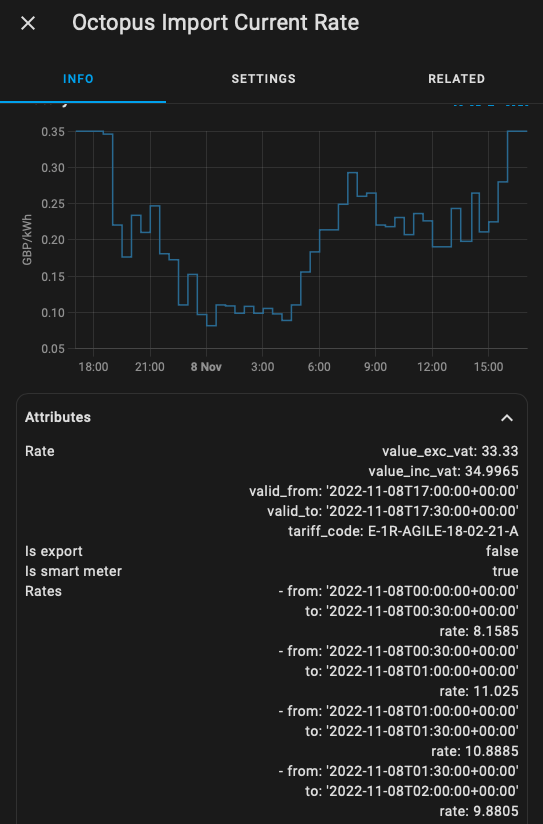
If the former I use This HA Integration which provides a sensor with the current price and within that sensors attributes the following 24hours 30 min slots with prices are also stored.

If the latter then the current rate from the sense looks like this: "0.349965" and the attributes which contains the full 24 hours worth or rates look like:

 Rate
value_exc_vat: 33.33 value_inc_vat: 34.9965 valid_from: '2022-11-10T18:00:00+00:00' valid_to: '2022-11-10T18:30:00+00:00' tariff_code: E-1R-AGILE-18-02-21-A 
Is export
false
Is smart meter
true
Rates
- from: '2022-11-10T00:00:00+00:00' to: '2022-11-10T00:30:00+00:00' rate: 12.7785 - from: '2022-11-10T00:30:00+00:00' to: '2022-11-10T01:00:00+00:00' rate: 16.9785 - from: '2022-11-10T01:00:00+00:00' to: '2022-11-10T01:30:00+00:00' rate: 15.2145

I also use another HA integration called OctopusAgile but the dev is no longer maintaining it and really wants someone to take it over, though I think his integration should actually be merged into the Octopus Energy Integration as its more mature and does a lot of what his does but with out some of the bits like rates card.

Finally see my feature request for the former Integration as it has some more details on formats and screenshots. More Screenshots

#123 TheDragon (GivEnergy)

Im tempted by Agile at these prices

I
#125 ispookie666

Is there a way to use GivTCP to restart the inverter?

M
#126 MycroftVonLipwig

ispookie666 Not that is documented but then much is not.

#127 TheDragon (GivEnergy)

MycroftVonLipwig

Thats amazing. Whats kept me till now from looking was the silly prices, but the cap seems to now also apply to Agile aswell. So even at peak times its only as much as anyone else pays

M
#128 MycroftVonLipwig

TheDragon (GivEnergy) I’m not sure about that. I am on a legacy contract from April 2022 so i am capped till May 2023 at 35p. The cap for new customers last I saw was 75p.

C
#130 chickengeorge

MycroftVonLipwig I run the Octopus integration, I guess as I'm not on agile I don't get the prices, I'm not sure how you'd pull the date and time stamps into HA.

I assume Tariff Automation on the GE Portal doesn't integrate with Agile?

M
#131 MycroftVonLipwig

chickengeorge Not currently no. Not with and logic anyway.

T
#132 Tim

ispookie666 I can't answer specifically for Givtcp, but POSTing the following restarts the inverter

https://www.givenergy.cloud/internal-api/inverter/actions/MyInverterSerialNumber/restart

Obviously, you need to send your API key etc within the header.

While this doesn't answer the question, it might be transferrable to Givtcp if someone has the skills to work out what that would look like within Python, sent directly over the LAN.

M
#133 MycroftVonLipwig

OK So last night my automation (mostly) worked. I removed the force charge as an action for any of my automations and used:
Action
charge slot 1 start = 19:00:00
wait 20 seconds
charge slot 1 end = 16:00:00
wait 20 seconds
Enable charging schedule

then secondly trigger condition that when price goes above x Disable Charge Schedule. I also 00:00:00 the start and end slots for good measure.

Annoying I have to put those waits in otherwise only the last action happens. What would be good would be a way to set both charging slots in a single api call or MQTT command. that would be nicer. To be able to do all 3 would be even better in one command. Pretty sure it's possible with the API as Octopus R&D app which I was using as nothing else would work sets it all in one hit, need to see if it is possible with GivTCP.

Also need a way to "count" slots in the next 24 hours lower than x so I can prioritise slots. If there is 8 slots of 30 mins at 0p or below, don't bother with the below 10p slots. Something like that.

I
#134 ispookie666

Would parallel process help?

M
#135 MycroftVonLipwig

ispookie666 Can you elaborate?

If I set start time then immediately end time, only end time is updated. If I pause they both get set. This is either GivTCP can’t handle 2 commands back to back OR the invert can not. I’m leaning towards the inverter as everything takes an age to react on the inverter l, even via the givenergy.cloud page.

So I don’t think firing both actions at the same time will help as i dont think the inverter will accept 2 at a time. If that’s what you mean?

I
#136 ispookie666

MycroftVonLipwig
I don't think your process is going to work, maybe I have not tried it yet!
Why not add wait for when time equals to be an action before your end time?

M
#137 MycroftVonLipwig

ispookie666 how will I know what time equals? The slots are 30 min slots that change daily.

I tried it last night, worked a treat. Well I did not watch every trigger as it was from 00:00:00 till 06:00:00 when energy was negative cost.

So I have set start 19:00:00 till 16:00:00 as I NEVER want to charge at peak so this another failsafe incase disable charge fails ever.

Will keep testing but seemed to do the job. First successful ā€œforce chargeā€ with out using force charge that occasionally works but lost out on so many charge slots when it fails.

If only I could reduced the number of waits. Between each action have to wait 30 seconds for the inverter to accept the request and Givtcp to update to reflect. Must dig through the code to see how force change works. Maybe that’s why it’s unreliable as it tries to do too much at once though never had an issue setting, only reverting.

M
#139 MycroftVonLipwig

ispookie666 Ah i get you now. Would that survive a reboot though or power cut? Assuming on an ups then yes that would work. I have done it with:

1) 2 automations that turn a Boolean toggle switch on depending if price is below 10p and above 0 and off when above 10p (used choose for action so conditional action) and another to do the same when price goes below 0p. Both triggered on any change of octopus rate sensor.

2) if cheap energy toggle becomes on, set the start and end to 19:00:00 and end 16:00:00 and enable charge schedule … if off, turn off charge schedule and reset slots.

3) if free energy toggle becomes on, do the same if off do the same as above

4) if Givtcp charge schedule enable is on, turn on immersion heater, if off, turn off

5) if Givtcp charge schedule enable is on and condition free energy toggle is on, go nuts and turn on electric heaters etc to make money and use free energy for stuff. If Givtcp charge scedule is off, settle down!

All actions conditional so one automation for on and off based on change.

Water heater and elec heaters triggered by charge schedule with conditions of the toggles so never to pull from battery accidentally, inverter must be not discharging battery to ensure pull from the grid.

Seems complex, probably is but means for changing cheap rate I only have to change one automation. Also means while toggle is on I don’t have to wait as the change in toggle (helper) is the trigger for the rest. Hope that makes sense. Only one automation being evaluated every 30 mins by rates sensor instead of say 4 or 5.

I
#140 ispookie666

Looks Uber complex.
I'm sure some sort of automation can be added with trigger of Loss of mains ā˜ŗļø.
Looks like we are looking for things to play around 🤣

M
#141 MycroftVonLipwig

ispookie666 agreed, complex but flexible.
Just need a way to:

1) count slots below x on agile rates publish (4pm) so to not charge from cheap if enough free or better is available.
2) if not free slots, choose the 8 best slots if below x
3) set start, end and enable charge all in one api call (if possible) for optimisation purposes
4) reliable weather forcast for solar. Always take free or better but don’t take cheap if Solar will cover the daily need plus battery.

Using solcast and solar.forcast and both wildly off in different ways. Might need to average between the two for a semi reasonable forcast.

Think then I could sit back and relax. …. Then start looking at export automation and profit optimising but one thing at a time. While it’s the wrong seasons, not much chance of profit other than maybe agile in and agile out store and dump at the right times… different set of calculations there. šŸ¤’

I
#142 ispookie666

Finally managed to integrate data from forecast.solar. I had to setup the panels as 3 separate installs, then used a template to add the values together.

#143 TheDragon (GivEnergy)

ispookie666

Did you integrate each separately, then add the resulting energy forecast?

I
#144 ispookie666

Yes
I have panels in 3 orientation, setup 3 integrations, used the estimated forecast for today from the three to add upto a new sensor using template. Then used that sensor output in the automation depending on the value.
< 5, 5-10, 10-15, 15-20 and above 20 KWh. I also added unknown and unavailable as an option.
I'm hoping the values will remain sensible when the automation is triggered.

#145 TheDragon (GivEnergy)

ispookie666

solar.forecast is that the built in one, or did you add solcast

I
#146 ispookie666

Yes its the forecast.solar integration, this allows multiple strings. Solcast only lets you upto two.

#147 TheDragon (GivEnergy)

ispookie666 Thanks I will re visit this, as I only saw one, so had to fudge it a bit to average my 2 into one

I
#148 ispookie666

template:

  • sensor:
    • name: "Solar Forecast Tomorrow"
      unit_of_measurement: "KWh"
      device_class: power
      state: >
      {{ [states('sensor.energy_production_tomorrow'), states('sensor.energy_production_tomorrow_2'), states('sensor.energy_production_tomorrow_3') ] | map('float') | sum | round (1) }}
    • name: "Solar Forecast Today"
      unit_of_measurement: "KWh"
      device_class: power
      state: >
      {{ [states('sensor.energy_production_today'), states('sensor.energy_production_today_2'), states('sensor.energy_production_today_3') ] | map('float') | sum | round (1) }}

This is the template I used for 3 strings, might be wise to check the indenting

#149 TheDragon (GivEnergy)

ispookie666 is this the new template format?

Looks very different to values_template way

I
#150 ispookie666

TheDragon (GivEnergy) Google was my friend and I believe it's the new format.

M
#151 MycroftVonLipwig

I find the forecasts from both HA integrations (Solar.forcast and solecast) to wildly inaccurate but usually in opposite ways. So from about 3 weeks of visually checking them both I think my best option for using a forecast in an automation is to average them both. Anyone know how to create a sensor that takes the average of 2 other sensors and makes that its value? I think I could then use <5kwh forecast tomorrow, charge with cheap rate, if not, don't. Im newish to HA so not had to do much yaml stuff yet, so if you know, like tempate sensor or something, please explain where I stick it :-) I will assume configuration.yaml but if you could advise please, need to learn to fish here.

I
#152 ispookie666

MycroftVonLipwig follow what I have posted above, replace your sensors as needed with the ones from Solcast and forecast.solar . Then use the new sensor in the automation.

I
#153 ispookie666

Anyone know what the undefined is under the mode option.
I was trying to pause the eco mode, but did not seem to work.

#154 TheDragon (GivEnergy)

It's a mode that is calculated from other values. If the source entities arent in a listed state, it shows undefined.
I replicated this and it's getting resolved in next release.

A
#156 AndyA

Hi Britkat

I've been losing my mind as to why I can no longer get GivTCP working in HA. I'm not sure if the issue is related to V2 or a new inverter as both events happened around the same time for me. Original inverter was replaced under warranty by GE after a month of perfect operation with GivTCP installed.
I've tried pretty much everything, deleting .pkl files, changing IP address from DCHP to static, reinstalling of the addon, new build of HA (running on VM), new VM host, restarting the inverter, syncing time etc etc.
I've searched here by can't seem to find anyone else with the same error which has always been the same since October when the new inverter was installed.

debug log file:

2023-01-06 19:02:10,364 - read - [INFO] - ----------------------------Starting----------------------------
2023-01-06 19:02:10,365 - read - [INFO] - Getting All Registers
2023-01-06 19:02:10,366 - read - [INFO] - setting lock file
2023-01-06 19:02:10,366 - read - [INFO] - Connecting to: 192.168.108.4
2023-01-06 19:02:10,443 - sync - [DEBUG] - Connection to Modbus server established. Socket ('192.168.108.137', 44207)
2023-01-06 19:02:10,445 - transaction - [DEBUG] - Current transaction state - IDLE
2023-01-06 19:02:10,449 - transaction - [DEBUG] - Running transaction 1
2023-01-06 19:02:10,450 - sync - [DEBUG] - New Transaction state 'SENDING'
2023-01-06 19:02:10,690 - transaction - [DEBUG] - Changing transaction state from 'WAITING FOR REPLY' to 'PROCESSING REPLY'
2023-01-06 19:02:10,692 - payload - [DEBUG] - [b'\x00\x00', b'\x00\x00', b'\x00\x00', b'\x00\x8a']
2023-01-06 19:02:10,693 - transaction - [DEBUG] - Adding transaction 1
2023-01-06 19:02:10,693 - transaction - [DEBUG] - Changing transaction state from 'PROCESSING REPLY' to 'TRANSACTION_COMPLETE'
2023-01-06 19:02:11,197 - transaction - [DEBUG] - Current transaction state - TRANSACTION_COMPLETE
2023-01-06 19:02:11,197 - transaction - [DEBUG] - Running transaction 2
2023-01-06 19:02:11,198 - sync - [DEBUG] - New Transaction state 'SENDING'
2023-01-06 19:02:11,440 - transaction - [DEBUG] - Changing transaction state from 'WAITING FOR REPLY' to 'PROCESSING REPLY'
2023-01-06 19:02:11,441 - payload - [DEBUG] - [b'\x00\x00', b'\x00\x00', b'\x00\x00', b'\x00\x8a']
2023-01-06 19:02:11,442 - transaction - [DEBUG] - Adding transaction 2
2023-01-06 19:02:11,442 - transaction - [DEBUG] - Changing transaction state from 'PROCESSING REPLY' to 'TRANSACTION_COMPLETE'
2023-01-06 19:02:11,943 - transaction - [DEBUG] - Current transaction state - TRANSACTION_COMPLETE
2023-01-06 19:02:11,943 - transaction - [DEBUG] - Running transaction 3
2023-01-06 19:02:11,943 - sync - [DEBUG] - New Transaction state 'SENDING'
2023-01-06 19:02:12,190 - transaction - [DEBUG] - Changing transaction state from 'WAITING FOR REPLY' to 'PROCESSING REPLY'
2023-01-06 19:02:12,190 - payload - [DEBUG] - [b'\x00\x00', b'\x00\x00', b'\x00\x00', b'\x00\x8a']
2023-01-06 19:02:12,190 - transaction - [DEBUG] - Adding transaction 3
2023-01-06 19:02:12,191 - transaction - [DEBUG] - Changing transaction state from 'PROCESSING REPLY' to 'TRANSACTION_COMPLETE'
2023-01-06 19:02:12,692 - transaction - [DEBUG] - Current transaction state - TRANSACTION_COMPLETE
2023-01-06 19:02:12,692 - transaction - [DEBUG] - Running transaction 4
2023-01-06 19:02:12,692 - sync - [DEBUG] - New Transaction state 'SENDING'
2023-01-06 19:02:12,928 - transaction - [DEBUG] - Changing transaction state from 'WAITING FOR REPLY' to 'PROCESSING REPLY'
2023-01-06 19:02:12,929 - payload - [DEBUG] - [b'\x00\x00', b'\x00\x00', b'\x00\x00', b'\x00\x8a']
2023-01-06 19:02:12,929 - transaction - [DEBUG] - Adding transaction 4
2023-01-06 19:02:12,930 - transaction - [DEBUG] - Changing transaction state from 'PROCESSING REPLY' to 'TRANSACTION_COMPLETE'
2023-01-06 19:02:13,432 - transaction - [DEBUG] - Current transaction state - TRANSACTION_COMPLETE
2023-01-06 19:02:13,433 - transaction - [DEBUG] - Running transaction 5
2023-01-06 19:02:13,433 - sync - [DEBUG] - New Transaction state 'SENDING'
2023-01-06 19:02:13,680 - transaction - [DEBUG] - Changing transaction state from 'WAITING FOR REPLY' to 'PROCESSING REPLY'
2023-01-06 19:02:13,680 - payload - [DEBUG] - [b'\x00\x00', b'\x00\x00', b'\x00\x00', b'\x00\x8a']
2023-01-06 19:02:13,680 - transaction - [DEBUG] - Adding transaction 5
2023-01-06 19:02:13,680 - transaction - [DEBUG] - Changing transaction state from 'PROCESSING REPLY' to 'TRANSACTION_COMPLETE'
2023-01-06 19:02:14,184 - transaction - [DEBUG] - Current transaction state - TRANSACTION_COMPLETE
2023-01-06 19:02:14,184 - transaction - [DEBUG] - Running transaction 6
2023-01-06 19:02:14,185 - sync - [DEBUG] - New Transaction state 'SENDING'
2023-01-06 19:02:14,425 - transaction - [DEBUG] - Changing transaction state from 'WAITING FOR REPLY' to 'PROCESSING REPLY'
2023-01-06 19:02:14,426 - payload - [DEBUG] - [b'\x00\x00', b'\x00\x00', b'\x00\x00', b'\x00\x8a']
2023-01-06 19:02:14,426 - transaction - [DEBUG] - Adding transaction 6
2023-01-06 19:02:14,426 - transaction - [DEBUG] - Changing transaction state from 'PROCESSING REPLY' to 'TRANSACTION_COMPLETE'
2023-01-06 19:02:14,929 - GivLUT - [CRITICAL] - Consecutive failure count= 5
2023-01-06 19:02:14,930 - read - [ERROR] - Error collecting registers: (<class 'ValueError'>, ValueError('hour must be in 0..23'), <traceback object at 0x7fabc135b4c0>)
2023-01-06 19:02:14,931 - read - [INFO] - Removing lock file due to read error
2023-01-06 19:02:15,243 - read - [INFO] - ----------------------------Starting----------------------------
2023-01-06 19:02:15,243 - read - [INFO] - Getting All Registers
2023-01-06 19:02:15,243 - read - [INFO] - setting lock file
2023-01-06 19:02:15,244 - read - [INFO] - Connecting to: 192.168.108.4
2023-01-06 19:02:15,250 - sync - [DEBUG] - Connection to Modbus server established. Socket ('192.168.108.137', 35399)
2023-01-06 19:02:15,252 - transaction - [DEBUG] - Current transaction state - IDLE
2023-01-06 19:02:15,254 - transaction - [DEBUG] - Running transaction 1
2023-01-06 19:02:15,255 - sync - [DEBUG] - New Transaction state 'SENDING'
2023-01-06 19:02:15,487 - transaction - [DEBUG] - Changing transaction state from 'WAITING FOR REPLY' to 'PROCESSING REPLY'
2023-01-06 19:02:15,488 - payload - [DEBUG] - [b'\x00\x00', b'\x00\x00', b'\x00\x00', b'\x00\x8a']
2023-01-06 19:02:15,489 - transaction - [DEBUG] - Adding transaction 1
2023-01-06 19:02:15,489 - transaction - [DEBUG] - Changing transaction state from 'PROCESSING REPLY' to 'TRANSACTION_COMPLETE'
2023-01-06 19:02:15,997 - transaction - [DEBUG] - Current transaction state - TRANSACTION_COMPLETE
2023-01-06 19:02:15,998 - transaction - [DEBUG] - Running transaction 2
2023-01-06 19:02:15,999 - sync - [DEBUG] - New Transaction state 'SENDING'
2023-01-06 19:02:16,230 - transaction - [DEBUG] - Changing transaction state from 'WAITING FOR REPLY' to 'PROCESSING REPLY'
2023-01-06 19:02:16,231 - payload - [DEBUG] - [b'\x00\x00', b'\x00\x00', b'\x00\x00', b'\x00\x8a']
2023-01-06 19:02:16,231 - transaction - [DEBUG] - Adding transaction 2
2023-01-06 19:02:16,231 - transaction - [DEBUG] - Changing transaction state from 'PROCESSING REPLY' to 'TRANSACTION_COMPLETE'
2023-01-06 19:02:16,734 - transaction - [DEBUG] - Current transaction state - TRANSACTION_COMPLETE
2023-01-06 19:02:16,734 - transaction - [DEBUG] - Running transaction 3
2023-01-06 19:02:16,735 - sync - [DEBUG] - New Transaction state 'SENDING'
2023-01-06 19:02:16,974 - transaction - [DEBUG] - Changing transaction state from 'WAITING FOR REPLY' to 'PROCESSING REPLY'
2023-01-06 19:02:16,974 - payload - [DEBUG] - [b'\x00\x00', b'\x00\x00', b'\x00\x00', b'\x00\x8a']
2023-01-06 19:02:16,975 - transaction - [DEBUG] - Adding transaction 3
2023-01-06 19:02:16,975 - transaction - [DEBUG] - Changing transaction state from 'PROCESSING REPLY' to 'TRANSACTION_COMPLETE'
2023-01-06 19:02:17,490 - transaction - [DEBUG] - Current transaction state - TRANSACTION_COMPLETE
2023-01-06 19:02:17,491 - transaction - [DEBUG] - Running transaction 4
2023-01-06 19:02:17,492 - sync - [DEBUG] - New Transaction state 'SENDING'
2023-01-06 19:02:17,729 - transaction - [DEBUG] - Changing transaction state from 'WAITING FOR REPLY' to 'PROCESSING REPLY'
2023-01-06 19:02:17,731 - payload - [DEBUG] - [b'\x00\x00', b'\x00\x00', b'\x00\x00', b'\x00\x8a']
2023-01-06 19:02:17,732 - transaction - [DEBUG] - Adding transaction 4
2023-01-06 19:02:17,733 - transaction - [DEBUG] - Changing transaction state from 'PROCESSING REPLY' to 'TRANSACTION_COMPLETE'
2023-01-06 19:02:18,236 - transaction - [DEBUG] - Current transaction state - TRANSACTION_COMPLETE
2023-01-06 19:02:18,237 - transaction - [DEBUG] - Running transaction 5
2023-01-06 19:02:18,238 - sync - [DEBUG] - New Transaction state 'SENDING'
2023-01-06 19:02:18,474 - transaction - [DEBUG] - Changing transaction state from 'WAITING FOR REPLY' to 'PROCESSING REPLY'
2023-01-06 19:02:18,475 - payload - [DEBUG] - [b'\x00\x00', b'\x00\x00', b'\x00\x00', b'\x00\x8a']
2023-01-06 19:02:18,475 - transaction - [DEBUG] - Adding transaction 5
2023-01-06 19:02:18,476 - transaction - [DEBUG] - Changing transaction state from 'PROCESSING REPLY' to 'TRANSACTION_COMPLETE'
2023-01-06 19:02:18,977 - transaction - [DEBUG] - Current transaction state - TRANSACTION_COMPLETE
2023-01-06 19:02:18,978 - transaction - [DEBUG] - Running transaction 6
2023-01-06 19:02:18,978 - sync - [DEBUG] - New Transaction state 'SENDING'
2023-01-06 19:02:19,222 - transaction - [DEBUG] - Changing transaction state from 'WAITING FOR REPLY' to 'PROCESSING REPLY'
2023-01-06 19:02:19,223 - payload - [DEBUG] - [b'\x00\x00', b'\x00\x00', b'\x00\x00', b'\x00\x8a']
2023-01-06 19:02:19,224 - transaction - [DEBUG] - Adding transaction 6
2023-01-06 19:02:19,225 - transaction - [DEBUG] - Changing transaction state from 'PROCESSING REPLY' to 'TRANSACTION_COMPLETE'
2023-01-06 19:02:19,734 - GivLUT - [CRITICAL] - Consecutive failure count= 6
2023-01-06 19:02:19,734 - read - [ERROR] - Error collecting registers: (<class 'ValueError'>, ValueError('hour must be in 0..23'), <traceback object at 0x7f2138533e40>)
2023-01-06 19:02:19,736 - read - [INFO] - Removing lock file due to read error

Log file:

`2023-01-08 10:12:29,433 - startup - [CRITICAL] - Config directory already exists
2023-01-08 10:12:29,437 - startup - [CRITICAL] - Running Redis
2023-01-08 10:12:29,440 - startup - [CRITICAL] - Running RQ Dashboard on port 9181
2023-01-08 10:12:29,440 - startup - [CRITICAL] - Setting up invertor: 1 of 1
2023-01-08 10:12:29,551 - startup - [CRITICAL] - Recreating settings.py for invertor 1
2023-01-08 10:12:29,557 - startup - [CRITICAL] - Running RQ worker to queue and process givernergy-modbus calls
2023-01-08 10:12:29,557 - startup - [CRITICAL] - Running Invertor read loop every 5s
2023-01-08 10:12:29,577 - startup - [CRITICAL] - Subscribing Mosquitto on port 1883
2023-01-08 10:12:29,597 - startup - [CRITICAL] - Starting Gunicorn on port 6345
2023-01-08 10:12:29,616 - startup - [CRITICAL] - Creating web dashboard config
2023-01-08 10:12:29,617 - startup - [CRITICAL] - Serving Web Dashboard from port 3042
2023-01-08 10:12:29,656 - startup - [CRITICAL] - Setting daily charge target forecast job to run at: 00:20
[2023-01-08 10:12:31 +0000] [15] [INFO] Starting gunicorn 20.1.0
[2023-01-08 10:12:31 +0000] [15] [INFO] Listening at: http://0.0.0.0:6345 (15)
[2023-01-08 10:12:31 +0000] [15] [INFO] Using worker: sync
[2023-01-08 10:12:31 +0000] [29] [INFO] Booting worker with pid: 29
[2023-01-08 10:12:31 +0000] [30] [INFO] Booting worker with pid: 30
[2023-01-08 10:12:31 +0000] [31] [INFO] Booting worker with pid: 31
RQ Dashboard version 0.6.0

  • Running on 0.0.0.0:9181
  • Serving Flask app 'rq_dashboard.cli'
  • Debug mode: off
    UPDATE The latest version of serve is 14.1.2.
    INFO: Accepting connections at http://localhost:3042.
    2023-01-08 10:12:37,086 - GivLUT - [CRITICAL] - Consecutive failure count= 6
    2023-01-08 10:12:37,090 - read - [ERROR] - Error collecting registers: (<class 'ValueError'>, ValueError('hour must be in 0..23'), <traceback object at 0x7f658226ea80>)`

Any help would be much appreciated. I can't work out if it's me or the inverter?
Thanks
@AndyD

J
#157 jake

AndyA It will probably be one of the charging/discharging time slots being blank, It does need fixing in GivTCP but in the meantime I've heard others have managed to resolve the problem by resetting the inverter to default settings from the portal. Hope this helps.

I
#158 ispookie666

Is there a way to set the inverter to idle?
Eg: once it reaches the set charge level, the inverter constantly charges and discharges during the times charge window.

J
#159 jake

ispookie666 pretty sure that's normal and it's just balancing the cells

M
#160 mpartington

ispookie666 yes, very easy.

This is the action part of the automation, just set the ceXXX to your inverter serial number

action:

  • service: number.set_value
    data:
    value: "0"
    target:
    entity_id: number.givtcp_ceXXX_battery_discharge_rate
    mode: single

Edit, copy and paste has messed up the required indentation, but easy to do in visual editor of the automation

It sets the discharge to zero (so stops the charge/discharge behaviour) , you would need to do another step to revert back to 100% at the end of the charge window (and maybe a check to ensure the numbers have actually been set)

I
#161 ispookie666

jake nope it's pretty much pulling power from grid and discharging, cycles every 30ish seconds

J
#162 jake

ispookie666 cycles like this of about 300w in and out after the AC charging target is reached?

I
#164 ispookie666

@mpartington
My automated charge stops at a specific SOC depending on predicted solar generation. Should the discharge be set to 0 as soon as the charging automation starts or should it be set to 0 once the target SOC has reached?

I'm a bit cautious of messing with my Automation, it has taken a while to get here!

update! Added one for set charge rate to 0 and the other to 100 at various stages. Hopefully it will work.

J
#165 jake

ispookie666 I've looked back and I can see some more aggressive swings in my data on different days, my current monitoring comes from a separate board and clamps so i doubt its anything specifically to do with GivTCP rather the firmware on the inverter and how it behaves when AC charging.
It might be worth starting a new thread to try and get to the bottom of it šŸ™‚

M
#166 mpartington

ispookie666 I set mine (at start of automation) to discharge to zero if the SoC is less than or equal to the target during the charge window. That way if you have more than target (based on solar forecast), it will drain down to that level (personal preference). I used 'or less than', because i saw the actual soc flip flopping over the target sometimes. E.g. if I set to 50%, it would flick between 49 and 51%, never setting on 50%

I did mine in node red, but sure must be doable in HA. I added a check 30 seconds after setting the discharge value to confirm it had taken and it would keep looping around until the expected value was confirmed. Nothing worse than waking up to find it stuck on zero discharge, because coms to the inverter failed.

I
#167 ispookie666

That went south.
I think a few over lapping events prevented the inverter from setting the discharge rate back to 100 šŸ™ˆ.
Hoping it will be ok tonight

M
#168 madhulk

I'm trying to use the SMARTTARGET part of the GivTCP HomeAssistant add-on. I've imported by GivAPI key, SolcastAPI Key and SolcastSiteID into the tool, but I'm seeing a nightly error of this in the log:

palm_soc - [ERROR] - 404 Client Error: Not Found for url: https://api.solcast.com.au/rooftop_sites//forecasts?format=json&api_key=REMOVED_BY_ME

As you can see, it's not inserting the SiteID into the URL between rooftop_sites and forecasts. If I do this by hand, the URL loads fine in a browser. I can see from the GivTCP code that it should be picking the SiteID up as an environment variable, but this doesn't seem to be working.

Does anyone else see this?

M
#170 madhulk

As a ā€œtime beingā€ fix I’ve just put then site ID in twice (for both site IDs) and it seems to accept this and work fine.

It would be great if there could be some updates to palm_soc to accept a single site id and also if the months that it automatically charges to 100% could be adjusted would be fantastic!

Happy to help out with these if @Britkat fancies explaining how to use git hub for a beginner. I tried forking my own edition of GivTCP add-on for home assistant but failed miserably .