

Excel VBA 'simple' API data request

27 comments started 2022-12-17 last 2024-01-04
APIsHome Automation
#1 mattpdavey

As there is no current way to download half hourly data for more than just a single day at at time via the portal, I am looking to use Excel to pull down the required data from the GivTCP API.

Trouble is I am VERY green to all things coding, except for a little VBA. But as this is really the only thing I need on top of what the portal already provides.... I am hoping some brainier folk than me on this good forum can help. I hope.
If anyone could share an example of a previous VBA API request, I am sure I would be able to cobble something together, but reading through the GivTCP help page, I am a little lost to know where to start.

The example given here (https://givenergy.cloud/docs/api/v1?fbclid=IwAR3F00cW_BORgiOGt_kF-TzHP-mY2h4FuLSWro3ms5FNiiq7IFZb6QQti0M#energy-flow-data) for 'Energy Flow data' is basically what I am after but in VBA form.
#2 mattpdavey

From googling around I think I may be off to a start on the Authentication & JSON etc.... but possibly not... and also completely missing how to grab the data sets for any required date range. Any guidance appreciated.

Public Sub testAPI()
Dim http As Object
Dim JSON As Object

Dim Sh As Worksheet
Set Sh = Sheets("DailyData")

Set http = CreateObject("MSXML2.XMLHTTP")

http.Open "GET", ("https://api.givenergy.cloud/v1/inverter/consequatur/energy-flows"), False
http.SetRequestHeader "Authorization", "Bearer {eyJ0eXAiOiJK...removed for security}"
http.SetRequestHeader "Content-Type", "application/json"
http.SetRequestHeader "Accept", "application/json"

http.Send
Set JSON = ParseJson(http.ResponseText)

Sh.Cells(2, 8).Value = JSON("data")

End Sub
Z
#3 Zakalwe

Search for Terravolt's page. If I recall correctly he's got a how-to showing how to extract data from GivTCP using Powershell.

T
#4 Tim

mattpdavey With help from @hoggy (Terravolt admin) I’ve done this in Node-RED but you should be able to achieve it with VBA, you just need to save a token for each REST call. Can’t remember the exact details but will have a look to see if I can post for you.

T
#5 Tim

mattpdavey check this thread. The process that work inNode-RED is sort of documented in it and you should be able to adapt it in VBA.

T
#6 Tim

mattpdavey GivTCP API.

I believe that you’re actually using Givenergy’s cloud API which my code works with. Givtcp is a Python package that uses Modbus over TCP to communicate with the inverter over the LAN. Givtcp queries the inverter registers either on a schedule specified in its config or when called from a trigger of some sort.

S
#7 SilverArt

It's a shame that there isn't a half hourly data download option on the portal for more than a day but if you download the the daily data why not just merge the daily data into your 'master' file? Fairly easy to do manually but should be easy to make even easier with a macro. A bit of a pain to catch up though, but a search on "Merge excel files" may give some ideas.

#8 mattpdavey

SilverArt Thanks for this suggestion, and yes after exploring the other options kindly suggested by those above, I think this may be the best way forward.

I am bumping into another issue however, in that when you download Daily data from the portal, the dates/time stamps in the excel file are given in 12hr clock instead of 24hr. Crazy, seeing as its even displayed on the portal in 24hr format!!?!

Wouldn't normally be a problem, but for the fact in the excel file, they have just duplicated the 12hr time codes....(i.e. 12:00 appears twice, once for midnight and again for midday). So as far as I can tell there is no way to convert to 24hr time without some convoluted manipulation. Hope that makes sense, but try downloading daily data for a single day and you will quickly see what I mean.

Geeezee. Its always the simple things that make life so difficult. Wonder if anyone else has has this issue and may know of a workaround?

S
#9 stevelewis

mattpdavey I've not seen that when downloading as a CSV (also easier to concatenate for multiple days) ... sure it's not the cell formatting that you're seeing?

C
#10 cluelesscris

mattpdavey Where exactly are you downloading from - all the files I download have the time in a full timestamp column i.e. '2022-12-18 21:52:34'. Or do you have a custom default date/time display setting in your Excel?

S
#11 SilverArt

The problem is that they export the Date/Time code field as the text rather than as the date/time code. The fact that they have decided the user wants to see the twelve hour clock does make it difficult to use as you want to. Perhaps a feedback?

To use the data isn't that difficult though. Set up your 'Master' sheet with Col A as a proper Date/Time column, enter the start date time in the first cell you want to use and then increment Ax row by + .02833333 - this should give you half hourly time stamps in the column.

Then open the downloaded data:- Copy B2 to end of data and paste into your 'Master'

This should be easy to do in a Macro if you felt so inclined.

S
#12 SilverArt

cluelesscris Look at the half hourly time stamps in 'Power Graph' downloads for example.

C
#13 cluelesscris

cluelesscris I found it. The flows download does give the date/times in 12 hour format. A simple VBA routine or macro could fix this for you.

#15 mattpdavey

SilverArt thanks, yes have already fed this back (not that any of my previous have ever gone responded too let alone closed out).

I have already started writing a macro to rework the downloaded daily data files on mass. An extra step that neednt be…..it’s a shame GE are diluting the data upon export like this.

#16 mattpdavey

stevelewis how are you getting hold of these in CSV? The only portal download format available that I can find is in xlsx.

Yes, checked the custom cell formatting in my version of excel. Also tried on multiple computers and even phone. All show same 12hr time codes.

S
#17 stevelewis

mattpdavey Just checked and I was downloading in XLS and saving as CSV.

If it helps, the sample Python code can return up to 1000 records (20 days) in a single query as a JSON file with the correct timestamps which can then be converted to CSV.

#18 mattpdavey

stevelewis ah I see. Well I am certainly open to that as an alternative as would save me some time. But as you can see from my opening post here, my coding skills are barely up to the task. Would you be willing to share all / the most pertinent parts of the code here, even if its not the exact same query?

S
#19 stevelewis

mattpdavey Sample code for pulling the data in JSON format.

#!/usr/bin/env python3.8

import requests
import json
import csv

url = "https://api.givenergy.cloud/v1/inverter/<SNxxxxx>/energy-flows"
key = "Bearer <API key here>"

payload = {
"start_time": "2022-12-01",
"end_time": "2022-12-12",
"grouping": 0,
"types": [
0,
1,
2,
5
]
}
headers = {
'Authorization': key,
'Content-Type': 'application/json',
'Accept': 'application/json'
}
response = requests.request('POST', url, headers=headers, json=payload)
print(response.json())

#20 mattpdavey

stevelewis You are a star! Manged to get this script to run successfully once I had correctly entered my inverter Serial Number and API Key.

The resulting data drawn down and listed out within the python command screen itself (can already see the 24hr timestamps - yay!).....but is there a smarter way than copying and pasting this into an excel file? I have then tried using text to column function with delineation method to no avail. Suspect I am just missing something simple, and sorry to burden you with my inexperience. That said, thanks for getting me this far....... with some more googling I dare say this nut is all but cracked 😁

S
#22 stevelewis

mattpdavey Good to hear it worked for you! Dump the results straight into a .JSON file and open in Excel as a JSON import. I've not tried it myself, but it should work. The alternative is to learn a little Python and save it as .CSV.

Edit: or use this additional code to format in a friendly form (the 3 lines after the while statement need to be indented)...

data = json.loads(response.content.decode('utf-8'))
trimmed = data['data']
index = 0
while index < len(trimmed):
line = trimmed[str(index)]
print(line['start_time'], line['data']['0'], line['data']['5'])
index += 1

#23 mattpdavey

stevelewis YES! Just the ticket thank you. That neatly arranged each half hour data set onto a rows, and I was then able to copy into excel (still cant fathom how to export to .json file despite various attempts) & use the spaces as a delimiter. This will allow me to quickly get into the correct columns.

Thanks for your help

#24 mattpdavey

This Python API has just stopped working all of a sudden. Was working every month prior to now so wondering if something has changed since we have entered a new year?? Or perhaps GivEnergy have changed something as it seems to not accept the term 'data' in the script? Could also be something I am doing wrong, always a possibility!! The tail end of the run script is pasted below is as below with error messages in bold....

payload = {
... "start_time": "2023-12-01",
... "end_time": "2023-12-09",
... "grouping": 0,
... "types": [
... 0,
... 1,
... 2,
... 3,
... 4,
... 5,
... 6
... ]
... }
headers = {
... 'Authorization': key,
... 'Content-Type': 'application/json',
... 'Accept': 'application/json'
... }
response = requests.request('POST', url, headers=headers, json=payload)

#Below is for viewing the requested data raw:
#print(response.json())

#Below is for viewing the requested data in a more neatly arranged fashion:
data = json.loads(response.content.decode('utf-8'))
trimmed = data['data']
Traceback (most recent call last):
File "<stdin>", line 1, in <module>
KeyError: 'data'

index = 0
while index < len(trimmed):
... line = trimmed[str(index)]
... print(line['start_time'], line['data']['0'], line['data']['1'], line['data']['2'], line['data']['3'], line['data']['4'], line['data']['5'], line['data']['6'])
... index += 1
...
Traceback (most recent call last):
File "<stdin>", line 1, in <module>
NameError: name 'trimmed' is not defined

S
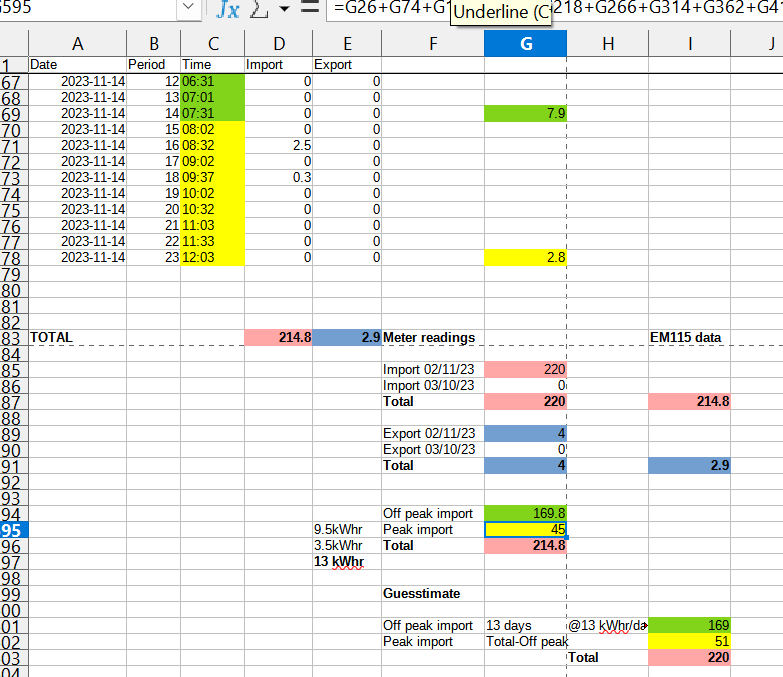
#27 SteveCook

some of my output compared to Octopus meter readings when "debating!!" my bills with them!