Mesh network connection issues

31 comments started 2023-02-08 last 2023-06-25
CommisioningGivEnergy ProductsHybrid
P
#1 PBoo

Had my Gen2 Hybrid Inverter installed today, all good except we couldn’t connect to the wifi. It simply never connected.

Ended up wiring it with an Ethernet cable.

I’ve got an eero 5 mesh network and I’m wondering if anyone else has had trouble/has a fix?

Tried WPA2 AES which is what the eero supports but no joy. Signal strength should be good as we moved an eero to the garage to sit near the Inverter.

C
#2 cluelesscris

If you have connected it with an ethernet cable I wouldn't worry about wifi. There's tons of problems with wifi and this seems especially so with Mesh systems. Assuming a mouse doesn't chew your ethernet cable it should be rock solid.

D
#3 dhb666

Hard wired LAN is preferable if available, but always worth having different SSID for the 2.4GHz and 5GHz bands on the mesh router. Often the device being used is on 5G where as the Dobgle WiFi is on 2.4G band and it gets messy. This isn’t just a GE issue, other manufacturers have the same problem.

P
#4 PBoo

I guess I’ll leave one of the Mesh routers in the garage then and leave it wired in. The cables pinned to the wall so it’d have to be quite the acrobatic mouse to chew threw it.

I’m quite happy with my wifi configuration generally and I wouldn’t want to run a non-mesh extender ideally or split my 2.4 and 5ghz.

I did notice the GivEnergy UI showed my SSID 3 or 4 times in the list. Maybe one would have worked but who knows.

#5 positor1

PBoo UI showed my SSID 3 or 4 times in the list

surely its not working in mesh mode then?

T
#6 Tim

PBoo GivEnergy UI showed my SSID 3 or 4 times in the list

Do you mean your router UI?

You have no idea how many people would give their eye teeth to be able to connect their inverter over ethernet! When the wifi works, it's fine but there are so many times when data goes missing or the inverters can't be contacted and trying to work out why is a headache. Wifi is always the first in line to be blamed for any connectivity problem and expecting end-users to be able to configure their dongle is a tall order for many.

M
#7 MarkMilward

I have a different brand of mesh repeaters (Fritz!), one is a few feet away from the inverter's WiFi dongle and the other repeater is 100 feet away. I'm afraid it's a total lottery which mesh box your dongle connects to.

Problems...

  1. Mesh standard is defined as 802.11s but there are many older or cheaper devices that don't support 802.11s. Giv's dongles are one example, all the Ring products and many more are the same. High end / good laptops and modern phones do support mesh.
  2. The Giv dongles only use the old 2.4Ghz WiFi standard which has very good distance but poor in other areas.

So my 'hacky solution' was to turn off the distant mesh repeater and then reboot the inverter, thus fooling the dongle to connect to the strong signal of the local inverter then restart the distant inverter. This works, and stays connected to the local inverter.

#8 Riscy

positor1 surely its not working in mesh mode then?

That's totally normal. Each Mesh AP will show up separately, each with its own MAC address.

It still shouldn't be a problem.

I've got Fritz! mesh, as mentioned by @MarkMilward in fact. I've got 4 APs all visible to the inverter, with pretty decent overlap. Never had a single drop-out. 2.4 and 5GHz have the same network name, too.

P
#9 PBoo

Tim I meant the SSID list in the inverters web ui when the installer was trying to get it connected.

This is a Hybrid Gen 2 Inverter which doesn’t have the dongle but the built in Wifi, so I was hopeful some of the wifi issues that I’ve read about would’ve been resolved.

Luckily the eeros all have two Ethernet ports so I’ve happily popped one of them near the inverter now. Might have to do a little rearranging but I’ll survive!

#10 positor1

Riscy
I have two asus ZenWiFi AX and only ever see one SSID for the 2.4 and one 5ghz band that i have separated.
I wonder if one isn't broadcasting?

M
#11 MarkyG82

I'm pretty sure the standard mesh setup is for one visible SSID. If you can see multiple it sounds like you are either broadcasting 2.4 + 5 GHz networks or the nodes are setup as repeaters. I certainly cannot see multiple networks and have setup the whole system twice. Also my inlaws have the same brand as me (TP-link) and my brother has eero. Neither of those broadcast multiple networks.

I've been battling with connecting mine to the wifi for a while and didnt think to connect via cable. I'll be moving my kitchen node to the garage over the weekend to see if I can get a wired connection. It does ping ok but the app very rarely says it's connected.

#12 Riscy

Yes, this is all normal:

positor1 I have two asus ZenWiFi AX and only ever see one SSID for the 2.4 and one 5ghz band that i have separated.

MarkyG82 I'm pretty sure the standard mesh setup is for one visible SSID

Every wifi Access Point device (whether you call it a router, repeater, or mesh) has a unique MAC address. In fact so does your phone, laptop, etc, not that that's relevant.

So if you have say 3x Access Points (be them Mesh or otherwise) set to the same network name ("SSID"), then all wifi device hardware on that network will see 3x separate devices with different MAC addresses. Or more accurately, they'll see all the ones which are in-range.

But, depending on the device you're using, these 3x Access Points are presented differently:

  • Most clients - e.g. your phone - just summarise it by saying "hey, I can see at least 1 Access Point on this SSID, and the strongest AP has signal strength nn%" Even if they can see other AP MAC addresses with the same SSID, they don't bother telling you that, because it doesn't really matter.

  • Other clients - e.g. the Giv dongle - list every individual AP and all their MAC addresses. In fact the admin screen for most Mesh wifi will show you the same SSID repeated many times. Once for each AP.

Also, don't forget that for many years before Mesh we had large-scale corporate wifi (e.g. hotels) with the same SSID across many APs. As your laptop moved around the building, it would always just connect to whichever AP had that same SSID and the best signal. You'd connect to wifi in the lobby, and it would still work seamlessly an a different AP near your room.

Edit:

What I don't know is whether the Giv dongle is specifically binding to a particular AP's MAC address, rather than the normal behaviour of just roaming to whichever one has the strongest signal at any given moment. If it is binding to one MAC, then it's important that you select the right AP for it to connect to...

I can check this behaviour for you - if I go disable the nearest Mesh AP to my Inverter, I can check and see if it roams to another Mesh AP seamlessly or not. I'll check shortly.


#13 Riscy

Yup, verified. Worked fine.

  1. Inverter was connected to the nearest AP in the Mesh (in the garage)
  2. I switched off that AP by just unplugging it from the mains. Very ungracefully.
  3. Inverter wifi immediately roamed to another nearby Mesh AP (in the house) with no issues. GivTCP kept collecting data the whole time.

I can share screenshots proving it - it's just a faff uploading them - but the TL;DR:

  • Mesh is fine.
  • Mixed 2.4GHz/5GHz with the same network name is fine.
  • Having several APs with the same network name is fine.
  • Probably don't hide your network name (it's ineffective as a security measure anyway)
  • It doesn't matter which network MAC address you connect to during Giv dongle setup - it will always connect to whichever signal is strongest at any given moment.

Screenshots:

Inverter successfully roaming between various Mesh APs to find the stongest signal, on a mixed 2.4GHz/5GHz environment

P
#14 peteastewart

Couple of things that may help.

  1. Ensure your Mesh is broadcasting a 2GHz Network.
  2. Disable Beamfoaming (this was causing me issues on my Deco Mesh)
  3. Deploy your Mesh as an Access Point, so it bridges your ISP Routers LAN configuration (aka local IP Schema).
M
#16 MarkyG82

So in my infinite ignorance I failed to realise that the ac3.0 has no ethernet port.
How critical is the dongle to the operation of the kit? I'm wondering if I can swap it out for a usb to ethernet adapter.

M
#17 MarkyG82

Deploy your Mesh as an Access Point, so it bridges your ISP Routers LAN configuration (aka local IP Schema).

I think this is my issue but the whole point in having a mesh is to use the supplied router only as the conduit to the outside world.

T
#18 ToothyChris

The dongle is not just a WiFi device, so you cannot simply change if for something else. There was someone on FB who was trying to hack a dongle, to access the network connection on the chip, but I have no idea if he made any progress.

M
#19 MarkyG82

ToothyChris Thanks. My next thing to try is a dedicated wifi signal from my virgin router with only that connected. Main issue is the router is the other side of the house. I also would rather not have multiple signals clogging up the airwaves. I do hear that people have a dedicated smart home wifi alongside the main wifi. It's probably fine.

Unless someone knows if I can connect a single deco node as access point? No mesh. Would that need a hard wire?

C
#20 cluelesscris

MarkyG82 This is standard adivce from network experts when setting up a smart home. The router rules can then be used to isolate smart devices from external threats, including anyone being naughty on your guest wifi, if you have one. This is how I set mine up. All smart devices, and I have quite a few, are on a separate subnet and those using wifi only are on a dedicated wifi network tied to that subnet.

M
#21 MarkyG82

Thanks. Been a while since I've had to think about IT security in this way and I think I'll stick to it.

I've managed to connect the inverter to the WiFi now a can ping it. Definitely was the mesh bit causing issues.
Next step is to connect it to home assistant. Can ping it from HA but so far neither of the add-ons are seeing it. I may need to plug the pi into the virgin router directly as it's currently on a separate IP group (...168.xx instead of ...0.xx).

T
#22 Tim

MarkyG82 I suggest that you consolidate your subnets to enable connectivity in the first instance (ie all devices using the same 192.168.x.? with mask of 255.255.255.0). Once you are sure your wifi signal is sufficient to enable devices to communicate with each other, you can then look at putting different subnets/masks on the same interface. It's a long time since I worked in IT and I have no idea whether routers need to route different subnets on different interfaces, or if they can route on a single interface.

M
#23 MarkyG82

Tim thanks. Same with the IT work stuff. Win7 rollout is my era!
I have it stable right now after getting some grief last night for "turning off the internet". I'll wait till I have time on my own to tinker any more. I think the first step is to get the mesh running as access point and let the virgin system drive the IP's. This might let me get the inverter back onto the mesh system with a dedicated subnet. If the virgin hub is too limited in the settings then I will have a rethink.

T
#24 Tim

MarkyG82 Win7 rollout is my era!

Ha! I started with Mainframe terminals, then put in managed LAN infrastructure with MsDOS then Win 3.11 and ended after Y2K and Windows NT to the desktop. Managed ethernet was just coming in at that time even though we'd been asking for it for several years to replace our multi token-ring managed cabling. I remember having a long discussion with one guy who thought his productivity would improve if he had a mouse when he moved off MsDOS 5! My kids have never known a time without internet in their bedroom. In fairness, I moved out of IT into different roles in the early 2000s but the infrastructure that followed really was very robust (and locked down to the nth degree).

#25 Hook

Hi all,

My install is happening this week, so this thread was interesting as I have an Orbi mesh Wi-Fi system.

I switched off displaying the ssid to my 5ghz network so that the installer would only see the 2.4ghz network.

All installed ok with no issues or dropouts. Reenabled 5ghz after he left.

Panels go up tomorrow so will be monitoring more closely. Inverter currently idle.

N
#26 NotoriousPyro

If your router has an option for "WMM mode" - either disable it or create a separate SSID with it disabled and connect to that instead. The dongle seems to not work with WMM mode enabled. I broadcast both 2.4 (channel 9 + 5) and 5 GHz (channel 161) and this works fine. But unless I have a separate SSID with WMM mode off, e.g. labelled "SSID_iot" and use that, it simply disconnects as soon as I close the door the inverter is behind.

D
#27 deepanshus

cluelesscris i have a Gen 3 but my ethernet cable connection has no effect. It still only uses the wifi, i tried switching off the "STA Interface Setting" by giving incorrect password but the inverter did not connect using the attached LAN cable. not sure what i am missing.

R
#28 rjp

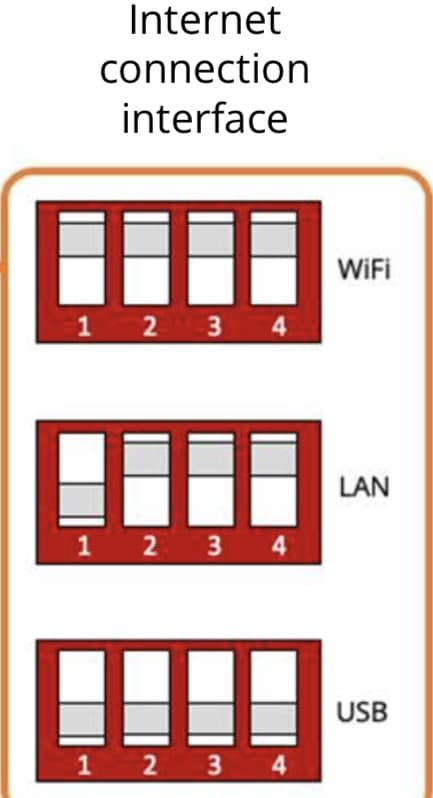
deepanshus Gen 2 has DIP switches next to the LAN port, I assume Gen 3 is the same?

For Wifi, all are ON
For LAN, 1 is off, 2,3,4 are on.
for USB, all are OFF

You may need to restart the inverter after changing.

Look at the installer training manual in the KB for confirmation.

D
#29 deepanshus

rjp

thanks , this is exactly what i was looking for.. the installer training manual just mentioned the dip switch, it doesn't say which ones...will try it once my system is stable

R
#30 rjp

deepanshus Note that those are the GEN 2 settings. Maybe a dangerous assumption that Gen 3 are the same 🙂

D
#31 deepanshus

rjp in the facebook group, someone replied as below, seems the settinsg are good fro Gen 3 as well !