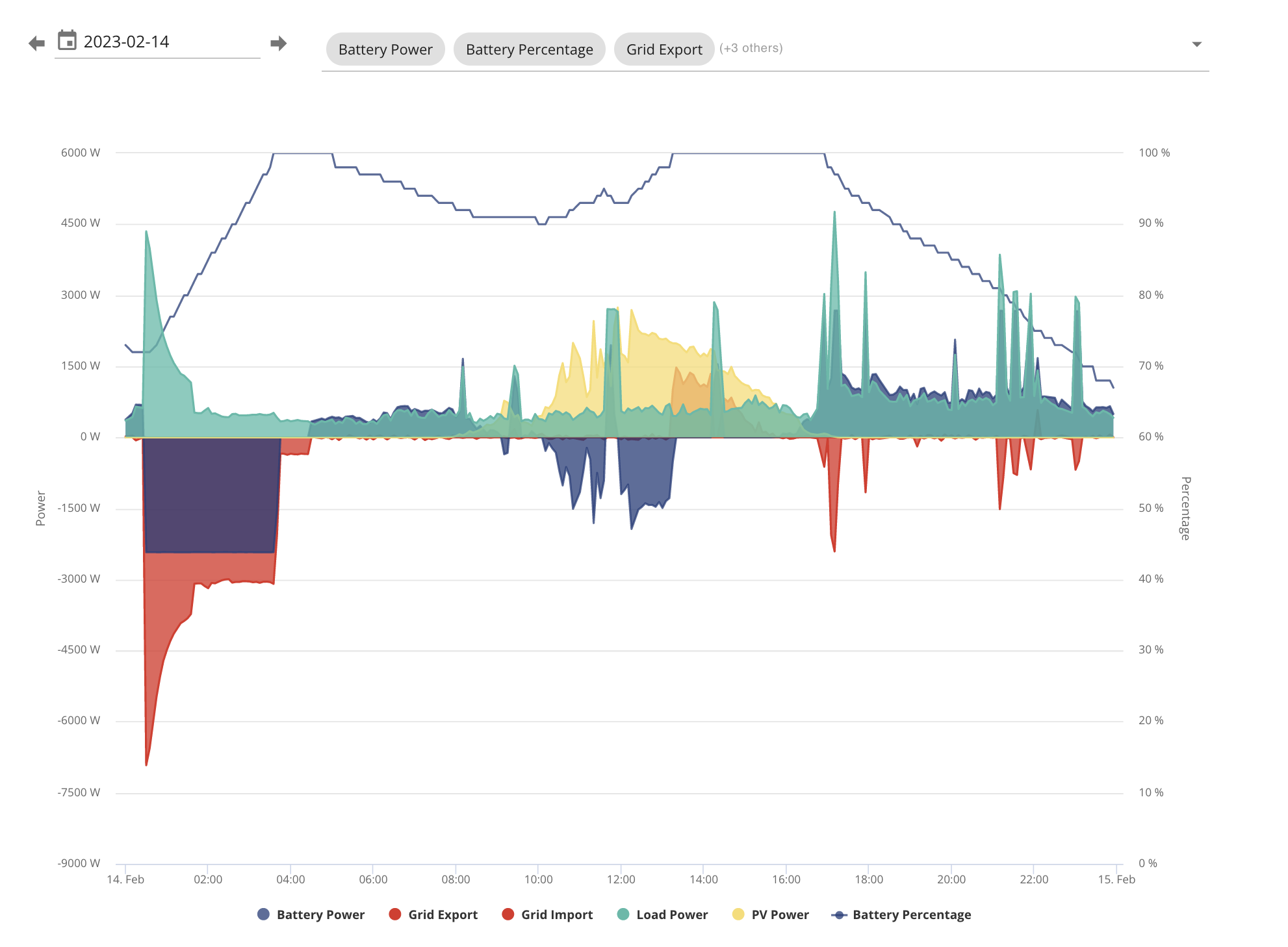
Unexpected overnight charge to 100%, battery no longer discharging

24 comments started 2023-02-15 last 2023-02-23
GivEnergy ProductsHybridBattery
L
#1 lantix

I have a Gen1 5kwh hybrid inverter and a 9.5kwh battery. The system is configured for eco mode, and has been working fine for about 3 months - charging and discharging as expected I have made no changes to the settings.

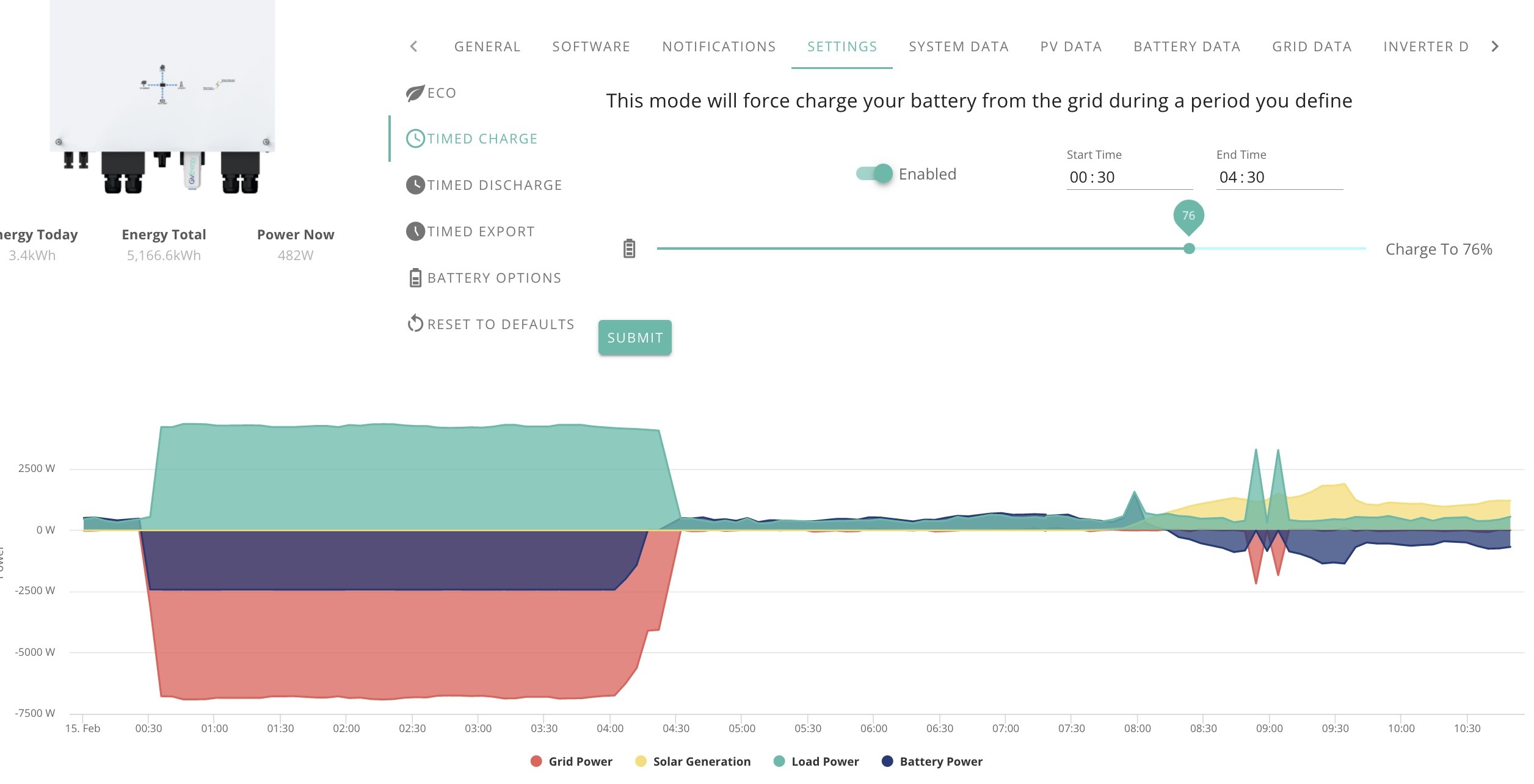
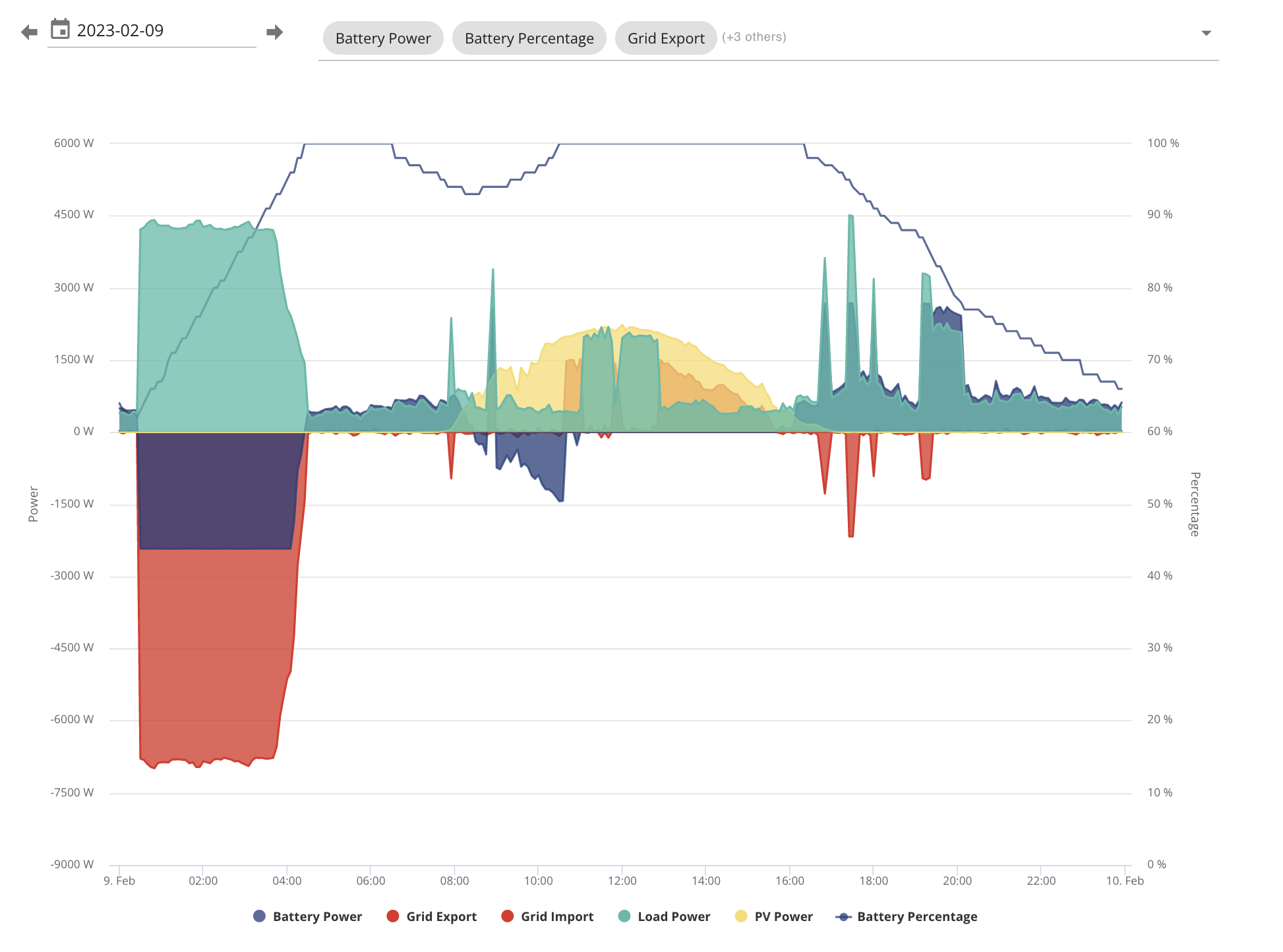
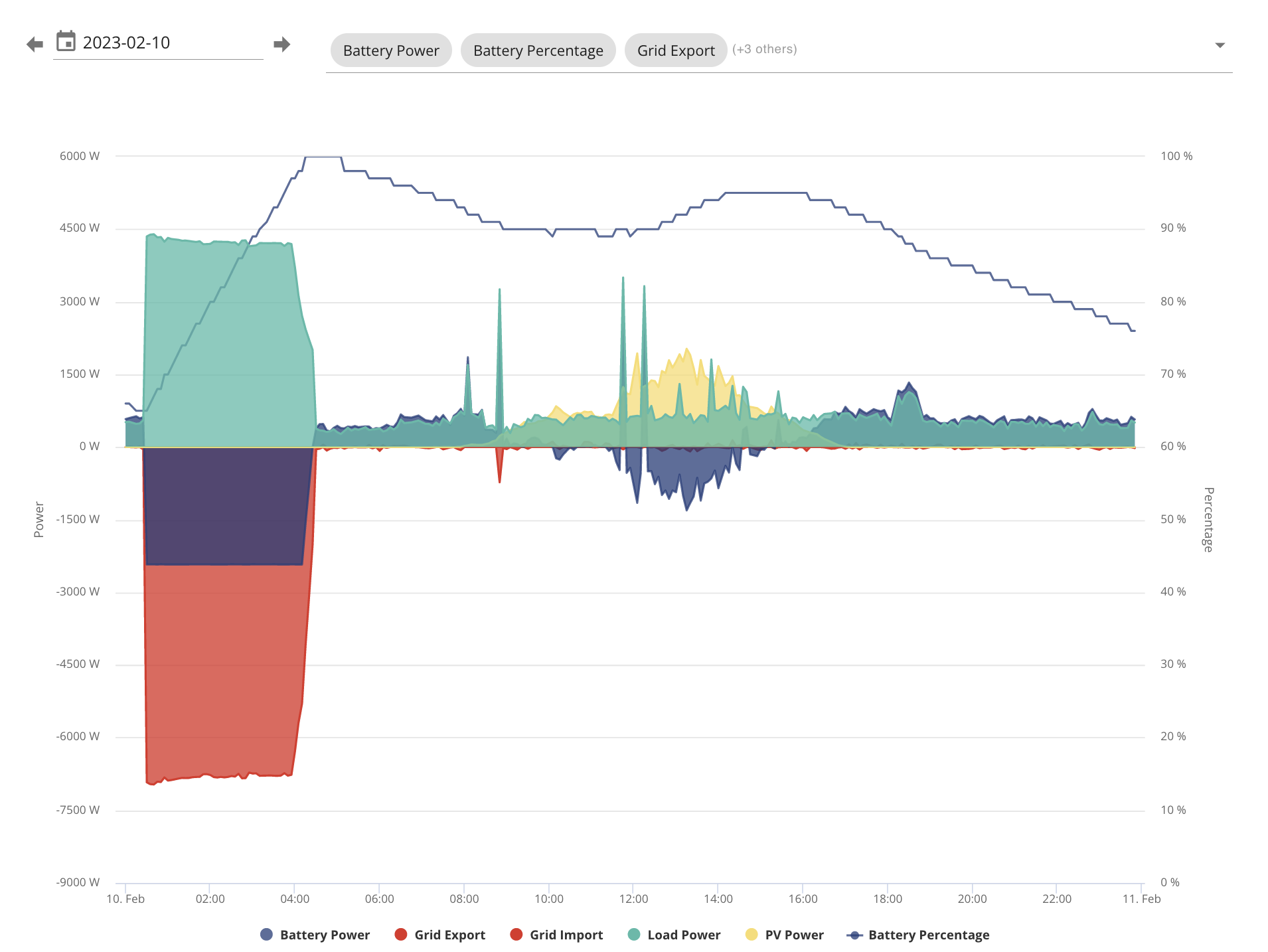
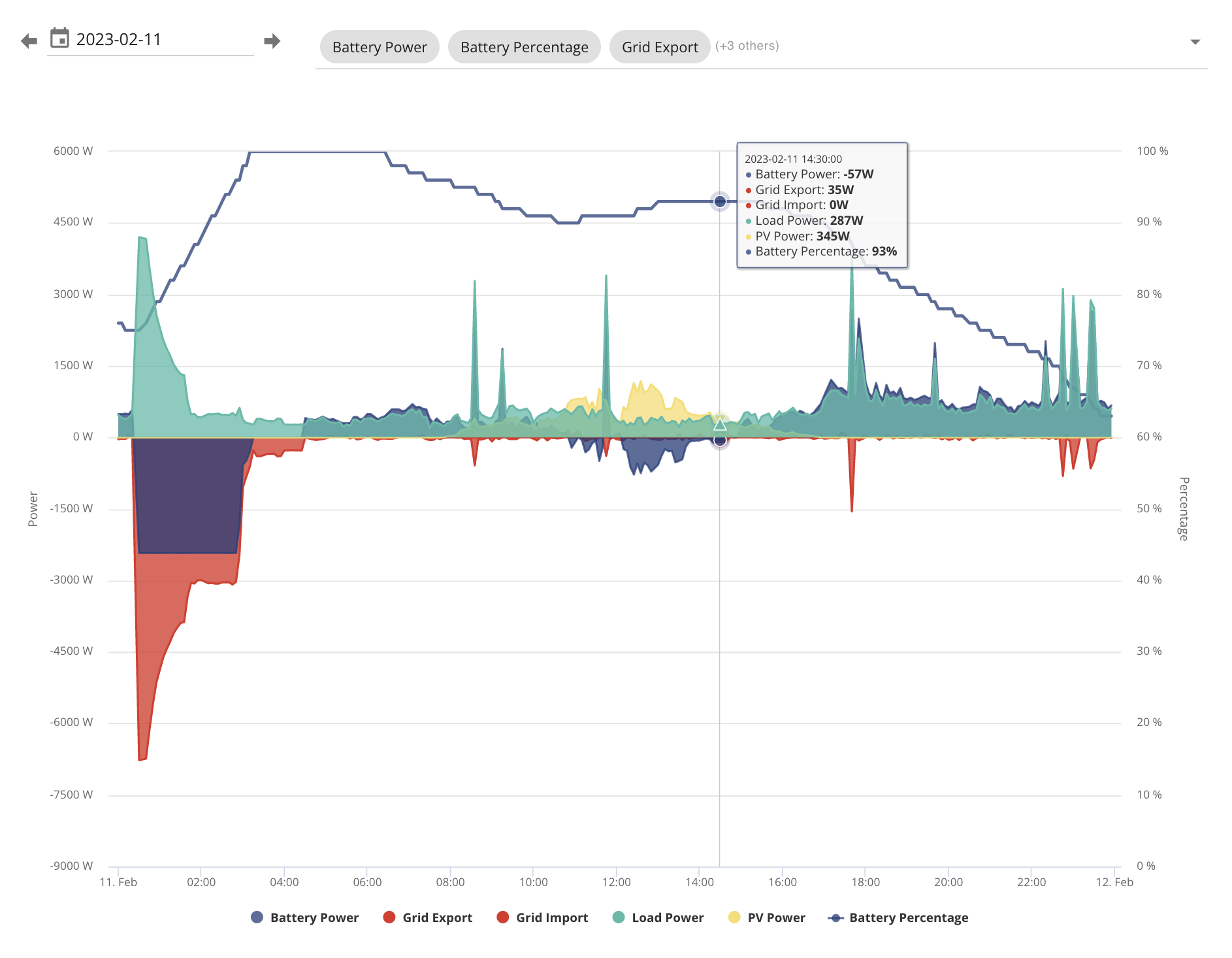
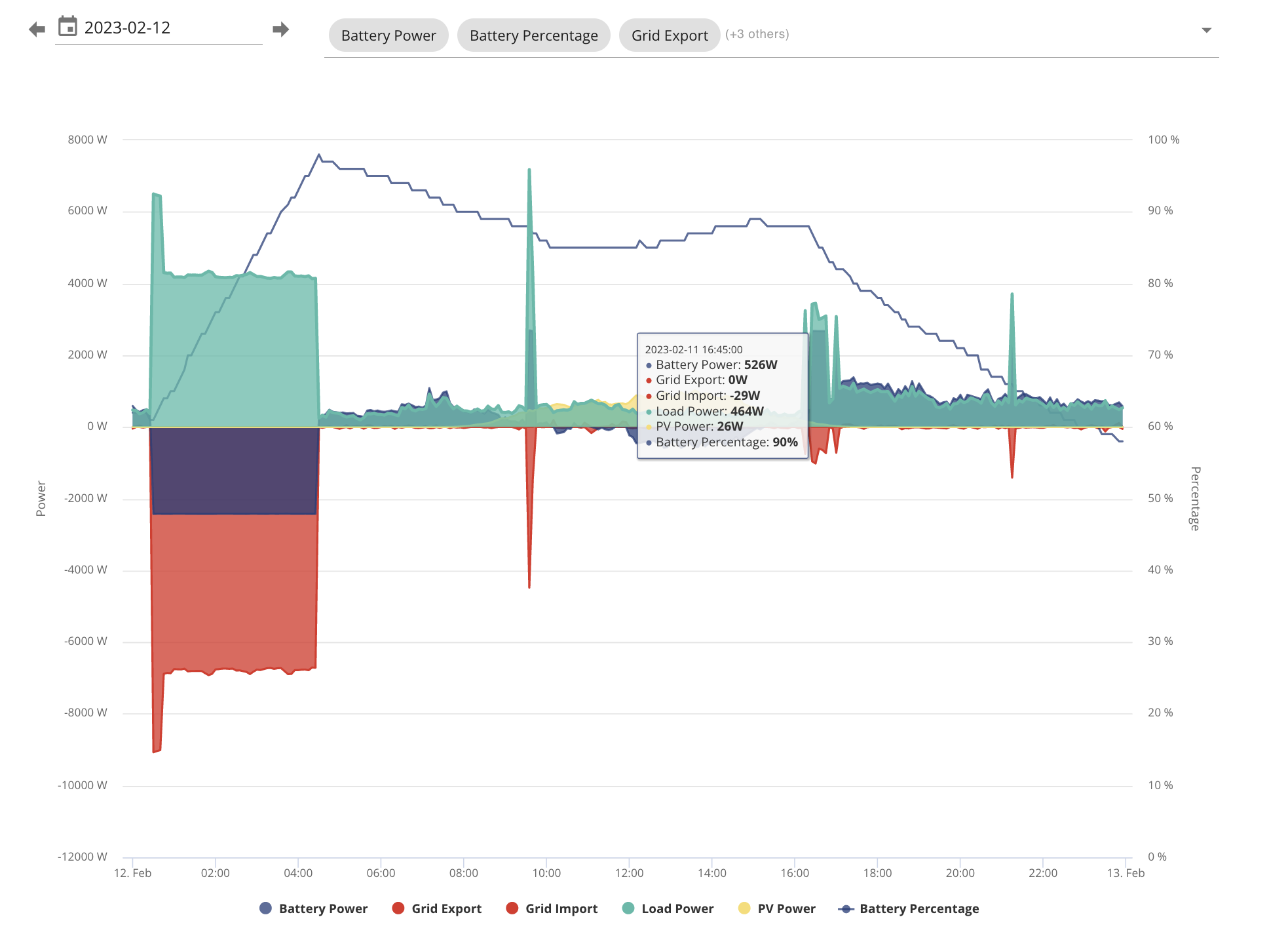
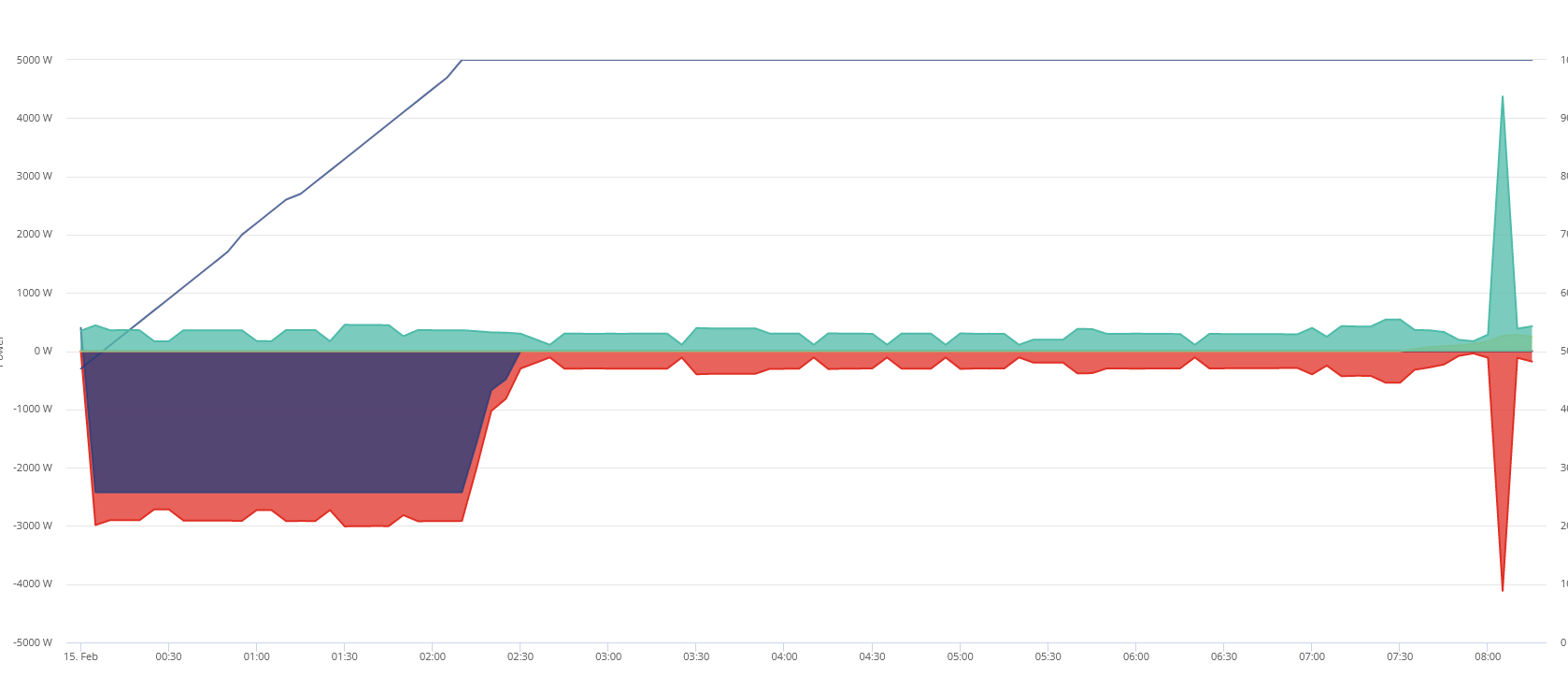
Last night at 12am exactly, the battery unexpctedly underwent a full change to 100% using grid power. Since then, the battery has not been discharging to cover my overnight/morning usage, and is currently "stuck" at 100%.

I have not seen this behaviour before. Is this normal, happens occassionally with these systems, or will fix itself on its own? Or is it something that needs further investigation?

T
#2 ToothyChris

I would start with an inverter restart, from the Portal. If that does nothing, I would reset the settings to default, again using the portal (after making a note of them).

I had something similar a day ago....

4
#3 4monks

lantix Are you running GivTCP? If so, make sure SMARTTARGET is disabled in the config area.

L
#4 lantix

4monks Nope, I have no automation. I am just using the portal with all inverter settings set to default and eco mode turned on.

I have restarted the inverter using the portal, but have to wait until this afternoon when the sun goes to see if the battery is discharging again.

4
#5 4monks

lantix Is "Timed Charge" enabled and if so, what window is set? Have a check through the "Remote Control" register values via the cog on "My Invertor" and perform a read of the values. Also look to see if any values have changed in the "Remote Control History" log at the bottom.

L
#6 lantix

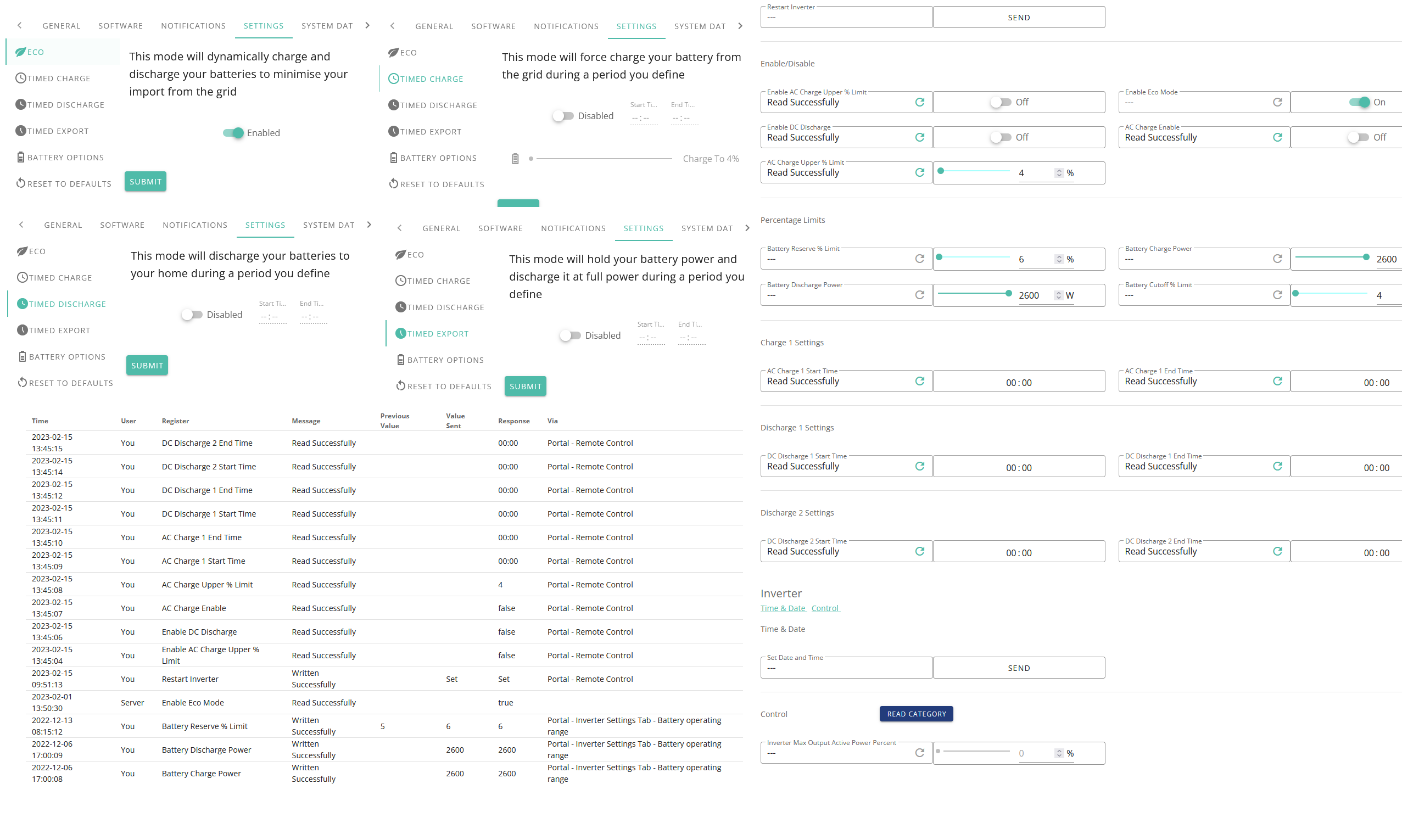
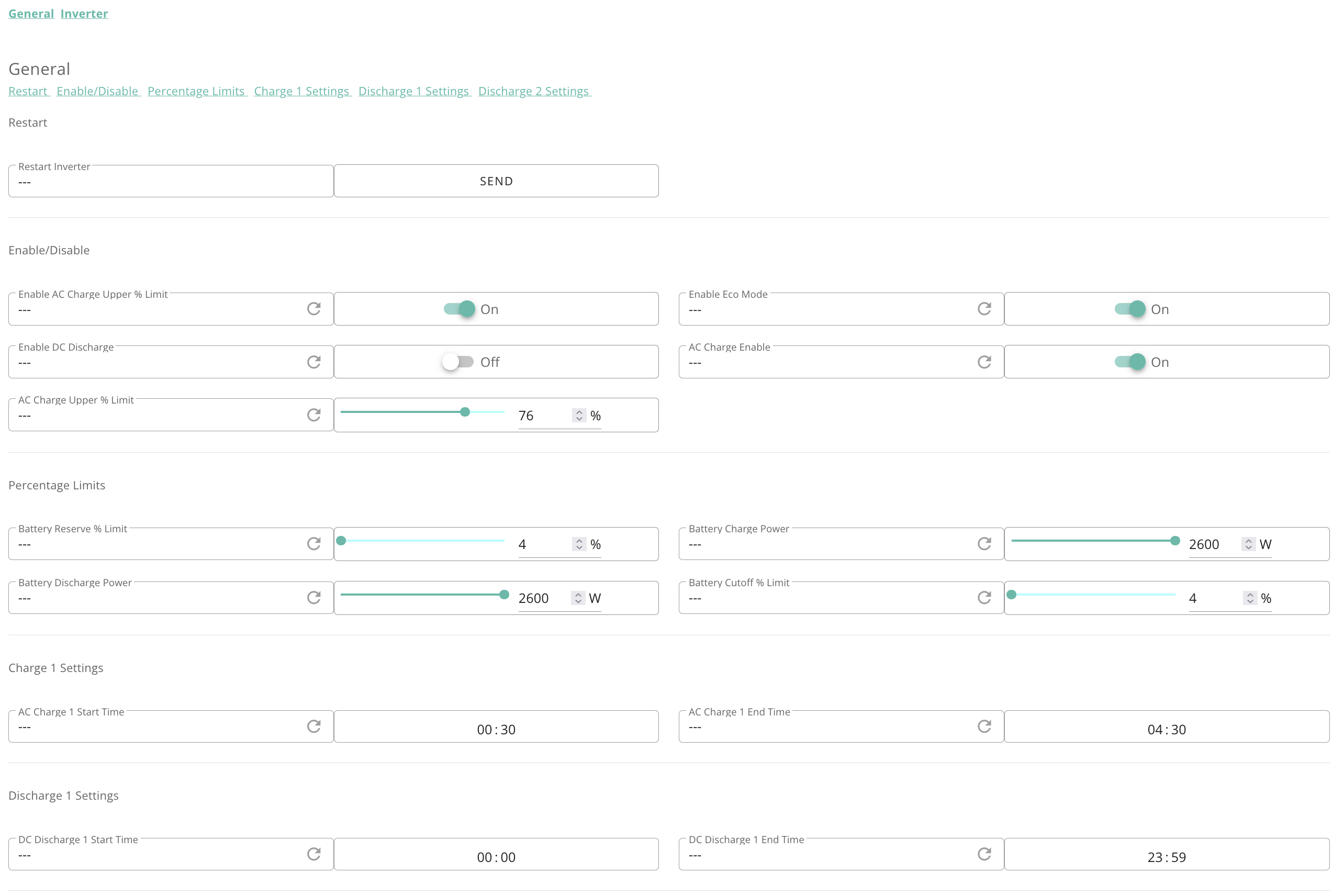
Settings are below. Nothing looks awry to me, but let me know if I've missed something.

4monks

4
#7 4monks

lantix Looks ok; similar to my settings except I charge at night off-peak if there was not enough sun during the day. Monitor for a couple of days and see if it does the same after your restart. It might then be worth setting TIMED CHARGE with a night time window and a low target SOC if it doesn't clear - perhaps 01:00 to 05:00 and target SOC 20% for example or reaching out to GE support.

L
#8 lantix

4monks Thanks for you help. I want to switch to an off-peak night tariff, but can't use Octopus Go as i don't have an EV. I'm seriously considering their new Flex tariff though if I can setup two charging periods.

But if this happens again I'll definitely be reaching out to my installer or GivEnergy - I was hoping this was either an expected thing once every few months, or something with an easy fix.

4
#9 4monks

lantix To sign up to Octopus Go, you only need an EV order number i.e. Tesla order is £200 deposit, which you might subsequently cancel if you go another route.... but would retain Octopus Go whilst you sort your other route out 😉 Worth checking out.

C
#10 cluelesscris

4monks You need any proof you have an EV or even ordered one. The 'survey' asking for details of your EV is optional.

4
#11 4monks

cluelesscris .. assume that is "don't" need? I can't recall when I signed up for Go originally. I know you do for IO obviously as the test charge is part of the acceptance process.

T
#12 ToothyChris

lantix The standard controls (App and Portal) do not allow you to have multiple charge windows (despite appearances to the contrary) - but I believe it can be done with external control systems.

In this case, the Octopus Economy 7 tariff may be better for you, if your battery is of a reasonable size.

C
#13 cluelesscris

4monks Yes, Sorry. I didn't need one. Signed up in October last. IO needs specific hardware testing as the Octopus Servers inteerfac with the charging device(s). Go is simply a split tariff wihtout any interfaces.

L
#15 lantix

As an FYI for the original problem - solar output has dropped below my needs, but the inverter is still pulling power from the grid instead of using the battery which currently sits at 100%. This is after a reset of the inverter.

I've reached out to my installer and should be hearing back soon, but in the meantime I was wondering if anyone else has had a similar problem where the inverter suddenly charges and then completely ignores the battery?

T
#16 Tim

lantix Check that your battery isolator hasn't tripped. The gen1 inverters have an additional isolator between the inverter and battery. They are prone to installation problems and the contacts also seem to be problematic at times. If the isolator has tripped, report it to your installer. Chances are that after you reset it (by pushing it upwards like the MCBs in your consumer unit), it will behave perfectly for a while, then trip again. If so, your installer may be able to fix the problem by re-terminating the cables or simply swapping out the isolator.

K
#17 Karen

I've been looking at the settings in your message above - are you sure you reset everything after pressing re-set. To me it looks as though you need to go back in and put your settings back in. Just as an example. I usually charge overnight between 00.30 and 7.30, but at a reduced wattage (1134W), and last night I charged to 75%.

My settings are
Enable AC Charge % - ON
Enable ECO mode - ON
Enable DC discharge -OFF
AC Charge Enable -ON
AC Charge Upper limit % - 75%

Battery reserve limit - 4%
Battery Charge power - 1134W (my choice to give a longer slower charge across my E7 period)
Battery discharge power - 3000W (maximum for my battery and AC3.0)
Battery cut off limit - 4%

AC Charge start time - 00.30
AC charge end time - 07.30

S
#18 Steve0898

lantix I’ve just posted the same issue before I saw your thread. The same thing happened to me today at 10.30. Sudden surge from 83-100% within 5 minutes and battery remained at 100% since. This is despite it appearing to push energy into the home which is odd. I’m going to try Tim’s response below though when I get home

4
#19 4monks

Also be aware you might not have a DC RCD between the battery and the invertor as the 9.5 kWh batteries have the DC RCD built in.

L
#20 lantix

Another update. My installer is being unresponsive, and I was still having the same issue - battery at 100%, not discharging. I found the reset to defaults button (thanks and apologies to ToothyChris for not trying his suggestion sooner) and applied it. It took two attempts, but it succeeded on the second try. After this, my battery immediately started discharging as expected. Problem (hopefully) solved.

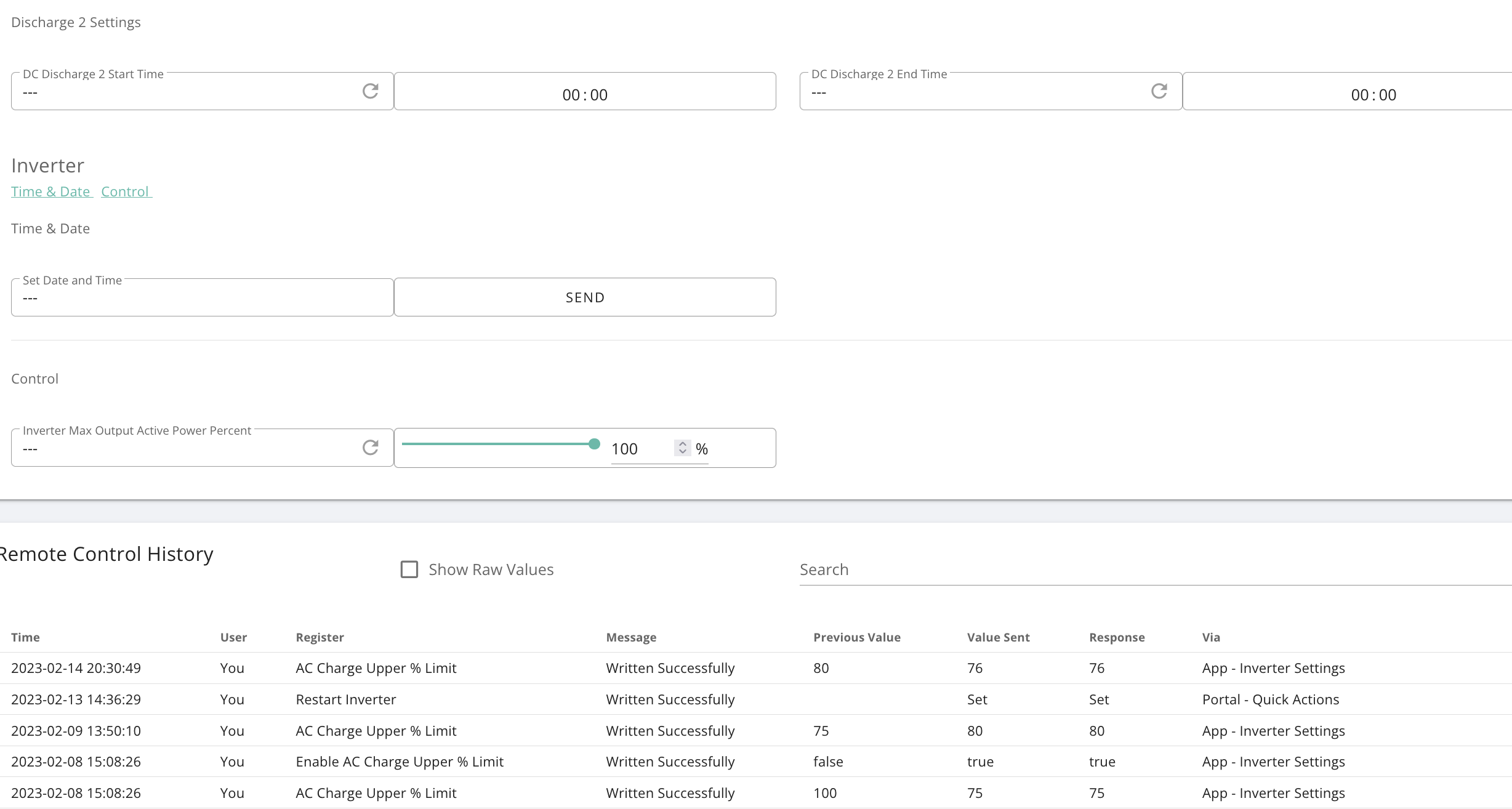
However, I was wondering if anyone might have any insight into why this might have worked? There were no changes to the settings on/near the night that the battery abruptly charged to 100% and stopped discharging. Below is my remote control history.
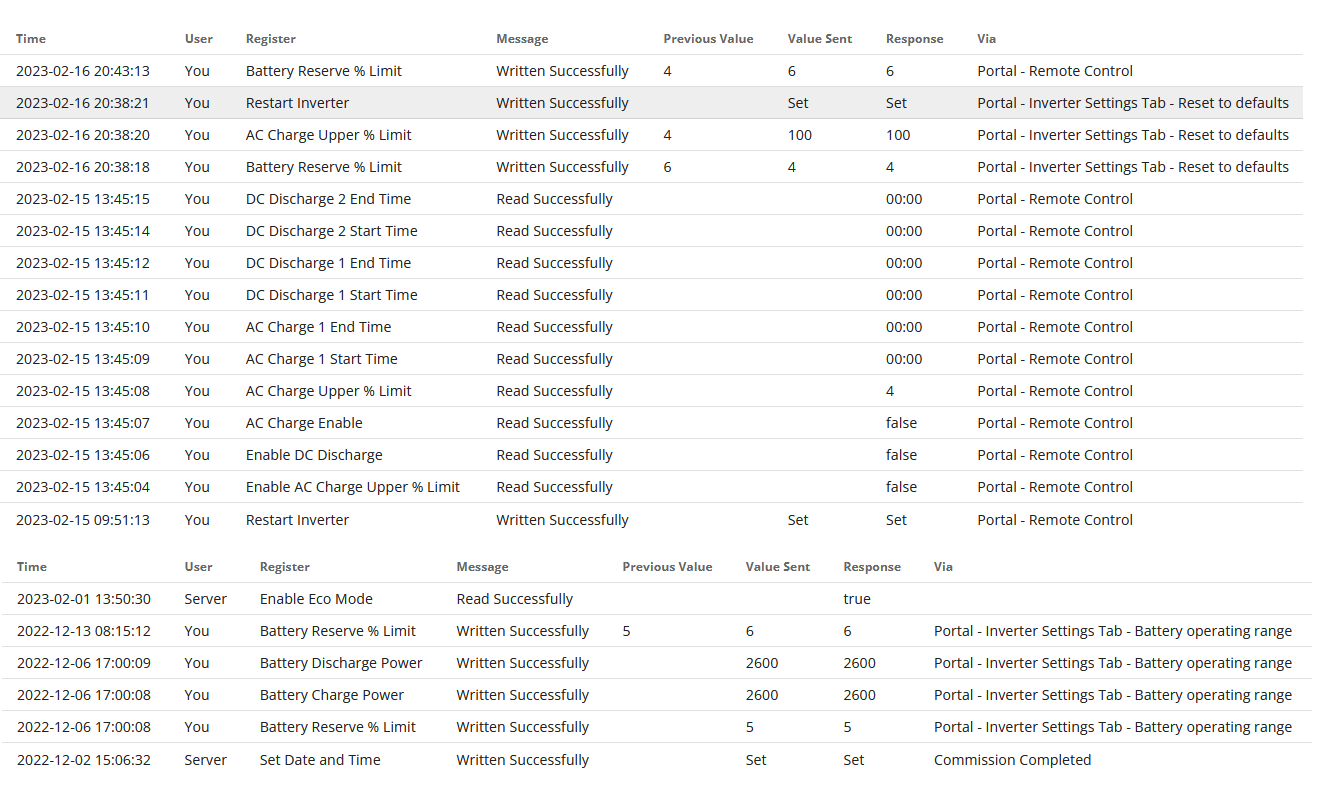
On the 15th, we can see my initial restart of the inverter (which did not help the issue). Later we can see my read of all unread registers, For reference later, note that my "Enable AC Charge Upper % Limit" was false, with a percent value of 4.

Later on the 16th, we can see my reset to defaults take effect. We have the modification to the Battery Resvere % Limit (expected, as I had previously modified it from 4 to 6 on 06/12 and 13/12).

However, we can also see my AC Charge Upper % Limit was reset from 4 to 100. I can't imagine how this value would have mattered, as the Enable AC Charge Upper % Limit value was set to false and (I assume) should have been an inert value. Additiionally, we can see from the full history that the value had never been set (at least not via Remote Control), and yet it still as reset to a new value.

Other than that, there's no evidence that any other values were actually reset by the reset to defaults, and yet that is what solved the issue.

Do I chalk this up to sometimes needing to "turn it off or on again", or could there be an underlying issue worth further investigation? Perhaps a bug in the software/firmware?

J
#21 jam_cam

Hi. I have this same issue with the AC Charge Upper Limit %age being ignored.

Last year until winter I used the upper limit (with charge from grid from 0030-0430) to allow for topping up from solar during the day rather than exporting.

It was set to 100% over winter with timed charge from 0030-0430.

Last week I set it to 75% now that the solar performance is improving, but noticed batteries were still charging to 100% overnight.

I spoke with GE who said even though the setting might look correct, if you read the register there is a known bug that means it can revert to 100%. Sure enough, reading the register it was 100, not 75. So I set the value to 75 and read the register back to ensure it had set correctly. However, it reverted to 100 overnight and fully charged the barriers.

🙁

Interested to see if there is a reliable fix prior to an update.

FYI I have 7.2kW panels, 5kW Gen1 hybrid inverter, and 3 x Gen1 8.2kWH batteries.


T
#22 ToothyChris

A crude method is to limit the charging power or to limit the charging time.

4
#23 4monks

jam_cam Are you running GivTCP and have you checked that SMARTTARGET is disabled in the config?

M
#24 MrWobling

4monks I'm running GivTCP on Home Assistant and can confirm that disabling SMARTTARGET does not resolve the issue of the battery charging to 100%, irrespective of target SOC setting.