
My maths is bad...

8 comments started 2023-02-26 last 2023-02-26
Cloud Portal
O
#1 oddchoice

We got our install in November, finally started selling back to Octopus last month (53p!) but trying to understand "what we saved" so I can see how the payback is working. Seems to be a challenge:

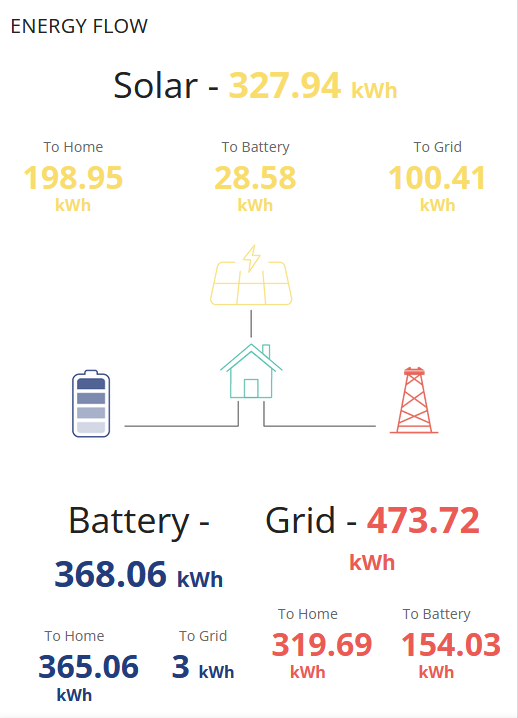
Looking in the GivEnergy panel

1) the usage is hugely different to that my smart meter says I am billed for - seems others have had this issue and it's "one of those things"

2) the sums don't add up.

365.06 Battery to home
28.58 less Solar to battery

154.03 less Grid to battery

182.45 Since the batteries are reporting 100% where has this come from? (Interestingly this is almost half)

If anyone can point me in the right direction I would be very grateful.

Thanks
--OddChoice
C
#2 cluelesscris

Really speaking, the only reliable way of working your numbers is from your smart meter. Whilst the GE panels can give a good indication of how your system is performing it is never going to match the truth that is the bill from your energy company (or companies if you have a different export agency).
You can install devices which connect to your smart meter by zigbee and give you 100% accurate readings - both totals and current load/export rate. Failing these, wait until your bill arrives, then use the half hourly numbers accompanying it to calculate what ever you need.

K
#3 Karen

I work out my savings using the Octopus graphs for export and import - that way it ties in with my bills. On Octopus - go to my account and select "explore my energy usage". Scroll down below the big boxes showing your usage this week to the section that says "explore my data". I usually use the custom search as you can pick the dates and periods you want to look at. I got confused too, because half the numbers don't mean what you think. There are some threads on here that talk about it

C
#4 cluelesscris

Karen You can also download the half hourly data from here the 'Explore my Usage' section. Buils yourself a spreadsheet that does the maths for you and save it as a template. Then you can open one up paste any period of data into it and get expectly what you want.

T
#5 Tim

oddchoice As @cluelesscris says, the smart meter is the ultimate arbiter since that's your utility bill device. You can also download your last 13 months of smart meter readings with 30 minute intervals (and 1 hour, daily, weekly and monthly) if you download the Bright app (Hildebrand Glow) and sign up to them providing you (and keeping a copy for themselves) with your data. If you want to make use of real-time MQTT data, you can also buy their dongle.

O
#6 oddchoice

Thanks. Some useful pointers.

I still can't see how my usage from solar and battery sums can be right. If those figures are wrong, is anything valid? Is the inverter correctly switching between sources...

What should be a simple exercise is quite a lot of thinking

Thanks again.

#8 positor1

SteveCook
same here, got £50 refunded that wouldn't have happened had i not been checking.
