Recommended overnight charge percentage

18 comments started 2023-03-11 last 2023-03-17
GivEnergy ProductsHybridBattery
M
#1 michaelhoskins

Hi all. I'm a new poster and have just had installation of a 9.5kwH battery, 5kh gen 2 inverter and an array of 5.25kwp.

Have joined Octopus Flux (on the import tariff now and waiting for the export mpan).

Just wondering what people did with overnight charge. I have set it to charge to 100% during cheaper period (I was on Go before but swapped to Flux as I don't have an EV - yet). But seems a waste because it only drops to 70% or so before it starts to recharge (and the will get better as we move into spring and summer). On the flip side, this means we were still at 50% yesterday night before charging started.

Is there a benefit to keeping the battery charge high like this (lifespan of battery etc) or should I aim to just minimise import/export (which is my overall aim).

Thinking of setting charge limit to about 70% instead tonight - see how it goes. Reckon I'd just need to manage it throughout the year (e.g 100% in winter to no charge in summer)

Any thoughts or recommendations on how best to approach? Realising that there is a real learning curve to this!

P
#2 pacemaker

Pretty much all the same as you in terms of tariff and size of install. I'm setting mine to 70% charge in the flux cheap period. I'm assuming I'll slowly cut that as the days get better

S
#3 stevelewis

pacemaker Flux cheap rate import = 20p/kWh, daytime export rate = 24p/kWh. Storing PV makes no sense with Flux. Charge fully overnight and only allow discharge from the start of the expensive period. If you're confident that your battery will hold out through the expensive period, allow some discharge earlier in the day.

P
#4 pacemaker

stevelewis

Thanks Steve - this seemed counterintuitive in my head at first, as surely it's better to charge the battery on free electricity? But after a morning of Excel spreadsheets, I can see that charging to 100% on Flux will always be the right decision, whether you have a bad, good or great solar day.

S
#5 SteveCook

stevelewis
Steve
How would you setup to "only allow discharge during the expensive period"?
Regards
Steve

T
#6 Tim

SteveCook "only allow discharge during the expensive period"

Set your timed charge to start at your off-peak start and end at the start of the "expensive period".

M
#7 michaelhoskins

Thanks for the tips. I hadn't really thought about maximising export (I went down this route before I knew about Flux or Agile).

So, based on the above, this would be Timed Charge to 100% from 2am to 5am (the battery would be fully charged before 5am but this means the house would be using grid import at this time).

Generation doesn't exceed usage until around 10 or 11am at the moment (though it's only march) so the house would be using the battery until then (no export)

So after that, it's better to export any excess solar to the grid rather than store it - until 4pm-7pm?

So just prevent battery discharge between say 11am (earlier as we get towards summer) and 4pm, and then use battery only between 4pm and 7pm (and as long as possible until 2am).

Sorry if I've got the wrong end of the stick.

I've pretty much accepted that March is going to be tinkering time and not to expect much savings while it's figured out.

(And I don't have an export MPAN yet anyway)

Thanks again.

#8 Maxwell

Tim I'm struggling to find the right settings to enable me to limit the battery discharge (just to the house) between times i choose. When i configure what i believe are the correct seetings i end up discharging excess battery storage to the grid which is not what i want to do. Over here @sammyz had to get GE to change some hidden automation setting. https://community.givenergy.cloud/d/881-app-changes-charge-discharge-times/4
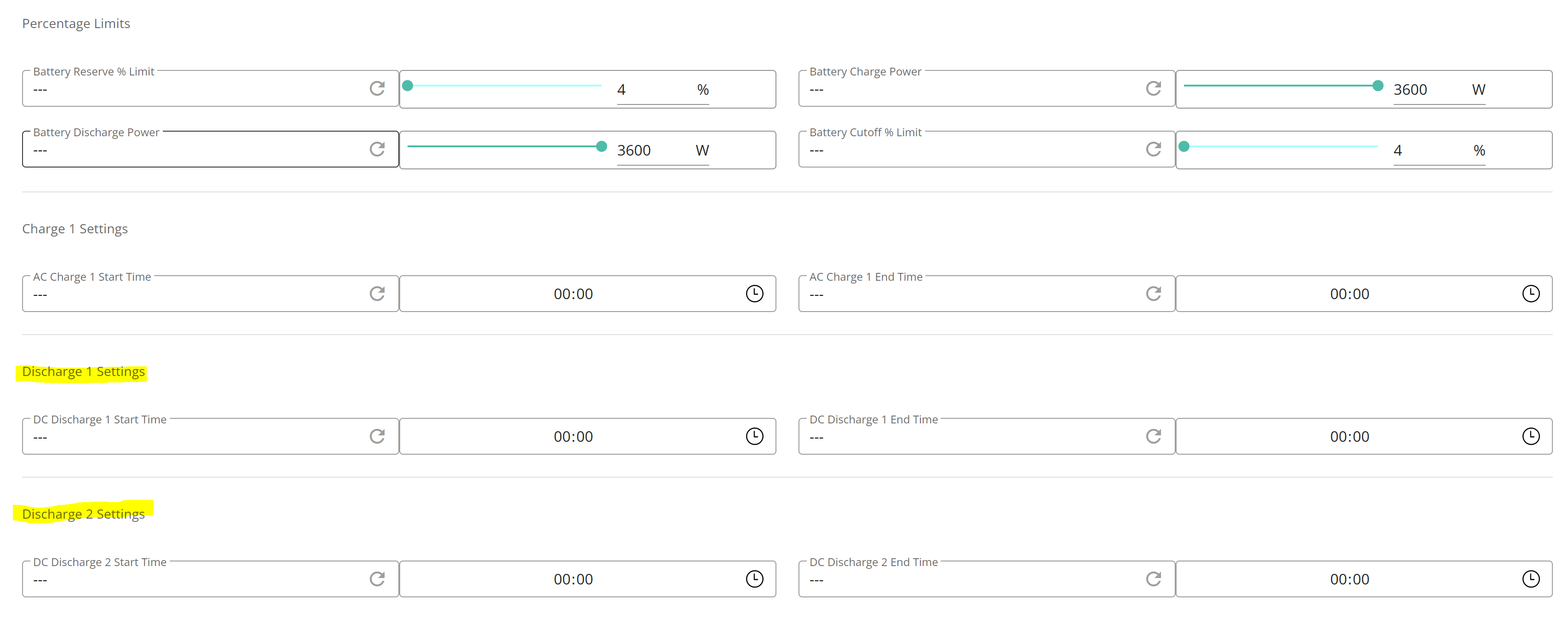
At the moment i have left mine on Eco with timed discharge disabled, not ideal but it limits the massive grid export. This hidden control that @sammyz had to get GE to change isn't the only thing missing to users. The second discharge time period shown in the remote settings picture doesn't have a visible field in the portal settings image.

Now i can get that there may be settings that could be dangerous if they were set incorrectly, we are our own worst enemy. But, i would have thought that even if they aren't editable they could be made visible to the user and some explantion of what they mean or how they impact the user.

S
#9 stevelewis

michaelhoskins unless you have some code on a Raspberry Pi or similar, this scheme looks too complicated to implement on the GE portal. Set Eco mode with an AC charge from 0200 to 1600 (or an earlier end time if you're confident that the battery will still last through the expensive period)

T
#10 Tim

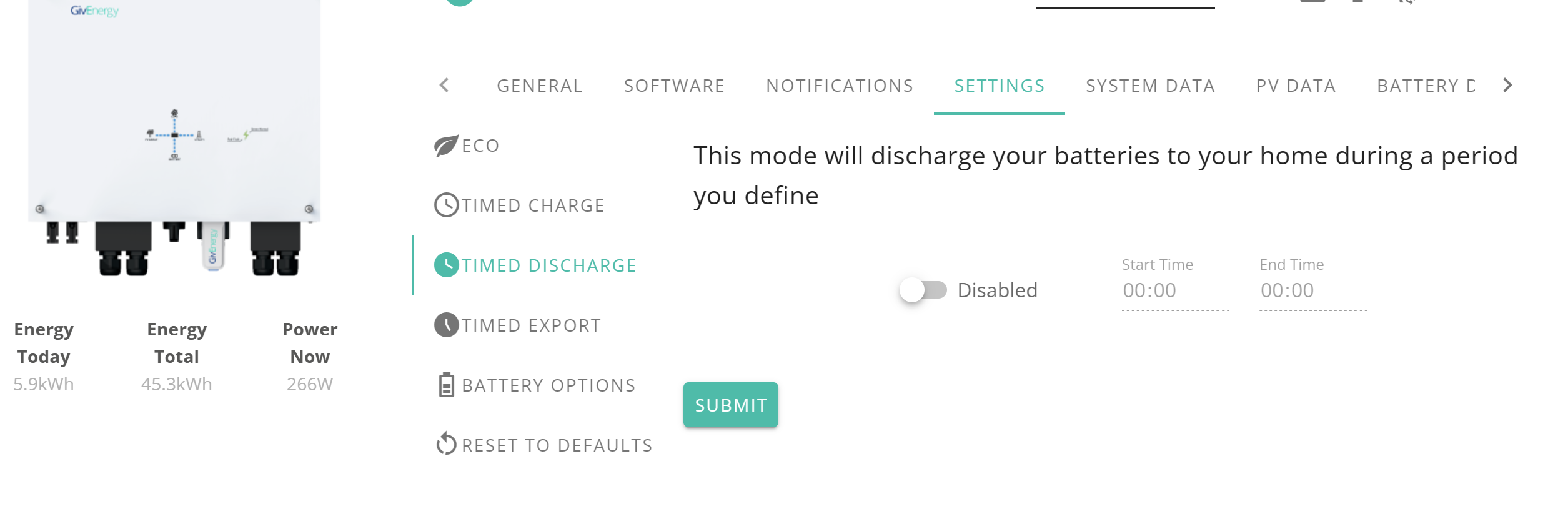
Maxwell To limit battery discharge so that it only supplies the house, with no export, enable ECO mode and disable timed discharge and timed export modes. If you have a time of use tariff and want to charge up overnight, set a timed charge for the full duration of the off-peak period and limit the amount you charge to by setting Charge to % to whatever you need. This is readily accomplished in the web portal and app.

If you have limited battery capacity and want to keep it available to avoid import during peak period, set the timed charge to start at your off-peak start but end at the start of the peak period. Grid will supply the house for the duration of this extended timed charge period. ECO mode will supply the house once the extended timed charge has finished.

The remote control page isn't the best place to set the modes and timed charge periods etc. Use the inverter card - settings for that.

P
#11 pacemaker

Tim

Grid will supply the house for the duration of this extended timed charge period.

Wouldn't solar take care of that (assuming it's available). Grid would only come into play if you're consuming more than you're making?

T
#12 Tim

pacemaker Wouldn't solar take care of that

Yes it will and if there's surplus PV and the battery will also be topped up if it has capacity.

#13 Maxwell

Tim Thanks for your reply. So, at the moment i have eco selected and the discharge options disabled. But looking at the data for today i can see that the battery has sent 0.6kwh to the grid. Is this just a side effect of the system not quite balancing the needs of the home with solar and battery ? But, what if i want to set a period when i don't want the battery to either supply the house or export o the grid ? What settings do i ned to set for this ?

C
#14 cluelesscris

Maxwell Set the discharge rate to 0%. Portal | Inverter Data | Settings | Battery Options

T
#15 Tim

Maxwell as @cluelesscris says or extend your timed charge to end when you want the battery to start to operate. Both will be effective. WRT grid import/export during ECO period, it’s very likely just the ramp up time for the inverter followed by the overshoot. The inverter can’t see you switching on the kettle and has to “see” grid import feeding that demand before it starts the ramp up to reduce import. The new beta is said to have significantly faster response times but the overshoot is greater so the grid import/export in a day doesn’t change much. Looking at our smart meter import, I’m happy if that figure is less than 1kWh/day.

T
#16 Toogie

Tim
A bit off topic but can the PV export excess solar when home demand is =to/or >than 3.6kW?
4kWp array; 3.6kW gen 1 hybrid inverter;17kW battery

T
#17 Tim

Toogie The inverter (clever chap) in ECO mode, will minimise grid import/export and supply house load from PV, or battery if there's not enough PV. If there's more PV than the house needs, the inverter will divert the surplus to charge the battery. If the PV exceeds house demand and the battery is fully charged, or charging at the maximum rate (2.5 to 3.6kW depending on inverter), export to grid starts

With a HY3.6 and 17kWh of battery, its feasible that there will be times when you are exporting (PV at max and 2.5kW to battery charge and with house load less than 1kW), but I would expect the battery to be charging almost all the time the PV exceeds house load with such a relatively large battery storage.

T
#18 Toogie

Tim
That is the way I want the system to work for me Tim so thank you for explaining the process so comprehensively.