None of these seem to exist in a way I thought they would in the visual editor so assume I have to write the YAML but then its a bit light on documentation...
Replace my inverter Serial with your own
alias: Force Charge Example
description: ""
trigger:
platform: time
at: "22:00:00"
condition: []
action:
service: select.select_option
data:
option: "60"
target:
entity_id: select.givtcp_ce2146g163_force_charge
mode: single
alias: Force Export Example
description: ""
trigger:
platform: time
at: "22:00:00"
condition: []
action:
service: select.select_option
data:
option: "60"
target:
entity_id: select.givtcp_ce2146g163_force_export
mode: single
alias: Set Eco Exmaple
description: ""
trigger:
platform: time
at: "08:00:00"
condition: []
action:
service: select.select_option
data:
option: Eco
target:
entity_id: select.givtcp_mode
mode: single
N
#7naltsta
TheDragon (GivEnergy) So these are "services" not "device actions" - that explains some of my confusion!
#8TheDragon (GivEnergy)
naltsta Yes its a service, which goes away and set a ton of stuff for you. Not just on value
N
#9naltsta
TheDragon (GivEnergy) I also seem to have my secondary battery doing some strange things. Only noticed it when going through everything in Home Assistant but now see it does display on the app too. Doesn't seem to want to go below 22% for the last few days even though overall SOC is reporting 4%.
#10TheDragon (GivEnergy)
naltsta Barteries becoming out of balance.
2 batteries one inverter?
G
#11Graham_Harrison
naltsta I've been getting this a bit lately, try restarting your inverter via the GivEnergy Portal, its worked for me a couple of times as the significantly higher or lower soc is often false so you then get a big step change in 1 go
#12TheDragon (GivEnergy)
Graham_Harrison Good call. I see if a SoC goes below 3% it gets stuck for some reason.
Stuck as in the display is stuck, the actual SoC could well be charging just fine
A
#13aniseedvan
I found the battery SOC to just give up updating when the battery was discharged to 4%. Was often reading much higher, and then would just add on the charge values when the sun came up, so would end up reporting a higher value than it actually was. Changed display to inverter SOC (asked speaktothegeek) and the display has been right for over a week. I do only have one battery though.
Something funky going on... (I only told GivTCP about my second battery yesterday but it doesn't seem to get below 23%)
A
#15Adrian
TheDragon (GivEnergy)
Where is the documentation for these services please? What are these "options" - eg the "60".
service: select.select_option
data:
option: "60"
target:
entity_id: select.givtcp_ce2146g163_force_charge
mode: single
N
#16naltsta
Adrian Im pretty sure the "options" are time in minutes but haven't discovered any documentation anywhere!
A
#17Adrian
naltsta Thanks nalsta. I don't know about you but I NEED documentation. It seems people here are either psychic or very good guessers!
T
#18Tim
Adrian The documentation is severely lacking. That's one of the issues with a bunch of people jumping on the back of one person's work in his spare time. The person doing all the GivTCP development is @Britkat and his repository contains all the documentation that there is (AFAIAA). Apparently, he does use Facebook and posts updates of what he's done/doing there. If Givenergy were to bring this unofficial add-on within their domain, it would have to have better documentation. But given the choice of a working, feature-rich, undocumented and unofficial add-on and the official Givenergy one that hasn't been updated for many months, it's not a difficult choice.
A
#19Adrian
Tim I wasn't criticising @Britkat - at all. Indeed, the options I was talking about are GivEnergy's - GivTcp just passes them through, as far as I can see (guess). GivTCP is really very good. I just wish I understood much more about its various options than I do!
D
#20DD
Decades ago, I was actively developing a thing called gnuplot. (It's still around - not sure how popular it still is.) I was very fortunate to have a user who happily took on the role of documenting it all - he wasn't able to assist with code development, but as a grateful user, he was pleased to be able to contribute nonetheless. It really was a godsend.
(I'd volunteer, but I'm only here doing some reading in advance, since it will be a while before I get my system.)
T
#21Tim
DD a user who happily took on the role of documenting it all
Therein lies the problem. There will be people who are feeding back bugs and new features requests to @Britkat and he's busy fixing and developing them as well as keeping the repository in sync with Givenergy changes, but since the feedback/feature requests are (AFAIAA) via facebook or similar, there's no record in Github. If there was a record of changes in Github, then a third person carrying the documentation load would be a much simpler task.
It wouldn't be difficult to make use of the features built into Github for version-control purposes but that does not appear to be the way Mark works. And I suspect that if there was someone motivated enough to do it anyway, they might struggle to get Mark to keep them informed other than on Facebook etc. Nevertheless, we are all grateful for the work he's putting in.
A
#22AlastairCooper
I set up the ha givtcp combo, and it's been working fine. I also set up solar forecast with the idea of trying to use this to say the overnight charge value. Two things have come up since April came round, when I thought it would automatically kick in.
Overnight charge target hasn't been changed.
If I try to do it manually it seems to be forgotten and reverts to 100%
Do I need to change any inverter setting to allow HA automation?
What's the role of eco setting in the inverter?
T
#23Tim
AlastairCooper ECO should be the default setting for most use cases. In this mode the inverter minimises import and export. It does this by supplying house load automatically from PV/battery. When PV exceeds House load, the inverter diverts the surplus to charge the battery. When the battery is full, the inverter diverts surplus PV to export. That’s about it. You don’t need to do anything with the inverter to enable HA to change settings. I don’t use Solcast so can’t advise on why the automation isn’t working as you expect.
A
#24AlastairCooper
Tim thanks, I've definitely got the inverter on eco. Can't really think of any use cases where I wouldn't want it to behave like that.
The key problem is that even if I try to manually change the target soc the inverter software seems to ignore the setting, despite reporting that value I have set. Weird eh?
M
#25madhulk
AlastairCooper In terms of the automation not running - have a look in your logs for the GivTCP HA add-on. If it’s still setting to 100% due to not being able to read solcast forecasts, try putting your site ID into both of the site ID fields in the GivTCP setup page - if you only enter 1, it can’t find a solcast forecast for the non-existent 2nd roof and errors out. Doubling up the IDs seemed to fool it into working for me.
T
#26Tim
AlastairCooper If you want to see if the issue lies with the automation or GivTCP, disable SMARTTARGET in GivTCP. Apparently that feature sets the Charge to % to 100% in winter but I don't know when the changeover is. Disabling it and any Octopus automations should leave you with full control. BTW, you are using the Web Portal - Inverter Card - Settings - Timed Charge page to set the Charge to %? If you've done this and the inverter still charges to 100%, check the remote control page; the Enable AC Charge Upper % Limit switch should be enabled. Using the web portal automatically sets and resets this switch so you shouldn't need to touch it manually if you use the timed charge page.
M
#27madhulk
Tim Just FYI - the SMARTTARGET "winter" is October through to March, at which point it will charge to 100%, for April - Sept it will do the smart charging - at the moment, mine is setting to 45% each day, which is serving us well.
I have tried to modify your example above for the Force Charge to use it to set the Battery Charge Rate back to 100% automatically at the start of the day, but I get the following error message:
"Message malformed: required key not provided @ data['action']" when I try to save it.
The modified YAML is as follows:
alias: Change Charge Rate Example
description: ""
trigger:
platform: time
at: "06:00:00"
condition: []
action:
service: select.select_option
data:
option: "100"
target:
entity_id: select.givtcp_CE2105gXXX_battery_charge_rate
mode: single
I am going to have to dig into this a little more? I need to read the HA addon logs and see if there is anything there.
Any expertise in debugging this stuff would be handy since I am greener than green grass at automation (but not software, pretty capable at that).
A
#30AlastairCooper
madhulk
Ah, I missed that, I will do this and report back
A
#31AlastairCooper
I saw evidence in the GivTcp logs that the second site id was in fact the error so I followed the advice and we'll see at 0020 tomorrow.
2023-04-12 00:20:16,858 - palm_soc - [CRITICAL] - PALM... PV Automated Load Manager Version: v0.8.3bSoC
2023-04-12 00:20:18,950 - write - [ERROR] - Setting Charge Target failed: (<class 'AssertionError'>, AssertionError('Unexpected response from remote end: Modbus Error: [Input/Output] No Response received from the remote unit/Unable to decode response'), <traceback object at 0x7f8a4b1980>)
This appeared in the log today. Seems like something wrong trying to set the state of charge target?
A
#33AlastairCooper
Digging a little more, it seems for the last few days I have been seeing:
Exception("Garbage or failed Invertor Response: ERROR:-(<class 'KeyError'>, KeyError(HR:013)
In the log when the PALM automation runs in HA.
Clearly it is having trouble with writing the SoC target. Not sure if its the garbage response that causes the KeyError in python or the inverter (RestApi?) is having that error and feeding it back?
Not sure if this is the best place to debug GivTCP/HA.
Not really clear how I can get more information out of the system (like what its trying to DO exactly when it gets this error). I see people tagging @Britkat (thanks for your efforts BTW!) so maybe there is help available here.
A
#34AlastairCooper
A little experimentation later, I've seen that there is a debug error logging level, so enabled that.
I've also seen that almost 9/10 times I try to change a setting either through inverter settings or the remote control page I get an "Inverter timeout" error. I am wondering if that is somehow related -- but without much info on how far through the palm_soc.py module I am getting it's hard to be sure.
T
#35Tim
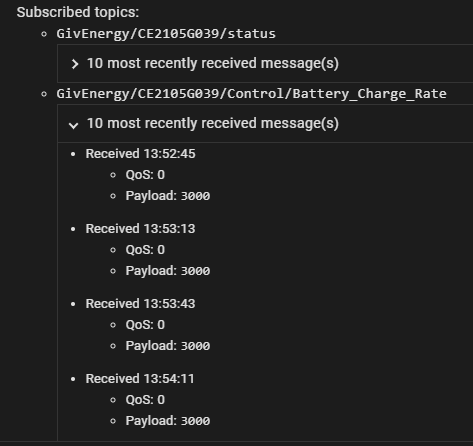
AlastairCooper It looks to me like the inverter is not responding within the expected timeframe. If you use MQTT Explorer, it can give you a different perspective on the comms.
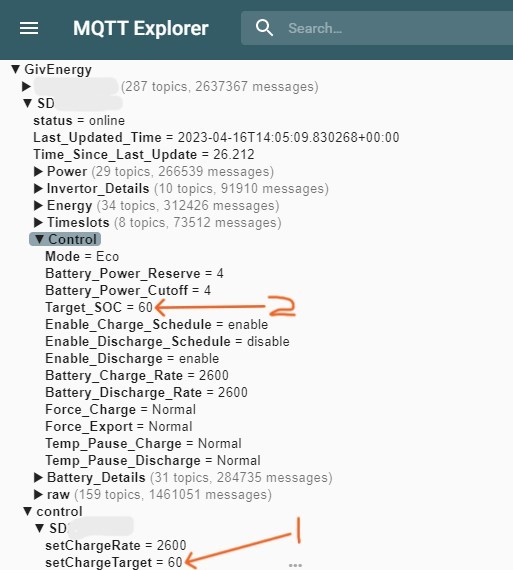
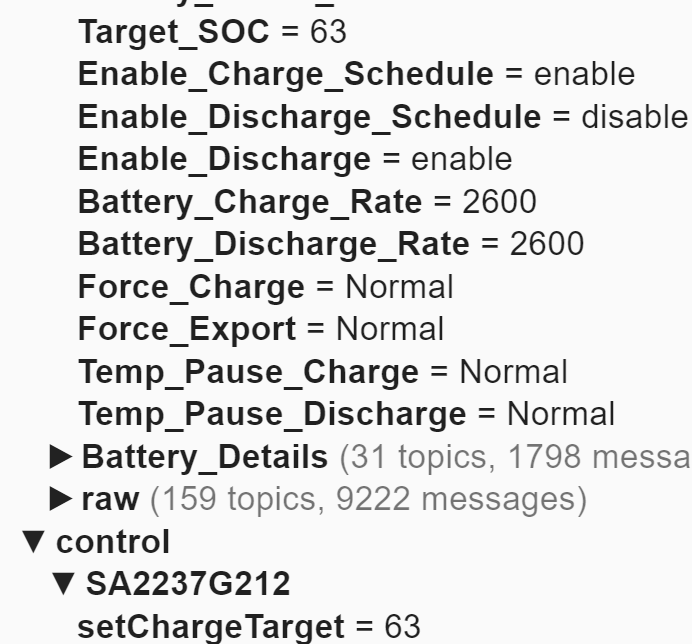
When you change the Charge to % (AKA Target SoC in HA), a message appears in MQTT Explorer under the /Givenergy/Control/INVERTERNO/SetChargeTraget topic with the new value (1). When the inverter register is updated and next read, it appears in the /Givenergy/INVERTERNO/Control/Target_SoC as the updated value (2). Same with Charge rate. Doing this will enable you to see whether the message is being sent but the inverter isn't updating. If that's the case, the inverter may be being polled too often by GivTCP. I've set mine back to 20 seconds to give the inverter some quiescent time.
M
#36madhulk
Because I've just reminded myself how to do it - here's a VERY unofficial way to test/debug palm_soc.py:
(The usual warnings about running code you find on the internet without understanding them go here - I don't think I've sneaked anything in to format your computer, but maybe read through to be sure! 😃)
You'll need to use your own SSH keys to get it to work - PuttyGen on Windows creates a key which is suitable to go into authorized_keys
When you are SSH'd into this shell, you can run
docker stats
to find the instance name of the GivTCP container - mine is "addon_a6a2857d_givtcp"
Use docker to exec a shell inside the running GivTCP instance:
docker exec -it addon_a6a2857d_givtcp /bin/ash
You can now cd into GivTCP_1
python ./palm_soc.py
This should run the palm_soc script and give you enough output to trace where it's getting to.
Hope that's helpful to someone!
S
#37stevelewis
madhulk If the version of palm_soc.py ported into HA is not much modified from my original, ./palm_soc.py -d should provide a more verbose output for debugging. I've also made a few changes since last year, but it looks like the error you're getting isn't directly related to my code.
A
#38AlastairCooper
madhulk
That is awesome. I had installed the Addon ssh thing, but this looks much more concrete.
I already have ssh keys set up so that is fine.
Tim Awesome explanation, MQTT explorer is pretty neat!
I didn't see any update until after I changed SELF_RUN_LOOP_TIMER to 20 Tim Awesome explanation, MQTT explorer is pretty neat!
I didn't see any update until after I changed SELF_RUN_LOOP_TIMER to 20
Everything seems to work now!
So, lets see if this helps overnight. If not I will try to install the SSH access to the docker instance.
A
#40AlastairCooper
Thanks to everyone here, I now have a working palm_soc!
#41judgepd
More a general GivTCP query, mine has been working fine for ages, but a while ago the 2 entities for charge and discharge rate both went unavailable and have never come back online. All the other information is still coming over fine. Did these change in a new version at some point?
I'm wondering about this palm_soc script because today the solar forecast was awful, and rain predicted to boot.
For some reason the Target SoC is the same as yesterday when there was a much better (2x) forecast.
As a result the battery is teetering on empty at 16:27 and we still have cooking to do!
I don't get ANY info in the logs about decisions it takes unless I turn the log level up to the point where the output is swamped. I am going to use the proper SSH access instructions to try and get this sorted but do you have any pointers.
#44judgepd
AlastairCooper I think I've sort of worked out what has happened. The value coming in from MQTT for those registers are set as 3000 but in home assistant they are set to a min of 0 and a max of 100 which I guess is what they were previously. I can't work out how to change that and it won't bring them in as the value is no longer valid.
That is truly weird. What version of the GivTcp do you have. Seems like misconfiguration.
S
#46stevelewis
AlastairCooper it's odd for the target to be exactly the same on two consecutive days (unless it's 100 %). Check that there was a target SoC write. Or maybe it was served up zeros as usage data? Without the detailed output, it's hard to say. Mine reverted to 100% today but the battery was still flat by mid-afternoon. Ho hum😢
B
#47Bornslippy
AlastairCooper I’ll give you an example of where eco is not useful….if you charge in an overnight agile slot which is say, 14p, and the next slot has an import of 17p, then it makes no sense for the inverter to switch into eco mode and start discharging just because you aren’t charging. I want the battery to discharge when the import rate is greater than, say, 25p, not all the time.
#48judgepd
AlastairCooper I'm on 2.1.7. You can see here the issue. Payload is 3000 but entity is stuck between 0 and 100 and I don't know how to change it. I wonder if @Britkat has any ideas.
D
#49dp100
Hi
Question for the hive mind.
What is the current correct syntax to 'force charge' my battery using the GivTCP add on in HA?
The call service option stated above (from march 23) no longer works, and instead the 'Inverter control' now has a bewildering number of varieties 'next slot, next option, normal' that despite experimenting none trigger a forced charge.
I've just moved to octopus intelligent and i want to force my battery to charge when the low rate 'OE Intelligent Dispatching' sensor in ON (as surfaced by the excellent 'BottleTopDave' OE integration). I could set my battery to charge on a timed scheduled in the app, but the OI periods are static.
Thanks all!
#50Lofthouse
I do something similar for the Agile Cheapest binary sensor from the same integration.
I use the “Change GivTCP <inverter id> Control GivTCP Force Charge” option, set to the maximum time, 180 minutes, to turn Force Charge on, then the same option with Cancel to turn it off. In fact, it doesn’t really matter if you set the time to 180, 120, 60 or whatever, as you are just going to Cancel when the binary sensor changes state to Off.
dp100 Here’s the sequence of commands I send to my gen 1 hybrid inverter to start a force charge for 2 hours (its part of a larger script but these are the bits to turn on charging):
Thanks so much for all this!
It probably be the weekend before i can dive into this, but its great to know its possible and i'm looking forwards to looking at your yaml/approached in more detail.
@geoffreycoan - what is the 'larger script' that you've taken this lengthy excerpt from? I'm impressed when people show off nested routines - i've i'm still in the noddy level of yaml whereas your skills sound distinctively higher grade!
Really appreciated - cheers!
G
#55geoffreycoan
dp100 Its very much self taught in the month or so of having home assistant setup. Observing what givenergy controls change when initiating charge and discharge on the GE app, then cursing and trial and error trying to get this into YAML code.
The full script controls my inverter on an Octopus power up event, of which there’s one today. It lets the battery charge to 50%, then checking every 10 minutes keeps the SoC at that level. Then at 2pm, the start of the power up event it initiates a force charge at full rate which will fill my battery by 4pm when the power up event finishes and it stops the force charge, returning to Eco mode.
Here’s the full script if its useful to you:
``alias: G182 Inv 1 Octopus Power Up
description: >-
Only let the battery charge to 45-50% in the morning; hold charge at that
level, then force charge 2-4pm in the Octopus Power-Up period
trigger:
Unfortunately, the button doesn't work correctly as it only inserts two backticks when, for the code to work, there needs to be three backticks followed by a return, then the code, followed by a return and then three backticks (key above Tab on UK keyboards)
I was only getting two back ticks when I clicked the insert code button and was putting the code between the two but it doesn't preserve formatting.
Found out about 2 back ticks at start and end, produces the long code as above.
Didn't know about 3 back ticks, I'll do that next time.
Wonder what 4 back ticks does? 🤔
A
#58Arg0t
geoffreycoan it’s all markdown. Find a markdown cheat sheet online to see all the options to format posts.