Is one of my strings not working?

16 comments started 2023-04-06 last 2023-04-11
Cloud PortalGivEnergy ProductsHybrid
Z
#1 ZmGahH6yQBe

First thing to note is that my system is not fully commissioned yet. It was installed on Wednesday and we could not create my account due to GE systems not working properly. The installer said they will return to finish the process once GE systems are working fully. My battery is not yet operational but the solar is up and running.

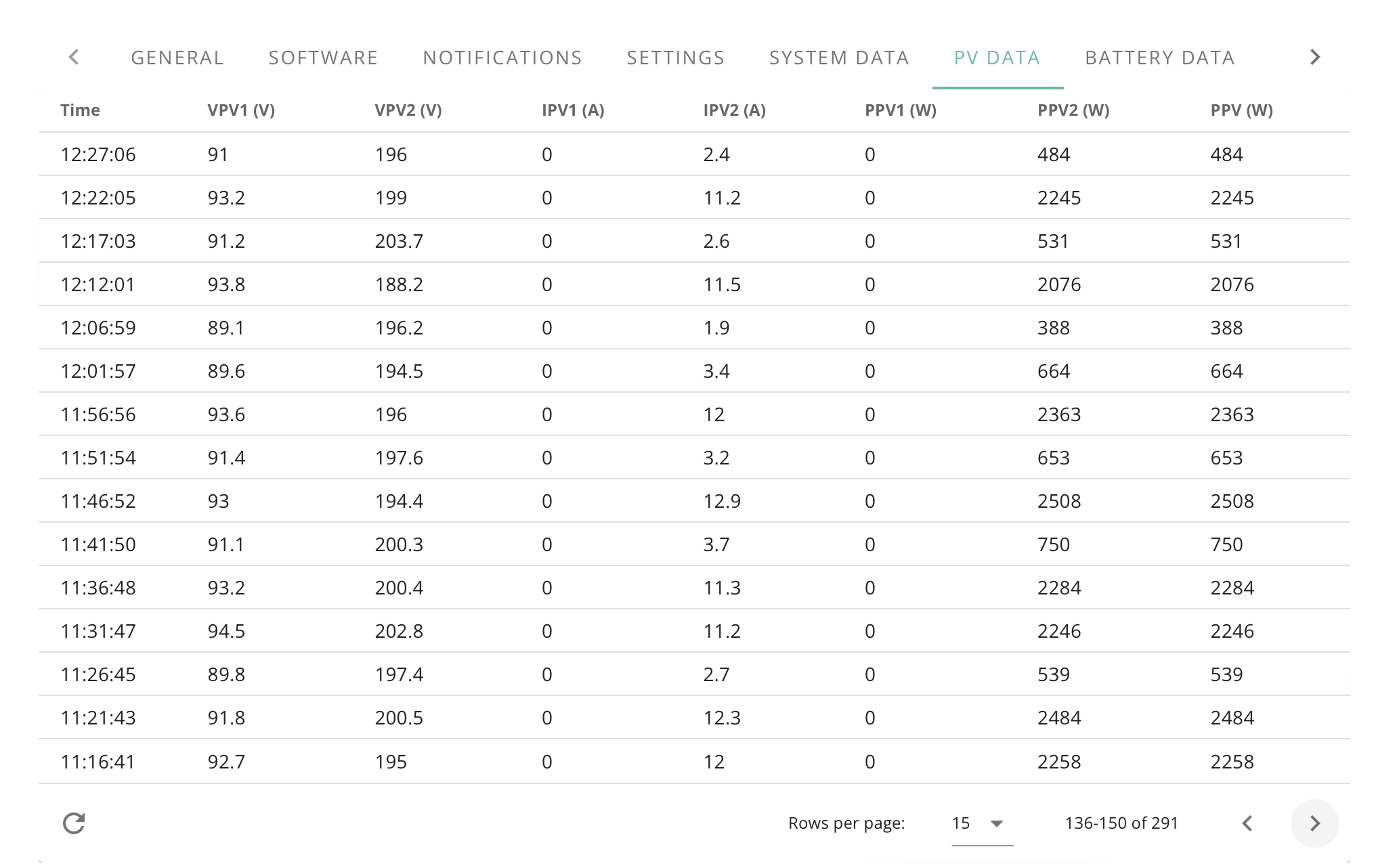
This morning I got the invite email and created my GE account. While looking though the solar data it looks like one of the strings (string 1) may not be working, although I'm just familiarising myself with all the data available so I could be reading it wrong. Am I right, or am I reading it wrong?

P
#2 Phil_H

The voltage on string 1 (vpv1) is not high enough for the inverter to start using it, do you know what your string configuration is? (number of panels of each string)

I'd also be a little concerned about the current on string 2 (ipv2) as it is bouncing between about 2 and 12 which unless you have very fast moving regular thick clouds with sunny gaps might indicate a problem on that string too.

Z
#3 ZmGahH6yQBe

Phil_H I have 6 panels on each string, so 12 in total, each panel is 400W. My roof is /\/\ shaped, so 6 panels on the external pitch and 6 panels on the internal pitch. Both a south facing. The internal pitch should have tigo optimisers on them as they can get some shading from other parts of the roof at certain times.

Out of interest what does the voltage need to be for the inverter to use it? I would have expected the generation to be similar on each string for most of the day given the same direction and pitch of the strings.

Unfortunately I don't know which is string 1 and which is string 2. It wouldn't surprise me if there are only 5 tigo optimisers on the internal pitch rather than 6 as the plan was to have 7 panels on the external pitch and 5 on the internal pitch. When they did the initial instal they didn't install the optimisers so had to retro fit them. As no one had told me they had changed the number of panels on each pitch I told the office there needed to be 5 optimisers. It was only when I sent my drone up to have a look that I saw the configuration had changed.

Could this all be because the system hasn't been properly commissioned yet?

P
#4 Phil_H

ZmGahH6yQBe the inverter needs 150V on a string to startup I believe, which should easily be met by 6 panels. The shading would have an impact on production which is where the optimisers would be required, if there are only 5 on 6 panels then you'd have a problem.

I would talk to your installer, it may be that they haven't finished it yet, or haven't checked voltages yet so will identify whatever is happening here at that point. Ask them what should be working at this point (if anything) and then go from there.

U
#5 Ubarrow

I noticed exactly the same thing today. One string, just like yours, is not showing any output.
However, the peak output is higher than either of my strings can produce.
I have a separate inverter for the panels and I wonder if it just feeds one combined string into the GE inverter?

S
#6 SilverArt

Ubarrow I suspect you have the AC3 which is there to control the battery, It just has one string showing which is your inverter's total. For my inverter, a Growatt, if I want to see the individual string performances I need to go into the Growatt Shine app. . Unfortunately IMHO it is a bit useless as you can't download the individual string data, you can only view it, and there is only a three month history.

U
#7 Ubarrow

Yes, I do have the AC inverter and that makes sense.

S
#8 Slartibartfast

SilverArt Growatt inverter. Have you got an export meter fitted? I have - an Eastron SDM230-Modbus meter. It has an additional feature - flashing Green leaf and warnings 308 & 309. Neither the installer or Growatt know what is going on. Anyone got a clue?

D
#9 dragon2905

Phil_H
Unless its changed its 100V minimum (but you would need to check the specs on your equipment)

ZmGahH6yQBe

I think its safe to assume that VPV1 is the string with Tigo Optimisers fitted to them as, dependent on which model and how they have been installed in conjunction with your PV Panels, they limit the maximum output to the following;

Maximum power: 500W
Maximum voltage: 90VDC
Maximum current: 12ADC
Maximum string voltage 1000V/1500V

Also if you look at VPV2 you can see that the following calculation - V x A = W
eg. 196 x 2.4 = 470.4 (its within tolerances) 199 x 11.2 = 2228.8

The fact that you have no output on IPV1 or PPV1 would seem to indicate that their is a connection fault on that string.

There is an alternative error that could have occurred and they wired those panels with optimisers in Parallel (rather than in series).
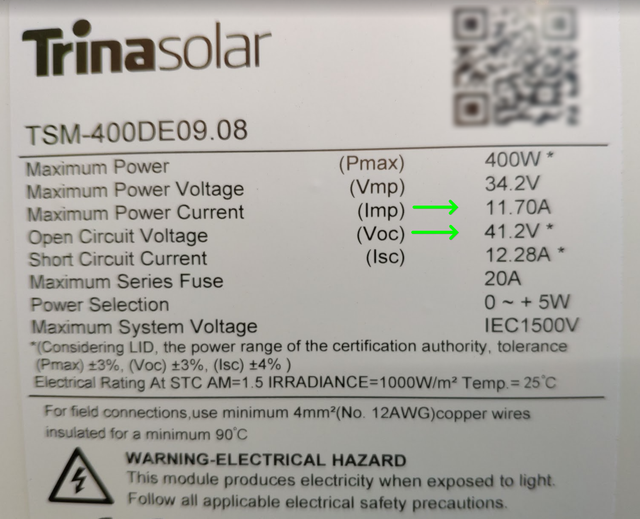
If you wire the panels in Series you ADD the voltages of each panel together but the current stays constant.

Using this panel as an example: 41.2 x 6 = 247.2V x Current (Amps) 11.7 = Power (Watts) 2.892kilowatts

If you wire the panels in Parallel you ADD the Current of each panel together but the voltage remains constant.

Same example 11.7 x 6 = 70.2 Amps x Voltage 41.2 = Power (Watts) 2.892kilowatts

Its seems too much of a coincidence that the VPV1 is so close to the Tigo Optimiser maximum voltage of 90V.

It's either a faulty string, wired incorrectly or they just installed a Single Optimiser at the end of that string (saving them time and money) but "ballsing" up your install.

D
#11 dragon2905

As Phil_H said it varies depending what specific equipment you have installed

S
#13 Slartibartfast

dragon2905 It's the Growatt inverter that has the warning errors ...

Z
#15 ZmGahH6yQBe

Installers returned today and I'm all up and running now. Although it's a terrible day for solar so I can't really see much going on with the generation. The figures from both strings look similar now. Hopefully all resolved.

D
#16 dragon2905

ZmGahH6yQBe great stuff glad it appears to be resolved