GivEnergy & Octopus Dashboard

47 comments started 2023-04-11 last 2023-08-23
APIsHome AutomationGivEnergy ProductsHybrid
C
#1 CalvinDouglas

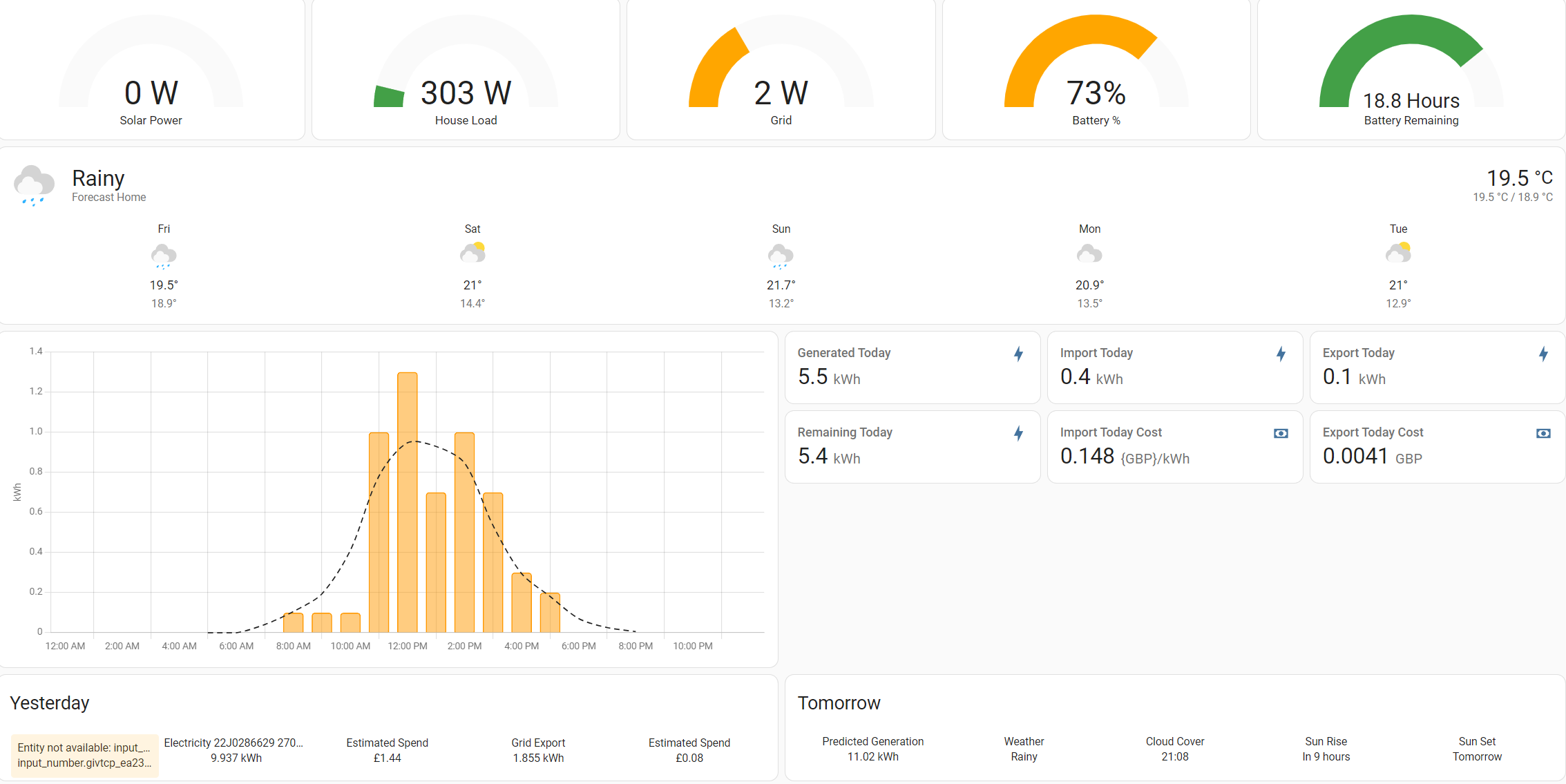
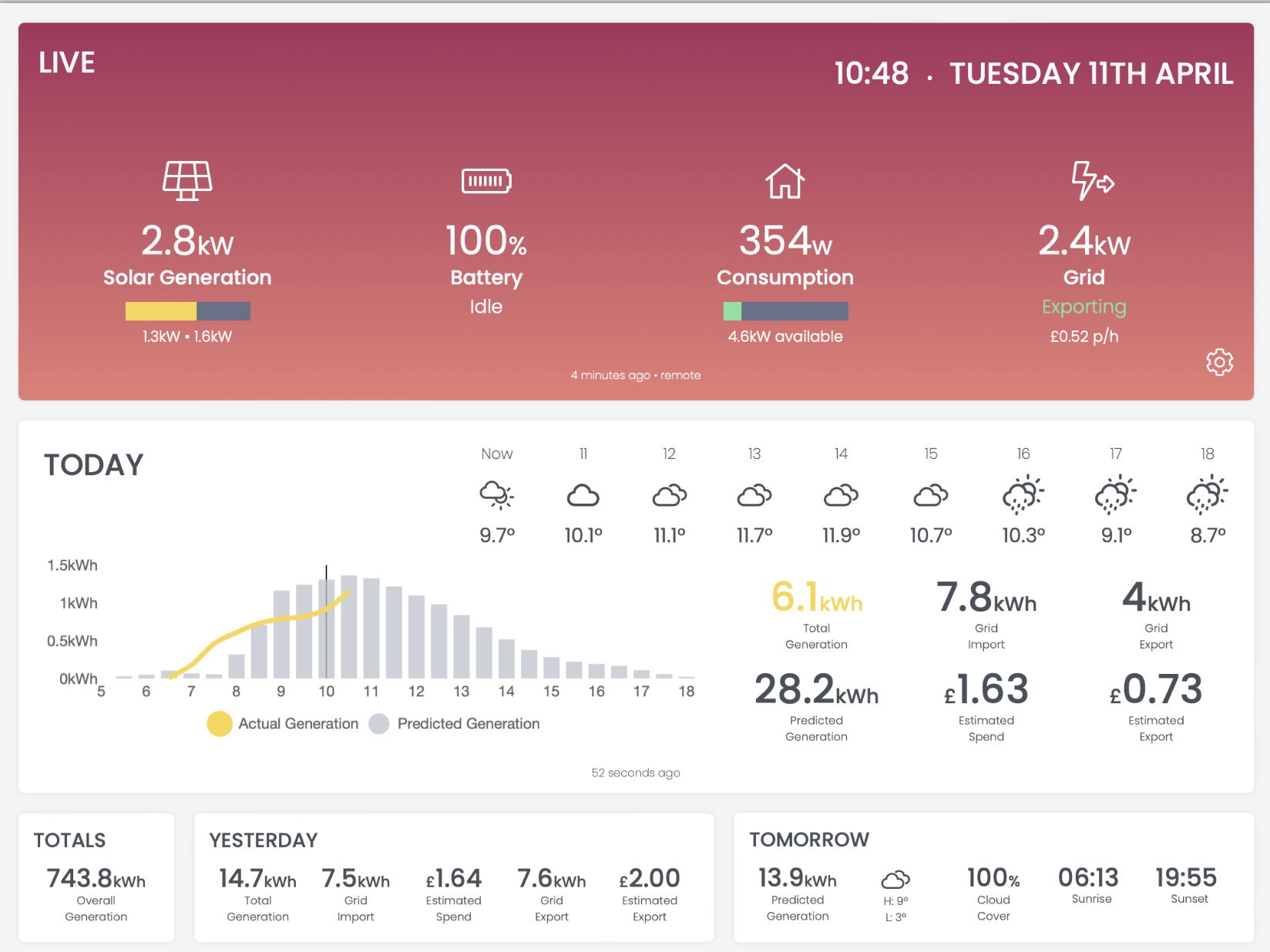
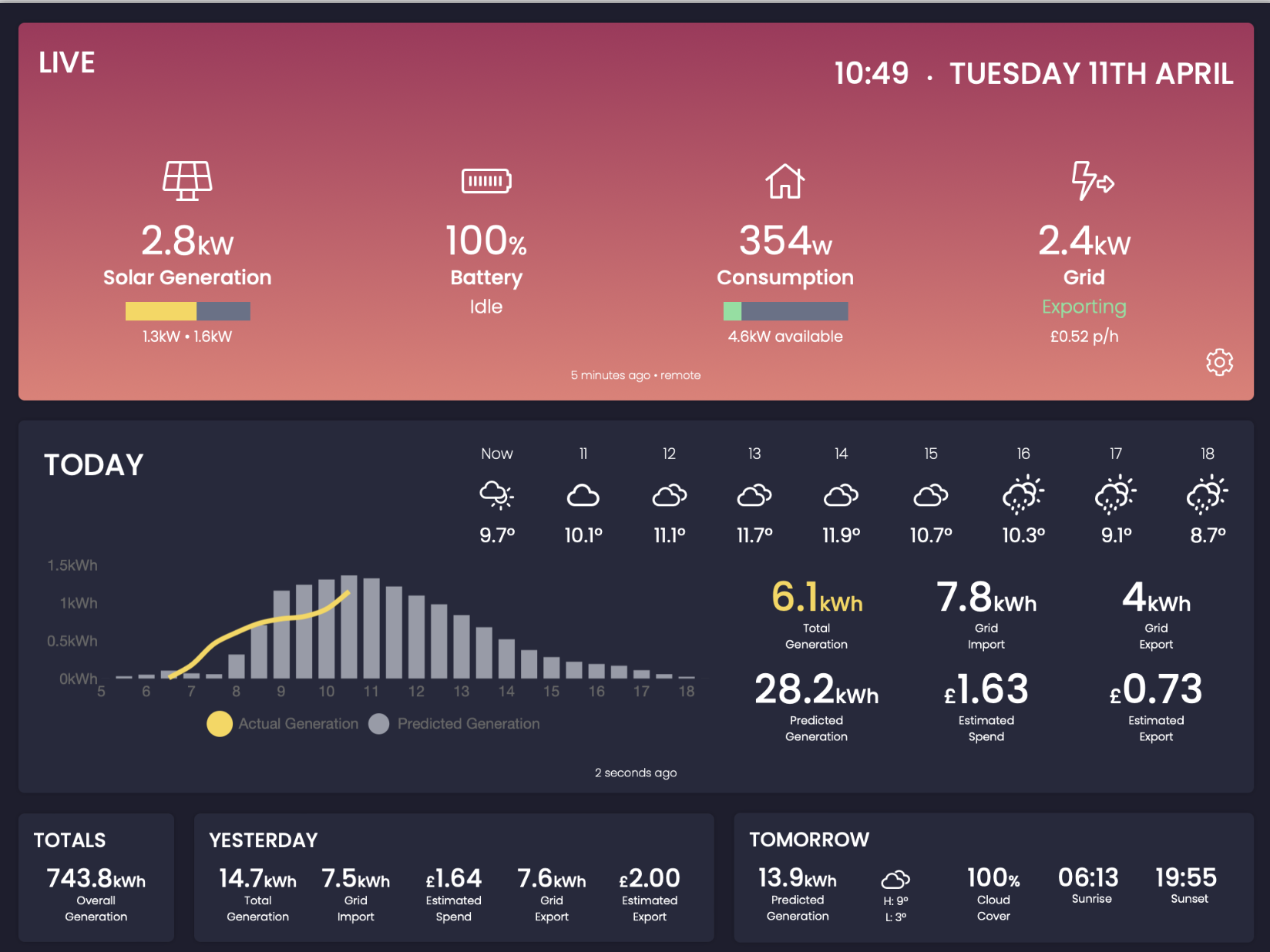
Decent as the GivEnergy app is it didn't give me all of the data I wanted so I've been working on a dashboard that shows me everything I wanted to know, without overdoing things.

It uses GivTCP for live data (when connected locally), or switches to the GivEnergy API when remote for semi-live data. It also uses the GivEnergy API for the daily usage data.

It connects to the Octopus API and combines the tariff data to work out estimated costs for the current date and the day before, as well as instantaneous prices for grid import / export.

It also uses the Solcast API to generate a solar forecast, I've programmed it to allow an optimism selection from 1 to 5, I've found the default Solcast forecast to be very optimistic so I usually have it set to 1.

It does connect to the MyEnergi API as well so can show Eddi usage, although I have mine turned off at the minute as it's not worth it with the Flux export rates.

Finally it has a weather forecast from tomorrow.io.

Features I'm planning on adding when I get time:

  • Warnings for inverter / battery temperatures
  • More detailed weather forecast view
  • Octopus consumption data with costs for the previous week / month / year
  • forecast.solar integration as an alternative to Solcast

I don't want to be replicating much that's done by the proper app or anything Octopus related that's done by other apps, I'm mostly doing it as a learning experience.

One issue I've found with the GivEnergy API is the 30 minute power flow data seems to lag the current totals by quite a bit, so my estimated spend and export gain fields don't accurately reflect the current import & export kWh fields. Has anyone got any experience of using the API and found the same issues?

I think most people on here seem to use Home Assistant so I don't know if there would be any interest in it if I put the source code on Github but that's my plan eventually, once it's at a reasonable level of progress.
P
#2 pacemaker

looks great! I am a Mac guy and seems givtcp for whatever reason won't work on my M1 Mac, so home assistant is also a no go at the moment.

All I'd say is, if you can make it easy for non-tech to download/install, then you have a winner. GivTCP/HA is nice, but you need to be somewhat technical to use them.

C
#3 CalvinDouglas

pacemaker

I'm also on a Mac but I have GivTCP running on Unraid on my NAS, along with the web server for the dashboard. I've not tried installing Docker on the Mac yet.

I think the issue would be that it requires GivTCP & a web server so it's not the most straightforward of setups.

Could possibly create a Raspberry Pi image with everything as pre-configured as possible but I think there is a limit to how simple you can make things.

P
#4 pacemaker

CalvinDouglas

Docker on M1 Mac will run GivTCP, but it never receives data even though it's connected to the inverter. I couldn't get any support for the issue so gave up.

I tried running VM on my Mac to install it all too but because its M1, the VM software (oracle virtual box) is also in beta, and it definitely was beta... failed at the second hurdle. So I gave up.

I think my only way is to get an actual R-Pi. I don't know what Unraid is but sounds like that is an option

Presume you are running local web server ?

C
#5 CalvinDouglas

pacemaker

Unraid is the software that runs my NAS, it's got Docker on it so I've installed GivTCP on there as well as a web server, so it's all running locally. Also lets me use Plex. All running on a HP Microserver.

D
#6 DD

CalvinDouglas I don't want to be replicating much that's done by the proper app or anything Octopus related that's done by other apps, I'm mostly doing it as a learning experience.

This looks really interesting. Do you say which platform you're developing on?

One thought... building in such things like solar forecasting is obviously good, but is there some way to separate that sort of thing out, so that it is available to your app, but can also be more easily shared. The obvious options are a self-contained module (which obviously constrains other uses to the same language/platform), or as a network service of some sort (mqtt seems popular).

This way, people interested in forecasting specifically can collaborate on that stuff, while still choosing to use home assistant, for example. (I'm not yet sure whether to go down the HA route...)

C
#7 CalvinDouglas

DD

It's currently written in PHP & Javascript so requires a web server to run the backend, then it will display on anything with a browser, I've designed it for a tablet but it works on a phone or desktop well too. Ideally I would turn it into a self contained app so it could run quite easily for anyone but that's currently beyond my abilities.

Building components as modules would be the best way forwards, definitely something I will look into.

I did intend on building it entirely in javascript so it didn't require a full web server but I had trouble accessing any of the APIs, I think due to security issues.

#8 positor1

CalvinDouglas It does connect to the MyEnergi API as well so can show Eddi usage, although I have mine turned off at the minute as it's not worth it with the Flux export rates

you feel it is better to export on flux than heat your hot water?

C
#9 CalvinDouglas

positor1

Yes, gas is 10p a kWh and I get 22p/kWh export, even taking into account efficiency it's going to be financially better to use gas.

Eco-friendly wise, it's better to use gas at 90% efficiency for the water and export my electricity for my neighbours to use rather than use electricity from a gas power station at a much lower efficiency. Or so I've read anyway.

If I switch back to Go during the winter I will probably turn the Eddi back on then.

T
#11 Tim

pacemaker I think my only way is to get an actual R-Pi.

The Raspberry Pi is a great platform for IoT but for Home Assistant I would recommend you go to eBay and buy a second hand Dell Wyse or similar. I got one with 8GB RAM and 64GB Storage for £30. HA loaded onto the SSD when plugged into my PC’s USB with an adapter and it just worked straight away as a headless server.
I haven’t looked the Pi market recently but they had been like hens teeth to get hold of for well over a year whereas second hand Citrix terminals with better processors, the same memory and more reliable storage are readily available and half the price.

#12 hoggy

Tim Did you get the one with the Quad Core AMD GX-424 processor?
I was that impressed how snappy it was I got another for the garage running W10 (runs all the Terravolt data gathering stuff behind the scenes!)

T
#13 Tim

hoggy yes. That’s the one. I’m decommissioning the three Raspberry Pi now.

J
#14 James L

I'd be interested in this - the Dell option sounds good. I'm away for the summer (lucky me), so won't be able to look properly at it until around September.

J
#15 James L

Tim What model Dell Wyse did you get?

J
#16 Jon-boy

James L I bought a Dell Wyse 5060 from EBay for £34, working well running HA

T
#17 Tim

James L same as @Jon-boy. Most are 4GB RAM and 8GB Storage, which is sufficient, but if you keep looking (start now) you should pick up one like mine with 8GB RAM and 64GB Storage for the same price.

J
#18 justpassing

Did you ever measure the power draw ? I am running a little gigabyte brix, a nuc wanabee, and was amazed that it ran at almost exactly the same power draw as a pi4. 6-8 watts.

D
#19 danerf

CalvinDouglas very nice dashboard. Please share in GitHub ☺️

S
#20 sungrad

That is stunning. You've created the sort of dashboard I've been trying to set up in HA but have hit the nail on the head for a really professional looking UI. Very nicely done!

J
#21 justpassing

Sorry, got distracted by talk of hardware :-) The Dashboard is very nice indeed. I look forward to trying it if you do decide to put it on Github. (please :-) )

S
#22 SteveCook

justpassing
I hope so, and I hope someone can explain how to get it from Github and into my HA (please :-) )

#23 Hook

That is lovely. I need it in my life. Givenergy should be hiring you.

A
#24 alan_johnston

Awesome. This thread should be pinned.

C
#25 CalvinDouglas

I will definitely put it on GitHub once it's finished, just need to find the time to iron out some bugs with it.

T
#26 thewhalw21

CalvinDouglas On the off chance you are still on the forum. Did you ever manage to finish the dashboard? Still haven't see anything quite so nice as this.

C
#27 CalvinDouglas

thewhalw21

I’ve not fully finished it yet, but I’ve just set up Home Assistant alongside GivTCP so I’m planning on implementing it on there as a dashboard, seems like an easier way to get it running.

It’ll take me a while but I will update the thread.

T
#28 thewhalw21

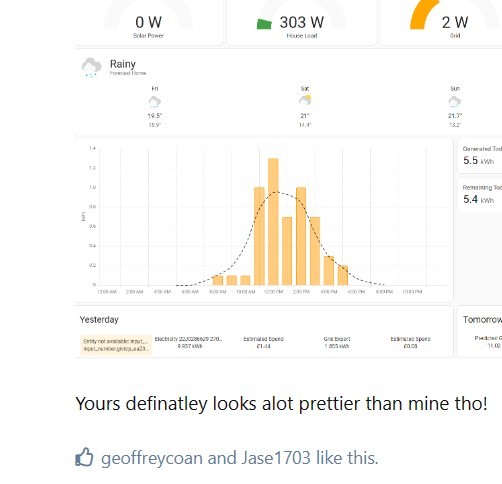
CalvinDouglas Ahh okay 🙂. I started doing the same thing today too.

Yours definatley looks alot prettier than mine tho!

S
#29 SteveCook

thewhalw21
What do you use to produce this graph please

T
#30 thewhalw21

SteveCook it's the built in one from the energy page.
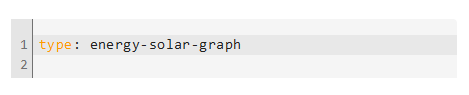
You can add a custom card with "type: energy-solar-graph" in and it'll pop up

https://www.home-assistant.io/dashboards/energy/

Apex charts is alot nicer looking but you'll need some yaml knowledge to get that going and I'm not quite there yet.

S
#31 SteveCook

thewhalw21
Thanks.
My problem is I have a GE system and a SolarEdge and I can't get the SE data into that energy page. I can get the SE entities I need into other cards, but not that one.
I will keep trying

T
#32 thewhalw21

SteveCook What happens when you add them into the energy page? They just not work?

S
#33 SteveCook

The SE on is called "SolarEdge lifetime energy" so I never bothered with it as it seemed wrong.
I have now added it in and it appears to do the maths OK, but I will have to do some cross checking

S
#34 SteveCook

SteveCook
Thanks. I have found the solar production card on the energy dashboard with a load of other cards, but how do I get the solar production one onto one of my own dashboards.
I cannot figure it out?
Thanks
Steve

S
#36 SteveCook

Phil_H
Thanks, but I have looked at that and can't find that card and/or can't figure out how to get it onto one of my own dashboards

S
#37 SteveCook

SteveCook
I went to my dashboard that I am trying to create and started a manual card and typed "energy-usage-graph" and I now have a card that is awaiting data.

P
#38 Phil_H

SteveCook I might be misunderstanding what you're trying to achieve, but click the buttons to add a card to your dashboard, scroll to the bottom of available cards and select 'manual', then put
in the box. It will display the card exactly how it does in the energy pages

S
#39 SteveCook

Phil_H
Thanks
Easy when you know how - I did not know there was such a thing as a manual card.
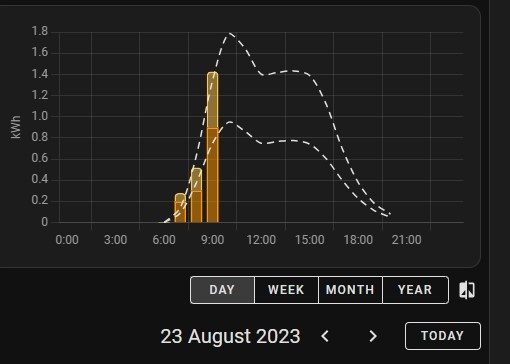
I have done what you said and have the prediction showing the same as the Energy dashboard, but not getting the production.
Do I need to add another line of code or something.
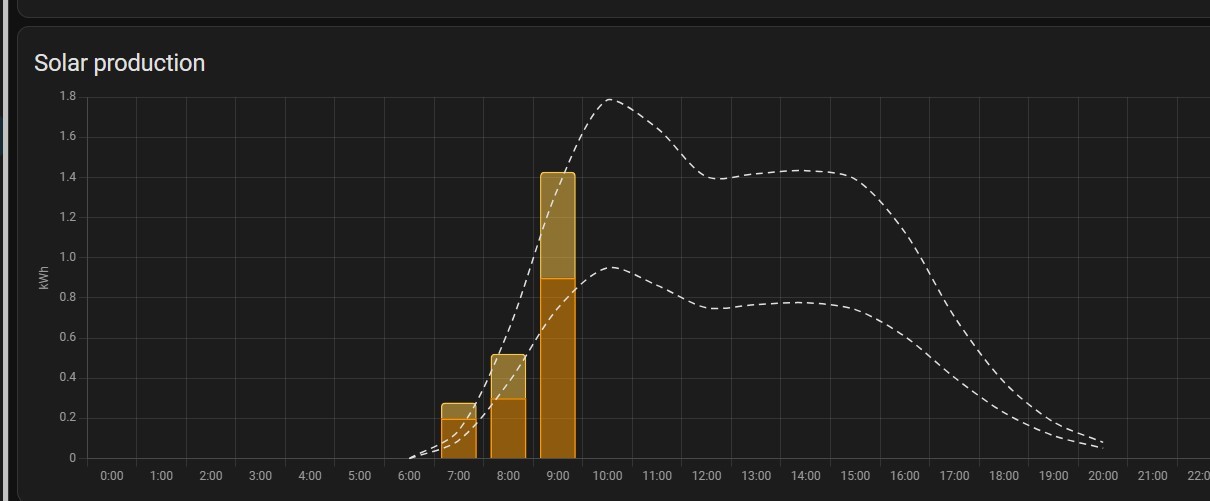
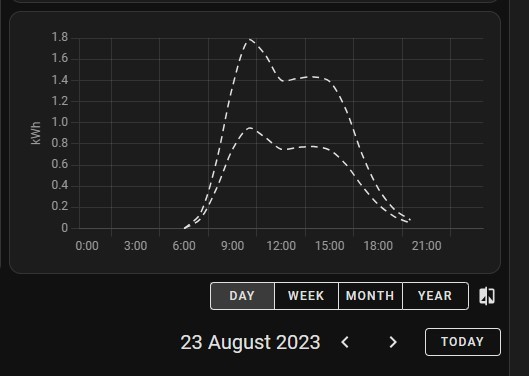
This is what I am trying to replicate.

P
#40 Phil_H

SteveCook That has more on it than mine. I have a dotted line for the solcast prediction and the orange bars for my actual production (though the bars are a single orange colour, without sections). Do you have multiple prediction sources and/or multiple production sources defined to get that extra stuff?

No extra code required, the card doesn't have any config options available.

What does it show in your dashboard?

S
#41 SteveCook

I have GE panels/inverter and SolarEdge panels/inverter.
I have added details of both in the energy page and 2 lots of Solcast prediction.
The graph posted from the Energy Dashboard shows prediction and actual, but on my manual card I am only getting prediction.

S
#42 SteveCook

Production data has just appeared.
Thanks for the help

P
#43 Phil_H

SteveCook Hmm, the short answer is it should just be the same on both, like I said there's no config options on the card. I don't have mine setup with the date picker as well but I can't see that being the issue. Have you tried a force refresh (Ctrl + F5 if on a browser, force close the app and reload if using the app)?

I guess hovering over bits of the lines only shows the forecast details as well, not the production values?

edit: looks like I took took long replying! glad it's working now

R
#44 Rbor

Phil H, Thank you so much for introducing me to energy cards. I have been trying to adapt the community energy cards but this dashboard/energy cards link gives me a new opportunity.
I have a similar set up to Steve with SE PV inverter feeding into Giv 3AC coupled inverter to Giv batteries. The HA energy dashboard doesn't allow the SE energy today entity but others do.
HA has so much potential but the learning curve is large. Within the documentation, there are many useful features such as these energy cards.
Now to see how I get along ........

Rob

J
#45 Jellybaby

Tim Thanks for the heads up on this, the pi's for a beefy one are still in short supply so have been looking at alternatives as the only thing I got atm that can run a VM is my gaming PC which I dont want to leave on overnight as it consumes 60-90w idle and my 24/7 machine I dont think can do a VM and if it could its only got 8gb of ram and when in use it hovers around 45-60% in use depending on what im doing.

Too scared to upgrade ram incase something goes wrong and I start blue screening and whatnot and its a bit much of a headache lol

Will have to keep an eye out for an 8gb one, better to have it and not need it 😃

A
#46 anglefire

Jellybaby just get a mini pc or NUC cheaper than a rpi usually have at least 256Gb SSD and 4 to 8GB ram.
Power is well under 10w so similar to a rpi.
Dead easy to setup - I use proxmox and created a vm to run HA on - fully supported.
And you can install a backup off what you are using now to avoid starting again.

G
#47 geoffreycoan

anglefire I did the same, I bought an i5 7th gen (5th gen is fine) mini PC with 500Gb SSD and 16Gb RAM (8 is enough but I wanted to future proof). I’m currently running HA as a virtualbox under Windows 10 but may strip the W10 out.

Mine was a Lenovo Thinkcentre M710q, there are plenty of similar machines on eBay for £50-80.