HA 2023.5.3 / GivTCP 2.1.13 issues

33 comments started 2023-05-15 last 2023-06-15
Home AutomationGivEnergy ProductsHybridBattery
4
#1 4monks

Anyone had issues with the recent HA and/or GivTCP update on rpi? Appears to have broken GivTCP for me. Most GE values are showing as unavailable. It looks like GivTCP rolled something back in .13 and it's created duplicate names eg xxx and xxx_2? Any clues anyone? Will try and roll it all back to a previous backup.

T
#2 Tim

4monks mine shows a few entities but most are unavailable after the update.

A
#3 anglefire

I’ve not updated but there is an issue that Mark the developer has apologised for - its a change of the way the HA devices are named I believe.
I’m not sure what the plan is going forward but I think the new naming is staying pretty much with a further update to solve some of the issues.
There is something on Facebook but can’t remember the exact details. (Getting old and forgetful!)

4
#4 4monks

Still working on it.. but if you go into the visual editor in HA, edit the "unavailable" entity in each dashboard i.e. select and then deselected it, it picks up the correct entity name and the displayed value switches form "unavailable" to the correct value. Under the hood it is switch form "xxxx" to "xxxx_2"

It looks like in the release notes for GivTCP .13 there was a naming convention rollback. I have tried rolling the whole of HA back to before the .5.3 release (but that still had the .13 GivTCP release) - that did not work. I tried rolling GivTCP back to .11 - that did not work. So now I'm updating the dashboards and scripts to _2 as I don't want to do a full rollback 2 weeks - my last full backup.

For each GivTCP entity "xxxx" there is a "xxxx_2" that now works.

#5 hoggy

For those not on Facebook here is the proposal:

Entity naming and 2.1.13…
Hi all,
Firstly apologies for all the hassle you might have experienced over the last 24 hours with the latest update to GivTCP.
To explain, I have implemented a new way to creating entities in HA, where the underlying entity_id is not linked to the name that is displayed in dashboards etc… However the initial resolution didn’t take into account multiple invertors and/or changes to the HADEVICEPREFIX.
In short, 2.1.13 should have kept consistent your entity_ids … IF you had a single invertor with GivTCP as your device prefix.
However I appreciate that this doesn’t cover all eventualities. I’m some cases, even where this is the case, because of some other underlying changes in the MQTT discovery message, duplicate entities were created.
Moving forward I am not proposing to change the entity_id convention again. But before I nail it down there is a possibility of one more change to make sure it fits for all use-cases.
Currently the entity_id is constructed as follows:
HADEVICEPREFIX_SerialNumber_entityname
Eg. Givinvertor1_SA1234567_soc
However, if you ever change your HADEVICEPREFIX config setting, this will rename your entities, leading to a similar situation as happen recently.
We could move to just:
SerialNumber_entityname
Eg. SA1234567_soc
But you lose the ability to easily search all entities.
So I propose to change the naming to the following where the prefix is fixed to “GivTCP”.
Eg. Givtcp_SA1234567_soc
This will NOT change the entity name which is displayed, which will use the following naming convention:
HADEVICEPREFIX_entityname
I’d like some feedback if this makes sense, or if people have any better solutions!
Sorry once again for the inconvenience.

T
#6 Tim

hoggy Thanks for connecting us to the information. If I was paying/had paid for GivTCP, I'd be pretty cheesed off that the developers were making (necessary) changes which causes me to do a lot of rework. However, since the rework I have to do is small in comparison to the effort that @Britkat has put in for free for everyone's benefit, I'll swallow the pill and get on with it. If I had better knowledge of HA under the hood, I'd export the entity meta data, do a global edit using search and replace and then import the meta data back into HA, but I don't, so it'll be a manual whiz down the list of about 300 entities. Hey Ho!

#7 hoggy

Tim Yes it seems those with Plant/Multi setups have suffered the most on this occasion. It is an unfortunate problem and I'm sure Mark is on it HOWEVER I do feel that GE could / should just give Mark several inverters for free to allow him much better oversight on most setups.
He has done so much for the community & in all honesty if I can snag spare Hybrid G1's for £250 to just play around with it should be no problem - they likely have a bucket of them laying around he could have in their warranty bay!

For others, GivTCP does have a lot going on inside so there's a lot for Mark to keep up with - an often unmentioned alternative is https://github.com/cdpuk/givenergy-local which is much less powerful but is a lot easier to install/config if you just want the basics. It runs ontop of the same Modbus Library as GivTCP.

N
#8 nythbran

I have seen the same issue. But with 2.1.13 on a fresh install I cannot get any LOCAL data from the Inverter now - not even to the Giv IoS App. Data is streaming OK to cloud.

B
#9 beardyblair

I believe you can map entities in yaml by giving a unique ID. Then if there is a "breaking" change you just update the source for each entity and dont lose the data or automation. I was really drunk/tired last night when I looked into this so will report if I get any further with it.

N
#10 nythbran

Of course but at the moment I do not have local connectivity at all - on the Giv Energy App or on HA

S
#11 SteveCook

can you see your inverter IP on your router network
can you ping your inverter with a cmd command

N
#12 nythbran

I can see it - HF-A21 . I can access the dongle settings remotely across the network. I can ping it. It is outputting to the cloud OK.
I just cannot get the GivEnergy IoS app to see it locally (even manually) or get anything to HA. I have tried a new API code.

M
#13 michaelmcgoldrick

Yeah I had to roll back my version of home assistant to get it all working again. The inverter time went on me last week but it's back now

N
#14 nythbran

Well I just cannot get GivTCP to work - IU have a clean install here now and it just gives exactly the same log on startup:

2023-05-16 20:23:52,798 - startup - [CRITICAL] - SUPERVISOR_TOKEN is: a75e621a43bd6711d78b55ae9ba1571dc1f5beef533d7eaf65c3dbe8cc103b48d0424c5c2e12142c2dce7c0c915292ad762267d46371d0cd
2023-05-16 20:23:52,813 - startup - [CRITICAL] - MQTT Details are: <Response [200]>
2023-05-16 20:23:52,814 - startup - [CRITICAL] - Config directory already exists
2023-05-16 20:23:52,824 - startup - [CRITICAL] - Running Redis
2023-05-16 20:23:52,834 - startup - [CRITICAL] - Running RQ Dashboard on port 9181
2023-05-16 20:23:52,835 - startup - [CRITICAL] - Setting up invertor: 1 of 1
2023-05-16 20:23:52,934 - startup - [CRITICAL] - Recreating settings.py for invertor 1
2023-05-16 20:23:52,937 - startup - [CRITICAL] - Removing old battery data cache
2023-05-16 20:23:52,939 - startup - [CRITICAL] - Rate Data exisits but is from today so keeping it
2023-05-16 20:23:52,948 - startup - [CRITICAL] - Running RQ worker to queue and process givernergy-modbus calls
2023-05-16 20:23:52,949 - startup - [CRITICAL] - Running Invertor read loop every 5s
2023-05-16 20:23:52,960 - startup - [CRITICAL] - Subscribing Mosquitto on port 1883
2023-05-16 20:23:52,977 - startup - [CRITICAL] - Starting Gunicorn on port 6345
[2023-05-16 20:23:54 +0100] [17] [INFO] Starting gunicorn 20.1.0
[2023-05-16 20:23:54 +0100] [17] [INFO] Listening at: http://0.0.0.0:6345 (17)
[2023-05-16 20:23:54 +0100] [17] [INFO] Using worker: sync
[2023-05-16 20:23:54 +0100] [20] [INFO] Booting worker with pid: 20
[2023-05-16 20:23:54 +0100] [21] [INFO] Booting worker with pid: 21
[2023-05-16 20:23:54 +0100] [22] [INFO] Booting worker with pid: 22
RQ Dashboard version 0.6.0

  • Running on 0.0.0.0:9181
  • Serving Flask app 'rq_dashboard.cli'
  • Debug mode: off
    2023-05-16 20:24:00,321 - read - [CRITICAL] - First time running so saving AC Charge status
    Traceback (most recent call last):
    File "/app/GivTCP_1/read.py", line 597, in getData
    previousUpdate = pickle.load(inp)
    EOFError: Ran out of input
    During handling of the above exception, another exception occurred:
    Traceback (most recent call last):
    File "/app/GivTCP_1/read.py", line 1066, in <module>
    globals()sys.argv[1]
    File "/app/GivTCP_1/read.py", line 692, in self_run2
    runAll("True")
    File "/app/GivTCP_1/read.py", line 654, in runAll
    result=getData(full_refresh)
    File "/app/GivTCP_1/read.py", line 619, in getData
    consecFails(e)
    File "/app/GivTCP_1/read.py", line 630, in consecFails
    oldDataCount= pickle.load(inp)
    EOFError: Ran out of input

N
#15 nythbran

Bear in mind also that this has been working fine for 6 months without a glitch...

N
#16 naltsta

I seem to have managed to get everything up and running again after the duplicate entities were created.

Having updated to the new entities in the HA "Energy" tab i have now lost all historical data.

Is there any way I can tell it to use the old entities for historical data and the new entities going forward?

4
#17 4monks

nythbran Are you running MQTT Broker between GE and GivTCP? If so, try running the MQTT Explorer to ensure you are extracting the data from GE.

N
#18 nythbran

4monks How do I do that please? HA is on Pi4

N
#19 nythbran

Ok - I have Explorer running. It is finding GivEnergy then the SD number and reporting status=online
Nothing else - what else should i be seeing?

4
#20 4monks

nythbran Double check that HA is configured correctly to use MQTT Broker on the pi4. If you re-installed, you might have forgotten to setup an MQTT account in HA for the broker? There are a couple of you tubes out there that cover it.

N
#21 nythbran

Yes it is and the Log shows now errors:
s6-rc: info: service s6rc-oneshot-runner: starting
s6-rc: info: service s6rc-oneshot-runner successfully started
s6-rc: info: service fix-attrs: starting
s6-rc: info: service fix-attrs successfully started
s6-rc: info: service legacy-cont-init: starting
cont-init: info: running /etc/cont-init.d/mosquitto.sh
[07:15:34] INFO: SSL is not enabled
cont-init: info: /etc/cont-init.d/mosquitto.sh exited 0
cont-init: info: running /etc/cont-init.d/nginx.sh
cont-init: info: /etc/cont-init.d/nginx.sh exited 0
s6-rc: info: service legacy-cont-init successfully started
s6-rc: info: service legacy-services: starting
services-up: info: copying legacy longrun mosquitto (no readiness notification)
services-up: info: copying legacy longrun nginx (no readiness notification)
s6-rc: info: service legacy-services successfully started
[07:15:34] INFO: Starting NGINX for authentication handling...
[07:15:35] INFO: Starting mosquitto MQTT broker...
2023-05-17 07:15:35: Warning: Mosquitto should not be run as root/administrator.
[07:15:35] INFO: Successfully send discovery information to Home Assistant.
[07:15:36] INFO: Successfully send service information to the Supervisor.

4
#22 4monks

Is "Enable MQTT Output" enabled in HA config? Maybe set the Log Level to info to get a better idea what's going on. Could you screenshot the MQTT Broker section of the HA config. If the MQTT Explorer (assume you are running windows version) is seeing all the data when pointed to HA, rpi but HA is not displaying, it feels like a HA config issue.

N
#23 nythbran

In Explorer I am seeing homeassistant and status = online
I am now not seeing GIvTCP at all.
GivTCP is set as before and the Info level log still shows exactly the same content/errors as posted 13 hours ago.
There seem to be no comms between GivTCP and MQTT
MQTT is set to default settings. No SSL.
I have double checked all the settings/user/password in Gi
vTCP and cannot see where the error is.
Everything else in HA is fine (Node Red / NVR Camera etc)

4
#24 4monks

When you say you are not seeing GivTCP at all, what do you mean? Have you tried adding a new dashboard and it fails or doesn't list GivTCP entities?

N
#25 nythbran

I';m going to start HA again right from a new RPi image. Everything afresh.
As I say, it has worked for months with no issues.
Let you know in due course how it goes. Thanks for all the inputs.

B
#26 beardyblair

nythbran do you not have a full system backup to roll back to?

If it was all working you should be able to restore and revert.

N
#27 nythbran

A fresh install is now workking so there must have been some corruption somewhere.
This all came about becuase I thought somethign had gone wrong when the feed stopped and duplicate entities all appeared after the update and I started to try and sort it.... grrr

Thanks all once again.

T
#28 Tim

nythbran If you get duplicate entities in HA, try deleting the Givenergy topic and sub-topics using MQTT Explorer. That should remove them from HA, ready for the inverter to pop out the updated entities on the next poll.

It's the same with Tasmota. If you want to change entity friendly names in HA, go to the tasmota device web interface (Configuration - Configure other), change the friendly name for the relay etc, delete the complete entry for that device in MQTT Explorer - tasmota-discovery topic-MACAddress, then reboot the device from web interface. The friendly names will then show up in HA as well as the entity name and will survive any HA updates.

N
#29 nythbran

All back up and running - well all the key stuff. I am also now back on a Pi400 rather than VM on the NUC. Better to have it totally separate. Also saved a full backup away from the Pi too! We learn...

A
#30 Annaka

naltsta yes you can, that is what I done to keep the history. Just set the old entities up as well as the new ones , all works fine

E
#31 Eamonnogorman

Has anyone had a problem in ha where the logs tell you it is not detecting a battery ?

I do have a battery and the givenergy app sees it but the logs in givtcp in ha show battery not detected

"Battery Object empty so skipping"

T
#32 Tim

nythbran Also saved a full backup away from the Pi too!

The later version of HA allows you to set the backup target to an external SAMBA (eg NAS) drive by default. Keeps the backups separate and the HA drive free.

Eamonnogorman but the logs in givtcp in ha show battery not detected

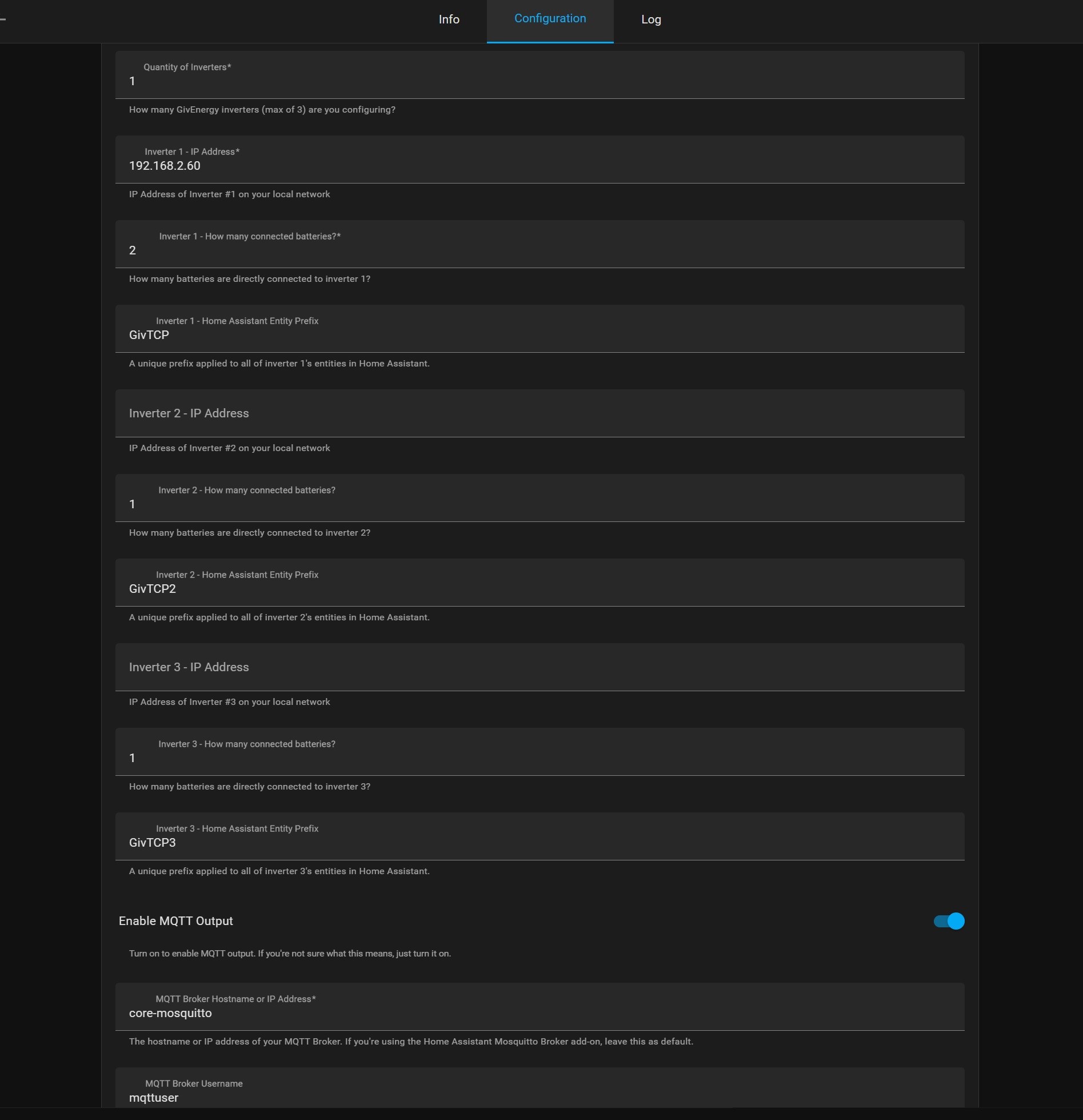
Did this ever work? Check the GivTCP config is correct for your system (eg Inverter1 has 1 battery or 2 etc)?

E
#33 Eamonnogorman

Yep, it's just 1 battery with 1 inverter, I never noticed if it ever worked before as oddly enough the battery info etc does come through so I never had need to check the logs until now.

The or problem became apparent when I tried to add the givenergy power card , it looks for the battery entity which doesn't seem to exist