T
Inverter Firmware update failed!
SA2053G084
Givenergy Support kicked off my inverter firmware update this am around 11.30am
inverter is showing as red/fault
will be grateful for suggestions! Have reported via email and await response

Inverter Firmware update failed!
SA2053G084
Givenergy Support kicked off my inverter firmware update this am around 11.30am
inverter is showing as red/fault
will be grateful for suggestions! Have reported via email and await response

Inverter is OFFLINE at the moment, so cant check. Last data from it was 11:13AM
not looking good 🙁
Have called and followed email instructions to remove & replace dongle files. No change so far. await further news...
Note to self... if its not broke - don't fix it! I'm not aware that I had an urgent need to do the inverter update - so wish I had not! Only done at suggestion of Givenergy engineer - no doubt with every good intention to be helpful.
TheDragon (GivEnergy) that's fine .. and understood.
I will post outcome here so the general knowledge is passed on...
EXTREMELY DISAPPOINTING NEWS
support email proposes a repair may take several weeks!!!! for an inverter firmware upgrade??
Other people may want to consider carefully what has gone wrong here as well as Givenergy ability to resolve.
I am challenging and will post if I get news
_this is going to need a site visit unfortunately with that in mind, something has gone wrong in the firmware update.
I will push this to a visit from our side and put it directly in the planner, please note the est wait time is currently around 3-5 weeks I am sorry to say due to a queue of other systems.
The relevant teams will be in touch 1 week prior.__
a month or more of peak solar wasted. No EPS
Frankly extremely disappointing ... is putting it mildly
Tim Adams You have my sympathy! Evidently a firmware upgrade is not supposed to cause a hardware fault. That said, maybe the "upgrade" uncovered a weakness/latent fault that Givenergy was previously unaware of? It's a pity that they are unable to get field engineers out to otherwise happy customers trying to keep on the front foot. If it takes 3-5 weeks for a field engineer to confirm the mode of failure, there's likely more customers with the same kit as you who will fall into the same trap?
Tim yes indeed.
strangely this follows on from a "bms shorted" issue last year in my batteries that meant one of the 3 batteries was unusable for 3 months last Aug to Nov (strangely a hardware failure again following a firmware update). At least on that occasion it was not a complete system outage. Taking 3 months to get an engineer out for a relatively simple board replacement.
To see 20 panels idle for the peak month of the year together with an inverter & 3 batteries providing no backup, time of use capability etc is heartbreaking.
I have been a huge supporter of Givernergy vocally to friends and family and am very keen to see further adoption of such tech. But for them to say they cannot do anything to prioritise systems that are wholly down indicates a failure at every level in management as they rush for growth. If they don't have the engineers they should consider providing replacement kit that the installer can swap over or other options. Reputations can be easily damaged and takes years to rebuild.
Ouch…
That makes me question if I’d want to stick my neck out for an AIO 😮
IT Crowd quote: Have you tried turning it off and on again?
My firmware upgrade failed, and here is what happened.
09:51 Upgrade started - Battery SOC 14%
09:54 Dongle went offline
09:54 - 11:21 No comms, nothing on portal, but smart meter showing exporting
11:21 Decided to power off. AC first, then PV, finally battery.
Wait 5 minutes
11:26 Battery On. Dongle comms reactivated.
11:28 AC On.
11:29 PV On.
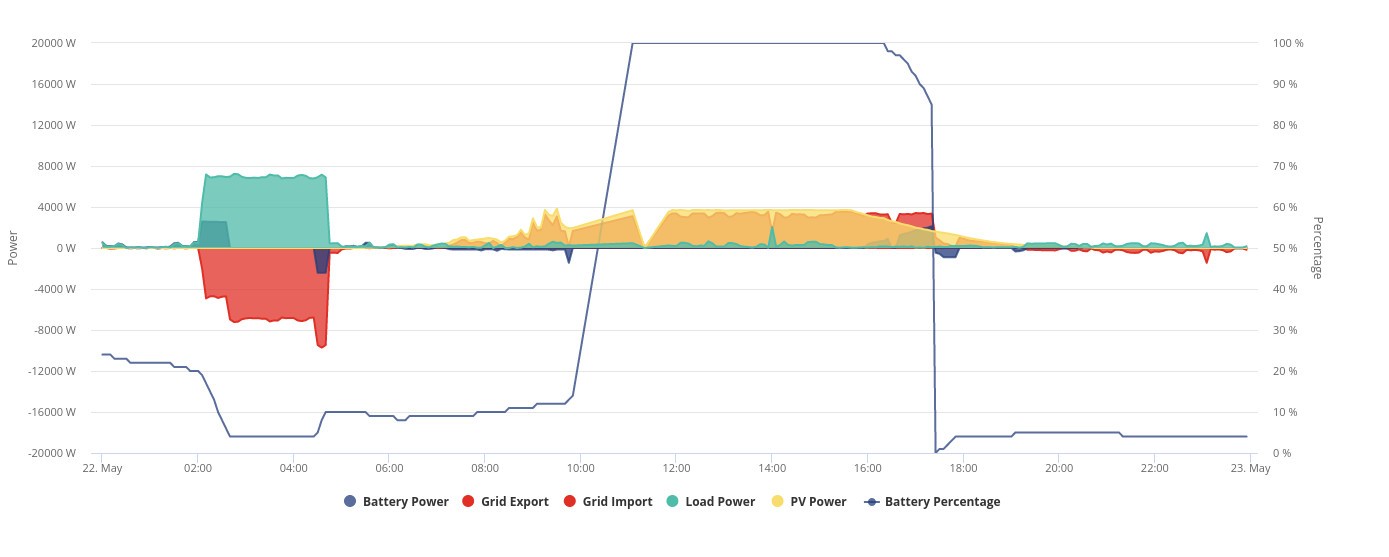
When everything was back running, firmware was still 3008, but SOC was 100%. No surprise to say after the sun went down SOC crashed from 86% to zero. Working fine again since. Maybe I was lucky to get away with it.
Try turning everything off and leave it off for at least 5 minutes. Power up slowly and see what doesn't work. Right now it sounds like you have nothing to lose.
Rubikcube I think your example was with battery firmware upgrade? My battery upgrade went ok but this problem is with the inverter firmware upgrade.
I have tried multiple "reboots" - all without success. Including leaving gaps in the sequence.
However one thing I note is the wifi dongle is never "lighting up" - could that indicate the issue is as simple as the dongle? If dongle is removed and inserted in laptop I can see the files
I'm due to have my inverter firmware updated. I'm one of the Gen 1 owners that may need a visit so a test needs to be carried out first.
@The Dragon - Before I proceed I have some questions:
1) How many of these Pre 2209 GEN 1 upgrades have been done?
2) How many have been successful?
3) How many have failed?

Take the dongle out and turn it on. It may be a goosed dongle holding it out. Plug dongle into a laptop, does it light up now.
Inverter should carry on doing whatever it was last told (hopefully that was eco mode on and not full discharge or anything not helpful like that)
Stevef1964 @The Dragon - Before I proceed I have some questions:
The @TheDragon (GivEnergy) needs to be picked from the drop down for the person to be notified 😃
@The Dragon - Before I proceed I have some questions:
1) How many of these Pre 2209 GEN 1 upgrades have been done?
2) How many have been successful?
3) How many have failed?
Tim Adams should only be 1 I think - the others are the update files which may be corrupt.
I've had this before on mine and it caused the inverter hang and generally just not work.
Copy all of the files off the stick (so that you can put it all back if you need)
then delete them off the stick entirely (you may need to format it if it's really corrupted)
put the MSN.txt file back on again afterwards.
Stick it in your inverter and see if it's happy now?
hoggy thanks for the thought!
I have tried that again now (was tried yesterday but always worth double check). The other 2 files were added at suggestion of Givenergy support. At a guess the firmware upgrade never completed? So its how to get it to have some sort of factory reset I guess and start again?
Or whether the firmware update has somehow caused a hardware failure (as I had last year after a battery firmware upgrade last Aug causing a BMS failure and needing a card replaced).
Sorry, yes I was talking about my failed Battery Firmware upgrade.
To try and help the installer sent their engineer (who had previously been a Givenergy engineer) to check. Unfortunately unable to get it working but was perhaps useful in confirming diagnosis.
Wifi Dongle will not light up on inverter - even though appears ok in laptop.
So even trying to go back to earlier firmware it could not get fired up
Installer does not have access to software tools to further reinstate/check
GE will need their engineer to try and reinstate with their software and failing that likely to need a board replacing.
Givenergy will not give installers some of the software tools (as the tools have extra capabilities} which is sort of understandable if GE were able to make prompt repairs themselves. Needs rethinking at every level. e.g. Surely they could give access to restricted level of tools? Saving GE having to do the callouts themselves.
So far no comms from Givenergy to advise a repair date. We remain without PV production, exports, EPS, Time of use capability etc in peak period.
Very relieved to get engineer visit yesterday. Some uncertainty over reason for fault but main thing is that it was cured with a replacement board and dongle.
As it turned out I have been out of action for just over 2 weeks - but could've been much worse. So feeling grateful GivEnergy got here when they did!