Official GivEnergy API v1 Released!

150 comments started 2022-02-21 last 2025-03-14
Beta PortalCloud PortalAPIsHome Automation
#1 Sam D (GivEnergy)

Hi All,

Today we're very excited to announce the release of v1.0.0 of our official API. To use the API, you need to generate an API key, which can be done on the account settings page of the beta portal.

The API has a few core endpoints right now, but we will be expanding upon it over time.

The complete documentation can be found on the account settings page, too, or at this link. The documentation details how to use each endpoint, as well as providing example responses and the ability to test each endpoint in the browser given you provide your API key.

We also spoke about it in this week's what's new post. Take a look here!

If you you have any feedback, suggestions or notice any bugs, please let us know by filling out the feedback form on the beta portal.

Cheers,
Sam D.

P
#2 pjb904

(self confessed API clueless) - so should I regenerate a new API and re-feed it in to Solcast etc (can't remember where else I did it when setting up a couple of months ago)?
Thanks

#3 Danlambert (GivEnergy)

pjb904 The GivEnergy API allows you to access your system data outside of the GivEnergy Platform. In regards to the Solcast Data, you do not need to regenerate anything as the key for the data comes from Solcast, not GivEnergy.
Hope this helps.

#4 hoggy

Appears to be working ok on the few calls I've tried. No obvious holes although not pried too much into it (you know me, I'll be in touch if I find anything!)
Take it the Smart Device Card will make an appearance soon - given it's documented in the API how to push data to it publicly now?
Would be nice to see what my EV chargers have been doing, assuming the last few months of data push hasn't been going into a black hole!

#5 Sam D (GivEnergy)

hoggy

Hi Hoggy,

Yep, we've been storing the data as expected. I can see the data you've been recording against your 2 devices.

We are going to be working on a dashboard card for smart devices for sure, but we haven't got anything just yet! We'll keep everyone updated via the what's new posts on the portal.

M
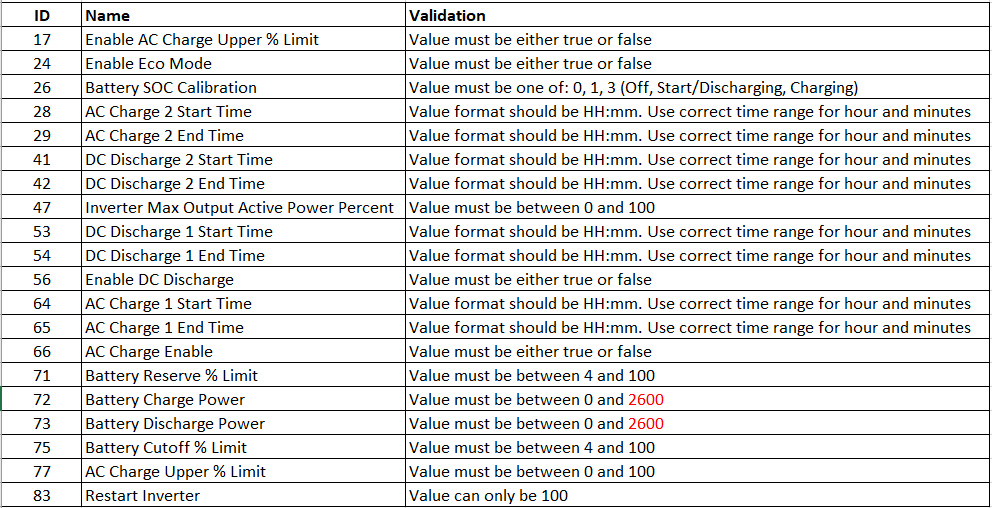
#6 Martyn

pjb904 (self confessed API clueless)

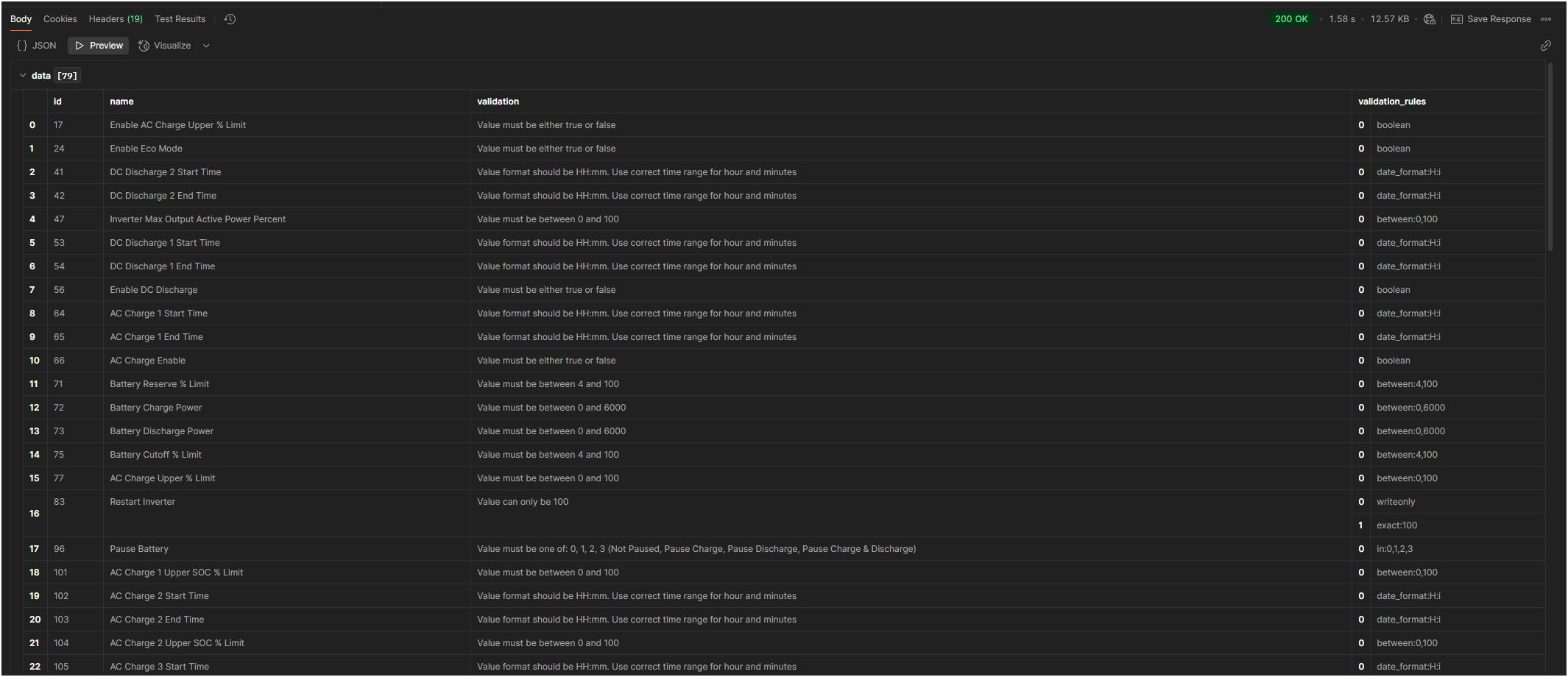
I am also API clueless.

Is there any information available for people who have never used API calls to give an example of how we can get more frequent data for generation and consumption? I would like to be able to find out when my washing machine and dishwasher heat the water so if I wanted to set them off together, I could time it so they are not making maximum demand at the same time.

I only have a Windows PC, so ideally would like to be able to retrieve the data from this PC.

Hopefully being given a simple starting point (GivEnergy API for Dummies), I may then be able to use that as a starting point for then being able to use the API to do other things.

#7 hoggy

Martyn This is now out of date as of yesterdays announcement, but it will still work until they close those off as an intorduction to APIs'
I guess i'll re-write them all when i get time.
Windows API Examples

EDIT: FYI You wont get more frequent data using either of the APIs i'm afraid. Only local control can do that.

G
#8 GrahamRead

Sam D (GivEnergy) thanks for the documentation page - really clear, and the scrolling matching "example window" in different languages really helped. I can usually get these things going, but I'm a very rusty programmer, so clear documentation like this is so helpful.

A
#9 anabanet

hoggy I do have a question...

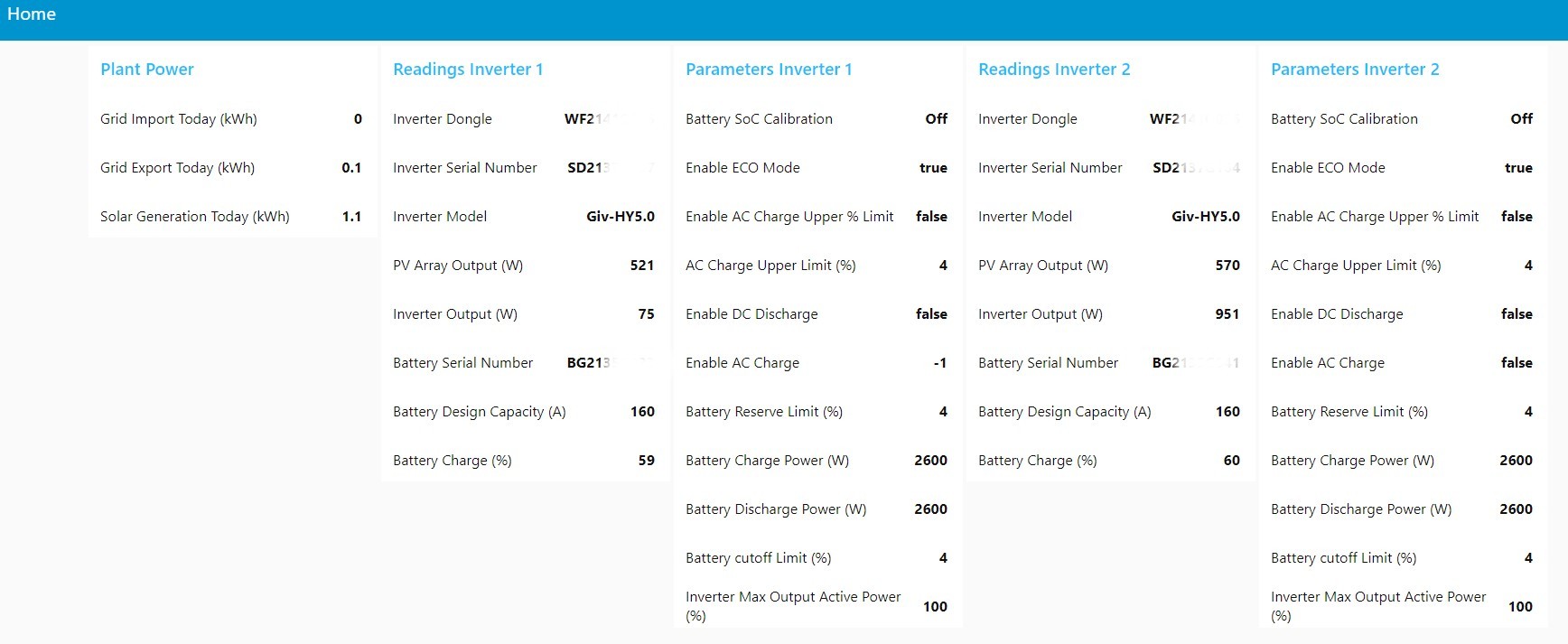
I have gotten a lot of these to work, but I am stumped with the Read Setting and Modify Setting.

I get the Bearer, the Inverter. These are obvious.
Next is Setting and ID of Setting - both are numbers.

So if I want to query ID 65 ->AC Charge 1 End Time, what do I enter ? Setting =65 and ID = 65?
I am lost on why there are two fields for entry there, and what I need to put in the fields. I have identified 65 as the Id of the AC Charge End Time - which is what I want to query...

Help?

#10 Mickey (GivEnergy)

anabanet

We'll amend this issue very soon. It looks like the docs generated two url parameters when all your need is just the 'setting' url parameter.

edit: as for the id 65, yes thats set as AC Charge 1 End Time

#11 hoggy

anabanet I'll be honest, i've not had heads up on this API so it's new to me and i'm yet to use it in anger.
(I've seemingly been using 'parts' of it with my Smart Devices trial) so you might have to bear with me on this!

A
#12 anabanet

I tried using 65 to get the existing value, but the computer said no.

Received response (404):
{
"message": ""
}

S
#13 Seye

What are "presets"? They are referenced but not described.
How do you set start/end time/SOC target for charging etc?
Where a call requires an "ID", where are they listed? ( surprised we need them, it would be better to have a descriptor rather than a number )

Is the battery.api remaining? That has that functionalty easily accessible by simple process calls

A
#14 anabanet

Seye You can query them, they get returned with the id...

A
#15 anabanet

anabanet Get Setting Presets

returns:
Received response (200):
{
"data": [
{
"id": 0,
"name": "Eco",
"description": "This mode will dynamically charge and discharge your batteries to minimise your import from the grid"
},
{
"id": 3,
"name": "Timed Charge",
"description": "This mode will force charge your battery from the grid during a period you define"
},
{
"id": 1,
"name": "Timed Discharge",
"description": "This mode will discharge your batteries to your home during a period you define"
},
{
"id": 2,
"name": "Timed Export",
"description": "This mode will hold your battery power and discharge it at full power during a period you define"
},
{
"id": 4,
"name": "Battery Options",
"description": "Operating Range"
},
{
"id": 5,
"name": "Reset to Defaults",
"description": "Reset all charge modes, timers and limits to their factory defaults"
}
]
}

T
#16 Tim

I've tried the API examples with my new key and all seem OK except for Get Your Account Information (Under Account). It says it's for all any Account Type but the example is for Engineer. If this is for end-users, it's not working for me when all the other examples worked OK.

T
#17 Tim

I'm working to create a Node RED flow which uses the API to return data to a debug node (so anyone can use the payload however they wish). I have two inverters and when I use the API page to "Get Communication Device Information by Serial Number" it fails when I enter any serial number in the URL Id field. When I leave it blank, I get the same data as is returned in "Get Your Communication Devices". Not sure if this expected behaviour or if I've got the wrong end of the stick?

#18 Mickey (GivEnergy)
S
#19 Seye

@Mickey (GivEnergy) Are these new APIs a precursor to removing the older summary/chart/plant apis?

What is the plan for the beta battery.api? https://kb.givenergy.cloud/article.php?id=54

I use that as its far easier to use a process API than the low level system ones. Simple calls to deliver complex functions without needing to know much at all about how it works under the covers.
The Battery.api also has API signitures that are identical to GivTCP so there is the ability to use local or cloud with just a simple change of URL
Hopefully Battery.api is not being depreciated now that this new set of systems apis has been released.

Can you clarify the API roadmap please

#20 Mickey (GivEnergy)

Seye

Hi Seye,

We looked to improve the functionality of the Battery API considering that our goal is moving towards one set of APIs for our infrastructure, whereas the battery API was made first and foremost purely for inverter control. We've transitioned these features into the new APIs, hoping to bring quicker updates in the future.

https://beta.givenergy.cloud/docs/api/v1#inverter-control-GETinverter--inverter--settings

Gives you every setting you have accessible to your inverter and then below are the read and write settings for your inverter. Unfortunately, this means the id of these register are changed to what GivTCP use.

We will be hosting the battery and legacy APIs for an indefinite period until things look more stable on our portal. The beta platform would be notified of these changes as soon as a decision is made.

S
#21 Seye

Mickey (GivEnergy)

The new APIs require you know know the registers. The battery.api doesnt, its in english and acheives the required function in 1 call. I dont think the registers are openly published, and there is always a risk they can change in the future as new models of inverters come along.

I would have expected battery.api to be the primary route for most users. Why would I want to use a register values?
Its great the system APIs are improving. I would have expected the battery.api to transparently switch to use the new system apis and get the benefit of those improvements.

I think what you are saying is that is not the plan. Is that correct? Disapppointing if it is.

All that will happen then is that someone will create there own open source process api tier and develpments will fragment. Is that the intent? encourage innovation?

As cloud and GivTCP are diverging, is it there intent to keep GivTCP and cloud alligned or just let them diverge?

#22 Mickey (GivEnergy)

Seye

The registers are openly published, its using this endpoint

https://beta.givenergy.cloud/docs/api/v1#inverter-control-GETinverter--inverter--settings

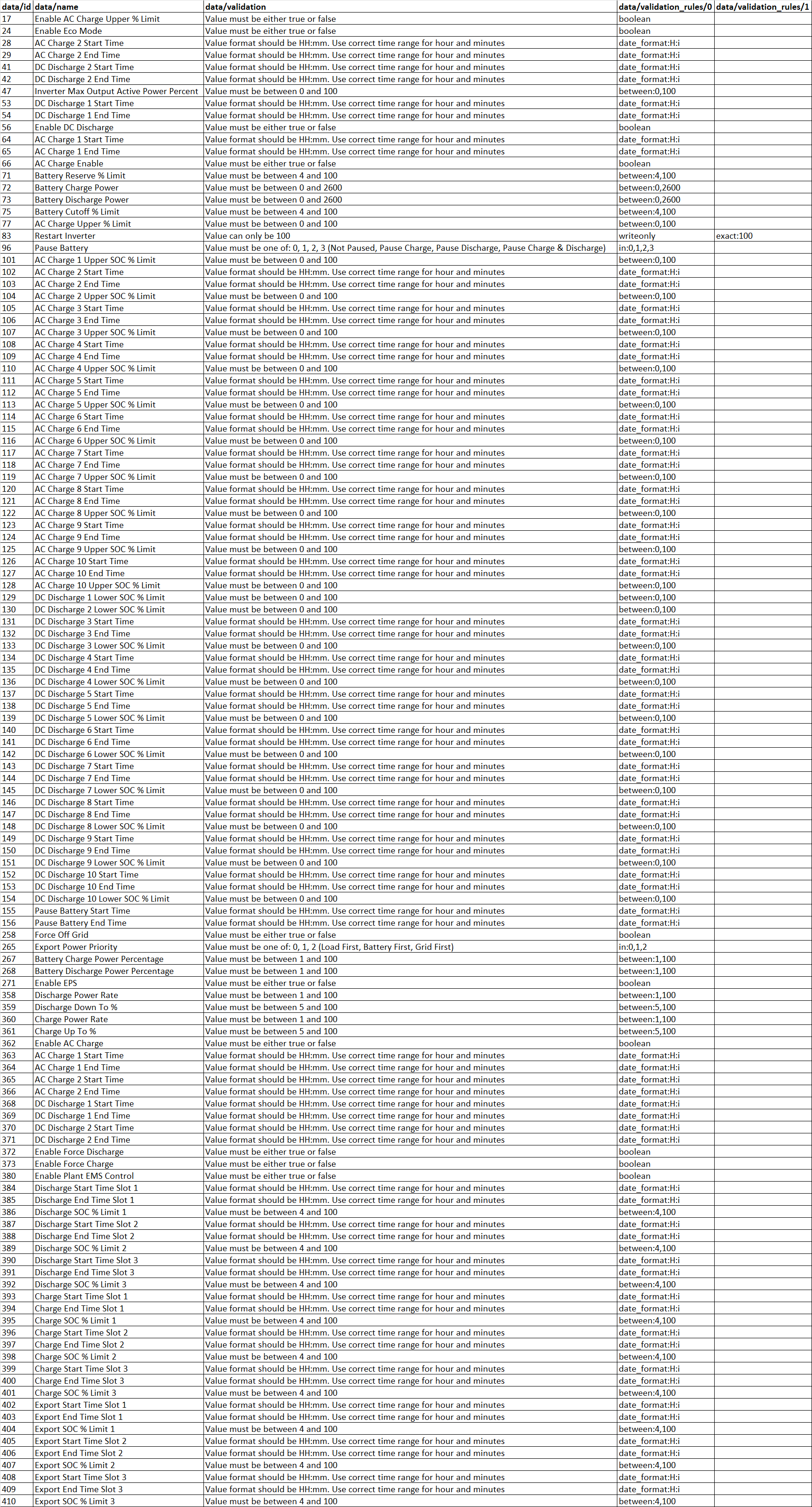
We're openly giving the information for which registers customers will be able to use. We're not removing any disclosure as to what the registers do. We also have the presets which are id'd for customers that want an all in one setting to charge or discharge their battery.

https://beta.givenergy.cloud/docs/api/v1#inverter-control-GETinverter--inverter--presets

We're still keeping the old APIs available for the meanwhile, but internal restructuring means we needed to create a new set of APIs for customers to follow. We apologise for those that created something that might not be sustained in the future. But we hope to keep their open source API tiers on our new platform for good.

We're leaving GivTCP to the open source developers. The protocol for the hardware won't change and they'll eventually diverge. GivTCP was made for the inverter hardware and will stay that way unless there's a constant push for updates. The GivEnergy team has no direct influence as to what gets pushed out there.

#23 judgepd

I've just started to have a look at this to move from the existing battery api but I can't even get the sample calls on the documentation site to work. I've tried the 'try it out' option here https://beta.givenergy.cloud/docs/api/v1#account and entered my bearer token but it just returns a 404. I presume I'm doing something really basic wrong.

#24 hoggy

judgepd which API key are you using?
It needs to be one generated from the new beta portal (account settings page)
It’s not the new old one (Beta Battery API) or the old old one (old portal account settings page).
I’ve not played with this one much yet but did at least get the examples working ok.

#25 judgepd

Yeah, I've generated a new one and all I can get out of the simplest account info call either from home assistant or using the 'try it out' function is { "message": "" }

Edited: It's really odd, half of the try it out functions works and half don't. I can't do the simplest get account info one but the get settings list one works fine...

#26 judgepd

Just for balance, I should confirm that I've now got 2 of the new api calls working fine to get data in to home assistant but still not sure why they don't work on the test page. So far the new api seems more reliable than the battery api as for me that would fail at least once every day or so.

#27 hoggy

Is the Chartable JSON going to make it across? I run a script each night which updates daily, weekly, monthly data.
To do the same with this API would be having to do a lot of processing?

S
#28 Sheerin123

Another API illiterate here, but I love to benefit from the work of developers who produce something I would like to benefit from.

How about an interface to allow us to prepare the simple, clear and really useful reports previously available on the cloud homepage, or will these be making a reappearance on the new dashboard soon anyway?

#29 hoggy

So i'm starting to transition all my API stuff across. One of the things i do in my custom app & also EV chargers is adjust the battery charge & discharge percent. I've noticed on the new API rather than a % it's a power value.
While I get this makes things more obvious, it does mean that i've now got to account for every inverter & battery combination (ie mine has boundaries 0-2600W, presumably the AC coupled is 0-3000, your new gen 2 stuff will be something else again) This makes it more arduous to maintain rather than a % of the boundaries.
Is this % to W a conscious decision or just happened - Can the inverter really be fine tuned in 1W increments?
I note there is an "Enable DC Discharge" (56): Is this basically pause battery which may be my get out? Is this available across all GE inverters?
(Given there is ID 47 which I think is total inverter output including battery & PV that's how I would assume it)
{
"id": 47,
"name": "Inverter Max Output Active Power Percent",
"validation": "Value must be between 0 and 100"
},
{
"id": 56,
"name": "Enable DC Discharge",
"validation": "Value must be either true or false"
},
{
"id": 72,
"name": "Battery Charge Power",
"validation": "Value must be between 0 and 2600"
},
{
"id": 73,
"name": "Battery Discharge Power",
"validation": "Value must be between 0 and 2600"
},

#30 hoggy

Also the Smart Devices section, this used to allow data being sent as a paramater / one shot URL while we were trialling it.
The new API docs suggest sending it in the request body.
I've just modified the URL to reflect the new API endpoint and out of curiosity pressed send - I still get a 201 "Created OK" response which would suggest this still works? Can you check these are coming through OK as this is far easier...
Example URL:
https://api.givenergy.cloud/v1/smart-device/DEVICE_UUID/data?time=**$Timestamp**"&"power=**$Load**

#31 hoggy

So, 2 further things:
1 - Enable DC Discharge is actually to do with the discharge timers so this doesn't pause anything. Should not try to do this with no sleep!
2: Most calls are working (not got through them all) BUT Get Account seems to just return Null. This is the same in both the KB and Postman.
https://beta.givenergy.cloud/docs/api/v1#account
Returns:
{
"message": ""
}
I was hoping to use this to first query the API for the Inverter Model which i could then use against a power table to set maximum discharge rates automatically. However I'm not sure if even this call contains the inverter model (is there any call that does, can't see anything obvious?)

EDIT: So it's under communication device.
"info": {
"battery_type": "LITHIUM",
"model": "Giv-HY5.0"
Does the model number change to say "Gen 2" for the new ones or something?

#32 Sam D (GivEnergy)

hoggy

Hi Hoggy,

Your assumption regarding register 47 is correct.

'Enable DC Discharge' essentially sets the battery to only discharge during the set times (if enabled). If Eco mode is also on this will cause the battery to discharge dynamically to meet demand. If eco mode is disabled it will force the battery to discharge at the maximum allowed power. If enable DC discharge is turned off and eco mode is turned on, the system will follow its normal logic. If enable DC discharge is off and eco mode is also off, the battery won't do anything (unless is it set to force charge)

The battery charge and discharge power registers are a little tricky, but essentially we convert the value you send to a value between 0-50 where 50 is 0.5C battery power. This changes depending on the size of batteries installed and the inverter, for example 0.5C on a 8.2kWh battery would be 4.1kW, however there is no inverter that can currently provide this power, so the actual power would be lower. This means that values less than 0.5C may actually equal the same power value 0.5C when the maximum inverter charge/discharge power is also taken into account. Gen 2 inverters can be identified by their serial number, and will always start ED.

Regarding the Smart Devices question, you can pass the parameters in either the body or as query parameters as we parse both in the same way, but we recommend following the structure defined in the API as query parameters will always be optional (for POST requests), whereas body parameters may not be.

M
#34 mrand31

Sam D (GivEnergy)

I'm feeling the need to draw out a truth table. 😀

#35 hoggy

Right OK. I've just basically fudged the max value to 5000W (which is obviously an impossible figure to discharge) and your API twigs this is not valid so returns that it's set it to 2600 (the max value my inverter can handle) therefore I suspect the easiest way around this for now is to simply use 0W & 5000W as pause / resume battery values.

Not how I suspect you intended this to work but does get around having to ferret about in various calls finding which inverter people have...
I'll still have to do something for a sliding scale for the app, but given the EV charger scripts are setup so the battery is stopped rather than blending power when they are running this solves the immediate problem.

any idea why the Account call doesn't work? (Don't think i need it but just curious)

#36 hoggy

To save effort below is the register table for the Gen1 Hybrid 5 Inverter.
I suspect the rest of the range is largely the same with the Power Limits adjusted accordingly.

#37 hoggy

So for the system presets, you run a GET request which pulls them down, but it doesn't actually populate the presets with the current settings (or which one/ones are active) so i'm unsure as to the point of this?
If you were to modify one of the presets, can you do that from the "modify preset" call and add the parameters on to the call? Or do you still have to modify the underlying settings each time?
How the KB is written it just looks like the "Modify" call simply selects a pre-defined preset (say 1 - 5) rather than actually modifying the settings inside the preset. Is that right?

Example:
How would you setup timed export? The settings table posted above has no ID for pure Export timers, so how do you set the "Timed Export" preset up with what times you want it to do so? Do you actually set each individual ID up in which case whats the point of presets at all? Or do you have to use the portal to set everything as you want and then flick between presets?

EDIT: Answered my own question now the API is back up, so you need to pass all the required fields (presumably in the body) - Still, would be nice if the "GET" presets actually returned what everything is currently setup as so you can store it and revert back.

L
#38 locked

hoggy agree when doing a GET on the presets it would be good to return the current set. The doc does not mention anything re body so not sure how to get the current values via presets?

#39 hoggy

Not trying to re-invent the wheel but when I first started playing with all this stuff I found it incredibly hard to find a resource that explained everything in a format that made any sense to someone who had never touched one before.
(terms like - make the following call to the API for Auth then pass the token yadda yadda... - yeah great, what's a token? and what do I send the request from? How do I work cURL or Postman?)
To that end I've tried my best with the following page that goes through how it works with some of the most basic tools most will have at their disposal already.
I'd appreciate if anyone else can remember things from when they first started out that wasn't immediately obvious and I'll add them in as well. Likewise if I've made any assumptions or something doesn't sound right.

I also know that NodeRed is a popular start for this. I don't personally use it so it wouldn't be great for me to write one for that - but if anyone has some spare time to do a guide using this new API I'm sure it would benefit the group. (if you have your own hosting/site I'll happily link to it. Likewise if you don't I'm happy to host it for you and you can take the credit for it. I would say I'd share any ad revenue but I don't run any nor intend to!)

#40 Mickey (GivEnergy)

hoggy You should definitely create your own thread on the forums as this looks to be a very extensive documentation for any beginners wanting to use our APIs and is a great resource to get discussions running!

A
#41 anglefire

hoggy I might see what I can do. Though it won’t be quick as I have to still work out the complicated stuff. 🤣
And time is always short these days.

J
#42 jkazer

anglefire so long as you open source it we can contribute too

T
#43 Tim

hoggy I'll publish a Givenergy Node-RED flow on their contrib site and send you a link. I did this already for the old API, so will just be an update.

A
#44 anabanet

I am waiting for Hoggy to build the 'local control' so I can steal his code.....

#45 hoggy

anabanet haha which one, using GivTCP over Powershell or that dashboard thing?

T
#46 Tim

hoggy I've posted a flow to the Node-RED contribs which uses the v1 APIs to produce a dashboad as below. It doesn't display all values returned from the APIs and can easily be built on by anyone wanting to get into Node-RED.

The flow can deal with two inverters, or can be modified to remove the second one. It can also deal with multiple batteries per inverter although I couldn't test that as I only have one on each.

I haven't included any control functions as I would rather use the Givenergy portal if I needed to do any of that. However, I will probably move to control later in the year (autumn/winter) when I start importing from the grid overnight to charge the batteries.

A
#47 anglefire

Tim Thanks for this Tim - the only thing I can't get to work is the dashboard - though its largely academic as I use Home Assistant with its dashboards. But I'd like to get it to work regardless!

A
#48 anglefire

Tim - Its ok - Nodered is running in a container on mine and you can't open the dashboard from with Home assistant. But if Node-red is run from a browser directly it works just fine!

T
#49 Tim

anglefire The dashboard is really just to help people understand the output from the various API calls. I wouldn't necessarily expect people to use the dashboard, rather develop the core for their own purposes. There aren't even any buttons, sliders or switches which you probably would want to use in Home Assistant for changing settings. Anyway for anyone wanting to pull data from Givenergy into HA via Node-RED, it's a starter for ten.

A
#50 anglefire

Tim it also means I don’t have to work out how to get the data out of the new api 🤣.
I was only curious about the dashboard as I’ve never tried it inside of HA.
I’m using GivTcp to get the data locally faster so this is all just academic.

L
#51 LeiChat

Is GivTcp written by a GivEnergy developer? https://github.com/GivEnergy/giv_tcp
If not, are GivEnergy happy for us to connect locally?

Might a local API (or officially supported TCP library) be coming in the future?

I was disappointed to learn that the inverters don't store the data until it is uploaded to the GivEnergy cloud servers and am keen to understand my options for extracting data locally to avoid the risk of it being permanently lost.

A
#52 anglefire

It’s been developed independently of givenergy but with their support.
With respect to the storage of the data, the inverter stores things like total kWh etc so all you will loose is the granular data.
Comparing this year with last year for example will (unless you are a proper geek) be limited to daily total production at best.

L
#53 LeiChat

anglefire Thank you. When you say "stores things like total kWh" is that daily or an all time cumulative?

I would be very content with daily totals for the battery charge/discharge, especially if that includes the sub totals for the source of the energy that's gone in to the batteries. (Supplementary question... Is the AC inverter able to distinguish between when it charges from grid or excess solar (I already have a PV array and Solaredge inverter)? Or is that data split only available with the GivEnergy hybrid inverters?

I have a myenergi zappi which is able to use a CT clamp to monitor charge/discharge from a battery but I believe it's only really for that real time monitoring so the zappi may 'avoid drain/charge' and isn't recorded to myenergi's cloud.

A
#54 anglefire

LeiChat at least all time cumulative. But I suspect daily too. I’ve turned off the inverter in the past and it has retained the data.
And given that in an external power outage the battery would still be supporting the inverter there is no reason for any loss of data per-sey.

L
#55 LeiChat

"today": {
"solar": 1848.7,
"grid": {
"import": 9385.7,
"export": 65776.9
},
"battery": {
"charge": 55689.5,
"discharge": 56903.5
},
"consumption": 91852.3
},

Is it possible to get the source split for the daily battery charge?
How much charge was self-consumed solar generation and how much was charge from grid import?

For the last few years I have been logging each day how much of the daily generation is exported to the grid, diverted to our iBoost or zappi and how much is used by the house. Once I have my GivEnergy system installed I was hoping I would be able to record how much of the self-generation is stored to the batteries and how much I charge the batteries from the grid during off-peak.

I appreciate that (unlike a hybrid inverter DC coupled battery setup) a GivEnergy AC inverter would not be able to tell if the inbound energy is from excess solar or grid import but hopefully the split could be based on defined off-peak hours. Or failing that, half-hourly subtotals for charge would enable me to calculate it myself.
Thanks in advance of your kind response.

A
#56 anglefire

This is what I read out of my system (Well part of it, I get a shed load more stuff!)

"Energy": {
"Today": {
"AC_Charge_Energy_Today_kWh": 0,
"Battery_Charge_Energy_Today_kWh": 0.4,
"Battery_Discharge_Energy_Today_kWh": 2.2,
"Battery_Throughput_Today_kWh": 2.6,
"Export_Energy_Today_kWh": 0,
"Import_Energy_Today_kWh": 4.3,
"Invertor_Energy_Today_kWh": 3.7,
"Load_Energy_Today_kWh": 8,
"PV_Energy_Today_kWh": 2.2,
"Self_Consumption_Energy_Today_kWh": 2.2
},
"Total": {
"AC_Charge_Energy_Total_kWh": 98.5,
"Battery_Charge_Energy_Total_kWh": 379.1,
"Battery_Discharge_Energy_Total_kWh": 343.7,
"Battery_Throughput_Total_kWh": 722.8,
"Export_Energy_Total_kWh": 37.9,
"Import_Energy_Total_kWh": 1408.4,
"Invertor_Energy_Total_kWh": 673.8,
"Load_Energy_Total_kWh": 1945.8,
"PV_Energy_Total_kWh": 667.3,
"Self_Consumption_Energy_Total_kWh": 629.4
}
},

I have a 3.6kW hybrid inverter.

#57 hoggy

@Tim thanks for that. It's taken me a while to find the time to update but I've added a link on the API page and also created a brief post which links to your flows.
Many thanks for the time you've spent on it. (I'll get round to trying it at some point)
Page is here

A
#58 anabanet

hoggy GivTCP over powershell. ...... waits .....

D
#59 dcsh

Is there a way to pull a particular value (e.g. exports) for whole month without having to call and sum each day? I'm pulling data in to a google sheet that already pulls data from Octopus, so it would be nice to see exports along with peak and off-peak imports so I can calculate the costs imports + standing change - exports. I export to a different company and they don't have an api to get data direct from the meter, so from the inverter will have to do.

T
#60 Tim

dcsh If your electricity meter is SMETS2 (or SMETS1 and enrolled into DCC) you can sign up to the Bright App and enter your MPAN and use their API to download your (30-minute, hourly, daily, weekly and monthly) meter data for the last 13 months. If your meter is set up for Export, that data should also be available. I don't have a SEG tariff yet and while my export is recorded on the meter it is not ported to DCC.

If you buy one of their Consumer Access Devices such as the Glow Stick, you can get the data almost real-time (5 second intervals) via MQTT but you do have to ask for MQTT to be enabled for you.

#61 hoggy

dcsh not via the API no, just by day for now (You can just pull out data from the portal though via Day/Month/Year as an excel file via the Power Flow Card)
For automation on the old API you could trick it with daily dates by starting at a date and incrementing by 1 with a simple script (even beyond the 31st of the month to get multiple months all piled into one file) but alas this doesn't work with the new one as it falls over after the 31st.

L
#64 locked

For info now a glitch has been fixed in the v1 API I have updated my home automation project from the old API to V1 API. For info, the code looks at tomorrows weather forecast (cloud cover per hour), uses this to calculate how much energy to top up the battery at cheap rate and then uses the API to set the smart charge time and percentage in the inverter. The goal being to maximises use of solar generation and minimise any grid use. The code and more info can be found here : - https://github.com/lockedj/solarbatteryoptimize

V
#65 Vince31

Ive got the AC 3.6 inverter and managed to get the available settings data from the unit via the API ok.
I can see what the AC Charge 1 Start Time & End Time settings are for; but what are the AC Charge 2 Start Time & End Time settings used for as they dont show up in the settings GUI menu? Can I use these for different charge times at the weekend for instance (via an API command)?

T
#66 TX200

Vince31 they don’t do anything at present. Maybe will in the future.

P
#67 PJT

Sam D (GivEnergy)

Hi

I installed the App on my mobile and laptop towards the end of March, do I therefore have the latest version of the software on each device?

Thanks in advance

S
#68 Sykes

hoggy To that end I've tried my best with the following page that goes through how it works with some of the most basic tools most will have at their disposal already.

@hoggy
Good effort! Thanks for this.
I've been messing around with Python so far - just to get a flavour for it all.
I've only ever 'programmed' (if you can call it that) in VBA, so this is all quite daunting; your explanations have helped a lot - despite referring to Powershell.
One question about the registers - what does id 75 i.e. 'Battery Cutoff % Limit' refer to?
Presumably, 71 ('Battery Reserve % Limit') refers to the %age during routine discharge, at which the discharge will stop - reserving further discharge only for the grid failure case i.e. during EPS operation?
I therefore can't immediately see what 'Battery Cutoff % Limit' does.
TIA.

#69 hoggy

Sykes on holiday & don't have my notes so this is from memory - but one is the "normal" cutoff that you want the battery to stop at while still connected to the grid I.e A daily setting.
The other is what you want it to discharge down to beyond the "normal" cutoff if you are using the EPS in a power cut.
Both have a lower limit of 4% no matter what and I can't particularly think of a reason why when in EPS you'd want to stop at anything other than 4% as you'd be without any power at all then.

Note: should I be remembering it wrong, it's the Internet... so someone will be a long shortly to disagree with me in a belittling tone...

S
#70 Sykes

hoggy on holiday & don't have my notes...

@hoggy What are you playing at - going on holiday, without your notes? !!

Thanks for the response. What you say makes sense.
I suppose what I should have asked was, where I might find a definitive list of registers, and what they actually do.
I'm sure you'll be aware of this, but you're on holiday, so I don't expect an answer too soon...

... an hour or two should be fine, thanks! 🤣

#71 hoggy

Sykes probably one for @Mickey (GivEnergy) who can give you a detailed list or what they all do. (They pretty much mimic the portal remote control page, can't remember if that has tooltips if you hover on them?)

I do have all the Modbus register details and quite a few other interesting bits about what they all do but thats all under NDA so i cant share it.
(Much as id like to visit Givenergys workshop id prefer it not to be under the pretence of being lined up against the back wall of the yard and shot for sharing internal documents! )

S
#72 Sykes

hoggy (Much as id like to visit Givenergys workshop id prefer it not to be under the pretence of being lined up against the back wall of the yard and shot for sharing internal documents! )

Answering posts whilst on holiday's fair game; doing anything to get beaten up behind the GE bike shed's probably an ask too far, so fair dos.

Ta.

#74 judgepd

Wonder if someone can help so I don't have to chuck my computer out the window!

I've got 2 api calls from home assistant which work perfectly, one uses ...system-data/latest and the other is ...meter-data/latest. I've tried to add another one to read a specific setting namely ...settings/77/read (AC charge limit) but it always comes back as blank. The api call seems to work fine but it just returns a home assistant value with nothing in the attribute.

Any ideas anyone?

#75 judgepd

Got this sorted now, I hadn't realised that to read an individual setting you have to do a POST not a GET...which seems a bit odd to me.

S
#76 steve

Tim Thanks. I was using your old flow, which was great. Now looking at this one, but after entering my API key I'm getting an error on the "Set Serial Numbers" function, as below:

05/07/2022, 22:03:13node: Set Serial Numbers
function : (error)
"TypeError: Cannot read properties of undefined (reading 'serial')"

I've been trying to debug it, but not having much luck. Any pointers please?

T
#77 Tim

steve Steve, I've just downloaded my Node-RED flow linked to by @hoggy on his Terravolt site.

I added it into a Node-RED test environment (V2.03) on my Pi, entered my API Key into the "Initailise flow contexts - Put your API Key into here_" inject node and deployed it. On deploy, the inject node is automatically triggered and the key is wrapped with some headers etc and sent to a REST Endpoint that returns all the Communications Devices associated with the key. Each Communications Device (ie dongle) returned, has associated objects with inverter serial number, number of batteries, battery serial numbers and so on.

If the API Key is correct and the flow is deployed, it should "just work". All the key data such as API key, baseURL, Inverter serial number(s), battery serial number(s) etc are all stored as flow variables to be used as and when.

Making a minor change to the flow (disable/enable Debug output for example) would enable you to redeploy the flow and reset it. If you do this and it still doesn't work, let me know what the environment it is sitting in (version of Node-RED?, Docker?, what else?) and I'll have a ponder. Mostly, it just sits and works for me. Even after rebooting the Pi or redeploying the whole instance, it just re-initialises itself and works quietly in the background.

T
#78 Tim

steve I just raised a bug report because while my Node-RED flows are working fine, the web-based API doesn't want to play ball. I was wanting to use it to work out why I was seeing something I didn't understand, but the web interface just wouldn't work with the API key that works with my Node-RED. I'm assuming there's some maintenance going on behind the scenes between this web url and the REST endpoint.

S
#79 steve

Tim Thanks Tim, I found the same with the web-based API, still erroring when using my API key. I know the API key is correct as running API's with it via Postman is no problem.

S
#80 steve

Tim Thanks for having a look and testing it for me. It's an odd one, I'll keep playing with it. I checked my API using Postman and running some basic API's, just to be sure.

I'm running Node-RED (v12.0.2) via Home Assistant Add-on. HA OS is running on a VM.

T
#81 Tim

steve Node-RED (v12.0.2)

There's something odd there. Node-RED V3.0.0 is only just out in beta. Is that the version of Nodejs? I think I'm on v12.2.2 of Nodejs although the recommended version is now v14 for the latest release of Node-RED. By the way, I've changed the flow (just the blurb, not the code) to remove reference to the beta portal, it just refers to www.givenergy.cloud now.

Fair play, even having a VM is something I'd shy away from, let alone having a HA add on. I don't use HA although I should look at it as it could probably take some of the work out of IoT in the home for me.

S
#82 steve

Tim :-) Thanks for the reply. Aye, I think the v12.0.2 is the HA Add-on version, not Node-RED. In the Node-RED flow dashboard, the about is showing my version v2.2.2.

Just run the flow again today, using the import I did the other night, and no error that I posted above, very odd :-)

Thanks Tim

M
#83 Mack1979

I get constant "The remote server returned an error: (404)
I've refreshed my API key and just using the simplest test/account. On the API documentation page if I paste this into the box and hit send it gives a fail message. I've had the email confirming it, I've checked no missing or extra characters showing. Any ideas?

T
#84 Tim

Mack1979 Are you referring to the Givenergy Plants and Inverter API (v1.1)? A code 404 means "The requested endpoint or resource could not be found", suggesting that the server did not recognise some part of the http request. The only part of the request that is not generic is the API key.

If you had an email confirming the API key value, and you've copy/pasted that into the inject node msg.payload, then I'm struggling to work out why you'd get a 404. If you are a member of the Node-RED forum, I think that would be a more appropriate place for further exploration. But let me know if you post a question there so I can go looking for it and help further.

M
#85 Mack1979

Yes, the API v1.1 that was what this post is covering, think I'm in the right place. I've had the email and even tested it on the GivEnergy API documentation page and it errors there too. I'm not using NodeRed, I use HomeSeer with MSQRTT plugin which works great with MyEnergi API and the old GivEnergy API. I get the same error via PowerShell, the plugin or using the documentation page. As you say, there's no other parameters. In pshell I'm using
$GivEnergyPortalAPI = "xxxx"
$headers_Giv_En = @{
'Authorization'="Bearer $GivEnergyPortalAPI"
'Content-Type'='application/json'
'Accept'='application/json'
}
$Giv_En = Invoke-RestMethod -Method 'GET' -Uri https://api.givenergy.cloud/v1/test/account -Headers $headers_Giv_En

and the error I get is:
`Invoke-RestMethod : The remote server returned an error: (404) Not Found.
At line:29 char:12

  • $Giv_En = Invoke-RestMethod -Method 'GET' -Uri https://api.givenergy ...

  • ~~~~~~~~~~~~~~~~~~~~~~~~~~~~~~~~~~~~~~~~~~~~~~~~~~~~~ + CategoryInfo : InvalidOperation: (System.Net.HttpWebRequest:HttpWebRequest) [Invoke-RestMethod], WebException
    + FullyQualifiedErrorId : WebCmdletWebResponseException,Microsoft.PowerShell.Commands.InvokeRestMethodCommand`

    On the Account part of the documentation page https://givenergy.cloud/docs/api/v1#account, I paste my API key and hit send request and get the following error:
    `Request failed with error:
    Failed to fetch

    Tip: Check that you're properly connected to the network.
    If you're a maintainer of ths API, verify that your API is running and you've enabled CORS.
    You can check the Dev Tools console for debugging information.`

#86 hoggy

Yeah someone's made an change of the documentation that's wrong (presumably we now know where the Beta version of the API hides under /test/ endpoints!)
Haven't tried them all but I guess anytime you see "/test/" in the endpoint just take that out the URL and you should be golden.
Example:
https://api.givenergy.cloud/v1/account
not
https://api.givenergy.cloud/v1/test/account

Tried that one and no longer 404's.

@Mickey (GivEnergy) could you take a look at your API docs page and resolve. Currently it won't work for in browser testing as is with the "test" parts of the endpoints.

M
#87 Mack1979

Ah, that's it! Removed the "test" and all working and json response on the ps script.

Thanks!

#88 Mickey (GivEnergy)

hoggy Mack1979

Hi guys,

Thank you for informing us of this issue. We'll be resolving this immediately and making an update so the next time your import a collection, it won't have this 'test' appended to it

#89 TheDragon (GivEnergy)

Is there a set of github addon for Home Assistant.

I see a couple of home brew ones, but would prefer an official GivEnergy set.
Using https://youtu.be/NQ84z_Wa19k

This guys work, which does the job.
With a few anomalies.

A
#90 AnnNicholson

What on earth is API, no explanation anywhere?
Do I need it to access my solar system?
Locked out of it for a month now.

A
#91 anglefire

AnnNicholson you don’t need it to access your system. You should have log in details into the portal which you can get onto via a browser or you can download an android or iOS app onto your device (phone tablet etc) to see the system - effectively live if you are at home or with 5minute updates if you are remote.
The api is something that you can do to access the system from something like home assistant or power shell to directly call the inverter for information.
It’s something really for geeks and tinkerers and not something most worry about. Especially now the apps are out giving rapid updates.

D
#92 Dpe

I am trying to get some data via the API into node red. no success so far, so tried some of the examples in the 'view API documentation link'. After entering my API I also only get the response below as was detailed previously.
I cannot see what I am doing wrong and have checked for the 'test' issue but cannot see that this is the problem.
I am by no means an API or Node Red expert so it tends to be a trial and error approach - any help gratefully received!

Mack1979 Failed to fetch

Tip: Check that you're properly connected to the network.
If you're a maintainer of ths API, verify that your API is running and you've enabled CORS.
You can check the Dev Tools console for debugging information.`

#93 hoggy

Dpe That's a Givenergy issue, the browser test pages are broken ( @Mickey (GivEnergy) one for you)
The API is still working if you try other methods. My Terravolt page has them for Windows Powershell if you want to get a feel for it.

D
#94 Dpe

Thanks for the reply.
I have used your pages (the node red examples) and I have got the API to work with these. These were great and I hope I can now build on these to do what I want.
Its a slow process for me!

T
#95 Tim

Dpe If you have any questions about Node-RED, feel free to ask. I've completed my implementation of API calls and also use Givtcp to pull data into my flows.

D
#96 Dpe

Hi Tim,
I have copied some flows from the node red site and have made some progress. I have changed someone else's flow to suit my purpose and using MQTT have got a readout of tomorrows solar forecast from 'my site' in to Domoticz. (I use Domoticz because of the heating system I have, which I previously used Domoticz to log the data).
I have the logic to use this data to determine the battery charge needed overnight and have an output of data that I want to send to the inverter, for example
{"enable":"true","start":"0300","finish":"0600","chargeToPercent":50}"
What I cannot get my head round is how to do this in the best way, I would also like to do some other pieces of logic but I think once I understand how to do this first item I could work out the rest.
I was interested to read that you have used Givtcp, I thought of how I might do this but the only simple implementation I could find used home assistant, and I did not really want to download and start again with a different home automation programme. I might do this if I can run it on the same Rpi as Domoticz. My primary reason for wanting to use the tcp route was that I would be interested to see the actual individual battery voltages.
I have a AC 3.0 inverter and two 5.2 batteries

T
#97 Tim

Dpe You can control the inverter through the Givenergy API (using their cloud) or through Givtcp. Both use HTTP request nodes and different syntax. You would just build your message with the appropriate headers and url and submit the POST request. When I've been developing flows, I've used the Givenergy API pages to submit values to achieve what I wanted and then replicated the settings in a function node in Node-RED.

If you followed the link from @hoggy's terravolt website to the Node-RED contrib flow, then you are using the one I developed.

T
#98 Tim

Dpe I've just been onto the API page and even though my Node-RED flows are getting API responses, that page just isn't working for me with the correct API Key. Very odd. Maybe it's moved?

Anyway, the flow you have has GET Settings Presets and Read Inverter Settings, so the step to change them should be quite short, although it would be very convenient to test them on the API page first.

H
#99 Heywood51

Have just got my battery installed this week and was hoping to try out the API, but I don't seem to be able to access most of the data. I can get simple things like getting communication device or list of sites (so I know my API key is fine), but nothing like inverter data or energy flow data. Whenever I try the examples in a bash script, I get a blank message response.

It looks as though I need "inverter read permission". Is there something I should have set to get this permission?

#100 hoggy

Heywood51 no the API key should do that to authenticate your access level.
I wonder if with the new Smart Plugs coming out theres a new user tier (as a non inverter owner) and theres a bug with API keys so it thinks your a smart plug owner and not a system owner?
@Mickey (GivEnergy) could you take a look and advise?

#101 Mickey (GivEnergy)

hoggy Heywood51

We're as clueless as you guys. We won't know unless the exact response or what message is shown is given to us. Usually you won't have access to the API when its a validation exception (422) thrown from the API itself

T
#102 Tim

Mickey (GivEnergy) @hoggy @Heywood51

The API works fine for me when called from a node request in Node-RED. However, when I follow the link from my Account Settings and use the same API key as in Node-RED, irrespective of which call I make, I always get:

Request failed with error:
Load failed

This is a PITB because I can't validate calls before coding them in Node-RED. If it's there, it should work; the link to the API page does not.

#103 hoggy

Tim it's a bit weird, I guess the page is bust again.
If you copy the (failed) request from the browser (Dev Tools > Network) and shove it unto Postman it works fine.

Don't recall there being 2 boxes for inverter Serial everywhere? What's that about?
inverter_serialNum string
inverter string

Although filling in both, one or the other doesn't solve either.

H
#104 Heywood51

Mickey (GivEnergy) Not sure what to tell you, since the response is just

{'message': ''}

I have tried the url = 'https://api.givenergy.cloud/v1/inverter/consequatur/data-points/' example in both bash and python and I get the response above. Let me know if there's anything I can provide, either in this thread or offline to help you look into it.

Any help would be much appreciated.

#105 Mickey (GivEnergy)

Heywood51

url = 'https://api.givenergy.cloud/v1/inverter/consequatur/data-points/'

The consequatur part looks to be where the inverter serial number needs to be. This looks to be a 404 error when you get {'message': ''} so please take another look at it.

I've also been informed the docs have changed with inverter_serialNum and inverter, but please just enter in the inverter name into the url

H
#106 Heywood51

Mickey (GivEnergy) Yes, that worked. My mistake - just copied the link from the examples and didn't read the documentation carefully enough. All working now. Thanks!

T
#107 Tim

Mickey (GivEnergy) The url may work (it does from my instance of Node-RED), but the link from my account to View API Documentation takes me to a page with the right information on but the "Try it out" has a link with the /docs/ in the path. If this is incorrect, (duh, yes it is), then changing the urls in the web page would be very helpful for anyone who would like to Try it out. Can you get the urls updated?

#108 Mickey (GivEnergy)

Tim This ones a bit trickier and it comes down to how our web domain isn't allowing CORS restriction, somewhat meaning the web isn't allowing the user to send API calls from the website. Whether we made a change somewhere along deployment. I believe it was when we switched SSL certificates.

Because of this, we've decided to just disable the thing because its not working. Apologies for this and we will re-enable it after testing from our side.

edit: our developer has fixed this with the next release

R
#109 Rtidey

This is a simple powershell script using the API to get a csv file for daily summary data over a range of dates. That can then be imported into a spreadsheet

The summary data is Date,Solar,Import,Export,Consumption,Battery

At the moment one just edits the script to put in start date and number of days but that could be enhanced.

One needs to edit the $GivEnergyPortalAPI with your own apikey and $SerialNum with your own serial id

You then just right click the file and Run with Powershell

$GivEnergyPortalAPI = "apikey"
$SerialNum = "serialno"
$DateFirst = "2022-09-01"
$DatePick = $DateFirst
$DateCount = 30
$page = 1
$pageSize = 300
$DataPointsStr = "Date,Solar,Import,Export,Consumption,Battery
r`n"

########end user input#############

##Go Fetch Data Points##

$headers_Giv_En = @{
'Authorization'="Bearer $GivEnergyPortalAPI"
'Content-Type'='application/json'
'Accept'='application/json'
}

function GetDatePickData {
$Giv_En = Invoke-RestMethod -Method 'GET' -Uri https://api.givenergy.cloud/v1/inverter/$SerialNum/data-points/$DatePick"?"page=$page"&"pageSize=$pageSize -Headers $headers_Giv_En
$Giv_Obj = $Giv_En | ConvertTo-Json -depth 10 | ConvertFrom-Json

$last = $Giv_Obj.Data.Count - 1
$solar = $Giv_Obj.Data[$last].today.solar
$import = $Giv_Obj.Data[$last].today.grid.import
$export = $Giv_Obj.Data[$last].today.grid.export
$consumption = $Giv_Obj.Data[$last].today.consumption
$battery = $Giv_Obj.Data[$last].power.battery.percent
$parArray = @($DatePick,$solar,$import,$export,$consumption,$battery)
$ret = $parArray -join ","
return $ret + "`r`n"

}

for($index = 0; $index -lt $DateCount; $index++) {
Write-Output $DatePick
$DataPointsStr += GetDatePickData
$DateObj = [Datetime]:😛arseExact($DatePick, 'yyyy-MM-dd', $null)
$DateObj = $DateObj.AddDays(1)
$DatePick = $DateObj.ToString('yyyy-MM-dd')
}

$DataPointsStr | Out-File -FilePath .\DataPoints$DateFirst.txt
Write-Output "Data Saved to: DataPoints
(Date).txt"
Write-Output "All done - Exit in 5...."
start-sleep -s 5

Exit `

R
#110 Rtidey

I thought I had quoted the code but a smiley appeared in the middle! That should be a colons followed by a P i.e. two colons ParseExact

#111 hoggy

Yeah this forum doesn’t do code too well, I tend to link to the file. Although I did find the emoji+”arseExact” amusing!

T
#112 Tim

Rtidey Code will work fine with three backticks. For some reason the "insert code" button just puts one in!

$GivEnergyPortalAPI = "apikey"
$SerialNum = "serialno"
$DateFirst = "2022-09-01"
$DatePick = $DateFirst
$DateCount = 30
$page = 1
$pageSize = 300
$DataPointsStr = "Date,Solar,Import,Export,Consumption,Batteryr`n"

########end user input#############

##Go Fetch Data Points##

$headers_Giv_En = @{
'Authorization'="Bearer $GivEnergyPortalAPI"
'Content-Type'='application/json'
'Accept'='application/json'
}

function GetDatePickData {
$Giv_En = Invoke-RestMethod -Method 'GET' -Uri https://api.givenergy.cloud/v1/inverter/$SerialNum/data-points/$DatePick"?"page=$page"&"pageSize=$pageSize -Headers $headers_Giv_En
$Giv_Obj = $Giv_En | ConvertTo-Json -depth 10 | ConvertFrom-Json

$last = $Giv_Obj.Data.Count - 1
$solar = $Giv_Obj.Data[$last].today.solar
$import = $Giv_Obj.Data[$last].today.grid.import
$export = $Giv_Obj.Data[$last].today.grid.export
$consumption = $Giv_Obj.Data[$last].today.consumption
$battery = $Giv_Obj.Data[$last].power.battery.percent
$parArray = @($DatePick,$solar,$import,$export,$consumption,$battery)
$ret = $parArray -join ","
return $ret + "`r`n"
}

for($index = 0; $index -lt $DateCount; $index++) {
Write-Output $DatePick
$DataPointsStr += GetDatePickData
$DateObj = [Datetime]::ParseExact($DatePick, 'yyyy-MM-dd', $null)
$DateObj = $DateObj.AddDays(1)
$DatePick = $DateObj.ToString('yyyy-MM-dd')
}

$DataPointsStr | Out-File -FilePath .\DataPoints$DateFirst.txt
Write-Output "Data Saved to: DataPoints(Date).txt"
Write-Output "All done - Exit in 5...."
start-sleep -s 5

Exit 

`

R
#113 Rtidey

Thanks. I have also added the code to my github

https://github.com/roberttidey/GivEnergyScripts

and properly quoted code (There was a back tick swallowed as well

##Robert Tidey 2022

#####User details here#####
##Givenergy Portal API Key Goes Below between " "
 

$GivEnergyPortalAPI = "apikey"
$SerialNum = "serialno"
$DateFirst = "2022-10-01"
$DatePick = $DateFirst
$DateCount = 21
$page = 1
$pageSize = 300
$DataPointsStr = "Date,Solar,Import,Export,Consumption,Battery`r`n"

########end user input#############

##Go Fetch Data Points##

$headers_Giv_En = @{
 'Authorization'="Bearer $GivEnergyPortalAPI"
 'Content-Type'='application/json'
 'Accept'='application/json'
 }

function GetDatePickData {
	$Giv_En =  Invoke-RestMethod -Method 'GET' -Uri https://api.givenergy.cloud/v1/inverter/$SerialNum/data-points/$DatePick"?"page=$page"&"pageSize=$pageSize -Headers $headers_Giv_En
	$Giv_Obj = $Giv_En | ConvertTo-Json -depth 10 | ConvertFrom-Json

	$last = $Giv_Obj.Data.Count - 1
	$solar = $Giv_Obj.Data[$last].today.solar
	$import = $Giv_Obj.Data[$last].today.grid.import
	$export = $Giv_Obj.Data[$last].today.grid.export
	$consumption = $Giv_Obj.Data[$last].today.consumption
	$battery = $Giv_Obj.Data[$last].power.battery.percent
	$parArray = @($DatePick,$solar,$import,$export,$consumption,$battery)
	$ret = $parArray -join ","
	return $ret + "`r`n"
}

for($index = 0; $index -lt $DateCount; $index++) {
	Write-Output $DatePick
	$DataPointsStr += GetDatePickData
	$DateObj = [Datetime]::ParseExact($DatePick, 'yyyy-MM-dd', $null)
	$DateObj = $DateObj.AddDays(1)
	$DatePick = $DateObj.ToString('yyyy-MM-dd')
}

$DataPointsStr | Out-File -FilePath .\DataPoints_$DateFirst.txt
Write-Output "Data Saved to: DataPoints_(Date).txt"
Write-Output "All done - Exit in 5...." 
start-sleep -s 5

Exit
T
#114 TheRadkes2020

Rtidey many thanks for the code. Working great.

Is there a way to log the 5min data instead of the total day?

Many thanks Roman

R
#115 Rtidey

TheRadkes2020

The function GetDatePickData actually retrieves all the data for a day at 5 minute intervals as that is what the API allows. It then transforms the json data into an array.

To get the totals per day which is what I wanted then the function just gets the last record in the array and extracts the fields I want from the today element which has the running total.

It would be very easy instead to iterate over the array and pull out the fields required to create a csv file containing all the data at 5 minute intervals.

A
#117 anglefire

Rtidey Thanks for this - I've run it now, but had to run it in ISE in admin and remove the restriction on scripts because it was trying to save the file to a restricted location - how do you change where it saves the file?

A
#118 anglefire

Ah its run, but I can't find the file! Says its created succesfully! But its not where I expected it to be (system32)

T
#119 TheRadkes2020

Rtidey Many thanks. That will give me (I think) what I need to build a model to check against a PVSyst model on yearly forecasts, etc.

One other question. How do I change the kWh data to kW data? As well as what do I use to log Array voltages and Grid Frequencies, etc. Is there a list of those readable parameters somewhere?

R
#120 Rtidey

anglefire

If it was trying to save in a restricted location then Windows may have put in the virtualstore version of that location.

The script currently writes the file in the same folder as where the script is. You can either run the script from a location where it is OK to write files or change the paths in the script. If you look for $DateFirst.txt in the script then that has the filename and the path. The original script has one place. The full 5minute script has it in 2 places as it appends lines as it creates them.

R
#121 Rtidey

TheRadkes2020
The easiest way to change what parameters you want to record is save the json response from the API so you can see all the parameters available.

To do that temporarily add a line like

$Giv_En | ConvertTo-Json -depth 10 | Out-File -FilePath .\DataPoints_$DatePick.json

just before the line
$Giv_Obj = $Giv_En | ConvertTo-Json -depth 10 | ConvertFrom-Json

The resulting json file is a text file and you can easily see the structure and it should be clear how to extract fileds just like the script does.

A
#123 anglefire

Rtidey For some reason the directory it was in it wouldn't work - it was just a document folder - put it in the root on a different drive and its currently working 🙂

R
#124 Rtidey

TheRadkes2020

Works for me.
I added a script to get energyflow data at my github

N
#125 Neilk

Trying to write a plugin for someone to work with Indigo Domotics (Mac based HA Platform), in advance of me going with my own kit. I have successfully built a plugin that pulls the inverter data, but it is a little cumbersome developing without my own API key, and I am struggling with the energy flow endpoint. I know the authentication is good but I cannot get a response to energy flow requests

the payload is {"start_time": "2022-11-16", "end_time": "2022-11-16", "grouping": 0, "types": [0, 1, 2, 3, 4, 5]}

and the error is

HTTP error getting Energy Flow 1/2 hour xxxxxxxxxx data: 422 Client Error: Unprocessable Content for url: https://api.givenergy.cloud/v1/inverter/xxxxxxxxxx/energy-flows
2022-11-16 10:27:58.144 GivEnergy Debug Updating Flow device: Energy Flow Daily with aggregation 1

I have tried a number of variations of start and end time, but suspect this may be part of the problem as I am not 100% clear on how that should be defined.

Any pointers on this, or is a "test" api key available I could test against, at the moment every thing I change is an new plugin version and 24hrs to get results.

Neil

T
#126 Tim

Neilk I copied your payload JSON into a Node-red function node which pulls my API key etc as the header. I got an error first time because I'd forgotten to change the HTTP request to POST from GET. After changing to POST, I got the following JSON object in the payload response for our inverter:

{"data":{"0":{"start_time":"2022-11-16 00:00","end_time":"2022-11-16 00:30","data":{"0":0,"1":0,"2":0,"3":1.85,"4":1.13,"5":0}}}}

HTH

N
#127 Neilk

Tim Thanks so much, at least that rules out the payload so I can look elsewhere.

Neil

M
#128 mikelonerider

Sam D (GivEnergy) help no HELppp, lost in space, I just want to be able to control my system, I have down loaded the GE app from play store, got on to this cloud portal, never understood the cloud. I seem to be in a geek alternative universe, I am a point and shoot type of guy.

Beyond the commissioning of my system by the engineer, how can I get the same control he had, for instance when by battery sends or recives from the grid. My system is as preset by GE full echo, note I have no smart meter

R
#129 Rtidey

mikelonerider

In the app go to settings/preferences then enable the quick settings button. This will give you basic control over charging and discharging battery.

If you want to get more detailed control then it is easier to use the web portal

https://portal.givenergy.cloud/dashboard

Are you sure about smart meter? Without that you would not normally be able to export energy to the grid.

I
#130 ianfretwell

Rtidey I had solar without a smart meter for 7 years - never stopped it exporting...

N-Power refused to fit a smart meter BECAUSE I had solar...they never did explain why. As soon as they went under and I was moved to E.On Next a smart meter was fitted straight away.

R
#131 Rtidey

ianfretwell

This is a confusing area. I was assuming one wanted to get paid for export. I think older schemes allowed paid export with non-smart if using a separate export meter. New installations seem to generally require smart meters to get SEG export but I don't know if there is any variation between suppliers..

T
#132 Tim

Rtidey ianfretwell Old style induction meters (spinning disk) would go backwards if you were exporting, reducing your electricity bill at the rate of your import. They don't fit them any more and swap them out for modern smart meters if they are still installed. Was the meter that N-Power refused to change a digital meter? If so, it may not have been smart but should have had two registers. Older SMETS1 meters should have separate import and export registers so that each increments when the energy flows in that direction. SMETS2 meters definitely do have both registers.

For import and export you need two MPANs. Your meter may register your export but if you don't have an MPAN registered via your DNO for export, you can't get SEG payments. If you have an older FIT installation, the MCS meter installed at the time is used for FIT payments based on "deemed export".

We have a SMETS1 meter which has both import and export registers. We can see our import on the In Home Display and Bright app but the export readings aren't sent with the import readings to the Data Control Centre. This is where our energy supplier sees our data in order to calculate our energy bill. We have SEG with Octopus and have to send manual meter readings for our export each month. If we had a SMETS2 meter, configured with both MPANs, it would all be done remotely.

I
#133 ianfretwell

Tim In my case the original meter was an old style spinning disk - I always just thought N-Power were just being awkward.

The new meter has an export register but E.On don't seem interested in using it (it's not uploading to the DCC - proved by my Glowmarkt MQTT feed).

When I called their FiT & SEG team to inform them of the battery fitting all the guy said was "Fine. I've made a note of that on your account." - that was it, didn't want anything sending through (despite the T&C's) saying otherwise. Probably he was just clueless/new but as far as I'm concerned I've done my bit.

T
#134 Tim

ianfretwell "I don't believe it!". From what you say, based on my understanding which I'm happy to be corrected on, it looks like all the time you were with N-Power, you were being paid FIT on "deemed export" at 50% of whatever your MCS meter reading was and your actual import was being reduced by whatever you actually exported. No wonder N-Power went bust!

As you're on FIT, I'm not sure that you will have an export MPAN. These days you can't get SEG tariff without one. You could ask E.On or whoever your FIT supplier is to apply to your DNO for one. Without an export MPAN, the smart meter won't upload the export registered on your smart meter to DCC and therefore your MQTT feed will lack that register. Our MQTT feed also lacks export register values although we do have an export MPAN but SMETS1 meter that Octopus doesn't care about remote readings.

I can't remember whether you said if you left your FIT installation as was, and added an AC-coupled or if you've changed your old FIT inverter for a hybrid. If the former, then there's no harm in asking for an export MPAN as it wouldn't affect your FIT payments and you would be able to use MQTT. If the latter, keep your head down, or ensure that you have an MCS meter with import and export registers to nett off the FIT?

I
#136 ianfretwell

Tim Ah, apologies for the confusion there (and mine) - sorry - it was a digital meter not a spinning disk. No idea why I was thinking that. So sadly, no, I wasn't being paid extra!

And the setup now as AC-Coupled so my FIT is just staying as it always has been.

S
#137 SweatyGoans

Sorry if this is covered above - I've scanned the thread and searched on obvious terms (I think).
Please can someone tell me what frequency is appropriate to regularly poll / hit the API end-point? By 'appropriate' I mean:-
1) How often does the data update? (as more frequent requests would be a waste of time)
2) Is the a request frequency above which GivEnergy would be concerned (e.g. presume once an hour is fine, but 20 times / second probably not!)

(The end-point I'm interested in is {{baseUrl}}/inverter/:inverter_serialNum/system-data/latest)

Thanks
Steve

#138 hoggy

I while back I jokingly threatened to poll it to break it and was responded to with "bring it on" so i think they are confident their end.
HOWEVER it's a little pointless as the API is basically what the portal runs off anyway - so the same rules apply - 5 mins between updates.
Any more than that likely won't be much help to you however it depends on timing as 5 min calls could result in 9+ mins lag if your unlucky by missing an update by a few seconds.
I've happily polled at 60sec intervals for 2+ years no bother.

worst case the API just returns a "429 Too many attempts" error if you bug it too much.

S
#139 SweatyGoans

Much appreciated - thanks

C
#140 CalvinDouglas

I'm having some trouble accessing the energy flow data from the API. I want to get 30 minute increment data for the current day and the previous day but the current day data only has from 00:00 to 00:30.

I've checked the portal and my data looks to be complete so not sure if I'm doing something wrong. I'm using PHP and have just copied the example code directly from the API documentation and modified the dates.

This is my request:

$response = $client->post(
$energy_flow_url,
[
'headers' => [
'Authorization' => 'Bearer ' . $givenergy_api_key,
'Content-Type' => 'application/json',
'Accept' => 'application/json',
],
'json' => [
'start_time' => $yesterdays_date->format("Y-m-d"),
'end_time' => $todays_date->format("Y-m-d"),
'grouping' => 0
],
]
);

I've tried adding times to the start and end time but it seems it only accepts YYYY-MM-DD. I've also just manually inserted the dates that I want and I still get the same limited data.

Any ideas what I might be doing wrong?

#141 hoggy

Do you not have to request which data you want?
0 PV to Home The amount of energy generated by the solar panels to be used immediately for local consumption
1 PV to Battery The amount of energy generated by the solar panels that has been used to charge the battery
2 PV to Grid The amount of energy generated by the solar panels that has been exported to the grid
3 Grid to Home The amount of energy imported from the grid that has been used immediately for local consumption
4 Grid to Battery The amount of energy imported from the grid that has been used to charge the battery
5 Battery to Home The amount of energy discharged by the battery that has been used for local consumption
6 Battery to Grid The amount of energy discharged by the battery that has been exported to the grid

So after your "Grouping" part of your PHP:
'grouping' => 0,
'types' => [
0,
1,
2,
5,
],

#142 hoggy

CalvinDouglas Apologies, I only use Day grouping, just tried and get the same half hour only as yourself.

If you can deal with lots of Zero's then you can set the "to" date for the future and it returns everything you want.

So if i wanted today from 00:00 setting it "start_time":"2023-03-02","end_time":"2023-03-03" spits out every half hour for the 2nd March until 23:59. Including those yet to actually happen.

C
#143 CalvinDouglas

hoggy

If you leave the types array out then it just returns everything which works for me.

I didn't think of setting the date to the future but that does resolve the issue, if I set it to the next days date then that works well, I can just filter out the results that haven't happened yet.

I feel like that might be a bug as it should be returning the data for the full day, returning one half hour period threw me.

Thanks for your help, much appreciated.

#144 TheDragon (GivEnergy)
R
#145 Rob_Quads

I've been looking at the API and the "smart-devices" section. Given that there is a "create" API I was wondering if its possible to create a device to represent my Zappi charger and feed in metrics from its API so that I can then see my zappi essentially as another smart device along side my existing smart plugs.

I have managed to create my own device which looks to be similar format but it doesn't appear in the App UI. I can submit and retrieve data points against it i.e. (values slightly changed)
typical plug

{
    "uuid": "d7773d92-2070-477b-adaa-1a5b7adbd710",
    "alias": "Office",
    "other_data": {
        "asset_id": "1552780121653419",
        "graph_color": "#ff11eb3b",
        "hardware_id": "bf5577e2957ff5e817hcym"
    },
    "product": null
}

vs the device I created using the API

{
    "uuid": "304f4b92-3b68-4484-948c-27d839fdb693",
    "alias": "zappi",
    "other_data": {
        "asset_id": "1552780121653419",
        "graph_color": "#fe0905ff",
        "hardware_id": "bfbfd11008dfc4c20ehwik"
    },
    "product": null
}

Is there a way to get a custom device to appear (Also is there a delete API as I've ended up creating a couple of duff devices too.)

#146 hoggy

Rob_Quads you are right that you can create a bunch of devices (I've had an Ohme charger and an Indra charger sending data every 60secs for 18 months to it)
It as yet won't display anything in the portal. It's been on the to do list for considerable time with an unknown ETA I'm afraid. The data is all saved someplace though I've been told!

For delete yes, although I think it's undocumented- I'll dig it out when I get a sec.

R
#147 Rob_Quads

Yeah would be good to get it charted like any other smart-plug. I wonder what controls what is shows vs not shown.

As you say I am sure there is a delete as I can delete a smart plug but would need to sniff the app to find the api so if you have it that would be awesome

#148 hoggy

Rob_Quads It appears I am wrong! it must have been something else i was testing at the time.
waaaaay back in 2021 when I set this up I had to get someone (who has now left) to manually go into the database and delete the ones i didn't want.
Might be worth putting a request in to GE with the UUID's you want removing.

What makes this data appear on the portal is something their end I'm afraid. The plugs are a little different given they work via Tuya in the background.
App is cert pinned and pretty locked down so you won't be sniffing much I'm afraid.

#149 hoggy

Looks like the "settings list" call has had an update. Not entirely confident my Gen 1 on old FW is capable of using any of these (they just timeout / -1 ) it may be of use to those on newer kit:

K
#150 KristianS

Hi hoggy - I am trying again to play with the API - now on v1.36 of the documentation. I am trying to GET the settings list https://givenergy.cloud/docs/api/v1#inverter-control-GETinverter--inverter_serial_number--settings but I don't get a list of returned settings...

I get a 200 OK response, but only get a nicely formatted blank web page.... Any ideas about what I am doing wrong?
Just an FYI, I can return other useful information - Like Site, https://api.givenergy.cloud/v1/site etc. Thanks in advance
Kristian

#151 hoggy

[unknown] ill have a look later today. I've not used the settings call since that last post!

#152 Wonder Watt

KristianS It's likely that you haven't got the Authorization header formatted correctly, it should be a Bearer token. Giv API weirdly returns a HTTP 200 with gibberish in the Auth header.

If you replace yourserial and yourGivAPI_token placeholders below, this should work.

curl -X GET https://api.givenergy.cloud/v1/inverter/yourserial/settings -H "Authorization: Bearer yourGivAPI_token"

Or from Python:

import requests
import json

serialNum = ""
apiToken = ""
url = f"https://api.givenergy.cloud/v1/inverter/{serialNum}/settings"

headers = {
    "Accept": "*/*",
    "Authorization": f"Bearer {apiToken}"
}

resp = requests.get(url, headers=headers)
print(resp.status_code)

# Print the JSON response
print(json.dumps(resp.json(), indent=4))
K
#153 KristianS

Wonder Watt Great shout Wim. You are correct. I had Bearer Token selected, rather than Inherit from parent as I have my API key globally! Doh

#154 Wonder Watt

KristianS Cool, glad you got it working!

K
#155 KristianS

Schoolboy error lol
In my defence. A 200 return suggests a successful return, which in my view, a authentication error is not a success, but hey ho