Hi folks, complete newbie, had my solar installed last week, 14 panels, with a GIV-HY5.0 married to a 9.5 battery. Been very pleased so far, has been generating well in excess of 30kWh at the weekends and seems to work well with my Zappi in Eco plus mode.
One thing I have found though is that the timed battery charge, which I have set to occur during my Octopus Golden hours, ignores the upper charge limit I set.
I've seen another older thread regarding this which suggested Smart Tariff information could be interferring, but I havent got any of that set up. Nor do I have HA or GivTCP (or are they the same?), I havent a clue what they do.
Does anbody have a suggestion as to why that upper charge limit is being ignored?
Many thanks in advance
Graham
Upper Charge Limit Ignored on Timed Charge
In what way are they being ignored? Is it the battery level that is being ignored or the charge rate? What are you using to change the settings? If using the app then try using the portal instead as that is more reliable and just use the app for info.
MarkyG82
Hi Thanks for getting back to me on this.
When I say ignored I mean if I set a timed charge of 2 hours duration, say 1am to 3am, with an upper charge limit set to 75% and let's say my battery is at 50% charge at 1am when the timed charge starts, the next morning when I check the stats I can see that the battery charged fully to 100% in those 2 hours. It basically started charging at max 3.6kW at 1am and did so at that rate for 2 hours (well actually it will stop at some point as it will hit 100% before 2 hours).
I am using the portal to set this figure, though I do see the same figures then reflected in the App when I check them.
Cheers

Scorzon Hit the remote control button and check ac charge upper limit just to confirm it did set to 75%
Scorzon Have you tried seeing what the actual settings are via the portal?
go to My Inverter > then click the cog icon (top right) for Remote Control.
You can see the values set for AC charge upper limit and Charge times (amoung others).
You can click on the --- box to have the portal re-read the value from the inverter to double check what the inverter is actually using.
There have been some cases of the AC upper limit being changed from the user setting due to some other condition.
THALL thanks, I had already checked those settings, read them again to be sure, yes it's on 75%
alan_johnston thanks yes I've checked and re-read the Remote Control settings they tally with the values I set in the Inverter Settings Page on the portal.

Scorzon At this point it will be a ticket with support I'm affraid.
THALL thank you, I was starting to lean that way to be honest, nice to have line of thinking confirmed. I guess I just login to the portal and raise it there? I'll be popping my ticket cherry so I'd best put my big boy pants on.

Scorzon Best way to get support is go to the givenergy website and start the webchat. You will get a faster response. It could be something as simple as a stuck register that needs resetting. Fingers crossed :-)
THALL Cheers, thanks for the steer, I did try doing a reset defaults and inverter restart but still not working as I expected. I'll get on that chat stat!

Scorzon I am kind of hoping this issue is something unique to your setup and not a new fault due to firmware's as I rely on the upper limit in the winter time when I switch back to Intelligent.
THALL Well the reply from GE was pretty quick and very definitive and you might not like it.
Quote:
There is a bug with the % limit currently, due to be fixed in the next version of firmware which should be available for update soon in the online portal in my inverters > software
No date given natch, but there you go. Hopefully sorted soon-ish.

Scorzon Will be very soon. I am on the beta list for firmwares :-)
Scorzon in the meantime, you can reduce the charge rate to say 1.5kW to put 3kWh in over the 2 hours.
Scorzon Thanks for raising this thread - it has helped me out.
I have had my AC3.0 plus 2x8.5 batts running quite satisfactorily since July 2021. Then recently I noticed that it had suddenly started charging to 100% instead of 80% on timed charge, and the reserve was back at 4% instead of 10%.
So I went to the portal and reset the limits but the next day it was the same...
So I reset the portal defaults and reset the limits and also checked that the correct limits came up on the app. But the same result this am - charged to 100% in the night!
Then I checked the app again and realised that, when playing with the app a couple of weeks ago, I had switched Smart Tariff on for some unknown reason!!
Anyway, it seems ok now, so thanks again.
PS for anyone interested, I am still on 599 and 3005...
Sorry to resurect this one, I have the same issue with a newly installed GIV-HY5.0 Inverter and 9.5 battery. Is this issue now resolved, I have Inverter FW version D0.393-A0.393 and battery is 3015... No updated FW is offered in the My Inverter section
I am experiancing the issue of ignored upper Battery fill limit on a timed overnight charge. it fills to 100% when the limit was set to 30%
On Octopus Flux with no export tarrif (Export scheduled to be ready tomorrow).
I have my smart tarriff setup in the portal
Eco Mode is set
Timed Charge from 2:00 to 05:00 with 3.6kwh charge rate and 30% as the settings
Have checked the Remote Control registers, and my settings have been saving as expected
Alweb As a workaround, you could reduce the charge rate to about 1kW, to add around 10% per hour. (But you'll need to increase it in the morning to collect all the solar.)
I automate this with a simple standalone python script via the api, but many use Home Assistant for this sort of thing. (Seems overkill for my simple needs.) Not sure if wonderwatt.com implements anything as simple as this.
Just had a similar issue fixed by GivEnergy support, the solution that fixed it for me was the getting the invertor firmware downgraded from 393 to 307
Alweb and my setup is the same as yours, GIV-HY5.0 Invertor with 9.5 kWh battery
I assume this issue still hasn't been fixed....
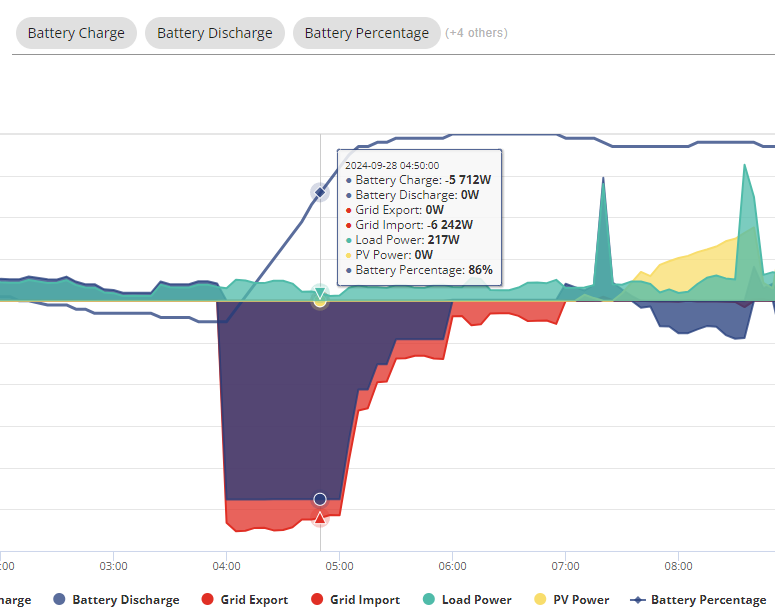
Had the max limit set to 85% on our AIO setup, and the system ignored it and charged the battery to 100%. This means any solar we generate early this morning will not be stored, but passed to the grid (for which we don't get any recompense 🙁
Apart from adjusting times or charge power settings, has anyone discovered a solution/work-around?
Ann_Hudson was there a jump from 85 to 100, or did it grow slowly to 100? Sometimes when it loses track of SoC it discovers the battery to be full before it expected it, manifesting as jumps up (or at the other end, down) in SoC.

No sudden jumps, just a gradual increase - see above, up until around 97%, where it slowed off until eventually reaching 100%.
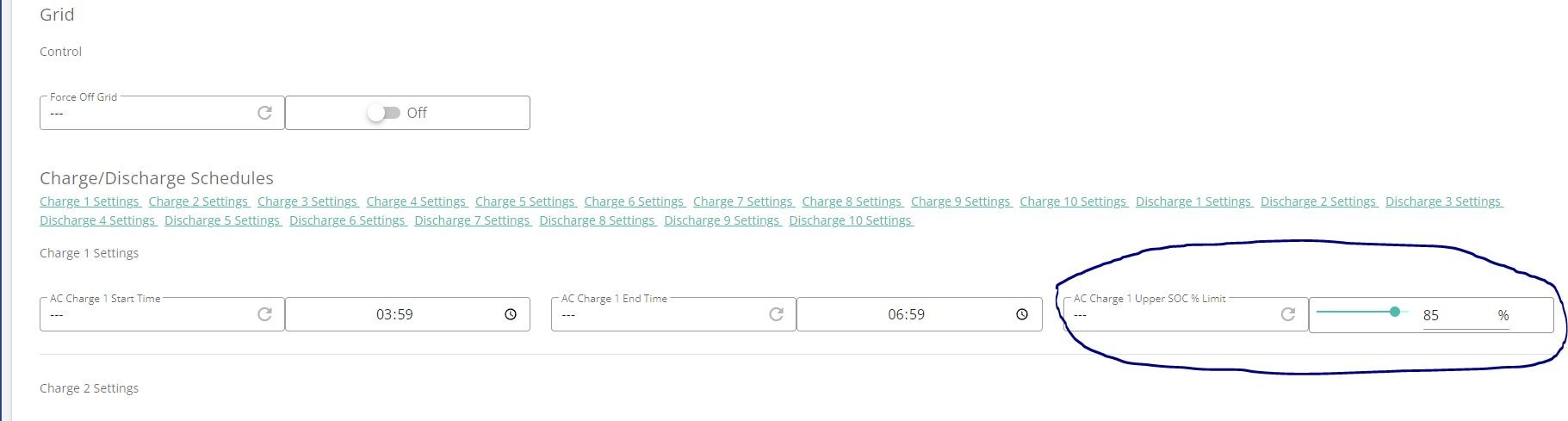
After posting earlier, I noticed within the remote control section there's an additional Charge/Discharge Schedules, that I've now also changed, and will see if that has the desired effect overnight.

So, it looks like this setting DOES need to be changed for the upper level to be respected. Battery topped out at 85%, as instructed 🙂 Now, I just need the sun to top it up fully...
Ann_Hudson sorry, this should have been the first thing I thought of... I think you've now found it, though.
On my system, the upper limit is actually controlled by the charge slot #1 limit, not the upper limit that the app exposed (or the one near the top of the remote control section). One of my API scripts copies the value from the slot the app uses to slot#1 so that I retain the ability to control it from the app.
Ann_Hudson Just a quick question, did you leave the main setting at 100% or made it match this setting as well? Just wondering what the main setting is for?
CW I set both, just to be sure... Haven't played around with not setting the main control. Feel free to give it a try...