B
Hi, my battery has been ignoring my home demand this afternoon and evening. Pulling from grid while battery sits with 100%. Anyone else seen this and know how to fix? It has moments of helping. Haven’t changed any settings. 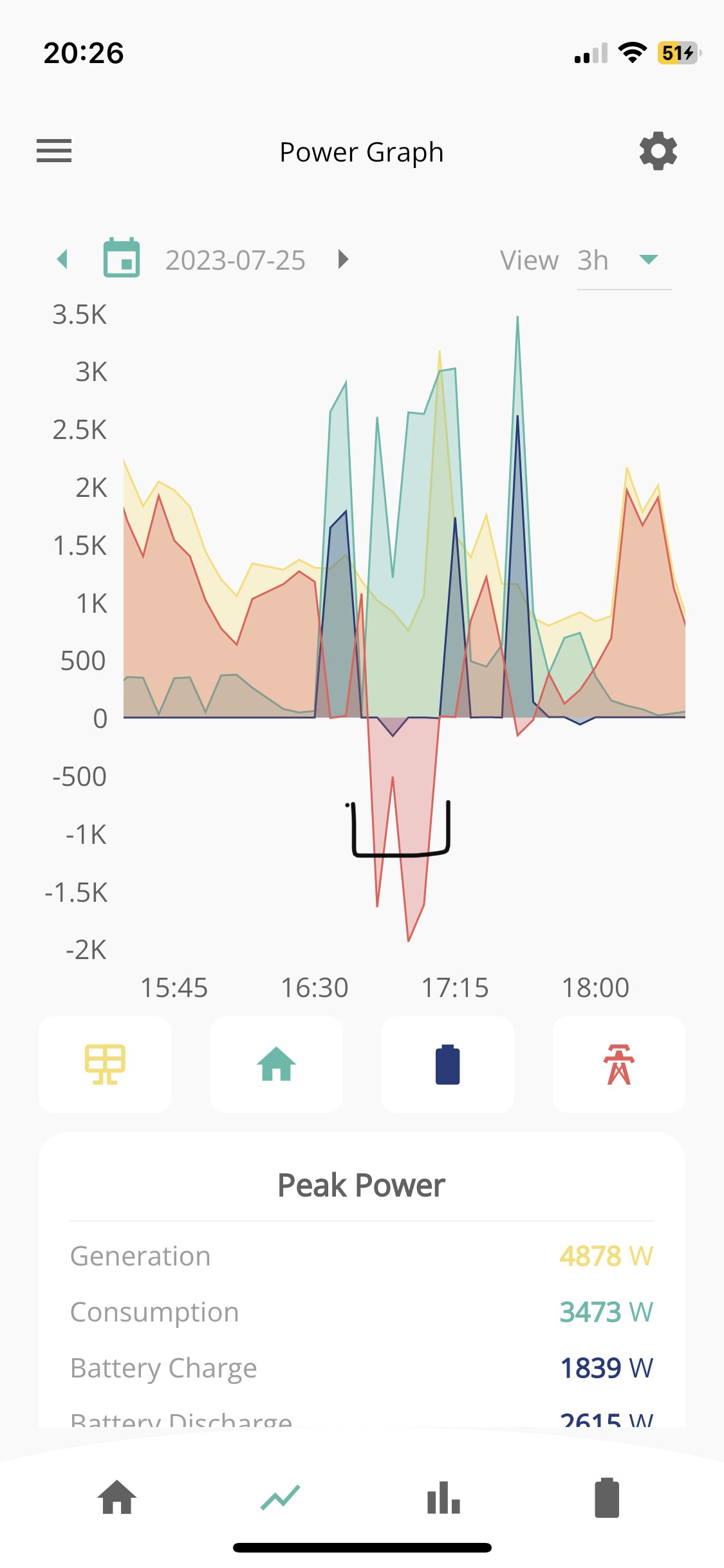
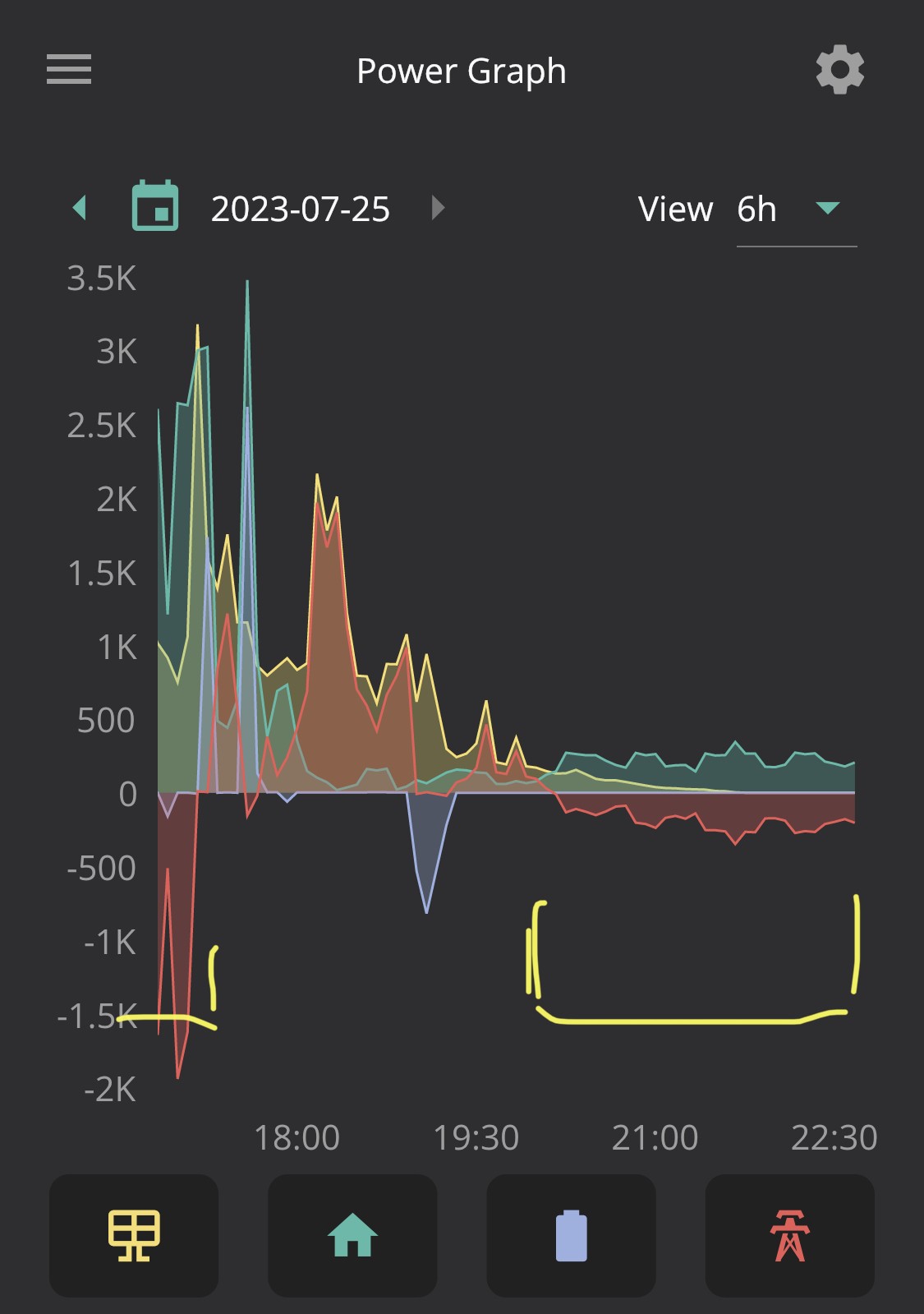

Hi, my battery has been ignoring my home demand this afternoon and evening. Pulling from grid while battery sits with 100%. Anyone else seen this and know how to fix? It has moments of helping. Haven’t changed any settings.
Hey, What mode do you have it in? Screenshot the settings inside the top right cog 🙂
Solar charge and dynamic. Been working fine.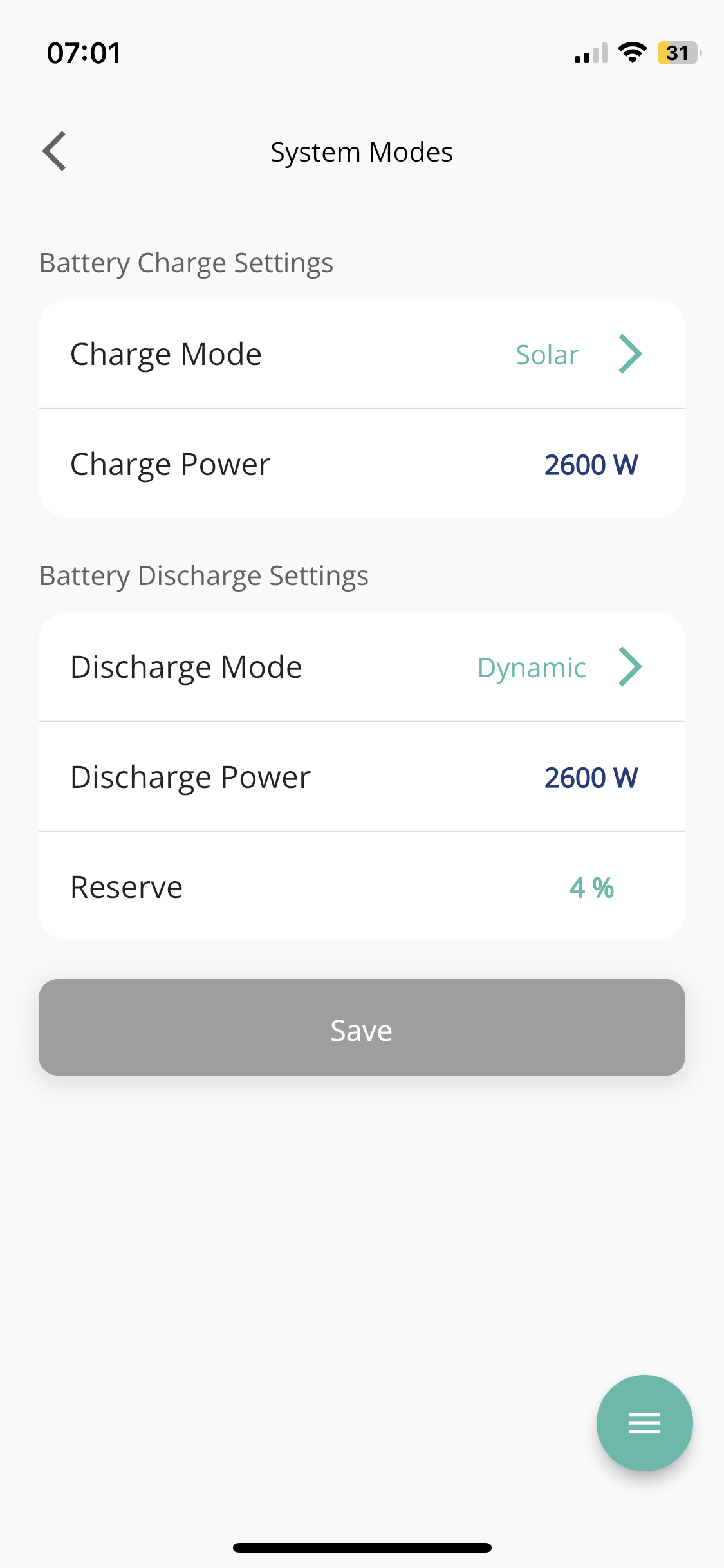
Tried a restart from the web portal (the little button on the MyInverter page)?
Tried that several times yesterday evening but nothing changed. Thanks for suggestion. I seem to have an uncommon bug!
I emailed the GE support team this morning and they have just got back to me to say they have adjusted some settings. Fingers crossed.
I had that yesterday too - its like the couple of days of really poor weather upset it and it was conserving power more than it needed to. One sunny day later and it fixed itself. Though today has been meh again.
Working, covering the demand now (too sunny earlier to tell!)
If you have used the mobile app to adjust these settings then you should use the "reset to defaults" on https://givenergy.cloud/dashboard -> inverter -> settings
It seems that the mobile app does something strange and causes the settings to get stuck in "charge only" or "discharge only" mode...
Soon as I reset mine and then inputted the values via the web instead of the app, it all worked fine.
BenG "I seem to have an uncommon bug!" - I don't think its actually that uncommon as you might think. There's another similar post, while I've recorded at least 2 instances of this happening using battery firmware version 3012.
I was on the phone to GivEnergy support about another matter and while we were discussing that I noticed I had an occurrence this afternoon when home demand was being served by the grid instead of the battery despite battery being fully charged and insufficient solar production to meet demand. Looked back and found more instances, so Andrew (GE Support) said he reset the battery to factory settings. I got a notification in the portal to say battery calibration had started (?), that was 2 hours ago. Andrew said to keep an eye on it over the weekend which I'll do. He wasn't confident this issue could be written off as something specific to the firmware but couldn't rule out it's been addressed in 3013, which I'm holding off on for now.
To be clear, this doesn't happen a lot to me. I've noticed it happen twice in one day a month ago and by chance again today. I can attribute the instances to using an iron and putting the kettle on. Anything that seems to need a more sustained demand seems to get battery discharge, that's the only pattern I can think of.
I'm interested in others' thoughts on this?
I had the battery not discharging sometimes at night on Gen 1 production firmware D0.450-A0.451 + battery 3012 as installed.
Support upgraded the battery to 3013 which worked but didn't seem to sort the problem.
They then put beta D0.195-A0.195 on the inverter, which does seem to have sorted the problem.
The only thing with D0.195-A0.195 is that I am seeing the battery cycling a bit when full. I think this might be a bug / issue with this beta firmware version that might well be resolved in the next iteration (which I think is actually D194).
I was talking about trying that version, but now I'm thinking I might let things settle a bit.
What inverter firmware are you on @BenG ?
I've observed this issue happen again today, battery at 100% but not discharging power and home demand was mostly fed by grid with about 500W by solar, so restarting doesn't seem to have done anything. I've attached a screenshot which contains data from around the time I made the observation. My gut feeling is that the inverter is taking too long to get the battery to kick in and serve power.
I have a 9.5KWh battery (firmware 3012) with AC3.0 using firmware D0.535-A0.535.
@Russell_B whats your inverter?
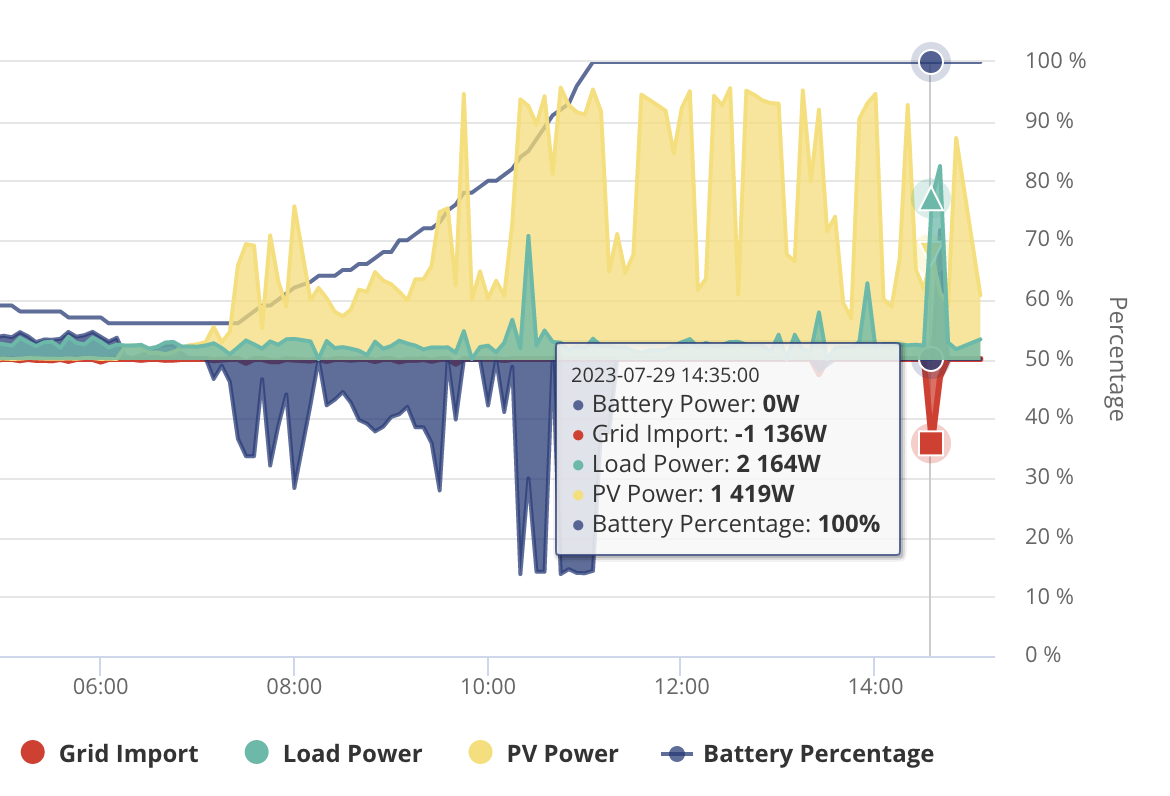
My inverter is Gen 1 HY3.6
Looks like just one reading on your graph there, which I guess could just be that the sample caught the moment where the battery hadn't quite kicked in yet. I think I can see your battery kicking in there next sample to respond to that demand spike.
What I saw was the battery kind of giving up for hours, normally at night on low load. The move to beta D0.195-A0.195 seems to have sorted this for me, I haven't seen it happen since, although I couldn't be 100% sure, I guess it could have been the 'reboot' of the new firmware going on.
Russell_B I concur. Spikes like this can mean nothing. Import plus PV looks suspiciously like a kettle being put on. It takes a few sconds for the inverter to kick in and provide power to meet the suddn demand. Of course the kettle will have switched off by the next data point so you won't see any battery usage shwon on this graph.
I've noticed something similar - so I've resorted to watching the Home Display. There is about a five second delay between the SMET2 meter and HD changing. There seems to be a long delay (a couple of minutes - ish) whilst the inverter wakes up i.e when it's sitiing at 100% with the inverter light flashing it takes a while to switch from 'Idle or standby' to Normal. I'll check the 'export limit meter' (throttles back the solar inverter) to see how long the inverter(s) take to wake up. I hope it's nothing to do with the BMS running a OCV cycle.
cluelesscris totally take on board your points and I'd be more forgiving if it were indeed a few seconds but in fact we're talking minutes (i.e. at least 60 seconds of sustained demand). More commonly its over 2 minutes.
Slartibartfast This backs up my experience & observations too:
There seems to be a long delay (a couple of minutes - ish) whilst the inverter wakes up i.e when it's sitiing at 100% with the inverter light flashing it takes a while to switch from 'Idle or standby' to Normal.
I have more examples of this happening too and it does add up so it is fairly frequent, I don't really remember this being as frequent on the version I had before 3012 (3009?) but honestly I can't be sure. I guess I can check the history on the portal.
Does anybody know how long the battery/inverter waits before drawing charge from the battery to meet demand?
Here's another minor example from a couple of days ago (minor in terms of wattage, but still serves the point).
Please note the graph. The table shows data for one the times demand was served from the grid instead of the battery. Happy to supply more examples if that'd help.
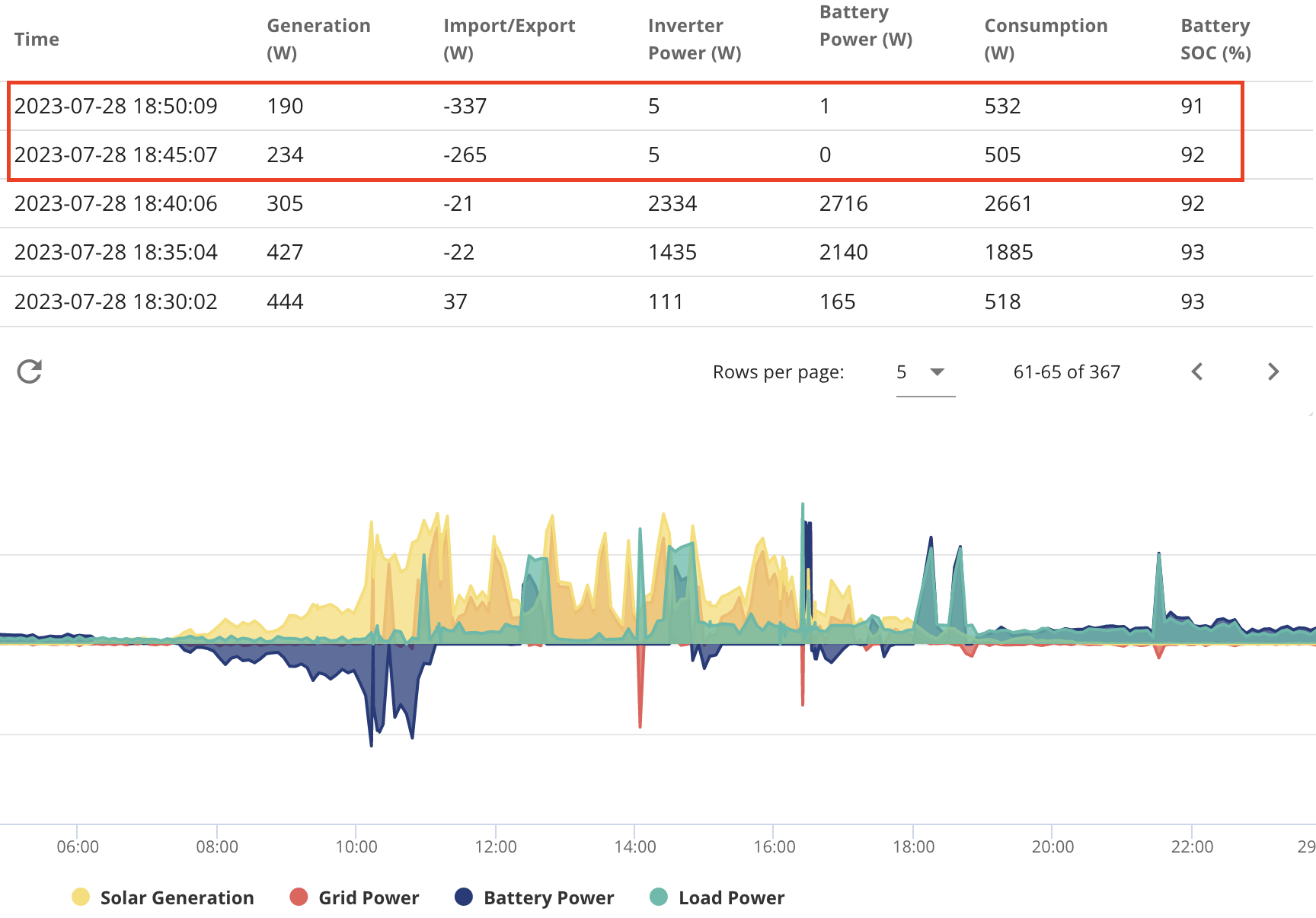
P3tro they are five minute snapshots aren't they?
One second later it could have been doing something completely different.
The only true way to monitor grid use is see how much the half hour chunk cost you. Anything else is transient data.
The app is obviously slightly better in that it is a snapshot every ten seconds, likewise IHDs too.
P3tro I think you need to add some extra monitoring to put your mind at rest as you are only seeing 5 minute snapshots - instant views that are potentially very misleading. Frankly, many of us will not use the portal for live monitoring as it's simply not granular enough. Consider using something like givTCP which will give you 10 second monitoring like the app and could be teamed up with a database to give you 10 second logging.
Thanks both for your replies.
If I find examples of this issue spanning over 5 minutes, would that justify more suspicion in your opinion?

I believe there is a known bug with the latest app where in local mode it also uploads that data to the portal at 10sec intervals? So leaving it open and running may help your diagnosis of how long it takes to react.
From what I can gather, the new firmware coming out is more responsive.
DouglasCollinson Thanks! I didn't realise you could do that...
Still seeing some random periods of battery not discharging to meet demand. This evening it decided not to kick in for a short spell (see screenshot, the meter data shows over 40mins using 0.5kwh). I'm on HY5.0 with firmware D0.450-A0.451, 9.5k battery on 3012 (failed to update last week every time I tried). Fingers crossed for that new firmware Russell_B 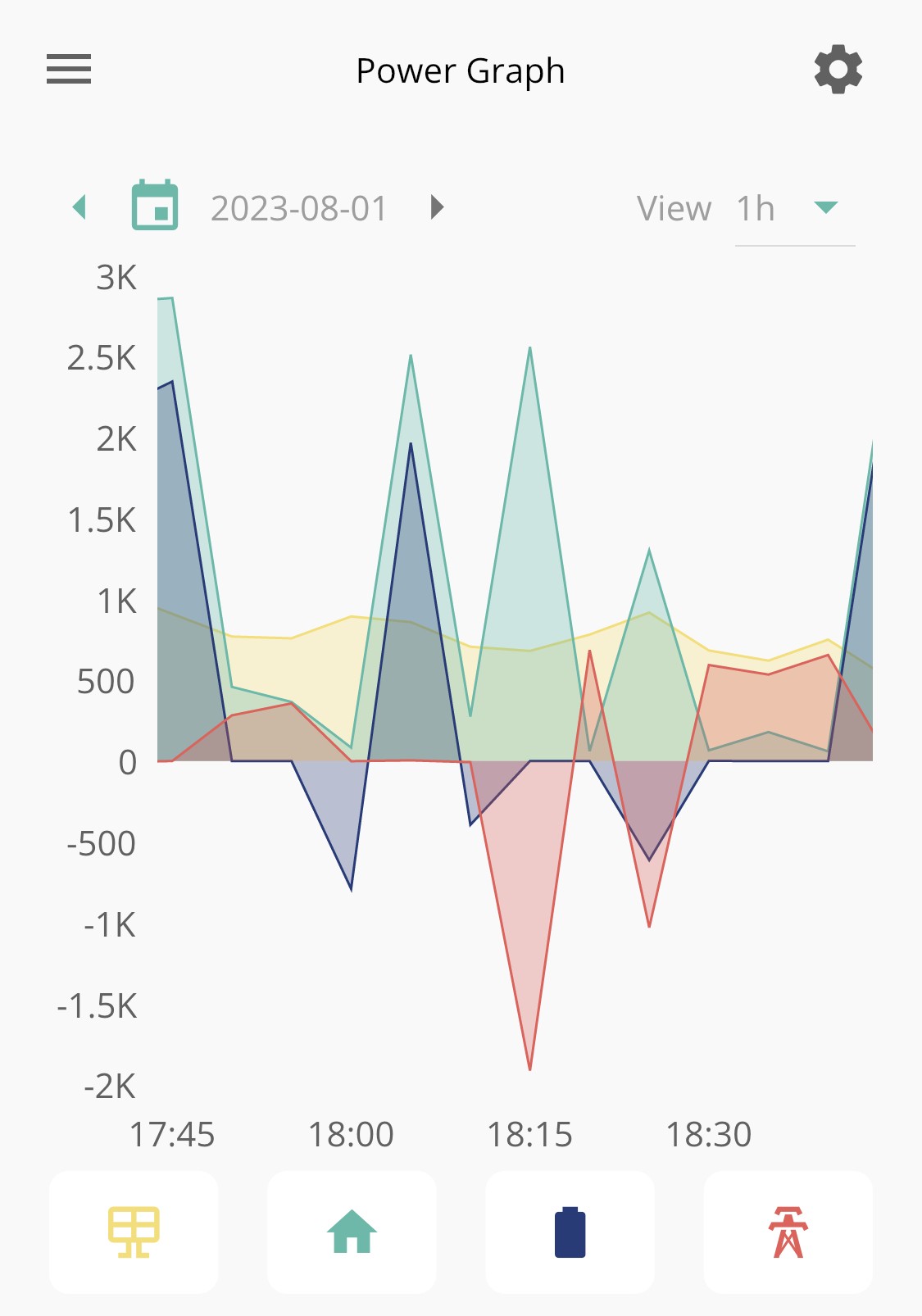
@BenG - yes I think you're seeing what I saw on D0.450-A0.451 + 3012. If I've understood correctly your inverter should be new enough for the new firmware.
I'm note quite sure where we're up to on gen 1 firmware just yet, it is maybe still a bit in flux. I'm on beta D0.195-A0.195 + 3013 that support put on there which seems to have sorted these issues, but introduced a minor side effect maybe.. (battery cycling when full + plenty of solar) .. sounds like hopefully that is fixed in the latest iteration .. I think I will hold back from the bleeding edge for a few weeks .. get involved properly end of August if needs be!
Battery is following demand nicely for me now on D0.195-A0.195 + 3013.
NotoriousPyro
Many thanks for this tip. Battery was 100% and stuck on idle even with 3kW house demand. I tried everything in the App and portal settings but no joy until ‘reset to defaults’ as you suggested. Greatly appreciated!
I've had this happen twice in the last week. I've got mine set to charge to 100% between 2am and 5am and found it didn't provide power for the next 3-ish hours. This time it's doing the same thing but also charging further. Resetting to defaults resolved the issue.
My guess is it's stuck in the previous state and refuses to come out of it. I've not seen it until the latest D0.450-A0.451 inverter firmware. Restarting the inverter didn't help either, just the reset to defaults. I'd contact GE but it looks like a known issue so I'll just keep using this workaround when I notice.