
Scheduled discharge reserve

9 comments started 2023-08-08 last 2023-08-08
Mobile AppGivEnergy ProductsHybridBattery
D
#1 dragos.balaban

Hello all

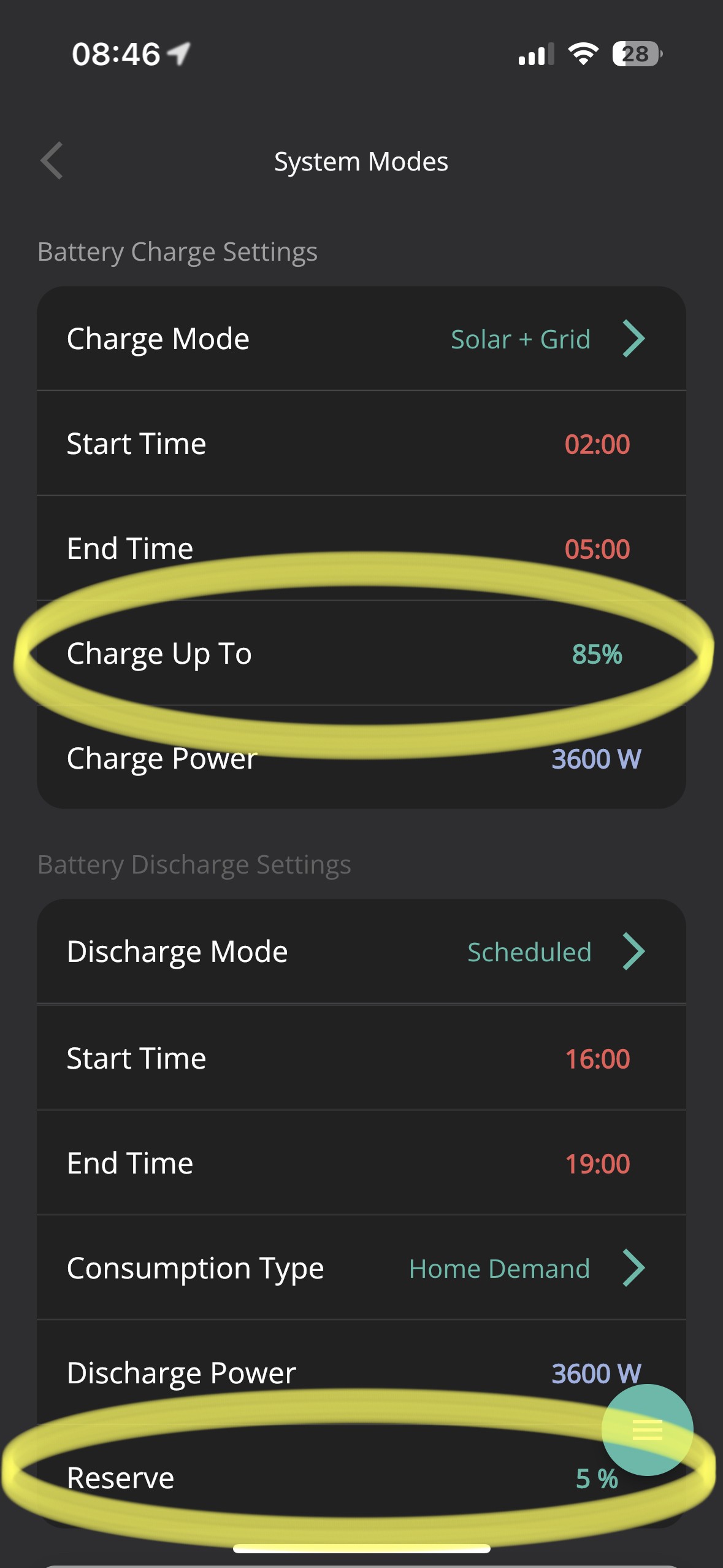
I'm having trouble to understand the wording on the System Modes screen on the iPhone app

In Battery Discharge Settings, if you set to Scheduled discharge and Consumption Home demand, the Reserve value does not refer to the value you want the battery to discharge during the discharge timeslot

The way I wanted it to work is to set a Reserve of about 20% there that would force the system to stop discharge at that value so that the remainder will support the load of the house until the next timed charge period. I expected the reserve to not apply outside the set timeslot.

Example of how I wanted it to work in real life: battery discharges to let's say 22% in scheduled discharge; the discharge period finished at 7pm and then the battery will slowly drain until 2am. I do not want to import from the grid even if SOC goes below 20%

How do you guys interpret this setting?
Am I reading it wrong?
J
#2 justpassing

No, you are reading it right. The reserve applied inside and outside your timeslot. The new gen2 hybrid firmware 911 should have multiple timeslots, with multiple soc targets (?) But none of the apps support them yet. So can't say if they do what you want or not.

D
#3 dragos.balaban

I have a gen3 firmware D0.305-A0.305 just for the sake of completeness

D
#4 Dean

If i'm reading this right,
Charge Up To = The battery will maintain that level of charge as a minimum, but is usable, if it dips under the set value it will top it up.
Reserve = Battery reserved power. So you can set it to be 50% reserved, 50% usable. So the reserved charge is unusable. in normal operations.

D
#5 dragos.balaban

@Dean I agree with the meaning of "charge up to" and "reserve", what confuses me is the time that this settings apply.

In Battery Charge settings, the "charge up to" value is only applied during the set time period
In Battery Discharge settings, the "reserve" value is applied irrespective of the set time period

T
#6 TX200

Isn’t reserve for EPS sockets/circuits e.g. during power outages, reserved for a power outage.

So if your eps isnt comissioned/wired, leave that at 4% .

J
#7 justpassing

TX200 there is considerable confusion, partly due to documentation, or lack of it, and different terminology in apps, remote control, xnc givtcp et all. You also get different behaviour in the timed period between gen1 and gen2. But the reserve on the app is 24 by 7 till you change it. It is as you say overridden by EPS I believe.

B
#8 BlokeFromStoke

I have an AIO and will be doing a similar thing to your setup, but I was thinking to drain the battery to minimum during peak flux payback - as the 30p you get from that is worth taking to then buy back from grid later at 20 odd?

D
#9 Dean

I think reserved is to protect the battery from complete depletion. Completely depleting the battery can negatively impact the life of the battery. Hence you cannot go lower than 4%
The same as in a EV, you can buy one with a 64Kwh battery but only 61Kwh is actually usable