Battery pairs charging with 25% difference

31 comments started 2023-08-10 last 2023-12-03
GivEnergy ProductsHybridBattery
P
#1 Pete UK

I’ve got four 9.5kW batteries on 2 inverters, two on each inverter. New install.

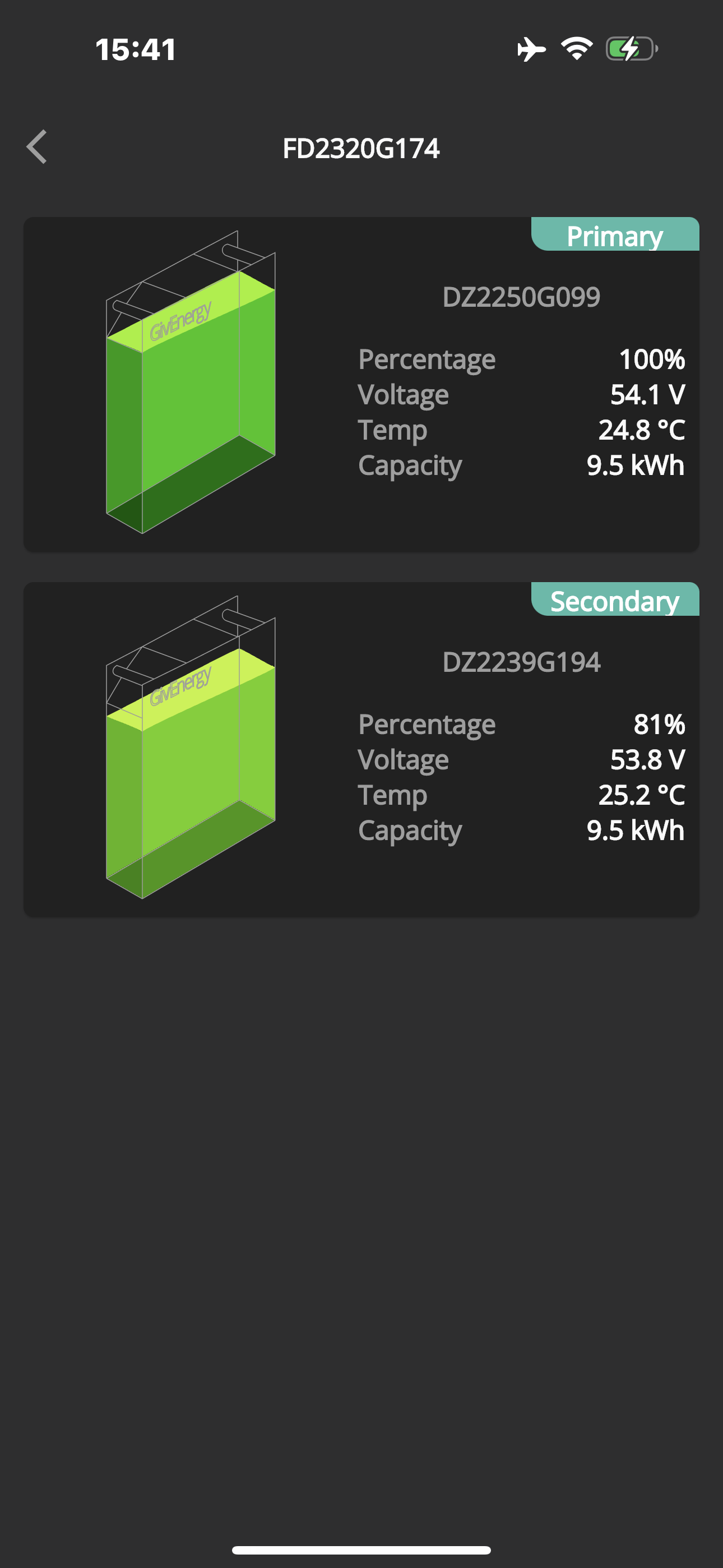
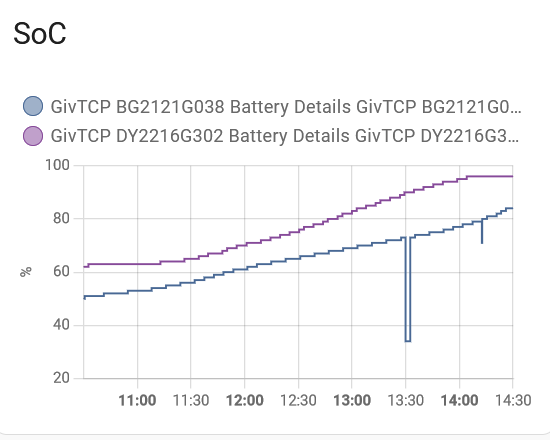
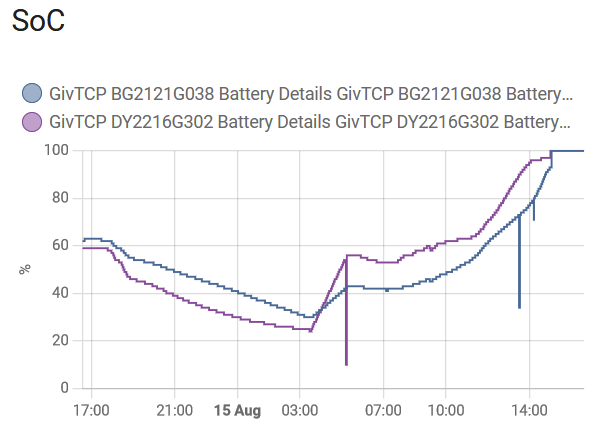
Both batteries charge up at a very different rates. So when one reaches 100%, the other one could be at only 75%.
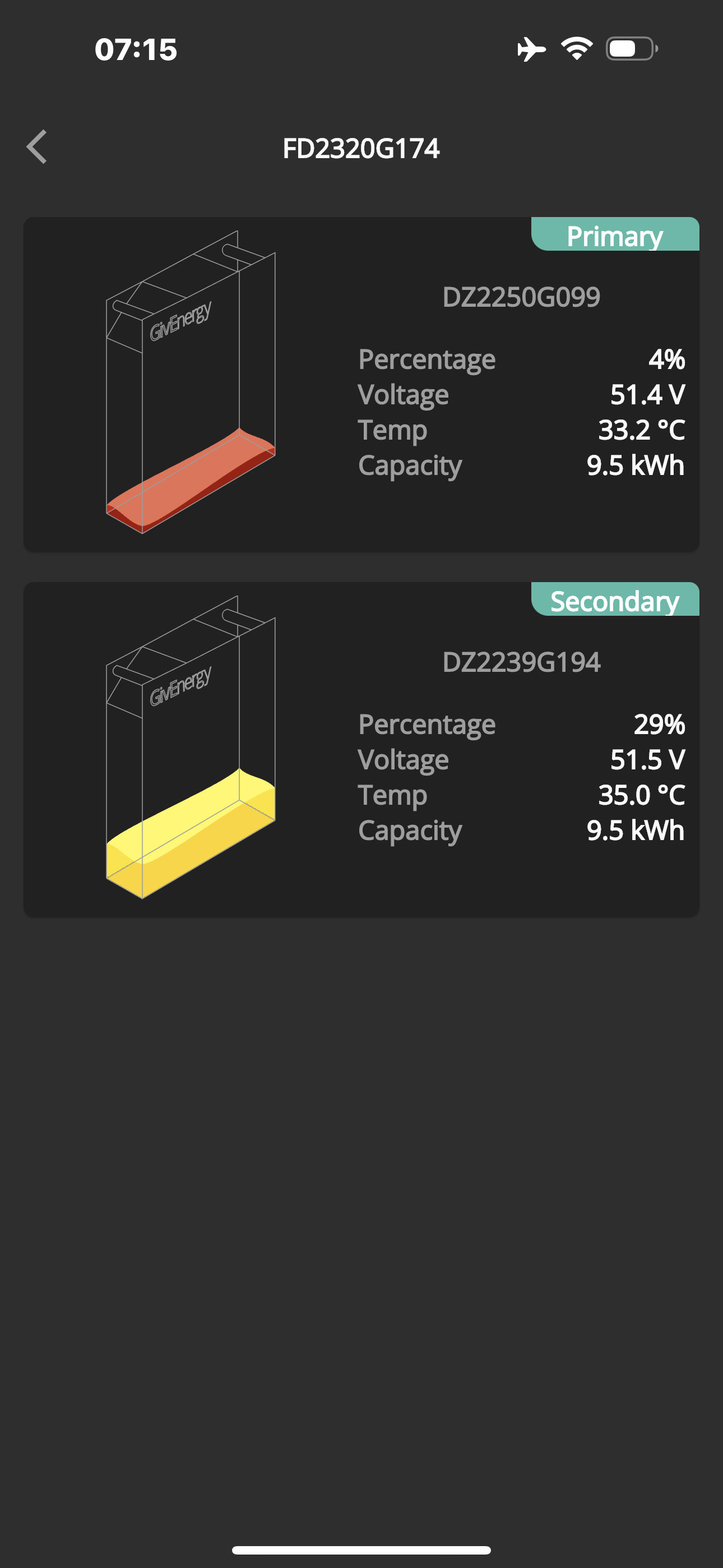
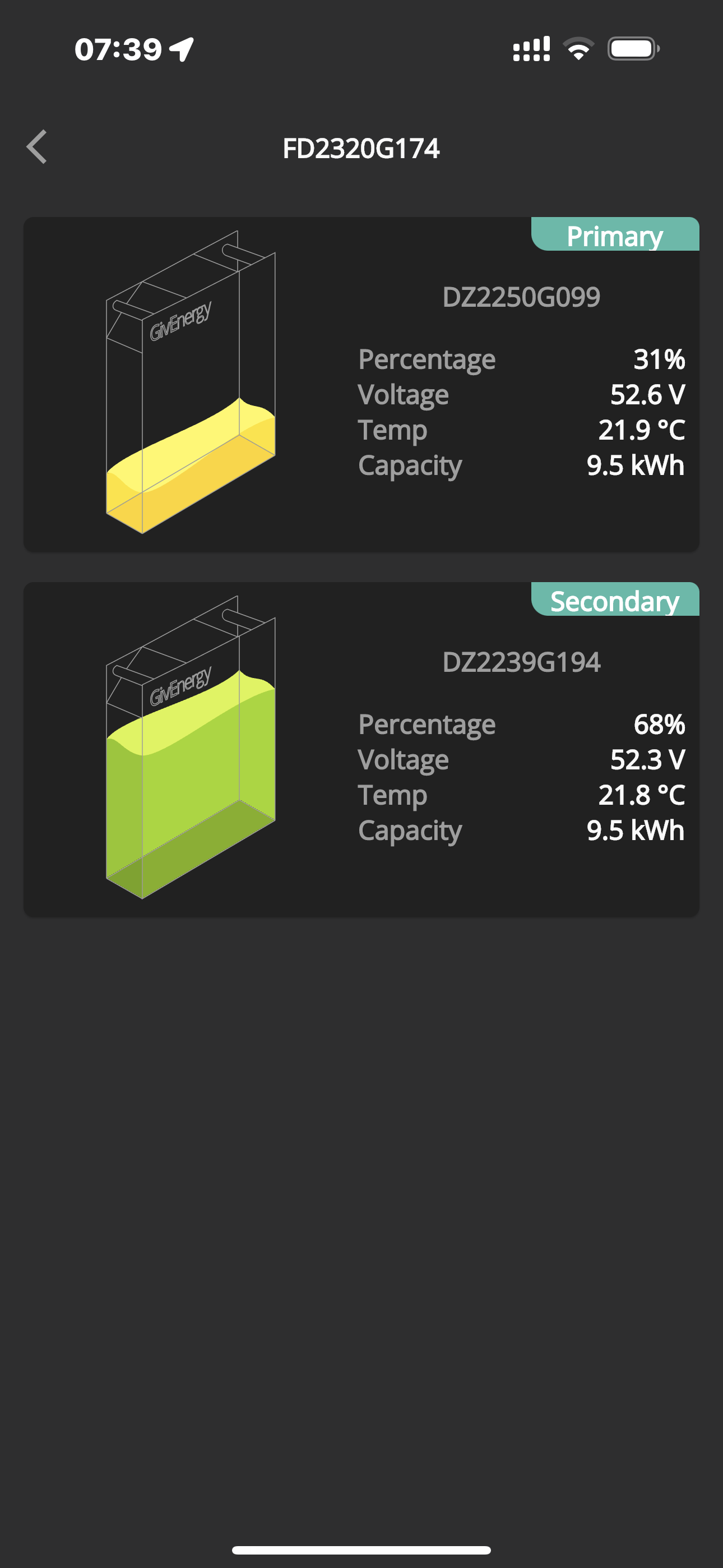
And the same for discharging. One could go down to 4% when the other one is still at 25%.
Then instead of using the 25% left, it starts to use grid import.

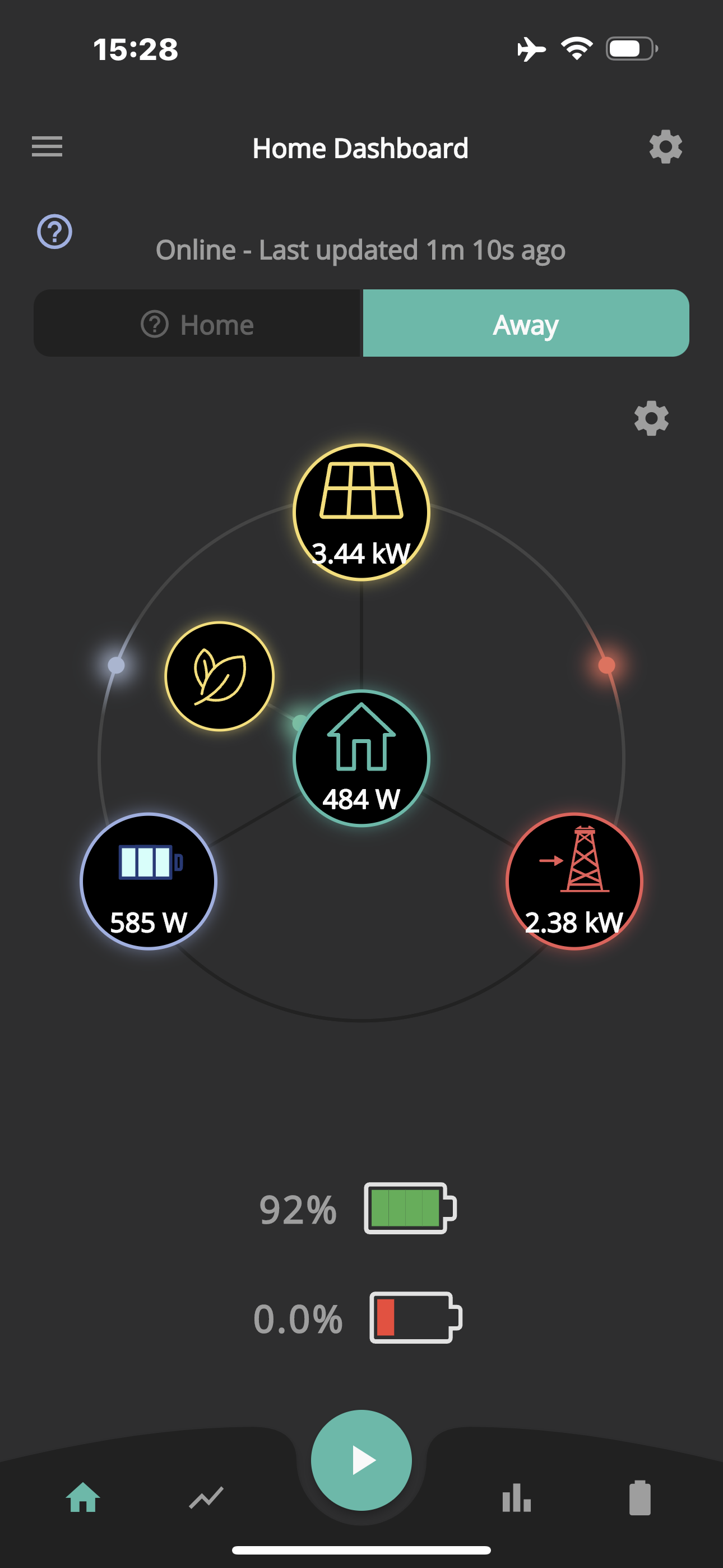
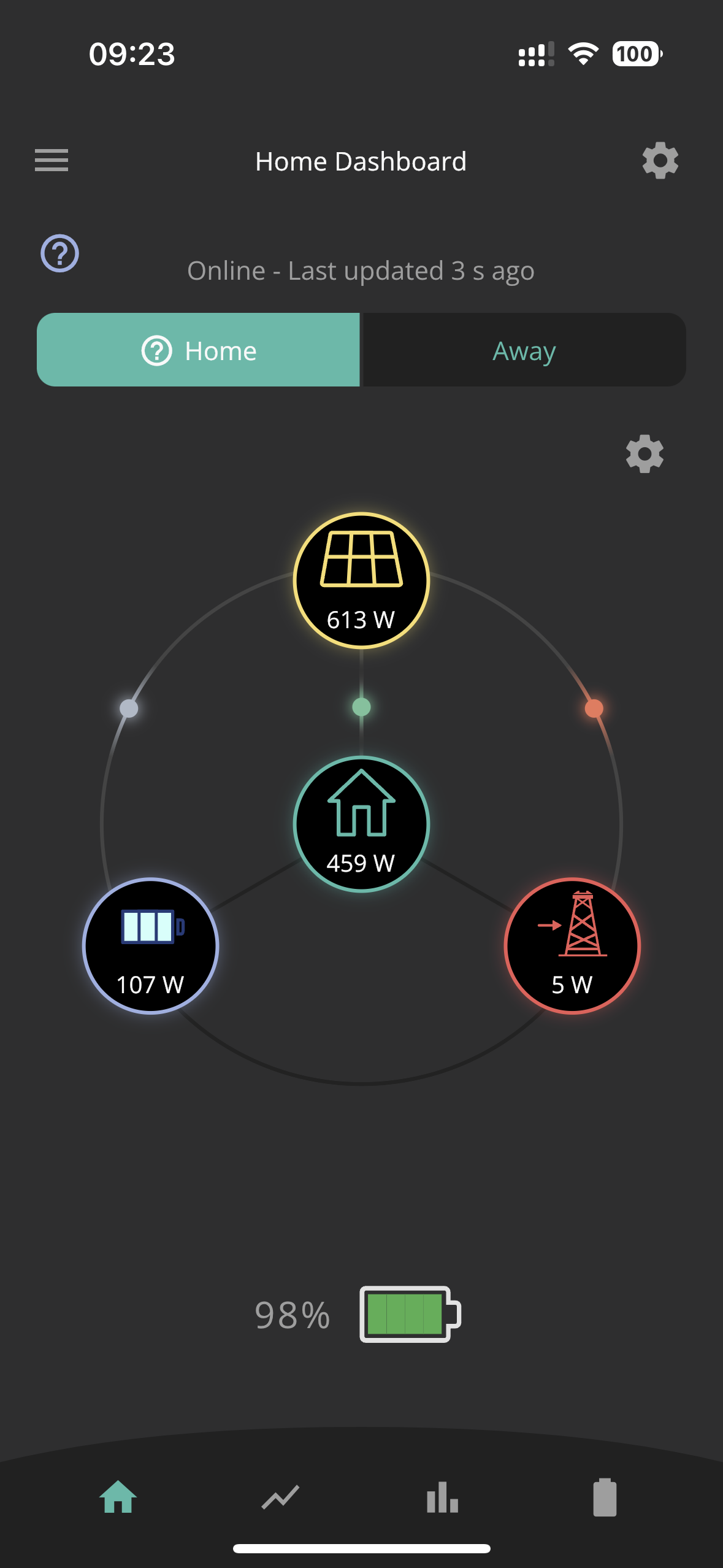
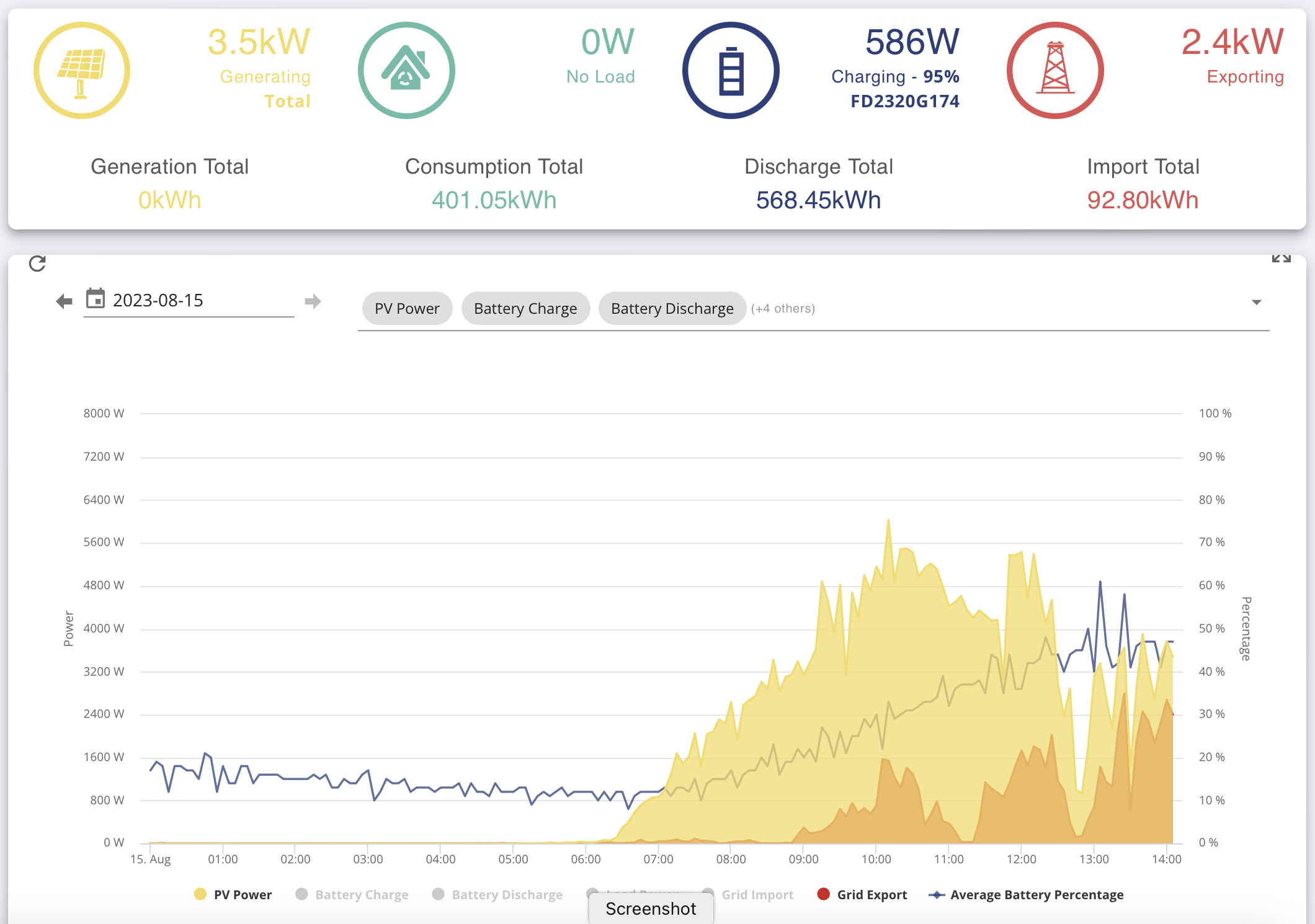
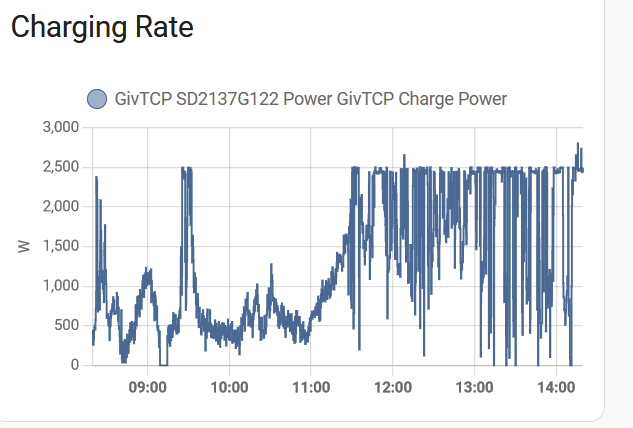
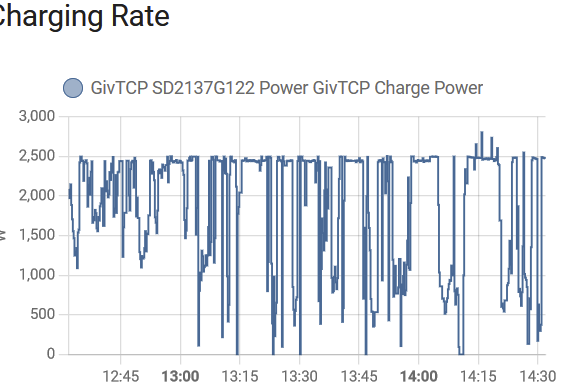
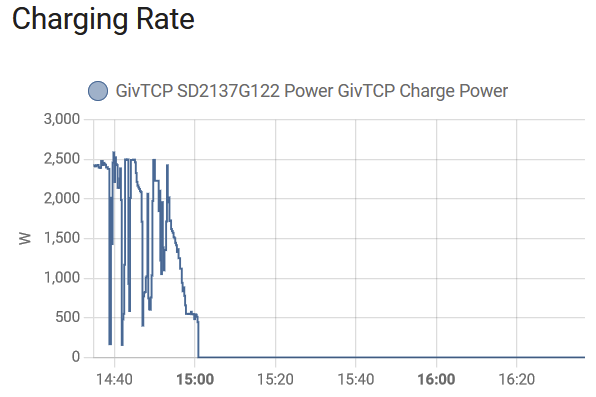
The problem with this is that when one is full, the other one charges at a much reduced rate (585W), so that it would take at least another 4 hours to catch up. If indeed it ever catches up. In the mean time, the power that could be charging the lower state battery is being wasted to export.

This doesn’t seem right to me and means that effectively I can’t use the full capacity of both batteries. This happens on both inverters.

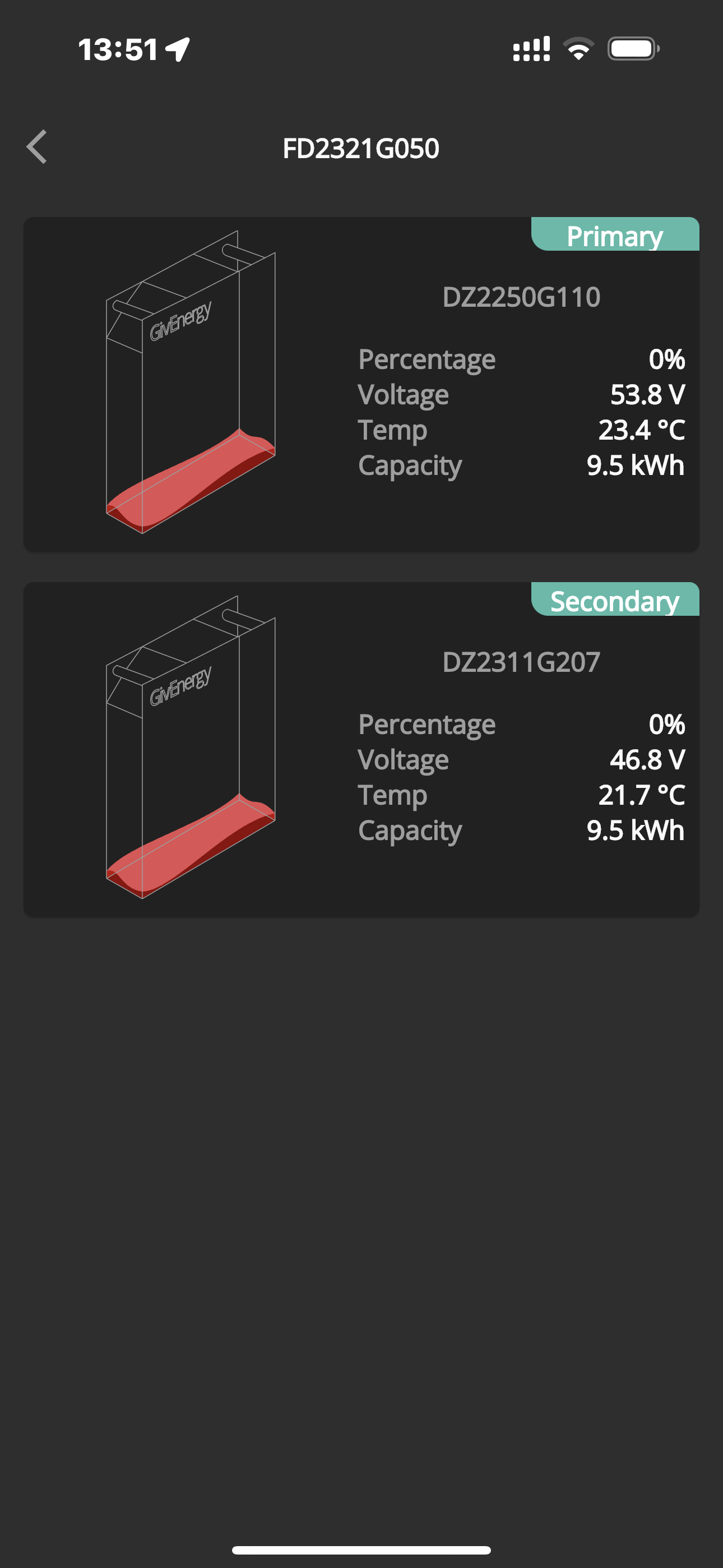
In addition. Two batteries on the other inverter have stopped working completely. One just went to 0% from about 28% and the other one stopped working after an update was pushed to me.

Can someone from GivEnergy comment on this please.


P
#2 Pete UK

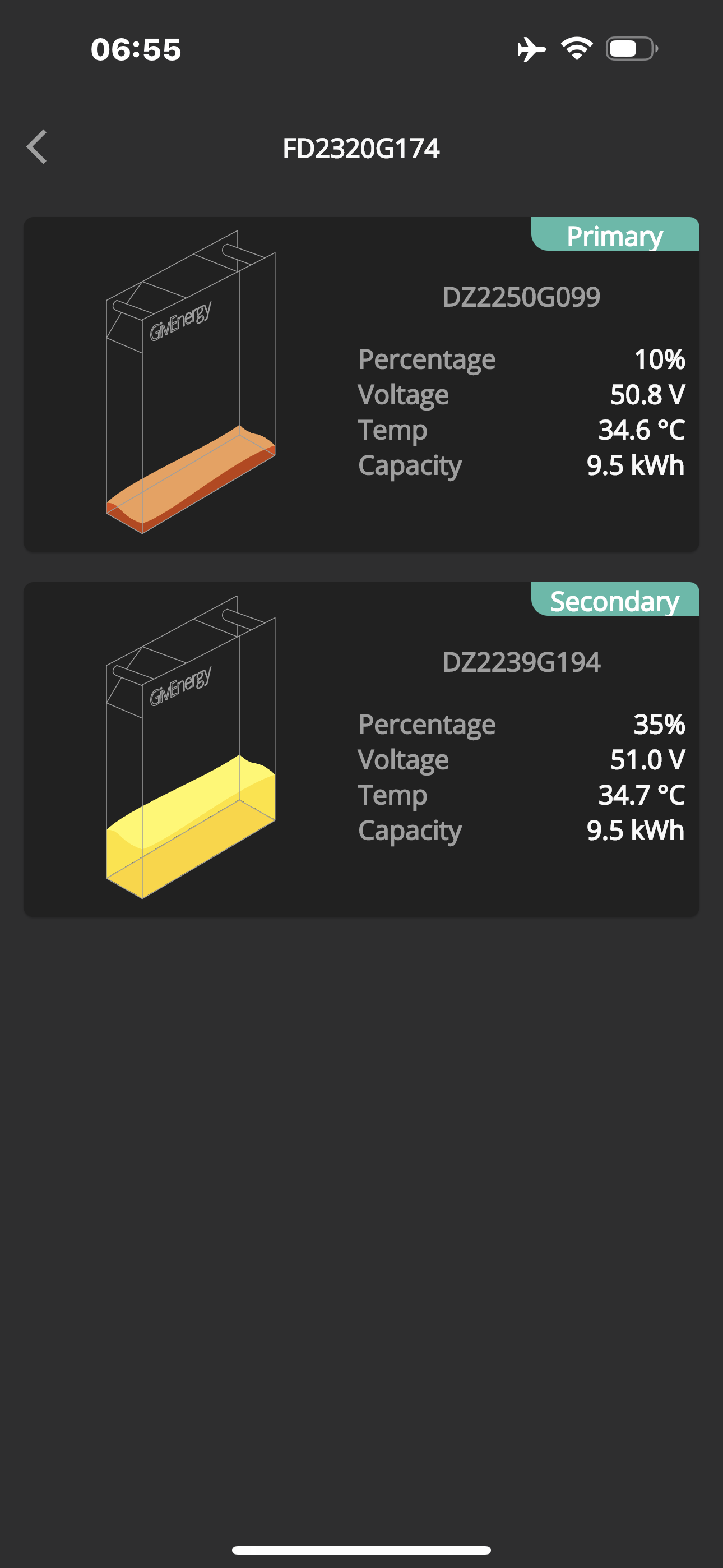
And this is at the low end…..


Meaning I can only use 6.75kW of each 9.5kW of battery I’ve paid for.

Only 70% usable?

  • This isnt acceptable.
#3 hoggy

The one ending G050 is very very low at 46.8V.
Can it not be forced charged at all? Perhaps turning off the other one until they are better matched?

#4 ProximusAl

Pete UK On your second screenshot, why have you got 2 batteries showing?

My app has only ever shown one battery even though I have 2 packs. This is on the “front page” so to speak.

P
#6 Pete UK

hoggy

That’s the one that stopped working after the update was pushed to me. It was on about 50% when it stopped working I think IIRC.

Tried everything. Installer been out twice. Been over diagnostics on the phone to GE. No joy.

P
#7 Pete UK

hhall

Yes - 2 inverters. 4 batteries. @ProximusAl - It’s in the >hamburger >settings >preferences page of the app “show multiple batteries” toggle switch.

But I believe this problem is present on single inverters with multiple battery packs as well. Looking at other threads.

Why would they be so far out? It’s as if one is being prioritised for charging and discharging before the other one.

#8 ProximusAl

Pete UK I don’t have a show multiple batteries toggle on iOS. Hmmm. Is it because you have 2 inverters maybe

P
#9 Pete UK

ProximusAl

I think so, yes.

Z
#10 Zakalwe

ProximusAl
The Android app certainly shows my two batteries. Single inverter.

P
#11 Pete UK

From today…

The batteries charged like this so far;

Primary: 4% to 54% (+50%)
Secondary: 29% to 45% (+16%)

Then the primary will keep accelerating ahead.
It’s charging and discharging at 3x the speed of the secondary !

Obviously something wrong there

R
#12 Roberto

I have a single AC and two 9.5s. They are oten 10 to 15% different. Once one gets to 100% the second magically jumps to 100% too. I have yet to run both down to 4% so have no idea what happens at the bottom end.

P
#13 Pete UK

Pete UK

Does anyone have any ideas what is going on with my remaining two functional batteries ?

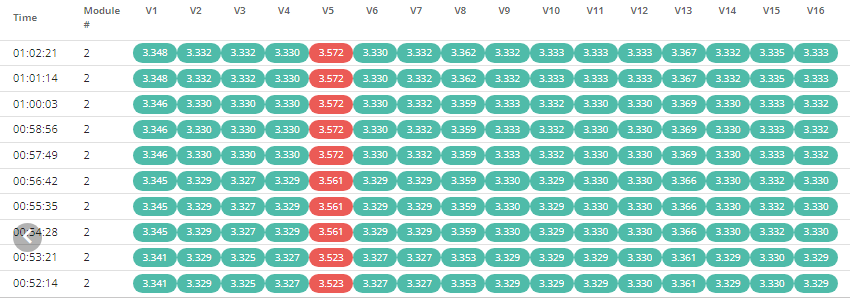
Usable:
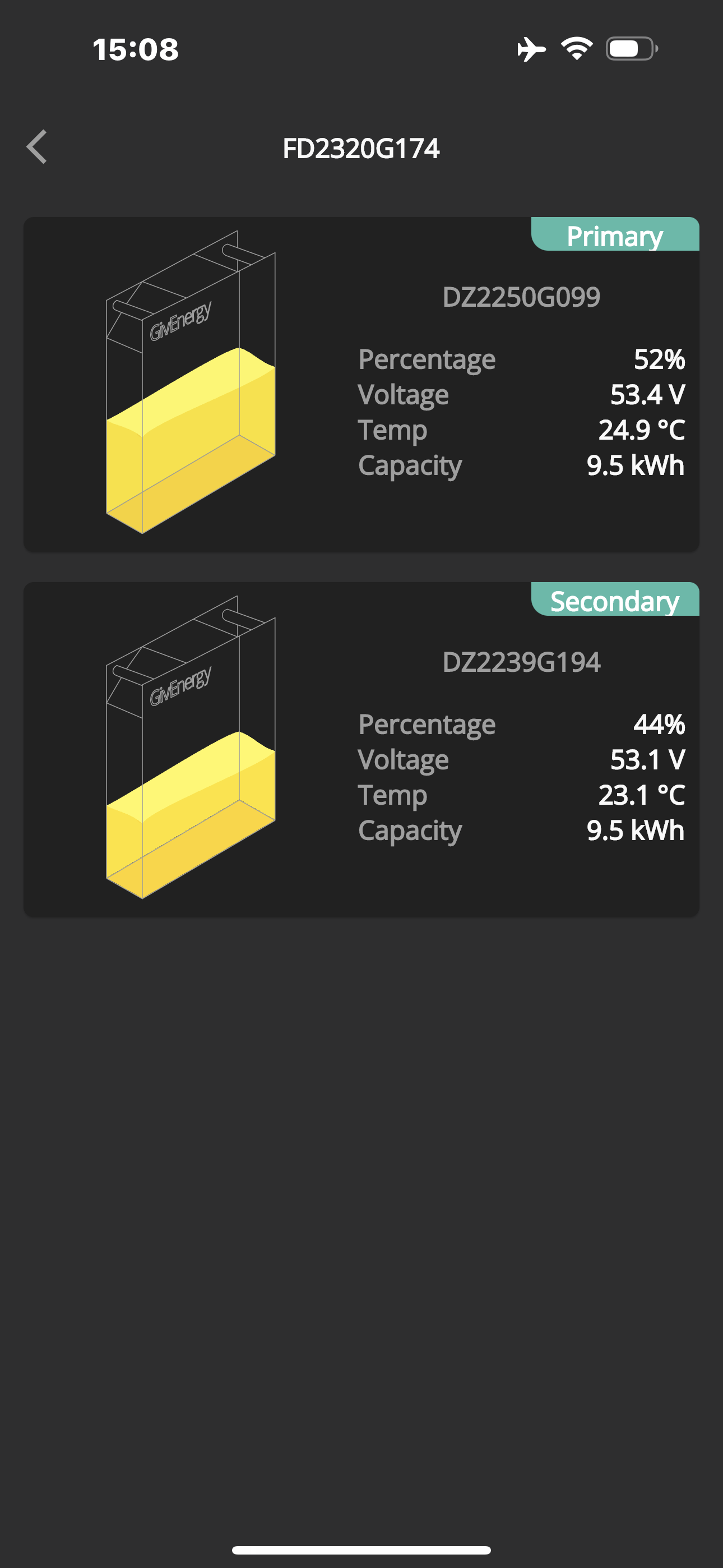
Primary from 4% to 94% while…..
Secondary from 29% to 70% ???

Why is this happening?

Any ideas what could be wrong?

N
#14 Newman

I have single AC3 charging two 8.2 kWh batteries. I ignore individual battery SoC and look at battery voltages and cell voltages. During charging the primary battery has higher voltages than the secondary. During discharges, the primary battery is at a lower votage than the secondary. I think this is due to the additional connections and 1 metre lenght of cable installed with the second battery. All cell voltages are aligned to the nearest 0.01 volts so it seems to be working as designed. Do you have poor connections between batteries that are making these voltage differences higher?

P
#15 Pete UK

Newman

Hi,

It’s a new install, so I assume all the connections are good. They might not be though. Installers have been out and gone through diagnostics with GE already for the other two bricked batteries.
How do you see the individual cell voltages? I don’t have access to that.

If you look at the picture showing 4% and 29% the temps and voltages are almost identical.

If you look at the picture showing 70% and 94% same there.

Mid range (50%) everything looks normal and more or less balanced. Just one pack doing all the heavy lifting and the other one being very lazy.

Are you implying it could be a SOC indication problem? If so I would expect the lower one to stop charging at the same time as the high one, not continue slowly charging for the next 4 hours.
Even if it is; The SOC indication on the almost full battery is preventing the other one from charging up to 100% or discharging to 4% at normal speed. It gets there, just extremely slowly. Which implies the SOC indication is correct.
I’m not seeing any SOC jumps up or down either.

The thing is, taking the latter case, the 70% battery slowly (at 585w or so) increases towards 100% where the other battery is, so it doesn’t seem like a SOC indication problem. It could be a bad lead I guess? Maybe? Or different BMS in different batteries? Or different cell manufacturers with different BMS mapping? Not sure. Only GE probably know for sure.

GiveEnergy are sending an engineer out to fix the problem, when they sort out the other 2 bricked batteries showing 0%. Not sure when, as they are waiting for “approval” from higher management to send the engineer out. Just a shame they are saying it’s a 3-5 weeks wait. It’s already been 2 weeks due to the installer coming out to look at it twice and going over diagnostics with GE on the phone !

If I ignore the individual battery SOC(s) the problem would still be there, it doesn’t really help me. Half the battery system is down and the other half I’d only see working properly between about 15% to 85% (combined average percentage for a battery pair). Or if I look at total SOC for all four batteries it’d only show it working properly from 7% to 42%

Woes indeed. Hopefully it’ll get sorted but it’s going to be a long wait with only two thirds of half of the battery storage available.

The thread was really to see if anyone else is having the same issue with battery pairs or if it’s just me with equipment from a bad batch or something else.

N
#16 Newman

I use android inverter monitor by Rubikcube. It monitors without control and shows all batteries and cell voltages. Only works at home but saves starting up PC. Very useful. Thanks to Rubikcube.

P
#17 Pete UK

Ok, so this is what I’m seeing after one battery reaches 95%+ and the other is on 70%+

Charging slows right down for the lower pack and the majority of the solar is getting exported.

Anyone else seeing this?

Z
#18 Zakalwe

One of mine is at 96% and the other at 81%. I'll keep an eye on it, but at the moment it's charging at full rate.

Z
#19 Zakalwe

The primary battery is now flatlined at 96%

The secondary is now catching up. I expect it will SoC jump to 97%. Charging is still going at full pelt (when the clouds allow it).

So, no I'm not seeing charging slowing down once one battery show full.

Gen 1 Hy5
2 x 8.2 batteries.
5.2kWP south facing array in two strings.

P
#20 Pete UK

Thanks for that very interesting. Are you seeing the same indications in the app/ portal ?

I’m Gen 3 5.0 hybrids, 9.5kW batteries

Z
#21 Zakalwe

As expected, the secondary jumped from 93% to 100% (this behaviour has been there from day 1, regardless of what firmware it is on). Both are now on 100%. The charging rate stayed at 2.5kW until the last 5-10 minutes or so.

9
#22 94jdh

Pete UK I had a similar issue about a week ago, two inverters gen3 5kW and a 9.5kWh battery on each.
One of my batteries dropped to 0.0% and the BMS had hibernated with a low voltage of 3v
Paul kick started it for me on a slow charge, then solar charged it once the voltage was over 48v.

P
#23 Pete UK

Ok. Maybe Paul can try that with one of my 0% ones; G207 - the one that failed after the update was pushed to me. It’s on 46.8v. Apparently the other one on that same inverter has a BMS fault. I’m still waiting to be assigned an engineer visit.

Who’s Paul ? And how to contact?

As for the other two batteries on the other inverter above, still exhibiting a very large split at top and bottom end, with charge/ discharge rates dropping off a cliff. Right now they are idle and the primary is at 96% and secondary is at 98%. Global figure for the pair combined says 100% 🤔

You’re on the EMS beta as well right? The S/W one?
I sent you a PM on the Tesla forum BTW but didn’t hear back.

Regards.

T
#24 TX200

Pete UK pop your inverter serial number in the thread and type an @ symbol followed by thedragon and click on that to add his username to the thread.

Although he might be on holiday.

Alternatively web chat or email support.

P
#25 Pete UK

@TheDragon (GivEnergy) - Hi, any chance you can try and kick my battery DZ2311G207 on inverter FD2321G050 back to life with a slow charge?

Many thanks.
Pete

And if you’re on holiday, stop reading work stuff and enjoy your holiday 😜

9
#26 94jdh

Pete UK I must have missed that one, I've not been active on it recently as busy with work shutdowns, sorry about that.
I'm not on the software one (yet) but I know someone that is, so hopefully will be rolled out on an open beta soon....

P
#27 Pete UK

@TheDragon (GivEnergy)

“Hi, any chance you can try and kick my battery DZ2311G207 on inverter FD2321G050 back to life with a slow charge?”

Hi please can you look at the above, when you have a moment. I’m down to half a system and no engineer visit date on the horizon.

Many thanks.

Pete

#28 TheDragon (GivEnergy)

Pete UK that's not the problem Pete. There is no connection between inverter and at least the master battery.
A force charge does nothing and there is no BMS data sent.

You need the engineer to replace the faulty board

P
#29 Pete UK

TheDragon (GivEnergy)

Hi, ok thanks for looking. Will continue to patiently wait. Sincerely appreciate you replying.

P
#30 Pete UK

The battery percentage split is getting worse. 37% difference this morning !

Voltage and temps very close though.

TheDragon (GivEnergy) any chance you could look at this, explain what’s going on and offer a fix please? Inverter FD2320G174

The GE engineer came on Monday but couldn’t fix my other problem with my 2 faulty batteries on the other inverter. I’m finding the GE support response is very slow to give me any updates. Since he visited on Monday I’ve chased and chased but I’ve not managed to get any response as to when they will be coming back to replace the faulty equipment. Or regarding the battery % split on the two remaining functional batteries.

P
#31 Pete UK

Ok, so just to finish this off then….

I hope this might be useful if you see similar things on your multi-inverter/ and/or multi-battery system.

I had the secondary battery on the first inverter pair with the large split in SOC between them (25-35%) replaced a few days ago.

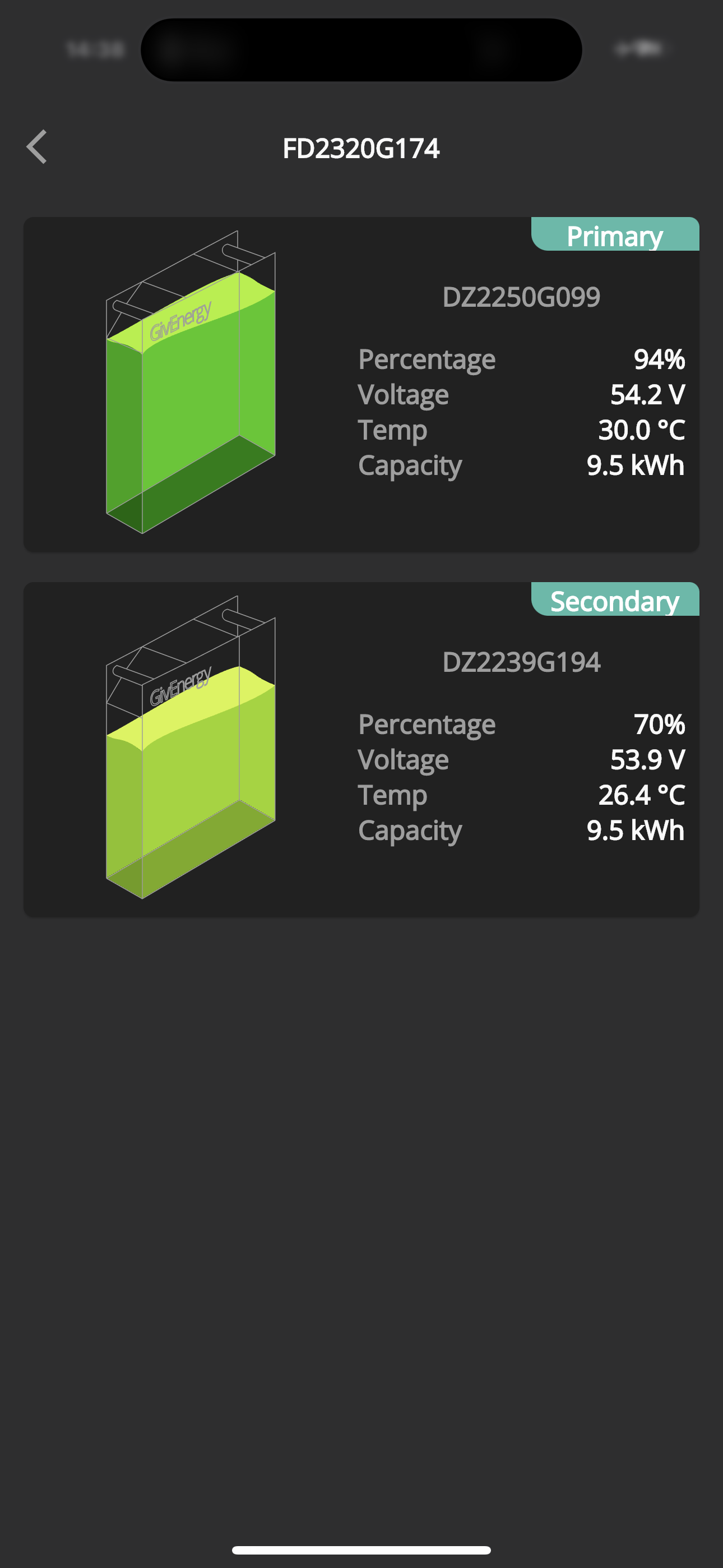
It turns out that there was a “dead cell pack” so the voltage on that pack was getting far higher than the other cell packs and stopping itself (and the other battery) from charging/discharging correctly. This seems to have been the crux of the problem from day one (end of June), causing all the SOC, limited charging/discharging and available capacity issues on that pair of 9.5’s.

The other pair that both “died” - one battery was replaced a month or so back and a board and BMS on the other replaced (at least twice); the first try had it indicating the wrong capacity randomly and the wrong serial number showing, along with a sizeable split in SOC between the two.

Now all seems to be significantly better. I’m still seeing a split in SOC on the first battery pair (18% bit with similar voltages!), but it’s catching up slowly towards the end of discharging, in so far as I’ll see 0% on the primary and 12% on the secondary when “empty”. The calibration didn’t finish properly on this pair (only discharged, no full charge). So that may be the reason?

It took 5 months to rectify my system in total after reporting the issue on day one. I’m happy that my system is now fixed But also a bit anxious about the long rectification times in case problems develop in the future. And how to get these problems taken seriously and fixed in a timely manner!

I’m on the latest firmware updates (307 and 3015). I’m also on the inverter balancer beta testing.

This is what GE saw, which I couldn’t see….