In the portal, the top card with the charge / discharge figure for the battery, for my 8.2kWh I'd expect that to charge the battery from 25% to 50% would take roughly 2kWh, correct? Likewise with discharge. I am not seeing that, even with the battery firmware update yesterday and SOC calibration, it is more like 25% = 1.5kWh. So either the calculation on the dashboard is wrong or my battery is not being charged fully, missing about 1.5-2kWh. What does everyone else see? Is there anywhere I can check more details about the battery charge state?

Battery charge / discharge figure in the portal
chris_p I see figures for my systems that suggest 2kWh provides about 25% charge. However the last time my battery ran out overnight, it stopped discharging at just after midnight (4%SoC/43.74V); five minutes later, it logged 0% and 45.79V and started charging from the grid at 500W for 15 minutes, then increased to 1500W for about 25 minutes and stopped charging, showing 4% SoC and 52.88V. Looking at daily battery data, it seems to remain around 52V irrespective of the SoC.
You can get individual cell voltage from Givtcp but not from the portal or API. I think a call to tech support might get you the answer you're looking for.
Tim Thanks for that. Before I went back to Givenergy Support, I wanted to hear what others see on their dashboard to make sure mine is essentially 'different' and could be a potential issue. Hopefully more people can corroborate the "25% = 2kWh" theory.

Last night I added 4kWh to my 8.2 which took it from 41% to 90% so that's roughly the same as 25% being 2kWh.

You can still get the cell data from the API if your desperate.
There's a basic Powershell Script on this thread if you don't have experience of the API.
hoggy Does that work with the new API?

chris_p no its different but the old API isnt dead yet.
hoggy Ok thanks. I can't seem to see where to create a key in the old dashboard, or will a new API key work?

chris_p it's from the old portal:
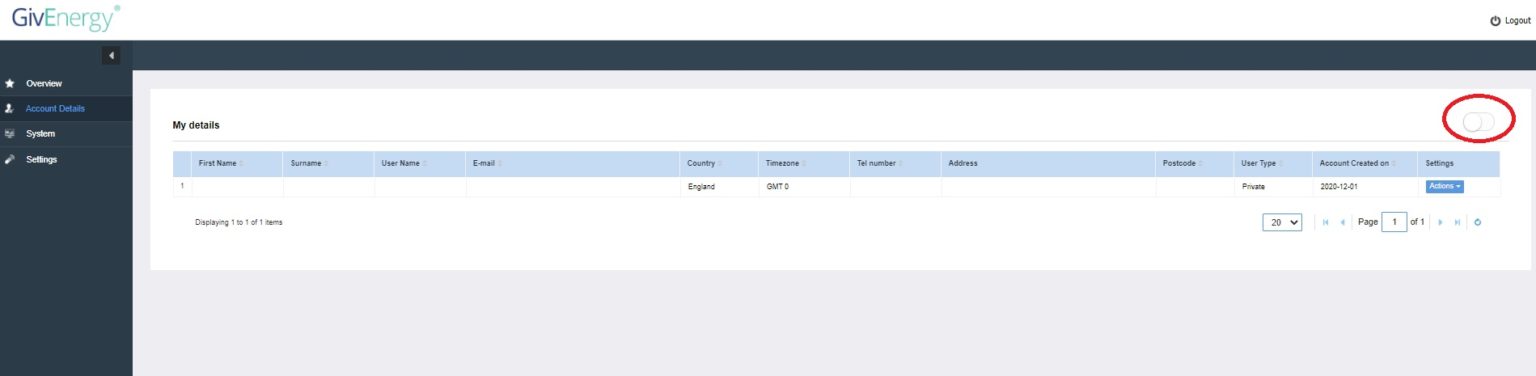
Login to Old Portal > Account Details > Toggle in Top Right Corner:

hoggy Woah, super obvious! 🤣 Many thanks!

Yeah I've just asked how this works when this old portal goes in a few weeks. It may well be the end of the legacy API's unless the new keys work on both now.
Got that working, got this back...
{"success":true,
"lost":false,
"maxVoltModule":1,
"minVoltModule":1,
"modules":[{"cellVoltage8":3309,
"cellVoltage9":3301,
"cellVoltage4":3306,
"moduleVoltage":529,
"cellVoltage5":3327,
"designCapText":"160.00",
"cellVoltage6":3303,
"cellVoltage7":3306,
"moduleSoc":60,
"cellVoltage10":3306,
"cellVoltage1":3306,
"cellVoltage2":3301,
"cellVoltage3":3306,
"cellVoltage14":3306,
"hasBmsCellModuleInfo":true,
"cellVoltage13":3304,
"cellVoltage12":3303,
"cellTempreture2Text":"25.4",
"cellVoltage11":3308,
"minVoltItem":2,
"maxVoltDiffValue":26,
"cellTempreture3Text":"26.2",
"module":1,
"charging":1,
"maxVoltItem":5,
"cellTempreture4Text":"25.1",
"cellVoltage16":3301,
"cellVoltage15":3306,
"discharging":1,
"moduleTempretureText":"27.8",
"fullCapText":"148.42",
"time":"2022-03-16 13:09:53",
"cellTempreture1Text":"26.8"}]}
I thought in the old portal there was a voltage > cell table for the battery?

Yeah thats gone a while back. Was supposed to make it to the new portal at somepoint.
The above is all that cell table though (and a bit more) just without the data processing
cellVoltage8":3309 Divide by 1000 = 3.309V
"moduleVoltage":529, Divide by 10 = 52.9V
"designCapText":"160.00", = Cell Factory Capacity - Multiply by Nominal 51.2V = 8.2kWH Pack
"fullCapText":"148.42", as above but actual TOTAL capacity of cells now = 7.59kWH technically available Including buffering (usable is still less though)
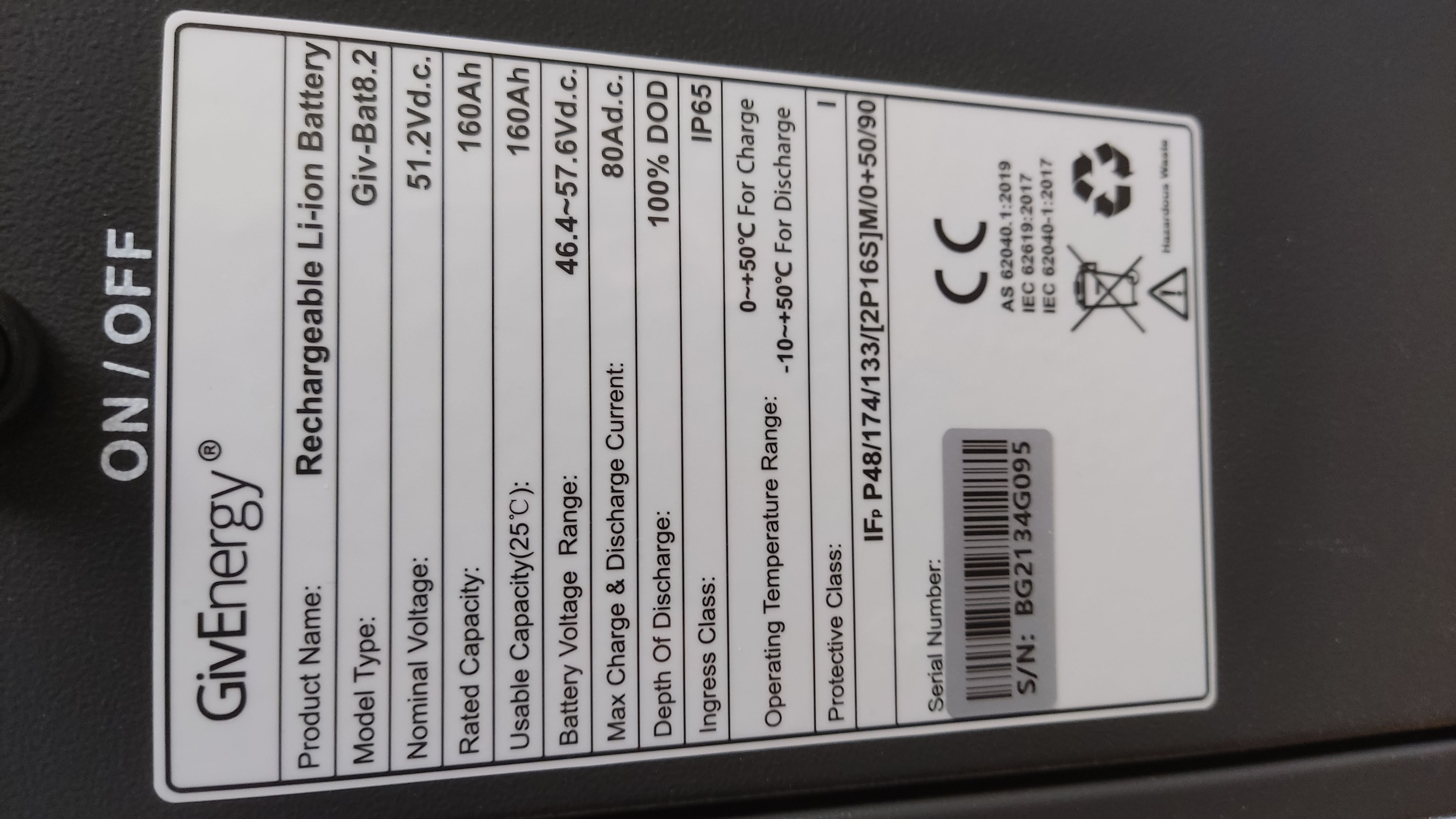
So hopefully if I've got that right, you have the same Battery as me - a 1st Gen 8.2kWh Pack with 80% DOD (8200 * 0.8 = 6.5kWh which should match the sticker on the side of the pack) and currently 1kWh of Buffer left.
hoggy Interesting, thanks for looking at that. I thought the 80% DOD made it 8.2kWH, so it is actually a 10kWh pack?

chris_p on the newer ones it is (the design cap is 200ah cells so (51.2 x 200) x 0.8
They did some older ones that i have and i think you have although you might not have known that were 8.2 with 80% DoD.
It should say on the sticker on the battery "usable"
hoggy This is my sticker...


Now don't quote me on this as I've only heard of it from 1 or 2 people but i think there was a duff firmware a while back which essentially converted the 100% DOD battery to an 80% one by accident.
I'd have a chat with GE support on this, as it stands (if your figures from the API are genuine) you are not getting 8.2kWH from your battery - the full cap should be 160AH not 148.42AH / 7.5kWH you appear to be getting.
hoggy That could explain it. Although they did do a firmware update and full SOC calibration yesterday and it still isn't right today. I've emailed GE support explaining the issue (as I originally did in February when they suggested an update but said my USB was missing - which it wasn't so had to do manual update using laptop... Not very end user friendly that!). So I'll see what they say and report back here. Thanks for your help hoggy, really appreciate it 😀

chris_p it would explain why your not seing the right amount of power in/out per %.
It tallys surprising well with a 6.5kwh usable battery if you base your sums on that.
Adam of GE Support has replied saying that a physical visit to my battery may be required. Will keep you all updated.

chris_p tell them to chuck a 9.5 one in the van "just in case"
hoggy You read my mind 🤣

I expect they will as it has replaced the 8.2
THALL They asked for a photo of the battery location, guessing that could be to check if the larger 9.5 will fit.

Well fingers crossed.
@chris_p We've experienced a similar problem with our 8.2 kWh battery over the last week or so. The fullCapText value initially dropped to 102.09 (5.2 kWh), and is now down to 70.22 (3.5 kWh). We've also been told that we'll need a site visit and were asked to send photos of the install. Have you been given a date for the visit yet?
404 Not Found No date yet, I plan to chase them next week
404 Not Found I contacted GE support on Monday to ask if they have a timescale for the onsite visit, but no reply yet. Have you heard anything?
chris_p Yes - someone is coming to look at our system this afternoon. I'll let you know how it goes.
404 Not Found Great, appreciate that - thank you!
chris_p The chap from GivEnergy was here for an hour or so at lunch time. If I've understood everything correctly, the problem with our battery was that the voltage on a couple of the cells had dropped a long way below the rest of them. This has now been rectified, the battery SoC has been re-calibrated, and the system is showing a fullCapText of 144.27 (up from 70.22 last week). According to the dashboard, it took a little under 8 kWh to charge the battery from 0 to 100%.
404 Not Found That's great that it is sounding like it is much improved. I wonder if it was ultimately something they could have rectified without a site visit?

If the cell voltages were in the portal, on a Battery tile. You could have done this yourself. Saving a GE engineer visit,.
Maybe send in some feedback for a dedicated battery tile. With the full set of battery data available. 16 cells per pack, each can be monitored for voltage & temp.
@Danlambert (GivEnergy) , an idea here to save a wasted engineer visit, had the user known the cell voltages were out of sync

TheDragon (GivEnergy) The battery tile is coming, I asked for it a while back. No eta on it.

To be fair the cell voltages are still available in the API so GE would already have access / known all this info already. I imagine there was a little more to this fix than simply running a calibration.
Edit: I guess @chris_p could just run one himself if he wanted.
hoggy They already did a calibration remotely once and it didn't fix it, so agree there must have been more to it?

Fair one

Awesome. I love data, 90% of no use to jo average. But to engineers and geeks, info is useful in spotting and heading off issues before they happen.

Looks like I may be suffering a similar problem now. Following my latest battery SOC reporting anomaly on Wednesday, the charge and discharge curves are now much steeper than they were. This morning my battery (new 8.2kWh) is showing as having gone from 53% to 100% on only 1.9kWh of charge! No sudden jumps (which is my usual problem) just a much steeper line than it should be.


hoggy If only I could. I used to look at the battery figures in the old portal but they are not there any more.
I don't have an API key and have no desire to go down that route. 😀
Hopefully the battery figures will materialise on the new portal one day.
chris_p I think the site visit was necessary - the chap from GivEnergy had the cover off the battery and a laptop connected to an internal diagnostic port in order to find and fix the fault. They could see that one of the cells was reporting a low voltage remotely, but he found another that was out of alignment during the visit.
404 Not Found Ah ok, I'm still waiting to hear back about when they plan on visiting.

Yes my problem was similar in as much as the system was behaving as if the new 8.2kWh battery capacity was only 4.4kWh. I ran a "Battery SOC Calibration" from Remote yesterday and the charge/discharge curves have returned to normal. I now just need to find out why the battery recalibrated itself on Wednesday!
I had a SMETS 2 meter fitted on Wednesday which meant that the inverter and battery were both turned off and isolated from each other for around 90 minutes. Before shutting down, the battery SOC was showing 84%. After turning everything back on the displayed SOC showed 84% for two snapshots (10 seconds apart) before it plunged to 0%. The battery then charged normally from solar PV as the displayed SOC increased from 0% (at the expected rate for an 8.2kWh battery) until reaching 43% when it jumped to 100%. From this point onwards, until the battery SOC recalibration completed on Saturday, the displayed SOC figure behaved as if the battery capacity was only 4.4kWh. It is as if the system had recalibrated the battery based on the energy taken to charge from a true 84% SOC (or thereabouts allowing for displayed SOC drift) until the max voltage limit was hit. Quite why it chose to do this remains a mystery.
GE support coming tomorrow morning, they apologised for the delay in getting back to me. Will update here with what happens.

chris_p Had the following reply from GE ...
"It would seem one of the individual cells that comprise your battery had fallen out of line from the others, subsequently reducing the capacity. Fortunately, you did exactly what we would have done, and it appears to have rectified the system. I'll keep the system in monitoring for you for the rest of the week but it's looking as expected right now."
Top marks to GE for investigating and responding. Fortunately it did not need a site visit in my case. I hope they are able to resolve your problem and await the verdict with interest.
GE Engineer just left (very nice guy), similar issue here where the cells are unbalanced. They've set the battery to charge at a slower rate (1000wh) for 4 hours to see if that helps them re-balance. If it still isn't working as expected by tonight then a full SOC calibration may be done before looking to potentially swap the unit out. Bit concerned that after under 6 months of ownership this could be happening and what is to stop it happening again in the future?
I'm not convinced this has worked. From 0% to 50% it has taken 3.7kWh which if that rate continues is obviously 7.4kWh to full. I might be being picky here but to miss out on 0.8kWh from a battery less than 6 months old is not what I was expecting.

chris_p I'd give it a while. It needs to know both the lower & upper bounds - it'll (hopefully) get to 100% and just keep charging until it's truly full at 8.2 and then use that as it's upper / 100% bound.
OR maybe it won't and you'll be getting a new one...
hoggy That's very true, I'm very tired at the moment and my brain forgot that that could happen.
I think we have success, charge/discharge rate is now at a point where it should be over 8kWh at 100%.
Also API pull now shows: "fullCapText":"198.06" which is awesome

Uh I really want to see the fullcaptext on portal. After a winter of working hard I would like to see what 1 year has done to the total cap.
chris_p That's interesting... ours is still stuck at 144.
Seems I was a bit preemptive in declaring the battery good again. GE Support have said they plan on swapping the battery out next week.

chris_p wonder where the old ones go?
Can we buy a refurb one after they've swapped the cells out of a few bad ones to make a good one?
hoggy I'll ask when they come. I hope it's a new one I get, this one is less than 6 months old so it should be a new one that replaces it?
Had a 8.2kw battery for a month until last week in general tab battery showed 8.2kw now shows 6.4
and only seems to charge to 60 /70 % be for discharging to grid /sending solar to grid
do i need anything checked
trevor Best off sending an email to GE Support on that one in my opinion.