
Solar PV+Battery+EV+Intelligent+Octopus Outgoing

22 comments started 2023-09-08 last 2023-10-18
GivEnergy ProductsAC CoupledBatteryEV Charger
M
#1 MrWobling

I currently have a GivEnergy 9.5kwh battery, AC3 inverter and a SolarEdge PV system. I also have an EV which I charge on Intelligent Octopus via the original Ohme smart cable.

Following the announcement earlier this week, that Octopus Outgoing rates are going up to 15p/kwh AND are available to Intelligent customers, I'm trying to work out what the new daily regime should be, to minimise my electricity bills as much as possible. Having reviewed Outgoing Agile rates, I thought fixed seemed like a better deal, so went with that.

Whereas until now, I've been aiming to maximise self-consumption, with improved export rates (double what I pay in the cheap window), I believe it now makes sense to export as much as possible.

Does this sound like a good strategy? Any way it could be improved?

  1. Load shift everything I can overnight to the cheap slot, including all EV charging
  2. Load shift everything else to when it's sunny
  3. Fully charge the battery every night
  4. Discharge the battery to 50% 4-7pm (no financial incentive to target this slot, but may as well do my bit for a clean grid)

Any thoughts?

cheers,

Andrew
S
#2 S-P-W

I am pretty much on the same page as I have similar system, although went for 2 x 9.5 Kwh batteries and have just set my first scheduled discharge 5-7pm (not too much to discharge today), as currently they probably still get a fair bit of solar 4-5pm so will “help out” a little later.

I had set my off peak charge level for the battery to 55% on the basis that we may get a some sun to top up throughout the day before I discharge again at 4 or 5pm, however, as you say, the rates are flat so regardless off the time of day the outgoing rate is 15p/KWh, so I may as well charge to 100% by 5.30am and any generation over house base load once the battery is back to 100% will just feed back to the grid until 4pm when I force discharge.

Thanks for that and be interesting to hear other ideas to maximise benefit all round.

S
#3 Slartibartfast

Intelligent Octopus - car keeps failing the 'Test Charge'. Car - Coupra Born, charger - Zappi. Has anyone else got this 'combo' working?
Car goes in next week for a software update - to 3.2.1. Will try again after that.
Typicall - Octopus up the export rate whilst I'm stuck on Go with 4.1p SEG export ...

B
#4 bluenun

Mr Wobbling - I have a similar system but I opted for the agile export tariff, so I'm incentivised to discharge between 4pm and 7pm. The thing is...I can't understand how to do this. Do I leave the inverter in "eco", set timed charge for the overnight slot and set "timed export" to between 4 and 7pm? How to I tell the inverter to pause the discharge at a set percentage (say, 30% so that I have enough juice in the battery to cover home demand up until 11.30pm)?

M
#5 MrWobling

bluenun I'm struggling with exactly the same question - if I set a timed discharge, it seems to disable eco mode, which is absolutely not what I want. I'm coming the the conclusion I'm probably going to have to automate this via my Home Assistant installation.

Out of interest, what made you decide to go with Agile? I did a quick Eye-balling of recent rates and came to the conclusion I'd probably be better off with fixed export.

T
#7 TX200

MrWobling there's a fix for that coming. Timed demand I think it's called. Timed discharge during the specific period then back to eco like operations after.

It's been implemented and tested, just needs rolling out as part of a wider set of updates.

But home assistant can be used to do the same thing in the meantime (and a whole lot more!).

B
#8 bluenun

MrWobling Over the winter months, my PV system won't provide much spare electricity, so my only export will come from excess battery capacity - perhaps 3 or 4 kWh. If I can export only during the 4pm-7pm slot, I reckon I'll get more than the 15p fixed tariff offer.

Of course, this is all dependent on my being able to figure out how to set up scheduled export. All the posts here talk of something called HA (home assistant maybe?). No idea what this is though! Is there an idiot's guide somewhere that I've missed?

X
#10 x5toledo

My Home Assistant runs this Automation:

alias: Force export at 17:30 (90 minutes)
description: Sets battery to discharge for a while at the specified time if SoC exceeds 75%
trigger:
  - platform: time
    at: "17:30:00"
condition:
  - condition: numeric_state
    entity_id: sensor.givtcp_SERIAL_soc
    above: 75
action:
  - service: select.select_option
    data:
      option: "90"
    target:
      entity_id:
        - select.givtcp_SERIAL_force_export
  - service: notify.mobile_app_DEVICE
    data:
      message: Battery system is now exporting
      title: Battery system status
mode: single

It's been working fine for over a month now.

P
#11 Pandorian

I do something similar, except I force discharge the battery from 21:00 to 23:45 so that it ends up at 4% charge at 23:45. I wrote a python script to set the discharge rate so that it hits 23:45 reliably.

Solar is used to power the house, excess solar is exported - battery is set to pause charge from 05:30 to 23:59.

T
#12 Tiredeyes

This is next level, love the RPi, I got Victron Venus OS running for my Victron Campervan VRM.
Looks like I’ll be feeling the geek once I get the home solar system installed.

G
#13 Gregg

TX200 I've only recently found this community and the content is very useful. I'm 'suffering' with having to manually export my battery each evening due to the issues with scheduling and maintaining 'eco' mode. Do you know if there is any update on the release of the 'timed demand' setting ?

T
#14 TX200

Gregg I'm not sure to be honest. I get the feeling it won't be too long, but time is subjective!

Have you considered dabbling in Home Assistant or other such automation?

I've got my system monitoring and managed via that on a Raspberry Pi. Speak to the Geek (YouTube videos) good for learning it all.

P
#15 Pandorian

Gregg On My AIO, you can schedule a discharge and it will discharge to the power that has been set. This does not affect eco mode. If you use forced export, this clears eco mode.

I schedule a discharge each evening, and leave the system in eco mode all the while.

G
#16 Gregg

TX200 Thanks for the quick response - I have not looked at Home Assistant in too much detail (but aware of it's existence and the videos from 'speak to the geek'), although not sure I would have the expertise to set it all up especially as my needs are quite simple. Fingers crossed Givenergy release a firmware update soon !

G
#17 Gregg

Pandorian Thanks for the response - I have GIV-AC3.0 inverter with a 9.5kWh battery and think the issue is due to the inverter being Gen 1. When I schedule a 'discharge', this aligns with the house requirement (as opposed to a full discharge) and scheduling an 'export' turns off the 'eco' mode and stops the house using the battery ! I've heard that later versions (such as the AIO) have overcome this issue.

T
#18 TX200

Gregg I’m gen 1 (AC3) as well. On the beta, so have the newer firmware.

Timed demand works for me. Discharges to whatever the discharge rate is set to for the specific time, then goes back to eco mode after. I can adjust the discharge rate if I need to, rather than discharge at maximum. Anything I don’t use will go out to the grid.

Timed export continues to work in the same way, during the time slot it discharges at whatever the discharge rate is set to. Whatever isn’t needed by the house is exported. After the timed period ends, eco mode does not come back on - it runs from the grid - in order to save the battery for the next timed export. That does mean any solar being produced, by a separate system, doesn’t get diverted into the battery. A specific timed charge with charge limit could get around that issue, it for that you really need external automation.

G
#19 Gregg

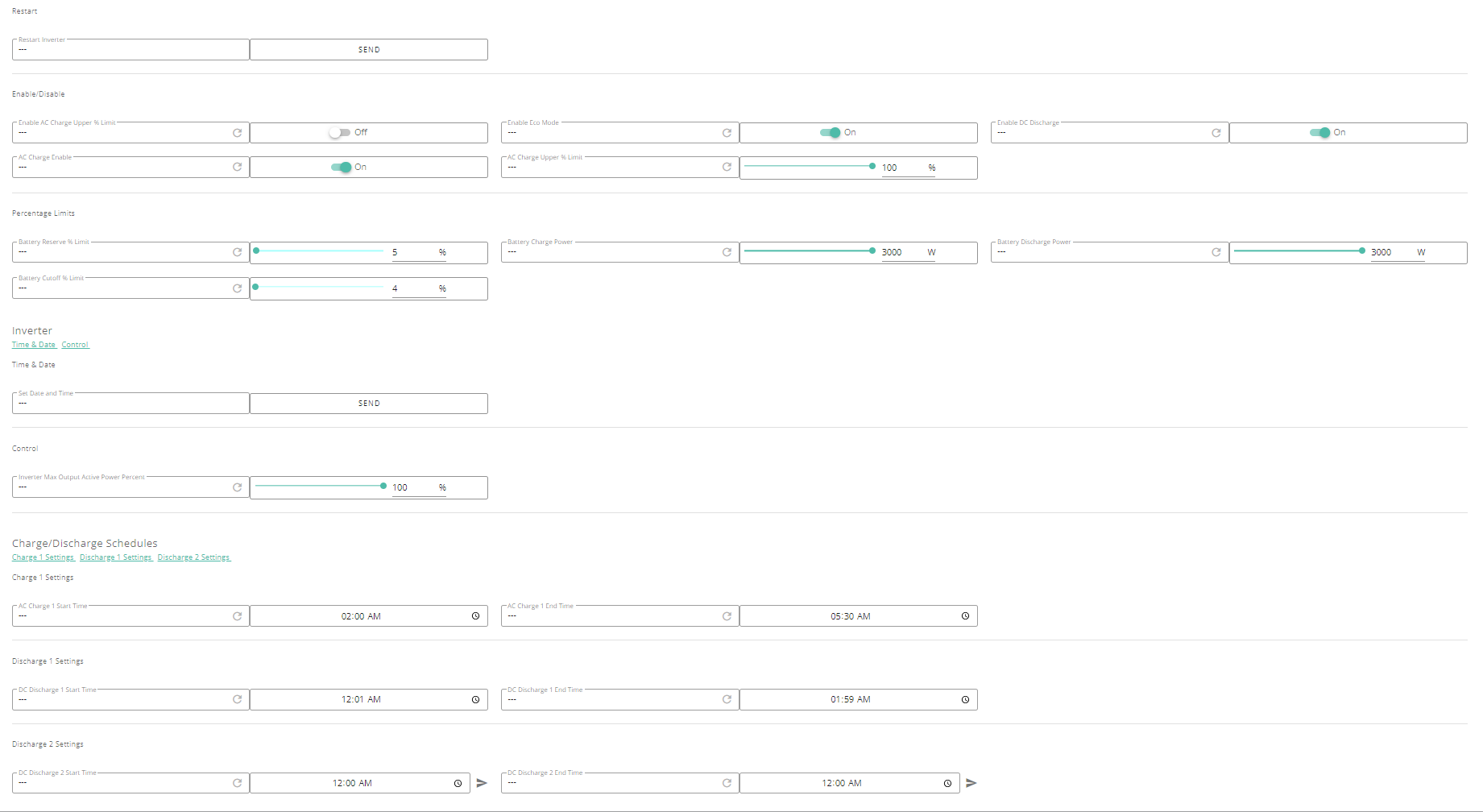
TX200 Ok, so that very interesting. My firmware version is "D0.535-A0.535" installed in June. My settings are per below - do you know if there is any obvious setting I need to change ? or is this a firmware issue (in which case - can you point me to where I get the beta version ?) - very much appreciate any help.

T
#20 TX200

Gregg don't think it's available on that firmware version. Or if it is, perhaps it is only available via GivTCP (e.g. home assistant or other automation).

T
#21 TX200

As for beta, it's generally closed for new members at the moment. With occasional exceptions I guess (if someone sees an interesting bug that no one on the beta can replicate).

G
#22 Gregg

TX200 So I'm back to fingers crossed :-) - but thank you very much for the feedback - it's been really helpful and I might dip my toes into the world of Home Assistant......