
Home Battery Setting Problem

8 comments started 2023-09-17 last 2023-09-18
GivEnergy ProductsBattery
S
#1 sixfoot2

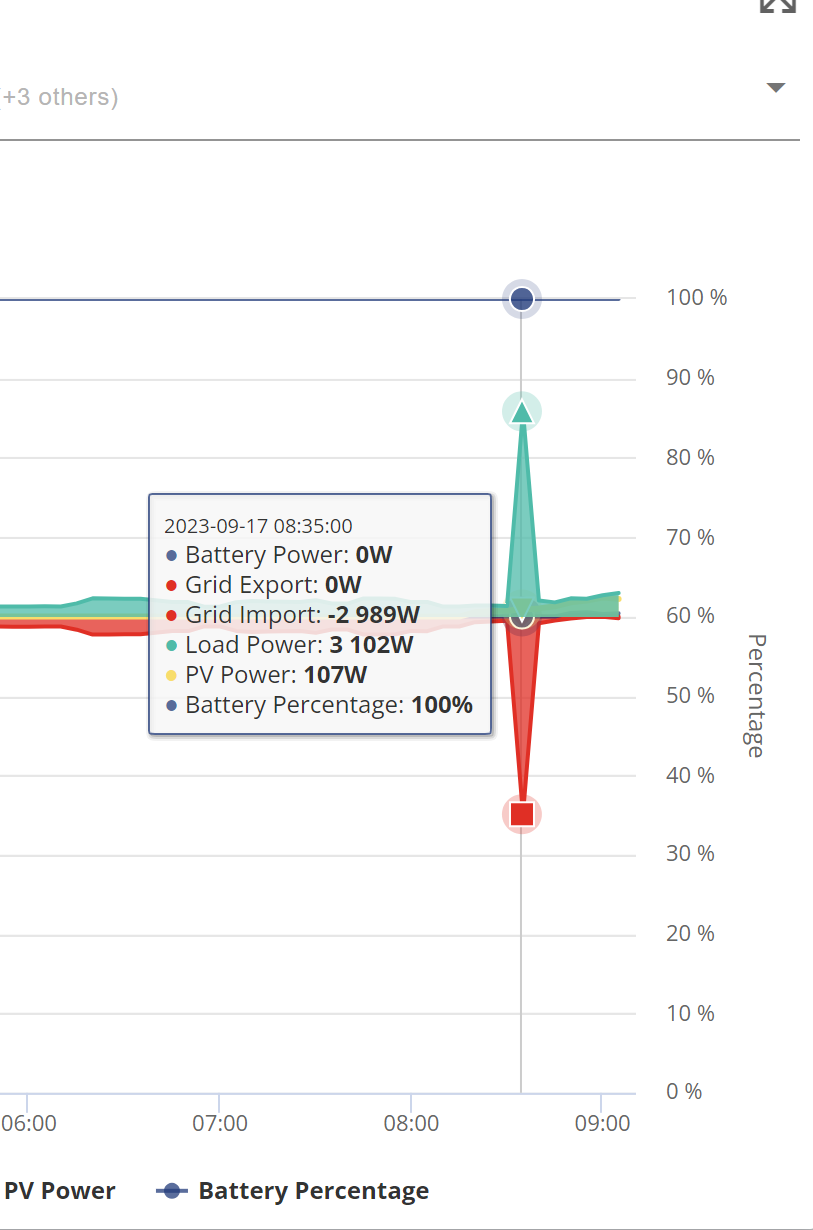
I'm on IO. Now that I'm discharging my battery to the grid, usually between 7 and 11.30 pm, in the morning after the battery is fully charged by 5,30, the system won't use the battery, and I have to change settings to Home Demand on my phone or Eco on my laptop.

Is this a programming fault, or am I doing something wrong?

Thanks for any help.

You can see no battery usage at the highlighted point.
Z
#2 Zakalwe

Gen 1 inverter?
It's a known "feature"....the system won't automatically revert to Eco mode after a Timed Discharge.

S
#3 SteveCook

You need to go to Home Assistant for an automation to do it

I think this may do it, but never tried.
https://www.wonderwatt.com/

G
#4 geoffreycoan

Zakalwe Just to add, if you manually trigger the discharge from the app, quick-settings battery minus then later on, Play mode, the gen 1 goes back into Eco mode OK.

I think its if you set the discharge as a scheduled activitiy that the not-reset-to-Eco-afterwards happens.

Home Assistant, WonderWatt, Octopus R&D are all potential ways to resolve the issue (assuming you don’t want to set alarms to manually do the discharge yourself)

S
#5 sixfoot2

The time and amount of discharge I want to set will change most days according to how much battery is used during the day. As we move into the winter months and solar is limited, there will be many days when I don't want to discharge. Are any of these systems up to this, or am I better just adjusting manually every day?

G
#6 geoffreycoan

sixfoot2 yes any of the above, or indeed the givenergy app/portal are good ways of managing grid import or export activities.
The difference is the degree of automation and control you have.
There is unfortunately a bug/feature in the gen 1 hybrid inverters that they don’t switch back to eco mode after a scheduled discharge, if its just overnight cheap rate charging you are focussed on for the winter then the app/portal will meet your needs.
I’ve personally moved to Home Assistant so I can program things in a more sophisticated manner, take account of daily solar forecast, daily usage patterns, etc, but its a bigger more complex setup that you may not need

Z
#7 Zakalwe

geoffreycoan I think its if you set the discharge as a scheduled activitiy that the not-reset-to-Eco-afterwards happens.

Correct. Which is what I said.

It seems to work OK, as you said, in the app if you are just using the Quick setting buttons.
I need to learn how to automate it in HA....I want to dump 50% of the charge to grid every day now that export is attracting 15p. What I think that I now want is to exit the Timed Charge at 100%, run off house load to be carried by solar (obviously reducing as we are now in the shoulder months) and battery during the day, and then start dumping to grid before the next Timed Charge starts.

Should be easy for anyone that's not an idiot in HA. Unfortunately, I AM an idiot in HA....

G
#8 geoffreycoan

Zakalwe There’s two main ways of talking to the Givenergy inverters, Givenergy Local and GivTCP.
I followed the GivTCP route as that was what I found described on the givenergy wiki site, a link to Speak to the Geek’s video on how to setup GivTCP

On this post https://community.givenergy.cloud/d/3022-inverter-settings/5 I’ve shared a brief run through of how I got my inverters setup and managed in Home Assistant, the basic dashboard and the flux evening discharge script that should be a good start for what you want to do