"GivEnergy-Octopus S. (GivEnergy)" user setting strange settings

12 comments started 2023-10-01 last 2023-10-08
GivEnergy ProductsHybrid
N
#1 Niceguy

Two weeks ago I had 6.88kWp of panels installed with a 9.5kWh GivEnergy battery with a 5kW GivEnergy hybrid inverter. All well so far, with solar production comfortably meeting all our needs and charging the battery for overnight use.

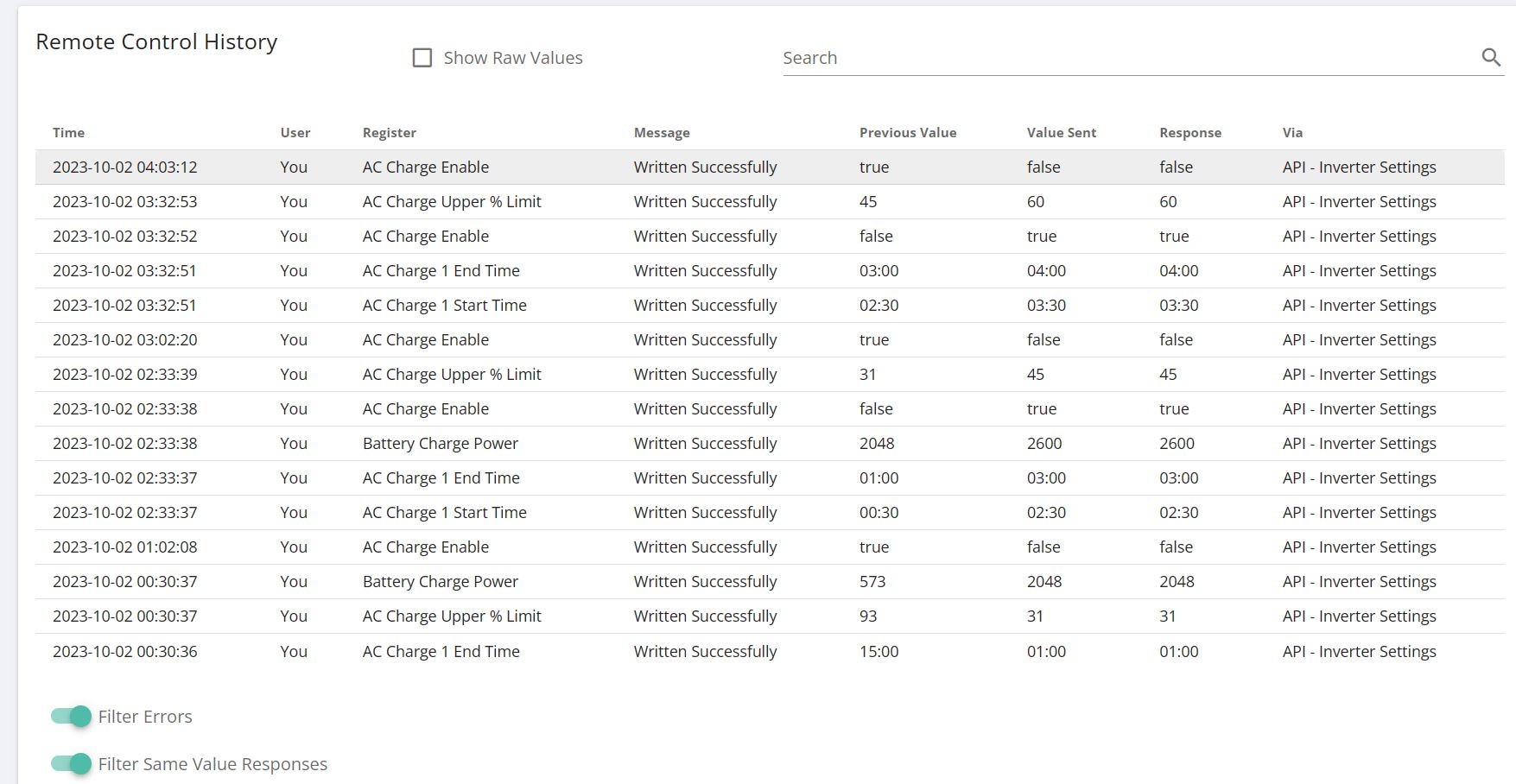
To my surprise this morning the battery was completely empty! Checking the logs I see that user "GivEnergy-Octopus S. (GivEnergy)" had, at 1am, enabled DC discharging, set the battery to discharge to the grid between 16:00 and 07:00!, and to force charge between 02:30 and 4:00! So the battery dumped its load onto the grid from 01:00 to 02:30, then charged itself from 02:30 until 04:00 and then emptied itself until 07:00. (Annoyingly I don't get paid for export yet until my DNO paperwork comes through).

I am on Octopus Agile, and have requested Agile Outgoing Fixed, and registered an interest in Octopus Intelligent Flux.

Does anyone know who the "GivEnergy-Octopus S. (GivEnergy)" user is or what is happening? :Has anyone else has this issue?

I wonder if Octopus were trying to set my system to discharge from 16:00 to 19:00 instead of 16:00 to 19:00?


T
#2 TX200

Is it octopus r&d - if you set that up?

Or is it a smart tariff? If you added a tariff to either the web portal or the app, press the stop automations button if the automations are showing as enabled.

N
#3 Niceguy

I meant to say, in my last line: I wonder if Octopus were trying to set my system to discharge from 16:00 to 19:00 instead of 16:00 to 07:00?

Thanks for your reply. It might be Octopus R&D trying to set up Octopus Intelligent Flux - I do have a notification on my Octopus account saying "my switch is on track", with supply aiming to be provided on 3 October. But no idea if this is related to my request to be a waiting list for Octopus Intelligent Flux, or for my application for Outgoing Fixed. I would have expected an email from Octopus advising me if either was about to go live.

I'm on Octopus Agile, but I would expect that to affect my battery charge until I'm set up for Outgoing Fixed.

I couldn't find a "Stop automation button" (although I'm sure I have seen it in the past) so instead I've turned Inverter -> Settings -> Eco to "Off", and discharge times to be the same. Hopefully this will stop the strange behaviour.

I've emailed Octopus to see if they can shed some light on it.

#4 positor1

If you have allowed tariff automations it will set it back again, you must turn off automations.
smart tariff card on the left
then right hand tab "automations" click stop automations.

#5 hoggy

On Intelligent Flux the commands are listed as sent by API not Octopus/Givenergy named specifically:

M
#6 MarkyG82

I am in the middle of changing to Intelligent Flux by accident. I selected "battery" instead of "EV" when setting up without realising that it would put me on Flux instead of EV Intelligent.
The API did loads of wacky things with my charging schedule so I have set them all back to how I want for Octopus Go as a temporary measure. I can't find the setting to turn off automations. Will the API change stuff back to it's own craziness? I suspect so. Have emailed Octopus to get them to change me to the EV tariff rather than Flux.

#7 hoggy

MarkyG82 Yes once connected to Octopus Intelligent Flux there is no user way to revoke access keys.
It'll probably keep changing things until your tariff changes (if you look in your Octopus App settings (not Givenergy) there should be something in there along the lines of "disconnect device" which should sever the link & tariff and allow you to try and join Intelligent EV again through the app.)

Intelligent Flux hooks in behind the scenes without using the API Key at all so even revoking all those will not stop it.
I have actually been speaking to GE about this, they can revoke access on your behalf should the above not work:
If you drop support a message & mention something along the lines of "Intelligent Flux Oauth Personal Access Token Revoke" it should get to the right person.

M
#8 MarkyG82

@hoggy amazing thanks. I'll have a play when I get home later.

M
#9 MarkyG82

So I managed to disconnect the house battery from the Octopus system and that triggered the Intelligent button in the app again (it had gone away after I set up Octopus Flux). With some faff I now have Intelligent Go functioning with my car. Doesn't work with both cars yet so hopefully it will work with Hyundai soon or we'll replace our relatively dumb charge point with something better.

N
#10 Niceguy

hoggy Thanks very much Hoggy.

My system logs say it is updated via the "API - Inverter Settings". I've checked with GivEnergy and they say it's not them, and it's not me, and it can hardly be caused by the Octopus Agile tariff, so I very strongly suspect it's the Octopus Intelligent Flux, given the settings that are being made.

The Octopus support person answering my emails says he doesn't understand what's going on, but seems unkeen to pass on my email to the Intelligent Flux team.

In the meantime I've been turning off my wifi to prevent changes being made in the middle of the night.

M
#11 MarkyG82

I am also having trouble with the intelligent part of all this.
I like to have my car charge overnight. Last night octopus gave me a slot that didn't fully charge the car. In Friday afternoon I tried charging due to excess solar and it again charged for a bit and I had to replug the car to get it to boost. I know I can bump charge in the octopus app but the whole point in me setting the charge the way I do is so I can forget about it. It's been reliable for the last 2 years until I have switched to intelligent go. Now doing my head in.

Is there a way to disable the charge slots and have manual control again? I do want to use the intelligent bit sometimes (eg. daytime) but for night times I want to charge by the car timer.

M
#12 MarkyG82

To answer my own question (and it may work for home battery charge issues too) there is toggle in the octopus app (account and settings - devices - intelligent octopus - smart charging) which toggles the smarts off. It definitely looks like it does what I want it to. All I'll need is to toggle it back on when I want to use it and that should keep the octopus servers happy that I'm still connected.