Octopus R&D Labs scheduled events not producing expected results

22 comments started 2023-10-21 last 2024-01-21
APIsHome AutomationGivEnergy ProductsHybrid
W
#1 Whitzend

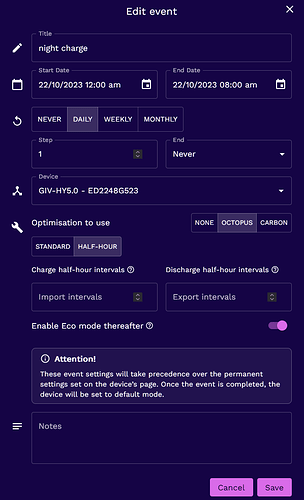
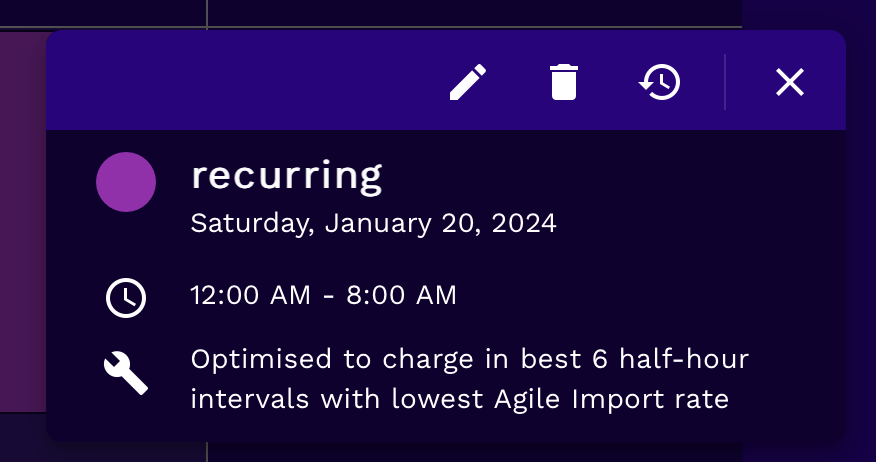
I'm using Octopus Flexible tariff and I have a daily scheduled charging event set in the Octopus R&D labs scheduler to charge my battery in the 7 cheapest 30 minute slots between 1200am and 0800am.

I have two other daily events scheduled:

between 1200pm-1600h charge in the 4x cheapest 30 minute periods
between 1600h-2330h discharge in the 2x most expensive 30 minute periods

Both of these two events seem to work fine every day.

For a while the nighttime charging event was working fine and getting my battery to full charge. Since 15 October it’s stopped working property and I’ve tried cancelling and recreating the scheduled event several times to try and fix it with no improvement.

There is no particular pattern to the failure except that it tends to start charging at midnight and will typically only charge between midnight and 0130am and then stop, irrespective of whether these are the cheapest slots and irrespective of whether the battery is fully charged or not.

If anyone can help me troubleshoot this scheduled charging activity it would be greatly appreciated.

Various screenshots follow:

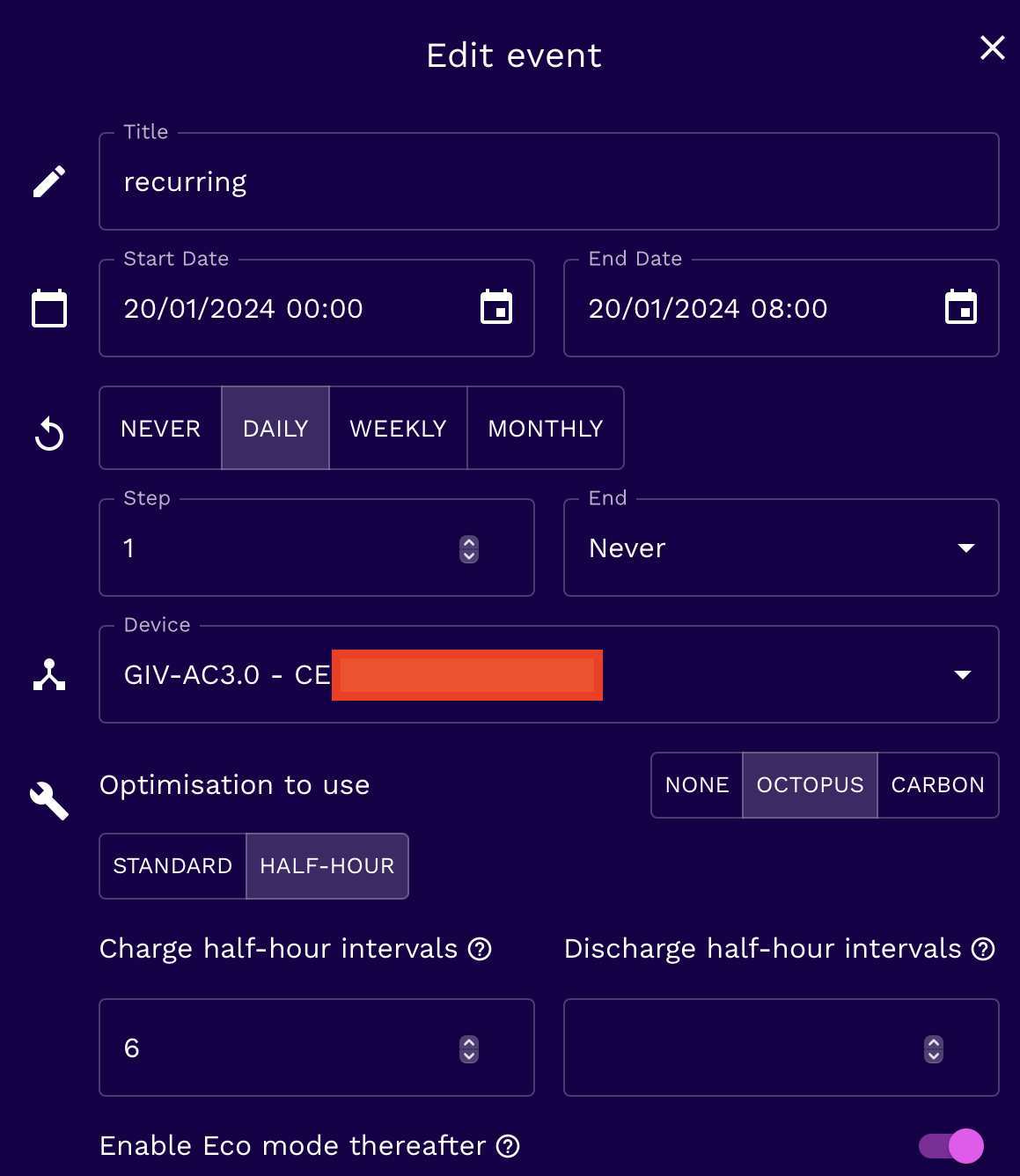
The scheduled charging event in the R&D lab:
Sample log file from R&D lab of the API events
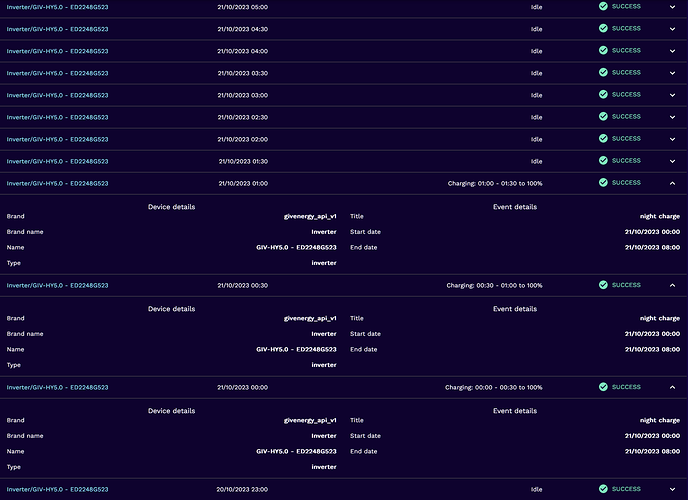
Corresponding logs from the inverter (1 of 2)
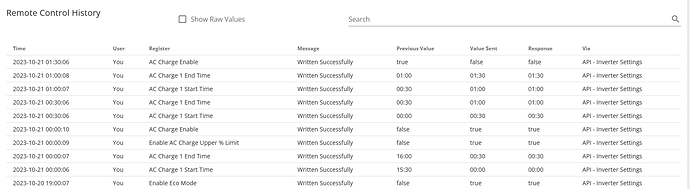
Corresponding logs from the inverter (2 of 2)

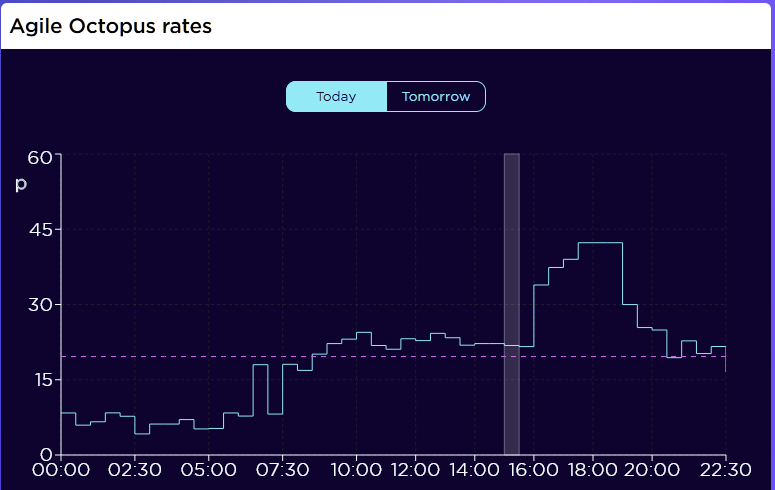
Today’s Agile Octopus rates for my account showing these slots wouldn’t be in the 7 cheapest 30 minute periods
S
#2 SteveCook

I had similar issues and so went to HA.
My server (raspberry pi) on my network and no worry about servers not sending signals or signals not getting through the internet.

M
#3 MarkHoltom

Hi, R&D labs has been doing this for the last 5 days. I have exactly the same problems.
On Facebook, I found that the solution was to start the schedule at 02.00 NOT 00.00 and it will work.
Also, complain to Octopus, as they haven't really responded to this, even though many people have called.
Cheers,
Mark

W
#4 Whitzend

MarkHoltom thanks!
I concluded that midnight start might be an issue so changed the schedule to start at 00:30 last night. It didn't help!

I'll try moving it out to 01:00 tonight and then in half hour increments to see if anything makes an impact.

I have cross-posted this on the Octopus community board and emailed Octopus about this vid the dedicated address. If I get any updates I'll share them here

D
#5 DouglasCollinson

Whitzend

I’ve scheduled three jobs,
8-11, 12-2 and 2 -8. Will see how those go.

R
#6 Rbor

Hi,
I am trying to get to grips with using R&D labs to charge my batteries during Agile low rates.
Can you help me to understand the following settings in the scheduler?

1. Octopus/half hour settings/Import intervals.
I 'think' this is linked to the Start and End date that I set.
If I select a 3 hour time window, say 13:00–16:00, with 4 time intervals, does this mean that charging will take place during the 4 lowest Agile rates out of the 6 slots in this example? When I have tried this, charging seems to take place from the start time (13:00 above) irrespective of whether it is a lower or higher Agile rate.

2. The 'Step' option.
If I select 'Daily', I get a 'Step' and 'Never' option.
What does 'Step mean'? My guess is that a Step of '3' would charge for 3 days, after which the schedule would stop. If I select just one charging slot, there is no 'step' option.

3. Octopus Standard setting
Would I be better off trying the Octopus/Standard setting, allowing me to select slots that charge when the Agile tariff if lower than my close value?

The R&D labs scheduler seems to work well and allows me to set more than one charging slot on my GE AC coupled inverter (a real limitation).

Thanks Rob

W
#7 Whitzend

It is hilariously badly worded/documented. Here is my understanding:

  1. Optimisation: Use Octopus + Half Hour. That is the setting to target the cheapest 30 minute slots from the Octopus Agile tariff
    1a. Under "Charging half hour intervals" set the number of 30 minute slots you want it to try and charge your battery between the start+end times - eg overnight you might want to set 6 or 8 half hour slots to make sure you're fully topped up to start the day.
    1b. At the top of the screen, set the start date + time & end date and time. Use the same date in both - ie tell it you want to start ad 1am tomorrow and finish at 8am tomorrow.
    1c. Set the repeat to DAILY - it will now use the same start + end TIMES every day
  2. STEP - badly worded. This is how many instances of the REPEAT it is active. So with a DAILY repeat, STEP=1 means every day, STEP=2 means every other day... STEP=7 is the same as once a week.
    2b. Set an end date if you want to, or select NEVER
  3. Octopus Standard Setting - can't help you here, I'm afraid, I have only used "half hour"
    3a. Set "enable eco mode thereafter" ON

So, for example, I have two events scheduled:

  1. between 00:00-08:00 to look for the 8 cheapest overnight slots to fully charge my battery.
  2. between 12:00 and 16:00 to make sure I'm topped up again at relatively low rates ahead of the peak prices in the evening.
    I have set them as DAILY events, with a step of 1 (so every day). When I first configured them I set them to start with the next available slot, so the overnight event started "tomorrow" and the afternoon event for "this afternoon"

The only extent to which I wish this could be better at present is:
a. If the cheapest slot overnight is, say 07:00-07:30, my battery might already be full by then from earlier slots among the "8 cheapest" available, so I miss out on true cost optimisation. A small wrinkle
b. I will manually change my afternoon topup at some point in the year when the solar generation increases to take less from the grid - and to add a forced discharge during peak outgoing rates. If I could add this sort of contextual intelligence to the schedule it would be great.

P
#8 pacemaker

Rbor I 'think' this is linked to the Start and End date that I set.
If I select a 3 hour time window, say 13:00–16:00, with 4 time intervals, does this mean that charging will take place during the 4 lowest Agile rates out of the 6 slots in this example? When I have tried this, charging seems to take place from the start time (13:00 above) irrespective of whether it is a lower or higher Agile rate.

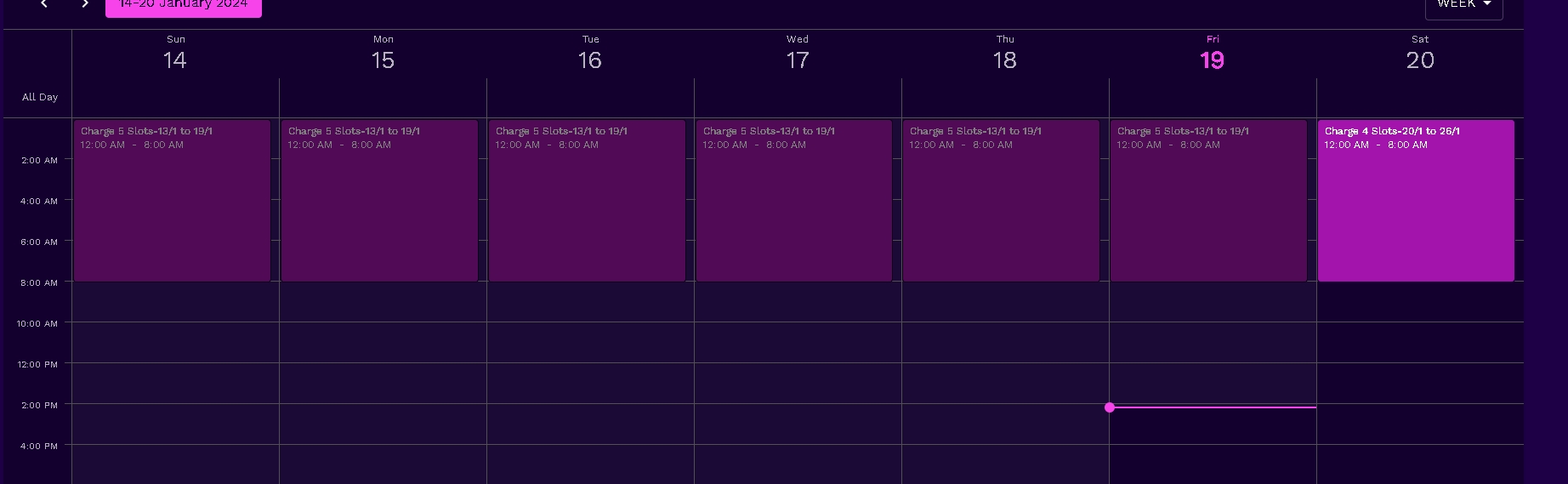
once you set it up, look at the calendar view and click the item. It will tell you in plain English how its configured:

Rbor 2. The 'Step' option.
If I select 'Daily', I get a 'Step' and 'Never' option.
What does 'Step mean'? My guess is that a Step of '3' would charge for 3 days, after which the schedule would stop. If I select just one charging slot, there is no 'step' option.

I leave this set to DAILY for a recurring (not ending) schedule. Step "1", End "Never".

Rbor 3. Octopus Standard setting
Would I be better off trying the Octopus/Standard setting, allowing me to select slots that charge when the Agile tariff if lower than my close value?

don't think so. My recurring schedule always charges in the cheapest slots I've assigned.

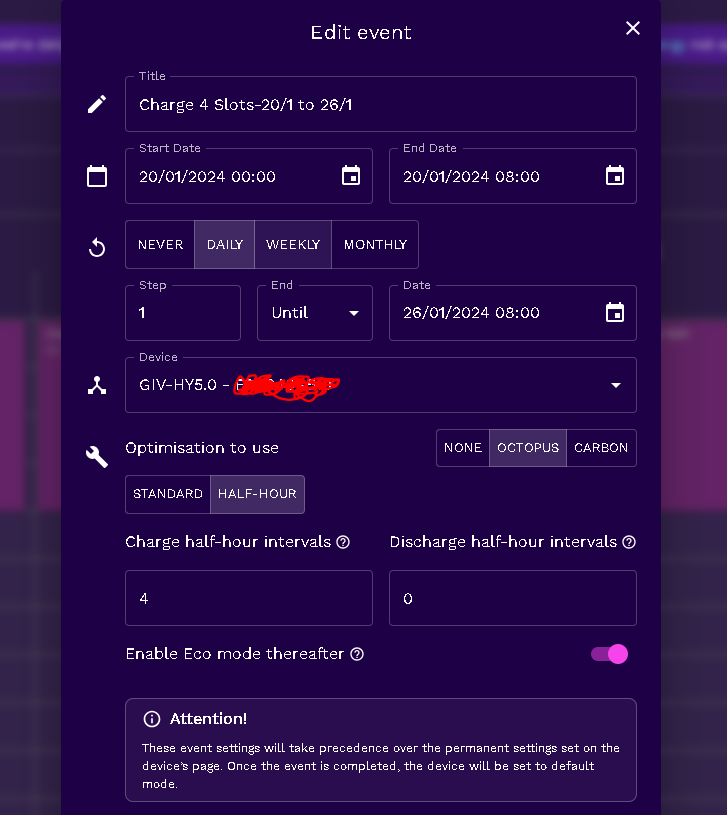
Here is my setup:

W
#9 Whitzend

Top tip for you: @Rbor
Never, EVER try to do this via the Octopus R&D labs mobile app (certainly not the Android one) and ideally, don't use a mobile browser.
The app seems to be missing several of the important options needed for this to work as intended.
The mobile web version just has some awful UI making it hard/impossible to use them all properly.

D
#10 dorosde

I 've been using Octopus R&D for almost a month now. Only missed 1 charging slot in all the days I have been using it so happy enough with it. Always use a web browser on a computer to set this up. That's how my settings look.


And that's my intention on how to use it in the upcoming weeks (I based this on last years data from Feb onwards that the system was installed!

After 15 March I will probably be switching to Flux to maximise my export!

R
#11 Rbor

Thanks much to Whitzend and @dorosde for your advice.
I would never have guessed the meaning of 'Step'.

I want R&D labs to work but I have had a mixed experience .....
Looking at your screenshots, I seem to have set up the schedules correctly, but

  • 2 nights ago, I set up a 6 import intervals in a 3.5 hour slot (7 intervals) during the night. To see if it worked, I deliberately started with a slot that was slightly more expensive. Agile charged during this slot but then missed one later on.

  • Last night, I asked for the best 8 slots out of a 12 slot gap. Nothing had been charged. I checked in history and all had been claimed as 'succeeded but as 'IDLE'.

  • Then today, to get some juice in the battery after last night, I selected 6 slots from 8. The first 3 slots worked but the battery then went idle. When I checked, the GE portal showed ECO switched off. (I have this switched on in the scheduling set up so I don't know what happened here). So this afternoon, I deleted my schedules and topped up using the GE app ......

  • I always use the web portal for setting up schedules.

I will persevere. Agile rates are fairly stable at the moment so I can experiment. If they plummet with the coming winds, I will probably delete R&D labs schedules and use the GE app to make sure.

Again thanks for your advice. As Whitzend has said, the instructions are badly written.

Rob

D
#12 dorosde

Rbor

Indeed some weird results from your end.
Unfortunately I can't see what might be causing it...
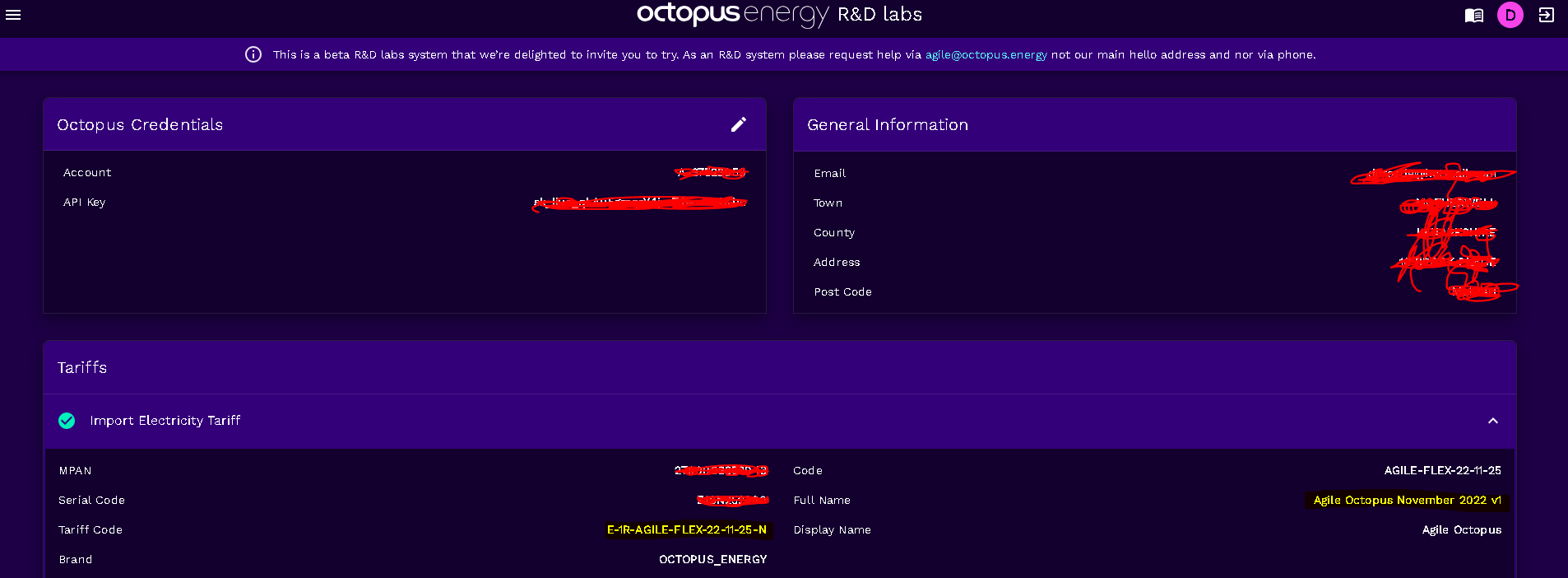
Another situation that I faced worth mentioning is that I was on standard variable rate before switching to Agile. I had octopus R&D setup prior to switching to Agile and the values highlighted yellow below didn't update until after I regenerated a new API from Octopus . It might worth checking this, especially if you were on a previous tariff recently.

On another note I recently discovered that my meter time is wrong(it's actually 2 hours and 6 mins behind of real time) so I am on constant pestering to Octopus to get it corrected, set my bills correct and re-calculate all the saving sessions! Only been on Agile since 10/12/23 so it wouldn't be that difficult for them to re-work out everything!

W
#13 Whitzend

Sometimes it does just fail.
Sometimes that's at Octopus's end. Sometimes GE, sometimes a bit of both. Sometimes GE change their API and Octopus has to update, Open question whether it's GE breaking the API by not being backwards compatible or Octopus not reacting quicker.
There was a period recently where you had to start your "overnight charging" event to begin at 2am because it just wouldn't work if you set it earlier.

Bottom line: it's a free R&D service, not paid for and you get what you pay for. But also, on a day to day basis any failures will be more expensive on your nerves than in your pocket.

D
#14 dorosde

Whitzend
To be honest I can’t wait for March to arrive and switch to Solar only where i will only getting paid for my electricity instead of paying them! 🥳

R
#15 Rbor

Thanks @dorosde

Using R&D labs, I've tried charging 2 cheap intervals in a 3 interval gap this evening and it worked just fine.

I want to make use of a good run of cheaper slots from 1 am tomorrow am, but am not going to trust R&D labs for the task. I have ensured that I have no slots set in R&D labs and have set up a long charge on the GE app.
I will then 'experiment' with daily slots until I have more confidence.

Like you, I can't wait for Solar days to return and return to Flux for the summer. For me, it was very lucrative.
This is my first winter with a heat pump and I am discovering that it may not be easy for my batteries to make it through the night. I was on Agile for some time last winter – it was great at times, plunge pricing and even some flexible exporting at over £1 a unit. It then got scary though and a bailed out!

Rob

B
#16 Ben Taylor-Wright

Where do you find the API key on the GE dashboard to register on the R&D site?

T
#17 TX200

Ben Taylor-Wright under account settings if I remember rightly.

R
#18 Rbor

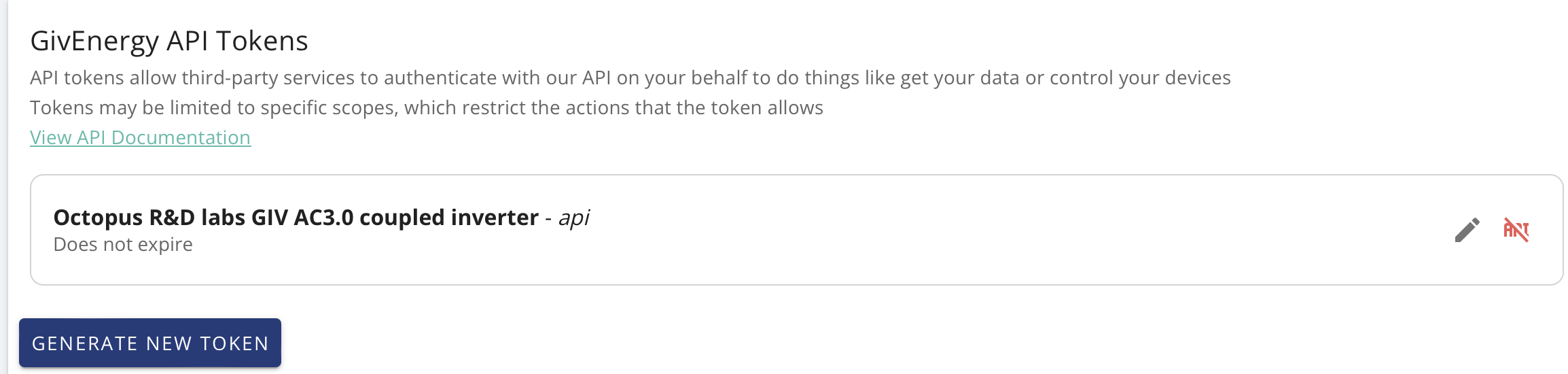
Follow my screenshots below.
1. Account settings in left sidebar

2. Manage Account Security, top right

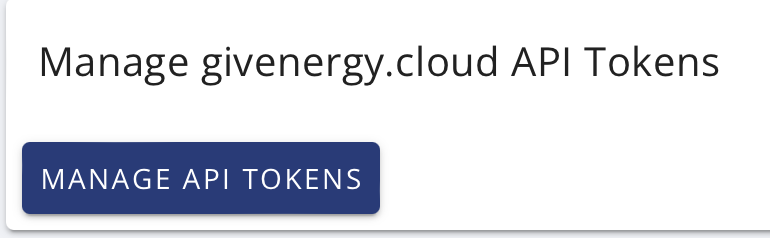
3. Manage givenergy API tokens.
Scroll right down to find this.

  1. Generate New Token.
    The screenshot shows my R&D token (I named it). You will likely see no tokens yet.

    Make sure the copy the api token and store it safely somewhere because you only get to see it once. It is very, very long. GE advice setting an expire date.

If I need other token for another application (say Home Assistant), I will generate a new api token just for that job, naming it clearly.

Hope this makes sense. It is far from intuitive, especially as GE changed the process from last summer.

Rob

R
#19 Rbor

Whitzend @dorosde
Hi,
I managed to get R&D labs to work perfectly this pm.
I set up a schedule for charging 4 intervals in the 6 slots from 12 midday to 3:00 pm. R&D labs nicely stopped charging for the 2 slots (which were not together) that were very slightly more 'expensive'.
I will probably grab another couple of slots later this evening and charge during the night using R&D labs scheduling. I won't touch the scheduling on the GE app in case it confuses matters.

Thanks for your advice on scheduling.
I know that many folk suggest using automations on Home Assistant. I have tried but had never succeeded. The HA interface drives me crazy as I go round in circles, getting more and more confused. If only there was a 'Back' button. I may try again but I do like what R&D labs aims to do.

Rob

B
#20 Ben Taylor-Wright

Rbor Thats brilliant, thank you - followed your guide and it worked first time. Thanks again.

R
#21 Rbor

Ben Taylor-Wright Now get some devices on. I use R&D labs for scheduling multiple charging sessions for my GE battery. It works well with Agile as it can choose charging slots with the lowest rates across a time period. It too some time for me to get to grips with how to do this reliably. See the posts within this thread for advice. But you can select your own multiple time slots for any tariff.

Rob

R
#22 Rbor

Whitzend Was your issue with charging 00:00–02:00 am resolved?

Thanks

Rob