Battery Won't Fully Discharge

16 comments started 2023-11-10 last 2023-12-06
GivEnergy ProductsBattery
S
#1 Scottishcammy

Hi folks,
Solar panels, 9.6kw battery, 2nd gen, latest firmware.
I've just went onto the flux tariff. I set the timed export to discharge fully between 1600-1900.

I noticed last night it discharged to 25% then sat idle.

Just notice its done the same again (discharged to 25% and idle from about 1730).

I checked on the online dashboard and the times export is still on. I went onto the android app and set it to force discharge but it's still just sitting idle at 25%.

Any ideas what's going on?
Cheers
A
#2 athresuk

Do you have a power reserve set for EPS ?

S
#3 Scottishcammy

Hi mate,

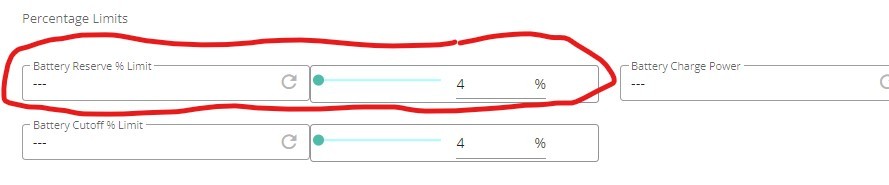
I've attached a screenshot of the bit I think you're talking about. I've not long had this instaled, so very much still a 'newbie'

S
#4 Scottishcammy

I've reset it to default settings a couple of times, but still sitting idle at 25% and when I try to force discharge or set export times after resetting back to defaults, it is still sitting idle at 25%

#5 hoggy

Try the battery cutoff % one. That one does persist after a reset to default I think so could be what's stopping it.

S
#6 Scottishcammy

hoggy
Hi mate, excuse my ignorance, what are you thinking I should set the battery cut-off % to?

Thanks

#7 hoggy

Scottishcammy default is set to 4% (it won't go any lower anyway.
If yours is 25% that is why it's stopping.

S
#8 Scottishcammy

I see what you mean. Unfortunately, it's set to zero. I'll have to phone givenergy on Monday and see if I can get a resolution.

#9 hoggy

Scottishcammy will it not change at all? You normally force it by setting the slider then clicking the '>' arrow to send?

S
#10 Scottishcammy

It stops discharging when it reaches 25%.
Even if I do it manually by forced discharge in the app, it just sits idle at 25%.
As soon as I resume it to normal operation, it will supply power to the house as normal, but I cannot get it to discharge to the grid past 25% whatever I do 🤷🏻‍♂️

G
#11 geoffreycoan

Scottishcammy The suggestion is that regardless of what it says it is set to, try setting it to say 10% and see if this cures the problem. The value may have got corrupted on the inverter. It should be 4% not 0%.

S
#12 Scottishcammy

geoffreycoan
Thanks mate, I'll give that a go 👍

S
#13 Scottishcammy

Tried setting the discharge limit to 4% and it stopped discharging at 25% again.

Managed to work it out eventually though, so hopefully helps anyone else who might find themselves in the same situation:

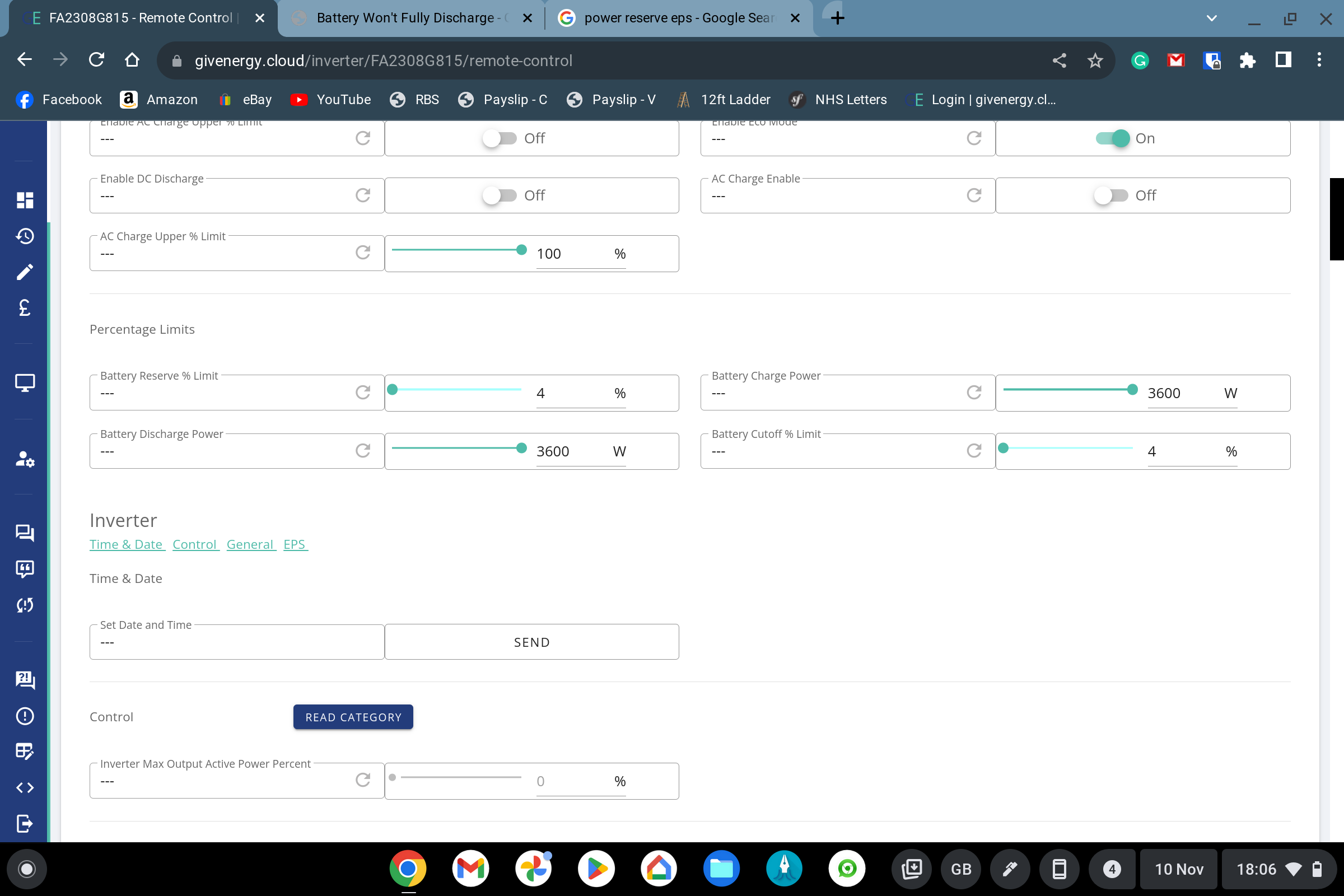
In the remote control section of the inverter:
in the section 'DC Discharge 1 Lower SOC % Limit" and the section immediately to the right of it:

If you simply put the section to the right to 4% it looks like it accepts it. However, when I did that, it didn't work.
When I was trying to work it out tonight, I clicked the refresh icon in the 'DC Discharge 1 Lower SOC % Limit" and the percentage field in the section to the right immediately went to 25%.

I changed it to 4% and seems to be working. It must be set to 25% but hidden from normal view. Goodness knows why...

Screenshot attached, hope it helps someone, and thanks for the advice.

A
#14 athresuk

Always hit the refresh button on any parameter when using the portal as the displayed value is often out of date/wrong

T
#15 twathooks

Thanks, had my installation for a couple of weeks with exactly this problem. Why on earth is it set to 25% on a battery that supposedly has a 100% discharge? Found the page after a lot of looking and it's now set to 4% so hopefully it will now fully discharge.