Saving Sessions ?

36 comments started 2023-11-28 last 2023-12-02
GivEnergy ProductsHybridBattery
P
#1 Phil89a

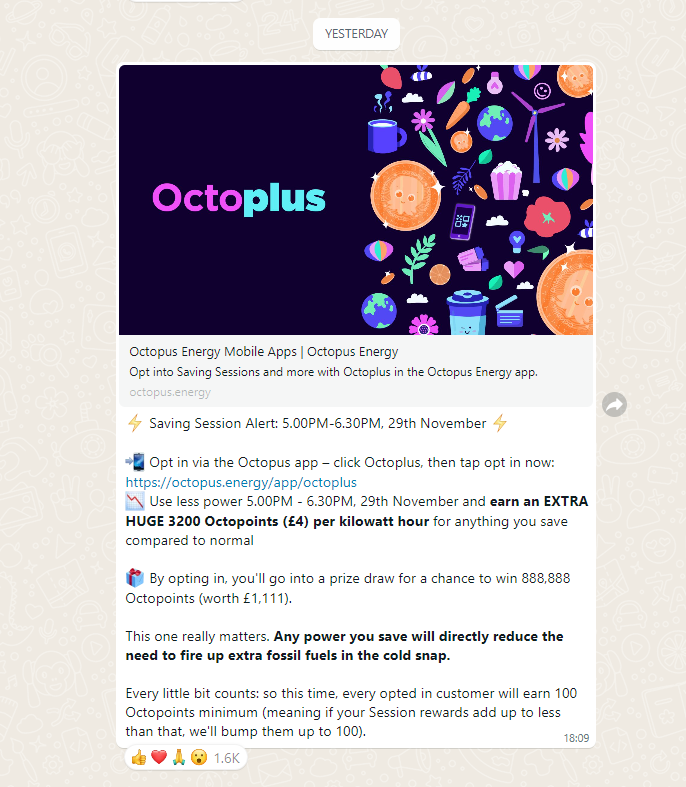
OK, so I have opted in for my first Savings Session with Octopus for tomorrow. I have a Hybrid Gen 3 with x2 9.5 kWh batteries.

How do I set the inverter to "export" the battery to the grid at 5pm tomorrow for 90 mins? With my setup and an export rate of 3,600W it could be worth £21, so worth doing (if I understand this right 🙂 )

Thanks

D
#2 DD

I'm just experimenting with that now - gen3 hybrid on #305. The app lets me set discharge mode to "scheduled", with a consumption type of 'home demand'. Things seemed good - it matched home demand until the start time, then discharged at the configured discharge rate. Unfortunately, it continued exporting beyond the end time, rather than going back to 'home demand' (which is what many other people report). A bit disappointing.

L
#3 lifco

In your dashboard, My Inverter / Settings

D
#4 DD

Tried again via the portal, enabling timed discharge. It did go back to eco/dynamic, but took over a minute to switch back. I guess I just didn't wait long enough when using the app to configure it.

#5 Jase1703

DD try calculating how much you can export at max rate for the full 90mins. Schedule export to start at 17:00 it will then export until empty, use the grid for the remainder of the evening. I plan to freeze discharging AIO at 70% and then export approx 9kw.

D
#6 DD

I'm trying to decide whether to go for max rate, or pick a slightly lower power to be kinder to the battery. But my max is around 3600W, I think, so I could get a little over 5kW in 90 mins, less any house consumption during that time. (Probably won't make a huge effort turning things off - consumption is pretty low anyway.)

A
#7 Arg0t

Phil89a remember to remove your house load from the calculation. The batteries still need to cover the house before export.

#8 Simon_C

Also remember to disable any solar diverter or similar equipment, or that will eat up a big chunk of your forced battery export. This caught me out for a few minutes during the last saving session.

J
#9 Jellybaby

I still got NO NOTIFICATION, I got their app on ios and android and neither are getting any notifications about these sessions and no emails either. Thanks for the heads up.

Also there is no information anywhere on how much they pay you for export.

This doesn't look good for my plans tomorrow

Had been getting 12-13kwh out of battery but looking to be lucky for 10 atm just in time for saving sessions >< lol

EDIT
Managed to get 10.3kwh into battery, lowest ive seen it since 24301 firmware was put on just in time for my first saving session lol

#10 nophead

I get the notifications from Octopus on their WhatsApp channel. I saw it on the BBC news and went to have a look and it appeared as I was watching.

M
#11 MarkyG82

Do we genuinely gain from export during this time? Or is it simply no usage to gain points?

D
#13 DD

Just doing some more testing on the app... if I set scheduled discharge with consumption = home demand, it leaves 'eco mode' on (by inspection from the givenergy monitor app), and continues to cover home demand. If instead I select 'full export', then it turns eco off, and the battery goes idle (presumably until the scheduled time).

I'm guessing these are equivalent to the 'timed discharge' and 'timed export' modes on the portal. The portal seems to allow you to enable all three of 'eco mode', 'timed discharge' and 'timed export', but in practise it was 'timed export' that won. (Not sure if that's just because I set it last.) This leaves the portal in an inconsistent state - the portal reports that eco mode is on, but in fact it's not. I assume it would have fixed if I'd reloaded the page. (In fact, the battery now isn't even charging - it's exported excess solar instead :-( ) Looking at the activity log in the 'remote control' section on the portal, it confirms that it turned off eco mode because timed export was enabled.

I also notice that, on the portal, the timed discharged section has an addtional slot for 'lower SO % limit' which isn't made available via the user-friendly part of the interface. That's worth knowing for anyone that wants to keep some back in case of a power cut.


N
#14 naltsta

Arg0t and I can automate getting 4p/month on the wheel of fortune. I know what I’m doing tonight!

T
#15 TX200

MarkyG82 yes, if you export more that you usually do, you get paid for the extra you export.

S
#16 SimonP

I participated in the last session manually from the app: Quick Settings > Discharge Now. That worked okay. Unfortunately, when I told it to Resume normal behaviour at the end of the session it decided it was in calibration mode and carried on discharging to zero then charging to 100%. Not the first time my system has done this -- it's the 3rd. actually! But under different circumstances. Makes me wary of trying again but nevertheless I'll give it a go this evening.

T
#17 Tim Adams

SimonP ouch! is that with AIO or which Gen inverter?

S
#18 SimonP

Tim Adams It's a 3.6kW Hybrid (gen 1) and 9.5kWh battery. Left alone it's fine!

L
#19 lifco

SimonP

Have you tried just setting the export timer instead ?

J
#20 Jellybaby

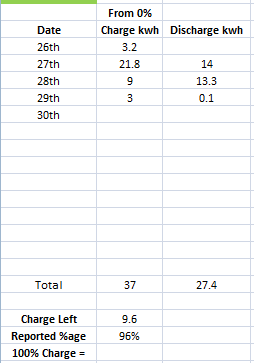
100% is less than 10kwh now, first time ive seen it below 10 since 24301 firmware, why today of all days lol.

P
#21 Phil89a

I am easily confused I know, but just to be sure - in the Inverter Settings, set Timed EXPORT to start at 17:00 and then end at 18:30. After 18:30 it will go back to ECO mode ?

Is this right?

Thanks

N
#22 Newman

I have an AC3 and use the portal. When I select "Export" then ECO is disabled straight away, I will have to wait until 17.00 to select "Export" then at 18.30 reactivate ECO. It would be nice if GE could make software that works but after 18 months I am not expecting it to be resolved.

L
#23 lifco

Phil89a

You need it like the following format mate, 05:00PM and 06:30PM and yes should go back to eco after

P
#24 Phil89a

Just noticed this as well. Set Export for 17:00. 30 minutes later noticed I was exporting to the grid and the battery was idle. Turned Eco back on and it sorted it.

What I don’t know is, will my timed Export happen at 17:00 or do I need to manually turn off Eco at that time ?

Anyone?

S
#25 SimonP

An issue I continue to have, despite reading want I can find, is that what the settings should do is not clear, the explanations given seem to be incomplete or only partly right (maybe there is variation depending on the inverter types), and there is inconsistency between what the portal and the app can do. Additionally, I think errors sometimes occur resulting in unpredictable behaviour (in my case the result seems to sometimes be an unnecessary and unwanted calibration being kicked off!).

L
#26 lifco

Phil89a

If you want to take part without any hassle if you join Givback (Axle) they do everything for you for every session

Just something to think about

D
#27 DD

Phil89a I am easily confused I know, but just to be sure - in the Inverter Settings, set Timed EXPORT to start at 17:00 and then end at 18:30. After 18:30 it will go back to ECO mode ?

That doesn't seem to be the case on my system: selecting timed export turns off eco mode, so that after the discharge window, the battery will go idle. But using Timed Discharge mode instead, it does leave eco mode on, and so does return to dynamic afterwards.

Does "timed export" discharge any faster than "timed discharge" - the latter does honour the discharge limit, but assuming that's set to max ? Is the difference just that "timed export" ignores the discharge limit, or is it able to go even faster ?

(In post #2, I reported that it didn't go back to eco mode, but I now suspect that I didn't wait long enough.)

D
#28 DD

lifco ou need it like the following format mate, 05:00PM and 06:30PM and yes should go back to eco after

That's the spelling I get on the app, but on the portal it's 17:00 to 18:30 - but it may be that on the portal you can choose whether it uses 12-hour or 24-hour representation.

#29 Jase1703

Jellybaby you’ve got your threads mixed up JB!

J
#30 Jellybaby

Jase1703 Nope, was just adding to earlier comment in preperation for saving session

S
#31 SimonP

lifco Thanks for reminding me of that option -- I did that this evening from the portal and it behaved as I hoped it would. Set it up 10 minutes or so beforehand and it turned off Eco but that was fine. Started and stopped as programmed, I did then need to turn back on the Eco mode which worked on the second attempt so all back to normal.

N
#33 Niceguy

DD I think GivEnergy could really do with a dashboard rewrite to make it clearer what state you are in: Eco, Timed Charge, Timed Export etc. Ideally there would be a text summary if you hover over it explaining it in more detail. Eg "Timed Export from time x to y; then Timed Charge from a to b, with Eco mode the remaining time".

The 2 main problems with the current system are:

1 lack of immediate response (I think on receiving a command update the inverter should action it straight away, rather than waiting 10 seconds, and also refresh the display data on the dashboard)

2 Changing some settings unset others

I'm sure it will come in time as the it's a newly developing field and new versions are coming along regularly, and there is a lot of competition from other battery and inverter suppliers.

G
#34 geoffreycoan

naltsta I can't seem to get this automation to work - does anyone actually have these entities? https://github.com/BottlecapDave/HomeAssistant-OctopusEnergy/blob/develop/_docs/services.md#automation-example-2

I set them up and they work fine for me. The session saver joiner worked perfectly on Thursday afternoon.
You need to be on the latest version of the Octopus integration
Copy/paste the integration into a new HA automation in YAML mode, then delete the entity name with the sample text <<ACCOUND ID>> and start typing it in again and HA should autocorrect the entity with the right named entity for you

N
#35 naltsta

geoffreycoan sorry - the saving session ones seem to be there but not the wheel of fortune ones…

D
#36 DD

Niceguy I think GivEnergy could really do with a dashboard rewrite to make it clearer what state you are in: Eco, Timed Charge, Timed Export etc. Ideally there would be a text summary if you hover over it explaining it in more detail. Eg "Timed Export from time x to y; then Timed Charge from a to b, with Eco mode the remaining time".

The way the app presents it seems more intuitive.

2 Changing some settings unset others

Yes, this is a problem when the UI presents information in a way that's different from the internal representaton. Though in this case, presenting it as:
eco mode on/off
timed export on/off.

Then if you have eco mode on, timed export corresponds to what is now timed discharge, but if you put eco mode off, timed export is as it currently is. (One difference remains, though - timed discharge honours the max discharge rate, whereas I believe timed export does not ?)