
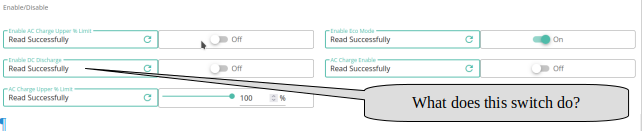
In my simple-minded understanding, it would prevent the battery discharging to the inverter. Or is there more to it than that?
In the light of GivEnergy Tech support comments such as "its a soft-switch" or "generally it acts as a switch", I'd appreciate any comments from the collective knowledge base here.
Regards, Martin
What is the function of this (Disable DC Discharge) switch?
It's enable DC discharge, not disable. This is the underlying control that's used for scheduled/timed discharge/export. If it's on, a forced discharge will run during the set time window.
DD
My apologies, I did not make myself clear and yes, I understand what you say, but that switch has two states. I'm questioning the reverse of "Enable".
If the "Enable Discharge" is OFF (as in the screenshot). Does that mean that discharge from the battery to the inverter is off/blocked/prevented until the switch is turned ON again?
Regards, Martin
PS Sorry for the delays responding. I'm not getting notifications...
mprowe no, not-enabled just means you don't have a timed discharge set up.
To test: on the app, set discharge mode to scheduled, mode to home demand, and start/end times some time in the future. Then on portal, force a read of this register - it should be on.
Then on the app come back to dynamic, and on the web, reload the registet. Should now be off.
(Assuming your system behaves like mine...)
DD
"To test: on the app, set discharge mode to scheduled,"
Which "app" is that? I don't see your wording on the givenergy cloud
mprowe the givenergy app. But can do it with web too - this would correspond to 'timed discharge' mode. Whereas "dynamic" is "eco mode".
Okay. Forget above. I've loaded an Android app (dated 6th Dec).
However, I can't see from the workflow you describe that it proves anything? Am I not just pushing settings around. From the Android App and confirming that the switch has changed?
Rather than get hung-up on the function of the "Enable Discharge" switch, may I seek your advice on how to achieve my objective? For the last 6 weeks I have been switching to Octopus Energy. There seems to be problems with my Smart Meter? So, while there is no Sun and no cheep overnight rate, I'd like to turn off the discharge from my battery to prevent it banging along the floor at zero percent. I know that there are "safety" switches (Power Reserve & Power Cutoff - as an aside, if you can tell me what the difference is between them is that would be appreciated) but in my case they don't seem to work!
Regards, Martin
mprowe depends on what model of inverter you have. For my 3rd-gen hybrid, if you scroll further down the settings page, there's a 'pause' function. You can set that to pause-discharge. Probably also need to set a time period 0000 to 2359.
Another way might be to turn off eco mode.
Another way may be to set the reserve charge to 50%. If you get enough sun to charge a bit, that may allow it to discharge halfway, but no further.
Unfortunately different versions seem to behave a bit differently.
Not sure about difference between reserve and limit. Perhaps reserve is used if you have ESP configured for power cuts ?
DD
Thank you.
I have a Gen 1-hybrid. I'll repost the question to see if anyone else can chip in with a solution?
mprowe I think there's no pause function on gen-1, but setting discharge power to 0 should have the same effect. (On gen-3, it won't reduce below 300W.)
DD but might still be better to use the reserve/limit feature: if you do get any excess solar during the day, the battery will charge up. If you set discharge power to 0, it will just sit there, but you may as well use it. So if you can use a reserve of 50% instead, it will still be allowed to use the added power, but (ideally) stop once it reaches 50%.
I've not played with this feature, so don't know how it works. (And may well be different from yours anyway.)
Have a look at my post about all the settings. I have an AIO so may have different settings but if there what you can see you should be able to see what each does.
https://community.givenergy.cloud/d/3650-understanding-the-settings-on-your-app-and-portal/24